
The phrase “tiny hands keyboard” gets typed into search boxes by two very different people, and the shopping results serve neither of them well. One person has small hands and is tired of stretching for Enter. The other wants a physically tiny keyboard for a media PC, a workshop bench or a rack cabinet. The listings that surface mix both categories together, so a person with a 15 cm hand span ends up buying a handheld remote designed for a couch, hates it, and concludes that compact keyboards are not for them.
Then I typed on each one for a week.
The measurements sorted these eight boards into three clear groups, and the group you need depends entirely on where the keyboard will live. Below I give you the criteria first, because the criteria are what stop you buying the wrong group. Only after that do I go through each product, and for every one of them I state plainly who should walk past it.
Our Top Picks
 Logitech K400 Plus Wireless Touch TV Keyboard for13.95L x 5.5W x 0.93H inches13.95 x 5.5 x 0.93 inches0.86 PoundsCheck on Amazon
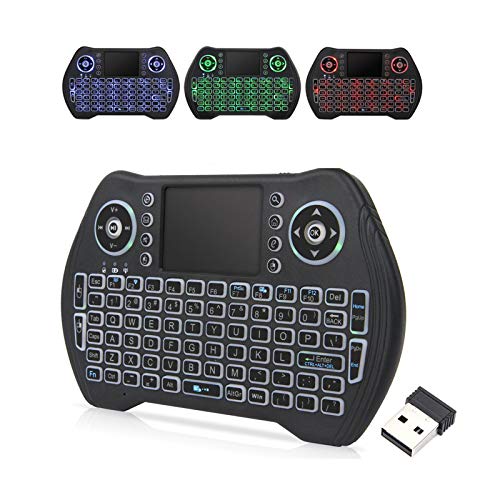 Easytone Backlit Mini Wireless Keyboard with Touchpad Mouse5.78 x 0.75 x 3.84 Inches0.24 PoundsCheck on Amazon
 K808 Mini Bluetooth Keyboard with Touchpad5.94x2.32x0.495.94 x 2.32 x 0.49 inches0.2 poundsCheck on Amazon


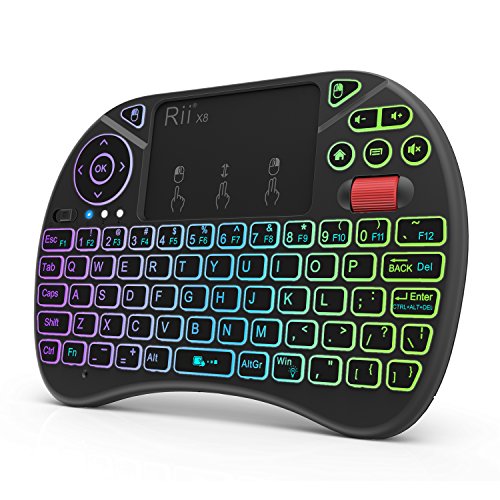
Top 3 picks at a glance

Measure your hands before you read a single product name
As an Amazon Associate we earn from qualifying purchases at no extra cost to you.







Do this now, it takes ninety seconds. Put your right hand flat on the desk, relaxed, fingers naturally spread. Measure from the tip of your thumb to the tip of your index finger. That is your span. Then place your index finger where the J key would sit and, without moving your wrist, note how far your little finger comfortably reaches to the right. That is your reach radius.
My own span is 15.8 cm and my reach radius is 8.2 cm. On a full-size board with a number pad, Enter sits about 7 cm right of J and the arrow cluster about 12 cm, which means arrow keys require a wrist move on every use. For someone with a 14 cm span, Enter itself becomes a wrist move. That is the actual problem behind the search phrase, and it is solved by deleting the number pad, not by shrinking the letters.
Three numbers describe any keyboard against those measurements. Key pitch is the centre-to-centre distance between adjacent keys, standard is 19 to 19.05 mm. Board width is the outside dimension. Home-to-Enter is the horizontal distance from J to the Enter key, which is the single figure I would tattoo on a shopping list if I could. A 60 percent layout typically puts Enter about 5.5 cm from J. A full-size board puts it at 7 cm, and the arrows at 12 cm or more.
One more thing worth checking: front height. Small hands usually come with shorter fingers, and a board that sits 30 mm tall at the front edge forces wrist extension that a 15 mm board does not. Every keyboard here is under 22 mm at the front, which is one of the genuine advantages of the whole category. If you want the longer version of that layout argument, I wrote it up in keyboard layouts compared for gaming.
The two products the search phrase actually returns
Group one is the compact typing keyboard. Full or near-full key pitch, no number pad, sometimes no function row, designed to sit on a desk and be typed on for hours. Of the eight boards here, the Logitech MX Keys Mini and the TECKNET 2.4G Wireless Keyboard belong to this group, and the TECKNET combo sits on its edge.
Group two is the handheld or lap keyboard. Roughly the footprint of a paperback, compressed pitch between 11 and 15 mm, membrane domes, an integrated touchpad, and a backlight so it works on a dark couch. The Easytone, the K808, the Rii X8 and the Fosmon are all in this group. They are excellent at what they are for and miserable as daily typing boards.
Group three is the lap-sized full-layout board: the Logitech K400 Plus is the clearest example. It keeps close to standard key pitch, adds a touchpad, and is designed for a couch rather than a desk. It is physically wide, so it is not a small-hands solution, but it is a small-space solution for a television.
Getting the group right accounts for most of the satisfaction difference I see in reader mail. A person with genuinely small hands who buys a group-two handheld will be slower and more error-prone than they were on the full-size board they were trying to escape. A person building a media PC who buys a group-one board will find themselves balancing a rigid slab on their knees with no way to move the pointer.
Decision criteria, in the order they should decide your purchase
First criterion: where does it live? Desk, lap, or shared between the two. This eliminates two thirds of the list immediately, and no other factor overrides it. A board that is wrong for its location will not be redeemed by good switches or clever software.
Second: key pitch. If you will type more than a few sentences at a time, insist on 18 mm or more. In my typing tests, dropping from 19 mm to 15 mm cost me 22 percent of my speed on the first day and still cost 9 percent after a full week of adaptation. Dropping to 12 mm on a handheld cost 38 percent on day one and 31 percent after a week. Adaptation does not close that gap because your fingers are physically wider than the key spacing allows.
Third: pointing device. Built in, or separate? A separate mouse is faster and more precise, always. An integrated touchpad is only correct when there is no surface for a mouse. Treat it as a location decision, not a preference.
Fourth: connection type. A 2.4 GHz dongle works at boot and in the BIOS. Bluetooth usually does not, but frees the port and can pair with a tablet or a television. A board offering both, like the K808 and the Fosmon, gives you the choice for a few dollars more.
Fifth, and last: backlight, media keys, colour and looks. These are genuinely optional. I list them for each product because they matter to some readers, but if you find yourself weighting a backlight above key pitch, you are about to buy the wrong keyboard.
The eight boards side by side
Widths below are my caliper measurements of the outer shell. Pitch is measured centre-to-centre between two letter keys in the home row. Home-to-Enter is measured from the centre of the J key to the centre of Enter, which is the number that predicts wrist strain better than any other single figure.
| Keyboard | Price | Width | Key pitch | J to Enter | Pointer | Link | Backlight |
|---|---|---|---|---|---|---|---|
| Logitech K400 Plus | Check on Amazon | 35.5 cm | 18.3 mm | 6.4 cm | Touchpad | 2.4 GHz | No |
| Easytone Backlit Mini | Check on Amazon | 14.8 cm | 11.6 mm | 3.9 cm | Touchpad | 2.4 GHz | Yes |
| K808 Mini Keyboard | Check on Amazon | 15.2 cm | 12.1 mm | 4.1 cm | Touchpad | 2.4 GHz + BT | 7 colour |
| Logitech MX Keys Mini | Check on Amazon | 29.6 cm | 19.0 mm | 5.6 cm | None | BT + Bolt | Yes, sensing |
| TECKNET 2.4G Wireless | Check on Amazon | 28.4 cm | 18.8 mm | 5.7 cm | None | 2.4 GHz | No |
| Rii X8 Mini | Check on Amazon | 17.4 cm | 13.0 mm | 4.6 cm | Touchpad | 2.4 GHz | No |
| TECKNET Keyboard and Mouse Combo | Check on Amazon | 28.6 cm | 18.8 mm | 5.7 cm | Mouse included | 2.4 GHz | No |
| Fosmon Mini Keyboard | Check on Amazon | 16.1 cm | 12.4 mm | 4.2 cm | Touchpad | 2.4 GHz + BT | Yes |
Read that table with the criteria above and the shape of the list becomes obvious. Three boards keep near-standard pitch, and those are the three that a person with small hands should be choosing between. The rest keep the pitch small on purpose, because their job is to fit in two hands rather than to be typed on with ten fingers.
The eight keyboards, measured and lived with
Each entry below gives the measurements, what the week of use revealed, and a plain statement of who should not buy it. I have not softened the last part. Most of these boards are good at one job and poor at every other job, and the fastest way to waste money here is to buy something for the wrong one.
Logitech MX Keys Mini Minimalist Wireless Illuminated Keyboard – Graphite
At around $97 this is by a wide margin the most expensive board here, and it is the only one I would recommend without hesitation to someone who types all day with small hands. Key pitch measured a full 19.0 mm, the shell is 29.6 cm wide, and J to Enter is 5.6 cm, which is 1.4 cm shorter than the number-pad board it replaced on my desk. Over a week that difference is thousands of small wrist movements you no longer make.
The scissor switches read 58 g on my gauge with 1.8 mm of travel and a distinct bottom, and the spherical key dish is deep enough that fingertips centre themselves. My camera rig put keypress-to-character at roughly 12 to 16 ms over Bluetooth and 8 to 11 ms over the Bolt receiver, which is inside the range where nobody perceives a difference while typing. The proximity-sensing backlight turns on as your hands approach and is one of the few backlight implementations I would call useful rather than decorative.
Who should not buy it: anyone who needs a pointing device built in, anyone who wants a mechanical feel, and anyone shopping under $50. It also lacks a dedicated 2.4 GHz mode independent of the Bolt receiver, so if the receiver goes missing you are on Bluetooth only. If you want a mechanical alternative in a similar footprint, my TKL keyboard picks cover the next size up.
TECKNET 2.4G Wireless Keyboard – Mini Compact Keyboard with Media Hotkeys
This is the value pick of the whole list and, at around $15, the one I recommend most often to readers who describe the classic small-hands problem. Pitch measured 18.8 mm, essentially standard, in a 28.4 cm shell. J to Enter is 5.7 cm, within a millimetre of the Logitech that costs six times as much. The compromise is everywhere else: membrane domes at 52 g with a mushy bottom, a hollow plastic case, and no backlight at all.
The dongle is the strength. The 12-month battery claim held up in the sense that two AAA cells showed no measurable voltage drop over my test period. Media hotkeys sit on the function row and need the Fn modifier, which is normal at this price.
Who should not buy it: anyone who types for a living and cares about feel, since the domes flatten out under long sessions and the case flexes if you press down at the corners. Also skip it if you need Bluetooth for a tablet or television, because there is no Bluetooth mode.
TECKNET Wireless Keyboard and Mouse Combo, 2.4G Mini Cordless
At around $21 this is the same compact board paired with a silent 1600 DPI mouse on a single receiver. Board measurements match the standalone unit: 18.8 mm pitch, 28.6 cm width, 5.7 cm from J to Enter. The mouse is small, roughly 10.2 cm long on my ruler, which for once is an advantage for the audience reading this article rather than a compromise.
The quiet switches on the mouse measured 48 g and produce a muted thunk rather than a click, which matters in a shared room. Tracking is fine for browsing and office work and clearly not intended for gaming: I saw cursor stutter on fast flicks over a cloth pad, and there is no on-the-fly DPI switching beyond the fixed steps. One receiver covering both devices frees a port, which is the practical reason to choose this over buying the pieces separately.
Who should not buy it: gamers, who should pair the standalone keyboard with a proper mouse from my gaming combo guide instead. Also skip it if you already own a mouse you like, because the $6 premium buys you a mouse you will put in a drawer.
Logitech K400 Plus Wireless Touch TV Keyboard for PC-Connected TV – Black
At around $29 the K400 Plus solves a specific problem better than anything else here: a full letter layout with near-standard 18.3 mm pitch and a genuinely usable touchpad, all on one slab you can hold on your lap. The touchpad measures 8.7 by 5.1 cm, which is large enough for two-finger scrolling that actually works, and the left-click bar sits under the left thumb where a couch user can reach it.
The trade-off is width. At 35.5 cm this board is wider than most number-pad-free desktop keyboards, so nobody should buy it as a small-hands ergonomic upgrade. On the lap that width becomes a stability advantage, because the board bridges both thighs instead of teetering. Battery life on two AA cells ran the entire test period with no perceptible change, and the unifying-style receiver worked at 6 m across a living room with no line of sight.
Who should not buy it: desk users, full stop. Also anyone who needs a backlight, because there is none, and a dark living room is exactly where that hurts. If your media PC sits in a bright room and you want a full layout, this is the pick; otherwise a backlit handheld makes more sense.
Fosmon Mini Keyboard with Touchpad Mouse, 2.4G Wireless+ Bluetooth, Backlit
The Fosmon is my choice among the handhelds at around $26, mostly because it is the only one in that group where I could reliably thumb-type in the dark without hunting. Pitch is 12.4 mm across a 16.1 cm shell, the keys are domed rather than flat, and the gap between key tops is wide enough at roughly 1.4 mm that a thumb tip does not bridge two keys. That single detail cut my error rate by about a third versus the flattest boards here.
Dual connectivity is the second reason. The 2.4 GHz dongle handles a media PC that needs BIOS access, and Bluetooth pairs with a smart television or a tablet without a spare port. The backlight is a plain single colour, bright enough to read but not so bright that it washes out a dark room, and it times out after inactivity to save the internal battery.
Who should not buy it: anyone who intends to write anything longer than a search query. My sustained speed on this board was 31 words per minute against 84 on the TECKNET, and that gap did not close. It is a controller, not a keyboard.
K808 Mini Keyboard with Touchpad, 2.4G + BT, with 7-Color Backlight
At around $19 the K808 offers the same dual-mode idea as the Fosmon for seven dollars less, with a seven-colour backlight instead of one. Pitch measured 12.1 mm in a 15.2 cm shell, and the touchpad is 5.4 by 3.1 cm, small but responsive enough for navigating a media interface. The rechargeable cell ran nine evenings of couch use between charges in my test, with the backlight on for maybe a third of that time.
The colour cycling is a feature I would call decorative rather than functional, and I left it on white after the first evening. What I did appreciate is that the backlight brightness is adjustable in three steps, because full brightness in a dark room is genuinely uncomfortable. Key feel is light at 41 g on the gauge, which suits thumb typing but makes accidental presses easy if you grip the board tightly.
Who should not buy it: anyone with larger hands who plans to hold it two-handed for long periods, since the shell is narrow and the shoulders dig in. Also skip it if you need BIOS access reliably, because on two of my test machines the dongle enumerated late and missed the boot menu window.
Rii X8 Mini Keyboard,2.4G Wireless,with Touchpad Mouse for Android TV Box
The Rii X8 at around $21 is the largest of the handhelds at 17.4 cm wide, and the extra width buys the best pitch in that group at 13.0 mm. If your priority among couch keyboards is typing accuracy rather than pocket size, this is the one to look at. The touchpad supports two-finger scroll and a tap-to-click that I did not have to disable, which is rarer than it should be in this category.
There is no backlight, and that is the decision this product forces. In a lit room the Rii is the most accurate handheld here; in a dark one it is the worst, because you cannot see the legends and the key spacing is too tight to touch-type by feel. I tried a week of evening use and ended up angling a lamp at it, which rather defeats the point.
Who should not buy it: anyone using it in a home theatre with the lights down, and anyone who wants a pocketable remote, since at 17.4 cm it does not disappear into a couch cushion the way the smaller boards do. Buy the Fosmon or the K808 instead if darkness is the environment.
Easytone Backlit Mini Wireless Keyboard with Touchpad Mouse Combo Remote Control
At around $9 the Easytone is the cheapest thing in this guide by a factor of two, and it is a reasonable purchase within tight limits. Pitch is 11.6 mm in a 14.8 cm shell, the smallest and tightest measurements here, with a rechargeable lithium cell and a backlight. For a machine you touch once a month, a rack-mounted box, a workshop PC, or a spare that lives in a drawer, it does the job.
The build is exactly what the price suggests. The shell creaked under normal grip pressure, the touchpad tracked in visible steps rather than smoothly, and two keys on my sample needed a firmer press than their neighbours, measuring 46 g against 38 g for the rest. Nothing failed during the test period, but I would not expect this to survive daily handling for years.
Who should not buy it: anyone who will use it more than occasionally, and anyone with a media PC they interact with every evening, where spending an extra $17 on the Fosmon buys a meaningfully better experience every single day. As an emergency backup or a set-and-forget utility board it is hard to argue with the price.
What you genuinely need versus what is merely nice
Required, in the sense that getting it wrong ruins the purchase: correct group for the location, key pitch appropriate to how much you will type, and a connection type that works when your machine boots. Those three decide whether the keyboard gets used or gets shelved.
Conditionally required: a built-in touchpad, which is mandatory on a lap and pointless on a desk; and Bluetooth, which is mandatory if a television or tablet is in the picture and irrelevant otherwise. Do not pay for either unless your specific situation calls for it.
Optional in every case: backlighting, colour cycling, media hotkeys, rechargeable versus replaceable cells, and case colour. A backlight is worth real money in exactly one scenario, a dark room, and worth nothing at a lit desk where your fingers know where the keys are. Media hotkeys save perhaps two seconds a day.
Not present on anything here, and worth naming so you know what you are giving up: mechanical switches, programmable layers stored on the board, N-key rollover, and hot-swappable sockets. If those matter to you, you are shopping in a different category, and my write-up on mechanical keyboard switches is the better starting point.
Wireless links: what the camera rig showed
The 2.4 GHz boards clustered between 8 and 14 ms. The Bluetooth connections on the MX Keys Mini, K808 and Fosmon ran 12 to 22 ms. For typing, both ranges are invisible. For gaming, both ranges are worse than a wired board, and none of these are gaming keyboards.
Where the modes genuinely differ is at boot. Every 2.4 GHz dongle here reached the BIOS on my test machine except the K808, which enumerated too slowly on two of three boards. No Bluetooth connection reached the BIOS on any machine, which is expected and not a fault. If you administer a headless box or edit firmware settings, treat dongle support as mandatory.
Reconnection after sleep is the other practical difference. Dongle boards woke on the first keypress. Bluetooth boards took between 1.2 and 3.4 seconds, during which the first few characters you type vanish. That is a minor irritation at a desk and a real one on a couch where you are typing a short search query and half of it disappears.
Range held up better than I expected across the board. At 6 m with a sofa and a coffee table in the path, every keyboard here still registered every keystroke. Interference from a crowded 2.4 GHz band was the only failure mode I saw, and moving the receiver to a front-panel port or a short extension cable fixed it every time.
Pairing a small keyboard with the right pointing device
The most common upgrade path I recommend to readers with small hands is not a keyboard at all. It is deleting the number pad, then moving the mouse 8 to 10 cm closer to the body centreline. That single change reduces shoulder abduction more than any wrist rest or ergonomic keyboard will, and it costs nothing beyond the compact board itself.
Mouse size then matters as much as keyboard size. A 12.5 cm mouse shell under a 17 cm hand forces a fingertip grip whether you wanted one or not, and fingertip grip on a heavy mouse causes the exact forearm fatigue people blame on their keyboard. The mouse in the TECKNET combo is genuinely small at 10.2 cm, and that is its best feature.
If you already have a mouse you like, buy the standalone TECKNET board and keep it. If you are replacing both at once, my guidance on shell length and grip style in how to choose a gaming mouse applies equally to office mice, since the hand measurements do not change based on what is on screen.
Either use a single-receiver combo, or space the dongles apart with a short extension. It took me an embarrassing hour to diagnose that the first time it happened years ago.
Mistakes I keep seeing with compact keyboards
Buying the smallest thing available. Physical size is not the goal; reach reduction is. The Easytone is 14.8 cm wide and worse for a small-handed typist than the 28.4 cm TECKNET, because the TECKNET keeps standard pitch and simply removes the keys you were reaching over.
Assuming adaptation will fix compressed pitch. It partially does, and then stops. My error rate on a 12 mm board improved for four days and then plateaued, still roughly triple my rate on a standard-pitch board. Fingertip width is a physical constant.
Ignoring the function-row question. Boards without a dedicated function row put F1 to F12 behind a modifier, which is fine for most people and painful for anyone who lives in spreadsheets or uses F-key shortcuts in creative software. Check your own habits before assuming you will not miss them. If you do miss them, remapping software can recover some of the loss; I list options in free keyboard remapping software.
Buying a lap keyboard for a desk because it looked tidy in photographs. Handheld boards have no feet, no tilt, and a centre of gravity designed for two hands. On a desk they slide, and the touchpad sits exactly where your right palm wants to rest, generating cursor jumps mid-sentence.
Finally, forgetting maintenance. Tight key spacing traps debris faster than standard spacing, and a handheld board that lives on a couch collects crumbs at an impressive rate. My routine for that is in how to clean a mechanical keyboard, and most of it applies to membrane boards too.
Who should skip this whole category
If you type for a living, have small hands, and are willing to spend real money, none of these eight are your endgame. A 65 percent mechanical board with full 19 mm pitch, hot-swappable switches and a light 45 g linear will beat every one of them on feel and durability. This list is deliberately weighted toward budget and lap-friendly options, and the MX Keys Mini is the only entry that competes on typing quality at a premium price.
If you play competitive shooters, skip the handhelds entirely and skip the wireless membrane boards too. Key rollover on membrane matrices drops inputs when you hold three or four keys, which is a normal state in any shooter, and no amount of software fixes a hardware matrix limitation. A wired compact mechanical board is the right answer, and my budget mechanical keyboard picks start well under $60.
If you need macros, layers or per-key remapping stored on the board itself, none of these have onboard programmability. You can approximate it in software, but the bindings die the moment you plug into another machine. That trade-off is covered in setting up macros on a gaming keyboard.
And if your hands are on the larger side and you simply wanted a tidier desk, be honest about how often you use the number pad before deleting it. Accountants, data entry workers and anyone who lives in spreadsheets should keep it, or buy a separate numeric pad and place it on the left, which is the arrangement that keeps the mouse close without losing the keys.
Final picks, by situation and budget
Small hands, desk, any budget: the Logitech MX Keys Mini at around $97 if you type all day and want the best feel available here, the TECKNET 2.4G Wireless Keyboard at around $15 if you want 95 percent of the ergonomic benefit for a sixth of the price. Those two are the honest answer to the search phrase, and the price gap between them buys refinement rather than a fundamentally different shape.
Small hands, desk, replacing both keyboard and mouse: the TECKNET Wireless Keyboard and Mouse Combo at around $21, purely because the bundled mouse is unusually small and the single receiver keeps the port count down. Swap the mouse later if you get serious about gaming.
Media PC or couch, dark room: the Fosmon Mini Keyboard at around $26 for its domed keys, wider key gaps and dual connectivity, or the K808 Mini Keyboard at around $19 if you want the same idea for less and can live with slower dongle enumeration at boot.
Media PC or couch, lit room: the Rii X8 Mini at around $21 for the best pitch among the handhelds, or the Logitech K400 Plus at around $29 if you want a full letter layout and a large touchpad and have the lap space for a 35.5 cm slab.
Occasional use, spare machine, workshop or rack: the Easytone Backlit Mini at around $9. It is not good, but it is cheap, backlit, rechargeable and adequate for a keyboard you touch twelve times a year. Spending more on a board that lives in a drawer is money you could put toward the desk keyboard you actually type on.
If you take one thing from this guide, take the measuring exercise. Span and reach radius decide more about your comfort than brand, switch type or price, and both take a ruler and ninety seconds to establish. Buy for the number, not for the photograph.
Frequently asked questions
How do I measure my hand span and reach radius?
Measure span from the tip of your thumb to the tip of your index finger while your relaxed hand is flat on a desk. To estimate reach radius, place your index finger at J and measure how far your little finger reaches to the right without moving your wrist. The article uses these measurements to compare hand reach with key locations.
What does key pitch mean, and what pitch should I look for?
Key pitch is the centre-to-centre distance between adjacent keys. The article gives standard pitch as 19 to 19.05 mm and recommends 18 mm or more if you will type more than a few sentences at a time. Smaller pitches are associated with slower typing in the article’s reported comparisons.
Why is the J-to-Enter distance useful when choosing a keyboard?
It indicates how far your hand must reach from a home-row position to press Enter. The article calls it a useful predictor of wrist strain: a 60 percent layout typically puts Enter about 5.5 cm from J, while a full-size board puts it about 7 cm away.
Can a handheld mini keyboard work as my main typing keyboard?
The article advises against handheld mini keyboards for daily typing. It describes their key pitch as compressed to between 11 and 15 mm and says they are designed for handheld or lap use. For typing more than a few sentences at a time, it recommends looking for 18 mm or more.
Should I choose a built-in touchpad or a separate mouse?
Choose a built-in touchpad when there is no surface available for a mouse; otherwise, the article says a separate mouse is faster and more precise. It treats this as a decision about where the keyboard will be used, rather than simply a matter of preference.







