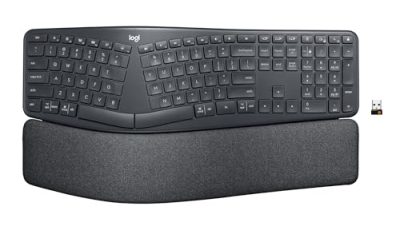
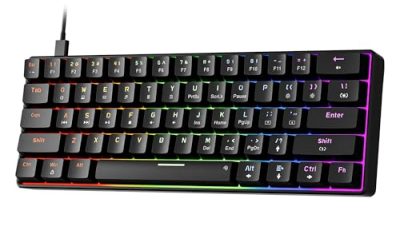
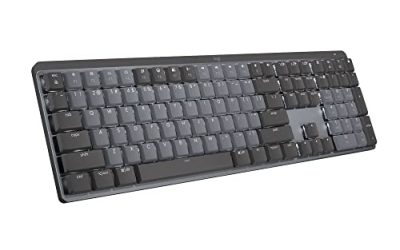
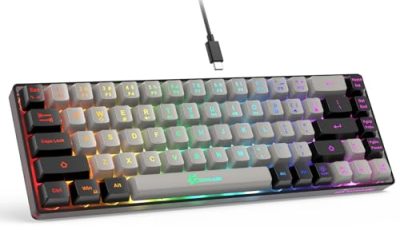
The best entry level mechanical keyboards are the Redragon K556 for a metal-framed full-size board, the HyperX Alloy Origins 65 for a compact linear board, and the Razer Reclusa X Mini for a hot-swappable 65% layout, all at a price tier far below flagship boards.
Our Top Picks
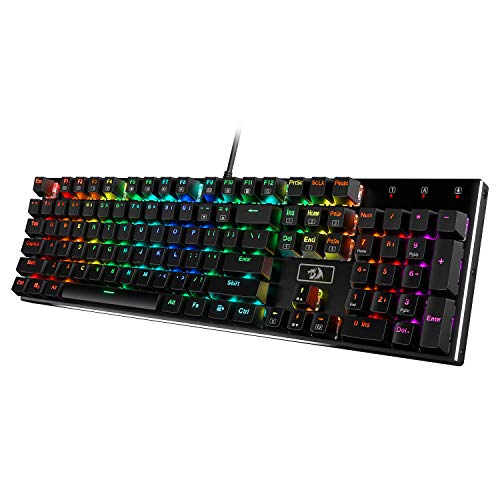 Redragon K556 Wired RGB Mechanical Gaming KeyboardBrown Switch17.13 x 4.88 x 1.59 inches2.2 poundsCheck on Amazon
 Razer BlackWidow V4 X Mechanical Gaming Keyboard20.5 x 8 x 2 Inch18.36 x 6.01 x 1.71 inches2.51 poundsCheck on Amazon
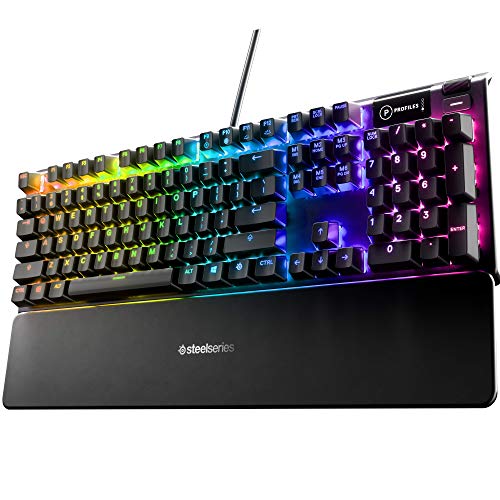 SteelSeries USB Apex 5 Hybrid Mechanical Gaming KeyboardApex 55.51 x 17.52 x 1.59 inches2.04 poundsCheck on Amazon


Top 3 picks at a glance
Quick answer
An entry level mechanical keyboard should give you real mechanical switches, a sturdy frame, and keycaps that will not wear shiny in a year, without paying for wireless, magnetic switches or an OLED screen. Start by choosing a layout (full, tenkeyless, 75% or 65%), then a switch feel (linear, tactile or clicky), and only then compare brands. The picks below are sorted so you can jump to the one that matches your desk.
Picks at a glance
| Keyboard | Layout | Switch / feel (as listed) | Frame | Tier |
|---|---|---|---|---|
| Redragon K556 | 104-key full size | Hot-swap, Tactile Brown | Aluminum | Budget |
| Redragon mechanical (hot-swappable) | Full size | Hot-swappable Red | Not listed | Very low |
| Logitech G413 SE | Full size | Tactile mechanical | Black aluminum | Budget to mid |
| HyperX Alloy Origins 65 | 65% | Linear Red | Not listed | Budget to mid |
| HyperX Alloy Rise 75 | 75% | Hot-swappable | Not listed | Mid |
| Razer BlackWidow V4 X | Full size | Yellow linear and silent | Not listed | Mid |
| Razer Reclusa X Mini | 65% | Orange tactile, hot-swap | Not listed | Budget to mid |
| SteelSeries Apex 5 Hybrid | Full size | Hybrid Blue | Aluminum alloy | Mid |
| AULA F75 Pro | 75% wireless | Pre-lubed Reaper, hot-swap | Not listed | Budget to mid |
| Cherry MX 3.0S | Full size | Cherry MX (variant per listing) | Aluminum housing | Mid |
How we chose
This guide is research-based. We did not use the keyboards ourselves. We compared the store listings, the makers’ spec pages and editorial coverage of budget mechanical keyboards, then sorted by layout, switch type, frame material and price tier. Where a listing does not say something, such as the frame, we write “not listed”. We make no promises about how any keyboard sounds, since that depends on your desk, switch and keycaps.
What counts as an entry level mechanical keyboard?
For this guide, entry level means a mechanical keyboard in the low to middle price tiers that offers real switches, a stable layout and the features most beginners will actually use. Typically that is a wired board with basic RGB or backlighting and macro support. Flagship extras such as magnetic switches, adjustable actuation and wireless charging are deliberately left out.
Best entry level mechanical keyboards
Redragon K556
As an Amazon Associate we earn from qualifying purchases at no extra cost to you.

The K556 is a well-known budget classic. Its listing describes a wired RGB mechanical gaming keyboard with a 104-key aluminum board, 20 backlight modes and hot-swap tactile brown switches for long typing sessions. A metal frame at this tier is the main reason it keeps being recommended.
- Layout: 104-key full size
- Switches: hot-swap tactile Brown
- Frame: aluminum
- Lighting: RGB, 20 modes
- Connection: wired
Best for: beginners who want a sturdy full-size board with a number pad.
Skip if: you need a compact layout or wireless.
Pros
- Metal frame at a budget tier
- Hot-swap switches let you change feel later
- Full-size layout
Cons
- Large footprint
- Software is basic
Redragon Mechanical Gaming Keyboard (Hot-Swappable Red)

A cheaper Redragon option, this wired board lists 11 programmable backlight modes, hot-swappable red switches, anti-ghosting and double-shot PBT keycaps for PC and Mac. The PBT keycaps are unusual at this price tier and a sign of a thoughtful budget build.
- Switches: hot-swappable Red (linear)
- Keycaps: double-shot PBT
- Lighting: 11 backlit modes
- Anti-ghosting: yes
- Connection: wired
Best for: people who want the cheapest real mechanical board with decent keycaps.
Skip if: you want a metal frame or a premium feel.
Pros
- Very low price tier
- PBT keycaps
- Hot-swap switches
Cons
- Plain design
- Budget typing feel
Logitech G413 SE
The G413 SE is a no-nonsense Logitech board. The listing mentions a black aluminum build, backlighting, tactile mechanical switches, anti-ghosting and Windows and macOS compatibility. It is a safe, recognisable choice if you want a mainstream brand and a simple layout.
- Layout: full size
- Switches: tactile mechanical
- Frame: black aluminum
- Compatibility: Windows and macOS
- Connection: wired
Best for: gamers who want a brand name and a clean full-size board for CS:GO-style play.
Skip if: you want hot-swap switches or a compact layout.
Pros
- Aluminum top
- Tactile switches suit typing and gaming
- Known brand support
Cons
- Large body
- Fewer custom options
HyperX Alloy Origins 65

The Alloy Origins 65 is a compact board in the HyperX range. The listing describes a mechanical gaming keyboard with a 65% form factor, linear red switches and double-shot PBT keycaps. It is a solid HyperX keyboard pick for players who want a small footprint without losing arrow keys.
- Layout: 65%
- Switches: Linear Red
- Keycaps: double-shot PBT
- Connection: wired
Best for: players who want a compact board for mouse space and FPS play.
Skip if: you need a number pad or function row.
Pros
- Compact 65% layout with arrow keys
- PBT keycaps
- Familiar HyperX software
Cons
- Smaller layout takes adjustment
- Mid price tier
HyperX Alloy Rise 75

A step up, the Alloy Rise 75 lists hot-swappable mechanical switches, a 75% layout, RGB lighting and NGENUITY software support. It suits users who want to customise the feel with new switches later.
- Layout: 75%
- Switches: hot-swappable
- Lighting: RGB
- Software: NGENUITY
Best for: typists and gamers who want a compact, customisable HyperX.
Skip if: you are on the tightest budget.
Pros
- Hot-swap switches
- 75% layout keeps function keys
- Brand software
Cons
- Higher price tier than the 65
- Details like frame are not listed
Razer BlackWidow V4 X

If you searched for the Black Widow tastatur (German for keyboard) the V4 X is the entry way into the line. The listing mentions yellow switches (linear and silent), six dedicated macro keys, Chroma RGB, doubleshot ABS keycaps, a roller and media controls, and Snap Tap.
- Layout: full size with 6 macro keys
- Switches: Razer Yellow linear
- Keycaps: doubleshot ABS
- Extras: roller and media controls, Snap Tap
Best for: gamers who want macro keys and a media wheel.
Skip if: you want a compact board or PBT keycaps.
Pros
- Dedicated macro keys
- Media controls
- Chroma RGB
Cons
- Mid price tier
- ABS keycaps wear shiny over time
Razer Reclusa X Mini
A budget Razer, the Reclusa X Mini is a 65% hot-swappable board. The listing mentions 3 and 5-pin switch support, Razer Orange tactile switches Gen-3, Chroma RGB, double ABS keycaps and sound dampening.
- Layout: 65%
- Switches: Orange tactile, hot-swappable
- Lighting: Chroma RGB
- Keycaps: double ABS
Best for: first-time compact board buyers who like tactile switches.
Skip if: you need a full-size layout.
Pros
- Hot-swap switch support
- Compact layout
- Sound dampening as listed
Cons
- ABS keycaps
- Razer software is a download
SteelSeries Apex 5 Hybrid
The Apex 5 is a mid-tier full-size board. The listing mentions an aircraft-grade aluminum frame, per-key RGB, an OLED smart display and Hybrid Blue switches. It suits players who want a display and a metal frame at a moderate tier.
- Layout: full size
- Switches: Hybrid Blue
- Frame: aluminum alloy
- Extras: OLED smart display, per-key RGB
Best for: people who want an OLED display and a metal body.
Skip if: you want hot-swap switches or a tiny layout.
Pros
- Aluminum frame
- OLED display
- Per-key RGB
Cons
- Hybrid Blue switches are clicky
- Full-size footprint
AULA F75 Pro Wireless Mechanical Keyboard

The AULA F75 Pro is a budget wireless thocky-style option. The listing describes a 75% hot-swappable board with knob, RGB, pre-lubed Reaper switches, side-printed PBT keycaps and 2.4 GHz, USB-C and Bluetooth 5.0 connectivity. It answers the best thocky keyboard prebuilt query with a ready-to-use board.
- Layout: 75%
- Switches: pre-lubed Reaper, hot-swappable
- Keycaps: side-printed PBT
- Connection: 2.4 GHz, USB-C, BT 5.0
- Extras: volume knob
Best for: people who want a prebuilt board with a custom-keyboard feel.
Skip if: you want a recognised mainstream brand.
Pros
- Hot-swap and pre-lubed switches
- PBT keycaps
- Tri-mode connection
Cons
- Lesser-known brand
- Software is basic
Cherry MX 3.0S

For anyone who specifically wants Cherry switches, the Cherry MX 3.0S is a wired mechanical gaming keyboard with an aluminum housing, RGB, full key rollover and anti-ghosting. Check the listing option carefully, because the same name is sold with different switch types such as silent red.
- Layout: full size
- Frame: aluminum housing
- Lighting: RGB
- Rollover: full key rollover, anti-ghosting
Best for: buyers who want Cherry-branded switches in a metal case.
Skip if: you want hot-swap or a compact layout.
Pros
- Genuine Cherry switches
- Aluminum housing
- Anti-ghosting
Cons
- Mid price tier
- Switch type varies by listing variant
Also consider
- SteelSeries Apex Pro Mini: a premium 60% board with adjustable actuation, aimed at the apex pro mini best buy query. It is in a much higher price tier than the picks above, so it is not entry level.
- Logitech G915 X: a low-profile aluminum board listed with double-shot PBT keycaps; check compatibility with third-party keycaps on the maker page, since low-profile caps are not interchangeable with standard ones.
- Corsair K70 Core TKL: a tenkeyless board with pre-lubricated MLX Red v2 switches as listed, in the mid tier.
Best keyboard for CS:GO and CS2
For CS:GO and CS2, choose a compact layout (tenkeyless, 75% or 65%) so your mouse has room, a linear or tactile switch you are comfortable with, and a firm frame so the board does not slide. The HyperX Alloy Origins 65, Razer Reclusa X Mini and Logitech G413 TKL SE are natural fits. Magnetic and rapid-trigger boards exist, but they are outside the entry level tier.
Best HyperX keyboard
HyperX makes several keyboards in the store. For entry level, the Alloy Origins 65 is the best-value pick, while the Alloy Rise 75 offers hot-swap switches for those who want to customise later. Higher tiers such as the Origins 2 line add 8k polling and swappable housings.
Best aluminium keyboard
The Redragon K556, Logitech G413 SE, SteelSeries Apex 5 and Cherry MX 3.0S all list aluminum frames or tops. For the lowest price, choose the Redragon K556; for the most recognised brand, the Logitech G413 SE.
Best thocky keyboard prebuilt
“Thocky” describes a deep, rounded sound that depends on the plate, case, switches, lube and desk. We cannot promise a sound, but boards with pre-lubed linear switches and PBT keycaps, such as the AULA F75 Pro, are the usual starting point. Treat any sound description as a tendency, not a guarantee.
Best Cherry switch keyboard
Cherry makes its own keyboards and also sells switches that other brands use. The Cherry MX 3.0S is the most direct pick here. If you prefer Cherry-style switch feel in a hot-swap board, look at boards listed as compatible with 3-pin and 5-pin switches, such as the Redragon K556 and Razer Reclusa X Mini.
Best illuminated keyboard
Almost every board here has backlighting. Single-colour backlighting costs less, and RGB adds colour effects. The Logitech MX Mechanical Illuminated is a more premium, office-focused option with low-profile tactile keys and multi-device Bluetooth.
Custom keycaps and the Logitech G915
The G915 family uses low-profile keys, so standard keycap sets will not fit. Look for low-profile compatible sets and check the maker page before ordering. For standard-height boards like the Redragon K556 and HyperX Alloy Origins 65, most standard MX-style keycaps fit.
Performance by use
Gaming
For gaming, you want reliable key registration, anti-ghosting and a layout that leaves room for the mouse. Every pick here is wired or has a wired mode apart from the AULA, which also offers a 2.4 GHz link. Linear switches such as the HyperX Alloy Origins 65’s red switches are the usual pick for fast repeated presses, while tactile switches such as the Razer Orange or Redragon Brown give feedback that some players prefer for precise movement.
Typing and office work
For typing, tactile switches give a bump that confirms each press without bottoming out. The Redragon K556 with tactile brown switches and the Razer Reclusa X Mini with orange tactile switches are the natural picks. If you share a room, avoid clicky switches such as the Hybrid Blue on the SteelSeries Apex 5, or choose a silent variant.
Small desks and travel
Compact layouts free up desk space. The 65% HyperX and Razer boards keep arrow keys, which makes them easier to live with than 60% boards. The AULA F75 Pro adds wireless connections, which suits a tidy desk or a laptop setup.
Switch types compared
| Type | Feel | Examples in this guide | Good for |
|---|---|---|---|
| Linear | Smooth, no bump | Redragon Red, HyperX Red, Razer Yellow | Fast gaming |
| Tactile | Bump at the actuation point | Redragon Brown, Razer Orange, Logitech G413 SE | Typing and mixed use |
| Clicky / hybrid | Bump plus a click | SteelSeries Hybrid Blue | People who like audible feedback |
| Silent | Dampened | Razer Yellow silent variant, Cherry silent red option | Shared rooms |
Layout comparison
| Layout | Keys (approx.) | Keeps | Drops |
|---|---|---|---|
| Full size | 104 | Everything | Nothing |
| Tenkeyless | 87 | Function row, arrows | Number pad |
| 75% | about 84 | Function row, arrows | Number pad, some spacing |
| 65% | about 68 | Arrow keys | Function row, number pad |
| 60% | about 61 | Main keys only | Arrows, function row, number pad |
Upgrading an entry level keyboard
One of the best things about the picks with hot-swap switches is that you can improve them without replacing the board. Typical upgrades, in order of cost, are:
- Change the keycaps to a PBT set if your board has ABS keycaps. Check that the set matches your layout and bottom-row size.
- Swap the switches to a feel you prefer, using a switch puller and a set of new switches that match the 3-pin or 5-pin socket.
- Add a wrist rest to keep your wrists neutral.
- Place a desk mat or foam under the board to reduce slide and change how the board feels to type on.
Only do the upgrade steps that the maker’s page confirms for your board, because not every keyboard supports hot-swap sockets, and forcing a switch into a soldered board can damage it.
Common mistakes when buying a first mechanical keyboard
- Choosing a layout that is too small and then missing the keys you use daily.
- Buying clicky switches for a shared room.
- Paying for wireless and RGB features you will never use.
- Ignoring keycap material and later finding shiny, worn keys.
- Assuming that all models sold under one name use the same switch; some listings, such as the Cherry MX 3.0S, offer several switch types.
Keeping your keyboard in good shape
- Turn the keyboard upside down and gently shake out crumbs every few weeks.
- Use a soft brush or compressed air between keys.
- Wipe keycaps with a slightly damp cloth, never with harsh solvents.
- Do not eat or drink over the board, even with spill-resistant claims.
- If you pull keycaps off, use a keycap puller so you do not bend the stabilisers.
Buying guide: thresholds that matter
Layout
Full size (about 104 keys) has a number pad. Tenkeyless (87) removes it. 75% keeps the function row in a smaller body. 65% adds arrow keys but removes the function row. 60% drops arrows too and is best for experienced users.
Switch feel
Linear (Red, Yellow) is smooth and good for gaming. Tactile (Brown, Orange) has a bump and suits typing. Clicky (Blue, Green) has a click and is loud in shared rooms. Silent versions soften the noise.
Hot-swap or soldered
Hot-swap lets you pull switches out without soldering and is a good sign at entry level, because you can change the feel later.
Keycaps and frame
PBT keycaps last longer than ABS, which wears shiny. A metal frame or top plate adds weight and rigidity.
Connection
Wired avoids battery and pairing issues. Tri-mode boards like the AULA add Bluetooth and 2.4 GHz.
Frequently asked questions
What are the best entry level mechanical keyboards?
The Redragon K556, HyperX Alloy Origins 65 and Razer Reclusa X Mini are three strong starting points, covering full size, 65% and hot-swap needs.
What is the best entry level mechanical keyboard for gaming?
The HyperX Alloy Origins 65 and Logitech G413 SE are good picks. Both are wired, simple and from brands with long-running software.
Is the Razer Black Widow a good first mechanical keyboard?
The BlackWidow V4 X is the entry way into the line, with macro keys and a media roller. It is mid tier, so the Reclusa X Mini is cheaper.
Is the SteelSeries Apex Pro Mini worth buying?
It is a premium 60% board with adjustable actuation. It is not entry level, so buy it only if you want that feature set.
Which keyboard is best for CS:GO?
A compact wired board with a switch you like. HyperX Alloy Origins 65 and Razer Reclusa X Mini are natural choices.
Can I put custom keycaps on a Logitech G915?
The G915 uses low-profile keys, so you need low-profile compatible keycaps. Check the maker page for supported sets.
What is a thocky keyboard?
Thocky describes a deep, rounded typing sound. It depends on case, plate, switches and lube, so no listing can guarantee it.
Price tiers at a glance
Without quoting exact figures, here is how the picks fall by price tier in the store. Very low: the hot-swappable Redragon board. Budget: Redragon K556, AULA F75 Pro, Razer Reclusa X Mini and HyperX Alloy Origins 65. Mid: Logitech G413 SE, HyperX Alloy Rise 75, Razer BlackWidow V4 X, SteelSeries Apex 5 and Cherry MX 3.0S. Prices move daily, so use these tiers as a guide and compare current store prices before you decide.
Moving up a tier typically buys a sturdier frame, nicer keycaps, better software or wireless connectivity. It rarely buys a better typing or gaming experience in itself. If you are not sure what you like, a cheap hot-swappable board teaches you what you prefer for far less than a flagship.
Which keyboard for which situation?
- Tiny budget, first mechanical board: the hot-swappable Redragon with PBT keycaps.
- Full size with a metal frame: Redragon K556 or Logitech G413 SE.
- Competitive FPS with a small desk: HyperX Alloy Origins 65 or Razer Reclusa X Mini.
- Macro keys and a media roller: Razer BlackWidow V4 X.
- Wireless and a custom feel: AULA F75 Pro.
- Cherry switches specifically: Cherry MX 3.0S.
Which one should you buy?
Buy the Redragon K556 for the cheapest full-size metal board, the HyperX Alloy Origins 65 or Razer Reclusa X Mini for a compact board, the Logitech G413 SE for a trusted brand, the AULA F75 Pro for a thocky-style prebuilt, and the Cherry MX 3.0S if you specifically want Cherry switches.
If you are still torn, remember that the switch and layout choice matters more than the brand. Pick the layout that matches the keys you use every day, choose a switch feel you can live with in your room, and prefer hot-swap sockets when the budget allows, because they let you change your mind later without buying a new board. Check the listing option you are adding to the basket, since several of these boards are sold in more than one switch variant, and confirm the switch type before you buy. A keyboard that fits your hands and your desk will always feel better than a spec sheet that looks impressive.
Sources
- Redragon and Logitech G product pages
- HyperX, Razer and SteelSeries product pages
- AULA and Cherry product listings
- Editorial mechanical keyboard buying guides
Last updated: November 2026
Related guides
More from Amazon
Programs that pair well with the guide above. Offers and eligibility are set by Amazon and may change.
Free shipping on eligible items, Prime Video and more. Eligible new members can start with a free trial.
Start a Prime free trialAd-free music streaming. Eligible new subscribers can start with a free trial.
Try Music Unlimited freeA Prime membership for ages 18-24 with a trial period. Eligibility is set by Amazon.
See Prime for Young AdultsAudiobooks and podcasts to listen to on the go. Eligible new members can start with a free trial.
Try Audible freeAs an Amazon Associate we earn from qualifying purchases.