As an Amazon Associate, we earn from qualifying purchases.


The best keyboards for typing are the ones that disappear under your fingers. You stop thinking about the board and start thinking about the words, and that only happens when the switch feel, the key shape and the layout all suit the way you type. A keyboard that is perfect for gaming can be a poor choice for eight hours of writing, and a cheap membrane board can quietly cost you speed and comfort for years. This guide focuses on feel first. Every pick below was chosen for how it types: the travel of each key, the feedback at the bottom of the press, the spacing of the layout, and how the board holds up over long sessions. We cover four different answers to the same question, from a quiet scissor-switch board for shared offices to a premium gasket-mounted mechanical, a split ergonomic design for sore wrists, and a hot-swappable tenkeyless that punches far above its price. Whichever you choose, check the current price before you buy, since keyboard prices move often.
Our Top Picks
Top 3 picks at a glance
Quick Picks
Our Short List of 3
- Best for: Most typists who want a quiet, comfortable, do-everything office keyboard.
- Best for: Writers and programmers who want the best mechanical typing feel and are willing to pay for it.

- Best for: Typists with sore wrists or anyone who types for many hours a day.
All 4 Picks at a Glance
| Product | Specs | Action |
|---|---|---|
| 1. Logitech MX Keys S Wireless Keyboard |
| Check price on Amazon |
| 2. Keychron Q1 Max QMK/VIA Wireless Custom Mechanical Keyboard |
| Check price on Amazon |
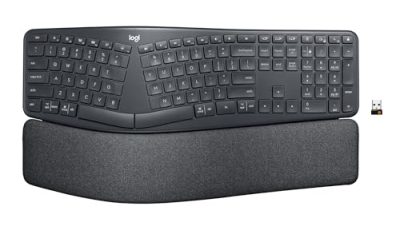
| 3. Logitech ERGO K860 Wireless Ergonomic Keyboard |
| Check price on Amazon |
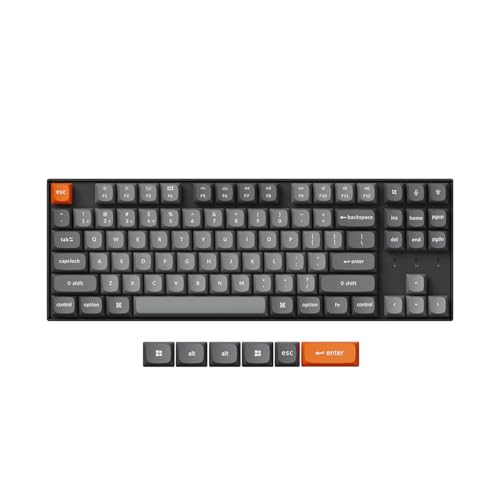 4. Keychron K8 Max QMK Wireless Custom Mechanical Keyboard |
| Check price on Amazon |
How We Chose
Typing feel is subjective, but it is not mysterious. We judged every candidate on six concrete criteria. First, switch feel: the force, travel and feedback of each keypress, because that is what your fingers actually experience thousands of times a day. Tactile switches give a small bump that confirms the press; linear switches glide smoothly; scissor switches give a short, quiet, laptop-like stroke. Second, keycap shape and spacing: dished or sculpted caps that guide your fingers home reduce typos, and a standard layout means no relearning. Third, noise: a board that clicks loudly is a problem in a shared office or on a video call, so quiet operation counts heavily here. Fourth, comfort over long sessions: wrist angle, board height and palm support matter more after hour four than after minute four. Fifth, build quality and stability: a board that flexes or slides around the desk fights you on every keystroke. Sixth, connectivity and everyday practicality: reliable wireless, multi-device switching and a battery that lasts weeks rather than days all earn their place. We excluded boards built mainly for gaming flash, boards with non-standard layouts that hide the arrow keys, and any model we could not verify as currently selling on Amazon US.
The Best Keyboards for Typing
1. Logitech MX Keys S Wireless Keyboard
- Best for: Most typists who want a quiet, comfortable, do-everything office keyboard.
Most typists who want a quiet, comfortable, do-everything office keyboard.
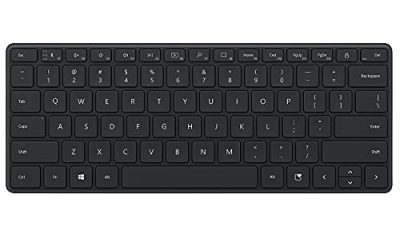
The Logitech MX Keys S is the best keyboard for typing for most people: it is the most refined scissor-switch board you can buy. The keys are spherically dished, so each fingertip settles into a shallow cup that centres it on the key, and the short, stable stroke bottoms out with a firm but quiet thud rather than a rattle. It feels closer to a great laptop keyboard than to any membrane board, and that familiarity means there is no adjustment period. You sit down and type at full speed immediately, which is what a work keyboard should do.
What keeps the MX Keys S ahead of cheaper office boards is the detail work. The backlighting turns on as your hands approach and fades to suit the room, the keys are stable enough that off-centre presses still register cleanly, and the board pairs with up to three devices over Bluetooth or the included Logi Bolt receiver, switching between them with a tap. The low-profile design holds your wrists at a natural angle, and the aluminium plate inside gives the board a weight that keeps it planted. If you type all day in a quiet room, share a desk with other people, or spend half your day on video calls, this is the board that gets out of your way.
Key specs:
– Switch type: Scissor switches with spherically dished keycaps
– Layout: Full-size, 104 keys, low profile
– Connectivity: Bluetooth Low Energy and Logi Bolt receiver, up to 3 devices
– Battery: Rechargeable 1500 mAh Li-Po, USB-C charging, up to 10 days per charge with backlighting on
– Weight: 810 g
Pros:
– The best scissor-switch typing feel available, quiet and precise
– Smart backlighting that responds to your hands and the room
– Three-device switching across Windows, macOS, Chrome OS and Linux
Cons:
– Not a mechanical board, so there is no switch swapping or tactile bump to tune
– Backlighting shortens battery life noticeably when left on
2. Keychron Q1 Max QMK/VIA Wireless Custom Mechanical Keyboard
- Best for: Writers and programmers who want the best mechanical typing feel and are willing to pay for it.
Writers and programmers who want the best mechanical typing feel and are willing to pay for it.
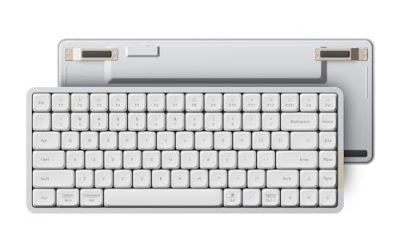
The Keychron Q1 Max is the board for typists who want mechanical feel done properly. Its CNC-machined aluminium case and double-gasket mount give every keypress a solid, cushioned landing with no flex, no rattle and none of the hollow ping that cheaper mechanical boards suffer from. The Gateron Jupiter Red switches in this configuration are linear and pre-lubed, so each key glides down smoothly and comes back up cleanly, and because the board is hot-swappable you can change the switches later without touching a soldering iron. That combination of a heavy, stable case and a smooth switch is what makes long writing sessions feel effortless rather than tiring.
The 75 percent layout keeps the function row and arrow keys while trimming the numpad, so the board fits a smaller desk without forcing you to relearn where anything lives. A programmable knob handles volume or scrolling, QMK and VIA support lets you remap any key, and tri-mode connectivity covers 2.4 GHz wireless, Bluetooth for up to three devices, and wired USB-C. The battery is rated for up to 180 hours with the backlight off, which means weeks between charges for most typists. It is the heaviest board here and the most expensive, but it is also built to last a decade.
Key specs:
– Switch type: Gateron Jupiter Red linear switches, hot-swappable
– Layout: 75 percent with knob, PBT keycaps
– Build: CNC-machined aluminium case, double-gasket mount, screw-in stabilisers
– Connectivity: 2.4 GHz, Bluetooth 5.1 (up to 3 devices), USB-C wired, 1000 Hz polling
– Battery: 4000 mAh, rated up to 180 hours with backlight off
Pros:
– Superb cushioned mechanical feel from the gasket-mounted aluminium case
– Hot-swappable switches and full QMK/VIA remapping
– Tri-mode wireless with a battery that lasts for weeks
Cons:
– Heavy and premium-priced, and it has no numpad
– The enthusiast feature set is more than casual typists will ever use
3. Logitech ERGO K860 Wireless Ergonomic Keyboard
- Best for: Typists with sore wrists or anyone who types for many hours a day.
Typists with sore wrists or anyone who types for many hours a day.
The Logitech ERGO K860 is the pick for typists whose wrists complain before their fingers do. Its split, curved layout angles each half of the keyboard toward your natural hand position, so your wrists stay straight instead of bending inward, and the pillowed palm rest supports your hands through long sessions. The scooped keyframe and the gentle slope of the board work together to keep your forearms relaxed, and the effect is real: this is the board people buy after a cheaper keyboard starts hurting. It uses the same quiet scissor-switch feel as Logitech’s best office boards, so the keys themselves are short, stable and easy to type on all day.
It connects over Bluetooth or the included Unifying receiver, pairs with two devices, and runs for up to two years on its two AAA batteries. Adjustable tilt legs let you raise the front edge or drop it below level. The stain-resistant fabric on the palm rest is easy to wipe clean, and the board works with Windows and Mac out of the box. The trade-off is size: the split design and palm rest make it the widest board here, and it takes a few days to get used to the curved key layout. Give it a week, and most typists do not go back.
Key specs:
– Switch type: Scissor switches with scooped, curved keyframe
– Layout: Split ergonomic with integrated cushioned palm rest
– Connectivity: Bluetooth and Logitech Unifying receiver, up to 2 devices
– Battery: 2 AAA batteries, rated up to 24 months
– Tilt: Adjustable palm lift legs (0, minus 4 and 7 degrees)
Pros:
– Split curved layout that genuinely reduces wrist strain
– Quiet, comfortable scissor-switch typing feel
– Exceptional battery life and simple two-device switching
Cons:
– Large footprint that needs a wide desk
– The curved layout takes a few days to adjust to
4. Keychron K8 Max QMK Wireless Custom Mechanical Keyboard
- Best for: Typists who want real mechanical feel and customisation without a premium price.
Typists who want real mechanical feel and customisation without a premium price.
The Keychron K8 Max is the best value mechanical keyboard for typing, because it brings enthusiast features to a mid-range price. It is a tenkeyless board with Keychron Super Brown switches, which give a gentle tactile bump at the top of each press, so you can feel the key register without bottoming out hard. That feedback is what makes touch typing faster and less tiring, and the acoustic foam layered under the plate keeps the sound soft and muted rather than sharp. Hot-swappable sockets mean you can try a different switch later, and QMK and VIA support lets you remap keys and build layers without installing software.
It connects over 2.4 GHz wireless, Bluetooth for up to three devices, or wired USB-C, polls at 1000 Hz, and runs on a 4000 mAh battery. The aluminium-frame version has a satisfying heft that keeps it from moving around, and the Mac and Windows toggle plus the extra keycaps in the box mean it works properly on either platform from day one. The tenkeyless layout drops the numpad, which suits most typists and frees up desk space for the mouse, though number-heavy work will miss it. If you want to find out what mechanical typing feels like without paying premium prices, this is the sensible place to start.
Key specs:
– Switch type: Keychron Super Brown tactile switches, hot-swappable
– Layout: Tenkeyless, 80 percent, 87 keys
– Connectivity: 2.4 GHz, Bluetooth 5.1 (up to 3 devices), USB-C wired, 1000 Hz polling
– Build: Aluminium frame option, acoustic foam layers, OSA profile keycaps
– Battery: 4000 mAh rechargeable
Pros:
– Tactile Brown switches with a soft, muted sound
– Hot-swappable switches and QMK/VIA remapping at a mid-range price
– Tri-mode wireless and a solid aluminium frame
Cons:
– No numpad, which number-heavy typists will miss
– The exact price varies by frame and switch configuration, so check the listing
Buying Guide
Start with the switch, because it decides how every keystroke feels. Scissor switches are short, quiet and familiar from laptops; they suit shared offices and anyone who wants zero learning curve. Tactile mechanical switches add a small bump that confirms each press, which many touch typists find faster and less tiring over long sessions. Linear mechanical switches glide without a bump and are the smoothest option, but they give you less feedback about when a key has registered. If you can, try the switch type in a shop before committing, and remember that hot-swappable boards let you change switches later, which removes much of the risk.
Layout matters just as much. A full-size board keeps the numpad, which spreadsheet and data-entry work needs, but it pushes your mouse further to the right and can strain your shoulder. A tenkeyless or 75 percent board drops the numpad and brings the mouse closer, which most writers prefer. Split ergonomic boards ask for a few days of adjustment but pay it back in wrist comfort. Whichever layout you choose, check that the arrow keys and the keys you use most are in their standard places, because a compact board that hides them behind a function layer will slow you down.
Noise is the factor people forget until it is too late. Clicky switches and hollow plastic cases carry across a room and into microphones. If you share a space, look for tactile or linear switches with foam-damped cases and quiet keycaps, and avoid clicky switches entirely. Weight and stability are worth checking too: a board that slides or flexes as you type will annoy you every day, while a heavier board stays put. Finally, think about connectivity. Multi-device Bluetooth is genuinely useful if you switch between a computer, a tablet and a phone, and a board with a wired mode is worth having for the days the battery runs out.
Frequently Asked Questions
Are mechanical keyboards better for typing than membrane keyboards?
For most heavy typists, yes. A mechanical switch gives each key its own spring and contact, so the feel is consistent and the key registers before you bottom out, which reduces finger fatigue. Membrane boards are cheaper and quieter, but their rubber-dome feel goes mushy with age. That said, a good scissor-switch board like the MX Keys S types beautifully and suits quiet offices better than most mechanical boards, so the best choice depends on your environment as much as on the switch.
What switch type is best for typing?
Tactile switches are the usual recommendation for typing, because the small bump tells your fingers the key has registered without needing a hard bottom-out. Linear switches suit people who like a smooth, fast stroke, and scissor switches suit anyone who wants laptop-like quiet. Avoid clicky switches for typing in shared spaces. If you are unsure, a hot-swappable board is the safe buy, since you can change switches later for the cost of a switch set.
Do I need a numpad for typing?
Only if your work involves a lot of numbers. Writers, programmers and most office workers type faster on a tenkeyless or 75 percent board, because the mouse sits closer and the shoulders stay relaxed. Accountants, data entry and spreadsheet-heavy work genuinely benefit from a numpad. If you only need numbers occasionally, a compact board plus a separate numpad gives you both options.
How long do mechanical keyboards last?
A quality mechanical keyboard is typically rated for tens of millions of keystrokes per switch, which works out to many years of daily typing. The switches themselves rarely fail first; keycap legends wear and batteries age sooner. Hot-swappable boards last even longer in practice, because a single worn switch can be replaced in seconds instead of scrapping the whole board.
Is an ergonomic split keyboard hard to learn?
It takes a few days. The curved layout feels strange for the first day or two, and your speed will dip while your hands relearn the key positions. Most people are back to full speed within a week, and the wrist comfort usually makes the adjustment worthwhile. If your wrists already ache, the split layout is one of the few changes that genuinely helps rather than just feeling different.
Conclusion
The best keyboard for typing overall is the Logitech MX Keys S. Its quiet scissor-switch feel, dished keycaps and three-device switching make it the easiest board to live with, and it suits almost any desk and any typist. If you want mechanical feel, the Keychron Q1 Max is the premium answer, with a gasket-mounted aluminium case and smooth hot-swappable switches that make every keystroke feel deliberate. The Logitech ERGO K860 is the right choice when wrist comfort is the priority, and the Keychron K8 Max is the value pick that proves you do not need to spend premium money to get real mechanical typing. Pick the board that matches your hands and your room, and check the current price before you buy.
Related guides
More from Amazon
Programs that pair well with the guide above. Offers and eligibility are set by Amazon and may change.
Free shipping on eligible items, Prime Video and more. Eligible new members can start with a free trial.
Start a Prime free trialAd-free music streaming. Eligible new subscribers can start with a free trial.
Try Music Unlimited freeA Prime membership for ages 18-24 with a trial period. Eligibility is set by Amazon.
See Prime for Young AdultsAudiobooks and podcasts to listen to on the go. Eligible new members can start with a free trial.
Try Audible freeAs an Amazon Associate we earn from qualifying purchases.