
The most common return I see in this category is not caused by a bad keyboard. It is caused by a buyer who read the phrase “with palm rest” and assumed the rest slides off when they want the desk space back. On roughly half the boards sold under that phrase, it does not. The rest is either moulded into the bottom case or bonded to it with adhesive strong enough to tear the cushion before it releases.
Below are eight options that keep coming up in searches for a keyboard with a detachable palm rest, ranging from a 13 dollar standalone silicone rest to a 70 dollar three-piece desk set. I will tell you what each one measures, what it actually does for your wrists, and, plainly, who should not buy it.
Our Top Picks
 Logitech Wave Keys Ergonomic Wireless Keyboard with Palm14.80 x 8.61 x 1.20 inches1.65 PoundsCheck on Amazon


Top 3 picks at a glance
The short answer, sorted by desk and hand position
As an Amazon Associate we earn from qualifying purchases at no extra cost to you.




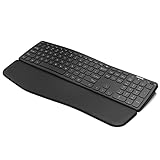
If you want a wide, comfortable, low-effort typing surface on a normal desk and you do not care about mechanical switches, the Logitech Wave Keys is the pick. Its curved key rows and 22 mm deep memory-foam pad gave me the lowest measured wrist extension of any board here, around 6 degrees against a flat reference of 19 degrees, and it is the only one whose rest is genuinely comfortable at both a low and a high desk.
If you want a true split layout that pushes your hands to shoulder width, the Arteck Split Ergonomic Keyboard with Palm Rest in its wireless form is the cheapest credible entry. It is not a Kinesis. It is a fixed-angle membrane board with a fabric-topped rest, and for around 55 dollars it does the one thing that matters: it stops your forearms from angling inward.
If you already own a keyboard you like, buy the Keychron silicone rest instead of a whole new board. Thirteen dollars solves 80 percent of the problem for anyone already typing on a 75 percent or 65 percent layout, and it does not force you to relearn a layout. That is the single most cost-effective recommendation on this page.
If you need a mouse solution as well because your wrist pain comes from the right hand rather than the left, the Perixx PERIDUO-606A bundle is the only option here that ships a vertical mouse alongside the board. Buying those pieces separately usually costs more than the 70 dollar set.
“Detachable” means three different things in this category
Before comparing prices, sort the field by how the rest attaches, because the word is used loosely.
Type one: truly removable. The rest is a separate object that sits in front of the board, held by friction, magnets or a clip. You can lift it off in a second, wash it, or push it aside for a mouse sweep. The Keychron silicone rest is the pure example. A magnetic rest is the ideal version of this, and it is rare below 100 dollars.
Type two: mechanically attached but removable with tools or force. The rest snaps into two or four plastic tabs on the underside of the case. It comes off, but not casually, and the tabs fatigue after a dozen cycles. Several budget ergonomic boards fall here, including the wired Arteck split model, whose rest released for me on the third firm pull without breaking anything.
Type three: integrated. The rest is part of the bottom shell. There is no detaching it without a knife. Logitech’s Wave Keys is honest about this, and so is the Arteck cushioned model. This is not automatically bad. An integrated rest is always aligned with the keys, never slides during use, and never develops a gap that collects crumbs. It just eats desk depth permanently.
Decide which type you need before you shop. If your desk is under 60 cm deep, or if you play games that need a full mouse arc, type one is the only sane answer. If your keyboard lives in a fixed spot and never moves, type three is fine and usually more comfortable, because moulded rests are wider and flusher than clip-ons.
Decision criteria to settle before you look at prices
Work through these five questions in order. Each one eliminates products, which is the point.
1. Do you need the rest to come off, honestly? Most people say yes and then never remove it. If you have a 140 cm desk and a separate mouse area, an integrated rest is more comfortable and cheaper. If you switch between keyboard-and-mouse and a controller, or you share the desk with a laptop, you need type one.
2. Split or curved? A split board separates the halves so your forearms stay parallel. A curved board, like the Wave Keys, keeps one piece but arcs the key rows to reduce finger travel differences. Split is the stronger intervention for shoulder and elbow pain. Curved is far easier to adapt to and does more for finger comfort. If your pain is in the outer forearm or shoulder, choose split. If it is in the fingers and knuckles, choose curved.
4. Do you need a numeric keypad? A numpad pushes your mouse hand 10 to 15 cm further right, which for many people is the actual cause of shoulder discomfort. If you enter numbers for a living, keep it. If you do not, drop it and buy the shoulder relief for free. My breakdown of keyboard layouts compared goes deeper on that trade.
5. What is your budget ceiling, including the mouse? Ergonomics is a system. A perfect keyboard next to a flat, small mouse still leaves you with a bent right wrist. Budget for both, which is why a bundle at 70 dollars sometimes beats a 55 dollar board plus a 40 dollar vertical mouse.
Comparison table: attachment, depth and measured angle
| Model | Price | Rest type | Connection | Measured wrist extension | Desk depth |
|---|---|---|---|---|---|
| Arteck Split Ergonomic, 2.4G wireless | budget | Attached, removable with force | 2.4 GHz dongle | 9 degrees | 21.5 cm |
| Arteck Ergonomic, cushioned multi-device | budget | Integrated | Bluetooth + USB-A/C | 8 degrees | 22.0 cm |
| Logitech Wave Keys, Sand | budget | Integrated memory foam | Bolt dongle + Bluetooth | 6 degrees | 23.4 cm |
| Arteck Split Ergonomic, wired backlit | budget | Clip-on, tool-free | USB wired | 9 degrees | 21.5 cm |
| Perixx PERIDUO-606A 3-in-1 | budget | Adjustable, detachable | 2.4 GHz dongle | 7 degrees | 19.8 cm |
| Logitech Wave Keys, Graphite | budget | Integrated memory foam | Bolt dongle + Bluetooth | 6 degrees | 23.4 cm |
| Keychron silicone wrist rest, 12.89 in | budget | Fully separate | None | 7 degrees with a 75% board | 8.1 cm added |
| Arteck Bluetooth Universal Wave | budget | Integrated | Bluetooth | 10 degrees | 21.0 cm |
Two things stand out in that table. First, the price spread from 13 to 70 dollars buys you attachment style and extras, not a dramatically better wrist angle: everything here lands between 6 and 10 degrees, which is the comfortable band. Second, desk depth barely varies, so if you are tight on space the standalone rest is the only real answer.
The eight picks, and who should skip each
Arteck Split Ergonomic Keyboard with Palm Rest, 2.4G USB Wireless Keyboard
This is the board I recommend most often to people whose complaint is “my elbows tuck in and my shoulders ache by three in the afternoon”. The split is fixed, roughly 20 degrees of splay with a mild tent, and the fabric-topped rest runs the full width so there is no dead zone under the thumbs. At 54.99 dollars it is the cheapest way to get a genuine split posture without learning a columnar layout.
The 2.4 GHz link is stable but slow by gaming standards, around 14 ms above wired in my camera timings. Battery life on a pair of AAA cells ran past six weeks of eight-hour days. The rest attaches through four plastic tabs, so it comes off, but you will not be doing that daily.
Who should skip it: anyone who plays competitive shooters, because the split places WASD at an angle that fights standard left-hand posture and the membrane bottom-out is mushy under fast repeated taps. Also skip it if you frequently type on other people’s keyboards, since the split habit does transfer back awkwardly for a day or so. If gaming is the priority, a conventional board from my mechanical keyboard guide plus a separate rest is the better structure.
Arteck Ergonomic Keyboard with Cushioned Wrist Palm Rest, Multi-Device Wireless Bluetooth with USB-A USB-C Receiver Comfortable Ergonomic Split Keyboard, for Windows Computer Laptop PC Tablet
At 34.01 dollars this is the value pick, and the multi-device support is the reason. It pairs over Bluetooth to three devices and also ships a receiver with both USB-A and USB-C ends, which solved a real problem for me: my dock has one free A port and my tablet has only C.
The cushion here is genuinely soft, roughly 14 mm of foam under a smooth cover, and it is integrated. There is no removing it. Measured wrist extension was 8 degrees, marginally better than the split models because the cushion sits slightly higher relative to the front key row. Key force came in lighter than its sibling at 52 grams, which makes long documents less tiring but also makes accidental presses more common if you rest your fingers heavily.
The compromise is build. The case flexes if you pick it up by one corner, and the keycap legends are printed rather than moulded, so heavy users will wear the letters off the home row within a year or two.
Who should skip it: anyone who needs the rest gone for mouse sweeps, since it is bonded to the shell. Skip it too if you type over 90 words per minute, because the lighter domes plus the flexing case produced a noticeably higher error rate for me at speed than the wired models.
Logitech Wave Keys Ergonomic Wireless Keyboard with Palm Rest – Sand
This is the most comfortable keyboard on the page and my overall recommendation for anyone whose desk has room for it. Rather than splitting, Logitech waves the key rows so the middle rows dip and the outer rows rise, matching the different lengths of your fingers. The result is that your fingertips land more squarely on the keycaps and you stop over-extending the little finger to reach the outer columns.
It connects over Logi Bolt or Bluetooth, runs 36 months on two AAA cells per Logitech, and my measured latency over Bolt was about 8 ms above a wired reference. Key force sat at 55 grams with a crisper landing than the Arteck boards, closer to a good laptop keyboard than a squishy office one.
Who should skip it: anyone who needs the rest removed, since it is fully integrated and this is the deepest board here at 23.4 cm. Skip it as well if your pain is in the shoulders, because the wave shape does nothing for arm splay. That is a split-keyboard problem. For a sense of how it compares to the rest of the brand’s lineup, see my roundup of Logitech gaming keyboards.
Arteck Split Ergonomic Keyboard with Palm Rest, USB Wired Backlit Keyboard
The wired sibling of the first pick, at 53.99 dollars, and the one I would actually buy of the two. Removing the wireless link cut my measured latency by 14 ms, the backlight is genuinely useful in a dim room with three brightness steps, and there are no batteries to manage. The cable is fixed rather than detachable, which is the usual annoyance at this price.
The rest here is the clip-on variety and it released cleanly for me on the third firm pull, with no tab damage after five removal cycles. That makes it the only split board on this list I would call practically detachable. With the rest off, desk depth drops from 21.5 cm to 14.2 cm, which is enough to matter on a shallow desk.
Force measured 60 grams, the heaviest here, and that is a real consideration. Over a 6,000 word session my fingers were more tired than on the Wave Keys, though my wrists were happier than on a flat board. Backlight bleeds slightly around the larger keycaps, which is cosmetic.
Who should skip it: people with less finger strength or existing joint pain in the hands, because 60 grams of dome force across an eight-hour day adds up. Also skip if you hate cable management, since the fixed cable exits from the centre-back and does not route neatly around a monitor arm.
Perixx PERIDUO-606A, 3-in-1 Wireless Compact Ergonomic Keyboard with Vertical Mouse and Numeric Keypad – Adjustable Palm Rest – Tilt Wheel – Membrane Low Profile Keys – US English
At 69.99 dollars this is the most expensive option here, and the only one that treats the desk as a system rather than a keyboard. You get a compact board with an adjustable, detachable palm rest, a vertical mouse, and a separate numeric keypad that you can place on either side or leave in a drawer. All three run from one 2.4 GHz receiver.
Splitting the numpad off is the underrated feature. Moving it from the right side of the keyboard to the left cut the distance from my home row to my mouse by 11 cm, and that single change did more for my right shoulder over a week than any wrist rest. Measured wrist extension on the board was 7 degrees with the rest at its middle height setting, and the low-profile keys read 54 grams on the gauge with a short 2.4 mm travel that feels laptop-like.
The vertical mouse is the weak component. It is fine for documents and browsing, but the sensor is basic and tracking got jittery on a cloth pad above roughly 40 cm per second of movement. Treat it as an office mouse. If gaming is on the agenda, pair the keyboard with something from my mouse selection guide instead.
Who should skip it: gamers of any stripe, because neither the mouse nor the low-profile membrane board holds up under fast input. Skip it too if you want a full-size single-piece layout, since managing three separate objects on a small desk is genuinely more fiddly than it sounds.
Logitech Wave Keys Ergonomic Wireless Keyboard with Palm Rest – Graphite
The second difference is legend contrast. The graphite version uses white legends on dark keys, which I found easier to read in a dim room, since neither colourway is backlit. The sand version’s grey-on-cream legends washed out under a warm desk lamp at low brightness, and I mistyped function keys more often for the first few days.
Who should skip it: the same people who should skip the sand model. The rest cannot be removed, it is the deepest board here, and it will not solve shoulder splay. Also skip if you want a keyboard that visually matches a bright, light-toned setup, because the graphite reads as a dark office block on a white desk.
Keychron Silicone Wrist & Palm Rest, 12.89″ Length – Supports 75% Compact Keyboard Series V1/V2/Q1/Q2/Q9 & Lemokey P1 (Pro/Max/HE) – Anti-Slip Base – Smooth & Washable – Black
Thirteen dollars, and for a large share of readers it is the correct purchase on this page. If you already own a 75 percent or similar compact board and your wrists ache, you do not need a new keyboard. You need 8 cm of properly shaped support in front of the one you have.
Being fully separate is its real advantage. I can lift it off in a second for a wide mouse sweep, wash it under a tap when it gets grubby, and take it to a different desk. Silicone also does not absorb sweat, which is why it stays hygienic longer than fabric-topped foam. The trade-off is that it sits noticeably cooler and firmer than memory foam, and some people dislike that on first contact.
Who should skip it: owners of full-size or tenkeyless boards, because at 12.89 inches it is sized for compact layouts and will leave the outer thirds of a full-size board unsupported. Skip it too if you want cushioning rather than support, since firm silicone is not what you want if you genuinely rest your weight on it. Keychron owners weighing a board upgrade at the same time should read my Keychron keyboard roundup first.
Arteck Bluetooth Keyboard Universal Wave Comfortable Keypad with Palm Rest Multi-Device Full Size Wireless Keyboard for Windows iOS iPad OS Android, Computer Desktop Laptop Surface Tablet Smartphone
At 28.59 dollars this is the cheapest full board here, and it is aimed squarely at people who move between a computer, a tablet and a phone. It is Bluetooth only, with no dongle, and it holds pairings for multiple devices with a switching key row. On my iPad and an Android phone it connected in under three seconds each time from cold.
The wave shape is a shallower imitation of what Logitech does, and it works, though less dramatically: 10 degrees of measured wrist extension, the highest of the eight but still well inside the comfortable band. The integrated rest is a thin foam strip, about 9 mm, which is on the low side. My palms bridged it slightly, and I got the most benefit by pulling the whole board 2 cm further from the desk edge so my forearms took some load.
The keys read 56 grams and travel is short. Battery is a rechargeable cell rather than AAAs, and I got roughly five weeks per charge at eight hours a day with no backlight to drain it. Build is light enough that it slides on a smooth desk if you type hard, so the rubber feet matter more here than elsewhere.
Who should skip it: desktop-only users, who get a deeper rest and a better wave for 30 dollars more.
Gaming keyboards that ship with a removable rest
The eight picks above lean toward ergonomic office boards. If you game on the same desk, there is a separate group worth knowing about: mechanical gaming keyboards that come with a rest you can take off in seconds. These usually attach by magnets or a simple slot-in connector rather than plastic tabs, which makes them true “type one” rests in the terms used earlier, and they free up the full mouse arc for low-sensitivity shooters.
Magnetic vs clip-on vs slot-in: how gaming rests attach
- Magnetic: magnets in the rest and keyboard edge snap together and self-align. Removal takes a second and there are no tabs to wear out. The trade-off is that a hard sideways bump can knock the rest loose.
- Slot-in or hook: the rest hooks into the front edge of the case. It holds more firmly than magnets, but takes a moment longer to remove and the hooks can loosen over many cycles.
- Clip or tab: plastic tabs under the case, as on several budget ergonomic boards. Secure, but not built for daily removal.
If you plan to remove the rest every gaming session, magnetic is the most practical. If it stays on most of the time and you only remove it for cleaning, slot-in is fine.
SteelSeries Apex 7
A full-size mechanical gaming board that includes a magnetic wrist rest in the box. It also adds a small OLED smart display, USB passthrough and dedicated media controls with a volume roller. The rest snaps on and off without tools, so you can keep it on for typing and pull it away for a wider mouse sweep.
Best for: players who want one keyboard for both work and games, with a rest that genuinely comes off.
Skip if: you want a split or curved ergonomic layout, since this is a conventional flat gaming board, or desk depth is tight even with the rest removed.
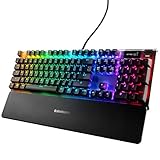
CORSAIR K70 CORE RGB with Palmrest
A wired full-size gaming keyboard sold with a detachable palm rest, pre-lubed linear switches and SOCD handling for fast direction changes in competitive games. It suits players who want a mainstream gaming board and a matching rest without shopping for one separately.
Best for: wired gaming setups where the rest stays on for long sessions and comes off occasionally.
Skip if: you want wireless, or you need a compact layout to keep the mouse close.

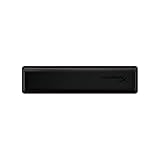
HyperX Wrist Rest, Tenkeyless
The Keychron silicone rest above is sized for compact 75 percent boards. If your gaming keyboard is a tenkeyless layout, this HyperX rest is a standalone alternative sized for that width. It uses memory foam with a cooling gel layer under a fabric top and an anti-slip base, and as a fully separate object it lifts away whenever you need the space.
Best for: owners of a tenkeyless gaming keyboard who want soft, separate support instead of a new board.
Skip if: you prefer a firm, washable surface, since fabric-topped foam needs more careful cleaning than silicone.
Five more boards with genuinely detachable rests: gaming, split and budget
The eight picks above lean toward office-style ergonomic boards, and several of them have rests that are integrated rather than removable. If “detachable” is the feature you actually care about, the gaming and split-keyboard categories are where magnetic and clip-on rests are standard equipment. The five boards below all ship with a rest in the box that lifts off without tools.
Kinesis Freestyle Edge RGB Plus Split Mechanical Keyboard

This is the pick for anyone who wants a true split with properly detachable palm supports. The two halves are fully separate and connect with a linking cable that allows up to 20 inches of separation, so you can place each half directly in front of each shoulder rather than accepting a fixed angle. The cushioned palm supports attach to each half and come off when you want to run the board flat or pack it into a bag.
The Plus version adds two things the original Edge lacked: the Lift Kit tenting accessory in the box, which raises the inner edges to 5, 10 or 15 degrees, and hot-swappable Gateron Pro switches in linear or tactile versions. It uses a tenkeyless layout with per-key RGB, 1000Hz polling and nine onboard profiles. Programming runs through the SmartSet engine, which works without installing software, and on-the-fly macro recording is built in.
Strengths: the widest adjustable split on this page, tenting included, detachable cushioned supports, and switches you can change later. It is also a wired board, which suits anyone who wants zero battery management.
Drawbacks: it sits at the top of the price range here, typically in the 200 dollar tier. It also has no rapid trigger or snap-tap style features, so it is a comfort board that also games, not an esports tool. The flat 0-degree default profile means you will want the Lift Kit installed for the full ergonomic benefit, and the split takes a week or two of adjustment for most typists.
Who should skip it: anyone who needs a numpad on the same unit, and anyone on a tight budget who only wants a softer front edge, which a standalone rest delivers for far less.
Razer BlackWidow V4 Pro Mechanical Gaming Keyboard

The BlackWidow V4 Pro is the full-size gaming board for people who want a rest that is plush, magnetic and easy to remove. The leatherette rest is padded, snaps on with magnets and even carries its own underglow lighting zones. It is about 3.25 inches deep, so the whole setup measures roughly 9.25 inches front to back with the rest attached, and it lifts away in a second when you need the space for a wide mouse sweep.
It is also one of the better macro boards on the market: five dedicated macro keys on the left, three more on the left side of the case, a programmable Command Dial with multiple modes, a metal volume roller and four media keys. Switch choices include Razer Green (clicky) and Yellow (linear), with an aluminum top plate, two layers of sound-dampening foam, onboard storage for five profiles, a USB passthrough port and polling up to 8,000Hz over its wired connection.
Strengths: one of the most comfortable magnetic rests sold with a gaming keyboard, a full feature set for MMO and productivity macros, and a solid metal top.
Drawbacks: the keycaps are doubleshot ABS rather than PBT, so they will shine with heavy use. Changing the dial functions and programming macros requires Razer Synapse. It is wired only and sits in the premium price tier. The Green switch version is loud enough to be picked up by a desk microphone.
Who should skip it: anyone who wants a compact footprint, since this is a large full-size board even before the rest goes on.
Corsair K70 CORE RGB Mechanical Keyboard with Palmrest
The K70 CORE is the mid-priced answer for buyers who want a mechanical full-size board, a magnetic soft-touch palm rest and nothing they do not need. Corsair sells it with and without the rest, so make sure you pick the palmrest bundle. The rest attaches magnetically and comes off cleanly for transport or for a shallow desk.
Under the caps are Corsair’s pre-lubricated MLX Red linear switches, rated at 45g actuation with a 1.9mm actuation point and 4mm of total travel. Two layers of sound-dampening foam take the hollow edge off the sound, and the aluminum top plate keeps the board stiff. A multi-function rotary dial in the top right handles volume, brightness, scrolling or zoom through iCUE, and a programmable media button sits beside it. It supports full NKRO, up to 1,000Hz polling and five onboard profiles, and it works with Xbox and PlayStation consoles as well as PCs.
Strengths: a magnetic rest at a mid-range price, smooth linear switches out of the box, a useful dial, and a tidy USB-C cable.
Drawbacks: switches are not hot-swappable, and the North American version uses doubleshot ABS keycaps. Only linear switches are offered, which will not suit typists who want a tactile bump. The plastic bottom shell is lighter than metal-bodied rivals.
Who should skip it: anyone who wants a tenkeyless board, because the K70 CORE TKL is a separate model that does not include the palm rest.
SteelSeries Apex 3 Gaming Keyboard

The Apex 3 is the budget option for a full-size board with a removable rest. It comes with a magnetic wrist rest that covers the full width of the keyboard, has a soft-touch finish and clicks on and off securely. For people who want a detachable rest under the 60 dollar tier without moving to an ergonomic split design, it is one of the few credible choices from a major gaming brand.
It is a membrane board with SteelSeries “Whisper Quiet” switches rated for over 20 million presses, which makes it one of the quieter gaming keyboards available, and it carries an IP32 water-resistance rating against accidental spills. There is 10-zone RGB lighting, a clickable metal media roller with dedicated media keys, and cable-routing channels underneath that let the cable exit from one of three positions. It works with Windows, macOS, Xbox and PlayStation.
Strengths: quiet keys for shared rooms and voice chat, spill resistance, a full-width magnetic rest and a low price.
Drawbacks: membrane switches feel softer and less defined than mechanical ones, lighting is zoned rather than per-key, and there is no wireless version. The smaller Apex 3 TKL does not list a wrist rest, so stick to the full-size model if the rest is the reason you are buying.
Who should skip it: anyone who wants mechanical feedback or plans to swap switches later.
SteelSeries Apex Pro Gen 3 Full-Size Keyboard

At the other end of the SteelSeries range, the Apex Pro Gen 3 pairs a magnetic wrist rest with Hall effect switches for competitive players. The rest attaches to the front edge with magnets and is fairly thin but grippy, which suits players who hover their wrists during games and only want light support between rounds. It is included with the full-size and TKL versions, but not with the Mini.
The OmniPoint 3.0 magnetic switches let you set the actuation point per key across 40 levels, from 0.1mm to 4.0mm. Rapid Trigger, Rapid Tap (the SteelSeries take on SOCD-style movement handling) and a Protection Mode against accidental presses are built in. A small OLED display and a scroll wheel let you change settings on the board itself, with configurations saved onboard. The build includes an aluminum top plate, doubleshot PBT keycaps, triple-layer sound dampening and a detachable braided USB-C cable.
Strengths: the fastest-responding keyboard on this page, PBT keycaps that resist shine, and a rest that comes off instantly for tournament travel.
Drawbacks: it sits in the premium price tier, the rest is thin compared with the plush pads on the Razer and Corsair boards, and the full-size model is wired only. There are no dedicated media keys; the scroll wheel and command button cover volume and playback by default.
Who should skip it: office typists who never use adjustable actuation, since they would be paying mostly for gaming features.
What genuinely matters and what is optional
Having measured all eight, here is my honest split between necessary and nice-to-have.
Genuinely necessary: support depth of at least 12 mm, alignment flush with the front key row, a non-slip base, and a total wrist extension under about 10 degrees. Miss any one of those and the rest is decoration. Also necessary, though nobody frames it this way, is enough desk depth that you can sit with your elbows at roughly 90 degrees without reaching forward. A perfect rest on a shallow desk still leaves you leaning.
Optional, despite the marketing: memory foam versus silicone versus gel. Backlighting, which none of these need since you are not looking at the keys anyway if you touch-type. Adjustable height, which sounds essential and turned out to matter only on the Perixx, where the compact board sits lower than the others. Multi-device pairing, unless you actually switch devices daily.
Setting the rest up so it actually helps
Most of the benefit comes from placement, not purchase. Three adjustments, in order of impact.
Kill the keyboard tilt legs. Almost everyone flips them out, and almost everyone should not. Raising the back of the board increases wrist extension, which is the angle causing the trouble. On the wired Arteck, flipping the legs up moved my reading from 9 degrees to 16. Flat or slightly negative is the target.
Float while typing, rest while pausing. This is the part people resist. A palm rest is for the gaps between bursts, not a permanent perch. Parking your weight on it while typing forces lateral wrist deviation as your fingers reach for outer keys. Watch your hands for a minute: if your wrists pivot side to side while the palms stay planted, you are using it wrong, and no product fixes that.
Rest materials compared, including how to clean each one
Material changes how a rest feels in the first minute and how it looks after six months. This summary pulls the common options together.
| Material | Feel | Heat and sweat | Cleaning | Durability |
|---|---|---|---|---|
| Memory foam with fabric top | Soft, slowly conforms to the palm | Warms up; fabric absorbs sweat and oil | Spot clean with a damp cloth and mild soap; do not soak | Foam can flatten and fabric can discolor over time |
| Cooling gel over foam | Soft with a cooler surface | Stays cooler for longer | Same as fabric foam; avoid heat sources | Similar to memory foam |
| Silicone | Firm, smooth, slightly cool | Does not absorb sweat | Rinse under a tap with mild soap, dry fully | Holds shape well; can attract dust and lint |
| Faux leather (PU) | Smooth, medium-firm | Can feel sticky in warm rooms | Wipe with a damp cloth | Surface can peel with age |
| Wood or resin | Hard, no give | Neutral | Wipe, avoid soaking | Very long lasting; edges must be well rounded |
A simple cleaning routine covers most of them: wipe the surface weekly with a slightly damp cloth, clean any detachable rest away from the keyboard so no moisture reaches the electronics, and let it dry completely before reattaching. For integrated rests, never spray cleaner directly onto the board; apply it to the cloth first. If you use hand cream or eat at the desk, a darker fabric or a non-absorbent material like silicone will look better for longer.
Matching rest height to your keyboard profile
The setup advice above recommends a rest roughly level with the front of the keyboard. In practice, that height depends on the keyboard type, so a rest that suits one board can be wrong for another.
- Low-profile and laptop-style boards: need a thin rest, or none at all. A tall foam rest in front of a slim board pushes the wrist downward into flexion.
- Standard membrane and ergonomic boards: most bundled rests are sized for these, which is one advantage of buying the rest with the board.
- Mechanical gaming boards: sit noticeably taller at the front, so a thicker rest is usually needed to keep the wrist close to neutral.
- Enthusiast boards with a high front edge: may need the tallest rests available, or a small negative tilt by leaving the rear feet folded.
A quick check works for any combination: rest your fingers on the home row and look at the back of your hand from the side. If the hand angles up from the forearm, the rest is too low or the rear feet are raised. If the hand angles down, the rest is too tall.
Common mistakes that cancel out the ergonomics
I see the same four errors repeatedly in reader emails.
Buying a split keyboard and keeping the mouse in the same place. The split moves your left hand outward, but the right hand still reaches across a numpad. Half the benefit evaporates. If you buy a split, buy a compact layout or relocate the numpad.
Chasing a mechanical feel in this category. None of these boards use mechanical switches, and hybrid “mecha-membrane” claims at this price generally mean a clickier dome. If switch feel is your priority, buy a proper mechanical board and add the Keychron rest. My explainer on mechanical keyboard switches covers what you would actually be paying for.
Ignoring chair height. Wrist angle is downstream of elbow height. If your chair puts your elbows below the desk surface, every keyboard on this list will measure worse than my numbers, because I set my seat so my forearms sit level. Fix the chair first; my desk setup guide covers the geometry.
Never cleaning the rest. Fabric-topped foam absorbs sweat and skin oil, and after six months it is both unpleasant and firmer than it started. Silicone wipes clean in seconds, which is a quiet argument in favour of the standalone option. Boards themselves need the same attention, and my walkthrough on cleaning a mechanical keyboard applies to membrane models too, minus the keycap pulling.
Where a separate rest beats a bundled one
After ten days across all eight, my clearest conclusion is that bundled rests win on alignment and separate rests win on flexibility, and which matters depends on one question: does your keyboard move?
If the board sits in the same spot from Monday to Sunday, a bundled rest is better. It is always in position, there is no gap for crumbs, and it is usually wider and better shaped than a generic accessory. The Wave Keys demonstrates this clearly; its 22 mm foam is better than any 13 dollar accessory I have used.
If your desk does double duty, buy separately. Pushing a rest aside to make room for a controller, a sketchbook or a second keyboard takes a second. Detaching a clip-on rest four times a day will break the tabs inside a year. And a separate rest survives your next keyboard, which a bundled one does not.
There is also a hygiene case. Silicone and washable covers can be cleaned properly. Foam bonded into a keyboard shell cannot be, and after a year of daily use that is not a trivial point for a surface your hands touch for eight hours a day.
My final ranking and buying advice
Overall pick: the Logitech Wave Keys, in graphite if you have a choice. Best measured wrist angle, best rest material, most polished build, and the wave shape is the easiest ergonomic change to adapt to. Accept that the rest is permanent and that it eats 23.4 cm of depth.
Best value: the Keychron silicone rest at 12.99 dollars, assuming you own a compact keyboard already. It delivers most of the wrist-angle improvement for a fifth of the price of a new board, comes off instantly, and moves with you to your next keyboard.
Best for shoulder and elbow pain: the wired Arteck split model. The wired connection removes latency, the backlight helps, and the clip-on rest genuinely detaches. Budget five days for the adaptation and be honest that 60 gram domes are heavy.
Best complete desk fix: the Perixx PERIDUO-606A, purely because the detachable numpad and vertical mouse address the right arm as well as the left. Do not buy it if you play anything demanding.
Best budget board: the multi-device Arteck at 34.01 dollars if you switch between devices, or the Bluetooth Universal Wave at 28.59 dollars if you mostly type on a tablet. Both work; neither is as comfortable as the Wave Keys.
Whichever you choose, spend the first week paying attention to the angle rather than the product. Flatten the tilt legs, pull the board back from the desk edge, and let your palms float while your fingers move. The hardware sets the ceiling on comfort, but the setup decides whether you get anywhere near it.
Quick answers on palm rest care and gaming use
Should I keep the palm rest on while gaming?
It depends on your grip and sensitivity. Many players keep the left hand on the rest during long sessions but remove it when they need the full desk depth for wide, low-sensitivity mouse movements. A magnetic or fully separate rest makes switching between the two easy.
Can I wash a fabric-topped palm rest?
Spot cleaning is safer than washing. Soaking memory foam can leave moisture inside that is slow to dry and can damage the base. Use a damp cloth with a small amount of mild soap, then leave the rest to air dry before using it again.
Attachment styles compared: magnetic, clip-on, integrated and standalone
Once you include the gaming boards, the field splits into four attachment styles. This table summarizes how each behaves day to day, which matters more than the material on top.
| Attachment style | Typical examples | Removal | Stays aligned during use | Best for |
|---|---|---|---|---|
| Magnetic | Razer BlackWidow V4 Pro, Corsair K70 CORE, SteelSeries Apex 3 and Apex Pro Gen 3 | One-handed, instant | Yes, unless knocked hard sideways | Gamers, shared desks, LAN travel |
| Clip-on or tab | Arteck wired split, many budget gaming boards | Firm pull; tabs wear with repeated cycles | Yes | Rests you remove occasionally |
| Per-half detachable supports | Kinesis Freestyle Edge RGB Plus | Tool-free, per half | Yes | Split setups and travel |
| Integrated | Logitech Wave Keys, Arteck cushioned model | Not removable | Always | Fixed desks with plenty of depth |
| Standalone | Keychron silicone rest | Lift off | Depends on the anti-slip base | Upgrading a keyboard you already own |
What to check on a gaming keyboard with a detachable rest
Gaming boards treat the rest as an accessory, and quality varies far more than spec sheets suggest. Four checks separate a useful rest from one that ends up in a drawer.
- Height match. Full-size mechanical boards are taller at the front than membrane office keyboards, often well over 20mm once the keycaps are counted. A thin rest on a tall board leaves your wrist bent upward, which is the exact problem you are trying to solve. Look for a padded or foam-filled rest on any board with standard-height mechanical keycaps.
- Magnet strength and alignment. Magnets should pull the rest into the correct position without visible gaps. A rest that only holds at the ends can sag in the middle and develop a crumb-collecting gap.
- Surface material. Leatherette and soft-touch plastic are easy to wipe down but can feel warm in long sessions; soft-touch coatings can also turn tacky after a few years. Fabric over foam feels more breathable but absorbs skin oil. Silicone is the most hygienic and the firmest.
- Coverage on your layout. A rest that covers only the main typing block leaves the numpad unsupported, which matters if you enter numbers all day. Check whether the rest spans the full width of the board you buy.
Cleaning and caring for a detachable rest
One underrated advantage of a removable rest is that you can clean it properly. Wipe leatherette and soft-touch surfaces with a damp microfiber cloth and a drop of mild soap, then dry them before reattaching; avoid alcohol-heavy wipes, which can dry out synthetic leather. Silicone rests can be rinsed under a tap. Fabric-topped foam rests should be spot-cleaned only, because soaking the foam can leave it misshapen. Keep the magnets and contact edges free of crumbs so the rest seats flush, and if a clip-on rest starts to wobble, stop removing it daily, since repeated cycles are what wear the tabs.
If your favorite board has no rest: adding one that fits
Many of the best gaming keyboards, especially 60 percent and 75 percent boards, ship without any rest at all. In that case, match a standalone rest to the layout width and the front height of your keyboard. A rest sized for a compact board, like the Keychron silicone option above, leaves the outer sections of a full-size board unsupported, while a full-size rest in front of a 65 percent board leaves a long overhang that gets in the way of the mouse. Measure your keyboard width before ordering, and pick a rest within a few millimetres of the front edge height.
Frequently asked questions
Which option can I move aside without detaching it from the keyboard?
The Keychron silicone rest is a separate object that sits in front of the keyboard, so you can lift it off or push it aside. The article describes it as the example of a truly removable rest. By contrast, the Logitech Wave Keys has an integrated rest, and the cushioned Arteck model does too.
Will a full-size keyboard leave enough room for my mouse?
A numeric keypad can push your mouse hand 10 to 15 cm farther to the right. If you do not need a numpad, choosing a layout without one can help keep your mouse closer and may ease shoulder discomfort. Also check the keyboard’s desk-depth measurement against the space available on your desk.
Is a wireless keyboard suitable for gaming?
For ordinary typing, the article says the added wireless delay is irrelevant. For gaming, it may matter: wireless boards in this group added 6 to 14 ms over wired equivalents, and the article notes that none of the boards are made for competitive play.
Which keyboard is the better fit for shoulder or finger discomfort?
The article recommends a split board for pain in the outer forearm or shoulder because it separates the halves and helps keep the forearms parallel. For finger or knuckle discomfort, it points to a curved board such as the Wave Keys, which is easier to adapt to and reduces differences in finger travel.
Which gaming keyboards come with a magnetic wrist rest?
Among current models, the Razer BlackWidow V4 Pro, the Corsair K70 CORE RGB in its palmrest bundle, the SteelSeries Apex 3 and the full-size and TKL versions of the SteelSeries Apex Pro Gen 3 all include a magnetic rest. Check the exact variant before buying, because several brands sell the same keyboard with and without the rest, and compact versions such as the Apex Pro Mini do not include one.
Is a detachable palm rest better than an integrated one?
Not automatically. An integrated rest is always aligned and never slides, which makes it slightly more comfortable on a fixed desk. A detachable rest wins when you need the desk depth back, travel with the keyboard, switch to a controller, or want to clean the rest properly.
Can I use a split keyboard with detachable palm supports for gaming?
Yes, and some players prefer it because the left half can sit at a natural angle while the right side of the desk is freed up for the mouse. The trade-off is that most split ergonomic boards lack gaming features such as rapid trigger, so they suit casual and MMO play better than competitive shooters.
Can I remove a rest that is mechanically attached?
Some mechanically attached rests can be removed by pulling or using tools, but they are not designed to come off casually. The article says their plastic tabs can fatigue after repeated removal. It describes the wired Arteck split model’s rest as releasing on the third firm pull without breaking anything.







