Keyboard layout for gaming primarily comes down to physical size, full-size, TKL (tenkeyless), 75%, or 60%, and each step down in size trades away some dedicated keys in exchange for more open desk space for mouse movement. TKL and 60% are the most common competitive gaming choices specifically because the extra 3-6 inches of freed-up desk space translates directly into more room for wide, low-sensitivity mouse swings common in many shooter genres.
Our Top Picks
 Redragon K585 Wired One-Handed RGB Gaming KeypadBlue Switch11 x 2 x 9 inches1.3 poundsCheck on Amazon




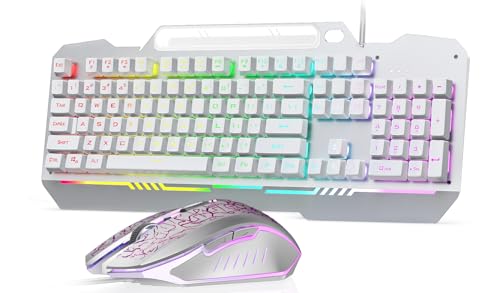
Top 3 picks at a glance
Full-size keyboards: the complete key set
A full-size keyboard includes the main alphanumeric key cluster, a function row, a dedicated arrow key and navigation cluster (Home, End, Page Up/Down, Insert, Delete), and a full numeric keypad on the right side, typically totaling 104-108 keys and measuring roughly 17.5 inches (44cm) wide.
As an Amazon Associate we earn from qualifying purchases at no extra cost to you.





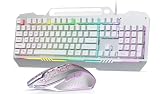


The numpad is the defining feature that separates full-size from every smaller layout, and it remains genuinely useful for anyone doing frequent numeric data entry, spreadsheet work, or using numpad-bound hotkeys in specific games or applications that expect numpad input for certain actions.
The tradeoff for this complete key set is desk footprint; the numpad alone typically adds 3-4 inches of width to a keyboard, space that on many desks directly reduces how far a mouse can travel to the right before running off the mousepad or desk edge, a real constraint for players using wide, sweeping mouse movements.
Full-size keyboards remain a sensible default for players who split time between gaming and work that benefits from a numpad, or for genres (some strategy and simulation games in particular) where extra dedicated hotkeys and numpad shortcuts genuinely improve workflow rather than getting in the way.
For players who don’t specifically need the numpad and use a mouse with meaningful side-to-side movement, especially at lower DPI settings requiring larger physical swings, full-size is generally the layout most likely to feel cramped or restrictive during actual gameplay compared to the smaller alternatives.
TKL (tenkeyless): the competitive standard
TKL removes the numpad entirely while keeping the function row, arrow keys, and navigation cluster intact, typically totaling 87-88 keys and measuring roughly 14.5 inches (37cm) wide, a reduction of about 3 inches compared to full-size.
This makes TKL the most common layout among competitive gaming keyboards specifically because it removes the single largest space-consuming element (the numpad) while preserving virtually all the keys most gamers actually use during typical play, requiring essentially no adjustment period for players switching from full-size.
The freed-up 3 inches of desk space translates directly into extra mouse swing room on the same desk or mousepad, which matters most for players using wide, sweeping mouse movements at lower DPI settings, common among players who prioritize precision aiming over raw cursor speed.
TKL keyboards are widely available across virtually every price tier and switch type, making them the safest default recommendation for players uncertain whether a more extreme size reduction (75% or 60%) would suit their habits, since TKL requires no functional keys to be relearned through an Fn layer.
Check this site’s mechanical keyboard for gaming and TKL gaming keyboard roundups for specific model recommendations if TKL’s balance of space savings and complete key access sounds like the right fit for your setup.
75% layouts: a compact middle ground
75% layouts compress the function row, navigation cluster, and sometimes arrow keys closer together with minimal or no gaps between key clusters, typically totaling 80-84 keys and measuring roughly 12.5-13 inches (32-33cm) wide, saving a further 1.5-2 inches compared to TKL.
Unlike 60% layouts, 75% keyboards generally retain dedicated arrow keys and a function row without needing an Fn-layer combination to access them, though navigation keys (Home, End, Page Up/Down) are often compressed into a single column or accessed via Fn combinations depending on the specific keyboard’s exact layout choices.
This makes 75% a genuine middle ground for players who want most of TKL’s dedicated-key convenience with a meaningfully smaller footprint, appealing particularly to users who also do general typing, browsing, or light productivity work where dedicated arrow keys and function keys remain convenient to have without reaching for an Fn layer.
The exact key layout on 75% keyboards varies more between manufacturers than TKL or full-size does, since there’s no single standardized 75% key arrangement; checking a specific model’s key layout diagram before purchasing is more important at this size than with the more standardized TKL or full-size layouts.
75% keyboards have grown considerably in popularity over the past few years as more gaming-focused brands have entered the category, moving from a niche enthusiast choice toward a mainstream option increasingly available at the same price points and switch options as TKL keyboards.
60% layouts: maximum desk space
60% layouts remove the function row, arrow keys, and navigation cluster as dedicated keys entirely, keeping only the main alphanumeric cluster plus modifier keys, typically totaling 61-68 keys and measuring roughly 11.5 inches (29cm) wide, the smallest common gaming keyboard size.
All the keys removed from the physical layout remain accessible through an Fn (function) layer, a secondary key mapping activated by holding a dedicated Fn key, meaning no functionality is truly lost, but every previously dedicated key press now requires a two-key combination instead of one.
This creates a genuine learning curve, typically taking most users one to two weeks of regular use to build enough muscle memory for common Fn-layer combinations (arrow keys, function keys) to feel as immediate as dedicated keys did on a larger layout, and some users never fully adjust if they need those keys frequently.
The payoff is maximum desk space savings, roughly 6 inches narrower than full-size and 3 inches narrower than TKL, which matters most for players with genuinely constrained desk space or those using extremely wide, low-DPI mouse swings where every additional inch of clearance has a real, measurable impact on comfortable arm movement.
60% layouts suit players who rarely use arrow keys, function keys, or navigation keys during actual gameplay and are willing to invest the adjustment period; players who frequently alt-tab, use function-key shortcuts in games or streaming software, or need quick arrow key access should carefully consider whether 75% or TKL better fits their actual usage pattern first.
| Layout | Approx. width | Key count | Numpad | Dedicated arrows/F-row |
|---|---|---|---|---|
| Full-size | ~17.5in (44cm) | 104-108 | Yes | Yes |
| TKL | ~14.5in (37cm) | 87-88 | No | Yes |
| 75% | ~12.5-13in (32-33cm) | 80-84 | No | Mostly (compressed) |
| 60% | ~11.5in (29cm) | 61-68 | No | No (Fn layer only) |
How layout size affects mouse swing room
Desk space freed by a smaller keyboard translates most directly into horizontal mouse swing room on whatever surface sits to the keyboard’s right (or left, for left-handed setups), which matters specifically for players who make wide, sweeping mouse movements rather than small, wrist-only adjustments.
Players using lower mouse DPI and sensitivity settings physically move the mouse further across the desk or pad for the same in-game turn distance, meaning the extra 3-6 inches gained by switching from full-size to TKL or 60% has a proportionally larger practical impact for low-sensitivity players than for high-sensitivity players making smaller physical movements.
Mousepad size interacts directly with keyboard layout choice; a player already using a large or extended mousepad may find less practical benefit from a smaller keyboard than a player using a standard-size pad where every inch of available surface area is already being used during wide swings.
Desk depth (front to back) also matters alongside keyboard width; a smaller keyboard layout combined with a shallow desk still constrains mouse movement in the forward-backward direction, so desk space savings from layout choice specifically address horizontal, not vertical, movement constraints.
For players who’ve never felt genuinely constrained by their mouse’s available swing room during normal play, the practical performance benefit of downsizing keyboard layout is smaller than for players who’ve specifically noticed their mouse hitting the keyboard or running off the pad edge during wide movements.
Learning curve for smaller layouts
TKL requires essentially no learning curve, since every key present on a full-size keyboard except the numpad remains in its familiar dedicated position, making it the layout most players can switch to immediately without any adjustment period affecting gameplay or typing speed.
75% layouts require a brief adjustment period, typically a few days, mainly to relearn the slightly compressed spacing between the main cluster and the function/navigation keys, since muscle memory for exact key distances shifts slightly even though most keys remain dedicated rather than moving to an Fn layer.
60% layouts require the most significant adjustment, commonly one to two weeks of regular use before Fn-layer combinations for arrow keys and function keys start feeling automatic rather than requiring conscious thought, and muscle memory built on a 60% board doesn’t necessarily transfer back smoothly if switching between a 60% board and a full-size or TKL board regularly.
During the adjustment period on 60% keyboards specifically, competitive players should expect a temporary, measurable dip in reaction time for any action bound to a now-Fn-layered key, which is worth factoring in before switching layouts shortly before a tournament or ranked competitive season rather than during a lower-stakes casual period.
Which layout suits which game genre
Tactical and competitive shooters, where wide mouse swings for precise aim adjustments are common, benefit most from TKL or 60% layouts specifically because of the extra mouse room, and these genres also tend to use a relatively small, consistent set of keybinds that adapt well to an Fn layer if going 60%.
MMOs and games with large, complex keybind sets (many simultaneous ability hotkeys, extensive UI navigation) often favor full-size or TKL layouts, since these genres are more likely to use numpad keys or extensive function-key bindings that would require frequent, repetitive Fn-layer combinations on a 60% board.
Strategy and simulation games with heavy numeric input (resource management, coordinate entry in some titles) are the genre most likely to genuinely benefit from a full-size keyboard’s dedicated numpad, rather than treating numpad access as optional the way most other genres do.
Single-player, story-driven games with modest keybind requirements generally work fine on any layout size, since the smaller key set these games typically use rarely stresses the limitations of a compact layout’s Fn-layer key access in the way a complex MMO or strategy game’s keybind set would.
Players who game across multiple genres regularly should weigh their most demanding genre’s requirements most heavily when choosing layout size, since a layout that works fine for a simple shooter but creates real friction in an MMO with extensive keybinds will be a persistent annoyance in that specific genre regardless of how well it suits the others.
Layout compatibility with wrist rests and desk setups
Smaller layouts pair more naturally with compact desk setups and standing desks where surface area is already at a premium, since a 60% or 75% keyboard combined with its shorter wrist rest (if used) takes up meaningfully less total desk depth than a full-size keyboard and matching wrist rest.
Centering a smaller keyboard directly in front of the body, rather than off to one side to make room for a numpad that would otherwise sit to the right, is a genuine ergonomic advantage some users report, since typing directly centered on the body rather than shifted left can reduce shoulder and wrist strain over long sessions.
External numpad accessories, standalone USB numpads that can be placed anywhere on the desk or removed entirely, let TKL, 75%, and 60% users regain numpad functionality on demand for spreadsheet or numeric-entry tasks without permanently sacrificing the smaller keyboard’s desk space benefit during gaming sessions.
Wrist rest compatibility varies by keyboard width, and some manufacturers sell matching wrist rests sized specifically for their TKL, 75%, or 60% models, while others require a separate universal wrist rest purchase, worth checking before assuming a wrist rest from a full-size keyboard will comfortably match a newly purchased smaller board.
For split or ergonomic keyboard setups (a separate consideration from simple size reduction), the same desk-space logic applies but with additional configuration options around hand spacing and angle, a more specialized category worth researching separately if ergonomics, rather than pure desk space, is the primary motivation for a layout change.
Mistakes people make choosing a keyboard layout
Downsizing to 60% purely because it looks appealing in photos or is popular among favorite streamers, without considering whether frequent numpad, arrow key, or function key use in daily games or work would create real friction, leads to buyer’s remorse for a meaningful share of first-time 60% buyers.
Underestimating the 60% adjustment period and expecting immediate comfort is a common frustration; the one-to-two-week adjustment window is a realistic expectation, not a sign of a defective keyboard or poor personal aptitude, and giving up during the first few days often means missing the point where Fn-layer combinations start feeling natural.
Assuming TKL automatically solves desk space problems without measuring actual available desk or mousepad space beforehand can still leave a player feeling cramped if the underlying desk itself is simply too small for comfortable wide mouse movement regardless of keyboard layout chosen.
Choosing a smaller layout for competitive genres while ignoring that a specific favorite game relies heavily on numpad or dedicated function-key bindings (some strategy games and certain MMOs) creates an ongoing functional mismatch that no amount of adjustment period fully resolves without remapping keybinds in-game.
Buying a non-standard 75% layout without checking its specific key arrangement against a diagram, assuming all 75% keyboards share an identical layout, can lead to unexpected key positions since, unlike TKL and full-size, 75% layouts vary meaningfully between manufacturers.
Troubleshooting: adjusting to a new keyboard layout
If Fn-layer combinations on a new 60% keyboard feel slow or error-prone after the first week, check the keyboard’s companion software for remapping options; moving frequently used Fn combinations to more ergonomically convenient key positions can meaningfully speed up the adjustment process beyond the default factory layout.
If a smaller keyboard’s compressed key spacing (common on 75% layouts specifically) causes frequent mistyped characters near the boundary between the main cluster and the function/navigation cluster, slow down deliberately during the first several days rather than typing at full speed, since accuracy at reduced speed rebuilds muscle memory faster than fast, error-prone typing does.
If specific games feel harder to play after switching layouts, check whether that game has customizable keybinds and remap any problematic Fn-layer-dependent actions to more accessible keys within the game’s own settings rather than relying solely on the keyboard’s hardware Fn layer for time-sensitive actions.
If desk space still feels cramped despite switching to a smaller layout, measure your actual available mousepad or desk surface area and compare it to your mouse’s swing requirements at your current DPI setting, since increasing DPI slightly to reduce required physical mouse travel is a separate, complementary fix alongside a smaller keyboard.
If you find yourself missing dedicated arrow keys or function keys enough to regret a 60% purchase after the full adjustment period, consider a 75% or TKL keyboard instead rather than forcing continued use of a layout that doesn’t match your actual key usage pattern; layout preference is genuinely personal, and no single size is correct for every player.
Related guides
- Open Back Vs Closed Back Gaming Headsets
- Mechanical Keyboard Switches Explained
- How To Set Up A Streaming Microphone
Frequently asked questions
What keyboard layout is best for competitive gaming?
TKL (tenkeyless) and 60% layouts are the most common choices among competitive players because removing the numpad and, on 60%, the function row and arrow keys frees up 4-6 inches of desk space for a wider low-DPI mouse swing, which matters most in tactical shooters and other genres relying on precise, wide mouse movements.
Do I lose important keys with a smaller keyboard layout?
Yes, functionally, though most are accessible through a function-key combination instead of a dedicated key. A 60% layout removes the numpad, function row, arrow keys, and navigation cluster as standalone keys, accessing them instead via an Fn layer, which has a learning curve but doesn’t remove functionality, just dedicated key access.
How much desk space does a TKL keyboard actually save versus full-size?
A full-size keyboard is typically around 17.5 inches (44cm) wide, while a TKL keyboard is around 14.5 inches (37cm), a savings of roughly 3 inches. That difference translates directly into extra horizontal mouse swing room on the same size desk or mousepad.
Is a 75% layout a good compromise for gaming and productivity?
For many users, yes. A 75% layout keeps the function row and often a compressed arrow key and navigation cluster while still saving 2-3 inches of width versus TKL, offering a middle ground between 60%’s minimal footprint and TKL’s more complete key set for users who do both gaming and general typing or spreadsheet work.
Will removing the numpad hurt me if I use spreadsheets or numeric entry for work?
If frequent numeric entry is part of your daily work, a full-size or TKL-plus-separate-numpad setup preserves that functionality without permanently sacrificing desk space during gaming, since standalone USB numpads can be added and removed as needed alongside a smaller primary keyboard.