Switches are the individual mechanisms under every key on a mechanical keyboard, and the type installed changes how the board feels, sounds, and performs far more than the case material or keycap set does. Every switch falls into one of three families: linear, tactile, or clicky, each defined by actuation force, actuation distance, and whether the press includes a physical bump or an audible click. Understanding these specs turns switch shopping from guesswork into a decision you can make from a spec sheet.
Our Top Picks


Top 3 picks at a glance
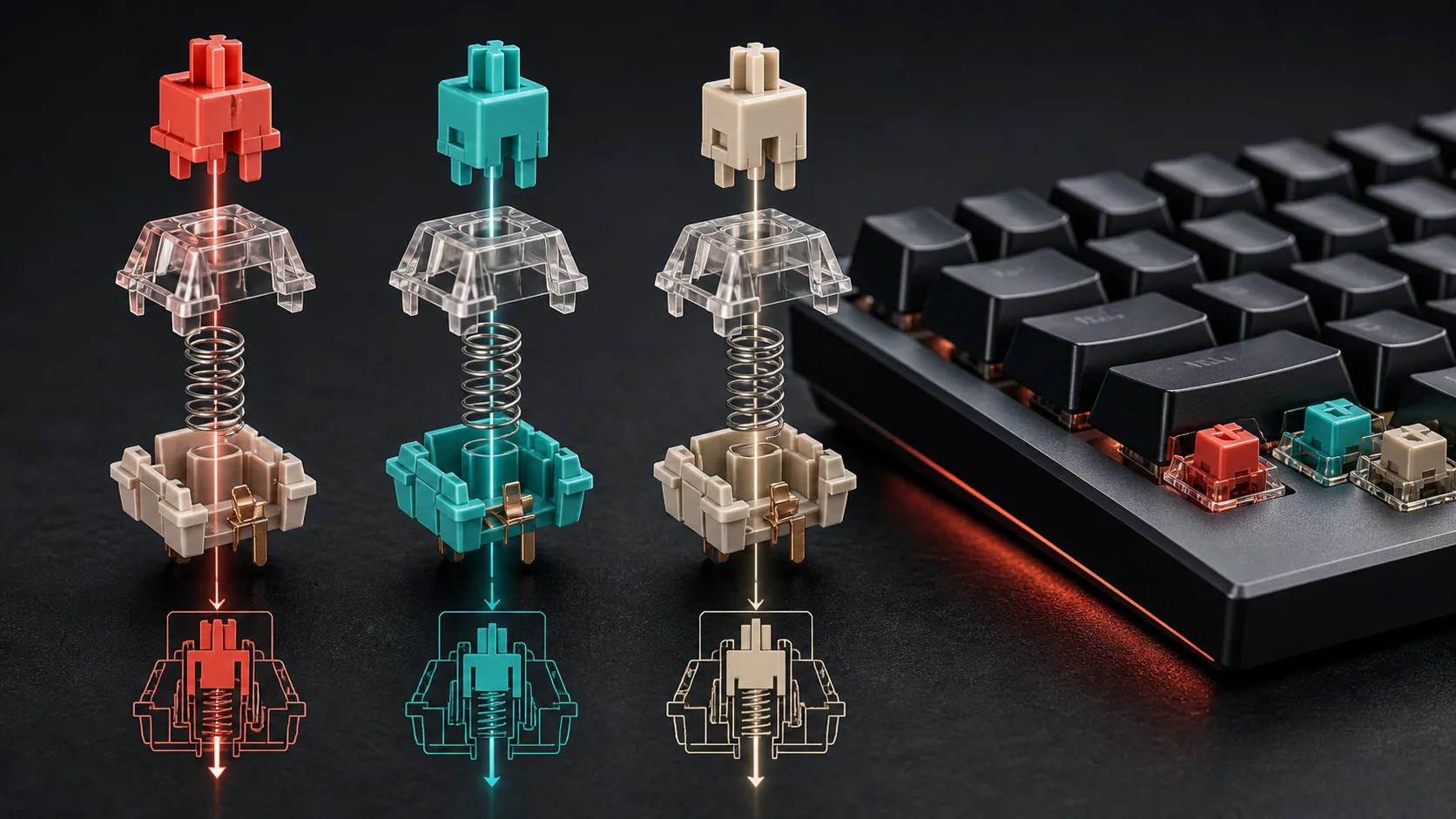
The three switch families: linear, tactile, and clicky
Linear switches, such as the Cherry MX Red or Gateron Yellow, move straight down from top to bottom with no bump and no click, offering a smooth, consistent press from start to finish. This uninterrupted travel makes them popular for gaming, where rapid double-taps and diagonal key rolls benefit from nothing interrupting the downstroke.
As an Amazon Associate we earn from qualifying purchases at no extra cost to you.




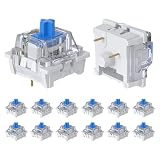

Tactile switches, like the Cherry MX Brown or Gateron Milky Yellow Pro, add a small bump partway through the keystroke that you feel in your fingertip but that produces no click sound. This bump signals actuation without needing to bottom the key out fully, which many typists prefer because it reduces unnecessary finger travel over a full writing session.
Clicky switches, such as the Cherry MX Blue or Kailh Box White, combine the tactile bump with an audible click generated by a secondary internal mechanism. The click is satisfying for many typists and distinctly polarizing in shared spaces or during voice chat, since a microphone will pick up every clack clearly.
Most keyboards sold for gaming specifically default to linear switches because competitive players value the unobstructed press, but tactile switches remain common on hybrid boards marketed for both gaming and office work. Clicky switches have become less common on gaming-first boards over the past few years, mostly due to streaming and voice chat noise complaints.
Within each family, manufacturers offer speed variants with shorter actuation distances, marketed under names like Cherry MX Speed Silver or Razer Yellow, designed specifically to register a keystroke earlier in the downward travel. These speed variants are linear switches with the same smooth feel but a shorter trigger point.
Choosing a family is the first decision to make before comparing specific switch models, since it filters the field from hundreds of options down to a manageable handful that match how you want the board to feel and sound.
Actuation force and actuation distance
Actuation force, measured in centinewtons (cN) or grams-force, describes how hard you must press before the keystroke registers. Light switches around 35-45cN require less finger effort and register faster under repeated taps, while heavier switches at 60-80cN resist accidental presses but tire fingers faster during long sessions.
Actuation distance, measured in millimeters, describes how far the key travels before it registers, separate from the full travel distance to the bottom of the keystroke. Standard mechanical switches actuate around 2.0mm into a total travel of about 4.0mm, while gaming-focused speed switches shorten actuation to 1.2-1.5mm for a faster response.
The table below lists common specs for widely available switches as reference points when comparing product listings.
| Switch | Type | Actuation force | Actuation distance | Total travel |
|---|---|---|---|---|
| Cherry MX Red | Linear | 45cN | 2.0mm | 4.0mm |
| Cherry MX Speed Silver | Linear | 45cN | 1.2mm | 3.4mm |
| Cherry MX Brown | Tactile | 45cN | 2.0mm | 4.0mm |
| Cherry MX Blue | Clicky | 50cN | 2.2mm | 4.0mm |
| Gateron Yellow | Linear | 50cN | 2.0mm | 4.0mm |
A lower actuation force paired with a shorter actuation distance produces the fastest possible response for rapid inputs, which is why esports-marketed keyboards often ship with speed switches around 40-45cN and 1.0-1.2mm actuation. The tradeoff is a higher chance of accidental presses if your typing or gaming style involves resting fingers heavily on keys.
Total travel distance matters separately from actuation distance because it affects how far your finger has to move to fully bottom out a key, which influences finger fatigue during marathon sessions more than actuation point alone. Shorter total travel switches, common on low-profile boards, reduce this fatigue at the cost of a less pronounced tactile experience for tactile and clicky types.
Popular switch brands and how they compare
Cherry MX switches, made in Germany, set the original industry standard and remain the reference point other brands compare against, with the color-coded naming scheme (Red, Brown, Blue, Black) now copied loosely by competitors. Cherry’s MX2A line, introduced in recent years, improved consistency and added factory lubrication compared to the long-running MX1A design.
Gateron switches, manufactured in China, are widely used as stock switches on budget-to-midrange keyboards and as an aftermarket option for hot-swap boards, generally offering a smoother out-of-box feel than unlubricated Cherry switches at a lower price. The Gateron Milky Yellow Pro in particular is a common enthusiast recommendation for a light tactile bump.
Kailh switches, also China-manufactured, span budget options up through the higher-end Kailh Box series, which adds a dust and moisture-resistant box-shaped stem design. Kailh’s Box White and Box Navy variants are popular clicky alternatives to Cherry MX Blue with a crisper click sound.
Newer entrants like Akko and NovelKeys-collaborated switches have grown popular in the enthusiast hot-swap community for offering factory-lubed, pre-tuned feel out of the box at competitive prices, often undercutting Cherry while matching or exceeding smoothness. These brands are worth checking specifically if you plan to buy switches separately for a hot-swap board rather than use whatever ships stock.
Prebuilt gaming keyboards from brands like Razer, SteelSeries, and Corsair often use proprietary switches manufactured under contract by Kailh or similar factories, branded under names like Razer Green or SteelSeries QX2, which perform similarly to their generic counterparts but usually cannot be swapped for other brands even on hot-swap models due to stem shape differences in some cases.
When comparing brands, prioritize actual hands-on impressions or detailed written feel comparisons over marketing copy, since force and distance numbers alone do not fully capture spring feel, wobble, or smoothness, which vary between manufacturers even at identical rated specs.
Hot-swappable versus soldered switches
Soldered switches are permanently attached to the keyboard’s circuit board, requiring a soldering iron and desoldering pump to remove, which makes switch changes a project rather than a quick swap. This was the standard on nearly all mechanical keyboards until hot-swap sockets became widely affordable around 2020-2021.
Hot-swappable keyboards use spring-loaded sockets that let you pull a switch out with a small switch puller tool and push a new one in within seconds, no soldering required. Most modern hot-swap boards support both 3-pin and 5-pin switches, though some budget hot-swap boards only accept 5-pin switches, which is worth confirming before buying replacement switches.
The practical benefit of hot-swap extends beyond trying different switch feels for fun. If a single switch develops a fault, such as a stuck key or intermittent registration, you can replace just that one switch for a few dollars rather than repairing solder joints or replacing the whole board.
Hot-swap sockets do add a small amount of resistance and connection points compared to a direct solder joint, which in rare cases with low-quality sockets can introduce a slightly less firm connection. This is uncommon on boards from established brands and mostly a concern on the cheapest hot-swap options.
If you are buying your first mechanical keyboard and are unsure which switch type you will prefer, a hot-swap board removes the risk of committing to the wrong switch. The $10-25 price premium over a soldered equivalent is usually worth it for that flexibility alone.
Switch lifespan and common failure modes
Standard mechanical switches carry a rated lifespan between 50 and 100 million keystrokes per switch, tested by manufacturers using automated actuation cycles. At a heavy daily use of roughly 3,000-5,000 keystrokes on your most-used keys, a 50-million-cycle switch would take upwards of 25-45 years to reach its rated limit under normal conditions.
In practice, switches fail well before hitting their rated cycle count due to dust, spilled liquid, or corrosion on the metal contact leaves rather than mechanical wear from actuation alone. A sticky spacebar or a key that occasionally fails to register is more often a contamination issue than the switch simply running out of its rated life.
Optical switches, which use a light beam interrupted by the stem rather than physical metal contacts, avoid contact-based wear entirely and are commonly rated for 100 million or more keystrokes with better resistance to dust-related misfires, though they require compatible optical-specific keyboards.
Magnetic Hall effect switches, covered in more detail in the following section, use a magnet and sensor rather than any physical contact point, pushing rated lifespan even further in many cases while adding features unrelated to durability, like adjustable actuation points.
Spring fatigue is a separate long-term wear mechanism from contact wear, where the internal spring gradually loses tension after tens of millions of cycles, producing a mushier feel over years of heavy use. This is a slow, gradual change rather than a sudden failure and is rarely noticeable within a normal keyboard’s usable lifetime.
Sound: what actually makes a keyboard loud, deep, or clacky
Switch type sets the baseline sound profile, but the keyboard’s case material, plate material, and keycap material change the final acoustic result more than most buyers expect. An aluminum case with a polycarbonate plate produces a different tone than a plastic case with an FR4 plate, even with identical switches installed.
Stabilizers, the wire mechanisms under longer keys like the spacebar, shift, and enter, are a frequent source of rattle and inconsistent sound on budget keyboards. Factory stabilizers on sub-$60 boards often need lubrication or clipping to eliminate a hollow rattling sound, while boards in the $100-plus range increasingly ship with better-tuned stabilizers from the factory.
Keycap material affects pitch: PBT keycaps, being denser and thicker than ABS, generally produce a slightly deeper, less hollow sound, which is part of why PBT keycap sets are a common first upgrade for players looking to change sound without replacing switches entirely.
Case foam, added between the plate and the PCB or inside a fully enclosed case, dampens hollow resonance and is now standard on midrange and higher enthusiast boards. Boards without internal foam, common at budget price points, often sound noticeably more hollow or “pingy” on lighter keystrokes.
If sound matters to you as much as feel, listen to typing test videos of the exact switch, keycap, and case combination you are considering rather than assuming a switch type alone determines the result, since the same Cherry MX Red can sound dramatically different across two keyboards.
Magnetic and optical switches: the newer trigger technologies
Beyond the traditional mechanical contact-leaf switch, two newer trigger technologies have gained ground specifically in gaming keyboards: optical and magnetic Hall effect. Optical switches use an LED and light sensor, registering a keystroke when the stem interrupts the beam, offering fast, consistent actuation without physical contact wear.
Magnetic Hall effect switches, used in boards like the Wooting 60HE and increasingly in mainstream releases from SteelSeries and Razer, detect stem position through a magnet and analog sensor rather than a binary on-off contact. This allows software-adjustable actuation points, often tunable anywhere from 0.1mm to 4.0mm on the same switch.
The headline feature enabled by Hall effect switches is rapid trigger, which resets the keystroke the instant you start releasing the key rather than waiting for the key to return fully to its top position. This can shave meaningful milliseconds off repeated strafing or counter-strafing inputs in shooters like Counter-Strike or Valorant, where competitive players have widely adopted the technology.
Analog input is a related feature on some Hall effect boards, letting a single key report a range of values like an analog stick rather than a simple on-off signal, useful for racing or flight sim throttle control mapped to keyboard keys.
These switches typically cost more than standard mechanical switches, and boards built around them are priced accordingly higher, often starting around $100-130 for entry Hall effect boards. The added cost is only worthwhile if you play titles where rapid trigger and adjustable actuation provide a measurable edge, since the feature does nothing for general typing.
Matching switch choice to how you actually use the keyboard
Gamers focused on fast-paced shooters generally benefit most from light linear switches, around 40-50cN with standard or shortened actuation distance, since the smooth uninterrupted press supports rapid repeated taps for strafing and rebinding movement keys without physical resistance getting in the way.
Writers and programmers who type for hours often prefer tactile switches, which provide feedback that reduces the tendency to bottom out every keystroke fully, potentially reducing finger fatigue over an eight-hour writing session compared to a linear switch that offers no signal until the key is fully pressed.
Streamers and anyone gaming with an open microphone should generally avoid clicky switches, since the click sound bleeds into voice chat and stream audio noticeably, even with a directional microphone positioned away from the keyboard.
Players competing specifically in titles that reward frame-perfect movement inputs, such as competitive shooters with strafing mechanics, are the primary audience that benefits from spending extra on Hall effect switches with rapid trigger, since the feature targets exactly that use case rather than general gaming.
If you share a desk or live space, weigh sound tolerance heavily in the decision, since a loud clicky board that feels great to you can be a genuine source of friction with roommates or family during late-session gaming.
What to do if a switch feels scratchy, sticks, or stops registering
A scratchy feeling during the downstroke, where the press does not feel smooth and consistent, is usually friction between the stem and the switch housing rather than a defect, and it often improves after a break-in period of a few thousand keystrokes as surfaces polish slightly with use. If scratchiness persists past normal break-in, the switch may benefit from lubrication or replacement if the board is hot-swappable.
A key that occasionally fails to register, sometimes called a missed keystroke, is most often caused by dust or debris under the switch rather than a worn contact, especially on keys near food or drink areas of the desk. Compressed air directed at the switch gap, followed by several deliberate presses, resolves this in most cases.
A spacebar or shift key that feels rattly or produces an inconsistent sound compared to other keys almost always points to unlubricated or unclipped stabilizers rather than the switch itself, and this is one of the most common single fixes that meaningfully improves a budget keyboard’s feel and sound.
If a hot-swap switch stops working entirely after installation, first reseat it firmly, checking that all pins are straight and fully inserted into the socket, since a bent pin during installation is the most common cause of a dead key on a freshly swapped switch.
Related guides
- Open Back Vs Closed Back Gaming Headsets
- How To Set Up A Streaming Microphone
- Wired Vs Wireless Gaming Peripherals
Frequently asked questions
What is the difference between linear, tactile, and clicky switches?
Linear switches move straight down with no bump and no sound beyond the bottom-out, tactile switches add a small bump partway through the press without an audible click, and clicky switches add both the bump and a loud click sound, so the choice comes down to whether you want silence, feedback you can feel, or feedback you can hear.
What actuation force is best for gaming?
Most gaming-focused linear switches sit between 40-50 centinewtons of actuation force, light enough for rapid repeated presses in fast-paced shooters without causing finger fatigue, while heavier 60-70cN switches suit typing-focused users who want to avoid accidental key presses at the cost of speed.
Are hot-swappable keyboards worth the extra cost?
Hot-swap boards typically cost $10-25 more than soldered equivalents but let you change switches without a soldering iron, which pays for itself the first time you want to try a different switch feel or replace one worn switch, so they are worth it for anyone who is not certain they will love their first switch choice.
How long do mechanical keyboard switches last?
Standard mechanical switches are rated for 50-100 million keystrokes per key, and optical or magnetic Hall effect switches often push past 100 million, which at a heavy typing pace of a few thousand keystrokes a day translates to well over a decade of daily use before failure becomes likely.
Do I need to lubricate my keyboard switches?
Lubing is optional and mainly improves sound and smoothness rather than fixing a functional problem, so factory-lubed switches from brands like Gateron or premium Cherry MX2A lines are fine to use straight out of the box, and manual lubing is worth the hour of work only if you specifically want a quieter, smoother feel.