The best 60% keyboard is the one that matches how you use the keys you lose. A 60% board drops the number pad, function row, navigation cluster and dedicated arrows, so pick a hot-swappable wired model such as the Redragon K617 if you want a cheap start, a Hall effect board such as the Aula WIN60 HE if you play fast shooters, and a wireless board such as the Logitech G PRO X 60% if you want no cable on the desk.
Our Top Picks
 Razer Huntsman Mini 60% Gaming Keyboard11.56x 4.07 x 1.45 inches11.56 x 4.07 x 1.45 inches1.1 poundsCheck on Amazon
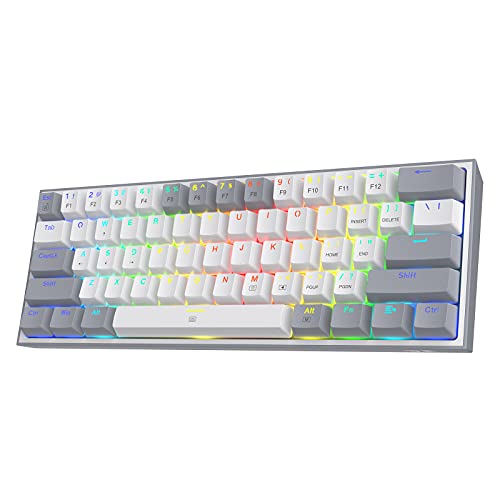


Top 3 picks at a glance
Our Picks at a Glance
- Best budget starter: Redragon K617 (wired, hot-swappable, 61 keys).
- Best for fast shooters: Aula WIN60 HE (magnetic switches, adjustable actuation, rapid trigger).
- Best 65% with arrow keys: HyperX Alloy Origins 65 (linear red switches, PBT keycaps).
- Best wireless: Logitech G PRO X 60% Wireless (tactile optical, LIGHTSPEED).
- Best brand-name optical 60%: Razer Huntsman Mini (linear optical switches).
- Best compact board with a knob: RK Royal Kludge R65 (volume knob, gasket mount).
- Best ultra-cheap first board: MageGee MK-Box (68 keys, LED backlight).
Compact Keyboard Comparison Table
| Keyboard | Layout | Connection | Switch type (per listing) | Budget tier |
|---|---|---|---|---|
| Redragon K617 | 60% (61 keys) | Wired | Hot-swappable mechanical | Budget |
| Aula WIN60 HE | 60% | Wired | Magnetic, adjustable actuation | Budget |
| HyperX Alloy Origins 65 | 65% | Wired | Linear red | Mid |
| Logitech G PRO X 60% | 60% | Wireless (LIGHTSPEED) | Tactile optical | Premium |
| Razer Huntsman Mini | 60% | Wired | Linear optical | Mid |
| RK Royal Kludge R65 | Compact with knob | Wired | Gasket-mount mechanical | Mid |
| MageGee MK-Box | 68 keys | Wired | Mechanical, LED backlight | Budget |
What a 60% Keyboard Actually Removes
A 60% layout keeps the alphanumeric block and the modifier keys, then moves everything else to a function layer. That means no dedicated F1 to F12 row, no Insert, Home or Page cluster and, on a true 60%, no arrow keys. Arrows, Delete and the function row sit behind a Fn key combination. A 65% layout adds a dedicated arrow cluster and a short column of navigation keys, which is why many people who try a 60% board end up preferring a 65% or 67% one.
The payoff is desk space. With a narrow board your mouse hand sits closer to your keyboard hand, which suits low-sensitivity aiming and small desks. It also makes the board easy to throw in a backpack for a LAN event. If you rely on arrow keys for spreadsheets or code, read the programming section below before you commit.
Before you buy, do a short self-check. Write down the keys you hit every day outside games: arrows, Delete, Home, End, Print Screen and F5 are the usual suspects. If three or more of those matter to you, look at the 65% and 68-key options in this guide instead of a strict 60%.
Best 60% Keyboard Picks
1. Redragon K617: Best Budget Starter
As an Amazon Associate we earn from qualifying purchases at no extra cost to you.

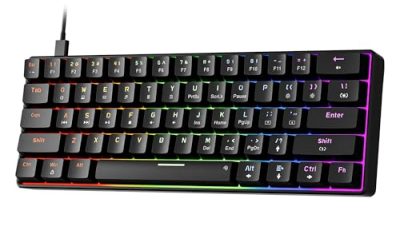
The Redragon K617 is a wired 60% board with 61 keys, hot-swappable switch sockets and RGB backlighting. The listing describes the compact design as leaving more room to aim, and the swap-ready sockets mean you can change switches later without soldering, subject to switch compatibility on the maker page. For a first compact keyboard it keeps the risk low: if you decide you do not like the layout you have not spent much, and if you do, you can upgrade the feel by swapping switches instead of buying a new board.
- Layout: 60%, 61 keys
- Connection: wired USB
- Hot-swappable: yes, per listing
Best for: first-time compact buyers who want to learn the layout cheaply. Skip if: you need dedicated arrow keys or wireless.
Pros: hot-swap sockets; RGB lighting; very small footprint; wide switch choice later.
Cons: no arrow keys without the Fn layer; build is budget-class.
2. Aula WIN60 HE: Best for Fast Shooters

The Aula WIN60 HE is a wired 60% board built around magnetic switches. The listing advertises hot-swappable magnetic switches, adjustable actuation and rapid trigger, which lets a key reset the moment you begin to release it. That behavior is the main reason competitive players look at magnetic boards: counter-strafing in a shooter feels sharper when the key stops registering as soon as you lift. Software support and the exact actuation range are not shown in the listing, so check the maker page.
- Layout: 60%
- Switch type: magnetic, adjustable actuation
- Features: rapid trigger, hot-swappable
Best for: FPS players who want adjustable actuation at a budget tier. Skip if: you type more than you game and prefer a traditional tactile feel.
Pros: rapid trigger; adjustable actuation; budget tier for the feature set; compact.
Cons: magnetic switches limit which third-party switches fit; configuration needs the maker’s tool.
3. HyperX Alloy Origins 65: Best 65% With Arrow Keys

The HyperX Alloy Origins 65 is a compact 65% wired keyboard with linear red switches and double-shot PBT keycaps, according to the listing. The 65% form factor keeps a dedicated arrow cluster, which solves the biggest daily complaint about a pure 60%. Players who want a compact desk but still browse, code or edit documents between matches tend to be happiest on this layout.
- Layout: 65%
- Switches: linear red
- Keycaps: double-shot PBT
Best for: players who want a compact board without losing the arrows. Skip if: you want a tactile Brown-style switch out of the box.
Pros: arrow keys retained; PBT keycaps; recognised brand; linear switches for smooth presses.
Cons: wired only; a little wider than a true 60%.
4. Logitech G PRO X 60% Wireless: Best Wireless 60%

The Logitech G PRO X 60% is a wireless 60% mechanical gaming keyboard with tactile optical switches and LIGHTSPEED wireless, per the listing. It is the only pick here aimed at players who want a compact board with no cable running across the desk. Battery life and exact switch details are not in the listing, so check the maker page before buying.
- Layout: 60%
- Connection: LIGHTSPEED wireless
- Switches: tactile optical
Best for: clean wireless desk setups. Skip if: you want hot-swap sockets at a budget tier.
Pros: wireless; tactile optical switches; compact; known esports brand.
Cons: premium tier; no dedicated arrows.
5. Razer Huntsman Mini: Best Brand-Name Optical 60%
The Razer Huntsman Mini is a 60% wired keyboard with linear optical switches, an aluminum top frame, Chroma RGB lighting and PBT keycaps, according to the listing. Optical switches register a press with light rather than a metal contact, which is why Razer markets them for fast actuation. The aluminum frame also gives the board a more solid footing than plastic-shell rivals.
- Layout: 60%
- Switches: linear optical
- Frame: aluminum top, PBT keycaps
Best for: Razer ecosystem users who want a compact, sturdy board. Skip if: you want tactile switches or wireless.
Pros: aluminum frame; PBT keycaps; Chroma lighting; optical linear switches.
Cons: wired only; Fn-layer arrows.
6. RK Royal Kludge R65: Best Compact Board With a Knob

The RK Royal Kludge R65 is a wired gaming keyboard with a volume knob, RGB backlighting and a gasket-mount design, per the listing, in a compact footprint. The knob is a rare feature on small boards and handy for adjusting volume without a function layer. Gasket mounting is generally associated with a softer, less harsh typing feel, though exact acoustics depend on the switches and case.
- Layout: compact, 65%-style with knob
- Connection: wired
- Features: volume knob, RGB, gasket mount
Best for: people who want a softer typing feel and quick volume control. Skip if: you want the absolute smallest layout.
Pros: knob; gasket mount; RGB; extra keys over a 60%.
Cons: wired only; slightly larger than a 60%.
7. MageGee MK-Box: Best Ultra-Cheap First Board

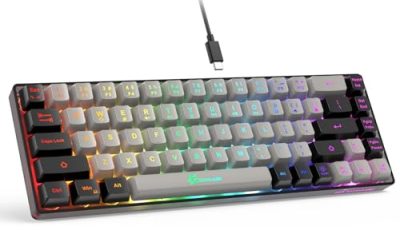
The MageGee MK-Box is a portable wired mechanical keyboard with 68 keys and a blue LED backlight, according to the listing. It is the lowest-cost way to try a compact layout before spending more on a hot-swappable board. Because it uses a 68-key layout it keeps arrow keys, which makes the jump from a full-size board much gentler.
- Layout: 68 keys, compact
- Connection: wired
- Lighting: blue LED
Best for: trying a compact layout cheaply. Skip if: you want RGB, hot-swap or software control.
Pros: very low budget; portable; mechanical switches; arrows on a 68-key layout.
Cons: basic lighting; limited upgrade path.
Also Consider
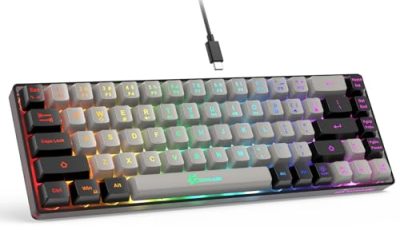
- Womier 60% keyboard: a wired hot-swappable 60% with PBT keycaps and RGB, sold in an anime-themed style. A good option if you want a cosmetic change from the usual black board.
- Aula WIN68 HE: the same magnetic switch idea as the WIN60 HE, with 68 keys so you keep the arrows.
- RK Royal Kludge RK68: a 65% wired board with hot-swappable switches, a budget alternative to the R65.
Best 60 Percent Keyboard Under 50 Dollars
For a tight budget, only a few boards in this guide sit in the budget tier: the Redragon K617, the Aula WIN60 HE and the MageGee MK-Box. The K617 gives you hot-swap sockets, the WIN60 HE gives you adjustable actuation, and the MK-Box gives you the lowest entry cost. Prices move, so confirm the current figure in the listing before you decide. Avoid very cheap membrane boards sold under a gaming label: they are not mechanical and have fewer upgrade options.
A good rule at this budget is to spend on the feature you will notice most. If you play shooters, put the money into the magnetic board. If you are unsure whether you like compact boards at all, buy the cheapest 68-key option and decide later.
Best 60% Keyboard for Programming
A compact board works for coding if the layout keeps what you use most. Programmers lean on arrows, Home and End, brackets and function keys. A true 60% hides those behind Fn, which slows some people down and suits others once remapped.
- Choose a 65% such as the HyperX Alloy Origins 65 or the RK Royal Kludge R65 if you want arrows on the board.
- Choose a hot-swappable 60% if you want to experiment with tactile switches, which many typists find more comfortable for long sessions.
- Check whether the board supports remapping software or on-board layers, so you can move the Escape or Control key where your hands expect it.
- Use a layer for brackets and navigation if you code in an editor with heavy keyboard shortcuts, and learn it for a week before judging the board.
Best 67 and 68-Key Keyboards
A 67 or 68-key layout is a 60% with a thin arrow cluster and a few navigation keys added. It is the sweet spot for people who like a compact board but cannot live without arrows. The Aula WIN68 HE and the MageGee MK-Box use 68 keys, and the RK RK68 is a 65% board in the same family. Pick this layout if you copy numbers, scroll documents or navigate menus often.
Best Beginner Mechanical Keyboard
A beginner should choose a board that is easy to live with and cheap to change. The Redragon K617 is a sensible first choice because the hot-swap sockets let you try new switches without buying a new keyboard. If you are not sure you will like compact layouts, the MageGee MK-Box is the lowest-risk option. Avoid very expensive boards until you know whether you prefer linear, tactile or clicky switches.
Cherry MX Brown and Tactile Switches on Compact Boards
Cherry MX Brown is a tactile switch: you feel a small bump before the key bottoms out, with no loud click. Most gaming-focused 60% boards ship with linear red or optical switches, while Brown-style tactile switches are more common on office and full-size boards. If you want tactile feel on a compact layout, look for a hot-swappable board, then fit tactile switches that your board supports. The Logitech G PRO X 60% uses a tactile optical switch, which is not the same as Cherry MX Brown but gives a similar bump. Always check the maker page for exact switch names and pin compatibility.
Switch Types Compared
| Switch family | Feel | Sound | Good for |
|---|---|---|---|
| Linear (red style) | Smooth, no bump | Quiet to medium | Fast gaming, repeated taps |
| Tactile (brown style) | Small bump | Medium | Typing, coding, mixed use |
| Clicky (blue style) | Bump plus click | Loud | Typing alone in a quiet room |
| Optical | Depends on version | Medium | Fast actuation, durability claims from the maker |
| Magnetic (Hall effect) | Smooth, adjustable | Quiet to medium | Rapid trigger, competitive shooters |
Gaming, Typing and Travel Use
Gaming
For shooters, a narrow board gives your mouse arm room. Linear, optical or magnetic switches suit rapid taps. For MOBAs and strategy games that use many hotkeys, a 65% or 68-key board is easier than a strict 60% because you keep arrows and a few extra keys.
Typing and coding
Tactile switches and PBT keycaps are the usual preference. A gasket-mounted board like the RK R65 can soften the typing feel. Remap software helps you build a layer that matches your habits.
Travel
A 60% board fits in most laptop bags. Wireless models such as the Logitech G PRO X 60% remove the need for a cable, but check the maker page for battery life if you travel for days between charges.
Common Mistakes When Buying a Compact Keyboard
- Buying a strict 60% without checking how the Fn layer handles arrows.
- Assuming every hot-swappable board accepts every switch; some magnetic boards only accept their own switches.
- Choosing a membrane board labelled as gaming when you wanted mechanical switches.
- Ignoring keycap material. ABS caps can shine with use; PBT caps tend to hold their texture better.
- Skipping software support. If you want rapid trigger or remapping, confirm the tool works on your operating system.
60% vs 65% vs 68 Keys: Which Layout Fits You
| Layout | Arrow keys | Function row | Desk footprint | Best for |
|---|---|---|---|---|
| 60% | Fn layer | Fn layer | Smallest | Minimal desks, low-sensitivity aim |
| 65% | Dedicated | Fn layer | Small | Mixed gaming and work |
| 67 to 68 keys | Dedicated | Fn layer | Small | People who want arrows and a compact size |
The difference between these layouts is a few keys, but it shapes your daily routine. On a strict 60% you press Fn plus a letter to move the cursor. On a 65% or 68-key board the arrows sit in the bottom-right corner where your hand expects them. Most buyers who regret a compact purchase say it was because the arrows were missing, so treat that as the first filter.
Setting Up a New Compact Keyboard
- Learn the Fn layer first. Print or save the maker’s layer chart and keep it on your desk for the first week.
- Remap one key at a time. If your board supports software, move Caps Lock or the right Alt to something you use more often, such as an arrow-layer key.
- Check actuation settings. On a magnetic board such as the Aula WIN60 HE, start with a mid-range actuation and lower it only if you want faster response. Very light settings can cause accidental presses.
- Swap switches carefully. On hot-swap boards, pull straight up with a switch puller and press new switches straight down, making sure no pin bends.
- Adjust your mouse position. A narrower board lets you move your mouse closer, so reduce arm strain by rearranging your desk instead of keeping the old setup.
Keycaps, Lighting and Build Details That Matter
Keycap material changes the feel more than most buyers expect. PBT caps have a slightly rough texture and resist shine, while ABS caps are smoother and can look glossy after heavy use. The Razer Huntsman Mini and HyperX Alloy Origins 65 list PBT keycaps in their descriptions, which is a point in their favor at the mid tier.
Lighting is less important than it looks on a product page. Per-key RGB lets you highlight a layer, but it also drains the battery quickly on wireless boards. If you buy the Logitech G PRO X 60%, plan on lowering brightness or using a dimmer effect when you want longer use between charges, and check the maker page for the battery figure.
Build quality shows up in flex and sound. A metal top frame, as on the Razer Huntsman Mini, reduces flex. A gasket mount, as on the RK Royal Kludge R65, aims for a cushioned feel. Neither claim replaces what you feel in person, so rely on maker documentation for details and on return policies if the board does not suit you.
How We Chose
This guide is research-based. We did not use these products ourselves. We compared maker pages, store listing details and published editorial reviews, then weighed layout, switch type, connection, upgrade options and brand support. We kept at most two picks from one brand and skipped renewed or unavailable listings. Where the listing did not name a spec, we say so rather than guess.
Buying Guide: What to Check Before You Buy
Layout: 60%, 65% or 68 keys
Choose 60% only if you are happy to use a function layer for arrows. Choose 65% or 68 keys if you use arrows daily.
Switch type
- Linear: smooth, quiet, favoured for fast gaming.
- Tactile: a bump on each press, favoured for typing and coding.
- Clicky: a sharp click, loud in shared rooms.
- Magnetic or optical: adjustable or very fast actuation, popular for shooters.
Hot-swap sockets
Hot-swap lets you change switches without soldering. Check pin type and whether the board accepts 3 or 5-pin switches.
Wired or wireless
Wired is cheaper and has no battery to charge. Wireless frees the desk, but expect a higher budget tier.
Keycaps and build
PBT keycaps resist shine over time. A metal top frame adds weight and stability. Gasket mounts soften the feel.
Software
If you want rapid trigger or remapping, confirm the maker supplies software for your operating system.
Frequently Asked Questions
What is the best 60% keyboard?
The best choice depends on use: the Redragon K617 for a cheap start, the Aula WIN60 HE for shooters and the Logitech G PRO X 60% for wireless. Match the board to your habits.
What is the best 60 percent keyboard under 50 dollars?
The Redragon K617 and Aula WIN60 HE are the budget-tier picks in this guide. Check current listing prices, since they change often.
Is a 60% keyboard good for programming?
Yes, if you remap arrows and function keys comfortably. If not, a 65% layout with dedicated arrows is usually easier for code.
What is the best 67 keyboard?
The Aula WIN68 HE and MageGee MK-Box offer 68-key layouts in this guide, giving you arrows on a compact board. Verify the exact layout on the maker page.
What is the best beginner mechanical keyboard?
A hot-swappable board such as the Redragon K617 is a safe start because you can change switches later without buying a new keyboard.
What are the best Cherry switches for programming?
Many typists prefer tactile switches such as Cherry MX Brown for coding because of the small bump. Check that your compact board supports the switch you want.
Is the Akko 3068B or Halo 65 a good alternative?
Both are popular compact boards but are not in our store, and we could not verify specs. Check the maker page for current details before comparing.
Which One Should You Buy?
- Tight budget, want to learn: Redragon K617 or MageGee MK-Box.
- Competitive shooters: Aula WIN60 HE.
- Need arrow keys: HyperX Alloy Origins 65 or RK Royal Kludge R65.
- Want wireless: Logitech G PRO X 60%.
- Brand-name optical build: Razer Huntsman Mini.
Sources
- Redragon product page
- Logitech G product page
- Razer product page
- HyperX product page
- Aula and RK Royal Kludge maker pages
Last updated: November 2026
Related guides
More from Amazon
Programs that pair well with the guide above. Offers and eligibility are set by Amazon and may change.
Free shipping on eligible items, Prime Video and more. Eligible new members can start with a free trial.
Start a Prime free trialAd-free music streaming. Eligible new subscribers can start with a free trial.
Try Music Unlimited freeA Prime membership for ages 18-24 with a trial period. Eligibility is set by Amazon.
See Prime for Young AdultsAudiobooks and podcasts to listen to on the go. Eligible new members can start with a free trial.
Try Audible freeAs an Amazon Associate we earn from qualifying purchases.