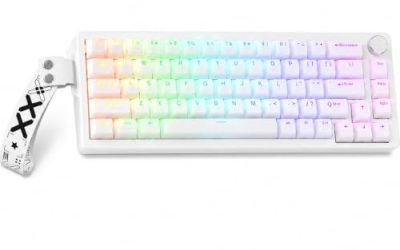
A real mechanical keyboard under 60 dollars is possible, but the cap forces trade-offs, and the 60 percent size is where most of the choices live. At this level the question is not whether you can find a keyboard with RGB and red switches, because nearly every listing has those. The question is whether you want a simple, compact board you can drop onto a desk and forget, or a more advanced board with magnetic switches and adjustable actuation that stretches the cap.
This guide is for students, first-time mechanical buyers, and small-desk gamers shopping in 2026 who want a compact wired board without overspending. We kept five distinct models. We dropped three listings that describe the board as “mechanical feeling,” because that wording usually signals a membrane design rather than true switches, and a generic listing with almost no model information. Prices move often, so confirm that the board you choose still sits under 60 dollars when you order.
Our Top Picks


Top 3 picks at a glance
Quick Picks
As an Amazon Associate we earn from qualifying purchases at no extra cost to you.


| Product | Best for | Key spec from the title |
|---|---|---|
| Newmen GM611 | First compact mechanical board | 61 keys, red switch, LED backlit, wired |
| MageGee MK-Box | Portable office and gaming use | 68 keys, red switch, LED backlit, wired |
| AULA WIN68 HE | Adjustable magnetic switches | Hall effect switches, 8000Hz polling, rapid trigger |
| Aula WIN60 HE | Hot-swappable magnetic 60 percent | Magnetic switch, hot swappable, 8000Hz polling |
| Guiheng Wired Portable 60% | Compact RGB board with arrows | 68 keys, red switch, RGB backlit |
How to Choose
Understand the layout you are buying
A true 60 percent board has about 61 keys and removes the function row, arrow keys, and number pad. A 68-key layout adds dedicated arrows, which makes everyday typing and spreadsheet work far less awkward. If you code, edit documents, or browse a lot, a 65 or 68-key layout saves frustration. If you game on a very small desk and use function layers happily, the 61-key size works. The function layer is where numbers, arrows, and media keys hide behind a modifier key, and it takes a week or two of muscle memory before it feels natural. Count how often you use the keys that disappear before you commit to the smallest layout.
Know the switch type
Red switches are linear, with a smooth press and no bump, and they are the common choice for gaming at this price. Magnetic or Hall effect switches use sensors to detect how far a key is pressed, which allows adjustable actuation points and rapid trigger functions. Hot-swappable sockets let you replace switches without soldering. None of this changes unless the listing states it, so read the title for each term. A board that says only red switch is not necessarily hot swappable, and a board that mentions mechanical feeling is usually not a true mechanical design at all. Switch brand is rarely named at this level, so judge by the stated type and the reputation of the seller.
Check polling rate and connection
A higher polling rate, such as 8000Hz, reports key presses to the computer more often, which matters to a small group of competitive players. Most people will not feel the difference, and a standard rate is fine for typing. Under this budget, wired USB is typical, which avoids battery and latency concerns. Confirm the cable is detachable if you plan to carry the board, because a fixed cable is the first thing to fray in a bag. For a desk setup, cable length and a USB port that is not shared with a crowded hub matter more than any speed figure.
Look past the extras and watch for cuts
Backlighting modes and brand styling do not alter the typing feel. To hit a low price, makers use thinner plastic cases, unbranded switches, and basic keycaps that can develop shine. Software support may be limited or missing, so macros and lighting may be controlled by key combinations. Also verify compatibility with your system, since some boards have limited macOS support in their software. Finally, think about noise: red switches are quiet compared with clicky ones, but a thin case can still ring when you bottom out the keys, so a rubber foot and a soft desk mat help.
The 5 Best Options
Newmen GM611
The Newmen GM611 is a wired 61-key compact keyboard with a red switch and LED backlighting, listed as portable. It is aimed at first-time buyers who want a small mechanical board that clears away desk space for a mouse. Because the title keeps the specification short, it is an easy board to understand: a wired, backlit, red-switch 60 percent keyboard without extra complexity. It works well as a second keyboard for travel or a dorm desk.
- Strength: red switches and a 61-key frame keep the design simple.
- Strength: compact and portable for a laptop bag or a small desk.
- Trade-off: no dedicated arrow keys, as with any 61-key layout.
Skip it if you rely on arrow keys or the function row for work, or if you hope for premium keycaps and software. Anyone who edits spreadsheets daily will find the missing arrows a constant irritation.
MageGee MK-Box
The MK-Box is a 68-key wired mini keyboard with red switches and LED backlighting, marketed for both office and gaming. The extra keys over a 61-key board include arrows, which makes it easier to use for everyday typing. The 68-key frame is a good compromise for someone who games after work but also spends the day in documents and browsers, and it stays small enough to slide into a backpack pocket.
- Strength: 68 keys add arrows without much extra width.
- Strength: the title calls out portability for Windows laptops and PCs.
- Trade-off: the title lists LED backlighting rather than full RGB.
Skip it if you want full-color lighting effects or a hot-swappable board. The listing does not mention either, and it also does not name a polling rate, so it is aimed at casual rather than competitive use.
AULA WIN68 HE
The WIN68 HE is a 60 percent gaming keyboard with Hall effect magnetic switches, fast trigger mode, adjustable actuation, 8000Hz polling, and RGB backlighting. It is for competitive players who want to tune how far a key travels before it registers. A shallower actuation point makes keys register sooner, while a deeper one avoids accidental presses, and rapid trigger resets a key the instant you lift off. These are features usually found on more expensive boards, which is why the WIN68 HE is the most feature-rich option in this group.
- Strength: adjustable actuation and rapid trigger are named in the title.
- Strength: the 8000Hz polling rate suits fast-paced shooters.
- Trade-off: magnetic features may push the cost toward the top of the cap.
Skip it if you only want a basic typing board and do not plan to use the adjustable settings. It also asks you to learn the adjustment method, so it is less simple than a red-switch board that works as soon as it is plugged in.
Aula WIN60 HE
The WIN60 HE is a wired 60 percent board with magnetic switches that are hot swappable, adjustable actuation, rapid trigger mode, 8000Hz polling, and RGB. It is a close relative of the WIN68 HE with a more compact layout, and the hot swappable feature lets you try different switches as your taste develops. For a buyer who plays fast shooters on a small desk, it is the more focused of the two Aula models.
- Strength: hot swappable switches are listed, allowing later changes.
- Strength: the compact layout leaves maximum mouse room.
- Trade-off: a 60 percent layout has no dedicated arrow keys.
Skip it if you want arrows on the main layer or a simpler, cheaper board. The same advice applies as with the WIN68 HE: confirm the final cost against your cap before you order.
Guiheng Wired Portable 60%
This Guiheng keyboard has 68 keys, red switches, and RGB LED backlighting in a wired design. It is aimed at desk users who want arrows in a small package, for school, home, or travel. The title pairs RGB lighting with a red switch and a 68-key layout, which makes it a straightforward everyday board for someone who wants colorful lighting without paying for brand-name extras.
- Strength: RGB lighting and 68 keys at a modest scale.
- Strength: compatible with Windows, laptops, PCs, and Mac, per the title.
- Trade-off: the title offers few specifics about build quality or keycap material.
Skip it if you want premium keycaps, brand-name software support, or a clear spec sheet. Because few details are listed, read the full product page and the return policy carefully.
Which One Fits Your Situation
You are buying your first mechanical board
Choose the Newmen GM611 or the MageGee MK-Box. Both pair red switches with a wired connection and a small frame, and the MK-Box adds arrow keys. If you want the smallest possible footprint, take the Newmen; if you want a smoother daily typing experience, take the MageGee.
You play competitive shooters
Look at the AULA WIN68 HE. Its adjustable actuation, rapid trigger, and 8000Hz polling rate are the headline features for fast-paced play. Use the adjustable actuation to set a short travel distance for movement keys, and leave typing keys deeper to avoid accidental presses.
You like to tinker with switches
The Aula WIN60 HE lists hot swappable switches, so you can change them later without soldering. That makes it the best fit for someone who enjoys learning how switches feel and wants a board that can grow with that interest.
You split time between work and play
Pick the MageGee MK-Box or the Guiheng Wired Portable 60%. The 68-key layout keeps arrows within reach for spreadsheets and documents.
Common Mistakes
- Assuming every “60%” listing uses true mechanical switches, when some say “mechanical feeling.”
- Buying a 61-key board and then missing the arrow keys.
- Paying for 8000Hz polling when you only type and browse.
- Ignoring the 60 dollar cap after shipping and variant differences.
- Expecting full software support from budget brands.
Related guides
- What Is The Best Budget Most Responsive Gaming Mouse Wired
- Low Latency Gaming Headphones Usb-C 2.4 Ghz Wireless
- Low Latency Gaming Headphones Usb-C Dongle 2.4 Ghz
Frequently Asked Questions
Is a 60 percent keyboard good for gaming?
Yes. It leaves more room for a mouse, and most games use keys that remain on the main layout. The trade-off is that function keys, arrows, and the number row sit behind a modifier on the smallest layouts, so check that your favorite games do not rely on them. A 68-key board keeps the arrows and is easier to live with.
What is the difference between red switches and magnetic switches?
Red switches are mechanical and linear. Magnetic switches use sensors and allow adjustable actuation points.
Are these keyboards wireless?
Every listing here is described as wired, which avoids charging and keeps latency low.
Can I use these on Mac?
Some titles mention Mac, while others list Windows. Check the listing before ordering, and expect that key labels, lighting controls, and any companion software may work differently on macOS than they do on Windows.