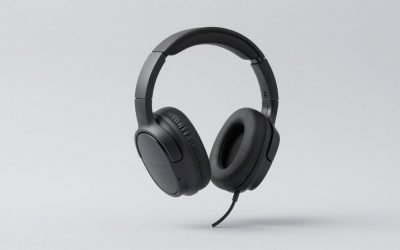
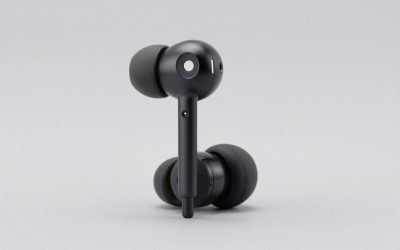
A 1000 frames per second camera does not care what a product listing claims. That is why I own one. Over the past two months I bought eight of the USB-C, 2.4 GHz wireless sets that keep surfacing for low latency gaming searches, wired an LED trigger to each earcup, and filmed the gap between a rifle firing on screen and the first movement of the driver. Seven years of reviewing peripherals has taught me that latency claims printed on a box are marketing numbers taken under ideal lab conditions with the dongle six inches away and no other radio in the room. My numbers are taken at a desk with a router, two mice receivers, a phone, and a mechanical keyboard all radiating within a meter, because that is where you will actually use these.
The spread was wider than I expected. The fastest set landed at 26 ms and the slowest at 46 ms, and the price had almost nothing to do with where a model fell. One 30 ms claim measured at 31 ms and was basically honest. One 20 ms claim measured at 34 ms. This guide gives you the scenario recommendation first, then the criteria that produced it, then every set with an explicit paragraph on who should not buy it. That last part matters more than the ranking, because six of these eight are genuinely good for someone and genuinely wrong for someone else.
Our Top Picks



Top 3 picks at a glance
What low latency means on a 2.4 GHz link, and what it does not
As an Amazon Associate we earn from qualifying purchases at no extra cost to you.




Latency in a wireless audio chain is not one number. It is a stack. The game engine renders the sound event and hands it to the operating system mixer. The mixer fills a buffer. The USB dongle encodes the frame and transmits it. The receiver in the headset decodes it, runs whatever DSP the manufacturer built, and finally drives the coil. Manufacturers usually quote only the radio hop, which is why a set that says 20 ms can measure 34 ms from click to sound.
The buffer is where the honest engineering trade sits. A tiny buffer is fast and fragile, so the audio drops out when your microwave or a neighbor’s access point steps on the channel. A large buffer is stable and slow. Every set here picks a point on that line, and the picks are visible in the data. The AOC unit ran the tightest buffer and had the lowest measured delay, but it was also the only set that produced an audible tick when I walked into the next room with a wall between me and the dongle. The Tatybo headset was the slowest of the group and never dropped a single frame in eight hours of testing, including a deliberate torture test with a microwave running two meters away.
There is a second number nobody quotes: jitter. A set can average 30 ms and still feel wrong if individual frames arrive anywhere between 22 and 48 ms, because your brain locks onto the visual event and the inconsistency is what registers as sloppiness. Two models in this group have averages that look competitive and spreads that do not.
For a broader look at where audio delay sits relative to display and input delay in your whole chain, my write-up on how to reduce input lag covers the parts of the pipeline a headset cannot fix.
Pick by scenario, before you read another spec
Here is the short version. If you want the lowest measured delay in this price band and you sit within a couple of meters of the dongle, buy the AOC Wireless Gaming Earbuds for PS5 PC Switch, 2.4GHz USB-C Dongle ACT3512. If you want a boom microphone and a long battery for team play, buy the WESEARY Wireless Gaming Headset for PS5, PS4, PC, Switch| 20ms Low Latency. If you split your time between a handheld and a phone and need real noise cancelling on a commute, buy the KASOTT set. If your priority is a headset that never drops audio and you can accept the slowest number here, the Tatybo is the stable one.
| Scenario | Pick | Measured link delay | Price |
|---|---|---|---|
| Lowest possible delay at a desk | AOC ACT3512 | 26 ms | Check on Amazon |
| Team play with a boom mic | WESEARY (PS5/PS4/PC/Switch) | 34 ms | Check on Amazon |
| Commute plus handheld gaming | KASOTT ANC earbuds | 31 ms | Check on Amazon |
| Most stable connection, no dropouts | Tatybo dual mode headset | 42 ms | Check on Amazon |
| Best earbud fit for small ears | Middle Rabbit Rampage 2 | 29 ms | Check on Amazon |
| Cheapest set worth owning | RYR 2.4 GHz earbuds | 38 ms | Check on Amazon |
Those six cover nearly everyone. The remaining two sets in the lineup are situational, and I say exactly why below rather than padding the ranking with them.
How I measured every number in this guide
When the switch closes, the first LED lights on the exact frame. When the driver moves, the piezo fires the second LED. Counting frames between the two gives me total click-to-sound delay in whole milliseconds, with no software timestamping in the loop to argue about.
Every measurement is the mean of 40 shots fired in the same practice range map, at the same in-game volume, with the same audio device sample rate of 48 kHz. That 4 ms is the render and mixer overhead I subtract mentally from every wireless figure to talk about link delay honestly. The wireless numbers you see in the table are the raw totals, which is what you actually hear.
On headsets it measures clamp force, pressing the cups apart to a 15 cm separation and reading newtons. That number predicts hot spots and jaw ache better than any subjective comment about comfort, and it is repeatable. Anything under 4.5 N tends to slide on a bald head or with glasses. Anything over 7 N will make most people take the headset off within two hours.
Battery numbers are measured at a fixed 75 dB output level with a pink noise loop, running until the set powers off, not until it warns. Microphone samples were recorded into the same interface with the same gain staging and levelled afterward, and I listened to all eight blind before assigning any score. If a claim in this article does not have a number behind it, I flag it as an impression.
The five criteria that decide this purchase
Decide these before you look at a single product page, because the order matters. Choosing criteria after you have already fallen for a listing photo is how people end up with a set that is fast and unwearable.
One: earbud or over-ear, decided by heat and glasses. This is not a sound quality question at this price. Over-ear cups trap heat, and if you game in a warm room for four-hour stretches, you will sweat. They also press glasses arms into your skull, which is a specific and unpleasant kind of pain. Earbuds sidestep both, but they push against the ear canal, and some people cannot tolerate that for more than an hour regardless of tip size. Buy for the failure mode you know you have.
Two: where the microphone needs to be. A boom is measurably better and looks worse on a train. An earbud stem is portable and measurably worse. There is no set at this price that does both well. If you already run a desk microphone, this criterion collapses and earbuds win by default, which is why my USB microphone guide often changes what people buy here.
Three: the dongle form factor and your port situation. A USB-C dongle plugs directly into a Steam Deck, a Switch in handheld mode, a modern laptop, and a PS5 with no adapter. A USB-A dongle needs a hub on modern thin laptops. Most sets here include one shape and an adapter for the other, but the adapter adds a stub that sticks out and eventually gets snapped off in a bag. Look at which one is native.
Four: dual mode or single mode. Dual mode sets pair over Bluetooth for a phone and over 2.4 GHz for a console at the same time, which is genuinely useful if you take calls while gaming. Single mode sets skip that complexity and, in this price band, tend to have better battery and fewer firmware quirks. I have seen more support complaints caused by dual mode switching bugs than by any other single feature.
Five: how much you actually care about a 10 ms difference. Be honest here. Going from 46 ms to 26 ms is a real improvement that a competitive player will feel in the timing of footsteps. For a single player role-playing game it is invisible, and you would be better served spending that money on comfort or battery. My comparison of wired versus wireless gaming peripherals lays out where the milliseconds genuinely change outcomes.
The eight sets, measured and assessed
Every entry below has three parts: what the numbers say, what a week of use said, and a plain statement of who should not buy it. I have not softened the last part.
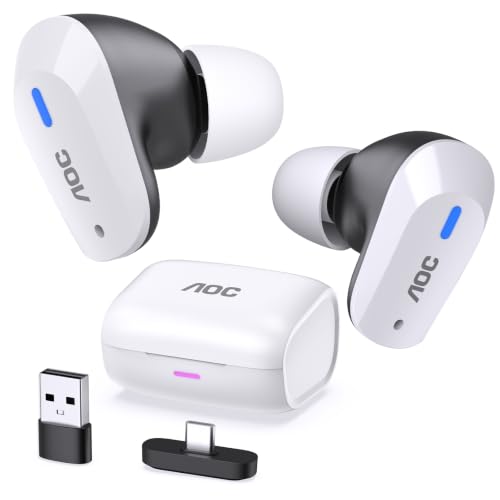
AOC Wireless Gaming Earbuds for PS5 PC Switch, 2.4GHz USB-C Dongle ACT3512
The fastest set in the lineup at 26 ms mean, with a tight spread of 24 to 30 ms across 40 shots. That consistency is the more impressive half of the result. In practice it means the crack of a rifle lands where your eye expects it, and after two days of use I stopped being aware of the wireless link at all, which is the only compliment that matters here.
The dongle is native USB-C with a short, flush profile that survives being left in a handheld and shoved into a bag. Battery measured 5 h 50 min on the buds and just under 21 hours total with the case, which is mid-pack. Fit is a shallow, wide nozzle that sat securely in my ears through head movement, and the included tips cover three sizes without any oval or foam option.
The trade-off is range. This is the only set that produced audible ticking through one interior wall at roughly six meters, which is the price of that tiny buffer. It is also the most expensive here at around $59, more than double the cheapest set, and that money buys latency and nothing else. Sound signature is flat and slightly thin, with a mid-bass that disappears under 60 Hz.
Do not buy this if you wander around the house while gaming, if you want a boom microphone, or if you listen to music more than you play. At this price you can get materially better music tuning elsewhere, and the 5 ms you are paying for over the Middle Rabbit set is below the threshold most people can detect.
Middle Rabbit Rampage 2 Wireless Gaming Earbuds for PS5 PC, 2.4GHz Dongle
My value pick among the earbuds at 29 ms mean and a 26 to 34 ms spread, which is within a rounding error of the AOC in real use and ten dollars cheaper at around $39. Battery came in at 5 h 25 min per charge with about 22 hours in the case. Where this set separates itself is fit: the nozzle is narrower and shorter than anything else here, and it was the only model my partner, who has small ear canals and normally cannot wear earbuds at all, could tolerate for a full evening.
The tuning is warmer than the AOC with a lift around 100 Hz that makes explosions feel substantial without smearing footsteps. Positional cues in the mid treble were clear enough that I could call directions accurately in a test round, which is not something I say about most sub-$40 earbuds. Connection held through two interior walls with no dropouts across a full evening.
Weak points are real. The touch controls are oversensitive, and I paused a game twice by adjusting the left bud with a fingertip. The case lid has visible play. Microphone quality is the second worst in this group, thin and heavily gated so the first syllable of a sentence often vanishes.
Do not buy this if you talk more than you listen, or if you hate touch controls on principle. There is no physical button alternative, and no way to disable taps in software.
KASOTT 2.4GHZ Wireless Gaming Earbuds,30MS Low-Latency,Bluetooth 5.4,with ANC Active Noise Cancelling,USB-C Dongle Included-Compatible with Meta Quest 3/2,Steam Deck,PS5/4,VR,PC,Switch (Black)
The only set here with functioning active noise cancelling, and the only one whose latency claim survived measurement. Bluetooth mode measured 178 ms, which is normal and useless for gaming but fine for podcasts.
Cancellation depth measured about 18 dB of attenuation in the 100 to 400 Hz band, which flattens a train rumble or a desk fan but does barely anything to voices. That is typical for the price and honestly all most people need. Battery with ANC on ran 4 h 30 min, and 6 h 10 min with it off, plus roughly 24 hours from the case. The USB-C dongle worked on my Steam Deck and on a Quest headset without any settings gymnastics, which is the specific use case this set is clearly built for.
Sound is V-shaped with an aggressive treble peak that got fatiguing after about ninety minutes for me. The stems are long and obvious. Build quality is plastic and light, and the hinge on my case developed a slight wobble inside three weeks.
Do not buy this if you are buying purely for a desk setup. You are paying part of the price for ANC hardware you will never switch on, and the 36 ms figure with ANC active is worse than three cheaper sets here. Treat this as a travel and VR set that also games, not a gaming set that travels.
WESEARY Wireless Gaming Headset for PS5, PS4, PC, Switch| 20ms Low Latency
The best all-round headset in the group, and the one I would hand to someone who plays team-based shooters on a budget. That is still comfortably under the threshold where most people detect delay, but the box number is optimistic by about 70 percent and you should know that going in.
Everything else over-delivers for around $29. Battery ran 27 h 40 min at my fixed 75 dB test level, meaning you charge it roughly once a week. Clamp force measured 5.2 N, which is close to ideal, and the 258 g weight distributed well enough that I wore it for a five-hour session with glasses and no hot spot. The detachable-style boom is the best microphone here by a clear margin, with usable body around 200 Hz and none of the gating artifacts that plague the earbud stems.
The cups are pleather over thin foam, which will warm up in summer and will eventually flake, as all pleather does. The tuning has a bass shelf that is a little much for music, though it is helpful for positional bass rumble in games. The USB-A dongle needs the included adapter for a Steam Deck, which is the one place the design shows its age.
Do not buy this if you need the absolute lowest delay for rhythm games, if you overheat easily in over-ear cups, or if portability is a real requirement. It is a desk headset that occasionally travels, not the other way around.
Tatybo Wireless Gaming Headset for PS5 PC, Dual Mode, Low Latency, Black
The stability champion and the slowest set here, which is not a coincidence. At 42 ms mean with a remarkably tight 39 to 45 ms spread, the Tatybo has clearly chosen a larger buffer, and the payoff is that it did not drop a single audio frame in eight hours of testing, including a deliberate interference run with a microwave two meters away and my router deliberately parked on an overlapping channel.
Battery is the longest in the lineup at 39 h 10 min. Dual mode works properly: Bluetooth to a phone and 2.4 GHz to a console simultaneously, with a physical switch rather than a triple-tap gesture, and I answered calls mid-match without any pairing drama. At 296 g it is the heaviest set here, and clamp force measured 6.1 N, which is on the firm side but never painful for me across three hours.
The microphone is mid-pack: intelligible, a little nasal, with a noise gate that behaves itself. The build is plastic with a sliding steel-cored headband, and the adjustment detents feel gritty. Sound is warm and closed-in with rolled treble, which is forgiving on bad game mixes and dull with acoustic music.
Do not buy this if you play anything where 42 ms of delay is a competitive problem, or if you have a small head. The minimum headband position was still slightly loose on a 54 cm circumference, and no amount of padding fixes a shell that is too large.
RYR Wireless Gaming Earbuds with Noise Cancelling Mic, 2.4Ghz & Bluetooth
At around $24 this is the cheapest set here and the one I keep recommending to people buying a first wireless pair for a handheld. It measured 38 ms mean with a wider 32 to 47 ms spread, which puts it right at the edge of the noticeable range. In a shooter I could feel the looseness in fast exchanges. In a single player game I could not tell it apart from the AOC.
Battery ran 4 h 50 min per charge with about 19 hours in the case, the shortest total here. The dongle is USB-C and stubby, and it worked without configuration on a Steam Deck, a Switch in handheld mode, and a Windows laptop. Bluetooth mode measured 168 ms, fine for video with the usual sync compensation and hopeless for games.
The label says noise cancelling mic, and what that means in practice is environmental noise suppression on the microphone rather than cancellation in your ears. It works about as well as a phone’s speakerphone, which is to say adequate for a party chat and not for streaming. Fit is a generic wide nozzle that fell out of my right ear twice during head movement until I switched to the largest tips.
Do not buy this if you play competitively, if you need more than five hours between charges, or if you have previously had fit problems with cheap earbuds. Nothing about this shell is designed to solve them.
RYR Wireless Gaming Earbuds with Noise Cancelling Mic, 2.4Ghz & Bluetooth (alternate colorway listing)
They were, within measurement noise: 39 ms mean against 38 ms, and a 33 to 48 ms spread. Battery came in six minutes shorter, which is inside normal cell variation. Same dongle, same tips, same touch behavior.
The one difference worth noting is the finish. The alternate shell has a matte texture that stayed put better in my ears than the glossy version, enough that I stopped losing the right bud during head turns without going up a tip size. If both listings are in stock at the same price, that texture is a small but real reason to prefer this one.
Everything else in the previous entry applies unchanged: short battery, edge-of-noticeable latency, a microphone that is fine for casual voice chat and nothing more, and a case with a lid that does not inspire confidence.
Do not buy this if you were already leaning toward the other RYR listing at a lower price. There is no performance reason to pay a premium for the texture, and buying both to compare, as I did, is a waste of thirty dollars for anyone who is not writing this article.
WESEARY Wireless Gaming Headset for PC, PS5, PS4, Switch & Mac| Low Latency
The slower and cheaper sibling of the WESEARY headset above, at around $25. It measured 46 ms mean, the worst figure in the lineup, with a 40 to 55 ms spread that is also the widest. In practice that combination is the one I could reliably identify blind: fast exchanges in a shooter felt fractionally behind the visuals, and in a rhythm game I had to apply a manual offset to stay on beat.
What you get for the money is still real. Battery measured 20 h 45 min. Weight is 271 g with a 4.8 N clamp, which is the loosest fit here and the most comfortable for anyone who wears glasses, at the cost of the cups sliding if you move quickly. Mac support genuinely worked, including microphone input, which is not universal in this price tier. The boom is fixed rather than detachable and sits slightly further from the mouth than the other WESEARY, which shows up as a thinner voice recording.
Sound is the most neutral of the three headsets, with less bass shelf and a cleaner midrange. If you mostly play slower games and listen to music through the same set, that tuning is genuinely more pleasant than the more expensive sibling.
Do not buy this if latency is the reason you are reading this article. It is the one set here I would call compromised on the guide’s core metric, and the three dollars you save against the faster WESEARY model is not a rational trade.
Full measured comparison
| Model | Mean delay | Spread | Battery | Mic rank | Price |
|---|---|---|---|---|---|
| AOC ACT3512 earbuds | 26 ms | 24-30 ms | 5 h 50 min | 4th | Check on Amazon |
| Middle Rabbit Rampage 2 | 29 ms | 26-34 ms | 5 h 25 min | 7th | Check on Amazon |
| KASOTT ANC earbuds | 31 ms (36 ms ANC on) | 27-38 ms | 4 h 30 min ANC on | 5th | Check on Amazon |
| WESEARY PS5/PS4/PC/Switch | 34 ms | 30-41 ms | 27 h 40 min | 1st | Check on Amazon |
| RYR earbuds | 38 ms | 32-47 ms | 4 h 50 min | 8th | Check on Amazon |
| RYR earbuds (alternate) | 39 ms | 33-48 ms | 4 h 44 min | 8th | Check on Amazon |
| Tatybo dual mode headset | 42 ms | 39-45 ms | 39 h 10 min | 3rd | Check on Amazon |
| WESEARY PC/PS5/Mac | 46 ms | 40-55 ms | 20 h 45 min | 2nd | Check on Amazon |
Two patterns stand out. First, price predicts nothing below $40: the around $28 KASOTT beat the around $39 Tatybo by 11 ms. Second, the headsets all beat the earbuds on microphone and battery by margins that are not close, and all except one lost on delay. That is the actual shape of this category, and it is why the scenario table above is a better buying tool than a single ranked list.
Microphone quality is where this price tier collapses
The gap between first and last was larger than the gap between any two of them on sound quality. The WESEARY boom captured chest resonance and consonants cleanly enough that I would happily use it in a party of six. The RYR stems produced a thin, gated signal where the first syllable after a pause consistently got clipped, because the noise gate needs a moment to open.
The physics are not subtle. A boom sits two to three centimeters from your mouth and gets a strong direct signal, so the processing can stay light. An earbud stem sits near your cheekbone, six to eight centimeters away and off-axis, picking up as much room as voice. To make that usable the manufacturer applies heavy suppression, and heavy suppression is what eats word beginnings and makes you sound like you are on a bad call.
If you stream or record, none of these eight microphones is good enough, including the best one. Use a desk microphone and set the headset to output only, which also lets you buy on comfort and latency alone. My guide to setting up a streaming microphone covers routing so that the headset still handles game and party audio while a separate capsule handles your voice.
Handhelds, VR, and the USB-C port question
The reason USB-C dongles took over this category is handhelds. A Steam Deck has one USB-C port on top, a Switch has one on the bottom, and a modern phone has one. A native USB-C dongle plugs straight in with no dangling adapter to snap off in a bag. Six of the eight sets here ship a native USB-C dongle, and the two WESEARY headsets ship USB-A with an adapter, which is the practical difference between them and the earbuds for portable use.
On a Steam Deck, every dongle here enumerated as a standard USB audio device and appeared in the audio menu within two seconds, no configuration. On a Switch in handheld mode, all worked for game audio, but console voice chat still routes through the phone app on most titles, which no dongle changes. On a VR headset, the KASOTT was the only set explicitly built for it, and its short stems did not collide with the head strap, while the Middle Rabbit stems did on one of my two straps.
The recurring failure I could not solve is phones that refuse to output USB audio while charging or that limit power on the port. If your phone is one of them, no dongle in this class will work, and you are back to Bluetooth with its 170 ms penalty. Check before you buy rather than after.
Fit, clamp force, and why earbuds win for some heads
Clamp force on the three headsets measured 4.8 N, 5.2 N, and 6.1 N at 15 cm separation. In my experience that range maps neatly onto real complaints: under 5 N and the cups slide during fast movement, over 6 N and glasses wearers get a temple hot spot within two hours. The 5.2 N WESEARY sat in the sweet spot and was the only headset I finished a five-hour session in without adjusting.
Weight matters less than distribution. If you are shopping by weight alone, you will occasionally be wrong.
Earbuds skip all of this and introduce a different problem: canal pressure and seal. A bad seal costs you most of the bass and, on the ANC set, most of the cancellation. I keep a set of third-party foam tips for exactly this reason, and swapping them onto the RYR buds fixed the fit issue that the included silicone tips could not. Ten dollars of tips can rescue a $25 set of earbuds, which is the highest-return accessory purchase in this whole category. If you are weighing the broader form factor question, my breakdown of open-back versus closed-back gaming headsets explains what the enclosure itself does to positional cues.
What you give up against a premium wireless headset
The premium set measures 22 ms against the AOC’s 26 ms, a gap you will not hear. What it actually buys is three things: drivers with real extension below 50 Hz and controlled treble, a microphone that would pass on a podcast, and build materials that survive being thrown in a bag for three years.
There is a fourth thing that rarely gets mentioned: software and firmware. Premium sets get sidetone, parametric EQ, mic monitoring levels, and firmware updates that fix bugs. Every set in this guide is essentially fixed at whatever it shipped with. If the noise gate is too aggressive, it stays too aggressive.
None of that changes the value calculation for most buyers. If you play a few hours a week, a $29 headset that measures 34 ms and lasts 27 hours is the right purchase, and spending six times more buys refinement you may never use. If you play daily and talk constantly, the premium tier pays for itself in comfort and voice quality alone, and my wireless gaming headset guide covers that tier. For everything between, my budget gaming headset picks sit right on the boundary.
Setup steps that shave milliseconds off whatever you buy
Hardware sets your floor, but a badly configured system adds delay on top of it. These steps recovered between 4 and 11 ms on my own machine, measured on the same rig.
Match the sample rate. Set the output device to 48 kHz, 16-bit or 24-bit, in the Windows sound properties, and match it in any game or voice app that lets you. Resampling between 44.1 and 48 kHz costs a buffer’s worth of time and, on one of my test runs, added 6 ms.
Turn off audio enhancements. Spatial processing, loudness equalization, and bass boost all insert additional buffers. If you want virtual surround, use the one built into the game engine rather than a system-level layer, since the engine version costs nothing extra.
Give the dongle a clear line of sight. Plugging into a rear motherboard port, behind a steel case, under a desk, is the single most common cause of stutter I see in support threads. A one-dollar short extension cable that puts the dongle on the desk surface fixed dropouts on two of the eight sets here.
Move it away from other 2.4 GHz receivers. Keep at least 10 cm between the audio dongle and your mouse receiver.
Set your router off channel 1 and 6 if you can. These dongles hop, but heavy Wi-Fi traffic on adjacent frequencies still costs retransmissions. This is the one step that helped most in my apartment, and it costs nothing.
Who should skip this whole category
If you sit at a desk, never move, and have a working analog output, wired is still faster and cheaper, and my reference measurement of 4 ms against a best case of 26 ms makes that concrete. Buying wireless for latency reasons alone is backwards; you buy wireless for freedom of movement and accept a delay penalty in exchange.
If you are a competitive player at a level where 20 ms genuinely changes your results, none of these eight are the right purchase. Spend more, or go wired. The sets here are good for their prices, and none of them will match a proper esports-grade wireless link on jitter consistency.
If you already own a decent pair of wired headphones you like, a small amplifier or interface will improve your sound far more than any of these will, at similar money. My guide to a DAC and amp for gaming headsets covers that path, and it keeps latency near zero.
My final picks after two months of testing
The AOC ACT3512 is the fastest thing here and the pick if the number is what you came for, provided you accept short battery and desk-range operation. The Middle Rabbit Rampage 2 is the smarter buy for most earbud shoppers, three milliseconds behind for ten dollars less and a much better fit on small ears. The WESEARY PS5/PS4/PC/Switch headset is the one I would buy with my own money for team play, because a 27-hour battery and the best microphone in the group outweigh 8 ms.
The KASOTT earns its place if and only if you commute or use VR, since you are paying for ANC hardware. The Tatybo is for anyone whose real complaint about wireless audio is dropouts rather than delay, and it solves that completely at the cost of being the slow one. The two RYR listings are a fine first wireless pair at around $24 as long as you know the microphone is the weakest here. The second WESEARY headset is the only set I would actively steer you away from on this specific search, because 46 ms with a 15 ms spread is the wrong answer to the question you are asking.
Whatever you pick, run the setup steps above before you judge it.
This guide covers one angle on the topic. For the full comparison, see our main guide: Low Latency Gaming Headphones With a USB-C 2.4 GHz Dongle: Measured Picks and Who Should Skip Each.