
Our Top Picks



Top 3 picks at a glance


Best Gaming In-Ear Headphones for Competitive Play
The best gaming in-ear headphones for most competitive players are wired IEMs paired with a clean USB-C or 3.5 mm connection. They avoid wireless delay, keep positional cues consistent, and let you choose a microphone separately. Pick the Truthear Zero: RED for a strong wired all-rounder, the Sennheiser IE 200 for a small, comfortable shell, or the Logitech G Fits for a convenient wireless gaming setup where mobility matters more than minimum latency.
For competitive play, prioritize clear left-right imaging, low connection latency, a microphone your teammates can understand, and a fit you can keep for a full match. Big bass and virtual surround are secondary: either can make footsteps less distinct or distort where sounds seem to come from.
As an Amazon Associate we earn from qualifying purchases at no extra cost to you.
The Best Gaming In-Ear Headphones, Model by Model
The comparison table below covers the main types of in-ear gaming setups. This section goes one level deeper, with six specific models that cover the realistic options in 2026: a wired IEM for imaging, a USB-C IEM with built-in tuning, a budget wired earbud with a microphone, a stage-monitor IEM built for durability, and two wireless gaming earbuds with low-latency dongles.
TRUTHEAR x Crinacle Zero: RED
The Zero: RED is the wired IEM that comes up most often in competitive-gaming IEM discussions, and for good reason. Each earpiece uses two dynamic drivers: a 10 mm driver for bass and a 7.8 mm driver for mids and treble, separated by a passive crossover. The tuning, developed with the reviewer Crinacle, aims for a neutral, balanced response with controlled bass, which tends to keep footsteps, reloads and ability cues distinct rather than buried under explosions.
It is easy to drive, with an impedance of about 17.5 ohms and sensitivity around 117.5 dB/Vrms, so a phone dongle, laptop jack or controller port is enough. The cable is detachable with a standard 0.78 mm 2-pin connector, and the box includes a 10-ohm impedance adapter that slightly shifts the tuning toward more bass if you want extra weight in single-player games.
Strengths: clear separation and imaging for the price tier, a replaceable cable that extends the life of the earphones, and a tuning that works for music and games alike. Drawbacks: the shells are on the larger side, so smaller ears may struggle to get a stable seal, and the standard cable has no microphone. You will need a separate mic, a mic-equipped 2-pin cable, or a desk microphone for team chat.
Who it is for: PC players who want the most competitive-friendly sound in the mid-range IEM tier and are happy to handle voice chat separately. If you mainly play on a phone or handheld and need a mic on the cable, the Moondrop CHU II DSP or HyperX Cloud Earbuds III below are simpler.
Logitech G FITS

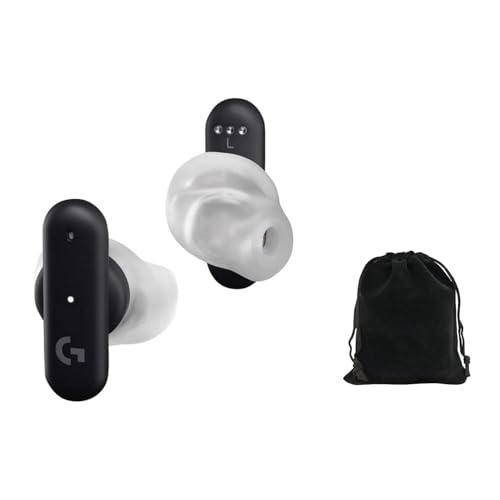
The G FITS were the first true wireless earbuds with Logitech’s LIGHTSPEED 2.4 GHz wireless built in, the same low-latency technology the company uses in its wireless mice and keyboards. They also connect over Bluetooth for phones. The defining feature is the LIGHTFORM ear tip: gel-filled tips that you mold to your own ears once, using light from the earbuds to cure them in about a minute. The result is a custom-fitted seal without a trip to an audiologist.
The earbuds use 10 mm drivers and dual beamforming microphones in each bud. Logitech rates battery life at up to about 7 hours per charge over LIGHTSPEED, with the case adding roughly one more full charge; Bluetooth runtime is longer. The receiver is USB-A with a USB-C adapter in the box, and compatibility covers PC, Mac, PlayStation, Nintendo Switch and Android.
Strengths: the molded fit gives excellent isolation and comfort for people who struggle with standard silicone tips, and LIGHTSPEED keeps latency low for gaming. Drawbacks: published reviews consistently criticize the charging case for holding relatively little extra charge, the onboard controls are limited, and there is no active noise cancellation. The molding process is also one-time, so you cannot redo it if you get it wrong.
Compared with the SteelSeries Arctis GameBuds, the G FITS offer a more personalized fit but less battery and no ANC. Choose them if seal and comfort have been your problem with every other earbud and you want wireless without Bluetooth lag.
SteelSeries Arctis GameBuds
The Arctis GameBuds are SteelSeries’ answer to the question of whether a wireless earbud can replace a gaming headset. They switch between a 2.4 GHz USB-C dongle for consoles and PC and Bluetooth 5.3 for phones, with a triple tap on the earbud. Four microphones power hybrid active noise cancellation, and there is a transparency mode when you need to hear the room.
SteelSeries rates the earbuds at around 10 hours per charge measured over 2.4 GHz with ANC off, and the case holds about three extra charges for up to roughly 40 hours total. The case also supports Qi wireless charging and has a slot for the dongle, which solves the most common problem with wireless gaming earbuds: losing the receiver. The earbuds carry an IP55 water-resistance rating, and the companion app offers a large library of game-specific audio presets.
There is one compatibility point you must get right: the standard version covers PlayStation, PC, Switch and mobile, while Xbox requires the separate Arctis GameBuds for Xbox model. Buying the wrong variant is the most common mistake with these earbuds.
Strengths: real ANC, the best battery life among the wireless options here, a dongle that stores in the case, and physical buttons you can remap. Drawbacks: they sit in the premium price tier, ANC reduces runtime, and like all wireless earbuds they add some processing delay compared with a wired IEM. Choose them if you want one pair of earbuds for a console, a phone and travel, with a usable mic built in.
Moondrop CHU II DSP

The CHU II DSP solves a problem the existing IEM picks leave open: many phones, handhelds and laptops no longer have a headphone jack, and many IEMs have no microphone. This version of Moondrop’s popular budget IEM comes with a USB-C cable that contains its own DAC, a digital signal processor, three control buttons and an inline microphone. You plug it straight into a USB-C phone, PC, Mac or handheld without an adapter.
Each earpiece has a single 10 mm dynamic driver with a metal alloy diaphragm in a zinc-alloy shell. Through the Moondrop Link app you can switch between reference, default and bass-heavy tunings or set a simple parametric EQ, and the setting is stored in the cable so it works without the app running. The earpieces use standard 0.78 mm 2-pin sockets, so you can swap to a 3.5 mm cable later.
Strengths: very low cost of entry, a microphone and controls on the cable, and tuning options that let you reduce bass for clearer footsteps. Drawbacks: the inline mic is fine for casual chat and calls but not as clear as a boom mic, the app’s EQ has limited filters, and USB-C audio support varies by device, so check that your phone or console accepts USB audio.
Who it is for: mobile and handheld players on a tight budget who want an IEM-style seal and a mic in one cable. It is the cheapest way into this category, and it pairs well with a Steam Deck-style handheld or a modern phone.
HyperX Cloud Earbuds III

The Cloud Earbuds III is HyperX’s 2026 refresh of its wired gaming earbud, built for handhelds, Switch, phones and console controllers. It uses 14 mm drivers, a 3.5 mm plug angled at 90 degrees to avoid snagging when you hold a handheld, and an inline control with an omnidirectional electret microphone, volume and mute. A USB-C variant, the Cloud Earbuds III S, adds a MEMS mic with noise reduction and a virtual surround toggle.
The key thing to understand is the fit. HyperX uses an intra-concha design in four tip sizes that rests in the outer ear rather than sealing the canal deeply. Ambient sound gets through by design, which is useful if you need to hear the doorbell or a train announcement, but it means less isolation and less bass than a sealed IEM like the Zero: RED. HyperX also includes a hard-shell carrying case.
Strengths: a mic on the cable that works with console controllers, a comfortable, low-pressure fit for long handheld sessions, and an angled plug designed for portable devices. Drawbacks: lower isolation, so it is not ideal for noisy rooms, and the drivers are tuned for general gaming rather than the precise imaging of a dedicated IEM.
Choose it if you play mostly on a handheld or controller-connected console and want a simple, inexpensive earbud with a working mic. Choose a sealed IEM instead if footstep detail in competitive shooters is the priority.
Sennheiser IE 100 PRO

The IE 100 PRO is a stage monitor first, built for musicians who wear in-ears through long performances, and that heritage makes it a durable choice for gaming. Each earpiece uses a single 10 mm dynamic driver, impedance is about 20 ohms, and Sennheiser lists around 26 dB of passive noise attenuation, which is strong isolation for loud rooms or shared spaces.
The detachable cable plugs into a recessed socket inside the earpiece and runs over the ear with reinforced ear hooks. That over-ear routing reduces cable noise when you move your head and keeps the earpieces secure, which matters during long sessions. The box includes three sizes of silicone tips, a cleaning tool and a pouch. Note that the wired version has no microphone; Sennheiser sells a Bluetooth connector with a mic, and a wireless kit that includes it, but for low-latency gaming you would still use the wired cable with a separate mic.
Strengths: professional build, very good isolation, stable over-ear fit and a clean, reasonably neutral sound that does not exaggerate bass. Drawbacks: no mic on the wired cable, a slightly smaller soundstage than the Zero: RED, and the recessed connector limits third-party cable choices.
Compared with the Sennheiser IE 200 mentioned above, the IE 100 PRO is the tougher, more isolating option built for daily wear, while the IE 200 is the more refined listening IEM. Choose the IE 100 PRO if you want a long-lasting IEM you can wear for hours in a noisy environment.
Head-to-head: which type suits your setup?
| Option | Connection | Competitive strengths | Trade-off | Best fit |
|---|---|---|---|---|
| Truthear Zero: RED | Wired, detachable 2-pin cable | Clear separation and useful positional detail; easy to replace the cable | The larger earpieces may not suit smaller ears; no built-in gaming mic | Players who want a wired IEM and will use a boom mic or separate microphone |
| Sennheiser IE 200 | Wired, detachable cable | Small, lightweight shells and a restrained sound that can make long sessions easier | Requires a separate microphone; fit and ear tips still affect bass and isolation | Players who value comfort and a compact fit |
| Logitech G Fits | Wireless LIGHTSPEED USB receiver or Bluetooth | Gaming-focused wireless receiver and an integrated microphone | Needs charging; wireless performance depends on using the gaming receiver, not Bluetooth | Players who want fewer cables or also use a phone |
| Wired IEM plus inline or boom mic | 3.5 mm or USB audio adapter | Low-latency audio; microphone can be chosen or upgraded independently | More parts to connect and check for compatibility | Players who want the most control over voice quality |
These are different kinds of choices, not a universal sound-quality ranking. An IEM that seals well in your ears can deliver more reliable bass and isolation than a more expensive model that fits poorly. Likewise, the G Fits’ gaming receiver is the relevant mode for play; Bluetooth is mainly useful for general wireless listening and may add noticeable delay.
What matters in a competitive match
Imaging: location matters more than “surround” claims
Imaging is how convincingly a headset places a sound to the left, right, near, or far. In a shooter, consistent stereo imaging can help distinguish a footstep moving across the soundstage from one coming from behind a wall. Detail and separation matter too, but no earphone can reveal information the game’s audio mix does not provide.
Start with the game’s normal headphone or stereo mix. Disable extra spatial processing if it makes directions sound smeared, hollow, or harder to judge. If you want to try a spatial mode, compare it in the same training area and keep it only if you can identify direction more consistently—not simply because it sounds wider.
Latency: use a wired path or the right wireless mode
A wired IEM has no Bluetooth transmission delay, though the game, operating system, and audio device can still add processing latency. For wireless gaming earbuds, use the included low-latency gaming receiver where supported. Do not assume that a Bluetooth connection has gaming-grade latency just because the earbuds advertise a gaming mode; performance varies by device, codec, and implementation.
Microphone: clear callouts beat a long feature list
Many audiophile-style IEMs include no microphone, while some cables have a small inline mic that can pick up keyboard noise or sound distant. A wired boom mic placed near the corner of your mouth often makes speech more intelligible. Wireless gaming earbuds are simpler, but check whether their microphone remains available when using the gaming receiver on your specific platform.
Before ranked play, record a short voice clip with your usual game audio running. Listen for clipping, room echo, fan noise, and words lost at the ends of sentences. Move the mic closer before raising its level; excessive gain usually makes background noise worse.
Comfort and seal: fit changes both sound and endurance
In-ears can be lighter than over-ear headsets, but nozzle shape, shell size, and tip pressure vary considerably. A poor seal reduces bass and can make one channel seem different from the other; excessive pressure can become uncomfortable over a long session. Try the supplied tip sizes, insert both sides evenly, and avoid tips that need constant readjustment. Foam tips may increase isolation, while silicone tips are easier to clean and often feel cooler.
If you use a mask, glasses, or a chair with a headrest, an IEM may avoid the ear-pad pressure that those create. On the other hand, players who dislike having something inside the ear may be more comfortable with a lightweight over-ear headset. Comfort is a performance factor if it keeps distracting you during a match.
Compatibility matrix: match the connection to your device
| Device or setup | Connection to check | Practical choice |
|---|---|---|
| Desktop PC with separate headphone and mic jacks | 3.5 mm TRRS headset plug versus separate TRS headphone and mic plugs | Use a compatible splitter for a headset cable, or connect a separate USB/3.5 mm microphone |
| PC with a USB-C port | Whether the port supports audio, and whether an adapter has a DAC | Use a USB-C audio adapter with a built-in DAC if the port does not provide analog audio |
| PlayStation 5 controller | 3.5 mm headset support and CTIA-style headset wiring | Connect a compatible headset cable to the controller; verify mic input in console settings |
| Xbox controller | 3.5 mm jack availability and headset wiring | Use a compatible 3.5 mm headset connection; USB wireless receivers are not automatically supported |
| Phone or tablet without a headphone jack | USB-C/Lightning adapter support and microphone passthrough | Choose an adapter that supports both audio output and mic input, or use compatible wireless earbuds |
Connector shape alone does not guarantee microphone compatibility. A three-pole stereo plug carries headphone audio; a four-pole TRRS plug can carry audio and mic, but wiring standards and device support matter. Check the IEM cable and adapter as a chain, especially when moving between a PC, console controller, and phone.
Quick comparison of the six models
| Model | Type | Connection | Microphone | Isolation | Price tier |
|---|---|---|---|---|---|
| TRUTHEAR Zero: RED | Wired IEM, dual dynamic | 3.5 mm, detachable 2-pin | None on stock cable | High (sealed) | Budget to mid-range |
| Logitech G FITS | True wireless | LIGHTSPEED 2.4 GHz, Bluetooth | Built-in beamforming | High (custom-molded tips) | Mid-range |
| SteelSeries Arctis GameBuds | True wireless, hybrid ANC | 2.4 GHz USB-C, Bluetooth 5.3 | Built-in | High, plus ANC | Premium |
| Moondrop CHU II DSP | Wired IEM, single dynamic | USB-C with built-in DAC | Inline | High (sealed) | Budget |
| HyperX Cloud Earbuds III | Wired earbud, intra-concha | 3.5 mm angled | Inline | Low (open fit) | Budget |
| Sennheiser IE 100 PRO | Wired stage IEM | 3.5 mm, detachable | None on wired cable | Very high | Mid-range |
How to choose: the details that separate good gaming IEMs
Driver type and tuning
Most gaming-friendly IEMs use one or two dynamic drivers, while some budget models use hybrid designs that combine a dynamic driver with balanced-armature drivers for treble detail. More drivers do not automatically mean better positional audio. What matters is the tuning: a moderate bass shelf with clear upper mids and controlled treble makes footsteps and reloads easy to hear without fatigue. A heavy V-shaped tuning can sound exciting in trailers but tends to mask quiet cues in shooters.
Impedance and sensitivity
Every wired IEM in this guide is easy to drive, with impedance around 17 to 20 ohms. That means a controller jack, laptop or basic USB-C dongle provides plenty of volume. Very high-impedance in-ears are rare, so for gaming the more important question is the quality of the output: a noisy motherboard jack can add hiss that a sensitive IEM reveals, which is one reason a small USB DAC or a cable with a built-in DAC, like the CHU II DSP, is worthwhile.
Detachable cables
Cables are the part of a wired IEM most likely to fail, especially when they get caught on a chair or yanked from a controller. Detachable 2-pin or MMCX connectors let you replace a damaged cable instead of the whole earphone, and they also let you upgrade to a cable with a microphone or a USB-C plug later. The Zero: RED, CHU II DSP and IE 100 PRO all have detachable cables; the HyperX Cloud Earbuds III does not.
Sealed versus open-fit designs
Traditional IEMs seal the ear canal, which blocks outside noise and delivers full bass at lower volume. Open-fit or intra-concha earbuds such as the Cloud Earbuds III rest in the outer ear and let ambient sound through. Sealed designs are better for focus and detail in noisy rooms. Open designs are better if you need to stay aware of your surroundings or find deep insertion uncomfortable.
Wireless: dongle, ANC and battery
If you choose wireless, the dongle is non-negotiable for gaming. Look for a 2.4 GHz receiver, check whether it is USB-A or USB-C for your platform, and confirm that the microphone works in that mode on your device. ANC helps in loud homes or on public transport, but it reduces battery life. Realistic runtimes for gaming earbuds are roughly 7 to 10 hours per charge, so a case that holds multiple recharges matters more than the headline per-bud figure.
Ear tips: the cheapest upgrade you can make
Stock ear tips are designed to fit as many people as possible, which means they fit many people poorly. Because the seal controls both bass and channel balance, a tip change can make a bigger difference to positional audio than switching earphones.
- Try every included size. Many people use a size too small. The right tip should seal with light pressure and stay put when you open your jaw.
- Use different sizes per ear if needed. Ear canals are often slightly different; mismatched tips are normal.
- Check the seal with music. If bass suddenly sounds thin on one side, that side has lost its seal.
- Consider foam tips for isolation. Foam expands to fill the canal and blocks more noise, though it wears out and needs replacing every few months.
- Match the nozzle size. Aftermarket tips come in different bore sizes; wider bores often sound slightly brighter, narrower bores slightly warmer.
- Clean tips regularly. Remove silicone tips, wash them with mild soapy water, dry them completely, and never run water into the earphone nozzle.
Getting a good microphone with IEMs
Voice chat is the weak point of most IEM setups. You have four practical options. First, a mic-equipped replacement cable with the same connector as your IEM adds an inline mic without changing the earphones; it is convenient but inline mics pick up clothing rustle and sit far from your mouth. Second, a clip-on or attachable boom mic placed near the corner of your mouth gives a big jump in clarity. Third, a desk or arm-mounted USB microphone gives the best voice quality on PC and frees your head from any wires except the IEM cable. Fourth, wireless gaming earbuds like the Arctis GameBuds or G FITS use built-in beamforming mics, which are the simplest option but rarely match a boom mic in a noisy room.
Whichever route you choose, record yourself with game audio running before ranked play, as described above. Mic placement fixes more problems than settings do.
A quick decision method
- Choose a wired IEM if low delay and dependable competitive audio are the priority and you are willing to manage a cable.
- Choose the Truthear Zero: RED if you want a wired option with a detachable cable and its shell size is comfortable for your ears.
- Choose the Sennheiser IE 200 if a smaller, lightweight form is more important than an integrated gaming microphone.
- Choose the Logitech G Fits if wireless convenience and a gaming receiver matter more than avoiding charging or owning an integrated mic.
- Add a separate boom mic if your IEM’s inline mic sounds distant or noisy and clear team callouts are essential.
For a wired setup, budget for the whole audio chain, not just the earphones: an IEM, a compatible mic or cable, and any required adapter. Capable wired IEMs span the budget to premium tiers, while wireless gaming earbuds commonly cost more; prices vary by region and promotions. Spend first on a secure, comfortable fit and a connection that works with your platform.
Recommended in-ear setups by platform
PC with a desk microphone
This is where wired IEMs shine. Pair the Zero: RED or IE 100 PRO with a small USB DAC or a clean front-panel jack and use your desk or arm microphone for voice. You get the lowest latency, the best isolation and the clearest voice chat, and you can switch IEMs later without touching your mic setup. Set Windows to stereo output and let the game handle its own headphone mix.
PC or laptop without a separate mic
The CHU II DSP is the simplest wired option because the cable carries a DAC and microphone over USB-C. If you prefer wireless, the G FITS or Arctis GameBuds keep latency low through their dongles while giving you a built-in mic. In either case, select the correct input device in your voice app instead of relying on the system default.
PlayStation 5
Plug a 3.5 mm IEM with an inline mic into the DualSense controller, or use a 3.5 mm mic cable on a detachable IEM. For wireless, the standard Arctis GameBuds use a USB-C dongle that works with PS5. Check the console’s audio settings after connecting to confirm both output and microphone are routed correctly.
Xbox Series X|S
Xbox is the most restrictive platform. Wired 3.5 mm IEMs through the controller jack are the universal solution. Wireless earbuds must be built specifically for Xbox, such as the Xbox edition of the Arctis GameBuds; standard Bluetooth earbuds will not carry game audio.
Switch, handhelds and phones
Portability and a mic on the cable matter most here. The HyperX Cloud Earbuds III, with its angled 3.5 mm plug and open fit, suits long handheld sessions, while the CHU II DSP is the better choice for USB-C-only devices and for players who want a sealed fit. If you also listen to music on the go, wireless earbuds with a dongle and Bluetooth mode cover both jobs, at the cost of charging.
Before your next match
Connect the earphones in the mode you intend to use, confirm that the game recognizes the correct output and microphone, and check left-right channel orientation. Set the game’s headphone mix, keep the volume at a comfortable level, and test footsteps and callouts in a repeatable practice area. If positioning sounds unclear, change one thing at a time—first the fit, then spatial processing, then equalization—so you can tell which adjustment actually helps.
More questions about gaming in-ear headphones
Are IEMs better than a gaming headset for footsteps?
A well-fitted, neutrally tuned IEM can make footsteps just as easy to locate as a good headset, and often easier than a bass-heavy one. The deciding factors are the seal, the tuning and the game’s audio mix. Headsets tend to have a wider sense of space; IEMs tend to sound more direct and isolated.
Do wireless gaming earbuds work on Xbox?
Only if they are specifically built for it. Xbox uses its own wireless protocol, so standard Bluetooth earbuds cannot carry game audio. The SteelSeries Arctis GameBuds, for example, require the separate Xbox version for Xbox consoles. Otherwise, plug a wired IEM into the controller’s 3.5 mm jack.
Can I use a USB-C IEM on a PS5 or Switch?
Often yes, because both consoles support USB audio devices on their USB ports, but microphone support and controls can vary by device and firmware. For controller-based play, a 3.5 mm IEM or a 3.5 mm cable on a detachable IEM is the most reliable choice.
Is it safe to wear in-ears for long gaming sessions?
Comfort and hearing safety are the main concerns. Because sealed IEMs block outside noise, you can usually play at a lower volume than with open headphones, which is good for your hearing. Take breaks, keep tips clean to reduce irritation, and avoid turning the volume up to hear quiet cues; adjust the game’s dynamic range or EQ settings instead.
What is the cheapest way to start with gaming IEMs?
A budget sealed IEM such as the Moondrop CHU II DSP, with the mic and DAC built into the USB-C cable, is the lowest-cost complete setup. If you already have a good microphone, a 3.5 mm IEM like the Zero: RED gives better imaging for a moderate step up in price.









