Our Top Picks




Top 3 picks at a glance
Best TV Headphones for Clear Wireless Audio
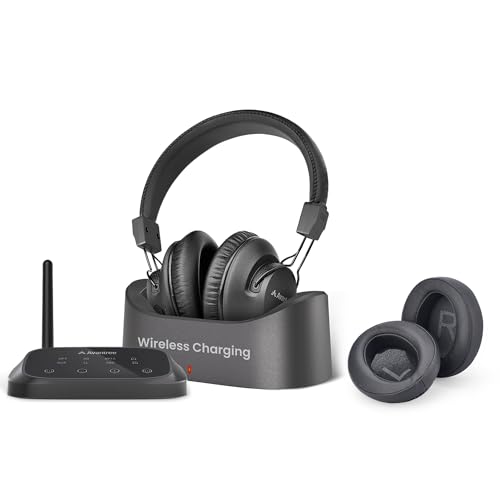
The best TV headphones for most people start with our top pick, the Avantree HT5009: a low-latency kit whose Bluetooth transmitter doubles as a charging dock, accepts optical and analog sources, and pairs with over-ear headphones rated for up to about 40 hours. Upgrade to a Sennheiser RF system such as the RS 195-U if clear speech and hearing adjustment matter most, or the RS 175-U for a simpler RF system from a major brand. If your TV relies on HDMI ARC, the Sennheiser RS 275 covered below is the modern alternative.
TV headphones are not simply ordinary Bluetooth headphones with a longer battery. The transmitter, connection type, dialogue processing, charging method, and ability to keep the television speakers active can matter more than headline sound quality. The right choice depends on whether you prioritize speech, cinema sound, low delay, multiple listeners, or easy setup.
As an Amazon Associate we earn from qualifying purchases at no extra cost to you.
Quick comparison
| Model or class | Best for | Wireless link | TV inputs | Typical battery claim | Usual market range |
|---|---|---|---|---|---|
| Sennheiser RS 195-U | Dialogue clarity and hearing adjustment | Digital RF, dedicated dock | Optical, analog | Up to about 18 hours | Premium |
| Sennheiser RS 175-U | Movies, music, and simple private listening | Digital RF, dedicated dock | Optical, analog | Up to about 18 hours | Upper mid-range |
| Avantree HT5009 | Budget users needing optical and Bluetooth flexibility | Bluetooth, low-latency transmitter included | Optical, AUX, RCA through adapter | Up to about 40 hours, depending on use | Budget to mid-range |
| Bluetooth headphones plus a low-latency transmitter | Using headphones you already own | Bluetooth, often aptX Adaptive or aptX Low Latency | Optical, AUX, sometimes HDMI ARC | Depends on headphones | Budget to premium, depending on headphones |
Battery figures are manufacturer claims and vary with volume, temperature, wireless mode, and battery age. A dedicated RF kit generally provides more predictable TV performance than Bluetooth, while Bluetooth offers more flexibility with phones, tablets, and other devices.
Best for dialogue: Sennheiser RS 195-U
The RS 195-U is the strongest choice when understanding speech is more important than maximum bass or surround effect. It includes selectable listening profiles intended to improve speech intelligibility, and its independent left-right volume adjustment can help when one ear hears differently from the other.
Its dedicated RF transmitter avoids the pairing problems common with televisions and usually delivers a stable connection throughout a room or nearby home. The charging station also gives the headphones a clear storage location, reducing the chance of discovering a flat battery just as a program starts.
Choose the RS 195-U when you want:
- Speech-focused listening modes rather than generic equalization.
- Independent left and right volume controls.
- A dedicated optical connection and charging dock.
- Low perceived delay for dialogue and video.
- Private listening without depending on the television’s Bluetooth implementation.
Its limitations are equally important. This is a specialized TV system, not the best travel headset, and it is less convenient if you regularly switch between a television and a phone. The transmitter is primarily designed for optical and analog TV outputs, so an HDMI ARC or eARC port alone is not enough.
Best simpler RF option: Sennheiser RS 175-U
The RS 175-U is a better fit for viewers who want a straightforward wireless TV headset without the RS 195-U’s hearing-oriented controls. It supports selectable sound modes, including a surround-style option and bass adjustment, but it is aimed more at general film and television enjoyment than precise speech compensation.
Its digital RF connection is the main advantage over ordinary Bluetooth headphones. Audio delay is generally low enough that mouths and voices remain synchronized, and the included dock charges the headset whenever it is stored correctly.
The RS 175-U makes sense for a single listener who wants reliable private audio and does not need to use the headphones as a general-purpose mobile headset. If dialogue is consistently difficult to understand, the RS 195-U’s speech profiles are worth the extra cost instead of simply increasing volume.
Best lower-cost flexible kit: Avantree HT5009
The Avantree HT5009 is a practical choice when price and compatibility matter more than advanced hearing adjustment. The kit includes a Bluetooth transmitter and over-ear headphones, with optical and analog connection options. Its low-latency design is intended to reduce the lip-sync delay that can occur with basic Bluetooth audio.
This type of system is especially useful for older televisions that have optical output but no Bluetooth. It can also be more convenient than a dedicated RF headset if you want the transmitter to work with another Bluetooth headphone later.
Check the exact television and transmitter settings carefully. “Low latency” is not a guarantee that every Bluetooth combination will be delay-free: both the transmitter and receiving headphones must support compatible codecs, and some televisions add their own audio-processing delay.
More TV headphone systems worth considering
The three systems above cover the most common situations, but they are not the only sensible answers. Newer Auracast transmitters now accept HDMI ARC directly, lightweight on-ear designs suit viewers who dislike heavy cushions, and neckband earbuds solve the problem of hot ears during long evenings. The following picks fill those gaps, and each one is matched to a specific type of viewer rather than presented as a universal upgrade.
Sennheiser RS 275: best HDMI ARC and Auracast system

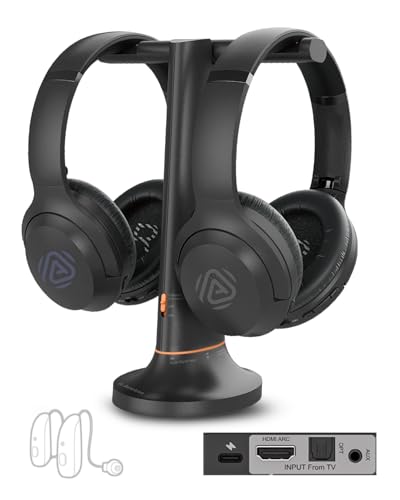
The RS 275, launched in early 2026, is Sennheiser’s first TV headphone bundle built around Auracast broadcast audio rather than a closed proprietary RF link. The kit pairs the HDR 275 over-ear headphones with the BTA1 transmitter and a metal headphone stand. The transmitter accepts optical, 3.5 mm analog, and HDMI ARC, and it switches automatically between active inputs, which removes the biggest compatibility headache covered later in this guide: televisions that only send audio over HDMI.
Sennheiser rates the headphones for up to 50 hours per charge, far beyond the roughly 18 hours of the RS 175-U and RS 195-U. Charging is by USB-C from the transmitter or any standard charger, and the headphones keep working while plugged in. Both the ear cushions and the battery are user-replaceable, which matters for a product that may stay next to the sofa for many years.
Listening modes include virtual surround, speech clarity, and a mono noise-suppression mode for older programmes. The companion app adds hearing profiles, EQ presets, bass boost, and left-right balance, so it covers much of what the RS 195-U offers for speech while adding modern connectivity. The headphones also support classic Bluetooth, so they can be used with a phone or tablet away from the TV, something the dock-based RF models cannot really do.
Because Auracast is an open broadcast standard, one BTA1 can feed several compatible headphones at once, and it can also stream to Auracast-capable hearing aids. Each listener keeps independent volume, and the TV speakers can stay on for others in the room. The transmitter’s stated range is up to 50 metres in open space.
Strengths: HDMI ARC input, very long battery rating, replaceable battery and pads, multi-listener and hearing-aid potential, phone use away from the TV.
Drawbacks: It sits in the premium price tier, Auracast receivers are still less common than ordinary Bluetooth devices, and the app-based setup is more involved than a simple RF dock. Viewers who want the simplest possible “put it on and press power” experience may still prefer the RS 175-U’s closed system.
Choose the RS 275 if your TV relies on HDMI ARC, if a household member uses Auracast hearing aids, or if you want one set of headphones for both television and mobile listening.
Sennheiser RS 120-W: best lightweight on-ear choice

The RS 120-W is the modern successor to one of the longest-running TV headphone lines, and it remains the most affordable way into a Sennheiser docked system. Instead of over-ear cushions, it uses an open, on-ear design with 30 mm drivers. The headphones weigh about 215 g with batteries, noticeably lighter than most over-ear TV sets, which helps viewers who find heavy headphones tiring or who wear glasses.
The transmitter doubles as the charging cradle and connects to the TV through RCA or a 3.5 mm adapter. There is no optical input, so it suits televisions with an analog headphone or line output, or a setup where you add a small digital-to-analog converter. Sennheiser lists a range of up to 60 metres in open space, and walls will shorten that as with any wireless link.
Three sound modes, Speech, Music, and Neutral, give a simple form of dialogue emphasis without the more detailed hearing adjustment of the RS 195-U. Battery life is rated at up to 20 hours, and the headphones use two standard AAA NiMH rechargeable cells. That is an unusual advantage: when the cells eventually wear out, they can be replaced cheaply instead of retiring the whole headset. The trade-off is a slow charge of around five hours in the dock.
Strengths: Light, open feel; easy dock charging; replaceable AAA batteries; one transmitter can serve additional compatible headphones; lower entry price than other Sennheiser kits.
Drawbacks: Analog inputs only, on-ear pads leak sound to others in a quiet room, and the open design does little to block a noisy household. Bass and cinema impact are modest compared with the RS 175-U.
Pick the RS 120-W when comfort over long evenings and simple dialogue enhancement matter more than optical input or immersive movie sound.
Avantree Duet Aura: best for two listeners
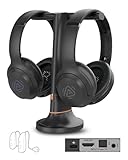
The Duet Aura is a complete two-person kit: a transmitter base and two over-ear headphones, each with its own volume control. It updates the original Duet by adding HDMI ARC, Auracast, and Bluetooth to the existing optical and AUX inputs. For couples who watch together but hear differently, this solves the problem described in the multi-listener section without assembling splitters or a second transmitter.
Avantree lists audio latency around 50 ms, range up to about 50 metres, and battery life up to 35 hours per headset, with charging on the dock or by USB-C. The base includes optical passthrough, so you can keep a soundbar connected to the TV’s optical port while the headphones are in use. HDMI passthrough is not supported, which is worth checking if your soundbar also depends on ARC.
Clear Voice EQ and an extra volume boost aim the kit at viewers with mild hearing loss. Because the transmitter broadcasts over Auracast, additional compatible headphones can join, and Auracast-capable hearing aids can receive the TV audio directly. Traditional Bluetooth hearing aids that lack Auracast will not work in that mode.
Strengths: Two headphones included, HDMI ARC plus optical and AUX inputs, independent volume per listener, long battery rating, room to add more listeners.
Drawbacks: It sits in the premium tier because you are paying for two headsets, the sound tuning is aimed at clarity rather than audiophile detail, and whether the TV speakers can stay on depends on your television’s own settings.
Compared with buying two Sennheiser RS 175-U kits, the Duet Aura is simpler to set up and accepts HDMI ARC. Compared with the HT5009, it adds a second headset and broader input support at a higher price.
Avantree HT4186: best neckband earbuds for TV

Over-ear headphones are not ideal for everyone. Some viewers find them hot, others dislike pressure on glasses, and some want to lie down or recline without cushions pushing against a pillow. The HT4186 pairs a Bluetooth transmitter with neckband earbuds, so the weight rests on the shoulders and only small earpieces sit in the ears.
The transmitter connects through optical or 3.5 mm analog, with RCA possible through an adapter, and works with older non-smart televisions. Avantree rates the earbuds for up to 20 hours and the link for up to about 30 metres. Listings currently mix the original model with the newer HT4186-Q, which moves to aptX Adaptive with latency under 50 ms; check the exact model number before buying if the lowest delay is important. The transmitter can also support two compatible headsets.
Because the earbuds are standard Bluetooth, they can also be paired directly to a phone for walks or podcasts. That makes the HT4186 a more flexible purchase than a dock-only system for anyone who wants one device for the TV and everyday listening.
Strengths: Light and cool to wear, easy to use when reclining, good battery rating, broad TV compatibility, usable away from the television.
Drawbacks: Earbuds isolate less bass and spaciousness than over-ear models, ear-tip fit varies between people, and there is no charging dock, so you must remember to plug in the neckband.
Against the HT5009, the HT4186 trades cinematic sound for comfort and portability. It is the better choice if over-ear headphones are the reason you stopped wearing TV headphones in the first place.
Sony MDR-RF995RK: best simple budget RF set
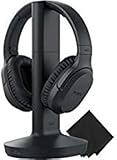
The RF995RK is an older, deliberately simple design that remains popular because it does one job with very little setup. A transmitter stand connects to the TV’s 3.5 mm or analog output, the headphones sit on the stand to charge, and the 900 MHz radio link covers up to roughly 45 metres in ideal conditions. There is no pairing and no app.
The headphones use 40 mm drivers and a replaceable rechargeable battery rated for up to 20 hours, although a full charge takes several hours. A Voice mode button lifts dialogue, and the headphones switch off automatically when not in use. Three transmission channels let you move away from interference if you hear noise.
Strengths: Straightforward operation, long reach between rooms, replaceable battery, comfortable large cushions, lower price tier than the Sennheiser kits.
Drawbacks: The analog radio link can pick up a faint background hiss, especially at the edge of range or near other wireless devices, and there is no optical input. Sound quality and dialogue processing are simpler than on the RS 175-U or RS 195-U.
Compared with the Avantree HT5009, the Sony avoids Bluetooth codec questions entirely, but it gives up optical input and the cleaner digital signal. It suits a second room, a bedroom TV, or a relative who wants the fewest possible buttons.
RF versus Bluetooth: which link is better for television?
| Requirement | Dedicated RF headphones | Bluetooth headphones |
|---|---|---|
| Typical TV delay | Usually very low and consistent | Can be low with a matched low-latency codec; otherwise variable |
| Setup | Usually connect the dock once and use it | Requires pairing and codec compatibility |
| Range | Often covers a room and nearby areas | Commonly around 10 metres in practical indoor use, but walls and interference reduce it |
| Phone compatibility | Usually limited or absent | Strong advantage |
| Multiple listeners | Possible on systems supporting additional compatible receivers | Requires dual-link or a separate transmitter designed for two devices |
For television, prioritize stable synchronization over maximum Bluetooth codec bandwidth. TV speech is normally delivered as stereo or compressed surround downmixed to stereo, so a higher-resolution Bluetooth codec does not automatically make dialogue clearer.
Optical, HDMI ARC, and analog compatibility
Optical output
Optical is usually the safest connection for dedicated TV headphones. In the television’s sound menu, set the digital audio output to PCM or stereo PCM if the transmitter produces silence. Many headphone transmitters cannot decode Dolby Digital, DTS, or multichannel bitstreams through their optical input.
HDMI ARC and eARC
HDMI ARC and eARC are excellent for soundbars and AV receivers, but many TV headphone docks do not have HDMI inputs. If your television offers only HDMI audio for the desired setup, use an HDMI ARC audio extractor that explicitly supports ARC or eARC, stereo output, and the required HDCP behavior. A basic HDMI-to-optical adapter designed for an input source may not work in the reverse ARC direction.
Headphone and RCA outputs
A 3.5-mm headphone socket is simple, but some televisions mute their speakers when it is used. RCA line output usually keeps the speakers active, though volume may be fixed and controlled on the headphones instead. If the TV has only a 3.5-mm output, a 3.5-mm-to-RCA cable can connect it to a transmitter with analog inputs.
When wired headphones still make sense for TV
Wireless is convenient, but a simple wired setup remains a valid choice in some rooms. If you sit within a couple of metres of the screen, a long 3.5 mm extension cable and any comfortable pair of wired headphones give zero latency, no charging, and no interference. This works best when the TV has a headphone output with its own volume control and the cable can be routed safely along the floor or furniture so nobody trips over it. A wired setup is also a sensible backup if a wireless kit’s battery fails before a programme ends. For most households, though, the trip hazard and limited movement make a docked wireless system the more practical everyday option.
Multi-listener setups
For two listeners, do not assume that any two Bluetooth headphones can connect to one television. The TV may support only one Bluetooth device, and even televisions advertising dual audio can introduce additional delay or restrict volume control.
There are three more dependable approaches:
- Use a dedicated RF transmitter that explicitly supports additional compatible headphones.
- Use a Bluetooth transmitter with documented dual-link support and two compatible low-latency headphones.
- Connect separate headphone systems through an optical splitter or suitable analog distribution adapter.
Before buying, confirm whether the second headset receives independent volume control. Some multi-listener systems share one transmitter but require each listener to use their own headphone controls.
Setting up TV headphones for an older relative
Many TV headphone purchases are gifts for parents or grandparents, and the best system on paper can fail if daily use is confusing. A few setup decisions make a large difference.
- Choose a dock over a cable. A headset that charges when placed on its stand removes the need to find a USB cable and remember which end goes where. The RS 175-U, RS 195-U, RS 120-W, and Sony RF995RK all charge this way.
- Set the TV output once and label it. After choosing optical or analog output and PCM format, write the setting on a small note near the TV. If a software update or reset changes the audio menu, anyone can restore it quickly.
- Keep the TV speakers on if others share the room. Use optical or RCA rather than the headphone socket so other viewers hear the speakers at a normal level while the headphone wearer uses a higher personal volume.
- Pre-select a speech mode. Start with the speech or Clear Voice setting and moderate volume. Raising overall volume is the most common habit, and it can increase listening fatigue without improving clarity.
- Check the controls by touch. Volume and power buttons should be easy to find without looking. Large physical buttons work better than touch panels for most older users.
- Place the dock where the headphones naturally end up. A stand beside the usual chair is used far more consistently than one hidden behind the TV.
Hearing changes are personal, and headphones do not replace a hearing assessment. If speech remains hard to follow even with dialogue modes, a hearing professional can advise whether hearing aids with Auracast or a dedicated TV streamer would be a better long-term solution.
Using TV headphones with soundbars, receivers, and game consoles
Home theater setups add a layer of complexity, because the TV may no longer be the device that outputs audio.
With a soundbar on HDMI ARC
If a soundbar already occupies the TV’s ARC port, the TV’s optical output is often still available. Connect the headphone transmitter there, and check whether the TV allows ARC and optical to be active at the same time; some models output to only one. Alternatively, a transmitter with optical passthrough, such as the Duet Aura, can sit between the TV and an optical soundbar.
With an AV receiver
Many receivers have a front headphone jack or a zone output. Feeding the transmitter from the receiver means every source, including streaming boxes and Blu-ray players, reaches the headphones. Set the receiver to stereo downmix when using headphones so dialogue from the centre channel is not lost.
With a game console
Docked TV headphones work for relaxed gaming, but they are tuned for speech and film rather than positional game audio. For competitive play, a dedicated wireless gaming headset with its own low-latency dongle is the better tool. If you only play casually on the living-room TV, the RS 175-U or RS 275 can handle both roles, and the RS 275’s direct Bluetooth support also allows use with a handheld console.
Care and lifespan
TV headphones often see hours of use every day, so small habits extend their life. Wipe cushions with a slightly damp cloth and let them dry before docking. Replace worn ear pads rather than tolerating cracked surfaces that irritate skin. Avoid leaving the headphones on a dock in direct sun or near a radiator, since heat shortens battery life. If a system uses replaceable cells, keep a spare set so a tired battery never ends an evening early.
Settings that improve dialogue immediately
- Set the TV’s digital audio format to PCM. This removes unsupported Dolby or DTS bitstreams that can cause silence or distortion.
- Disable artificial surround processing first. Virtual surround can spread effects but make voices less centered. Re-enable it only if dialogue remains clear.
- Begin with a moderate volume and raise speech enhancement before bass. Boosting overall volume also boosts music and effects, while a speech profile targets the frequencies that make consonants easier to recognize.
- Turn off volume normalization if it pumps or dulls speech. Try the TV’s night, clear voice, or dialogue mode instead, one setting at a time.
- Test lip synchronization with a news presenter. If the delay is visible, disable extra TV audio processing and use a matched low-latency transmitter and headset.
How the additional picks compare
| Model | Style | Wireless link | TV inputs | Rated battery | Price tier |
|---|---|---|---|---|---|
| Sennheiser RS 275 | Over-ear | Auracast (Bluetooth LE Audio) plus classic Bluetooth | HDMI ARC, optical, 3.5 mm | Up to 50 hours | Premium |
| Sennheiser RS 120-W | Open on-ear | Digital wireless from dock | RCA, 3.5 mm via adapter | Up to 20 hours (AAA NiMH) | Mid-range |
| Avantree Duet Aura | Two over-ear headsets | Auracast plus Bluetooth | HDMI ARC, optical, AUX | Up to 35 hours each | Premium |
| Avantree HT4186 | Neckband earbuds | Bluetooth low-latency transmitter | Optical, 3.5 mm, RCA via adapter | Up to 20 hours | Budget |
| Sony MDR-RF995RK | Over-ear | 900 MHz analog RF | 3.5 mm, RCA via adapter | Up to 20 hours | Mid-range |
Battery and range figures are manufacturer ratings. Price tiers are approximate and change frequently with sales.
What to look for before you buy TV headphones
1. Match the transmitter to your TV’s outputs
Look at the back of the television before comparing sound modes. If it has optical output, almost every dedicated kit will work. If it has only HDMI ARC or eARC plus a headphone socket, either choose a transmitter with an HDMI ARC input, such as the RS 275 or Duet Aura, or plan to use the analog socket. Many newer slim televisions drop RCA outputs entirely, so a kit that relies on RCA may need a 3.5 mm adapter.
2. Decide how much delay you can tolerate
Dedicated transmitters keep lip sync acceptable for most viewers. Delay becomes a problem mainly when standard Bluetooth headphones connect directly to a TV that uses a basic codec. If someone in the household is sensitive to lip-sync drift, favour docked RF systems or transmitters with aptX Low Latency, aptX Adaptive, or LC3.
3. Consider weight, fit, and heat
A two-hour film feels very different from a ten-minute demo. Lighter on-ear models like the RS 120-W and neckband earbuds like the HT4186 reduce pressure on glasses and keep ears cooler. Heavier over-ear cushions block more household noise and give fuller bass but can become warm. Viewers with limited hand strength should also look for large, tactile volume controls rather than small touch panels.
4. Think about battery type and charging habits
A charging dock is the most reliable way to ensure the headphones are ready each evening, because returning them to the stand becomes a habit. Replaceable batteries, as on the RS 120-W, RS 275, and Sony RF995RK, extend the useful life of a system that might otherwise be discarded when a sealed cell wears out.
5. Check hearing-related features
Speech modes, independent left-right balance, volume boost, and mono mode all help in different ways. Mono mode is useful for listeners with hearing loss in one ear, because it sends both channels to each side. If a listener wears hearing aids, check whether they support Auracast. If they do, an Auracast transmitter can stream TV sound directly to the aids, which can be more comfortable than headphones over hearing aids.
6. Plan for more than one listener
If two people want private audio now or might later, pick a system that already supports additional headphones. Auracast transmitters, Sennheiser’s multi-receiver docks, and dual-link Bluetooth transmitters are easier to expand than a single-pair kit.
How to choose the best TV headphones for your room
| Your situation | Best direction | Reason |
|---|---|---|
| Speech is difficult to understand | Sennheiser RS 195-U | Speech profiles and independent channel adjustment |
| You mainly watch films alone | Sennheiser RS 175-U | Low-delay RF, sound modes, and docked charging |
| You need optical compatibility on a budget | Avantree HT5009-class kit | Transmitter, optical input, and lower purchase cost |
| You already own good Bluetooth headphones | Matched low-latency Bluetooth transmitter | Avoids buying another headset, provided codec support matches |
| Two people need private audio | RF multi-headset system or documented dual-link transmitter | More reliable than assuming the TV supports two headphones |
| You need headphones for travel as well | Bluetooth noise-cancelling headphones with a transmitter | More versatile away from the television |
Troubleshooting common TV headphone problems
- No sound through optical: Set the TV’s digital audio output to PCM. Many transmitters stay silent when the TV sends Dolby Digital or DTS.
- Sound through HDMI ARC cuts in and out: Enable HDMI-CEC or the TV’s equivalent setting (often branded Anynet+, Bravia Sync, or SimpLink), and use the specific HDMI port labelled ARC or eARC.
- Hiss or crackle on an analog RF set: Change the transmission channel, move the transmitter away from Wi-Fi routers and cordless phone bases, and raise the TV’s output level so the transmitter receives a stronger signal.
- Volume too low even at maximum: If the transmitter uses the TV’s headphone socket, turn the TV volume up as well. Optical and fixed line outputs send a set level, so increase volume on the headphones instead.
- TV speakers turn off when headphones are connected: Check for a setting that keeps speakers active, use an RCA or optical connection rather than the headphone socket, or choose a transmitter with optical passthrough to a soundbar.
- Lip sync drift: Turn off extra TV sound processing, check whether the TV offers an audio delay adjustment, and avoid connecting ordinary Bluetooth headphones directly to the TV.
Frequently asked questions
Can I use regular Bluetooth headphones with my TV?
Yes, if the television supports Bluetooth audio or you add a Bluetooth transmitter. The weak point is delay: unless both the transmitter and the headphones support the same low-latency codec, speech can trail lip movement. A dedicated TV kit avoids that uncertainty.
What is Auracast, and why does it matter for TV headphones?
Auracast is a broadcast feature of Bluetooth LE Audio. One transmitter can send the same audio to any number of compatible receivers, including headphones and some hearing aids, with each listener controlling their own volume. Systems such as the Sennheiser RS 275 and Avantree Duet Aura use it to make multi-listener TV audio simpler.
Do TV headphones work with hearing aids?
Over-ear headphones can be worn over some behind-the-ear hearing aids, but feedback and comfort vary. A cleaner option is streaming directly to the hearing aids. That requires aids with Auracast support or the manufacturer’s own TV streamer; ordinary Bluetooth hearing aids may not connect to Auracast transmitters.
Will the TV speakers keep working while I use the headphones?
It depends on the connection. Optical and RCA outputs usually leave the TV speakers active, while the 3.5 mm headphone socket often mutes them. Some televisions let you choose in the sound menu, and some transmitters offer optical passthrough to a soundbar.
How far can I walk away from the transmitter?
Manufacturers quote open-space figures, typically between about 30 and 60 metres. Indoors, walls, appliances, and Wi-Fi traffic shorten that considerably. Expect reliable coverage in the same room and often a neighbouring room, but not necessarily across a large house.
Are in-ear TV headphones a good idea?
They are a good option for viewers who find over-ear cushions hot or heavy, or who watch while reclining. They provide less bass and spaciousness, and comfort depends on ear-tip fit, so they suit dialogue-focused viewing more than immersive film soundtracks.
Final verdict
Our top pick, the Avantree HT5009, is the easiest everyday choice for most households thanks to its charging-dock transmitter, optical and analog inputs, low-latency link, and long rated battery, all at a lower price tier than the Sennheiser kits. The Sennheiser RS 195-U is the upgrade when clear dialogue, hearing adjustment, and dependable everyday operation come first, and the RS 175-U is the better general-purpose RF option for a single viewer. If your television only sends audio over HDMI ARC, the RS 275 covers much of the same speech help with modern connectivity.
Whichever model you choose, check the television’s actual audio outputs before buying. Optical-to-PCM compatibility, a low-delay wireless match, and a charging dock will usually improve the viewing experience more than a larger list of sound modes or a higher Bluetooth codec number.