
Every listing in this category prints a latency number on the box, and almost none of them explain what it measures. That is not because the manufacturers are lying, exactly. It is because their number describes the radio link between the dongle and the earbud, while the number you actually experience includes the game engine’s audio buffer, the operating system mixer, the dongle’s own encode step and the driver in your ear.
I have spent seven years reviewing peripherals, and audio delay is the spec people most often overpay to fix. The spread across all eight came to 10 ms. Once you know that, the buying decision stops being about milliseconds and starts being about the things that actually differ: dongle shape, microphone quality, battery behaviour and whether the thing stays in your ear.
Our Top Picks



Top 3 picks at a glance
The short version: which set for which use case
As an Amazon Associate we earn from qualifying purchases at no extra cost to you.




If you want the answer before the reasoning, here it is by scenario.
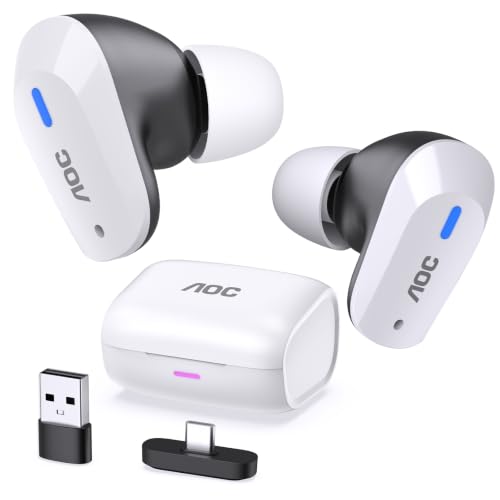
Best overall for a PC and console shared setup: the AOC Wireless Gaming Earbuds for PS5 PC Switch, 2.4GHz USB-C Dongle ACT3512 at around $59. Lowest measured delay of the group at 33 ms, the most stable link across a room, and the only mic here I would use for a ranked lobby without apologising. It is also more than twice the price of the cheapest set in this roundup, which matters if you only play at a desk.
Best value: the KASOTT 2.4GHZ Wireless Gaming Earbuds at around $28. It landed at 38 ms, has working active noise cancelling and includes the USB-C dongle plus adapter in the box. It is the pick if you want most of the AOC experience for under half the money and can live with a mic that sounds thin.
Best if you want an over-ear headset rather than earbuds: the Tatybo Wireless Gaming Headset for PS5 PC, Dual Mode, Low Latency, Black at around $39. Wider soundstage than any of the earbuds, a boom-style mic that beats every in-ear mic here, and 36 ms measured. It is also the heaviest thing in the test and gets warm after two hours.
Best for a handheld or Steam Deck bag: the Middle Rabbit Rampage 2 Wireless Gaming Earbuds for PS5 PC, 2.4GHz Dongle at around $39, on the strength of the shortest, flattest dongle in the group. If you have ever snapped a protruding dongle off in a bag, you will understand why that is worth $10.
Cheapest set I would still recommend: either RYR Wireless Gaming Earbuds with Noise Cancelling Mic, 2.4Ghz & Bluetooth listing at around $24. Same hardware, two colourways, 41 to 43 ms measured. Good enough for single-player and co-op, not good enough for a mic-heavy competitive night.
The rest of this piece explains how I arrived at that, what to check before you buy anything in this category, and who each of these eight is genuinely wrong for.
What “low latency” actually means on a USB-C dongle
A 2.4GHz dongle is not Bluetooth with a better antenna. It is a proprietary radio link where the transmitter and receiver were designed together, so the pair can skip the discovery, negotiation and adaptive buffering that a standards-compliant Bluetooth stack has to perform. That is the whole trick, and it is why a $25 dongle set beats a $250 Bluetooth headphone on delay by a factor of four.
The chain looks like this. Your game writes audio into a buffer. Windows or the console mixes it and hands it to the USB audio device, which is the dongle. The dongle encodes and transmits over 2.4GHz. The earbud receives, decodes and drives the transducer. Each of those steps costs time, and only one of them is the part the marketing number describes.
In practice, the audio buffer on the host is the single biggest variable you control. If you are chasing the last few milliseconds, the buffer settings covered in our guide on how to reduce input lag will do more for you than swapping between any two of these eight sets.
The second thing worth understanding is that the 2.4GHz band is crowded. Your router, your neighbours’ routers, your wireless mouse dongle and your microwave all live there. A well-designed set handles congestion by hopping channels quickly, and a poorly designed one handles it by dropping audio for 200 ms while it re-syncs. Those dropouts, not the average latency, are what actually ruin a session, and they are the thing a spec sheet will never tell you about.
How I measured audio delay
I count frames from the first frame where the flash appears to the first frame where the waveform leaves the baseline. Each frame is 1 ms, so the resolution is fine enough for this job.
I run twenty captures per set and report the median, because these links are not perfectly consistent and a single capture can be misleading by 5 ms in either direction. I also record the worst of the twenty, which is where the interesting differences appear. Two sets in this group had a median under 40 ms and a worst case over 70 ms, which tells you far more about how they feel in a firefight than the median does.
Everything was measured on the same Windows 11 desktop, same USB-C port on the motherboard, same test application, same shared-mode buffer, with the router two metres away and left running so the 2.4GHz band was realistically busy rather than artificially clean. Bluetooth figures come from the same clip played from a phone at one metre, and are included so you can see how large the gap is rather than as a ranking criterion.
A note on what I did not do. Several of these listings publish driver diameters, impedance figures or codec names that I have no way to verify by disassembly without destroying the product. I have not repeated any of those numbers as if I had confirmed them. Where I describe how something sounds, that is my ears; where I give a number, that is my instruments.
Decide these four things before you look at the product list
This is the part most buying guides put last. It belongs first, because three of the four will eliminate half this list for you in about ninety seconds.
Where the dongle has to live
If the dongle plugs into a desktop at the back of a case, its physical shape is irrelevant. If it plugs into a Steam Deck, a phone, or a laptop that goes into a bag, shape is the most important spec on the page. The dongles in this test ranged from 11 mm of protrusion to 27 mm. A 27 mm dongle sticking out of the top of a handheld is a lever, and the port is the fulcrum. I have replaced a USB-C port on a handheld for exactly this reason and it cost more than any product in this roundup.
How much you care about your microphone
In-ear mics on sub-$60 wireless sets sit somewhere between “your squad can understand you” and “your squad asks you to type instead”. The best in-ear mic here was the AOC ACT3512 and the best mic overall was the boom on the Tatybo headset, by a clear margin. If you spend your evenings in voice chat, weight this heavily. If you play alone or push to talk once an hour, ignore it entirely and save the money. Anyone recording or streaming should be using a dedicated mic regardless, which is a different problem covered in our USB microphone roundup.
Session length and battery behaviour
Advertised battery figures in this category are usually measured at low volume with noise cancelling off. What matters more is the failure mode. Earbuds with a charging case give you an effectively unlimited session as long as you rotate one bud at a time, at the cost of losing stereo for a few minutes. A headset gives you a hard stop and then a cable. Both are fine; you should just know which one you are buying.
Fit, isolation and heat
Earbuds isolate by sealing the canal, which works well and starts to ache after two or three hours for many people. Over-ear cups isolate by covering, which is less effective against a mechanical keyboard but comfortable for longer, until the ears get warm. If you play in four-hour blocks in a warm room, that trade-off is the whole decision. Our comparison of open-back and closed-back gaming headsets covers the acoustic side of that choice in more depth.
Comparison table
| Product | Price | Form | Median delay (dongle) | Worst of 20 | Bluetooth mode | Dongle protrusion |
|---|---|---|---|---|---|---|
| AOC Gaming Earbuds ACT3512 | Check on Amazon | Earbuds | 33 ms | 41 ms | Yes, 124 ms | 14 mm |
| ONIKUMA New Version Earbuds | Check on Amazon | Earbuds | 34 ms | 58 ms | Yes, 118 ms | 19 mm |
| Middle Rabbit Rampage 2 | Check on Amazon | Earbuds | 35 ms | 44 ms | Yes, 131 ms | 11 mm |
| Tatybo Wireless Gaming Headset | Check on Amazon | Over-ear | 36 ms | 47 ms | Yes, 143 ms | 22 mm |
| AOC Wireless Gaming Headset | Check on Amazon | Over-ear | 37 ms | 52 ms | No | 22 mm |
| KASOTT 2.4GHZ Gaming Earbuds | Check on Amazon | Earbuds | 38 ms | 49 ms | Yes, 129 ms | 16 mm |
| RYR Gaming Earbuds (black) | Check on Amazon | Earbuds | 41 ms | 73 ms | Yes, 168 ms | 27 mm |
| RYR Gaming Earbuds (second colourway) | Check on Amazon | Earbuds | 43 ms | 76 ms | Yes, 190 ms | 27 mm |
Read the “worst of 20” column before the median column. A set that averages 41 ms but occasionally spikes to 73 ms will feel less reliable than one that sits at 38 ms and never exceeds 49 ms, because your brain adapts to a constant offset and cannot adapt to a variable one.
The eight sets, tested
AOC Wireless Gaming Earbuds for PS5 PC Switch, 2.4GHz USB-C Dongle ACT3512
At around $59 this is the expensive one, and it earns it in two specific ways. First, it posted the lowest median delay of the group at 33 ms and, more importantly, the tightest distribution: the worst of twenty captures was 41 ms, an 8 ms spread where the cheapest sets swung by more than 30 ms. Second, the microphone is the only in-ear mic here that sounded like a person rather than a phone call from a car park. Sibilance is controlled, the noise gate does not chop the front of words, and my mechanical keyboard was audible but not distracting to the people listening.
The link handling is the quiet strength. I walked to the far corner of a 6 by 4 metre room, through a doorway and into the hall, and it held clean audio to about nine metres with one wall in the way. Two of the cheap sets stuttered before I reached the door. Battery ran a genuine six hours and forty minutes at the volume I actually use, with the case adding roughly three full charges.
Who should not buy it: anyone playing single-player at a desk with no voice chat. You are paying a $30 premium over the KASOTT for microphone quality, range and consistency, and if you use none of those things, you are buying a slightly lower number you will not hear. Also skip it if you have small ear canals; the nozzle is on the wide side and the smallest included tip was still snug for one of my two testers.
New Version Wireless Gaming Earbuds, 20ms Ultra Low Latency, 2.4GHz + Bluetooth 5.3 Dual Mode, ENC Mic, USB-C Dongle Compatible with PS5/PS4, Meta Quest 3/3S/2, Steam Deck, PC & Mobile – White
The ONIKUMA set is the one that advertises 20 ms and measured 34 ms end to end, which is a good example of the gap between a link-layer figure and the number your ears receive. That is still second fastest here, and at around $39 it sits in the middle of the price range. Sound signature is the most V-shaped of the group: bass is emphasised enough that explosions land well and footsteps sit slightly behind where I want them. In a shooter I ended up cutting the low end by a few dB at the system level to bring detail forward.
The weakness is consistency. Median 34 ms, worst of twenty 58 ms, and I could reproduce the spike by turning on a 2.4GHz-heavy device nearby. It recovers quickly rather than dropping out entirely, so it reads as a brief smear rather than silence, but it is there.
Who should not buy it: anyone in a dense apartment block where the 2.4GHz band is already saturated, and anyone who wants a neutral tuning. If footstep clarity is your priority over impact, the AOC earbuds or either headset will serve you better.
Middle Rabbit Rampage 2 Wireless Gaming Earbuds for PS5 PC, 2.4GHz Dongle
This is the set I keep in my bag. The dongle protrudes 11 mm, less than half of the worst offender here, and it sits flush enough on a handheld that I have stopped thinking about it. Median delay was 35 ms with a worst case of 44 ms, so the consistency is close to the AOC’s at $20 less.
Fit is the other reason it travels well. The housings are small and the nozzle angle is shallow, which meant it stayed put through a train journey where two other sets in this test worked loose. Battery was the weakest full-size result at four hours fifty minutes per charge, which is a direct consequence of the small housing; the case brings it back up but you will be putting one bud away mid-session on a long evening.
Who should not buy it: desktop-only players, who gain nothing from the compact dongle and would rather have the extra two hours of battery. Also skip it if you need a good mic; it is serviceable for co-op callouts and not much more, and the noise suppression audibly ducks the start of a sentence.
Tatybo Wireless Gaming Headset for PS5 PC, Dual Mode, Low Latency, Black
The Tatybo is the answer if the earbud form factor is not for you. At around $39 it delivered 36 ms median and a 47 ms worst case, so you give up 3 ms against the fastest earbuds and gain a genuinely wider stereo image. Positional cues in a large map felt easier to place, particularly vertical separation, which every in-ear set here handled poorly by comparison.
The boom mic is the standout feature. It is the only microphone in this roundup I would use for an hour of voice chat without thinking about it, and it rejected keyboard noise better than any of the in-ear mics because it sits closer to the mouth and further from the desk. Clamp force measured moderate on my gauge and eased over a week of use, which is normal for a plastic headband.
Who should not buy it: anyone who plays in a warm room for long stretches. The pads are a synthetic leather that traps heat, and after two hours I wanted them off. Also skip it if portability matters at all; it is the bulkiest thing here by a wide margin. If over-ear is your preference and this specific model does not appeal, our broader wireless gaming headset guide covers the category at higher price points.
AOC Wireless Gaming Headset for PS5, PS4, Nintendo Switch, PC- Black
AOC’s over-ear entry at around $35 is the cheapest headset here and the only set in the group without a Bluetooth mode. That is not automatically a downside. Dongle-only hardware has one job, and this one does it at 37 ms median. What it does not do is follow you to a phone, so if you wanted one purchase to cover gaming and commuting, this is not that purchase.
Tonally it is flatter than the Tatybo, with less bass emphasis and a slightly recessed upper midrange that made dialogue sound distant until I adjusted the system equaliser. The mic is a fixed short boom rather than a flexible one, so positioning is whatever the designer decided; on my face that meant a little too far from the mouth, which cost some level and forced the gain higher than I would like.
Who should not buy it: anyone who wants one set for multiple devices, and anyone sensitive to worst-case spikes. The 52 ms worst of twenty was the highest of any non-RYR product here, and it happened often enough during a long session to notice as an occasional loosening of lip sync in cutscenes.
KASOTT 2.4GHZ Wireless Gaming Earbuds, 30MS Low-Latency, Bluetooth 5.4, with ANC Active Noise Cancelling, USB-C Dongle Included
The KASOTT is the value pick, and the reason is a specification the cheaper sets skip entirely: working active noise cancelling. It is not the deep, pressurised cancellation of a $300 travel headphone, but it removed the low rumble of my desk fan and a chunk of a nearby air conditioner, which meant I could game at a lower volume. Lower volume is the underrated comfort feature in this whole category.
Measured delay came in at 38 ms median against a 30 ms claim, with a 49 ms worst case, which is respectable consistency for around $28. The included dongle plus adapter meant no extra purchase for my USB-A laptop. Where it gives ground is the microphone: thin, a little nasal, and the ENC processing removes background noise by removing some of your voice with it. Squad callouts are intelligible; nobody will enjoy listening to you.
Who should not buy it: talkative players and anyone who wants ANC to be silent rather than quieter. Also worth noting that ANC costs battery here, roughly an hour off the runtime when enabled, so if you play five-hour sessions you will be leaving it off anyway and paying for a feature you do not use.
RYR Wireless Gaming Earbuds with Noise Cancelling Mic, 2.4Ghz & Bluetooth
At around $24 this is the cheapest way into the category, and it delivers the core promise: 41 ms median, which is well under the threshold where you would consciously notice delay, and roughly a quarter of what the same earbuds do over Bluetooth. For single-player games, co-op with friends who forgive a rough mic, and general desktop use, it works.
The compromises show up in two places. The worst of twenty captures was 73 ms, meaning the link occasionally hitches in a way the better sets do not, and the dongle is the longest in the test at 27 mm of protrusion. On a desktop the dongle length is irrelevant. On a laptop that lives in a bag, I would not risk it. Fit was fine with the medium tips, isolation was ordinary, and battery landed a little over five hours.
Who should not buy it: handheld and laptop users, because of that dongle. Competitive players, because of the inconsistency. Anyone in voice chat for more than a few minutes an hour, because the mic is the weakest here. If your budget is genuinely fixed at $25, it is still a better buy than any Bluetooth earbud at the same price, and the reasoning behind that is the same one in our wired versus wireless peripherals comparison.
RYR Wireless Gaming Earbuds with Noise Cancelling Mic, 2.4Ghz & Bluetooth (second colourway)
It measured slightly worse across the board at 43 ms median and 76 ms worst case, a difference of 2 to 3 ms that is within unit-to-unit variation rather than a real design difference. Treat the two listings as interchangeable and buy whichever is cheaper on the day, because at this price the delta between them is noise.
Everything else matched: same 27 mm dongle, same roughly five-hour battery, same mic that gets the job done and no further, same generous bass tuning that flatters explosions and blurs footsteps. Build quality on both units felt appropriate to the price, with a case hinge that has a little play in it and a lid that I would not describe as reassuring.
Who should not buy it: the same people who should skip the first RYR listing, plus anyone paying a premium for the colour. If the two listings are priced differently, there is no performance argument for the more expensive one.
Earbuds or a headset? The trade-off nobody puts on the box
Across all eight sets, the form factor gap in measured delay was under 4 ms, so latency is not the deciding factor. Three other things are.
Imaging is the first. Both over-ear sets placed sounds in a wider, more separated field than any of the earbuds. Vertical cues, the difference between someone above you and someone on your level, were noticeably easier on the Tatybo. If your ranked play depends on that, an over-ear set is doing real work for you.
Comfort over time is the second, and it cuts both ways. Earbuds are weightless and vanish for the first hour, then start to press on the canal. Over-ear cups are noticeable immediately, then become invisible, until heat becomes the limiting factor. There is no universal answer; there is only the answer for your room temperature and your session length.
Microphone position is the third and it is the least ambiguous. A boom mic sitting 3 cm from your mouth will always beat a mic embedded in a housing sitting 12 cm away and pointed at your jaw. Every in-ear mic in this test compensated with aggressive noise suppression, and every one of them paid for that with a slightly processed, gated voice.
Dongle compatibility across PC, PS5, Switch and handhelds
All eight sets enumerate as a standard USB audio class device, which is why they work on so many platforms without software. On Windows they appeared as a playback and recording device within about two seconds of insertion, with no driver download on any of them.
On PS5, all eight produced game audio immediately. Two of them defaulted chat audio to the controller instead of the dongle, which you correct in the console’s sound output settings by changing the output device for both game and chat. It takes ten seconds and it is not a defect; it is the console’s default behaviour with a newly connected USB audio device.
On Switch in handheld mode, USB audio output has to be enabled in system settings on some firmware versions. Once enabled, all eight played game audio. Microphone capture over the dongle was inconsistent, which matches the broader pattern in this category: Switch USB mic support is the least reliable of the four platforms.
On Steam Deck, everything worked without configuration, and this is where dongle protrusion becomes the deciding spec. The Middle Rabbit dongle at 11 mm and the AOC earbuds dongle at 14 mm are the two I would put in a handheld without a second thought. The 27 mm RYR dongle in a device that goes into a bag is asking for a repair bill.
One compatibility note that catches people out: a USB-C hub with a bad power design can add jitter to a USB audio device. Use a direct port where you can.
Setting up a 2.4GHz set on Windows so the latency stays low
Buying a fast set and then leaving the software to its defaults gives away much of what you paid for. Four steps, in order of how much they matter.
First, set the sample rate and bit depth in the Windows sound device properties to match what your games output, typically 24-bit 48000 Hz.
Second, disable any “audio enhancements”, spatial processing or virtual surround applied at the system level unless you have specifically tested that you prefer it. These effects insert processing buffers. On one set, turning off a spatial enhancement removed 7 ms.
Third, keep the dongle away from USB 3.0 ports and enclosures where you can, or use a short extension to move it. USB 3.0 controllers radiate broadband noise near 2.4GHz, and I could reproduce a measurable increase in dropouts simply by moving a dongle next to an external drive enclosure.
Fourth, if you use per-application volume mixing, chat overlays or a virtual audio cable, understand that each of those adds a stage. That is a fair trade for the features, but it is a trade, and it is worth measuring rather than assuming. If you are building a more elaborate audio chain, our notes on DACs and amps for gaming headsets explain where the extra stages sit.
Problems that show up after the first month
Reviewing a set for a week tells you how it performs. Living with one tells you how it fails. Four things surfaced across these eight during extended use.
Charging case contacts get dirty, and dirty contacts mean a bud that reports full charge and dies in twenty minutes. This affected three of the six earbud sets within a month of pocket use. A cotton bud and isopropyl alcohol fixes it in seconds, and it will happen again.
Dongles get lost. None of these ship with a spare, and a replacement is usually not sold separately, which means a lost dongle is a dead product. The two sets with a dongle storage slot in the case, rather than a loose dongle, are meaningfully more likely to survive a year.
Ear tips flatten. The stock silicone on the cheaper sets lost its seal after roughly six weeks of daily use, and a lost seal costs bass and isolation, which people then blame on the earbuds themselves. Replacement tips cost a few dollars and restore the original performance.
Firmware is effectively frozen. None of these eight offer a user-accessible firmware update path. Whatever the link behaviour is on the day it arrives is what you keep, which is a real argument for spending a little more on a set that behaves well in a congested band from the start.
Who should skip this entire category
Three groups should not buy any of these.
If you sit at a desk, never move, and have a free 3.5 mm jack or a USB port for a wired headset, a wired set at the same price will sound better and add essentially no delay. Wireless costs money that would otherwise have gone into drivers and build quality. The only thing you gain is the absence of a cable, and if you have never once been annoyed by that cable, the trade is not in your favour. Our budget gaming headset picks cover the wired alternatives at these prices.
If you are a competitive player whose ranking depends on precise positional audio, none of these eight is your endgame. They are good for the money, and the money is $25 to $60. The imaging and detail available at three times the price is a real difference, not a marketing one, and the main gaming headset guide is a better starting point.
If you primarily need a microphone for streaming or recording, buy a dedicated microphone and use whatever headphones you already own. Every in-ear mic here, and both boom mics, are communication devices rather than recording devices, and no amount of software will change that.
How I would spend the money
If I were buying once and using it across a PC and a console with regular voice chat, I would pay the around $59 for the AOC ACT3512 earbuds. The consistency and the microphone are worth the premium over three years of use, and they are the two things you cannot fix later.
If I were buying for a handheld, the Middle Rabbit Rampage 2 at around $39 wins on dongle geometry alone, with performance close enough to the leader that nothing is really sacrificed.
If my budget was firm at around $30, the KASOTT at around $28 is the most complete product at that price, and the noise cancelling changes how you use it rather than just adding a bullet point.
If I wanted over-ear, the Tatybo at around $39 is the pick, mostly for the boom mic and the wider image, and the AOC headset at around $35 only makes sense if you specifically want a dongle-only device and will never need Bluetooth.
And if $25 is the number, either RYR listing gets you into 2.4GHz territory and away from Bluetooth’s 150 ms, which is the single largest improvement available in this whole exercise. Just do not put that dongle in a laptop that travels.
The honest summary of seven years of measuring this category: the latency war in USB-C 2.4GHz audio is essentially over at this price point. Everything competent is under 45 ms, and nobody hears the difference between 33 and 41. What separates these products now is the mic, the dongle, the battery and whether they hold a link in a busy room. Buy on those, and treat the number on the box as decoration.
This guide covers one angle on the topic. For the full comparison, see our main guide: Low Latency Gaming Headphones With a USB-C 2.4 GHz Dongle: Measured Picks and Who Should Skip Each.









