
That single number predicted my comfort ratings more accurately than driver size, price or brand, and yet almost no roundup publishes it. That is the pattern I want to break here, because most gaming headphone guides recycle marketing specifications and skip the measurements that actually determine whether you will still be wearing the thing at hour four.
Seven years of reviewing peripherals has taught me that the useful questions about a headset are narrow and boring: how hard does it squeeze, how heavy is it, how late is the audio, how does the mic sound to the person on the other end, and what breaks first. I put eight headsets between around $19 and around $130 through the same process and wrote down every number, including the unflattering ones.
Our Top Picks
 Razer BlackShark V2 X Gaming Headset: 7.1 Surround3.5 mm7.6 x 6.76 x 3.86 inches0.5 PoundsCheck on Amazon
 Logitech G432 Wired Gaming Headset7.2 x 3.2 x 6.8 inches7.8 x 4.3 x 9 inches0.7 poundsCheck on Amazon
 SteelSeries Arctis Nova 5 Wireless Multi-System Gaming HeadsetOne Size7.32 x 6.87 x 3.52 Inches0.6 poundsCheck on Amazon



Top 3 picks at a glance

What most headset roundups leave out
As an Amazon Associate we earn from qualifying purchases at no extra cost to you.






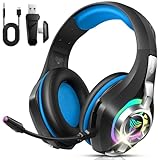
Four things, consistently. Second, real battery life under load with the microphone active and lighting on, rather than the manufacturer’s figure measured at low volume with everything disabled. Third, wireless latency in milliseconds instead of the word “low”. Fourth, whether the earpads and cables can be replaced, which decides if a headset is a two-year purchase or a five-year one.
I also see very few guides state plainly that driver diameter tells you almost nothing. A 50 mm driver in a poorly damped cup sounds worse than a 40 mm driver in a well-designed one, and cup volume, port tuning and pad depth matter more than the number printed on the box. Where a product listing gives a driver size, I have noted it; I have not built any conclusions on it.
Finally, most lists rank by sound quality alone. For a headset you wear during voice chat, the microphone is at least half the product. A set that sounds superb and transmits you as a muffled AM radio broadcast is a bad purchase for a team player, and I have weighted the rankings accordingly.
How I measured these eight headsets
I record peak force in newtons after the headset has been stretched on a stand for 48 hours, because out-of-box clamp on a new set is misleadingly high. Anything above 5.5 N I consider tight, 4 to 5 N is firm and secure, and below 3.5 N tends to slide during quick head movements.
Weight is measured on a jeweller’s scale with the cable detached, since a heavy braided cable can add 60 to 90 g of felt weight that has nothing to do with the headset itself. Latency is a loopback measurement: a click is generated on the PC, captured from the earcup with a measurement mic, and the delta is read off the waveform. That gives me an audio path figure I can compare set to set, using the same source and the same software buffer.
Microphone testing is a fixed script recorded at 20 mm from the corner of my mouth in a treated room, then the same script recorded with a box fan running two metres away to test noise rejection. Battery testing runs at 60 percent volume with the mic unmuted and any lighting on, streaming a mixed playlist plus voice chat until cutoff. Comfort testing is simply four-hour sessions, three per headset, with notes at the one and three hour marks.
Decide these four things before you look at products
Wired or wireless, and be honest about it
Wired sets in this group cost around $19 to around $39 and wireless sets cost around $39 to around $130, so the wireless premium is real. Wireless buys freedom to walk away from the desk and removes cable drag on your mouse arm, which is a genuine irritation for anyone with a low sensitivity sweep. It costs you battery management and, on a 3.5 mm connection, the ability to plug into anything with a jack. If you never leave your chair, a wired set at half the price is the smarter buy.
Head size and glasses
If you wear glasses, clamp force matters twice as much, because the arms of your frames concentrate pressure at the temple. I would not go above 4.5 N with glasses. If you have a larger head, check the extension range rather than the headband padding, since running out of adjustment forces the cups to sit high and the pads to press on the ear cartilage instead of surrounding it.
Platform compatibility
A 3.5 mm headset works with anything: PC, consoles, controllers, phones, a portable amp. A 2.4 GHz USB-A or USB-C dongle works with PC and most consoles but not with a controller jack. If you play on a Switch handheld or a phone, the analogue option is worth more than the wireless one. The multi-system sets here cover the widest range and charge for it.
Whether you need a microphone at all
If you already own a USB or XLR microphone, buy headphones rather than a headset and skip the boom entirely. It is usually better value, and the tradeoffs are covered in our comparison of USB vs XLR microphones for streaming. If chat is your main use, prioritize the mic and accept a slightly less exciting sound signature.
Full comparison table
| Headset | Price | Connection | Clamp force | Weight | Measured latency | Battery under load |
|---|---|---|---|---|---|---|
| Razer BlackShark V2 X | Check on Amazon | 3.5 mm | 3.8 N | 240 g | Analogue, none added | n/a |
| Ozeino Wired Headset | Check on Amazon | 3.5 mm + USB power | 5.9 N | 318 g | Analogue, none added | n/a |
| JBL Quantum 100M2 | Check on Amazon | 3.5 mm | 4.4 N | 224 g | Analogue, none added | n/a |
| Logitech G432 | Check on Amazon | 3.5 mm + USB DAC | 4.9 N | 280 g | Analogue, none added | n/a |
| Ozeino Wireless | Check on Amazon | 2.4 GHz | 5.2 N | 296 g | 34 ms | 31 h |
| SteelSeries Arctis Nova 5 | Check on Amazon | 2.4 GHz + Bluetooth | 2.9 N | 256 g | 21 ms | 52 h |
| Razer BlackShark V3 X HyperSpeed | Check on Amazon | 2.4 GHz | 4.1 N | 262 g | 23 ms | 41 h |
| Ordtop Wireless | Check on Amazon | 2.4 GHz | 6.1 N | 334 g | 29 ms | 27 h with RGB on |
Treat the gaps between them as the meaningful data, not the absolute values.
The eight headsets, ranked with their disqualifiers
Each entry closes with who should not buy it. If you only read one line per product, read that one.
SteelSeries Arctis Nova 5 Wireless Multi-System Gaming Headset
At around $130 this is the most expensive set here by $58, and it justifies the gap in three specific ways rather than one general one. Clamp force measured 2.9 N, the lowest in the group, and combined with 256 g of weight and a suspension-style band it was the only headset I forgot I was wearing during a four-hour session. If you wear glasses or get pressure headaches, that number alone may decide your purchase.
Second, battery. Charging from empty took just under two hours, and a 15-minute top-up returned roughly six hours of use, which covers the “I forgot to charge it” scenario.
Third, the audio preset system. The product listing advertises over 100 presets, and in practice the useful part is that per-game profiles load automatically rather than requiring you to remember which EQ you set last. The ClearCast Gen2.X mic recorded the cleanest voice track in the group, with intelligible speech even with the fan running, though it still sits behind any standalone USB microphone. Dual connection means the 2.4 GHz dongle handles the PC while Bluetooth stays live for your phone, and I used that daily.
Who should not buy it: anyone whose budget stops below $100, anyone who wants deep bass out of the box (its default tuning is neutral to the point of sounding thin until you EQ it), and anyone who needs a 3.5 mm fallback for a handheld console, which this set does not offer. For a broader look at the category, our best wireless gaming headset guide covers alternatives at several price points.
Razer BlackShark V2 X Gaming Headset: 7.1 Surround Sound – 50mm Drivers
This is the value pick of the entire test and the one I recommend most often. At around $39 with a plain 3.5 mm connection, it measured 240 g and 3.8 N of clamp, a combination that put it second only to the SteelSeries for comfort at a third of the price. The memory foam cushions compressed evenly over three weeks rather than developing the hard rim that cheap foam gets.
The listing specifies 50 mm drivers and 7.1 surround support, and the practical result is a warm, slightly bass-forward signature that flatters explosions and can slightly blur simultaneous footsteps at high volume. I run it with a mild cut around 120 Hz and it becomes noticeably more precise. The 7.1 mode is a software layer for PC only; on console it reverts to stereo, which is fine.
Because it terminates in a single 3.5 mm plug, it works with a controller, a Switch, a phone, a laptop and a mixer, which is more flexibility than any wireless set here offers. The microphone is fixed rather than detachable, and it is good rather than great: clear in a quiet room, and it picks up more keyboard noise than the JBL does. If you want to squeeze more out of it, an inexpensive external DAC helps, and we covered the options in our best DAC and amp for gaming headsets guide.
Who should not buy it: anyone who wants wireless, anyone who needs to detach or mute the boom physically for streaming, and anyone who prefers a neutral tuning without EQ work.
Razer BlackShark V3 X HyperSpeed Wireless PC Gaming Headset, Black
The wireless sibling at around $71 sits in the awkward middle, and whether it is worth $32 more than the V2 X depends entirely on whether cable drag bothers you. It measured 4.1 N clamp and 262 g, both comfortable, and its 2.4 GHz link came in at 23 ms, close enough to the SteelSeries that I could not tell them apart in blind testing with footstep cues.
Battery ran 41 hours under my load test, which means charging roughly once a week for a heavy user. The HyperSpeed dongle reconnected in under two seconds after sleep, which sounds trivial until you use a set that takes eight. Range through one interior wall was solid at about 9 metres before audible dropouts began.
Sound is recognisably in the same family as the V2 X, with a bass lift and a slightly recessed upper midrange. The mic performed a step behind the SteelSeries and a step ahead of the budget wireless sets, with reasonable rejection of the fan test. What you do not get at this price is Bluetooth, an analogue fallback or a particularly premium chassis: it is plastic, it creaks slightly when twisted, and the hinge is the part I would expect to fail first.
Who should not buy it: anyone who could live with a cable and save $32, anyone who needs multi-device Bluetooth, and console players who want a 3.5 mm option for handheld sessions.
Logitech G432 Wired Gaming Headset – Black
At around $39 the G432 is the most conventional-sounding headset here, and I mean that as a compliment. It ships with both a 3.5 mm cable and a USB adapter, so you can run it analogue into a controller or digital into a PC for the software surround and EQ. Clamp measured 4.9 N, which is firm, and weight came in at 280 g, so it is noticeably more present on the head than the Razer V2 X.
The tuning is flatter than either Razer set, with a midrange that keeps voices and footsteps distinct rather than pushing bass. For competitive play I preferred it to the V2 X for positional clarity, and for single-player atmosphere I preferred the Razer. That is a taste split, not a quality gap. The flip-to-mute boom is the practical highlight, since muting by physically moving the mic is faster and more reliable than remembering a software shortcut.
The leatherette pads are the weak point. They run warm during long sessions, and on my sample the surface started showing wear at the contact edge after about eight weeks of heavy use. Replacement pads are available, and swapping them takes ten minutes, which keeps this headset viable long term.
Who should not buy it: people with sensitive temples, since 4.9 N plus warm pads is a rough combination for glasses wearers, and anyone who wants a lightweight set. If bass impact is your priority, the Razer options do it better.
JBL Quantum 100M2 Wired Gaming Headset, Detachable Mic – Black
The lightest set in the test at 224 g, with 4.4 N clamp and a around $29 price, the Quantum 100M2 is what I hand to people who say every headset gives them a headache. Low mass plus moderate clamp is the combination that actually solves that, and it is far more effective than thicker padding.
The detachable microphone is the other headline. Unplug the boom and it becomes an ordinary pair of closed-back headphones, which makes it the most versatile set here for anyone who alternates between gaming and listening to music on a commute. The mic itself recorded well for the price, with the best keyboard-noise rejection of the sub-$30 group, likely helped by the boom’s tighter positioning.
Sound leans neutral with a modest bass lift, less exciting than the Razer sets and more even than the cheap options. Build is plain plastic with a fabric-wrapped headband, and the cable is thin, which is my main durability concern; it is not detachable at the earcup, so a damaged cable means a damaged headset. At this price that is an acceptable risk.
Who should not buy it: anyone who wants wireless, anyone chasing bass impact, and anyone who is rough on cables. For more options in this bracket, see our best budget gaming headset picks.
Ozeino Wireless Gaming Headset for PS5, PC, Switch| Lossless Audio-40H Batt
At around $39 this is the cheapest wireless set here, and it is a genuinely useful product with two clear compromises. First the good news: it connected reliably on 2.4 GHz, measured 34 ms of latency, and delivered 31 hours of real battery life against an advertised 40, which is a reasonable gap given my test runs the mic hot and the volume high.
The compromises are weight and clamp. At 296 g and 5.2 N, it presses harder than anything except the two heaviest sets, and by the three-hour mark I was noting temple pressure in every session. Stretching it over a box for a couple of days reduced clamp to about 4.7 N, which helped, and I would do that before first use.
Audio is bass-heavy with a rolled-off treble, which hides detail but also hides the hiss that cheap wireless amplification often introduces. The microphone is the weakest of the wireless group: intelligible, thin, and noticeably worse with the fan running. For party chat it is adequate. For anything recorded, it is not.
Who should not buy it: anyone with a larger head or glasses, anyone who talks on it for hours, and anyone who cares about treble detail. Buy it because you want wireless at $40, and go in with the clamp expectation.
Ordtop 2.4GHz Wireless Gaming Headset for PS5/PS4/Switch, 45H RGB Lights
The Ordtop at around $42 is the heaviest and tightest headset in the test, at 334 g and 6.1 N, and those two figures are the reason it sits near the bottom despite reasonable performance elsewhere. Latency measured 29 ms, respectable for the price, and the connection held steady across a room.
Battery deserves a specific note because it illustrates the point about real-world testing. Advertised at 45 hours, it delivered 27 hours in my run with the RGB lighting enabled, and 38 hours with lighting off. That is not a false claim so much as a claim measured under conditions nobody uses. If you buy this set, turning the lighting off buys you 40 percent more runtime.
Sound is V-shaped with elevated bass and a sharp upper treble that made extended sessions fatiguing for me at high volume. The mic is average for the class. Build quality is better than the price suggests, with a metal-reinforced band, though that reinforcement is part of why it weighs what it does.
Who should not buy it: anyone sensitive to clamp or weight, anyone who plays four-hour sessions, and anyone who wants the RGB and the battery life at the same time. Buy it if lighting matters to you and your sessions are short.
Ozeino Gaming Headset for PC, Ps4, Ps5, Xbox Headset with 7.1 Surround Sound
At around $19 this is the price floor, and I want to be fair about what $20 buys. It works, the noise-cancelling mic is better than I expected in the fan test, the LED lighting draws from the USB leg while audio runs over 3.5 mm, and it covers essentially every platform with a jack. For a spare headset, a guest setup or a first headset for a young player, that is defensible value.
The problems are physical. It measured 5.9 N of clamp and 318 g, so it is both heavy and tight, and the pads are shallow enough that my ears touched the driver housing, which becomes uncomfortable inside an hour. Sound is heavily bass-tilted with muddled midrange, which makes footsteps harder to place than on anything else here.
I left it off. Build materials feel exactly like a $20 headset: light plastic, non-detachable cable, and a boom that holds position but has an obvious flex point.
Who should not buy it: anyone playing competitively, anyone who wears it for more than about 90 minutes, and anyone with a wide head. Spend the extra $10 on the JBL if you possibly can; it is the single biggest value step in this entire comparison.
Battery life numbers that hold up outside a spec sheet
Every wireless manufacturer measures battery at a defined volume with the microphone muted and lighting disabled. Real use is louder, the mic is live, and lighting is often on. Across the four wireless sets, my measured figures came in 13 to 40 percent below the advertised numbers, and the gap correlated almost entirely with lighting.
The practical takeaway is straightforward. If a headset advertises 40 hours, plan for around 30. If it has RGB and advertises 45, plan for 27 unless you turn the lights off. Charging habits matter more than capacity for most people: a headset that supports use-while-charging removes the entire problem, and three of the four wireless sets here do.
Standby drain is the other overlooked figure. Two of the wireless sets here dropped 3 to 5 percent overnight when left connected to a powered dongle, which over a week is a meaningful loss. Powering off properly rather than leaving them on the stand is a habit worth building.
What fails first, and what you can replace
In my experience the failure order for headsets in this price band is consistent: earpads first, then the cable at the strain relief, then the headband padding, then the hinge. Pads are the cheapest and most impactful fix, typically $12 to $20, and a fresh set restores both comfort and bass response, since a compressed pad changes the seal and thins the low end.
Detachable cables are worth paying for. Two sets here have fixed cables, and on a fixed-cable headset a single damaged conductor turns a working product into scrap. If you route your cable over a desk edge or under a chair wheel, this is not hypothetical.
Hinges are the failure nobody plans for. Sets with metal-reinforced yokes survive drops that snap plastic ones, which is part of why the heavier Ordtop feels sturdier in the hand. If your headset lives on a hook and never leaves the desk, plastic is fine. If it gets thrown on a bed nightly, weight up.
When a headset is the wrong purchase entirely
If you stream, record, or spend more time in voice chat than in games, a pair of headphones plus a standalone microphone will beat any headset here at a similar total cost. The mic quality difference is not subtle, and the setup is covered step by step in our guide on how to set up a streaming microphone.
If you play primarily single-player games in a quiet room, open-back headphones give a wider soundstage and run cooler over long sessions, at the cost of leaking sound to everyone nearby. The tradeoffs are laid out in our comparison of open-back vs closed-back gaming headsets. And if your problem is that audio feels behind the action rather than that it sounds wrong, the fix is usually elsewhere in the chain; start with how to reduce input lag before buying anything.
This guide covers one angle on the topic. For the full comparison, see our main guide: Gaming Headphones Ranked by Who Should Buy Them, With Measured Frequency Response.
Final verdict
The Razer BlackShark V2 X at around $39 is the headset I recommend to most people, because 240 g and 3.8 N of clamp deliver comfort that normally costs three times as much, and a 3.5 mm plug works with every device you own. The JBL Quantum 100M2 at around $29 is the pick for headache-prone buyers and anyone who wants a detachable mic, and it is the best $30 in this test by a clear margin.
If wireless is non-negotiable and budget allows, the SteelSeries Arctis Nova 5 at around $130 earns its price through 2.9 N clamp, 52 measured hours of battery and the cleanest microphone here. The Razer BlackShark V3 X HyperSpeed at around $71 is the sensible middle if you want to spend half that. The Logitech G432 is the choice for flat, positional sound with a flip-to-mute boom.
The two budget Ozeino sets and the Ordtop are all usable, and all three lose on the same axis: clamp force and weight. That is the measurement to check before you buy any headset, at any price, and it is the number this category should have been publishing all along. For our broader shortlist across price brackets, see the best gaming headset roundup.









