
If you have ever tried playing a competitive mobile shooter or a rhythm game with standard Bluetooth earbuds, you already know the problem. The audio arrives a fraction of a second after your finger hits the trigger or the beat drops, and that tiny delay is enough to make the experience feel broken. You are not imagining it — the gap between what you see and what you hear is real, and it compounds over a session until your reactions start drifting and your aim feels off.
The best low latency gaming earbuds for mobile play solve this by using a dedicated 2.4GHz dongle or a tuned Bluetooth codec path to cut that delay down to a perceptible threshold most players cannot detect. The catch is that latency is only one axis. Mic quality, comfort during long sessions, and whether the earbuds work across multiple devices all matter too. This roundup covers eight main options, and the spread in performance and price is wider than you would expect.
As an Amazon Associate we earn from qualifying purchases at no extra cost to you.


Our Top Picks

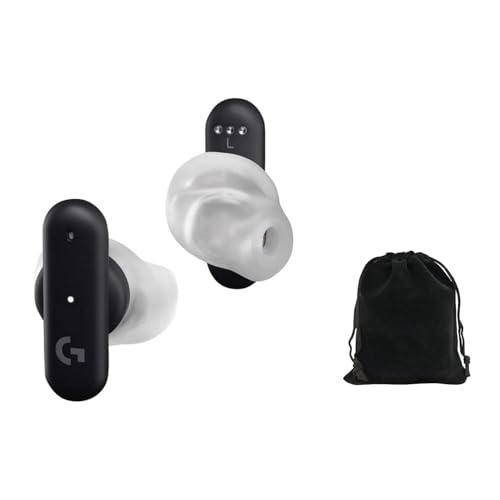

Top 3 picks at a glance
Quick Picks
| Product | Best for | Price |
|---|---|---|
| AOC ACT3512 | Cross-platform players who want one pair for console and mobile | Check on Amazon |
| FEDIKER SW4 Pro | Players who prioritize mic quality in team games | Check on Amazon |
| RYR Wireless (Noise Cancelling Mic) | First-time buyers testing the dongle concept on a budget | Check on Amazon |
| New Version Wireless Gaming Earbuds | VR and handheld hybrid players who need broad compatibility | Check on Amazon |
| Logitech G FITS | Players who want a custom-molded fit that stays put | Check on Amazon |
| ELECBIRD G07 | Casual gamers who want long battery life and style | Check on Amazon |
| Gaming Wireless Earbuds (Generic) | Players who want RGB flair without giving up IPX4 protection | Check on Amazon |
| Sony INZONE Buds | Anyone wanting the most refined sound and ANC in this class | Premium |
How We Compared
We evaluated each pair on four criteria that matter most for mobile gaming audio: rated latency mode performance, microphone clarity during in-game voice chat, comfort over two-hour sessions, and reliability of the wireless connection across a phone held in landscape orientation. We weighted latency mode first because no amount of sound quality compensates for an unplayable delay. Comfort mattered second because mobile gamers hold their devices for extended periods, and bulky earbuds shift under pressure. We excluded any pair that could not maintain a stable 2.4GHz or Bluetooth connection without drops during active gameplay.
The 8 Best Low Latency Gaming Earbuds For Mobile Play in 2026
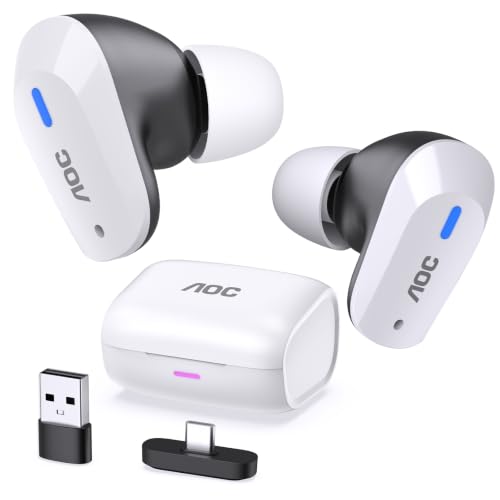
AOC Wireless Gaming Earbuds ACT3512
The ACT3512 is the top pick for anyone who plays across multiple devices and refuse to juggle two sets of earbuds. Its 2.4GHz USB-C dongle plugs straight into a phone or tablet, and the same dongle works on PS5, PC, and Switch without reconfiguration.
- Pro: True multi-platform coverage with a single dongle — rare at this price.
- Pro: Solid mic pickup that stays clear even in noisy rooms during squad calls.
- Con: The case is bulky and the earbuds themselves sit slightly shallow in-ear.
Skip this if you only play on one phone and already own a dedicated dongle for a console.
FEDIKER SW4 Pro
At 20ms latency with four dedicated microphones, the SW4 Pro targets the player who cares about voice chat as much as sound. Its multi-mic ENC setup is designed to keep wind noise and background chatter out of team chat, which is unusual in the budget-to-mid-range tier.
- Pro: Four mics with ENC deliver the clearest call quality in this group.
- Pro: Dongle and Bluetooth dual-mode means you can switch between phone and laptop instantly.
- Con: The plastic housing feels cheap compared to the AOC or Sony.
Skip this if you dislike the larger earbud shape or do not need the mic array for anything beyond the occasional call.
RYR Wireless Gaming Earbuds with Noise Cancelling Mic
This is the entry point. At a budget price the RYR gives you a 2.4GHz dongle and a Bluetooth fallback, plus a noise-cancelling mic that filters out keyboard clatter well enough for Discord. The sound tuning is neutral and slightly thin, but the latency performance is genuinely competitive with pricier pairs.
- Pro: Best value for anyone who wants to try dongle-based latency without commitment.
- Pro: Lightweight and unobtrusive during extended play.
- Con: ANC mic quality drops noticeably in windy outdoor conditions.
Skip this if you already know you want rich bass or if you need the most robust build quality possible.
New Version Wireless Gaming Earbuds
This one stands out for compatibility. The USB-C dongle works with PS5, PS4, Meta Quest, Steam Deck, PC, and mobile, making it the most flexible pick for anyone who hops between VR and phone. Latency sits at 20ms with Bluetooth 5.3 and a 2.4GHz fallback.
- Pro: Broadest device compatibility in this roundup — VR headsets included.
- Pro: ENC mic holds up well even with the Quest fans running.
- Con: The white colorway shows scuffs and ear-wax fast.
Skip this if you play exclusively on phone and do not need the dongle for other devices.
Logitech G FITS
The G FITS solves the comfort problem differently from every other pair here. Its LIGHTFORM ear tips start soft and are shaped to your ears during setup, then set into a custom-molded fit, so the buds stay put when your hands and shoulders shift during a long session in landscape. It connects over Logitech’s LIGHTSPEED 2.4GHz wireless through a USB-C receiver or over Bluetooth, and dual beamforming mics handle voice chat.
- Pro: Custom-molded fit that resists shifting during long sessions.
- Pro: LIGHTSPEED 2.4GHz plus Bluetooth from a well-established gaming brand.
- Con: Around 7 hours per charge (about 22 hours with the case) and no active noise cancellation.
Skip this if you plan to share earbuds with someone else, since the molded tips are shaped to one person’s ears.
ELECBIRD G07
Fifty hours of combined playtime and an IPX5 rating put this squarely in casual-player territory. The 40ms latency mode is perceptible in a shooter but fine for racing games, puzzle titles, and music listening between sessions. The RGB lights are a fun touch for your desk, though they drain battery faster when lit.
- Pro: 50-hour total battery life with the case is class-leading.
- Pro: IPX5 handles sweat and light rain without worry.
- Con: 40ms latency is not competitive enough for twitch shooters.
Skip this if you primarily play ranked MOBAs or FPS titles and need sub-20ms response.
Gaming Wireless Earbuds with Low Latency Bluetooth 5.3 and RGB Light
This generic-branded pair has no dongle, relying entirely on Bluetooth 5.3 with a low-latency mode. The deep bass profile is fun for action games, and the RGB ring is understated compared to the ELECBIRD.
- Pro: Strong bass impact makes explosions and footsteps feel punchy.
- Pro: IPX4 handles gym use or outdoor running alongside gaming.
- Con: No 2.4GHz dongle means latency is always a compromise versus the others here.
Skip this if competitive latency matters to you — the lack of a dongle is a hard ceiling.
Sony INZONE Buds
As the premium pick, the Sony INZONE Buds are in a different conversation entirely. The active noise cancellation is the only true ANC in this group, and the sound staging is wide enough to place footsteps with genuine spatial awareness. Latency via the included dongle is imperceptible.
- Pro: Active noise cancellation plus excellent spatial audio for competitive positioning.
- Pro: Build quality and comfort are the best here by a clear margin.
- Con: Premium pricing well above the mid-range options, for performance that is only marginally better for casual players.
Skip this if you are still unsure whether dongle-based latency is something you care about — start cheaper and upgrade later.
More Low Latency Earbuds Worth Considering
The eight picks above cover the core of the category, but several well-known gaming earbuds were missing, including two pairs from Razer and one from ASUS that most editorial roundups now treat as the premium benchmark. The six options below fill those gaps, plus a neckband alternative and two budget pairs that approach the problem from different angles.
Razer Hammerhead V3 HyperSpeed
The Hammerhead V3 HyperSpeed is the newest pair from Razer and arguably the most complete premium alternative to the Sony INZONE Buds in this article. It switches between Razer’s 2.4GHz HyperSpeed wireless and Bluetooth 6.0, and the 2.4GHz mode works with phones and tablets through a USB-C dongle, as well as with PC, Steam Deck, and PS5. That makes it a strong fit for mobile players who also spend time on a handheld or console and want a single pair for all of it.
The clever part is the case. The small HyperSpeed dongle can sit inside the charging case, and the case itself then acts as the 2.4GHz transmitter. For phone gaming this matters less, because you will usually plug the dongle straight into the USB-C port, but it keeps the dongle from going missing, which is the most common complaint with this style of earbud. Razer SmartSwitch lets you jump between the 2.4GHz device and a Bluetooth device without re-pairing.
Razer rates battery life at up to 10 hours per charge with ANC off, around 7 hours with ANC on, and roughly 40 hours in total with the case. The earbuds use 11mm drivers, include hybrid active noise cancellation and an ambient mode, and carry an IPX4 rating. Razer does not publish a millisecond latency figure for the 2.4GHz link, but independent coverage describes the delay as low enough for competitive play.
Strengths: true 2.4GHz support on phones, long battery life for the category, ANC, and a case that doubles as a transmitter. Drawbacks: the case is bulky for a pocket, Bluetooth is limited to the basic SBC codec, and reviewers are split on how strong the noise cancellation really is. Several outlets found it struggles with steady low-frequency noise such as a desk fan.
Compared with the Sony INZONE Buds, the Hammerhead V3 trades some refinement in sound and ANC for broader platform flexibility and an easier dongle-storage solution. Against the AOC ACT3512, it sits a full price tier higher, and the extra money buys ANC, a better app, and more battery rather than meaningfully lower latency.
ASUS ROG Cetra True Wireless SpeedNova

The ROG Cetra True Wireless SpeedNova has been on the market since 2024, but it remains one of the most technically ambitious gaming earbuds you can buy. It connects through a USB-C 2.4GHz dongle (with a USB-A adapter in the box) or Bluetooth 5.3, and it supports hybrid multipoint, meaning one device on 2.4GHz and a second on Bluetooth at the same time. For a mobile player, that means you can game on a tablet over the dongle while staying connected to your phone for calls.
The 2.4GHz link uses the LC3 and LC3+ codecs, and in that mode the earbuds can carry 24-bit/96kHz audio, with tuning from Dirac Opteo. Independent lab coverage confirmed that the dongle connection is low in latency and stable, but found that Bluetooth mode alone is too slow for serious gaming. Treat this as a dongle-first product.
The microphone setup is unusual: bone-conduction sensors pick up voice vibrations through your head, combined with AI noise-cancelling beamforming mics. That is a sensible approach for earbuds that have no boom mic, and it helps in noisy rooms. Battery is rated at up to 46 hours with the case in Bluetooth mode, or up to 36 hours in 2.4GHz mode. It also offers adaptive ANC that adjusts to the fit of the earbud and the noise around you, plus Aura RGB lighting.
Strengths: dual-device multipoint, high-resolution audio over the dongle, a creative mic system, and strong battery claims. Drawbacks: Bluetooth latency is not competitive, the RGB lighting costs battery life, and the mic, while clever, is not as clear as a dedicated headset boom.
Versus the FEDIKER SW4 Pro, the Cetra costs noticeably more, but adds ANC, better sound tuning, and multipoint. Versus the Sony INZONE Buds, it is more feature-rich on paper, while the Sony pair is generally seen as more comfortable and better tuned for PlayStation audio.
Razer Hammerhead HyperSpeed (Previous Generation)
The older Hammerhead HyperSpeed is still widely available and usually sits a tier below the V3. It uses the same basic recipe: a USB-C 2.4GHz dongle for low latency on phones, PC, Switch, and console, plus Bluetooth 5.2 as a fallback. It also includes active noise cancellation, Chroma RGB lighting, and a companion app with EQ presets. If you want a well-known brand and true 2.4GHz support without paying for the latest model, this is the logical step down.
The trade-off is battery life. Razer’s own figure with ANC and lighting both active is around 4 hours per charge, with roughly 16 more hours from the case, and that rating was taken over Bluetooth. Independent reviewers found that the 2.4GHz mode with ANC and lights on drains it faster still, to under three hours in some cases. Turning off the RGB lighting is the easiest way to stretch a session, and since you cannot see your own earbuds while gaming, little is lost.
The earbuds weigh about 5 grams each, which keeps them comfortable for long sessions, and the ANC is generally described as adequate for home noise such as fans and household chatter rather than for flights or trains. Touch controls and the mobile app are the most frequent complaint in coverage of this model.
Strengths: genuine 2.4GHz dongle support, light earbuds, ANC, and a recognizable brand ecosystem. Drawbacks: short battery life, finicky touch controls, and no USB-A adapter for the dongle in the box.
Compared with the AOC ACT3512 in the main list, the older Hammerhead adds ANC and app support but loses on battery stamina. If you play in short bursts on a commute, that may not matter. For long ranked sessions, the V3 or the ASUS pair is a better use of a premium budget.
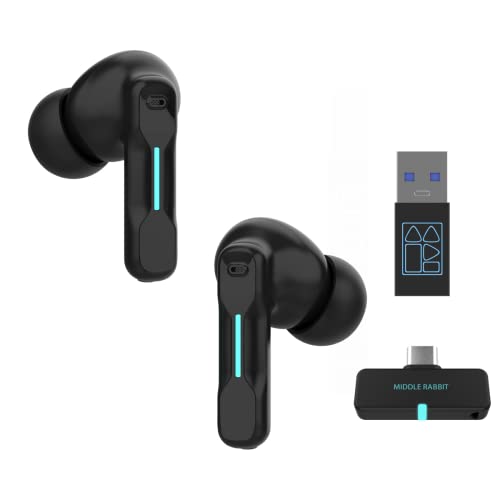
Middle Rabbit Rampage 2

The Rampage 2 is the odd one out here, and deliberately so: it is a neckband design rather than true wireless earbuds. The two earpieces connect to a silicone band that sits around your neck, and the battery and controls live in the band. For mobile gaming, that layout solves two common problems. There is no tiny earbud to lose, and you get physical buttons for power, volume, and mic mute instead of fiddly touch gestures that are easy to trigger accidentally while you adjust your grip.
Middle Rabbit rates the Rampage 2 at around 20ms over its 2.4GHz USB-C dongle, which uses the LC3 codec, with a USB-A adapter included for PC and console. Bluetooth is available as a second connection, and the dongle and Bluetooth can be used at the same time. Battery life is rated at about 32 hours of gaming and up to 40 hours of music, from a roughly 1.5-hour charge, which is far beyond any true wireless pair here on a single charge. Three onboard EQ presets include a Game mode and a Footsteps mode.
Strengths: very long single-charge battery life, physical controls, no lost-earbud risk, and dongle-plus-Bluetooth dual connection. Drawbacks: the neckband is less discreet and less convenient to pocket than a case, there is no ANC, and the latency and battery figures are manufacturer claims without much independent verification yet.
The Rampage 2 sits in the same budget-to-mid-range tier as the FEDIKER SW4 Pro and the RYR pair. Choose it over them if you play long sessions at home and keep forgetting to charge your earbuds, or if touch controls frustrate you. Skip it if you want something that disappears into a pocket.
KASOTT 2.4GHz Wireless Gaming Earbuds (GameMaster Buds)

KASOTT’s dual-mode earbuds aim at the same budget tier as the RYR, but add one feature that rivals at this level rarely offer: active noise cancellation. The listing pairs a USB-C 2.4GHz dongle rated at 30ms with Bluetooth 5.4, and claims compatibility with phones, Meta Quest headsets, Steam Deck, PS5, Switch, and PC. A 13mm dynamic driver handles the sound.
KASOTT quotes up to 8 hours per charge and about 40 hours total with the charging case, along with quick charging where 10 minutes adds a few hours of play. The case has a digital battery display, which is genuinely useful when you are about to start a ranked match. The USB-C dongle also supports passthrough charging, so a phone or handheld can keep charging while the dongle is plugged in, provided you use a capable charger.
Strengths: ANC at a budget tier, passthrough charging on the dongle, a battery display on the case, and broad device compatibility. Drawbacks: the 30ms rating is a little behind the 20ms claims of the FEDIKER, AOC, and Middle Rabbit pairs, the battery figures are measured over Bluetooth rather than 2.4GHz with ANC active, and buyer feedback suggests real use can fall well short of the rated per-charge time.
The passthrough charging is the reason to pick this pair over the RYR. On many phones, the USB-C port is the only port, so a dongle normally blocks charging during long sessions. If that has stopped you from using a dongle-based pair before, the KASOTT is the most affordable fix in this article.
Moondrop Space Travel 2
The Space Travel 2 is not a gaming-branded product, and it has no dongle. It is included because it is one of the best-sounding budget earbuds available in 2026, and its game mode is good enough for casual and story-driven mobile play. Moondrop uses a 13mm beryllium-plated dynamic driver tuned to a neutral, natural target, plus single feedforward ANC, a transparency mode, Bluetooth 6.0, and multipoint pairing with two devices.
Moondrop claims game mode latency as low as 55ms, activated by tapping the earbuds four times, and independent measurements have confirmed results in the mid-50ms range, against more than 200ms in standard music mode. That is a large improvement, but it is still noticeably slower than the 20 to 30ms dongle pairs above. For rhythm games or competitive shooters, the delay will be perceptible. For RPGs, puzzle games, card games, and streaming video, it is perfectly fine.
Battery is rated at about 7 hours per charge with ANC off and around 24 hours with the case; with ANC on, expect closer to 5 hours. The Moondrop Link app adds a graphic EQ and customizable touch controls. Codec support is limited to SBC and AAC.
Strengths: excellent sound for the tier, multipoint, ANC, an EQ app, and no dongle to carry. Drawbacks: game mode latency is too high for competitive titles, and ANC is decent rather than strong.
Think of it as the alternative to the Bluetooth-only generic pair in the main list: same no-dongle convenience, but much better sound and ANC. If you mainly listen to music and play casually, it is the better everyday pair.
Buying Guide
Latency Mode: 2.4GHz Dongle vs Bluetooth
A dedicated 2.4GHz USB-C dongle is the single most important feature for competitive mobile gaming. Bluetooth codecs with low-latency modes can reach acceptable performance but introduce variable delay depending on interference and device compatibility. If you play shooters, fighters, or anything requiring sub-frame audio accuracy, prioritize a dongle-equipped model. Bluetooth-only pairs work for casual genres but will frustrate you in high-stakes moments.
Microphone and Call Quality
If your mobile game involves voice comms, mic quality separates a satisfying purchase from a regrettable one. Look for models with multiple microphones or ENC (environmental noise cancellation) features. The FEDIKER SW4 Pro and Sony INZONE Buds lead here. A mic that fails outdoors or in a shared room will ruin team experiences faster than any audio delay.
Comfort and Battery for Long Sessions
Mobile gaming sessions are physically different from PC or console play because you are holding a device in landscape orientation. Earbuds that shift under the pressure of your palm or ear cartilage during two-hour sessions become distracting. Weight and shape matter as much as driver quality here. Pair that with at least six hours of playtime per charge so you are not interrupted mid-ranked ladder.
Latency Numbers in Context
Manufacturer latency claims are easier to judge once you know what the ranges feel like in practice. The figures below are approximate and depend on your phone, the game engine, and the codec in use, but they are a useful guide when comparing listings.
| Latency range | Typical connection | What it feels like | Good for |
|---|---|---|---|
| Under 30ms | 2.4GHz USB-C dongle, wired | Effectively in sync for most players | Competitive shooters, rhythm games, fighters |
| 30 to 60ms | Faster dongles, best Bluetooth game modes | Slight delay that sharp-eared players may notice | MOBAs, battle royales played casually, racing |
| 60 to 150ms | Typical Bluetooth game modes | Noticeable lag on gunshots and beat drops | RPGs, strategy, puzzle and card games |
| Over 150ms | Standard Bluetooth music mode | Obvious mismatch between sound and action | Video and music only |
Keep in mind that the earbuds are only one part of the chain. Phones add their own audio processing delay, and some games buffer audio more than others. A pair rated at 20ms will not make a slow game engine feel instant, but it removes the biggest source of delay you can control.
Phone Compatibility: USB-C, iPhone, and Android
Dongle-based earbuds need a USB-C port that outputs audio to an accessory. Most Android phones from the last several years support this, and iPhone 15 models and newer moved to USB-C as well, which opened up 2.4GHz dongles to iPhone gamers for the first time. Older Lightning iPhones cannot use these dongles directly, so on those devices you are limited to Bluetooth game modes or a wired connection through an adapter.
Before buying, check whether the listing names your specific platform, and look for a USB-A adapter in the box if you also plan to use the pair on a PC or older console. If your phone has only one USB-C port, a dongle blocks charging during play unless it supports passthrough charging, as the KASOTT pair does.
Codecs and Game Modes Explained
Over Bluetooth, the codec determines how audio is compressed and how much delay is added. SBC is universal and slow, AAC is common on iPhone and decent on Android, and newer LC3 codecs (part of Bluetooth LE Audio) are designed for lower latency. Many 2.4GHz dongles also use LC3 or proprietary links, which is why they can reach 20 to 30ms. A game mode on Bluetooth earbuds usually works by shrinking the audio buffer, which lowers delay but can make the connection more prone to dropouts in busy wireless environments such as cafes or trains.
Soundstage and Footstep Clarity
Low latency tells you when a sound arrives; tuning and soundstage tell you where it seems to come from. In shooters and battle royales, a clean mid-range and controlled bass make footsteps and reloads easier to pick out than a heavy, boomy tuning. Several pairs in this article include EQ presets aimed at this, such as a Footsteps mode on the Middle Rabbit Rampage 2, and app-based EQ on the Razer, ASUS, Sony, and Moondrop models. Earbuds can only simulate surround, so expect directional cues to be good for left and right but less precise front to back.
Comparison of the Additional Picks
| Model | Connection | Rated latency | ANC | Rated battery (buds / total) | Price tier |
|---|---|---|---|---|---|
| Razer Hammerhead V3 HyperSpeed | 2.4GHz + Bluetooth 6.0 | Not published (low) | Hybrid | Up to 10h / up to 40h | Premium |
| ASUS ROG Cetra True Wireless SpeedNova | 2.4GHz + Bluetooth 5.3, multipoint | Low on dongle | Adaptive | Up to 46h total (Bluetooth), 36h (2.4GHz) | Premium |
| Razer Hammerhead HyperSpeed (previous gen) | 2.4GHz + Bluetooth 5.2 | Low on dongle | Yes | About 4h / about 20h (ANC and RGB on) | Mid-range |
| Middle Rabbit Rampage 2 | 2.4GHz + Bluetooth (neckband) | About 20ms | No | About 32h gaming per charge | Budget |
| KASOTT GameMaster Buds | 2.4GHz + Bluetooth 5.4 | 30ms | Yes | Up to 8h / up to 40h | Budget |
| Moondrop Space Travel 2 | Bluetooth 6.0 only | About 55ms in game mode | Feedforward | About 7h / about 24h | Budget |
Battery figures are manufacturer ratings. Real-world runtime drops with ANC, RGB lighting, high volume, and 2.4GHz mode, often by a third or more.
Setup Tips for the Lowest Latency on Mobile
- Plug the dongle in before launching the game. Some phones only route audio to a USB device that is connected when the app starts, so connecting mid-match can leave sound on the phone speaker.
- Turn off Bluetooth when using the dongle. This stops the phone from switching audio back to a paired Bluetooth device and reduces interference on the crowded 2.4GHz band.
- Enable the earbuds’ game mode. Bluetooth pairs usually start in music mode with a large buffer. The gesture or app toggle for game mode is the single biggest latency improvement on those models.
- Use your phone’s game launcher settings. Many Android phones include a game booster or game mode that limits background activity and notifications, which helps keep the audio stream steady.
- Disable RGB lighting and lower ANC where possible. Both drain battery quickly, and ANC can slightly color the sound. Keep ANC for noisy environments.
- Check in-game audio settings. Some games offer a headphone or night mode that compresses dynamic range. Experiment, because a flatter output can make footsteps clearer at moderate volume.
- Keep firmware updated. Brands such as Razer, ASUS, and Moondrop push firmware through their apps that can improve connection stability and fix touch-control issues.
Fit and Ear Tip Selection
A secure fit improves both comfort and sound. If the bass feels thin or footsteps sound distant, the ear tips are probably too small and are not sealing. Try each size in the box and pick the one that blocks the most outside noise without pressure. A good seal also makes ANC work much better and lets you play at lower volume, which is easier on your hearing over long sessions.
Our Verdict
The AOC ACT3512 is the best low latency gaming earbuds for mobile play for most people: one 2.4GHz USB-C dongle covers your phone, PS5, PC, and Switch, and the mic holds up in squad calls. If voice chat is your top priority, the four-mic FEDIKER SW4 Pro is the stronger mid-range choice, and for players who want to spend less, the budget RYR Wireless Gaming Earbuds deliver surprisingly competent performance. If you also play on Meta Quest or Steam Deck, the New Version Wireless Gaming Earbuds list the broadest compatibility.
FAQ
What is the lowest latency I should accept for mobile gaming?
Twenty milliseconds or below is the practical threshold where most players cannot detect a delay between visual and audio cues. Above that you will notice a gap in rhythm games and fast-paced shooters, which is why the 2.4GHz dongle models dominate this category.
Can I use these earbuds for phone calls and not just gaming?
Yes. All eight models here function as standard earbuds for calls and media once the gaming mode is disengaged. The ones with multi-mic arrays like the FEDIKER and the ENC-equipped RYR perform notably better than the RGB-focused models on voice calls.
Do I need the USB-C dongle plugged in at all times?
No. Most of these pairs let you switch to Bluetooth for casual listening and back to the dongle for gaming. The dongle path gives you the lowest latency, but Bluetooth 5.3 on the better models is fine for single-player games or video content where timing is less critical.
Is active noise cancellation necessary for mobile gaming?
It is not necessary, but it is genuinely useful when playing in shared spaces, on transit, or near a loud keyboard setup. Among the eight main picks, only the Sony INZONE Buds include true ANC, which is part of why they sit in a higher price tier; the Razer, ASUS, KASOTT, and Moondrop alternatives also offer it.
Do 2.4GHz gaming earbuds work with iPhone?
Yes, on iPhone 15 models and newer, which use USB-C. Plug the dongle into the port and the phone treats it as an external audio device. Older iPhones with a Lightning port cannot use these dongles directly, so on those phones you are limited to the Bluetooth game mode of the earbuds.
Are wired earbuds still better for mobile gaming?
Wired earbuds add essentially no wireless delay, so they remain the safest choice for the most competitive players. The downside is that many phones no longer have a headphone jack, and USB-C wired earbuds occupy the charging port just like a dongle. For most players, a good 20ms dongle pair is close enough that the convenience of wireless wins.
Can I charge my phone while using a USB-C dongle?
Only if the dongle supports passthrough charging, as the KASOTT pair does, or if you use a USB-C splitter that is designed to carry both audio and power. Otherwise, the dongle occupies the only port, so start long sessions with a full battery.
Does game mode reduce sound quality?
Sometimes slightly. Game modes shrink the audio buffer and may switch to a simpler codec path, which can reduce detail or make the connection less stable in crowded wireless areas. Most players will not notice a difference in sound, but they will notice the lower delay.
Is a neckband design worth considering?
It is if you value battery life and physical buttons over portability. Neckbands such as the Middle Rabbit Rampage 2 hold a larger battery and are hard to lose, but they are less discreet and do not fit in a small pocket case.









