The best desk for gaming setup depends heavily on how much surface area and storage your specific peripherals and PC actually need, and among the eight desks we compared, the ODK 53″ L-Shaped with hutch and headphone hook offers the strongest balance of size, organization, and price at around $99. Prices in this roundup span from around $66 to around $120, and the real differences come down to shape, size, and how much built-in organization each desk provides beyond bare surface area.
Every desk here includes LED lighting and at least one power outlet as now-standard gaming desk features, so we focused our comparison on the factors that actually vary meaningfully: shape, dimensions, storage, and cable management design.
Our Top Picks
 PRAISUN L Shaped Gaming Desk with LED Lights51.2 Inch39.4 x 51.2 x 29.5 inches38.1 PoundsCheck on Amazon
 ODK 53" L Shaped Gaming Desk with Shelves53 Inch53.15 x 39.37 x 58.27 inches46.1 PoundsCheck on Amazon


Top 3 picks at a glance


Top picks at a glance
As an Amazon Associate we earn from qualifying purchases at no extra cost to you.


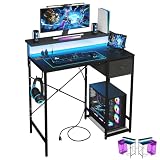

| Model | Key spec | Price | Best for |
|---|---|---|---|
| AODK L Shaped | LED light, power outlet | Check on Amazon | Standard L-shape with lighting |
| AODK w/PC Showcase | 59″ reversible, RGB LED, PC stand | Check on Amazon | Showing off your PC build |
| PRAISUN L Shaped | LED lights, power outlets | Check on Amazon | Budget L-shape |
| ODK 53″ (Hutch) | Hutch, headphone hook | Check on Amazon | Best overall value |
| Lufeiya | 40″, monitor stand, USB charging | Check on Amazon | Cheapest, compact option |
| ODK 53″ (Shelves) | Shelves, LED, outlets | Check on Amazon | Most storage per dollar |
| X-cosrack | 33.5″ small, CPU stand, drawer | Check on Amazon | Compact with hidden storage |
| Korfile | 48″, carbon fiber finish | Check on Amazon | Mid-size, distinctive finish |
ODK 53″ L Shaped Gaming Desk (with Hutch and Headphone Hook)
This ODK desk pairs a full 53-inch L-shaped surface with a hutch — an elevated shelf section above the main desk surface — and a built-in headphone hook, for around $99. The L-shape gives genuine dual-zone functionality: one wing for your primary monitor and keyboard setup, the other for a secondary monitor, laptop, or general workspace, which is a real advantage over single-surface desks in this roundup for anyone running multiple displays.
The hutch adds usable vertical storage without consuming additional floor footprint, useful for speakers, a secondary monitor riser, or general desk clutter that would otherwise crowd your primary work surface. The headphone hook is a small but genuinely practical touch — a dedicated spot for a gaming headset keeps it accessible without cluttering the desk surface or risking damage from being set down carelessly.
At around $99, this sits in the middle of this roundup’s price range while offering the most complete organizational feature set — L-shape, hutch, and headphone hook together — of any desk here at or below this price point.
Who it’s for: buyers who want a full-size L-shaped desk with genuine organizational features (hutch, headphone hook) without paying for the priciest AODK options.
Pros
- 53-inch L-shape provides real dual-zone workspace
- Hutch adds vertical storage without extra floor footprint
- Headphone hook is a small but genuinely practical inclusion
Cons
- No RGB LED specified, unlike the AODK options in this roundup
- No specific weight capacity listed
- L-shaped desks require more floor space than compact single-surface options
AODK Gaming Desk with PC Showcase Stand (59″, Reversible, RGB LED)
The largest and most expensive desk in this roundup at around $120, this AODK model includes a distinctive feature none of the other seven listings offer: a dedicated PC showcase stand, designed to display your tower — ideally one with a tempered glass side panel and RGB lighting — as a visible part of your setup rather than tucking it away on the floor. At 59 inches, this is also the widest surface area in the entire comparison.
The reversible design allows the desk to be configured for either a left- or right-hand L-shape orientation, adapting to different room layouts and personal preferences without requiring a completely different product purchase. Combined with RGB LED lighting built into the desk itself, this is clearly positioned as a showpiece setup centerpiece rather than a purely functional workspace.
At around $120, this is $10 more than the standard AODK L-Shaped desk below despite the shared brand, with the price difference buying the PC showcase stand, larger 59-inch surface, reversible configuration, and RGB (versus standard LED) lighting.
Who it’s for: buyers who specifically want to showcase their PC build as part of their desk setup and have the room for the largest desk in this roundup.
Pros
- Unique PC showcase stand not found on any other desk in this roundup
- Largest surface area at 59 inches
- Reversible design adapts to different room layouts
Cons
- Most expensive desk in this entire roundup
- PC showcase stand only adds visual value if your tower has a glass panel worth displaying
- Larger footprint requires more available floor space than compact alternatives
AODK L Shaped Desk (LED Light, Power Outlet)
The standard AODK L-shaped desk shares its parent brand with the PC showcase model above but drops the showcase stand, reversibility, and RGB lighting in favor of standard LED lighting and a power outlet, for around $110. This is a more conventional L-shaped gaming desk without the specialty features that define its pricier sibling.
At around $110, this is only $10 less than the PC showcase variant, making the value case for choosing this over its sibling somewhat weak unless you specifically don’t want or need the showcase stand and prefer standard LED over RGB lighting. The built-in power outlet reduces cable clutter reaching to a floor-level strip, a genuine convenience shared with several other desks in this roundup at lower price points.
Without the PC showcase stand’s differentiating value, buyers should closely compare this against the ODK 53″ hutch model below, which offers a full L-shape with more distinct organizational features for roughly $10 less.
Who it’s for: buyers who want AODK’s brand and L-shape design but don’t need the pricier sibling’s PC showcase stand or RGB lighting.
Pros
- Standard L-shape design provides dual-zone workspace
- Built-in power outlet reduces cable clutter
- LED lighting included as a standard feature
Cons
- Only $10 cheaper than the more feature-rich PC showcase variant from the same brand
- No hutch, shelves, or headphone hook found on some competitors at similar or lower prices
- No specific dimensions given beyond the general L-shape descriptor
PRAISUN L Shaped Gaming Desk (LED Lights, Power Outlets)
PRAISUN offers a similar L-shaped format to the AODK options above, with LED lights and power outlets, but at a notably lower around $89 — roughly $20 less than the standard AODK L-shape and $10 less than the ODK 53″ hutch model. This makes it the most affordable full L-shaped desk in this entire roundup.
Without more granular dimension specifications in this listing, it’s harder to confirm exactly how this compares in surface area to the explicitly-sized ODK 53″ or AODK 59″ models, though the L-shape format itself should provide meaningfully more usable surface than the compact single-surface desks later in this roundup. PRAISUN is a less established brand than some competitors here, worth factoring into expectations around build quality consistency.
At around $89, this represents the best entry point specifically for buyers who want L-shape functionality without paying the roughly $20-30 premium the AODK and ODK L-shaped alternatives command in this roundup.
Who it’s for: budget-conscious buyers who specifically want L-shape desk functionality at the lowest price in this roundup.
Pros
- Cheapest L-shaped desk in this entire roundup
- Includes both LED lighting and power outlets as standard features
- L-shape provides meaningfully more surface area than compact alternatives
Cons
- No specific dimensions given, unlike the ODK and AODK listings
- Less established brand than ODK or AODK
- No hutch, shelves, or additional storage features specified
ODK 53″ L Shaped Gaming Desk (with Shelves, LED, Outlets)
This second ODK listing shares the same 53-inch L-shaped dimensions as the hutch model above but swaps the hutch and headphone hook for open shelving, at a lower around $89 — a dollar less than the PRAISUN and $10 less than its own hutch-equipped sibling. Open shelves offer different organizational value than a hutch: more accessible, varied storage rather than a single elevated surface.
Shelves are particularly useful for items you want visible and quickly accessible — game cases, controllers, small speakers, or decorative items — compared to the hutch’s more singular elevated-surface approach. At the same 53-inch L-shape dimensions as its sibling, the core workspace functionality should be identical, with the storage style being the primary differentiator between the two ODK listings in this roundup.
At around $89, this is a dollar cheaper than the PRAISUN while offering confirmed 53-inch L-shape dimensions the PRAISUN listing doesn’t specify, making it arguably the stronger value pick between the two similarly-priced options.
Who it’s for: buyers who want the same ODK 53″ L-shape as the hutch model but prefer open shelf storage over an elevated hutch surface.
Pros
- Same confirmed 53-inch L-shape dimensions as the pricier hutch sibling
- Open shelves offer flexible, visible storage for varied items
- Cheaper than both the PRAISUN and the hutch-equipped ODK sibling
Cons
- No headphone hook, unlike the hutch-equipped ODK sibling
- Open shelves offer less enclosed, tidy storage than a hutch surface
- No specific weight capacity listed
Korfile Gaming Desk (48″, Power Outlet, LED, Carbon Fiber Finish)
At around $77 for a 48-inch desk, Korfile sits between the compact sub-40-inch options and the full 53-59 inch L-shaped desks in this roundup, offering a middle-ground size with a distinctive carbon fiber finish not found on any other listing here. This finish gives a more premium, textured aesthetic than the standard black or white finishes common across the rest of this comparison.
At 48 inches, this is a straight (non-L-shaped) desk, meaning less total surface area than the ODK or AODK L-shaped options despite being longer than the compact Lufeiya and X-cosrack desks later in this roundup. This size should comfortably fit a large monitor or dual smaller monitors alongside a keyboard and mouse, without the dual-zone flexibility an L-shape provides.
The carbon fiber finish is purely aesthetic and doesn’t affect functional capacity, but it’s a genuine differentiator for buyers who want their desk to visually stand out from the more common black gaming desk aesthetic dominating this category.
Who it’s for: buyers who want a mid-size straight desk with a distinctive premium-looking finish, without needing full L-shape dimensions.
Pros
- Distinctive carbon fiber finish not found elsewhere in this roundup
- 48-inch size comfortably fits a large monitor or dual smaller displays
- Includes both power outlet and LED lighting as standard features
Cons
- Straight desk shape offers less total surface area than the L-shaped alternatives
- No hutch, shelves, or additional storage features specified
- Korfile is a less established brand than ODK or AODK
X-cosrack Small Gaming Desk (33.5″, CPU Stand, Storage Drawer)
This X-cosrack desk is the second-smallest in the roundup at 33.5 inches, but compensates for its compact footprint with genuinely useful built-in organization: a long monitor stand, a dedicated CPU stand, and a storage drawer, for around $72. This is the most storage-dense compact desk in this comparison, packing real organizational function into a small footprint.
The dedicated CPU stand is a practical feature specifically for keeping your tower off the floor, improving airflow around the case and reducing dust intake compared to a PC sitting directly on carpet or a floor with poor ventilation. The storage drawer adds enclosed storage for smaller items you’d rather keep out of sight than displayed on open shelving, a genuine advantage over the Lufeiya’s more basic feature set at a similar size.
At 33.5 inches, this remains a genuinely compact desk suited to smaller bedrooms, dorm rooms, or secondary gaming spaces where a full L-shaped desk simply wouldn’t fit, while still offering more built-in organization than its size alone would suggest.
Who it’s for: buyers with limited floor space who still want a CPU stand and enclosed drawer storage rather than settling for a purely bare compact desk surface.
Pros
- CPU stand keeps your tower off the floor for better airflow and dust reduction
- Storage drawer provides enclosed storage in a compact footprint
- Long monitor stand adds ergonomic display height in a small size
Cons
- 33.5-inch surface is tight for anything beyond a single monitor and basic peripherals
- No L-shape option, limiting dual-zone workspace flexibility
- Smaller brand than ODK or AODK
Lufeiya Black Gaming Desk (40″, Monitor Stand, USB Charging Station)
The cheapest desk in this entire roundup at around $66, the Lufeiya offers a 40-inch surface with LED lighting, a built-in power outlet, a monitor stand, and a USB charging station — a genuinely well-rounded feature set for the lowest price point in this comparison. This is explicitly marketed toward teen and home-office use in addition to gaming, broadening its practical positioning.
The USB charging station is a feature unique to this listing within the roundup, offering direct device charging without needing a separate adapter plugged into the built-in power outlet — a small but genuinely convenient inclusion for a desk at this price point. The built-in monitor stand raises your display to a more ergonomic eye level while creating storage space underneath for a keyboard or other peripherals.
At 40 inches, this sits between the compact X-cosrack and the mid-size Korfile in surface area, offering a reasonable middle ground for buyers who want more room than the smallest options here without stretching to a full L-shape desk’s price and footprint.
Who it’s for: budget-conscious buyers who want the most complete feature set — monitor stand, USB charging, power outlet, LED — at the lowest price in this entire roundup.
Pros
- Lowest price in this entire roundup
- USB charging station is unique among the desks compared here
- Built-in monitor stand improves ergonomics and adds under-display storage
Cons
- 40-inch surface is smaller than the L-shaped and mid-size options in this roundup
- No CPU stand or enclosed drawer storage, unlike the X-cosrack
- No L-shape option for buyers wanting dual-zone workspace flexibility
How we compared and picked
For this roundup, we compared each desk’s confirmed dimensions, shape (L-shaped versus straight), and specific organizational features — hutch, shelves, CPU stand, drawer, monitor stand — rather than treating “gaming desk” as a single undifferentiated category.
We noted where listings didn’t specify exact dimensions or weight capacity, which was the case for several desks in this roundup, and flagged that gap explicitly rather than assuming a specific size or capacity based on the general product category.
We weighted genuinely differentiated organizational features — like the X-cosrack’s CPU stand and drawer, or the AODK showcase model’s PC display stand — more heavily than shared standard features like LED lighting or power outlets, which appear across nearly every desk in this roundup and don’t meaningfully differentiate between them.
What to look for in a desk for gaming setup
L-shaped versus straight desk formats
L-shaped desks, making up four of the eight listings in this roundup, provide genuine dual-zone functionality — one wing for gaming, another for a secondary monitor, laptop, or general workspace — at the cost of a significantly larger floor footprint than a straight desk. Straight desks, like the Korfile, Lufeiya, and X-cosrack here, are more space-efficient for smaller rooms but offer less flexibility for multi-monitor or mixed-use setups. Measure your available space carefully before committing to an L-shape, since the footprint difference is substantial.
Built-in organization: hutch, shelves, drawers, and CPU stands
Beyond raw surface area, built-in organization features meaningfully affect how usable a desk feels day to day. A hutch adds elevated storage without extra floor footprint, open shelves offer flexible visible storage, an enclosed drawer keeps smaller items out of sight, and a dedicated CPU stand improves airflow and reduces dust intake for your tower. Consider which of these matches your actual clutter — cables and small peripherals benefit from a drawer, while decorative items or frequently-used items benefit from open shelving.
Monitor stands and ergonomic height
A built-in monitor stand or riser shelf, found on the Lufeiya and implied by the “PC Showcase Stand” positioning of the AODK model, raises your display closer to eye level, which is generally recommended for reducing neck strain during long sessions, while simultaneously creating usable storage space in the gap underneath. If a desk in your consideration set doesn’t include this feature, factor in the cost of a separate monitor riser when comparing total setup cost across options.
Power outlets, USB charging, and cable management
Most desks in this roundup include a built-in power outlet, reducing the need to run cables to a floor-level power strip, and the Lufeiya specifically adds a USB charging station for direct device charging without a separate adapter. These features are genuine conveniences for reducing visible cable clutter, though functionally a separate power strip or USB hub accomplishes the same task if your preferred desk doesn’t include them built in.
Weight capacity for monitors and PC hardware
None of the eight desks in this roundup specify an exact weight capacity, which is a real gap worth addressing directly with the seller if you’re planning to mount a heavy ultrawide monitor, use a monitor arm requiring desk clamp support, or place a substantial PC tower on a showcase stand like the AODK model offers. Don’t assume any gaming desk automatically supports heavy peripheral setups without confirming capacity specifically for your intended configuration.
Mistakes buyers make
Choosing an L-shaped desk without measuring available floor space first, only to discover it doesn’t comfortably fit the intended room after purchase and assembly.
Assuming all “gaming desk” listings include the same standard features. As this roundup shows, storage style, dimensions, and included extras vary significantly even at similar price points.
Overlooking weight capacity for heavy monitor setups or PC showcase stands, a detail none of these eight listings confirm explicitly.
Prioritizing LED lighting or aesthetic features over practical dimensions and storage needs, when the functional differences between desks matter more for daily use than cosmetic lighting.
Buying a compact desk for a full dual-monitor setup, then finding the surface area insufficient once peripherals, a mousepad, and speakers are added alongside the monitors.
Not accounting for the desk’s actual footprint including chair clearance and walking space, particularly relevant for the larger L-shaped and 59-inch options in this roundup.
Verdict
For most buyers, the ODK 53″ L-Shaped desk with hutch and headphone hook at around $99 offers the strongest overall balance of size, organization, and price in this roundup. Buyers wanting to showcase their PC build should consider the AODK PC Showcase model at around $120, the only desk here with a dedicated display stand. For tight spaces, the Lufeiya at around $66 packs the most complete feature set into the lowest price and smallest footprint outside the X-cosrack’s drawer-and-CPU-stand combination. Pair your new desk with the right seating from our gaming chair roundup to complete your setup.
Frequently asked questions
What size desk do I need for a full gaming setup?
An L-shaped desk in the 53-59 inch range, like several options in this roundup, gives enough surface area for a large monitor or dual-monitor setup plus a separate work zone, while compact desks under 40 inches suit single-monitor setups in tighter spaces but require more careful peripheral arrangement.
Do gaming desk LED lights affect PC performance or cause interference?
No, the LED strips on these desks are entirely cosmetic lighting powered independently from your PC’s own components, with no functional connection to system performance, though they do draw from the same power outlet if using a shared power strip.
How much weight can a typical gaming desk hold?
None of the listings in this roundup specify an exact weight capacity, which is worth confirming directly with the seller if you’re mounting a heavy ultrawide monitor, a PC showcase stand loaded with a full tower, or multiple monitor arms simultaneously.
Is a monitor stand shelf built into the desk actually useful?
Yes, a built-in monitor stand or shelf raises your display to a more ergonomic eye-level height while creating usable storage space underneath for a keyboard, controllers, or documents, which is more space-efficient than a separate purchased monitor riser.
Do I need a desk with a built-in power outlet, or is a separate power strip fine?
A separate power strip works just as well functionally, but a built-in outlet mounted on or near the desk surface reduces cable clutter reaching across or under the desk to a floor-level strip, which is a genuine convenience factor rather than a strict necessity. For the chair to pair with your new desk, see our gaming chair and budget gaming chair roundups.