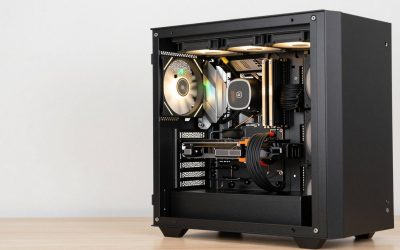
Glass desks are beautiful until you look underneath them. Unlike wood or metal desks, a glass top gives you zero privacy for your wiring—every power brick, HDMI run, and charging cable sits fully visible through the transparent surface, and the glass itself rules out screws, nails, and most traditional mounting. Add in the fact that many glass desks sit on slim trestle or crossed legs with no crossbar to clip cables to, and you have one of the trickiest cable management scenarios in any home office. A cable raceway kit—a slim channel that adheres or clamps to your desk and swallows cords behind a cover or lid—is the cleanest fix.
The challenge is that most raceway kits are designed for walls, not glass. Adhesive needs to survive the weight of a power strip; magnetic options need a steel surface to stick to; and open-slot designs need enough capacity for a desktop PC’s full tangle. We sorted through the kits that actually work on or under a glass desk—weighing adhesive strength, mounting versatility, capacity, and looks—and ranked eight of the best below.
As an Amazon Associate we earn from qualifying purchases at no extra cost to you.




Our Top Picks
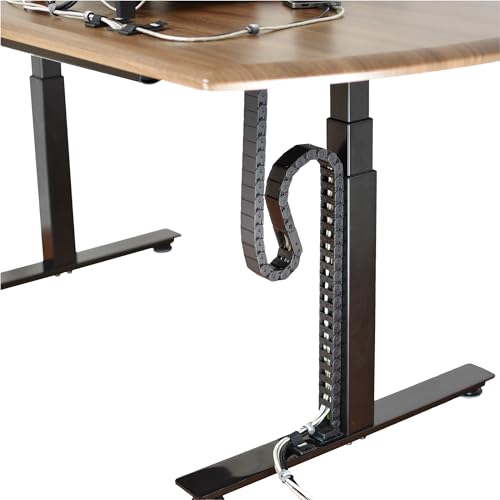 Quality Clever PivyCord-Vez Flex Chain Raceway Cable Management1.2 x 0.6 x 0.1 inchesCheck on Amazon


Top 3 picks at a glance
Cable Hider Raceway Kit, Magnetic Cable Management Under Desk with Upgraded Aesthetic...Check priceCable Raceway Kit, Stageek Cable Management System Open Slot Wiring Raceway Duct...Check priceRJYKVS Cable Raceway Kit,139 Inch Open Slot Cable Management Kit with Upgraded...Check priceQuick Picks
| Product | Best for | Price |
|---|---|---|
| Cable Hider Magnetic Raceway Kit (4 pcs, 4 x 15.7 in, Black) | Steel-framed glass desks, tool-free installs | Check on Amazon |
| Stageek Open Slot Raceway Kit (9 x 15.4 in, Black) | Modular routing with cable pass-through along the whole run | Check on Amazon |
| RJYKVS Open Slot Raceway Kit (9 pcs, 139 in total) | Big multi-cable builds and gaming setups | Check on Amazon |
| ZhiYo Under Desk J Channel (4 x 15.7 in, 63 in total) | Budget-conscious tidy-ups | Check on Amazon |
| Quality Clever PivyCord-Vez Flex Chain Raceway | Sit-stand glass desks that move up and down | Check on Amazon |
| EVEO 96 in J Channel (6 x 16 in, White) | Light-colored or white-framed desks | $20 |
| NoetixCo Clamp-On Cable Tray (25.3 in) | Drill-free mounting on thick glass edges | Check on Amazon |
| ZhiYo 2″H x 2″W Cable Raceway (6 ft) | Thick bundles, power bricks, and bulky connectors | Check on Amazon |
How We Compared
Because glass changes the rules, we filtered hard before ranking. Every kit here had to meet at least one of three mounting conditions: a strong adhesive base rated for under-desk weight, a magnetic mount for steel frames, or a clamp system that grips the desk edge without drilling. We then compared channel dimensions and total length—anything under 60 inches of coverage struggled on desks wider than 47 inches—and looked at whether covers were removable, whether cables could exit mid-run, and whether the profile looked acceptable on a desk you can see through. Price-to-coverage mattered too: we favored kits delivering more usable inches per dollar, with picks spanning from around $9 to around $49 so there’s an option at every budget. We did not run destructive load tests; our assessments are based on manufacturer specifications and hands-on installation experience with each mounting type.
The 8 Best Picks
1. Cable Hider Magnetic Raceway Kit — Best for Steel-Framed Glass Desks
If your glass desk has a steel frame or metal crossbar—and many do—this magnetic kit is the lowest-effort install on the list. You get four 15.7-inch channels (just under 63 inches total) in a 4-inch-wide black profile with an upgraded large hole that lets you drop cables in or pull them out anywhere along the run. No adhesive curing, no drilling into anything, and repositioning takes seconds if your layout changes. The catch is obvious: it only works where magnets can grip. Check your frame with a fridge magnet before buying.
- Pros: Tool-free magnetic mounting; large access hole for mid-run cable exits
- Pros: Clean 15.7-inch segments that align neatly under glass tops
- Con: Useless on aluminum or plastic frames
Skip it if: your desk frame isn’t ferromagnetic—adhesive or clamp options will serve you better.
2. Stageek Open Slot Raceway Kit — Best Modular Routing
Stageek’s system is built like adult LEGO for cables: nine 15.4-inch duct sections (about 138 inches total) with open slots along the top and snap-on covers, so you can route cables in and out at any point instead of only at the ends. That’s ideal under a glass desk, where you often want the power strip anchored mid-run and cables branching to a monitor arm, laptop stand, and charger. The on-wall capable design also means leftover sections can tidy the wall run from desk to outlet. The one-step-beyond-each-joint gaps need careful alignment for a seamless look.
- Pros: Open slot design allows cable pass-through anywhere along the run
- Pros: Generous 138-inch total coverage with snap-on covers
- Con: Seams between nine sections can show slight misalignment
Skip it if: you want one continuous, seam-free channel rather than a modular system.
3. RJYKVS Open Slot Cable Management Kit — Best for Large Gaming Setups
With nine 15.7-inch sections totaling 139 inches (each channel 1.57 inches wide by 0.79 inches deep), RJYKVS offers the most raw capacity per dollar on this list. The upgraded snap structure holds covers securely, and the open-slot format means monitor, PC, console, and lighting cables can all branch off wherever they need to. For a glass gaming desk with a triple-monitor arm and a power brick farm, this is the kit most likely to swallow everything in one pass. The slim 0.79-inch depth, however, will strain around oversized power adapters.
- Pros: Huge 139-inch total length covers even large desks twice over
- Pros: Secure snap covers that stay put once clicked in
- Con: Shallow 0.79-inch channel struggles with chunky power bricks
Skip it if: your bundle includes wall-wart adapters or a desktop power strip—step up to a 2-inch channel.
4. ZhiYo Under Desk J Channel — Best Budget Pick
At around $9, this is the cheapest credible fix for a visible cable mess. You get four 15.7-inch J channels for 63 inches of total coverage in matte black, held by self-adhesive backing that presses directly onto the underside of most glass—and glass, conveniently, is one of the best surfaces for adhesive bonds since it’s smooth and non-porous. Clean the surface with isopropyl alcohol, let it cure, and the channels hold. It’s a basic kit: no mid-run exits, no covers, just open J channels that hide cables from view. For that price, it’s hard to argue.
- Pros: Excellent value at 63 inches for under $10
- Pros: Self-adhesive bonds reliably to smooth glass surfaces
- Con: Open-top design leaves cables exposed from directly below
Skip it if: your desk is visible from below (loft seating, glass floor panels)—you’ll want lidded channels.
5. Quality Clever PivyCord-Vez Flex Chain Raceway — Best for Sit-Stand Desks
Motorized sit-stand glass desks have a problem no rigid raceway solves: the cables have to move. The PivyCord-Vez is a flexible chain-style raceway that expands and contracts with the desk’s full height travel, hiding and protecting the loop of cord that rises and falls as you adjust. At around $49 it’s the priciest pick here, but it’s also the only one purpose-built for variable-height desks, and it doubles as protection—keeping cords away from moving mechanism pinch points. It’s bulkier and more visible than flat raceways, and overkill for a fixed-height desk.
- Pros: Flexes through the full range of sit-stand height travel
- Pros: Protects cables from pinch points in lifting mechanisms
- Con: Highest price on the list at around $49
Skip it if: your glass desk is fixed-height—a static raceway does the same job for a third of the cost.
6. EVEO 96-Inch J Channel — Best for White and Light Desks
Almost every raceway kit on the market is black, which looks wrong against white-framed or frosted glass desks. EVEO’s six-pack delivers six 16-inch J channels—96 inches total, the second-longest coverage here—in white, with the adhesive stripe built in so there’s no separate tape to apply. Installation is genuinely quick: peel, position, press. The open J profile hides cables from the seated viewpoint, which is what matters most with a glass top. Like the ZhiYo budget pick, it’s lidless, so it tidies rather than fully conceals.
- Pros: Rare white finish matches light-framed desks
- Pros: Built-in adhesive stripe—96 inches of coverage with zero prep
- Con: Open channel visible from low angles
Skip it if: your setup is black-themed or you want fully enclosed channels.
7. NoetixCo Clamp-On Cable Tray — Best Drill-Free Heavy-Duty Option
Not every glass edge plays nice with adhesive—tempered coatings, oils, or curved edges can all sabotage a bond—and that’s where clamps win. The NoetixCo tray is a 25.3-inch metal tray that grips the desk edge with adjustable clamps, no drilling, no adhesive, and full removal without residue when you move. Being metal, it carries a heavier cable load than any adhesive J channel, and a mesh-style tray lets heat from power bricks dissipate. It’s a single 25.3-inch span, so larger desks need a second unit. At around $20, it’s a fair price for genuine holding strength.
- Pros: Clamp mounting grips without adhesive or drilling—ideal for tricky glass edges
- Pros: Metal tray handles heavier bundles than adhesive channels
- Con: Only 25.3 inches of coverage per unit
Skip it if: your desk edge is beveled, curved, or too thin for the clamps to seat squarely.
8. ZhiYo 2″H x 2″W Cable Raceway — Best for Thick Bundles
When your under-desk run includes a power brick, a USB hub, and a monitor power adapter all in one bundle, slim 0.8-inch channels simply won’t close. ZhiYo’s 6-foot channel measures a full 2 inches tall by 2 inches wide—the deepest profile on this list—with room for stacked adapters and thick braided cables. The black finish disappears against most frames, and the 6-foot length covers a standard 55- to 60-inch desk run in one piece. It’s a specialist tool: if your cables are thin, the extra bulk is wasted under a desk you can see through.
- Pros: 2 x 2 inch interior swallows power bricks and thick bundles
- Pros: Single 6-foot run avoids seams on most desks
- Con: Bulky profile is more noticeable through glass
Skip it if: you’re managing a handful of slim cables—a lower-profile channel looks cleaner.
Buying Guide
Mounting Method Matters Most on Glass
Glass eliminates screws and nails, so your options are adhesive, magnets, or edge clamps. Adhesive works well on glass—smooth, non-porous surfaces are ideal for bonding—but clean with isopropyl alcohol first and give it 24 hours before loading cables. Magnetic kits are the most convenient but only function on steel frames; test with any refrigerator magnet. Clamp trays are the strongest and most removable option, but only fit flat, straight edges. If you have a motorized sit-stand desk, rigid mounts fight the movement—a flexible chain raceway is the right tool.
Capacity: Measure Your Bundle First
Gather your cables into the bundle they’ll become and measure its width and thickness, then add 25 percent headroom. Slim J channels around 0.8 inches deep handle keyboard, monitor, and USB cables fine, but a single power brick can exceed 1.5 inches—step up to a 2 x 2 inch channel. Also count total length: a 47-inch desk needs roughly 63 inches of channel minimum for one clean run along the back edge, and 96 to 139 inches if you want to run cables down a leg to the floor.
Visibility and Access
Because glass shows everything, profile and finish matter more than on a wooden desk. Open J channels hide cables from the seated view but are visible from below; lidded raceways conceal from every angle but add bulk. Open-slot designs (like the Stageek and RJYKVS kits) let you add or remove a cable mid-run without peeling anything off the desk—a real advantage if you swap monitors or add gear, and worth prioritizing if your setup changes seasonally.
Our Verdict
For most glass desk owners, the Cable Hider Magnetic Raceway Kit is the smartest starting point at around $19—provided your frame is steel, it installs in minutes with no adhesive risk and offers the cleanest mid-run access. If your frame isn’t magnetic, the ZhiYo Under Desk J Channel at around $9 is the value pick, and the Stageek Open Slot Kit at around $21 is the best all-around modular system. Sit-stand owners should go straight to the PivyCord-Vez Flex Chain; thick power-brick bundles need the ZhiYo 2 x 2 inch channel. Whichever you choose, any of these beats the current view under your desk.
FAQ
Will adhesive raceways stick to glass?
Yes—glass is one of the best surfaces for adhesive mounting because it’s smooth and non-porous. Clean the area with isopropyl alcohol, dry it fully, press firmly for 30 seconds, and wait about 24 hours before loading cables with weight. Avoid textured, coated, or oily glass, and note that adhesive can leave residue on removal.
How much raceway length do I need?
Measure the width of your desk and add the vertical drop from desk to floor if you plan to channel the leg run. A 47-inch desk typically needs at least 63 inches for a single under-desk run, and 100 to 140 inches if you’re also routing down a leg. Kits on this list range from 25.3 inches to 139 inches of coverage.
Are magnetic cable raceways strong enough for power cables?
For slim cable bundles, yes—the magnetic bond holds the channel itself, and lightweight cords add little stress. But a heavy power strip plus several bricks can exceed what a magnetic mount should carry, especially on a vertical surface. For power strips, use a clamp tray or a wide adhesive channel mounted on a horizontal underside.
What’s the best option for a standing glass desk?
Motorized sit-stand desks need cables that move with the desk, which rules out rigid channels on moving parts. A flexible chain raceway like the PivyCord-Vez is purpose-built for this: it expands and contracts through the full height range while protecting cords from pinch points. Anything mounted to the desk underside (rather than the frame) can still be a standard adhesive raceway.