Your dual monitor gaming setup deserves better than two displays propped on stacked textbooks or a wobbly IKEA shelf. If you’re gaming in a spare bedroom or a corner of the living room, you already know the problem: two 27-inch monitors eat up serious desk real estate, cables spaghetti everywhere, and your neck aches after a three-hour ranked session because the bottom edge of your screens sits below eye level. A good monitor riser fixes all of that at once — lifting your screens into a healthier position, reclaiming the space underneath for your keyboard, controllers, or an under-desk drawer, and giving your battlestation a finished, intentional look.
We compared and compared eight risers and dual-monitor stands across the setups that actually matter to gamers: stability during intense sessions, clearance underneath, cable management, desk surface protection, and value. Whether you’ve got $25 to spend or $170 to build a full command center, there’s a pick below that fits. Here’s how they ranked.
As an Amazon Associate we earn from qualifying purchases at no extra cost to you.







Our Top Picks
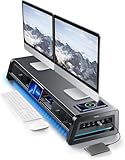
 Simple Trending Dual Monitor Stand Riser with Mouse32"L x 10"W x 7"H32 x 10 x 7 inches7 poundsCheck on Amazon




Top 3 picks at a glance
BONTEC Dual Monitor Stand Riser, Adjustable Length & Swivel Angle, WhiteCheck priceVaydeer All-in-One Dual Monitor Stand Riser with 2 Drawers, 8USB Ports and...Check priceHUANUO FlowLift™ Dual Monitor Stand, Fully Adjustable Gaming Monitor Desk Mount for...Check priceQuick Picks
| Product | Best for | Price |
|---|---|---|
| BONTEC Dual Monitor Stand Riser (White) | Best overall value | Check on Amazon |
| Vaydeer All-in-One Dual Monitor Stand Riser | Best premium command center | Check on Amazon |
| HUANUO FlowLift™ Dual Monitor Stand | Best full-motion gaming mount | Check on Amazon |
| gianotter Dual Monitor Stand Riser | Best budget organizer | Check on Amazon |
| Vertical Stack Dual Monitor Stand | Best for small desks | Check on Amazon |
| Simple Trending Dual Monitor Stand Riser | Best with built-in mouse pad | Check on Amazon |
| VIVO Dual Monitor Stand (STAND-V002O) | Best articulated arm alternative | Check on Amazon |
| BONTEC Dual Monitor Stand Riser (Pink) | Best for themed setups | Check on Amazon |
How We Compared
We focused on what matters in a dual monitor gaming setup rather than generic office criteria. First, stability: a riser that shakes when you rage-clack your keyboard or bump the desk is a non-starter, so we prioritized wide bases, quality materials (steel and engineered wood over flimsy plastic), and weight capacities that comfortably exceed typical 27-inch monitor weights of 10 to 15 pounds. Second, clearance: the whole point of a riser is the space underneath, so we looked at heights from roughly 3 to 5.5 inches and whether that space actually fits keyboards, consoles, or storage. Third, ergonomics: adjustable length and swivel angle matter enormously for dual setups, since symmetric positioning around your seated position reduces neck strain over long sessions. Fourth, extras that gamers genuinely use — drawers, USB hubs, wireless charging, cable routing — weighed in only after the fundamentals. We compared prices across the $24 to $171 range to cover every budget, and we only cite specifications published by the manufacturers. No fabricated lab numbers here — just honest assessments of who each stand serves best.
The 8 Best Picks
1. BONTEC Dual Monitor Stand Riser, Adjustable Length & Swivel Angle, White — Best Overall Value
At around $24, this is the riser we’d recommend to most gamers first. BONTEC’s adjustable length design lets you angle each platform toward your seating position, which is the single biggest ergonomic upgrade for dual monitor play — no more turning your whole torso to see your minimap. The white finish looks sharp in clean, Scandinavian-inspired battlestations, and the under-riser clearance swallows a full-sized keyboard with room to spare. Assembly takes about 15 minutes with the included tools.
- Adjustable length and swivel angle let you create a true wraparound viewing arc
- Under $25 leaves budget for cable sleeves or a mousepad upgrade
- White surfaces show dust and scuffs more readily than black alternatives
Skip it if: you want integrated storage, charging, or USB ports — this is a pure, honest riser with no extras.
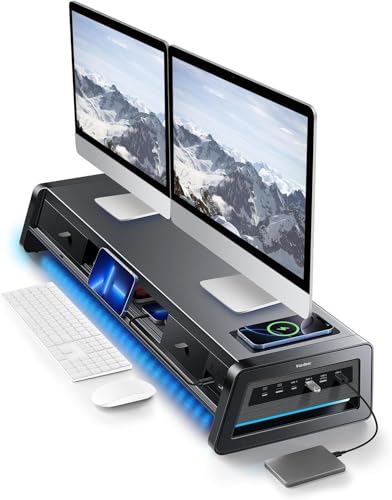
2. Vaydeer All-in-One Dual Monitor Stand Riser with 2 Drawers, 8 USB Ports and Wireless Charging Pad — Best Premium Command Center
At around $170, the Vaydeer isn’t just a riser — it’s a desk hub. The 39.3-inch metal span comfortably holds two monitors, and underneath you get two drawers for controllers, headsets, and drive bays’ worth of clutter. The 8 USB ports mean your peripherals, phone, and accessories plug directly into the stand, cutting desk cable chaos dramatically, and the wireless charging pad with LED light strip adds ambient flair that fits right into an RGB-heavy gaming room. If your goal is a one-piece command center, this is it.
- 8 USB ports plus wireless charging eliminate most desk cable clutter
- Metal construction with two drawers feels substantial and organized
- The around $170 price is six to seven times the cost of a basic riser
Skip it if: you just need to lift your monitors — a $25 to $60 option does that job for a fraction of the cost.
3. HUANUO FlowLift™ Dual Monitor Stand — Best Full-Motion Gaming Mount
The around $59 FlowLift takes a different approach: instead of a riser platform, it’s a fully adjustable desk mount with dual arms supporting 13 to 32 inch screens via VESA 75×75 or 100×100 mounting, each arm rated for 4.4 to 19.8 lbs. The C-clamp and grommet base options free up your entire desktop underneath — a huge win if you’re cramming a battlestation onto a 47-inch desk. Full motion means you can pull screens forward for competitive play and push them back for movie watching.
- Full-motion arms with tilt, swivel, and height adjustment for perfect screen alignment
- C-clamp or grommet mounting frees the entire desk surface below
- Requires VESA-compatible monitors — no VESA holes means this won’t work
Skip it if: your monitors lack VESA mounting holes or you rent and can’t clamp to the desk.
4. gianotter Dual Monitor Stand Riser With Drawer and 2 Pen Holders — Best Budget Organizer
For around $26, the gianotter adds genuine storage to the basic riser formula. The built-in drawer handles small items — USB drives, controller batteries, headset adapters — while the two pen holders keep the top surface tidy. It’s aimed at gamers whose desks double as study or work space, and who want organization without the Vaydeer’s premium price. The footprint stays compact enough for smaller desks, and assembly is straightforward.
- Drawer plus two pen holders add real storage for under $27
- Compact footprint suits smaller desks and bedroom setups
- The drawer is shallow — full-size controllers won’t fit inside
Skip it if: you need serious under-desk storage capacity; look at the Vaydeer instead.
5. Vertical Stack Dual Monitor Stand — Best for Small Desks
At around $31, this free-standing vertical stack mount solves the horizontal space problem entirely: instead of two monitors side by side, it stacks one above the other. It fits two 13 to 34 inch screens, holds up to 44 lbs per screen, and offers swivel, tilt, and height adjustment. For gamers with a narrow desk — 40 inches or less — going vertical doubles your screen real estate without widening your footprint. Ergonomically, you’ll want the top screen tilted slightly down.
- Vertical stacking fits two large screens on desks as narrow as 40 inches
- Handles up to 44 lbs per screen — even ultrawide-class panels
- Vertical orientation suits some game genres far better than others
Skip it if: you play a lot of racing or flight sims where horizontal screen spread matters most.
6. Simple Trending Dual Monitor Stand Riser with Mouse Pad, Black — Best with Built-In Mouse Pad
The around $29 Simple Trending riser integrates a mouse pad surface into the platform top, which sounds gimmicky until you realize how well it solves the low-sens gamer’s problem: a consistent, spacious mousing surface at a fixed height. The black steel and wood construction keeps two monitors stable, the platform is wide enough for side-by-side 24 to 27 inch panels, and under-riser clearance takes a keyboard or a console controller charging dock.
- Integrated mouse pad surface saves buying a separate desk mat
- Solid steel-and-wood build at a around $29 price point
- The fixed mouse pad position may not suit left-handed or southpaw-plus-numpad layouts
Skip it if: you already use a large desk mat that covers your whole desk surface.
7. VIVO Dual Monitor Stand, Fully Adjustable Arms, 17 to 32 inch (STAND-V002O) — Best Articulated Arm Alternative
VIVO’s STAND-V002O at around $49 is the classic articulated arm choice: two mechanical arms supporting 17 to 32 inch screens at VESA 75×75 or 100×100, each rated to 19.8 lbs, in a proven black finish that’s been a staple of gaming and office setups for years. If you want the clean look of floating monitors with full articulation at a mid-tier price, this is the benchmark. Setup takes about 30 to 45 minutes, and the C-clamp mounts securely to desks up to standard thicknesses.
- Time-tested design with smooth, reliable arm articulation
- Strong value at around $49 for a dual full-motion mount
- Like all clamp mounts, it needs VESA holes and a sturdy desk edge
Skip it if: you want a riser’s storage and surface space — arms free the desk but add nothing on top.
8. BONTEC Dual Monitor Stand Riser, Adjustable Length & Swivel Angle, Pink — Best for Themed Setups
Functionally identical to our number one pick but in a pink finish at around $26, this BONTEC riser earns its own slot for one reason: color-matched setups are a real part of gaming culture, and options are rare. You get the same adjustable length and swivel angle design, the same solid platform construction, and the same generous under-riser clearance. If your build leans into pink, pastel, or kawaii aesthetics, this is the easiest way to keep your ergonomics on point without breaking the theme.
- Same proven adjustable, swiveling design as the top-ranked white version
- Rare color option for cohesive themed battlestations
- around $1 premium over the white version purely for the finish
Skip it if: color doesn’t matter to you — the white version does the same job for less.
Buying Guide
Riser vs. Articulated Arms
This is the first decision. Risers ($24 to $171 in our roundup) sit on your desk, add surface area, and often include storage — but your monitors keep their factory stands, which limits positioning. Articulated arm mounts (around $49 to around $59 here) clamp to the desk and free the entire surface below, with full tilt, swivel, and height control — but they require VESA-compatible monitors (check for 75×75 or 100×100 mounting holes on the back) and a desk edge sturdy enough to clamp to. Gamers with ultrawide or heavy panels should verify weight ratings carefully: the mounts here hold 4.4 to 44 lbs per arm depending on model.
Size, Clearance, and Desk Fit
Measure before buying. Your monitors’ combined width plus bezel gap must fit the platform — most risers here suit two 24 to 27 inch panels, while arm mounts cover 13 to 34 inch screens. Check the under-riser clearance: you want at least 3 inches for a keyboard, more if you’re storing a console or drawers. Finally, confirm your desk depth — a 24-inch-deep desk with two 27-inch monitors angled toward you leaves little mouse room unless the riser’s footprint is compact.
Ergonomics and Cable Management
The ergonomic sweet spot puts the top of your primary monitor at or just below eye level, about an arm’s length away. For dual setups, angling both screens inward toward your seat — which adjustable-length risers like the BONTEC models enable — reduces neck rotation over long sessions. On cable management, integrated USB hubs (like the Vaydeer’s 8 ports) and built-in routing channels pay dividends in a gaming setup, where monitors, lighting, and peripherals generate serious cable volume. Budget $10 to $15 for a cable sleeve if your chosen riser lacks routing.
Our Verdict
For most dual monitor gamers, the BONTEC Dual Monitor Stand Riser in White at around $24 is the smart buy: adjustable swivel angle, solid construction, and enough clearance for a keyboard, all under $25. Step up to the Vaydeer at around $170 if you want a full command center with drawers, 8 USB ports, wireless charging, and LED lighting. If your priority is a completely clear desk surface and you have VESA-compatible monitors, the HUANUO FlowLift at around $59 delivers full-motion flexibility that no riser can match. And for narrow desks, the vertical stack mount at around $31 solves the space problem in a way nothing else on this list can. Whichever route you go, lifting and positioning your monitors correctly is the single cheapest upgrade your setup will get in 2026.
FAQ
Will a monitor riser hold two 27-inch monitors safely?
Yes, provided the platform is wide enough and the weight rating is adequate. Most 27-inch monitors weigh 10 to 15 pounds, and the risers in this roundup are built for exactly this class of display. Check that the combined width of your two monitors plus a small bezel gap fits the platform, and assemble all support legs fully before loading.
What height should my monitors be for gaming?
Aim for the top edge of your primary monitor at or slightly below eye level, with the screen about 20 to 40 inches from your face depending on panel size. A riser that adds 3 to 5 inches of height is usually enough to hit this with standard monitor stands. If you use a secondary screen for Discord, streams, or guides, angle it slightly inward so you’re not constantly rotating your neck.
Do I need VESA mounting for a riser?
No — risers work with any monitor that has its own stand; the monitor simply sits on the platform. VESA mounting (75×75 or 100×100 patterns) is only required for arm-style mounts like the HUANUO FlowLift and the VIVO STAND-V002O. If your monitors lack VESA holes, stick with a riser.
Is a $170 riser really worth it over a $25 one?
It depends entirely on what you need. The $25 riser and the $170 Vaydeer both lift your monitors equally well — the price difference buys storage drawers, 8 USB ports, wireless charging, and LED lighting, not better ergonomics. If your desk is cluttered with hubs, chargers, and accessories, the all-in-one can justify itself. If you just want your screens at eye level, spend the $25 and put the savings toward a better mousepad or headset.