Our Top Picks
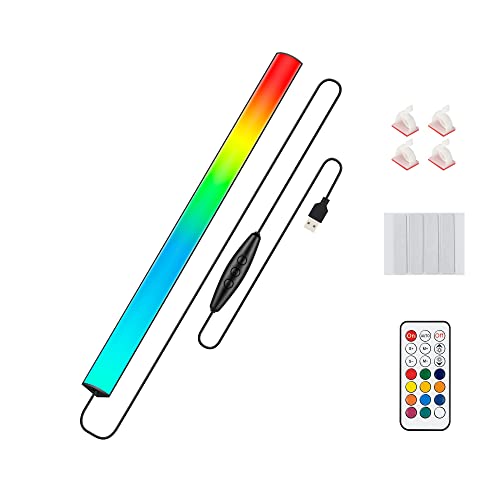
 Quntis RGB Monitor Light Bar with Remote20 inches20.08 x 0.78 x 0.78 Inches2.1 PoundsCheck on Amazon


Top 3 picks at a glance
The Short Answer
For most dual monitor setups, you need a light strip between 50 and 70 inches (127–178 cm) if you want one continuous strip running behind both screens, or two strips of 24–32 inches (61–81 cm) each if you prefer separate backlighting behind each monitor. The exact length depends on your screen sizes, whether they sit side by side with a gap, and whether you want the strip to wrap around the edges or run straight across the back.
A quick rule of thumb: add the diagonal sizes of both monitors, then multiply by roughly 1.2 to account for width versus diagonal measurement, and add 6–10 inches for the gap between screens and any corner turns. For example, two 27-inch monitors typically need about 70 inches of strip; two 24-inch monitors need around 58 inches; a single 34-inch ultrawide next to a 27-inch panel needs about 78 inches.
As an Amazon Associate we earn from qualifying purchases at no extra cost to you.




If you would rather skip strip measuring altogether, a fixed-length product like a monitor light bar is often the easier buy. A 16-inch bar (around $19) suits a single 27-inch monitor, while a model designed for flat, curved, and ultrawide panels (around $61) covers larger screens without any cutting or splicing.
Standard Sizes
RGB light strips and monitor lights come in several standard lengths. Here is how the common options map to typical dual monitor configurations:
| Product / Strip Length | Dimensions | Best Fit | Typical Price |
|---|---|---|---|
| 12-inch under-monitor light bar (USB, 5V) | 12 in / 30 cm long | Front-of-desk accent under a single 24–27″ monitor; use two for a dual setup | $13–$16 |
| 16-inch monitor light bar with RGB backlight | 16 in / 40 cm long | Single 27–32″ monitor; two units for two 24–27″ screens | $18–$25 |
| 16.4 ft (5 m) reel strip | 196 in / 500 cm, cuttable every 1–4 in | Full perimeter wrap around two monitors plus desk edge | $20–$40 |
| Govee Gaming Light for Monitor G1 (27–34″) | Covers 27–34 in / 69–86 cm panels | Single large monitor; two kits for a dual 27–34″ setup | $55–$65 per kit |
| Ultrawide monitor light bar | Fits up to 35–45 in / 89–114 cm panels | Ultrawide plus a second standard monitor beside it | $55–$70 |
| 32.8 ft (10 m) reel strip | 393 in / 1000 cm | Dual monitors plus full desk perimeter, shelving, or wall accents | $30–$55 |
Most reel strips can be cut at marked intervals (commonly every 1.97 in / 5 cm for 5V USB strips), so buying a longer reel and trimming to size is often cheaper than purchasing multiple short strips. Check that the strip supports corner connectors if your layout requires turns.
How to Measure Your Space
- Measure the width of each monitor. Use the horizontal width, not the diagonal. A 27-inch 16:9 monitor is about 23.5 in (60 cm) wide; a 24-inch is about 20.9 in (53 cm); a 34-inch ultrawide is roughly 31.4 in (80 cm) wide.
- Measure the gap between the monitors. On most dual stands this is 1–4 inches (2.5–10 cm). Include bezels if you want continuous coverage.
- Decide on your coverage style. A straight horizontal run behind both screens needs the combined width plus the gap. An edge wrap that follows the top and sides of each screen needs roughly 2.2 to 2.5 times the diagonal of each monitor.
- Locate your power source. Most USB strips run on 5V and draw 2–3 amps at full brightness (10–15 W per 16 ft reel). Your run should stay within reach of a USB port on the monitor, PC, or a wall adapter — usually 5–6 feet of lead cable.
- Add 10–15% slack. Extra length covers mounting curves, corner turns, and routing around the stand without leaving the strip taut.
- Write down your total and compare it against cuttable reel lengths or fixed-size products before buying.
By Room or Use Case
Home Office Desk (Dual 24–27″ Monitors)
The most common configuration. Two 27-inch 16:9 panels plus a 2-inch gap give a combined width near 49 in (124 cm), so a single 16.4 ft reel cut to about 52–55 in works well, or two fixed 24–32 in strips. If you prefer a clean top-of-monitor solution, two 16-inch light bars (2 × around $19) run about $40 total and mount without adhesive.
Gaming Battlestation (Dual 27–32″ or Ultrawide + Secondary)
Gamers chasing sync effects should look at addressable RGBIC kits like the Govee Gaming Light for Monitor G1 (around $59, sized for 27–34″ panels). Buying two kits keeps the effect mapping accurate per screen — a single long strip often smears colors across the gap between monitors. Budget roughly $120 for a matched dual-kit setup.
Under-Monitor Desk Glow
For ambient glow under the bottom bezel rather than behind the screens, a 12-inch USB bar (around $14) fits beneath a 27–32″ monitor. Two bars cover a dual setup, drawing about 5 W each from 5V USB — low enough to run from your monitor’s USB hub.
Content Creation / Streaming Desk
Streamers often combine monitor backlighting with bias lighting behind the desk. Plan a 16.4 ft reel for the monitors (about 52–60 in used) and a second 16.4 ft reel for the desk perimeter (typically 120–160 in around a 60 × 30 in desk). Software-controlled bars with music sync (around $19 for 16 inches) work well as camera-facing accents.
Standing Desk Conversions
Cable routing matters more than length here. Choose strips with longer lead cables (6 ft or more) or add a USB extension, since the power source moves with the desk. Keep runs behind the monitor arms, not the desk surface, to avoid strain when the desk rises 15–20 inches.
Bedroom or Media Nook Dual Setup
In smaller rooms, softer output matters. Dimmable strips rated under 10 W per 16 ft, or a bar with adjustable brightness, prevents glare in dark rooms. A single 16.4 ft reel usually covers both a dual-monitor wall and a headboard or shelf accent with footage to spare.
Common Sizing Mistakes
- Using diagonal size as width. A 27-inch monitor is only about 23.5 inches wide. Ordering based on diagonal leaves you short once the gap is added.
- Forgetting the gap between monitors. Even 2–3 inches matters when you need one continuous run. Measure the actual distance between bezels.
- Buying a strip exactly the length of the run. Without 10–15% slack, corner turns and curved mounts leave visible bare spots or stretched adhesive.
- Ignoring cut intervals. Many strips cut only every 1.97 or 2.5 inches. If your target length falls between cut points, you will be slightly over or under — plan around the interval.
- Overpowering USB ports. A full 16.4 ft reel at maximum brightness can draw 30 W or more. Monitor USB ports often supply only 4.5–9 W, so use a wall adapter for long, bright runs.
- Mixing mismatched strips. Two different strip models behind a dual setup almost never color-match. Buy identical products in the same batch.
- Skipping the mount test. Adhesive strips fail on textured or dusty surfaces. Wipe the mounting path and test-fit with clips before peeling the backing.
FAQ
Can I use one long strip for two monitors?
Yes, if both monitors sit at the same height and depth. A single cut-to-length run of 50–70 inches works for side-by-side 24–27″ panels. If the screens differ in size or one is an ultrawide, two separate strips or per-screen kits give a cleaner look and better color sync.
What length do I need for two 27-inch monitors?
Each 27-inch 16:9 monitor is about 23.5 in (60 cm) wide. Two panels plus a 2-inch gap need roughly 49 inches straight across; add slack and you should buy a strip or reel covering at least 55 inches — one 16.4 ft (5 m) reel is plenty, with leftover footage for desk accents.
How do I power a long RGB strip safely?
Most USB strips are 5V and draw 2–3 A per 16 ft. Runs up to 16 ft can use a 2–3 A USB wall adapter; longer 32.8 ft reels need a dedicated adapter (usually 5V 4–6 A) or a 12V system. Avoid powering long reels from a monitor or laptop USB port, which typically maxes out around 9 W.
Are monitor light bars a good alternative to strips?
For many people, yes. A light bar mounts on the top bezel, needs no cutting, and can be moved between setups. A 16-inch bar (around $19 range) covers a single 27–32″ screen, and ultrawide-compatible bars (around $61 range) stretch to 35 inches or more. The tradeoff is less coverage area than a full perimeter strip, so they produce a subtler glow rather than a wall of light — a look that has stayed popular through 2026 for minimal, glare-free desks.