As an Amazon Associate we earn from qualifying purchases
Best Budget Gaming Keyboard and Mouse Combos for Value
A budget gaming keyboard and mouse combo solves a specific problem: you need two working peripherals in one box, from one purchase, without researching two separate product categories. That convenience is exactly why the best budget gaming keyboard and mouse combo sets are worth comparing carefully. At this tier, manufacturers compete on lighting effects and headline DPI numbers, while the things that actually decide how a set feels — switch type, anti-ghosting, keycap quality and the mouse sensor — get quietly trimmed. This guide compares four current combo sets sold on Amazon US, explains what gets cut at the budget end and when it is smarter to buy a keyboard and mouse separately instead.
Our Top Picks

Top 3 picks at a glance
Quick Picks
| Product | Best for | Key spec |
|---|---|---|
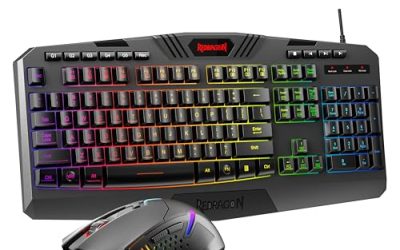
| Redragon S101 (S101-3 PRO) | Most first-time buyers | Wired set, macro keys, mouse up to 7,200 DPI |
| Havit Mechanical Combo (HV-KB389L) | Players who want real mechanical switches | Blue switches, full anti-ghosting, mouse up to 4,800 DPI |
| MageGee K1 | Quiet shared rooms and simple setups | Membrane keys, floating keycaps, plug and play |
| RedThunder K10 | Wireless on a budget | 2.4GHz wireless, rechargeable, mouse up to 3,200 DPI |
How to Choose the Best Budget Gaming Keyboard and Mouse Combo
Keyboard type: membrane, mechanical-feel or budget mechanical
This is the single biggest difference between budget combos. Most sets use membrane switches: a rubber dome under each key, soft and quiet, with a less defined keypress. Some sets advertise a “mechanical feel,” which is still a membrane board shaped and tuned to imitate the travel and sound of mechanical keys. A small number of budget combos, like the Havit set below, include genuine mechanical switches with individual switch housings. Mechanical switches give a clearer actuation point and usually last far longer, but budget blue switches are loud — a real consideration if you share a room. Decide which of the three you are actually getting before anything else, because listings do not always make it obvious.
Anti-ghosting and key rollover
Ghosting is when the keyboard fails to register a key because several others are already pressed — a problem in games where you sprint, strafe, jump and throw an ability at once. Budget keyboards quote figures such as 19-key or 25-key anti-ghosting, which covers the gaming cluster around WASD and is enough for most play. Full anti-ghosting with N-key rollover, where every key can register simultaneously, is normally a mechanical-board feature. If a listing only says “anti-ghosting” with no number attached, assume it protects a limited zone rather than the whole board.
The mouse decides more than the headline DPI
Combo mice are the weaker half of almost every budget set, and their headline DPI figure is the least useful number on the page. What matters more: how many DPI steps you can switch between on the fly, whether the buttons are programmable, the shape and weight, and whether tracking stays smooth at the low sensitivities most shooter players actually use. A mouse that adjusts in sensible steps between roughly 800 and 4,800 DPI covers nearly every genre. Treat anything far above that as marketing headroom rather than a feature you will use.
Wired versus wireless at this tier
Wired combos are the budget default for good reasons: no charging, no battery weight in the mouse, no receiver to lose, and no connection dropouts. Wireless budget sets like the RedThunder K10 below trade a little of that simplicity for a clean desk, and they rely on a shared 2.4GHz receiver and a rechargeable battery you must remember to top up. At this level, wireless makes sense for a living-room or tidy-desk setup; for a fixed gaming desk, wired remains the safer spend.
Backlighting: rainbow zones are not per-key RGB
Nearly every budget combo lights up, but the lighting is usually fixed rainbow zones — bands of colour that cannot be changed key by key — rather than true per-key RGB. Some sets offer multiple effects and adjustable brightness, and a few include software for recording macros and saving lighting profiles. Lighting is a legitimate reason to enjoy a setup, but it should be the last factor you pay for, after switch type, anti-ghosting and the mouse.
What gets cut to reach this tier
Understanding the cuts helps you pick the set whose compromises bother you least. Common ones: ABS keycaps whose legends can shine and wear smooth over time; fixed, non-detachable cables; basic or nonexistent software; membrane domes that soften with age; mice with simple optical sensors and fixed weights; and wrist rests that are thin moulded plastic rather than padded. None of these ruin a first gaming setup, but they are why a combo is a starting point rather than an endgame.
The Combos Compared
Redragon S101 (S101-3 PRO) — the default recommendation

The Redragon S101 has been the reference budget combo for years, and the current S101-3 PRO version adds the features earlier versions lacked. The full-size wired keyboard is a membrane board with RGB backlighting, an integrated wrist rest and five independent macro record keys you can program directly on the board, with Redragon software available for editing lighting effects, recording macros and adjusting the mouse. The bundled mouse adjusts from 800 up to 7,200 DPI and its buttons can be customised through the same software. It is the most complete package here for a first gaming desk.
- Strength: Macro keys and software support are rare at this tier; the wrist rest and full-size layout suit mixed gaming and homework or office use.
- Trade-off: The keyboard is membrane, so key feel is softer and less precise than a mechanical board, and the wired-only connection keeps two cables on the desk.
- Skip it if… you already know you want mechanical switches — go straight to the Havit set below instead of upgrading twice.
Havit Mechanical Keyboard and Mouse Combo (HV-KB389L) — real switches, budget tier
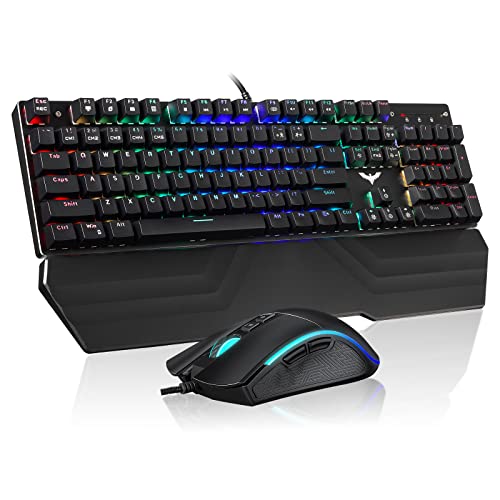
The Havit HV-KB389L is the combo to look at if the keyboard matters most. Its 104-key board uses genuine blue mechanical switches with full anti-ghosting and full-key rollover, an aluminium alloy top case that keeps the deck rigid, and a detachable wrist rest. The keyboard offers 21 backlight modes, and the mouse provides six DPI levels from 800 to 4,800, seven lighting modes and programmable buttons, plus 12 multimedia key combinations on the keyboard. Among budget combos, this is the one that behaves most like buying separates.
- Strength: Real mechanical switches with full rollover and a metal top plate — durability and typing feel a membrane set cannot match.
- Trade-off: Blue switches are clicky and loud, the ABS keycaps are basic, and the mouse is competent rather than outstanding next to the keyboard.
- Skip it if… you game late at night near other people, or you prefer a quiet desk — a membrane combo will annoy nobody.
MageGee K1 — simple, quiet and tidy
The MageGee K1 is a wired membrane combo built around ease rather than features. The 104-key keyboard has rainbow LED backlighting, floating keycaps with a transparent cover that makes the lighting look brighter than most rivals, and a stepped high-low keycap profile shaped to reduce hand fatigue. The matching mouse lights in seven colours and adjusts through six DPI levels up to 3,200. There is no software and nothing to configure: plug both USB cables in and play. Colour options beyond basic black make it a common pick for themed or white desk setups.
- Strength: The quietest typing here and genuinely plug-and-play, with looks that punch above its class thanks to the floating keycaps.
- Trade-off: No software, no macro keys and no anti-ghosting headline figure to rely on for crowded key combinations; the mouse is a basic optical model.
- Skip it if… you play competitive shooters or MMOs where simultaneous keypresses and macros matter — the Redragon or Havit sets serve you better.
RedThunder K10 — the wireless option

The RedThunder K10 answers the one complaint wired budget combos cannot: cables. Both the full-size keyboard and the mouse connect through a single 2.4GHz wireless link, and the set is rechargeable, built around a 3,800mAh battery. The keyboard is a mechanical-feel membrane board with anti-ghosting, RGB backlighting and pudding keycaps that let the light shine through the key legends. The mouse has seven buttons and adjusts up to 3,200 DPI. For a couch setup, a shared family PC or a desk that doubles as a workspace, it keeps things tidy in a way no wired set here can.
- Strength: One receiver runs both devices, the pudding keycaps look genuinely premium, and there are no cables to route or snag.
- Trade-off: Mechanical-feel is still membrane underneath; you take on charging discipline, and a budget 2.4GHz link is a step behind wired for latency-sensitive competitive play.
- Skip it if… your desk never moves and you play ranked shooters — a wired combo removes batteries and wireless from the equation entirely.
Which One Fits Your Situation
Your first gaming PC
Start with the Redragon S101. It covers every feature a new player is likely to want — backlighting, macro keys, an adjustable mouse, a wrist rest — in one box, and its software gives you room to experiment before deciding what to upgrade later.
You type as much as you game
Choose the Havit HV-KB389L. If essays, code or long chat sessions share the desk with games, real mechanical switches and full rollover pay off every day, and the detachable wrist rest helps on long sessions.
A bedroom or shared-room setup
Pick the MageGee K1 or the Redragon S101 and avoid blue switches entirely. Membrane boards keep peace with housemates and family, and the K1 is the quietest and simplest of the group.
A clean desk or living-room PC
The RedThunder K10 is the only wireless set here, and it suits a PC that lives under a TV or a desk that must convert back to a workspace. Accept the charging routine as the price of the tidy result.
You mostly play one competitive title
Buy separates instead. A combo splits its cost across two devices, so a dedicated gaming mouse with a proven sensor and a standalone budget mechanical keyboard will serve a single competitive game better than any set in this guide.
Common Mistakes
- Choosing by the DPI number. A 7,200 DPI headline does not make a combo mouse better than a 3,200 DPI one; steps, shape and tracking consistency matter more.
- Assuming “mechanical feel” means mechanical. Mechanical-feel boards are membrane underneath. Only a listing that names actual switches, like the Havit’s blue switches, is a mechanical keyboard.
- Expecting per-key RGB. Most budget combos light in fixed rainbow zones. Check whether lighting can be customised before valuing it.
- Ignoring anti-ghosting figures. A board with no stated anti-ghosting can drop inputs in busy fights; look for a number or full rollover.
- Forgetting platform limits. These sets are built for Windows PCs; Mac support is typically partial, with multimedia shortcuts often not working.
- Buying a combo when only one half needs replacing. If your current mouse is fine, a standalone keyboard alone is the better spend.
FAQ
Is a budget combo good enough for competitive games?
For casual and mid-level ranked play, yes — a set with stated anti-ghosting and an adjustable mouse covers the fundamentals. The limits appear at higher levels, where a dedicated mouse sensor and faster, consistent switches start to matter more than lighting or macro keys.
Membrane or mechanical: which should a beginner choose?
Membrane is quieter, lighter and simpler, and it is the right default for shared spaces and mixed use. Mechanical switches feel more precise and last longer, which suits heavy typing and players who like a defined keypress — just know that budget blue switches are loud.
Can I upgrade one half of a combo later?
Yes. The keyboard and mouse are independent USB or wireless devices, so you can replace either one on its own later. Many players start with a combo, then upgrade the mouse first, since that is where the performance gap to dedicated gear is largest.
Do these combos work on consoles and Mac?
Most are designed for Windows PCs. Some work for basic input on consoles in supported titles, and Mac keyboard support is usually limited, with multimedia shortcuts commonly unavailable. Check the listing for your exact platform before buying.
How long does a budget combo typically last?
Expect the mouse and membrane domes to age first: membrane keys gradually feel softer, and budget mouse switches and scroll wheels wear with heavy use. Mechanical sets like the Havit generally outlast membrane ones on the keyboard side, which is part of their appeal at this tier.
Related guides
More from Amazon
Programs that pair well with the guide above. Offers and eligibility are set by Amazon and may change.
Free shipping on eligible items, Prime Video and more. Eligible new members can start with a free trial.
Start a Prime free trialAd-free music streaming. Eligible new subscribers can start with a free trial.
Try Music Unlimited freeA Prime membership for ages 18-24 with a trial period. Eligibility is set by Amazon.
See Prime for Young AdultsAudiobooks and podcasts to listen to on the go. Eligible new members can start with a free trial.
Try Audible freeAs an Amazon Associate we earn from qualifying purchases.