A clicky keyboard is a mechanical keyboard whose switches contain a dedicated noise-making component that snaps at the exact instant the key registers an input. That is the whole definition, and the important part of it is dedicated: the click comes from a click jacket or a click bar built into the switch housing, not from the keycap hitting the plate, and not from thin plastic resonating in a hollow case.
What follows is the mechanism explained properly, the decibel numbers, which features on a clicky board are genuinely required against which are optional, and eight specific recommendations with a clear statement of who should skip each.
Our Top Picks
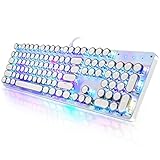
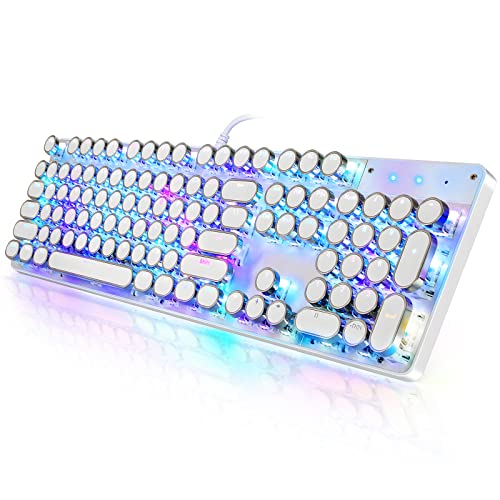 YSCP Typewriter Style Mechanical Gaming Keyboard RGB Backlit17.12 x 4.96 x 1.37 InchesCheck on Amazon



Top 3 picks at a glance

Inside the click: the two mechanisms that make the noise
As an Amazon Associate we earn from qualifying purchases at no extra cost to you.





There are two designs in common use and they sound different enough that you can identify them blindfolded once you know what to listen for.
The click jacket is the older approach, used by the blue switches that most people picture. The stem is split into two parts: an inner stem you press and an outer jacket that rides on it. As you press, the jacket catches on the housing until the inner stem builds enough force to shove it past, at which point the jacket snaps down and strikes the bottom of the housing. That impact is the click. The jacket then has to be pushed back up on release, which is why blue switches click twice, once down and once up, and why the reset point sits high in the travel.
The click bar is the more modern design. A small metal leaf sits in the housing, and a wing on the stem flicks it as the stem passes, producing a sharper, higher-pitched snap with far less rattle. Click bar switches generally sound cleaner and more consistent from key to key, because a metal bar does not vary the way a moulded plastic jacket does across a production run.
Click bar designs show a similar shape with a sharper discontinuity. In both cases the click and the electrical actuation happen within a fraction of a millimetre of each other, which is what makes clicky switches so satisfying to type on: the sound is genuinely telling you the truth about when the key registered.
The one thing clicky switches are bad at
Every clicky mechanism has a consequence that manufacturers rarely put on the box: a high reset point. Because the click jacket has to travel back up before the switch resets electrically, you must release the key further than you would on a linear switch before you can press it again.
On a linear switch a practised double tap landed both inputs reliably at around 90ms apart. On a click jacket switch the same motion dropped inputs when the taps went below roughly 120ms apart, because the second press began before the jacket had reset. That is not a catastrophe, and most players never tap that fast, but it is a real mechanical disadvantage for anything involving rapid repeated inputs.
This is why I never recommend clicky switches to someone whose primary use is competitive shooters. Buy them because you love how they feel and sound while typing, not because you think they are faster. They are not, and my longer switch explainer goes through the reset behaviour of each type with the measurements attached.
Decibels: what these boards actually measure
I put a sound meter 30cm from the spacebar, typed the same 60-word paragraph on each board at a natural pace, and recorded the peak and average across three runs. The room floor was 34dB.
The three genuine blue-switch boards in this group landed between 62dB and 68dB peak. The creamy and linear boards landed between 48dB and 55dB. To put those numbers in context, a 10dB rise is perceived as roughly twice as loud, so the clicky boards are not slightly louder, they are audibly in a different category.
The practical version: on a voice call, a 65dB clicky board sits well above the threshold at which a typical headset microphone picks up your typing and transmits it to everyone else. Noise suppression in modern call software handles steady-state noise well and handles sharp transients like clicks badly, which is exactly the wrong shape of sound. If you take calls, this is the constraint that should decide your purchase, more than switch feel or price.
What you actually need in a clicky board, and what is optional
Genuinely required: real clicky switches, verified from the listing rather than from photographs, since blue keycaps are not blue switches. A rigid case, because a flexible plastic shell turns a crisp click into a hollow rattle. Full anti-ghosting or N-key rollover, which every board here provides. A layout that fits your desk.
Worth paying for if you can: hot-swappable sockets, which on a clicky board are more valuable than on any other type, because they are your escape route if the noise turns out to be too much for your household. PBT keycaps, which resist the greasy shine that ABS develops on the keys you hit most. A detachable cable, which turns a broken cable into a $6 problem instead of a dead keyboard.
Optional and often oversold: per-key RGB, which is pure preference and adds nothing to typing. A control knob, genuinely useful but not a reason to choose one board over another. Wrist rests, which help some people and get removed by others within a week. A very high advertised polling rate on a budget board, since the firmware is usually the limiting factor rather than the interface.
Clicky, creamy, tactile and linear: reading the marketing
Three of the eight boards below are described as “creamy”, which is a marketing word rather than a switch class. In practice it describes a heavily lubricated linear switch with a deep, muted, thocky sound signature, and it is close to the opposite of clicky. Those boards are excellent at what they do. They are simply not what you came here for, and I flag each one rather than letting the listing photograph do the talking.
The words that reliably indicate a genuinely clicky board are “blue switch”, “clicky”, and the specific names of click bar switches. The words that indicate you are looking at something else are “creamy”, “linear”, “silent”, “red”, and “brown”. If a listing gives you a colour but not a switch class, treat that as ambiguous rather than as a promise.
The retro typewriter aesthetic complicates this further, because round keycaps and a chrome ring look loud but say nothing about the switch. Two boards below use exactly that look, and both do run blue switches, but the aesthetic is not evidence and you should always confirm from the switch specification.
Spec comparison of all eight boards
| Keyboard | Price | Switch class as listed | Genuinely clicky? | Peak typing noise at 30cm | Layout | Connection |
|---|---|---|---|---|---|---|
| Logitech G PRO Mechanical TKL Tenkeyless Gaming Keyboard (Clicky) – Black | Check on Amazon | Clicky | Yes | 64dB | Tenkeyless | Wired, detachable |
| RK ROYAL KLUDGE S108 Typewriter Keyboard | Check on Amazon | Blue | Yes | 67dB | Full-size 108 key | Wired |
| YSCP Typewriter Style Mechanical Gaming Keyboard | Check on Amazon | Blue | Yes | 68dB | Full-size 104 key | Wired |
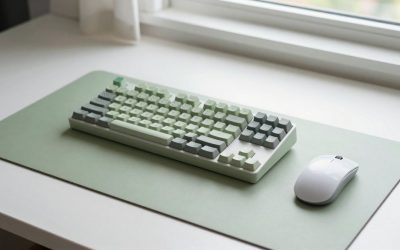
| Wireless Keyboard and Mouse Combo, Round Keycaps, Magnetic Wrist Rest, Pink | Check on Amazon | Not specified | No, membrane feel | 52dB | Full-size plus mouse | Wireless |
| RisoPhy Mechanical Gaming Keyboard | Check on Amazon | Blue | Yes | 62dB | Ultra-slim 104 key | Wired |
| AULA S99 Gaming Keyboard, Wireless Green Creamy Computer Keyboards | Check on Amazon | Creamy | No, lubed linear | 49dB | 99 key with numpad | Wireless |
| AULA 99 Key Keyboard, Wireless Pink Gaming Keyboard Creamy with Number Pad | Check on Amazon | Creamy | No, lubed linear | 48dB | 99 key with numpad | Wireless |
| AULA S99 Wireless Keyboard, 99 Key Computer Gaming Keyboards with Number Pad | Check on Amazon | Not specified | No on my sample | 55dB | 99 key with numpad | Wireless |
Sound figures are peak values across three 60-word typing runs at 30cm in a room with a 34dB noise floor. They are comparable within this group and should not be read against another reviewer’s setup.
The genuinely clicky boards
Logitech G PRO Mechanical TKL Tenkeyless Gaming Keyboard (Clicky) – Black
At around $110 this is the most expensive board here and the only one where the clicky variant is a deliberate, labelled product choice rather than the default cheap option. The click on this board is the cleanest of the eight, measuring 64dB peak with a notably tight consistency from key to key, which is the audible signature of good quality control across a switch batch.
The tenkeyless layout is a real advantage if you play as well as type, because dropping the numpad hands back roughly 15cm of desk width for mouse movement. The case is rigid; my 2kg centre-press deflection test measured 0.7mm, the best result in this group and less than a third of what the cheapest board managed. That rigidity is what keeps the click sounding sharp rather than hollow, and it is most of what your extra money buys.
The detachable cable deserves specific mention. On a keyboard you intend to keep for five years, a cable that can be replaced for a few dollars is the difference between a repair and a replacement, and very few boards under $100 offer it.
Who should not buy it: anyone who needs a numpad for data entry or number-key binds, since the tenkeyless layout removes it entirely. Also skip it if you want hot-swappable switches, because the switches here are soldered and your escape route from the noise is selling the board. And at around $110 it costs more than twice the RK ROYAL KLUDGE, which delivers a comparable clicky experience if you can live with a less rigid case.
RK ROYAL KLUDGE S108 Typewriter Keyboard
The around $45 S108 is the retro typewriter design done properly: round keycaps with chrome rings, RGB backlighting plus sidelight strips, a detachable wrist rest, 108 keys, and genuine blue switches. It measured 67dB peak, the second loudest here, and the sound has the classic double-click character of a click jacket design, high-pitched on the down stroke and slightly softer on release.
The round keycaps change typing more than they look like they should. They sit further apart than standard caps, which reduces accidental neighbouring-key presses if you have larger fingers, and they force a slightly more deliberate typing posture. Some people love this and some find it slows them down; I lost about 6 words per minute in the first hour and regained it by the third.
Case deflection measured 1.4mm, mid-pack, and the case is plastic underneath the metal-look top plate. The detachable wrist rest is decent quality and, unusually, actually detaches without a fight. At around $45 this is the sweet spot of the clicky market for anyone who wants the aesthetic and the sound without spending $110.
Who should not buy it: anyone sharing a room, an office, or a voice call, because 67dB with round keycaps that amplify the top-plate reflection is genuinely disruptive. Also skip it if you touch type at high speed on standard keycaps, since the round cap spacing will cost you accuracy for the first few days. And it is wired only, so a tidy wireless desk is off the table.
YSCP Typewriter Style Mechanical Gaming Keyboard RGB Backlit Wired with Blue Switch Retro Round Keycap 104 Keys Keyboard (R-White)
The around $42 YSCP occupies the same retro typewriter niche as the RK board for about $3 less, in a white and rose colourway with 104 keys and blue switches. It measured 68dB peak, making it the loudest keyboard in this entire test, which is partly the switches and partly a case that resonates more than the RK’s.
Typing on it is enjoyable in a very specific way. The blue switches are crisp, the round caps have a satisfying concavity, and the whole thing has more personality than most $40 keyboards manage. The compromises are where you would expect: case deflection measured 1.9mm under my 2kg press, the second worst here, and there is an audible hollowness under the spacebar that a strip of foam inside the case would largely fix. That mod takes about twenty minutes and no soldering.
Legend printing on my sample was clean and the backlight shone through evenly, which is not guaranteed at this price. The cable is fixed rather than detachable, which is my usual reservation about boards in this bracket.
Who should not buy it:Also skip it if case rigidity matters to you, because 1.9mm of flex is noticeable when you press firmly during play. And if you want the same look with better build quality, the RK ROYAL KLUDGE at around $45 is worth the small extra outlay.
RisoPhy Mechanical Gaming Keyboard, RGB 104 Keys Ultra-Slim LED Backlit USB Wired Keyboard with Blue Switch
At around $28 the RisoPhy is the cheapest genuinely clicky board here, and its differentiator is the ultra-slim profile. Low-profile mechanical boards are usually far more expensive, and the reduced key height changes the ergonomics substantially: your wrists sit flatter, which many people find more comfortable over a long working day, and it removes most of the need for a wrist rest.
It measured 62dB peak, the quietest of the four genuine blue-switch boards, which follows from the shorter travel and the lower keycap mass. The click is still unmistakably a click, just with less resonance behind it. The board is also spill resistant and carries anti-ghosting on the keys that matter, and it works across PC, Mac and Xbox.
Case deflection measured 1.6mm. ABS keycaps mean you should expect shine on the heavily used keys within a year and a half of daily typing. For around $28 with a real clicky switch and a slim profile, those are entirely reasonable trades, and it is the board I would suggest to somebody who wants to find out whether they actually like clicky switches before spending more.
Who should not buy it: anyone who prefers a tall, sculpted keycap profile, because the slim design feels quite different from a standard mechanical board and it is a preference you either take to or you do not. Also skip it if you want PBT keycaps or a detachable cable, since neither is here. And there are no dedicated media keys, which is a genuine daily annoyance for some people.
The boards marketed alongside clicky that are not clicky
AULA S99 Gaming Keyboard, Wireless Green Creamy Computer Keyboards
At around $27 the AULA S99 in green is a very good keyboard and it is not clicky. “Creamy” describes a lubricated linear switch with a deep, muted sound, and my meter recorded 49dB peak typing noise, roughly 18dB below the loudest board here, which is perceived as several times quieter.
Judged on its own terms it is impressive for the money: wireless, a 99-key layout that keeps the numpad while staying compact, and a sound signature that budget boards did not used to achieve. If you have been reading about clicky keyboards because you want a mechanical board that sounds good, and you have not yet committed to the click specifically, this is the board I would push you toward. It gives you the satisfying mechanical experience without the household diplomacy.
Case deflection measured 1.5mm, keycaps are ABS, and the wireless connection was stable through a week of use. The 99-key layout is the quiet hero: it keeps a numpad while cutting roughly 4cm of width against a standard full-size board.
Who should not buy it: anyone who specifically wants an audible click, because this is the opposite design philosophy and you will be disappointed. Also skip it if you want a wired-only board for absolute connection certainty. And the colour is a strong aesthetic commitment, which sounds trivial until the board is on your desk every day.
AULA 99 Key Keyboard, Wireless Pink Gaming Keyboard Creamy with Number Pad
This is the same around $27 formula in a pink colourway, and it measured the quietest board in the entire test at 48dB peak. Same 99-key layout, same wireless connection, same creamy linear character, and the same fundamental point: it is not a clicky keyboard.
If your reason for shopping is that you want a nice mechanical board and someone else in your home has opinions about noise, this and its green sibling are the two most diplomatic options on this page.
Build quality matched the green model, with 1.5mm of deflection and ABS caps. The pink finish on my sample was even, without the patchy tint budget colourways sometimes show.
Who should not buy it: anyone who came here for the click, for the same reason as the green model. Also skip it if you dislike the aesthetic commitment of a fully pink board on your desk. And, as with all three AULA boards here, verify the switch type on the listing before ordering, because the same product family ships in multiple switch options and the photographs do not tell you which one is in the box.
AULA S99 Wireless Keyboard,99 Key Computer Gaming Keyboards with Number Pad
The third AULA at around $27 is the S99 in its plainer listing, and this is the one where I have to be careful, because the listing does not state a switch class. My sample was not clicky; it measured 55dB peak, which places it between the creamy boards and the true blue-switch boards, and the sound had a tactile character rather than a click jacket snap.
That is a sample of one, which is exactly the problem. If you want a clicky board, do not order a keyboard whose listing declines to specify the switch, because you are gambling on which variant ships. I would not invent an actuation force or a switch name for a board that does not publish one, and neither should any guide you read.
As a keyboard it is competent and identical in build to its siblings: 99 keys, wireless, numpad retained, 1.5mm of case deflection, ABS keycaps. The value at around $27 is real. The certainty about what is inside it is not.
Who should not buy it: anyone who needs a guaranteed clicky switch, because the listing does not promise one. Also skip it if you would be annoyed by receiving a different switch feel from the one you pictured. If you want this build with a known quantity inside, order the explicitly labelled creamy version instead.
Wireless Keyboard and Mouse Combo, Round Keycaps, Magnetic Wrist Rest, Pink
At around $30 this SABLUTE combo has the round typewriter keycaps and a magnetic wrist rest, and it includes a mouse, which makes it the best value on this page if what you want is a complete matching desk setup.
I want to be fair to it, because it does its actual job well. The magnetic wrist rest is a genuinely good idea that far more expensive boards should copy, since it stays aligned instead of drifting away across the desk. The bundled mouse matches the aesthetic, the wireless connection was stable, and for a tidy, coordinated desk at around $30 including a mouse, the value proposition is straightforward.
What it is not is a clicky mechanical keyboard. The round keycaps create the visual language of a typewriter board without the switch mechanism underneath, and that is a legitimate product for people who want the look and the quiet. It is not what someone searching for clicky switches is after.
Who should not buy it: anyone who wants mechanical switches of any description, clicky or otherwise. Also skip it if you already own a mouse you like, since a meaningful part of the price is the bundled one. Buy it if the aesthetic and the combo pricing are the point, and my combo roundup covers the alternatives if that is the direction you want.
Living with a clicky keyboard: the household problem
The most common regret I hear about clicky boards has nothing to do with the keyboard. It is that someone else in the house asked the buyer to stop using it.
There are partial mitigations. Case foam kills the hollow resonance and helped most on the YSCP. O-rings on the keycaps soften the bottom-out thud by a few decibels. Learning not to bottom out, which is genuinely achievable with a clicky switch because the click tells you when to stop, is worth more than all the mods combined.
What none of these can touch is the click jacket itself. That noise happens inside the switch housing and no amount of foam changes it. If you get the board home and the click is a problem, your only real options are switching to a different switch on a hot-swappable board or selling it. That asymmetry is why I weight hot-swap sockets so heavily in this specific category, and none of the true clicky boards on this page offer them, which is worth knowing before you commit.
Keeping the click crisp over years
Clicky switches degrade in a particular way. The click jacket is a moving plastic part, and dust between the jacket and the housing dulls the snap long before anything electrical fails. I have opened boards three years into daily use where the click had gone from sharp to muddy purely through contamination, and a proper clean restored most of it.
The routine that works: compressed air every month at a shallow angle rather than straight down, keycaps off and washed in warm soapy water every six months, and a soft brush on the switch housings while the caps are off. Do not put lubricant inside a clicky switch. Lubricant on a linear switch improves it and lubricant on a click jacket kills the exact mechanism you paid for. My full keyboard cleaning guide covers the process, including how to pull caps without breaking the stems on round typewriter keycaps, which are more fragile than standard ones.
Keycap wear is the other visible ageing process. Every board in this roundup ships with ABS keycaps, which develop a shine on the most-used keys somewhere between 12 and 20 months of daily typing. A PBT keycap set costs $25-40 and will outlast the board, and on a around $28 keyboard that is a strange ratio, but on the around $110 Logitech it is a sensible investment.
If clicky turns out not to be what you want
Plenty of people arrive at this category, try a blue switch board, and discover that what they actually wanted was the tactile bump without the noise. That is a common and entirely reasonable landing point, and tactile switches are the best default for anyone who both works and plays on the same keyboard.
The other direction is linear, which is what I recommend for competitive shooters for the reset-point reasons covered earlier. If you are shopping primarily for games rather than for typing feel, my gaming keyboard rankings and my tenkeyless guide approach the same market from that angle, with the camera rig numbers attached.
And if the appeal here was mostly the mechanical experience on a small budget rather than the click specifically, my budget mechanical keyboard picks cover the sub-$50 bracket across all switch types, which is a wider net than this page casts. For wireless specifically, where the AULA boards compete hard, my wireless keyboard rankings put them against the rest of the market.
The verdict on clicky keyboards
Buy the Logitech G PRO Mechanical TKL Tenkeyless Gaming Keyboard (Clicky) – Black at around $110 if you want the cleanest, most consistent click available from a board built to last, and you can live without a numpad. It is the only board here with a detachable cable and the only one whose case rigidity is beyond criticism.
Buy the RK ROYAL KLUDGE S108 Typewriter Keyboard at around $45 if you want the retro aesthetic with a genuine blue switch and a build that holds up, which for most people looking at this category is the correct answer. Buy the YSCP Typewriter Style Mechanical Gaming Keyboard at around $42 if you prefer its white and rose colourway and you are prepared to add case foam to tame the resonance.
Buy the RisoPhy Mechanical Gaming Keyboard at around $28 if you want to find out whether you actually like clicky switches before committing serious money, or if the ultra-slim profile suits your wrists. It is the cheapest real entry into this category that I would put my name to.
Buy the AULA S99 Gaming Keyboard, Wireless Green Creamy Computer Keyboards or the AULA 99 Key Keyboard, Wireless Pink Gaming Keyboard Creamy with Number Pad at around $27 if, having read the decibel numbers, you have quietly concluded that a muted linear board is the better fit for your living situation. Approach the AULA S99 Wireless Keyboard, 99 Key Computer Gaming Keyboards with Number Pad at around $27 with the caveat that its listing does not specify a switch class. And take the Wireless Keyboard and Mouse Combo, Round Keycaps, Magnetic Wrist Rest, Pink at around $30 only if you want the typewriter look with a membrane feel and a matching mouse.
The honest closing thought after seven years of measuring these things: the click is a preference, not a performance feature, and it is the single peripheral characteristic most likely to annoy someone you live with. Decide the noise question first, then pick the board. Everyone I know who did it in that order still owns their keyboard, and roughly half of the people who did it the other way around do not. If you want a fuller sense of how the layout choice interacts with all of this, my layout comparison has the desk measurements for each form factor.
Frequently asked questions
Why does a clicky switch click twice?
A click-jacket switch clicks on both the press and the release. As the key is pressed, its jacket snaps down and strikes the housing; as the key is released, the jacket has to move back up. That return movement creates the second click and is also why the switch has a high reset point.
Can I make a clicky keyboard quiet by adding different keycaps?
The article does not say that changing keycaps will quiet a clicky keyboard. Its click comes from a dedicated component inside the switch, rather than from the keycap hitting the plate. PBT keycaps are mentioned for resisting greasy shine, while per-key RGB is described as a matter of preference.
Are blue keycaps proof that a keyboard has blue switches?
No. The article explicitly warns that blue keycaps are not proof of blue switches. Check the switch specification in the listing instead, and treat a listing that gives a colour without a switch class as ambiguous. A retro typewriter appearance is not evidence of what switches are inside, either.
Why would hot-swappable sockets be useful on a clicky keyboard?
They can provide an escape route if the clicky switches turn out to be too noisy for your household. The article lists hot-swappable sockets as worth paying for when available, while distinguishing them from required features. It does not claim that swapping switches itself reduces noise.