Trading is a keyboard job with an unusual shape. You are not typing essays; you are firing the same few actions again and again: buy, sell, cancel, flatten, switch chart timeframe. Shaving a second off each of those matters more than switch feel or a number pad. So the useful question behind “best keyboards for trading” is whether you need a better typing board, or a small programmable keypad that puts your repeated commands one key away.
This guide is for retail traders, crypto and futures watchers, and desk setups with multiple monitors who want faster execution and fewer mouse trips. It covers seven listings, mixing macro pads, a dedicated crypto-trading board, and a plain full-size keyboard, judged only on what their titles state. Before you buy in 2026, decide which platform shortcuts you actually use, because a macro pad is only as good as the hotkeys you can program.
Our Top Picks

Top 3 picks at a glance
Quick Picks
As an Amazon Associate we earn from qualifying purchases at no extra cost to you.



| Product | Best for | Key spec from title |
|---|---|---|
| 6-Key RGB Mini Keypad | Copy-paste and stock trading shortcuts | 6 keys, 1 knob, USB mechanical |
| Enjoytrading OKX Trading Keyboard | Crypto order control | One-click order control, cancel all orders |
| Koolertron Macro Keypad | One-handed macro workflows | 6 keys, 1 knob, hot-swappable |
| Basics Wired QWERTY Keyboard | Plain typing and a budget baseline | Full-size, plug and play, media control |
| VSD M18 Macro Pad | Visual, labeled shortcuts | Customizable LCD keys |
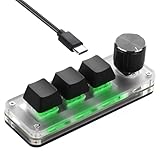
| SinLoon Mini Keyboard | Portable multi-device use | 3 keys, 1 control knob, hot-swappable |
| BTXETUEL OSU 12-Key Keypad | More programmable buttons | 12 keys, hotswappable red switches |
How to Choose
Typing board or macro pad
Most traders already have a keyboard they like. A macro pad adds a second input surface for your trading-specific shortcuts, and many experienced traders prefer that to replacing the main board. If you have no usable keyboard at all, a full-size model covers the basics, but plan to add a pad later for execution speed. Traders who work from a laptop on the road may prefer a small pad over a second full keyboard, because it fits in the same bag and takes seconds to set up at a hotel desk.
How many keys you need
Count the actions you repeat: buy, sell, cancel all, close position, and a few timeframe changes make about six to eight. Three keys is too few unless you use layers, six is workable, and twelve gives room for position sizing and chart tools. A knob is useful for scrolling charts, adjusting order size, or zooming, so look for one if your platform supports it. Also think about which hand you will use: a pad placed beside the mouse works best when keys are reachable without looking, so spacing and key height matter as much as the count.
Programming and platform support
Check how the device is programmed. Some use onboard memory with a simple app; others depend on desktop software that must be running. Think about your trading platform too: dedicated tools like the Enjoytrading board are designed around specific exchange actions, while generic pads rely on keystroke macros that your platform must accept. Never program one key to fire a live order without a confirmation setting you trust. Write down your layout, label the keys with small stickers if the caps are blank, and back up the profile file so a driver update or a new computer does not erase hours of setup.
Switches, hot-swap, and noise
Mechanical switches feel precise, and hot-swappable sockets let you change switches without soldering. Red switches are linear and quiet; blue switches are clicky and loud, which matters in a shared room. Budget pads sometimes cut corners on software stability and key legends, so ignore the lighting effects and focus on programming reliability. A pad that forgets its profile after a restart, or needs a clunky app running in the background, will cost you more time than it saves.
The 7 Best Options
6-Key RGB Mini Keypad
This compact USB pad has six keys and one knob, with the title naming stock trading, gaming, and copy-paste use. It is designed for traders who want a handful of shortcuts on a small footprint next to their main keyboard. The knob can handle chart scrolling or size adjustments, and the mechanical keys give a clear press when you fire a macro. The RGB lighting is mostly decoration, but a lit pad can be easier to find by feel in a dim trading room where screens are the only other light source.
- Strength: six keys plus a knob cover a typical trading routine.
- Strength: small footprint suits a crowded multi-monitor desk.
- Trade-off: the brand and software details are thin in the title.
Skip it if you need more than a handful of programmable actions.
Enjoytrading OKX Trading Keyboard
This is the only listing built around trading specifically. The title names one-click order control, spot and futures grid trading, one-click hedge and lock, cancel all orders, and custom symbol support. That makes it appealing to crypto traders on OKX who want exchange actions mapped to physical keys rather than hunting for buttons on screen. In fast markets, the difference between pressing a physical key and aiming a cursor at a small on-screen button can be the difference between a clean exit and a slipped one.
- Strength: purpose-built functions like cancel all orders and hedge and lock.
- Strength: aimed at spot and futures workflows.
- Trade-off: it appears tied to one exchange, so it has less value elsewhere.
Skip it if you trade stocks or on other platforms.
Koolertron Macro Keypad
A one-handed programmable mechanical keypad with six keys, one knob, backlighting, and hot-swappable blue switches. It targets workflow shortcuts in many programs, and traders can use it for platform hotkeys. The hot-swap design allows switch changes, which is handy if the clicky blue switches turn out to be too loud for your room. It is a sensible way to get a feel for macro-based trading without committing to a big, expensive setup.
- Strength: hot-swappable switches allow customization.
- Strength: one-handed design leaves your mouse hand free.
- Trade-off: blue switches are noisy in shared spaces.
Skip it if you trade late at night near sleeping family members.
Basics Wired QWERTY Keyboard
A plain full-size wired keyboard for Windows, with plug and play setup and media controls. It does nothing special for trading, but it gives a reliable typing surface for notes, searches, and ticker entries at a budget tier. Think of it as the baseline against which the macro pads add value, rather than a trading tool in its own right. Its media keys are handy for muting alerts or pausing a news stream during a busy session, and it will not need a driver on most Windows machines.
- Strength: plug and play with no software to install.
- Strength: full-size layout includes a number pad for data entry.
- Trade-off: no programmable keys or macros.
Skip it if you want shortcuts for faster order execution.
VSD M18 Macro Pad
A stream controller style pad with customizable LCD keys, a USB soundboard function, and trigger actions. Each key can show its own icon, which is useful when you have many shortcuts and need to see at a glance which one cancels orders and which one opens a chart. Visual labels also cut down on mistakes when you are tired or switching between instruments. It appeals to traders who value clear visual labels over a minimal setup.
- Strength: LCD keys make complex shortcut sets easy to read.
- Strength: flexible triggers can launch apps and sequences.
- Trade-off: it is built around streaming, so setup is more involved.
Skip it if you want a simple, tactile mechanical pad.
SinLoon Mini Keyboard
A portable programmable mechanical keyboard with three keys and one control knob, aimed at macro shortcuts and multi-device use. Its hot-swappable design and small size make it useful for traders who work across a laptop and desktop and want one pad that travels with them. With only three keys, you would likely use it for the three most critical actions, such as buy, sell, and flatten, and leave everything else to the main keyboard.
- Strength: portable and usable across multiple devices.
- Strength: hot-swappable switches allow later changes.
- Trade-off: only three keys, which limits a full trading routine.
Skip it if you need a dozen shortcuts without layers.
BTXETUEL OSU 12-Key Keypad
Sold as an OSU-style keypad, it has 12 keys with hotswappable red mechanical switches. Though designed for rhythm gaming, the twelve keys give more programmable buttons than the smaller pads here, which suits a trader with a long list of hotkeys for sizing, charts, and order types.
- Strength: twelve keys leave room for a full trading layout.
- Strength: red linear switches are quieter than blue clicky ones.
- Trade-off: it is built for gaming, with no trading-specific features.
Skip it if you want a knob for scrolling or sizing.
Which One Fits Your Situation
You trade crypto on OKX
The Enjoytrading OKX Trading Keyboard is the one listing built around exchange actions such as cancel all orders and one-click hedge and lock.
You trade stocks and want a few reliable hotkeys
The 6-Key RGB Mini Keypad or the Koolertron Macro Keypad gives you enough keys and a knob without clutter.
You want more buttons than any other pad
The BTXETUEL OSU 12-Key Keypad offers the most keys in this set, and the VSD M18 adds labeled LCD keys for visual clarity. Either one lets you separate order actions from chart navigation, which keeps the layout easier to remember under pressure.
You just need a clean typing board
The Basics Wired QWERTY Keyboard is a no-fuss baseline, and you can add a macro pad later if your workflow demands it. For traders who mostly place orders with the mouse, this is a perfectly reasonable place to start.
Common Mistakes
- Programming a single key to send live orders with no confirmation step.
- Buying a three-key pad and then needing a twelve-key layout.
- Choosing loud blue switches for a shared room.
- Expecting a gaming pad to include platform-specific trading features.
- Skipping a test of the macros in a demo account before going live.
Related guides
- What Is The Best Budget Most Responsive Gaming Mouse Wired
- Low Latency Gaming Headphones Usb-C 2.4 Ghz Wireless
- Low Latency Gaming Headphones Usb-C Dongle 2.4 Ghz
Frequently Asked Questions
Do traders really need a special keyboard?
No. A standard keyboard works fine. A macro pad is an optional upgrade that speeds up repeated actions and reduces mouse travel.
Are macro pads safe for placing orders?
They can be, if you use a confirmation setting and a demo account first. A mistaken key press is the main risk, so design layouts to avoid accidental triggers. Keep order-sending keys apart from navigation keys, and use a different color or position for anything that cannot be undone.
What does hot-swappable mean?
It means you can pull out and replace switches without soldering. That lets you change from loud to quiet switches or adjust the feel later. It also means a worn or unsatisfying switch can be replaced without buying a whole new pad.
Will a pad work with any trading platform?
Generic pads send keystrokes, so they work wherever the platform accepts keyboard shortcuts. Dedicated boards like the Enjoytrading unit are designed for specific exchanges. Before relying on any pad, run it in a demo or paper-trading account for a few sessions so the muscle memory forms without real money at risk.