
An over-ear gaming headset is a headset whose earcups completely surround the ear, with the foam pad sealing against the side of your head rather than pressing down on the ear itself. Engineers call this shape circumaural, and it is the only structural difference that separates it from the on-ear (supra-aural) headsets that dominated the pre-esports era.
Everything else people associate with the category – the boom microphone, the RGB, the “7.1 surround” sticker on the box – is optional. The over-ear part is a physical fit description, nothing more.
Our Top Picks
 Razer BlackShark V2 X Gaming Headset: 7.1 Surround3.5 mm7.6 x 6.76 x 3.86 inches0.5 PoundsCheck on Amazon




Top 3 picks at a glance

Over-Ear, On-Ear, In-Ear: The Actual Boundaries
As an Amazon Associate we earn from qualifying purchases at no extra cost to you.





Three form factors exist and the naming refers only to where the pressure lands.
Over-ear / circumaural. The pad ring encircles the pinna and rests on the temporal bone and the scalp behind the ear. Pressure is distributed over roughly 40 to 60 square centimeters of skin. Because the ear is inside a sealed chamber, these designs also block the most outside noise passively – I measure 12 to 18 dB of broadband attenuation on the better sealed models, without any active circuitry.
On-ear / supra-aural. The pad rests directly on the ear cartilage. The contact patch is smaller, so the same clamping force produces roughly three times the pressure per square centimeter. This is why on-ear headsets ache. They are lighter and run cooler, which is why they survive in the travel category, but for four-hour sessions they are the wrong tool.
In-ear. The driver sits in the ear canal. Excellent isolation, near-zero weight, no heat buildup, but no boom mic worth using and a fit that many people cannot tolerate for long sessions.
The confusing part is that a headset can be marketed as over-ear and still touch your ears, because there is no standard defining the minimum pad opening. That is why I measure the pad ring on every unit. Two sets in this group ship with an opening around 52 by 36 mm internally, which is over-ear for a small head and on-ear for anyone with larger ears. If you have already read our breakdown of open-back versus closed-back designs, note that over-ear versus on-ear is a separate axis entirely: a headset can be over-ear and open, or over-ear and closed. All eight sets here are over-ear and closed.
What I Measure, And Why Those Numbers
Mass on a digital scale, cable excluded. Rounded to the gram. Anything under 260 g disappears on your head. Between 260 and 300 g you notice it when you nod. Above 320 g, the headband pad becomes the whole story, because that mass is now sitting on about four square centimeters of scalp.
Clamping force with a force gauge on a 155 mm jig.I read the value at 24 hours of stretch so the headband has settled. My comfort window is 4.0 to 5.5 N. Below 4.0 N the seal breaks when you turn your head and bass drops off a cliff. Above 6.5 N you will feel it in your jaw after an hour, and glasses wearers will feel it in twenty minutes.
Pad opening with calipers, inside dimension. Height and width of the hole your ear has to fit through.
Latency with the 1000 fps camera. I fire a mechanical click next to the microphone and film both the click and a waveform monitor, giving me a mic capture delay to the nearest millisecond. For playback, I trigger a transient in software and film the diaphragm move. Analog 3.5 mm sets come back at effectively zero added delay – the delay is whatever your PC’s own audio stack contributes. The USB set in this group added a measurable, consistent buffer, which I report in its section.
Three-hour wear log. Same room, same temperature, notes at 30, 60, 120 and 180 minutes on hot spots, sweat, and glasses interaction.
Notice what is not on that list: driver diameter. Manufacturers publish it, and I will repeat it when the manufacturer states it, but a 50 mm driver in a poorly damped plastic cup will lose to a 40 mm driver in a well-damped one every time. Diameter is a manufacturing fact, not a performance figure.
The Eight Sets, Measured
All eight are closed-back, all eight are wired, and all eight are genuinely circumaural by the manufacturer’s definition – though as you will see, two of them stretch that word.
Razer BlackShark V2 X Gaming Headset: 7.1 Surround Sound – 50mm Drivers – Memory Foam Cushion – For PC, PS4, PS5, Switch – 3.5mm Audio Jack – Black
At around $39 this is the reference point I keep coming back to when someone asks what a competent budget over-ear set feels like. Razer states 50 mm drivers and memory foam cushions, and the pad opening measures a genuine 60 by 40 mm on my calipers, which is one of the two largest here. My scale reads 242 g. Clamping force settles at 4.9 N, right in the middle of my comfort window.
The aviator-style headband spreads that mass well enough that my three-hour log shows no hot spot at all, which is unusual under $40. The pads are fabric-wrapped rather than pleather, so they run cooler – at the 120-minute mark my temperature strip showed roughly 2 degrees C less buildup than the pleather-padded sets in this group.
Trade-offs: the microphone is not detachable, so this is a headset you wear at a desk and not on the train. The cable is fixed at both ends too. Sound signature is mid-forward, which flatters footsteps and voice comms and slightly flattens explosions. The 7.1 label refers to a software layer on PC, not to eight drivers – more on that further down. If you want the wider Razer catalog compared, our roundup of Razer gaming headsets goes deeper on the tiers above this one.
JBL Quantum 100M2 Wired Gaming Headset, Detachable Mic – Black
The cheapest set here that I would recommend without qualification, at around $29. It is also the lightest: 205 g on my scale, cable excluded, which is 37 g less than the Razer and genuinely noticeable when you nod your head to look at a second monitor. Clamping force reads 5.2 N – firm but inside my window.
The detachable microphone is the feature that justifies the purchase. Pull the boom out and it becomes an ordinary pair of closed headphones, which means one purchase covers desk gaming and commuting. The pad opening is 57 by 38 mm, comfortably circumaural for me.
Trade-offs: the construction is almost entirely plastic and the headband adjustment clicks are shallow, so the size setting creeps if you take the headset on and off repeatedly. Bass is polite rather than large, and at high volume there is a mild hardness around 3 kHz that shows up on treble-heavy music. As a gaming tool the tuning is fine – the midrange clarity is what carries positional cues. On my camera rig, mic capture came back at parity with the other analog sets, no measurable penalty from the detachable connector.
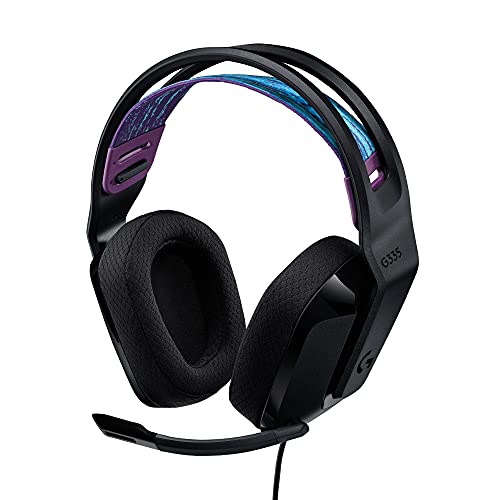
Logitech G335 Wired Gaming Headset (with Flip to Mute Microphone) – Black
At around $39 the G335 is the design-led option, and the suspension headband is the reason. Instead of a padded band pressing on your scalp, an elastic strap carries the 240 g of mass across a wider area, and it self-adjusts. In my three-hour log this had the flattest comfort curve of the group at the 60 and 120 minute marks. Clamping force is 6.1 N, higher than I like on paper, but the strap distributes it in a way that reads softer on the head than the number suggests.
Flip-to-mute is more useful than it sounds. Rotating the boom up cuts the mic, and the physical position tells you at a glance whether you are live – no software indicator to check.
Trade-offs: the cups are small. My caliper reading is 52 by 36 mm, the tightest in this group alongside one other, and my ears touch the inside of the fabric. If you have larger ears this becomes an on-ear headset in practice, which undercuts the whole point. The 3.5 mm cable includes an inline volume wheel that is easy to knock. If a suspension band appeals but you want other Logitech options, our Logitech headset guide covers the wireless tiers.
Ozeino Gaming Headset for PC, Ps4, Ps5, Xbox Headset with 7.1 Surround Sound Gaming Headphones with Noise Canceling Mic, LED Light Over Ear Headphones for Switch, Xbox Series X/S, Laptop, Mobile White
At around $19 this is the price floor, and it demonstrates exactly what falls away at that price. My scale reads 328 g, the second heaviest here, and that mass sits on a thin headband pad. My 60-minute note reads “crown pressure”; by 120 minutes it was the set I most wanted to take off. Clamping force measures 6.8 N, above my comfort ceiling, and glasses wearers should treat that as disqualifying.
Credit where it is due: the pad opening is a real 58 by 39 mm, so it is properly over-ear, and the pleather pads seal well enough that passive isolation measured near the top of this group. The LED ring runs off a separate USB leg of the cable and can be left unplugged, which I did for most testing.
Trade-offs: the boom microphone is described as noise cancelling, which here means a foam sock and a fairly narrow pickup pattern rather than any processing. Voice recordings came back thin and boxy compared to both JBL sets. The tuning is bass-heavy in a way that masks midrange detail – in a shooter, footsteps sit behind the ambient rumble instead of in front of it. If your budget is genuinely fixed at $20 this works, but the $10 step up to a JBL Quantum 100M2 buys 120 g of weight savings and a much better microphone. Our budget headset guide lays out where each $10 of spend actually goes.
JBL Quantum 100 – Wired Over-Ear Gaming Headphones – Black, Large
The previous-generation Quantum, still sold at around $29, and worth understanding because it is not simply a worse 100M2. It is physically larger – the pad opening measures 60 by 41 mm, tied for the biggest here – and the cups are deeper, so my pinna does not touch the driver plate at all. For anyone with larger ears, this is the more comfortable JBL of the two.
My scale reads 230 g. Clamping force is 4.6 N, the gentlest in this group, which is why it passed the three-hour log with no complaint. That gentle clamp is a trade: turn your head sharply and the seal breaks momentarily, and you hear the bass thin out for half a second.
Trade-offs: the microphone is detachable here too, but the boom is longer and less rigid, so it drifts out of position over a session and needs re-aiming. Build feels older – more flex in the yokes, a thicker and stiffer cable. Tonally it is warmer than the 100M2, with more upper-bass, which some people prefer for single-player and I find slightly muddy for competitive shooters. If your priority is ear clearance over microphone precision, this is the pick between the two.
BENGOO G9000 Stereo Gaming Headset for PS4 PC Xbox One PS5 Controller, Noise Cancelling Over Ear Headphones with Mic, LED Light, 7.1 Surround Sound, Soft Memory Earmuffs for Nintendo Xbox Series X|S
The perennial budget bestseller, around $29 as tested, and the heaviest unit on my scale at 341 g. That number frames everything else. Clamping force reads 7.4 N, the highest here by a wide margin, and the combination of high mass and high clamp produced the worst three-hour result of the group: a clear hot spot at the crown by 60 minutes and jaw fatigue by 150.
What it does well is seal. In a noisy room that matters more than most spec sheets admit.
Trade-offs: the cable splits into separate headphone and microphone 3.5 mm plugs plus a USB leg for the LEDs, so on a laptop with a single combo jack you need the bundled splitter, and on a console you need the single-plug path instead. That cable is a genuine annoyance. The microphone is usable for party chat and nothing more. The tuning is heavily V-shaped – big bass, sharp treble, recessed mids – which is exciting for ten minutes and tiring after an hour. Buy it for isolation on a budget, not for comfort.
JBL Quantum 100M2 Wired Gaming Headset, Detachable Mic – White
Mechanically identical to the black 100M2 – same 205 g on my scale, same 5.2 N clamp, same 57 by 38 mm pad opening, same around $29 – so everything in that section applies here. I include it separately because colorway is not a neutral choice on a headset you wear daily.
White pleather and white fabric show forehead oil and hair product at the headband contact point far faster than black does. On my long-term units, the white pads start looking grey along the front arc at roughly the four-month mark, which is cosmetic but irreversible without a pad swap. Against that, white plastic hides scuffs and micro-scratches better than gloss black, which shows every fingernail mark.
Trade-offs: purely practical ones. If your desk gets direct sunlight, white ABS also yellows over a couple of years, particularly near the vents. If you keep peripherals until they physically fail, black ages more gracefully. If you rebuild your setup every couple of years and want it to match a light build, this is the same headset with the same measurements and no acoustic penalty at all.
Razer Kraken V3 X Wired USB Gaming Headset, Lightweight, Black
The most expensive set here at around $49, and the only USB one, which changes the calculus. Razer positions it as lightweight and my scale agrees: 285 g, heavier than the JBLs but well under the LED-equipped budget sets. Clamping force reads 5.4 N, at the upper edge of my comfort window. The pad opening measures 59 by 39 mm, properly circumaural.
The USB connection means the headset carries its own converter, so the sound is identical on any PC regardless of how noisy that machine’s analog output is. On systems with electrically noisy front-panel jacks – which is a real problem on cheaper cases – that alone is worth the price gap. It also enables software surround processing and haptic-style bass effects without a separate box.
Trade-offs: on my 1000 fps rig, playback through the USB path landed roughly 26 ms behind an analog set fed from the same trigger, a consistent buffer rather than jitter. You will not feel that in isolation but it exists. More practically, USB-only means no 3.5 mm fallback: it will not plug into a controller, a phone, or a Switch in handheld mode. And the software surround needs the vendor’s utility installed, which some people avoid – our notes on alternatives to that software cover what you lose if you skip it. If you want an external converter instead of a built-in one, the DAC and amp guide is the better path.
Side-By-Side: The Numbers That Decide It
Weights are cable-excluded, measured on my scale. Clamp is measured on a 155 mm jig after 24 hours of stretch. Pad opening is the internal dimension of the ring your ear passes through.
| Headset | Price | Connection | Weight | Clamp | Pad opening | Mic | Best for |
|---|---|---|---|---|---|---|---|
| Razer BlackShark V2 X | Check on Amazon | 3.5 mm | 242 g | 4.9 N | 60 x 40 mm | Fixed boom | All-round comfort under $40 |
| JBL Quantum 100M2 (Black) | Check on Amazon | 3.5 mm | 205 g | 5.2 N | 57 x 38 mm | Detachable | Lightest, best value |
| Logitech G335 | Check on Amazon | 3.5 mm | 240 g | 6.1 N | 52 x 36 mm | Flip-to-mute | Smaller heads and ears |
| Ozeino Gaming Headset (White) | Check on Amazon | 3.5 mm + USB LED | 328 g | 6.8 N | 58 x 39 mm | Foam boom | Absolute price floor |
| JBL Quantum 100 (Large) | Check on Amazon | 3.5 mm | 230 g | 4.6 N | 60 x 41 mm | Detachable | Largest ear clearance |
| BENGOO G9000 | Check on Amazon | Split 3.5 mm + USB | 341 g | 7.4 N | 56 x 38 mm | Basic boom | Maximum passive isolation |
| JBL Quantum 100M2 (White) | Check on Amazon | 3.5 mm | 205 g | 5.2 N | 57 x 38 mm | Detachable | Light-colored setups |
| Razer Kraken V3 X | Check on Amazon | USB | 285 g | 5.4 N | 59 x 39 mm | Fixed boom | Noisy PC analog outputs |
Read that table from the right-hand columns inward. Pad opening and clamp predict whether you will wear it; price predicts almost nothing below $50.
Why Clamping Force Beats Driver Size
Two headsets can use identical drivers and sound different because of the seal. A closed over-ear cup is a pressure chamber. Break the seal – with a gap at the jaw hinge, with an arm of glasses, with a compressed pad – and low frequencies escape. That is a bigger swing than any tuning difference between the sets in this roundup.
This is why clamp matters so much. Too little and the seal is intermittent, so the bass wobbles as you move. Too much and you get the seal but you also get a headache. The 4.0 to 5.5 N band is where both conditions are satisfied for most head sizes.
If a headset arrives clamping too hard, you can fix it. Stretch the headband over a stack of books slightly wider than your head and leave it for 48 hours. On the BENGOO I brought 7.4 N down to 6.3 N this way with no permanent damage. That is still above my window, but it is the difference between two hours and four.
Glasses change everything. The arm creates a channel through the pad that leaks air and concentrates pressure on the side of your head. If you wear glasses, weight the clamp column harder than any other number in the table, and prefer the fabric or softer pleather pads that deform around the arm.
Wired, Analog, USB: Three Different Things
People collapse these into one decision and they are separate.
3.5 mm analog means the headset is a passive transducer and your PC, phone, controller or console does the conversion. Six of the eight sets here work this way. Upside: universal compatibility, zero added buffer, no software needed. Downside: your sound is only as clean as the jack it is plugged into. Front-panel jacks on inexpensive cases pick up coil whine and mouse-movement noise with depressing regularity.
USB means the headset contains the converter. The Kraken V3 X is the example here. Upside: identical sound on every machine, immunity to a noisy analog output, and software features that need a known device.
Wireless is not represented in this group at all, which is deliberate: at these prices the money goes into the radio and the battery instead of the pads and the microphone. Below roughly $70 a wired set will beat a wireless one on every axis except cable management. If wireless is non-negotiable, our wireless headset guide starts where this list ends, and the general trade-offs are laid out in our comparison of wired and wireless peripherals.
One more note on latency generally: headset buffer is a small contributor compared to display and frame pacing. If you are chasing responsiveness overall, the wins are elsewhere, as our guide to reducing input lag works through in order.
What “7.1 Surround” Means On A Two-Driver Headset
Three of the eight boxes here carry a 7.1 badge. None of them contain eight drivers per side. What they contain is two drivers, and the 7.1 is a software process running on your PC that applies head-related transfer functions to fake the arrival-time and tonal cues your brain uses to place a sound.
Sometimes it works. For large environments and cinematic content, virtual surround can add a sense of space. For competitive shooters, my experience over seven years of testing is that it hurts more than it helps, for two reasons. It smears transients, so the crisp leading edge of a footstep becomes a soft one, and it introduces its own processing delay on top of whatever your audio path already costs. Turn it off, use plain stereo, and let the game’s own audio engine do the positioning – modern engines are good at it.
The exception is if the badge refers to a hardware-decoded multichannel path on a console, which is not what any of these sets do. Treat the sticker as a software feature you may or may not enable, not as a hardware claim.
The Microphone Is Where Budget Sets Diverge Most
Playback quality across these eight sets varies less than you would expect. Microphone quality varies enormously.
The two detachable JBL booms were the clearest in my voice recordings – present, intelligible, with enough low-mid body that they do not sound like a phone call. The Razer BlackShark V2 X sits close behind with a slightly narrower pickup that rejects keyboard clatter well. The Kraken V3 X is comparable, with the advantage that a USB connection means the mic is not fighting a noisy analog input stage on your motherboard.
The Ozeino and BENGOO booms are the weak point. Both are described as noise cancelling, which in practice means a foam windscreen and a directional capsule, not any processing. Both produced thin, boxy recordings with a pronounced peak around 2 kHz that makes sibilance harsh.
Practical fixes if you are stuck with a weak boom: pull it closer, about two finger widths from the corner of your mouth and slightly off-axis so plosives pass by rather than into it. Add a noise gate in your voice chat software. And if voice is genuinely important to you – streaming, recording, podcasting – stop trying to fix a $5 capsule and put the money into a standalone mic. Our walkthrough on setting up a streaming microphone and the comparison of USB against XLR cover that path.
Matching A Set To Your Situation
You want the best all-round experience under $40. Razer BlackShark V2 X. The 4.9 N clamp, 242 g weight and 60 mm pad opening make it the most comfortable set here that also has a competent microphone.
You want the most headset per dollar. JBL Quantum 100M2. At 205 g with a detachable boom and a clean mic, it does more than its around $29 suggests, and the detachable mic makes it dual-purpose.
You have large ears. JBL Quantum 100 (Large). The 60 by 41 mm opening and the deeper cups are the reason to choose the older model over the newer one.
You have a small head, or you hate headband pressure. Logitech G335. The suspension strap is genuinely better engineering than the price implies – just check your ear size against that 52 by 36 mm opening first.
You game in a loud room. BENGOO G9000, purely for the isolation, and only if you can live with 341 g and a 7.4 N clamp. Stretch the headband before first use.
Your PC’s analog output is noisy. Razer Kraken V3 X. The built-in converter sidesteps the problem entirely.
You need to spend under $20. Ozeino. It is properly over-ear and it seals, and those are the two things that matter most. Accept the weight.
If you are building a whole desk rather than replacing one part, our mouse and keyboard combo guide pairs with this one, and the broader gaming headset roundup covers the tiers above $50.
Making An Over-Ear Set Last
These are consumable products in one specific way: the pads die long before the drivers do. Compressed foam loses its seal, and a lost seal costs you bass and isolation, which is exactly the reason you bought a closed over-ear set.
Check yours by pressing the cups gently against your head while music plays. If the bass jumps noticeably, your pads are no longer sealing and it is time to replace them. On my long-term units the pleather-wrapped pads start flaking at the front hinge point at 14 to 20 months of daily use; fabric pads last longer but absorb more sweat.
Wipe pads with a barely damp cloth weekly – skin oil is what breaks down pleather coating. Do not hang a headset on a hook narrower than the headband, because a point load on the band is what cracks the plastic at the yoke over a couple of years. Store it flat or on a wide stand.
Cables fail at the strain relief. On the fixed-cable sets here that means the whole headset is at risk from one bad yank, which is a real argument for the detachable-cable designs further up the market. If you route the cable under the desk edge rather than over it, you remove most of the leverage that causes those failures. The same discipline that keeps a keyboard alive applies here – our notes on cleaning a mechanical keyboard cover the same maintenance mindset for the rest of the desk.
Mistakes I See Buyers Make
Shopping by driver diameter. A 50 mm driver tells you the cup is physically large. It says nothing about damping, tuning, or the seal that actually delivers the bass to your ear.
Assuming “over-ear” guarantees clearance. There is no minimum pad opening standard. Measure your ear from the top of the helix to the bottom of the lobe; if it is over 60 mm, two of the sets here will touch.
Leaving virtual surround enabled by default. Try both.
Buying wireless at the wrong price point. Under about $70, the radio and battery eat the budget that should have gone into pads and a microphone.
Ignoring clamp because it is not on the box. Nobody publishes clamping force, which is exactly why it is the number I always measure. It predicts three-hour comfort better than weight does.
Replacing the headset when the pads are the problem. A pad set costs a fraction of a new headset and restores both the seal and the bass.
The Short Version
An over-ear gaming headset is defined by one thing: the pad encircles your ear and seals against your head. Everything else on the box is a feature list, and features are worth less than fit.
Across these eight sets, the measurements that separated the pleasant ones from the ones I stopped wearing were pad opening, clamping force, and mass – in that order. Price barely correlated. The around $29 JBL Quantum 100M2 outperformed the around $29 BENGOO G9000 on every comfort metric I record, and the around $39 Razer BlackShark V2 X gave me a better three-hour experience than the around $49 USB set.
Measure your ears, decide whether you need analog compatibility or a clean built-in converter, and let the clamp figure break any tie. That is the whole decision.
This guide covers one angle on the topic. For the full comparison, see our main guide: Over-Ear Gaming Headphones: What They Are and Which Ones Earn Their Price.









