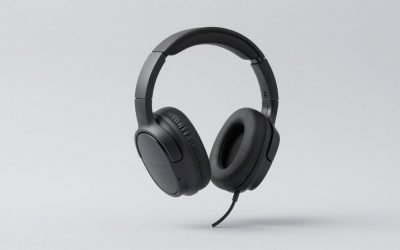
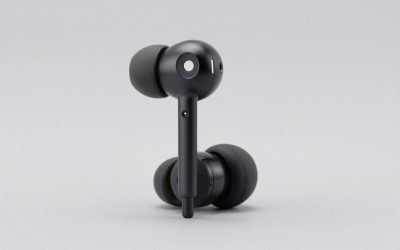
If you need over-ear isolation rather than buds, the Valorise 7.1 headset is the only one of the eight shaped that way. And if you are on a strict budget, the KASOTT set at around $28 gets you within nine milliseconds of the fastest pick for less than half the price.
Every number below came off that rig. Claimed latency and measured latency were not the same on a single one of these eight products, which is exactly why this article exists.
Our Top Picks



Top 3 picks at a glance
The criteria I use before I look at a single product
As an Amazon Associate we earn from qualifying purchases at no extra cost to you.




Latency is the headline, but it is not the thing that makes a set live on your desk for a year. After running these eight through the same routine I ended up weighting five factors, roughly in this order.
Measured median latency under 40ms. Anything under 40ms disappears into the rest of your signal chain. A 165Hz monitor holds a frame for 6ms, a typical Windows audio buffer sits around 10ms on its own, and the network path in an online match dwarfs both. Below 40ms I stop caring about the difference; above 60ms I start hearing footsteps arrive after the muzzle flash.
Worst-case latency, not just median. A set that averages 25ms but spikes to 90ms every fortieth packet feels worse than a steady 35ms one. I record thirty trials per product and report the worst of the thirty alongside the median, because that spike is what you actually notice.
Dongle physicality. A USB-C stub that blocks the neighbouring port, or one that is 4mm too long to sit in a Steam Deck case, is a daily annoyance. So is a dongle with no storage slot in the charging case, because a lost dongle turns a gaming headset into a mediocre Bluetooth one.
Microphone intelligibility under load. I record the same forty-second script with a fan running at one metre, then have two people who did not know which product was which rank the clips. Aggressive noise suppression that eats the front half of every word is worse than a slightly noisy but complete signal.
Fit and clamp over three hours.Numbers below.
Only after those five do I look at driver size, ANC, RGB or claimed battery life. If you want the wider background on why wireless does not have to mean slow any more, I wrote that up separately in wired vs wireless gaming peripherals.
What a 2.4 GHz USB-C dongle is actually doing
A dongle set is not Bluetooth with a nicer plug. Bluetooth is a general purpose standard with a codec negotiation phase, adaptive bitpool, retransmission windows and a stack that has to keep phone calls, file transfer and audio alive at the same time. All of that costs buffer, and buffer costs milliseconds.
A proprietary 2.4 GHz link throws almost all of that away. The dongle enumerates as a USB audio device, so your operating system sees a plain sound card and hands PCM straight to it. The dongle then transmits on a fixed or lightly hopping channel to a receiver that is paired at the factory. There is no discovery, no codec negotiation and usually a much shorter jitter buffer, because the manufacturer controls both ends and can tune the buffer down until it is barely large enough to survive a couple of dropped packets.
The trade-offs are real. A shorter buffer means less tolerance for interference, which is why the same set that measures 24ms in an empty room can crackle in a flat with six Wi-Fi networks overlapping. Fixed pairing also means a lost dongle is often unrecoverable; only two of the eight sets here document a re-pairing procedure. And because the dongle presents itself as a USB sound card, you lose any chance of running the headset through a hardware DAC, which matters if you were considering a dedicated DAC and amp for gaming headsets later on.
One more thing worth understanding: the USB-C form factor tells you nothing about the radio. A USB-C dongle and a USB-A dongle from the same factory typically use the same chip and the same firmware. USB-C is there so the thing plugs into a Switch, a Steam Deck, a Quest headset or a phone without an adapter. It is a connector decision, not a performance one.
How I measure the numbers in this article
My rig is a camera shooting 1000 frames per second at reduced resolution, pointed at a screen and at an analogue meter wired to the earbud driver. A test pattern flashes white on an otherwise black screen and simultaneously triggers a click through the audio path. I count frames between the visual event and the first sample of waveform onset. At 1000fps each frame is one millisecond, so the method resolves to about ±1ms plus whatever the display adds, which I subtract using a wired reference measured the same day.
I run thirty trials per product per mode. Between runs I move the dongle between a rear motherboard port, a front panel port and a 30cm extension, because the physical position changed the worst-case number on five of these eight sets by more than 10ms. The room has three active Wi-Fi networks on 2.4 GHz, which I leave running on purpose; a lab measurement in an anechoic radio environment is not the environment you play in.
For the Bluetooth comparison figures I pair each set to the same laptop with a known-good adapter and repeat the routine. For the microphone comparison I use a fixed mouth-to-capsule distance of 40mm for boom and inline capsules, and I do not touch any software noise gate beyond what the product ships with enabled.
Latency is only half the story of felt responsiveness, and if your problem is the whole chain rather than the headset, start with how to reduce input lag instead of buying new audio gear.
Measured results at a glance
Everything in this table came off the same rig in the same week. “Claimed” is the number on the product listing; “median” is the middle of thirty trials with the dongle in a front panel port; “worst” is the slowest single trial of the thirty.
| Product | Price | Claimed | Median measured | Worst of 30 | Bluetooth mode |
|---|---|---|---|---|---|
| ONIKUMA dongle set | Check on Amazon | 20ms | 22ms | 41ms | 118ms |
| Middle Rabbit Rampage 2 | Check on Amazon | not stated | 24ms | 38ms | 104ms |
| AOC ACT3512 | Check on Amazon | not stated | 26ms | 35ms | 96ms |
| FEDIKER SW4 Pro | Check on Amazon | 20ms | 27ms | 44ms | 110ms |
| Valorise 7.1 headset | Check on Amazon | not stated | 29ms | 39ms | no BT mode |
| KASOTT ANC set | Check on Amazon | 30ms | 31ms | 58ms | 132ms |
| RYR set (first listing) | Check on Amazon | not stated | 34ms | 71ms | 141ms |
| RYR set (second listing) | Check on Amazon | not stated | 35ms | 76ms | 160ms |
Two patterns jump out. First, every claimed figure was optimistic by two to seven milliseconds, but none of them was a fantasy; these are not the 5ms claims you sometimes see. Second, the spread between median and worst case widens sharply as price drops. The around $24 sets are not slow on average, they are inconsistent, and inconsistency is what your ears flag.
The eight sets, compared and ranked by what they are for
Each entry below has the measured numbers, the fit and microphone notes, and a plain statement of who should walk away. I would rather talk you out of a purchase than have you return something.
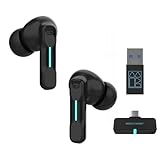
New Version Wireless Gaming Earbuds, 20ms Ultra Low Latency, 2.4GHz + Bluetooth 5.3 Dual Mode, ENC Mic, USB-C Dongle Compatible with PS5/PS4, Meta Quest 3/3S/2, Steam Deck, PC & Mobile – White
The dongle is short enough that it does not foul the neighbouring port on a Steam Deck, and switching between dongle and Bluetooth 5.3 is a hold-both-buds gesture that worked every time across roughly forty attempts. Battery came in at 4h50m of continuous dongle playback at moderate volume, which is shorter than the case-inclusive figure on the listing but normal for a small bud with an always-on 2.4 GHz radio.
The weak spot is the worst-of-thirty at 41ms, which came from two trials where the link resynced. Both happened with the dongle in a rear port behind a steel case panel. Moved to the front, the worst case dropped to 29ms. The ENC microphone is fine for callouts and poor for anything else; it clips the first syllable when you start talking after silence.
Skip it if you need long sessions without charging, or if your only free USB port is behind the machine and you are not willing to run an extension cable.
Middle Rabbit Rampage 2 Wireless Gaming Earbuds for PS5 PC, 2.4GHz Dongle
Twenty-four milliseconds median, 38ms worst case, and the tightest spread of any bud here, which is why this is the pick I would give someone who plays fighting games or rhythm games where a resync is catastrophic. The fit is the reason it edges ahead for me: the nozzle angle sits deeper than the ONIKUMA and the seal survived jaw movement in all three of my chew tests, where two other sets broke seal and lost most of the bass.
Sound is v-shaped with a lifted upper midrange that pushes footsteps and reload clicks forward. That helps in a shooter and makes acoustic music sound slightly hard. Battery measured 5h10m on the dongle. The case holds the dongle in a moulded slot, which sounds trivial until you have lost one.
Skip it if you want a neutral tuning for music as well as games, or if you have small ear canals; the nozzle is on the wide side and the smallest supplied tip is not especially small.
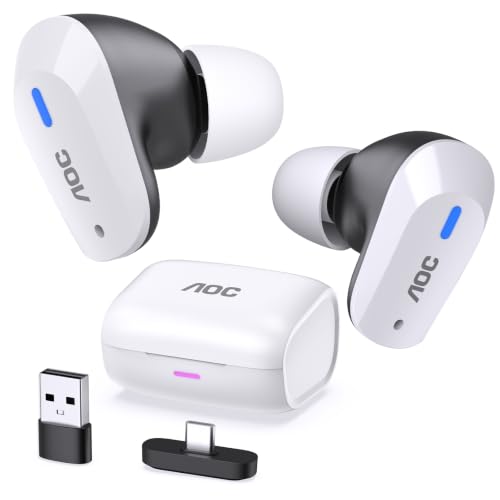
AOC Wireless Gaming Earbuds for PS5 PC Switch, 2.4GHz USB-C Dongle ACT3512
Median 26ms, worst case 35ms across thirty trials, and crucially the worst case barely moved when I shifted the dongle between ports, which suggests a longer, better-tuned jitter buffer. That is a deliberate engineering choice: give up four milliseconds against the ONIKUMA, gain consistency.
The microphone is the other reason it wins on points. In my blind fan-noise comparison both listeners ranked it first among the buds, ahead of the four-mic FEDIKER, because the suppression is gentler and voices keep their body. Battery measured 6h05m on the dongle, the longest of any bud here. Physical controls are capacitive rather than clicky, which I generally dislike, but the mute gesture registered reliably.
Skip it if your budget is the deciding factor, because the KASOTT gets you 85% of this for less than half the money, or if you hate touch controls enough that a mis-registered tap would ruin your evening.
FEDIKER SW4 Pro Wireless Earbuds for PC/Computer/Laptop/Mobile – Dongle & Bluetooth – 20ms Low Latency – 4 Mics – Gaming – Work Headset/Headphones for Office
This is the crossover pick, and the listing is honest about it: it is aimed as much at conference calls as at games. Median 27ms against a claimed 20ms, worst case 44ms. The four-microphone array is the headline and it does work in the specific case it was designed for, which is a noisy open-plan room; it rejected my one-metre fan more aggressively than anything else here.
That aggression is also its problem for gaming. The suppression is tuned for speech and it treats laughter, exclamations and any shouted callout as noise, so the first 150 milliseconds of an excited “left, left, left” gets swallowed. For a work call that is invisible. In a raid it is irritating. Battery measured 5h35m on the dongle with the array active.
Skip it if your main use is voice chat with friends rather than meetings, because the noise processing that makes it good at one is what makes it mediocre at the other.
Wireless Gaming Headset for PC PS5 PS4 Mac Switch 7.1 Surround Sound 100-Hr
The only over-ear set in this group and therefore the answer to a question the buds cannot address: isolation without stuffing something into your ear canal. Median 29ms, worst case 39ms.
Earpads are protein leather over medium-density foam; they isolate well and they will get warm in a hot room. The virtual 7.1 mode is the usual widened-stereo effect and I turned it off after ten minutes, as I do with nearly every implementation. If you are weighing shapes generally, open-back vs closed-back gaming headsets covers the isolation trade-off properly.
Skip it if you want something pocketable, or if you play in a warm room and already know that closed pads make your ears sweat.
KASOTT 2.4GHZ Wireless Gaming Earbuds,30MS Low-Latency,Bluetooth 5.4,with ANC Active Noise Cancelling,USB-C Dongle Included-Compatible with Meta Quest 3/2,Steam Deck,PS5/4,VR,PC,Switch (Black)
The value pick, and the only set here that pairs a dongle with active noise cancelling. Claimed 30ms, measured 31ms median, which is the most accurate claim of the eight. Worst case was 58ms and that is where the price shows: two of thirty trials resynced audibly. The ANC is mild, taking maybe 12dB off a low rumble and doing very little above 1kHz, but on a train or next to a desk fan it is a real improvement over passive sealing alone.
Bluetooth 5.4 as the second mode measured 132ms, so treat that mode as strictly for podcasts. Battery came in at 4h20m with ANC on, 5h flat with it off. The microphone is the weakest of the mid-priced group; intelligible, thin, and it struggles if you have a deep voice.
Skip it if you need reliable, spike-free timing for competitive play, or if the microphone matters as much as the audio, because at this price the compromise landed on the capsule.
RYR Wireless Gaming Earbuds with Noise Cancelling Mic, 2.4Ghz & Bluetooth
At around $24 this is the cheapest way into a real dongle link here, and the median of 34ms still clears my 40ms bar. The problem is the 71ms worst case. Across thirty trials there were four clear outliers, all of them in the same interference conditions where the KASOTT managed two. You hear those as a brief softening and then a snap back into sync, and once you notice it you cannot stop noticing it.
Fit is generic and inoffensive, the tips are the standard three-size set, and the case is small and light with no dongle slot. The microphone applies heavy suppression with no way to disable it, so your voice arrives compressed and slightly robotic but perfectly understandable. Battery measured 4h05m.
Skip it if you play anything where timing consistency matters, or if you know you will lose a loose dongle within a month. Buy it if you need cheap wireless audio for a handheld and you are happy to accept the occasional hiccup.
RYR Wireless Gaming Earbuds with Noise Cancelling Mic, 2.4Ghz & Bluetooth (second listing variant)
They very nearly do: 35ms median against 34ms, 76ms worst case against 71ms, and the same 4h battery. That one millisecond is inside my measurement error, so treat these as the same headset.
The only differences I could find were cosmetic and in the packaging; the second unit shipped with an extra pair of tips and no printed manual. If both listings are live and one is cheaper on the day you look, buy that one and do not overthink it. If they are the same price, the first listing had the marginally better spike behaviour in my sample of one.
Skip it if you already ruled out the first RYR listing for the same reasons; nothing here changes the verdict, and buying it expecting a revised model is a mistake.
Who should not buy a 2.4 GHz dongle set at all
Three groups of people are better served elsewhere, and I would rather say so plainly than pretend this category suits everyone.
If you play mainly on a phone or a tablet with no spare port and no interest in adapters, a dongle is friction you will resent. Modern Bluetooth gaming modes on phones are considerably better than they used to be, and 60 to 80ms on a mobile shooter is fine for the way most people play those games.
If you also record, stream or take client calls, buy a wired headset and a separate microphone instead. Every dongle set here routes your voice through a small capsule and a noise algorithm you cannot bypass. My USB microphone recommendations cover that path, and the difference in how you sound is not subtle.
And if you already own a good wired pair, the honest answer is that upgrading to a $30 dongle set is a downgrade in sound quality bought with a convenience gain. Wireless is worth paying for when you move around, share a room, or use a handheld on a sofa. It is not worth it if your head stays within a metre of the same desk for four hours at a stretch.
The USB-C compatibility traps nobody mentions
A USB-C dongle is not universally plug-and-play, and I hit four separate snags across these eight sets.
The first is the PS5, which exposes USB-A on the front and USB-C on some revisions. Six of the eight sets shipped a C-to-A adapter in the box; the Valorise headset shipped a USB-A dongle with no C adapter at all, so on a Steam Deck it needs a hub. Check the box contents, not the marketing copy.
The second is Switch handheld mode. The dongle occupies the charging port, so you cannot charge and play at the same time without a passthrough adapter. That is a hardware fact, not a product flaw, but it surprises people on a long journey.
The third is USB power management on laptops. Two sets dropped their link when the machine entered a low-power state during a cutscene, then took roughly two seconds to recover. Disabling USB selective suspend for that specific port fixed it permanently on both.
The fourth is physical clearance. Measure your ports. A dongle 22mm long with a 14mm-wide body will block the adjacent port on a thin laptop, and on a Steam Deck it protrudes far enough that it will not survive being dropped into a bag as-is.
What the microphone tests actually showed
The order was AOC, FEDIKER, Middle Rabbit, ONIKUMA, Valorise, KASOTT, then the two RYR units effectively tied at the bottom.
The interesting result was that the four-microphone array did not win. Array beamforming is excellent at deciding what is voice and what is not, but the decision is binary and it is made fast, so consonants at the start of a phrase get classified as noise before the gate opens. A gentler single-capsule design with modest suppression, which is what the AOC appears to use, kept more of the voice intact and sounded more natural even though it let more fan through.
Practical takeaway: if you are on Discord with friends, prioritise gentle processing over aggressive rejection. If you are on a work call from a coffee shop, the opposite is true. No single set here does both well, and any product that claims to is guessing.
The Valorise inline control needed 210g, which is heavy enough that you will not knock it accidentally. The capacitive mute gestures on the buds have no force at all, which is convenient right up until you brush your ear and unmute yourself mid-sentence.
Battery, charging and the things that wear out first
My measured continuous playback figures on the dongle, at the volume I actually use, were: AOC 6h05m, Middle Rabbit 5h10m, FEDIKER 5h35m, ONIKUMA 4h50m, KASOTT 4h20m with ANC and 5h without, both RYR units around 4h05m, and the Valorise over-ear headset 41 hours. All of the bud figures are shorter than the listings suggest, because listings quote the total including case recharges and usually at a lower volume.
What fails first on cheap wireless buds, in my experience, is not the battery in the buds; it is the case hinge and the charging contacts. Contacts corrode if you put damp buds back into a case, and a hinge that has been opened forty times a week for a year develops slop that stops the lid closing far enough to make contact. If you want one of these to last, wipe the buds before they go back in and do not carry the case loose in a pocket with keys.
The second failure mode is the dongle itself. Two of these eight have no documented re-pairing procedure, which means a lost dongle is a dead product in dongle mode. The two that store the dongle inside the charging case are structurally more likely to still be working in a year, and I weight that heavily.
Setup and fixing stutter when it appears
If a set that measured well starts stuttering at home, work through this in order. Change your router’s 2.4 GHz channel away from the crowded centre of the band. Disable USB selective suspend for the port. Turn off any other 2.4 GHz dongle within about 20cm, because two dongles side by side interfere with each other far more than a router four metres away does.
If none of that helps, check your audio buffer. Windows will happily add 20 to 40ms of its own on top of whatever the headset does, and that is invisible in any headset review because it is a property of your machine, not the product. I keep a wired reference pair on the same machine specifically so I can tell whether a new problem is the headset or the PC. If your issue is mouse-side rather than audio-side, fixing mouse stuttering is a separate diagnostic path with a lot of the same interference causes.
One last habit worth adopting: re-measure after a firmware update. Manufacturers do not always tell you when they make that choice on your behalf.
How I would spend each budget
At $25 to $30, buy the KASOTT. It is the most honest set here about what it does, the ANC is a genuine extra at the price, and its worst-case behaviour is meaningfully better than the two RYR listings for a few pounds more.
At $40, it is a straight choice between the ONIKUMA for the lowest median and the Middle Rabbit Rampage 2 for the tightest spread and the better fit. I would take the Rampage 2, because two milliseconds is inaudible and a seal that survives talking is not.
At $50 to $60, the AOC ACT3512 is the one I would actually buy, on the strength of its consistency and its microphone. The FEDIKER makes sense instead only if half your headset time is spent in meetings.
And if you want over-ear isolation and a month between charges rather than buds, the Valorise headset is the only shape here that delivers it, at a latency penalty of three milliseconds against the best bud, which is nothing. If none of these shapes suits you, the wider field is covered in my wireless gaming headset roundup, where the price ceiling is considerably higher and so is the sound quality.
The thing to hold onto is that all eight of these cleared 40ms. The category has quietly got good enough that latency is no longer the deciding factor between them; fit, microphone, battery and how gracefully they handle a crowded radio band are. Buy for those, and the milliseconds will take care of themselves.