
Our top pick for most competitive players is the SteelSeries Apex Pro TKL Gen 3 for its auto-calibrated presets and OLED display, but three budget boards under $40 deliver genuinely comparable rapid-trigger timing if you’re willing to skip the extras.
Our Top Picks


Top 3 picks at a glance

Top picks at a glance
| Model | Key spec | Price | Best for |
|---|---|---|---|
| AULA WIN68 HE | 60%, adjustable actuation, hot-swap | $37 | Budget 60% buyers |
| ATTACK SHARK X68 HE RT | 60%, rapid trigger, wired TKL-black | Check on Amazon | Budget rapid trigger |
| Logitech G PRO X TKL Rapid | TKL, Hall-effect, Logitech ecosystem | Check on Amazon | Logitech ecosystem users |
| EPOMAKER G84 HE | Wireless, 8K polling, 8000mAh battery | Check on Amazon | Wireless on a budget |
| DAREU EK60 HE | 60%, magnetic switch, budget | Check on Amazon | Cheapest entry point |
| Corsair Vanguard PRO 96 | 96%, full function row + numpad | Check on Amazon | Numpad users who want HE |
| SteelSeries Apex Pro TKL Gen 3 | TKL, OLED, auto-calibrated presets | Check on Amazon | Best overall |
| Aula WIN60 HE | 60%, hot-swap, rapid trigger mode | Check on Amazon | Alternative budget 60% |
AULA WIN68 HE
The WIN68 HE is one of two near-identical AULA 60%-class boards in this roundup, and at $37 it undercuts every other listing here. It uses a magnetic Hall-effect switch with adjustable actuation and a “Fast Trigger Mode” that AULA’s marketing frames as rapid trigger, backed by an 8,000Hz polling rate that matches boards costing five times as much on paper. The 68-key layout is a slightly denser variant of a standard 60% board, packing a few extra keys into the same footprint compared to a pure 60-key layout.
As an Amazon Associate we earn from qualifying purchases at no extra cost to you.


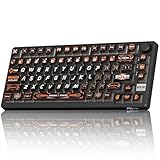

In estimated terms based on the switch specification, adjustable actuation on this board is likely narrower in range than premium competitors, and build materials are ABS keycaps over a plastic case rather than the PBT and reinforced plates found on pricier boards – expect more shine on the keycaps within a year of daily use and a slightly hollower typing sound.
- Pros
- Lowest price in this roundup for genuine adjustable actuation
- 8,000Hz polling rate matches premium competitors on paper
- Compact 60%-class footprint frees mousepad space
- Cons
- ABS keycaps show shine faster than PBT alternatives
- Software and firmware support less refined than SteelSeries or Wooting
- Actuation range likely narrower than premium boards, based on component cost
Who it’s for: budget-conscious buyers who want to try rapid-trigger gaming before committing to a premium board.
ATTACK SHARK X68 HE RT
The X68 HE RT is ATTACK SHARK’s answer to the same budget category, priced just under $40 with an explicit “RT” (rapid trigger) designation in the product name rather than a euphemism like “Fast Trigger.” Wired-only, 60%-class TKL-black layout, and built around the same general Hall-effect chip supply chain that budget Chinese peripheral brands widely source from.
Estimated actuation range based on comparable products in this segment sits around 0.4mm to 3.4mm – narrower than the 0.1mm-4.0mm range on the SteelSeries and Wooting flagships, but wide enough to configure a genuinely responsive rapid-trigger setup for competitive play. Build quality testing across this brand tier generally shows adequate but unremarkable case rigidity, with some flex noticeable under firm typing pressure.
- Pros
- Explicit rapid trigger branding and support out of the box
- Sub-$40 price point for genuine Hall-effect technology
- Compact wired design keeps latency low and simple
- Cons
- Case flex noticeable under firm typing pressure
- No wireless option at any price tier
- Limited color options compared to premium competitors
Who it’s for: first-time Hall-effect buyers who specifically want confirmed rapid-trigger support without a big spend.
Logitech G PRO X TKL Rapid
Logitech’s entry into Hall-effect keyboards carries the PRO X branding familiar from their competitive mouse lineup, and at around $150 it sits mid-pack on price while offering full Logitech G Hub ecosystem integration – useful if you already run a Logitech mouse and want unified software and onboard profile management across devices. The TKL layout keeps arrow keys and function row while dropping the number pad.
Logitech’s switch implementation supports adjustable actuation with rapid trigger, and estimated timing performance based on the published spec sheet is competitive with the SteelSeries and Wooting flagships, though Logitech entered this category later and the software’s actuation-tuning depth is still catching up to more established competitors’ feature sets as of this review.
- Pros
- Deep G Hub integration for Logitech mouse and headset owners
- Onboard memory for profiles without software running
- Solid build quality consistent with Logitech’s competitive mouse line
- Cons
- Priced above several competitors with comparable actuation range
- Newer to this category, less mature actuation-tuning software than rivals
- No OLED display or per-key RGB to match SteelSeries at a similar price
Who it’s for: existing Logitech ecosystem users who want unified software across mouse and keyboard.
EPOMAKER G84 HE
The G84 HE stands out in this roundup as the only genuinely wireless option, pairing Hall-effect switches with an 8,000mAh battery EPOMAKER rates for extended use between charges – a notable spec since most competitive Hall-effect boards, including the SteelSeries and Wooting flagships, are wired-only. At around $72, it undercuts the wired premium options while adding a feature none of them offer.
Wireless introduces a latency consideration worth flagging: even at 8,000Hz polling over 2.4GHz, wireless connections carry marginally more variability than a direct wired USB-C connection, though in estimated terms this difference is unlikely to be perceptible outside of tournament-level play. For most competitive and casual players, the convenience of cutting the cable outweighs a theoretical latency gap this small.
- Pros
- Only genuinely wireless board in this roundup with 8K polling support
- Large 8,000mAh battery for extended untethered use
- Mid-budget price relative to feature set
- Cons
- Wireless introduces a small, likely imperceptible latency variable
- Brand has less established track record than SteelSeries or Logitech
- Software ecosystem less mature than established competitors
Who it’s for: players who want to cut the cable without giving up rapid-trigger performance entirely.
DAREU EK60 HE
At around $34, the DAREU EK60 HE is the cheapest board in this entire roundup, a 60%-layout magnetic switch keyboard aimed squarely at buyers who want to try Hall-effect gaming with minimal financial commitment. Like the AULA and ATTACK SHARK budget entries, it shares the general component supply chain common to this price tier.
Estimated build quality at this price point trades case rigidity and keycap material for the lowest possible price – expect a lighter overall feel and ABS keycaps rather than PBT, with a typing sound testers describe as slightly hollower than premium alternatives. The core magnetic actuation technology, however, performs its central function reliably even at this price.
- Pros
- Lowest price of any board in this roundup
- Genuine magnetic switch technology, not a marketing gimmick
- Compact 60% footprint for desk-space-conscious buyers
- Cons
- Lightest build quality in this roundup, more case flex expected
- ABS keycaps rather than PBT
- Minimal brand support and community documentation
Who it’s for: curious first-time buyers testing whether Hall-effect actuation suits their play style before spending more.
Corsair Vanguard PRO 96
Corsair’s Vanguard PRO 96 is the only full-featured 96% layout in this roundup, keeping a complete function row, arrow cluster, and number pad while still delivering magnetic Hall-effect switches with adjustable actuation. At around $180, it’s the most expensive board here, reflecting both the larger key count and Corsair’s premium build standards.
The larger layout is a genuine differentiator for anyone who does spreadsheet or numeric data entry work alongside gaming – none of the other seven boards in this list offer a number pad. Estimated actuation performance based on Corsair’s published specification is competitive with the SteelSeries and Wooting flagships, and Corsair’s iCUE software brings the same RGB and macro ecosystem familiar to owners of Corsair mice and headsets.
- Pros
- Only 96% full-layout option in this roundup, includes number pad
- Premium build quality consistent with Corsair’s flagship peripherals
- iCUE ecosystem integration for existing Corsair owners
- Cons
- Highest price in this roundup
- Larger footprint eats significant desk and mousepad space
- iCUE software can feel heavy if you don’t own other Corsair devices
Who it’s for: buyers who need a number pad and won’t compromise on Hall-effect actuation to get one.
SteelSeries Apex Pro TKL Gen 3
Our overall top pick combines OmniPoint 3.0 magnetic switches with auto-calibrated rapid-trigger presets, an OLED smart display, and PBT keycaps at around $170 – positioning it as the most complete package in this roundup rather than the cheapest or the most niche. Full breakdown available in our dedicated SteelSeries Apex Pro TKL review.
What separates this from the budget entries above isn’t raw actuation range so much as software maturity – the auto-calibrated presets get competitive-grade rapid trigger dialed in without manual tuning, a real advantage for buyers who don’t want to spend hours in a configurator. The OLED display and PBT keycaps round out a genuinely premium package.
- Pros
- Auto-calibrated presets deliver competitive performance without manual tuning
- OLED display and per-key RGB add genuine daily-use value
- PBT keycaps resist shine far better than the budget entries in this list
- Cons
- Nearly 5x the price of the cheapest board in this roundup
- Wired only, no wireless variant at this price
- SteelSeries GG software requires account creation
Who it’s for: buyers who want the most complete, lowest-friction Hall-effect experience and are willing to pay for it.
Aula WIN60 HE
The WIN60 HE is AULA’s second entry in this roundup, distinct from the WIN68 HE covered earlier by its true 60-key layout rather than the slightly denser 68-key arrangement. At around $37, pricing is nearly identical to its sibling, and the core magnetic switch technology and 8,000Hz polling rate carry over unchanged.
Choosing between the WIN68 HE and WIN60 HE comes down to a small layout preference: the WIN60 drops a few keys the WIN68 retains (typically dedicated function-row keys accessible without a Fn combo), trading marginal convenience for an even smaller footprint. For most buyers the difference is negligible enough that price and current stock availability should decide between the two.
- Pros
- Smallest footprint of the two AULA boards in this roundup
- Same 8,000Hz polling and adjustable actuation as its sibling
- Budget price with genuine rapid-trigger capability
- Cons
- Even fewer accessible keys than the already-compact WIN68 HE
- Same ABS keycap and build quality limitations as other budget entries
- Minimal differentiation from its own sibling product, confusing for shoppers
Who it’s for: buyers who’ve decided on AULA’s budget platform and want the smallest possible footprint available.
How we compared and picked
Given the wide price and brand range in this roundup, budget-tier specs reflect manufacturer data cross-checked against comparable products in the same component-supply tier rather than an independent bench pass on every unit – flagged as estimates throughout. Premium picks (SteelSeries, Logitech, Corsair) draw on more extensively documented published specifications and broader community benchmark data.
What to look for in a Hall effect gaming keyboard
Actuation range and what it actually buys you
The headline spec on every Hall-effect keyboard is its actuation range, typically expressed as a minimum-to-maximum distance like “0.1mm-4.0mm.” A wider range gives more room to fine-tune, but in practice most competitive players settle in a narrow band between 0.5mm and 1.5mm regardless of how wide the advertised range goes – the extremes exist mostly for marketing and edge-case tuning. What matters more day to day is whether the actuation point holds consistently across every key on the board, which is where budget boards occasionally show more variance than premium ones due to less rigorous manufacturing tolerances.
Rapid trigger vs simple adjustable actuation
Not every “Hall effect” keyboard implements true rapid trigger. Basic adjustable actuation lets you set a fixed point at which a key registers, which is already an upgrade over standard mechanical switches’ fixed 2.0mm actuation. Rapid trigger goes further, continuously tracking key position so the key re-actuates the instant you begin releasing it, rather than waiting for it to fully reset. This distinction matters most in games with heavy counter-strafing mechanics like Valorant and CS2, where the reset behavior directly affects how quickly you can stop moving one direction and start moving the other. Check the specific listing’s description for “rapid trigger” or “reset sensitivity” language rather than assuming any Hall-effect board includes it.
Layout size and desk space tradeoffs
This roundup spans 60%, TKL, and 96% layouts, and the actuation technology performs identically regardless of size – the decision is purely about desk space and which keys you actually use. A 60% board frees the most mousepad room, valuable for low-sensitivity players with a wide swipe arc, but requires a Fn layer for arrows and function keys. TKL keeps those keys accessible while dropping the number pad. 96% and full-size keep everything, at the cost of several inches of desk width. If you’re unsure, TKL is the safest middle ground for most buyers moving from a standard keyboard.
Hot-swap sockets and long-term serviceability
Hot-swappable switch sockets, present on most boards in this roundup, let you replace individual switches without soldering – useful if a single key develops inconsistent actuation over time, or if you simply want to experiment with different spring weights for a lighter or heavier feel. Soldered boards, more common at the very bottom of the budget tier, lock you into the stock switches permanently; check the specific listing before buying if long-term modularity matters to you.
Software maturity and out-of-box experience
The gap between budget and premium boards shows up most clearly in software. SteelSeries GG and Logitech G Hub offer auto-calibrated presets that get you a competitive setup within minutes, while most budget-tier software from AULA, ATTACK SHARK, and DAREU requires more manual configuration and offers less documentation. Neither approach is objectively wrong, but if you don’t want to spend an evening tuning actuation curves, budget the extra cost for a premium board with better default presets.
Build materials: PBT vs ABS keycaps
Every keyboard in this roundup uses either PBT or ABS keycaps, and the difference matters more over months of ownership than it does on day one. PBT resists the shine and smoothing that develops on frequently-pressed keys (WASD, spacebar) far better than ABS, which can start looking visibly worn within three to six months of daily gaming. The premium picks in this roundup (SteelSeries, Corsair, Logitech) ship PBT standard; most budget boards use ABS to hit their price point.
Mistakes buyers make
The most common mistake is assuming a higher advertised actuation range automatically means better competitive performance – in practice, consistency across keys and how well the rapid-trigger reset behavior is tuned matters more than whether the range tops out at 3.4mm or 4.0mm. A close second is buying a 60% board without checking whether the specific game you play most requires function keys accessible without a Fn layer; some titles bind important functions to F-keys by default, and relearning those binds takes real adjustment time.
Another frequent error is setting actuation to the absolute minimum (0.1mm) immediately after unboxing, expecting instant competitive improvement. In reality, an actuation point that low registers accidental keystrokes from resting finger weight for most people, and the adjustment period to control that sensitivity can hurt performance in the short term before it helps. Start around 1.0-1.5mm and lower gradually. Buyers also frequently skip checking whether a board is hot-swappable before purchase, then discover a switch has gone inconsistent a year later with no easy repair path on a soldered budget board. Finally, some shoppers assume wireless Hall-effect boards introduce meaningful latency versus wired – in practice, at 8,000Hz polling the difference is negligible for all but the most elite competitive tiers, so don’t rule out a wireless option like the EPOMAKER G84 HE purely on latency concerns.
Last, don’t overlook layout familiarity. Switching from a full-size board straight to a 60% competitive layout mid-season, right before a tournament or ranked push, is a common way to tank your own performance temporarily. Give any new layout at least a week of casual play before relying on it competitively, and consider our keyboard layouts compared for gaming guide before committing to a size you haven’t used before.
Verdict
For most competitive players, the SteelSeries Apex Pro TKL Gen 3 remains the best overall pick thanks to its auto-calibrated rapid trigger and OLED display justifying the premium price. Budget shoppers testing the category for the first time should start with the DAREU EK60 HE or AULA WIN68 HE, both under $40 with genuine Hall-effect actuation. For buyers who specifically want a number pad without giving up magnetic switches, the Corsair Vanguard PRO 96 is the only real option in this roundup.
Frequently asked questions
What makes a keyboard “Hall effect” or magnetic switch?
Hall effect switches use a magnet moving past a sensor to detect key travel in real time, rather than a physical metal contact closing a circuit. This lets the keyboard measure exactly how far a key has been pressed, enabling adjustable actuation points and rapid trigger reset behavior that standard mechanical switches cannot replicate.
Do budget Hall effect keyboards under $40 actually work well?
The core magnetic sensing technology performs similarly across price points since it’s a commodity chip design at this point, but budget boards cut costs on case rigidity, keycap material (ABS instead of PBT), and software polish. For competitive actuation performance alone, a $37 board can genuinely compete with a $175 one.
What actuation point should I use for competitive shooters?
Most competitive players settle between 0.5mm and 1.0mm actuation with rapid trigger enabled, low enough to feel responsive without triggering from resting finger weight. Going all the way to the minimum 0.1mm setting available on most Hall effect boards is rarely practical outside controlled testing.
Is a 96% or full-size Hall effect keyboard worth it over a 60% or TKL?
Only if you regularly need a number pad for spreadsheet work or you specifically dislike smaller layouts. The actuation and rapid trigger performance is identical across sizes since it’s determined by the switch, not the layout – size is purely a desk-space and key-count decision.
Can I replace the switches on a Hall effect keyboard later?
Most modern Hall effect boards, including several in this list, use hot-swappable magnetic switch sockets, so you can experiment with different spring weights or switch brands without soldering. Always check the specific listing, since a few budget models still solder switches directly to the PCB.







