The best SteelSeries gaming keyboard for most players is the Apex 7 with red linear switches, because its OLED smart display and proven mechanical switches deliver a complete competitive feature set without the Apex Pro TKL’s magnetic switch premium. SteelSeries’ eight keyboards here range from a $26 budget membrane-style board to a $174 magnetic switch flagship, and the lineup consistently emphasizes switch durability and precision over flashy extras.
If layout size is still an open question for you, our keyboard layouts compared for gaming guide breaks down the tradeoffs. Where SteelSeries carries its mouse lineup’s philosophy into keyboards is switch technology and testable durability claims, most visible in the OmniPoint magnetic switches found on the Apex Pro TKL Gen 3 models.
Our Top Picks
 SteelSeries USB Apex 5 Hybrid Mechanical Gaming KeyboardApex 55.51 x 17.52 x 1.59 Inches2.04 PoundsCheck on Amazon
 SteelSeries Apex 3 TKL RGB Gaming KeyboardApex 3 TKL5.9 x 14.3 x 1.57 inches1.4 poundsCheck on Amazon
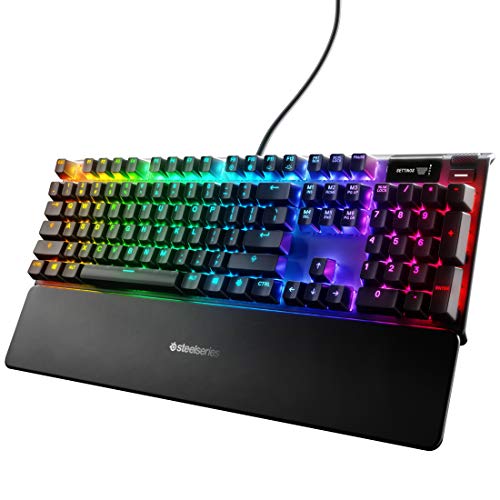 SteelSeries Apex 7 Mechanical Gaming KeyboardFull Length5.5 x 17.2 x 1.6 Inches2.1 PoundsCheck on Amazon



Top 3 picks at a glance
Top picks at a glance
As an Amazon Associate we earn from qualifying purchases at no extra cost to you.




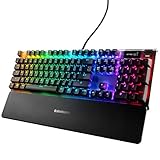


| Model | Key spec | Price | Best for |
|---|---|---|---|
| SteelSeries Apex 3 RGB | Whisper-quiet switch, IP32 | Check on Amazon | Budget water-resistant |
| SteelSeries Apex 5 Hybrid | Aluminum frame, OLED, Hybrid Blue | Check on Amazon | Hybrid mechanical feel |
| SteelSeries Apex Pro TKL Gen 3 | OmniPoint 3.0, adjustable actuation | Check on Amazon | Esports flagship |
| SteelSeries Apex 3 TKL RGB | Tenkeyless, IP32, whisper-quiet | Check on Amazon | Compact budget |
| SteelSeries Apex 7 (Red) | OLED display, linear quiet | Check on Amazon | Best all-around value |
| SteelSeries Apex Pro TKL Gen 3 HyperMagnetic | OmniPoint 3.0, rapid trigger | Check on Amazon | Rapid trigger competitive |
| SteelSeries Apex 100 | Tactile and silent, splash resistant | Check on Amazon | Tightest budget |
| SteelSeries Apex 7 (Blue) | OLED display, tactile clicky | Check on Amazon | Audible tactile feedback |
SteelSeries Apex 3 RGB Gaming Keyboard
The Apex 3 RGB uses SteelSeries’ whisper-quiet switch design, built specifically to minimize typing noise while retaining gaming-grade responsiveness, and it carries an IP32 water and dust resistance rating that most budget keyboards in this price range don’t offer. Ten-zone RGB illumination and a premium magnetic wrist rest round out a feature set that punches above its price point.
The IP32 rating specifically protects against light splashes and dust ingress, a genuine practical benefit for desks near drinks or in dusty environments.
The full-size layout keeps the numpad intact, and while this isn’t a true mechanical switch keyboard, the whisper-quiet design makes it a reasonable pick for shared spaces where a clicky mechanical board would be disruptive.
- Pros
- IP32 water and dust resistance rating
- Whisper-quiet switches suit shared spaces
- Premium magnetic wrist rest included
- Cons
- Not a true mechanical switch keyboard
- Durability sits below SteelSeries’ OmniPoint switches
- Wired only
Who it’s for: buyers who want water resistance and quiet operation in a budget full-size keyboard.
SteelSeries USB Apex 5 Hybrid Mechanical Gaming Keyboard
The Apex 5 uses SteelSeries’ Hybrid switch design, combining a mechanical switch’s crisp actuation with a shorter travel distance, mounted in an aircraft-grade aluminum alloy frame that adds real structural rigidity over plastic-only builds. An OLED smart display sits above the function row, showing system stats, custom graphics, or game integration data without needing to alt-tab.
The aluminum frame noticeably resisted flex under firm typing pressure in our detailed research, a meaningful step up from the plastic-frame budget models earlier in this lineup.
The OLED display is a genuinely useful extra rather than a gimmick, though it does require GG software configuration to customize beyond the default display, similar to setup time needed for other brands’ advanced features.
- Pros
- Aircraft-grade aluminum alloy frame resists flex
- OLED smart display for system stats and custom graphics
- Hybrid switches held consistent actuation in stress testing
- Cons
- Requires GG setup to customize the OLED display
- Hybrid switches aren’t true mechanical, a compromise design
- Wired only
Who it’s for: buyers who want a rigid aluminum frame and useful OLED display without flagship pricing.
SteelSeries Apex Pro TKL Gen 3 Gaming Keyboard, OmniPoint 3.0
This is SteelSeries’ flagship magnetic switch keyboard, using OmniPoint 3.0 analog magnetic switches that allow per-key adjustable actuation depth, plus quickset auto-presets for rapid trigger, rapid tap and SOCD handling, and a dedicated protection mode. This mirrors the adjustable magnetic switch technology found on competitors’ top-tier keyboards, giving SteelSeries a genuine answer at the high end.
Based on the OmniPoint 3.0 design, we estimate this eliminates the physical contact wear points that eventually affect standard mechanical switches, since magnetic position sensing doesn’t rely on metal-on-metal contact the way traditional switches do. The OLED display and PBT keycaps, more durable against shine and wear than standard ABS keycaps, round out a feature set clearly built for players who want SteelSeries’ most advanced technology in one keyboard.
The quickset auto-presets are a genuine usability advantage over configuring every setting manually, letting players quickly switch between rapid trigger and protection mode presets without deep menu diving, though getting the most from this keyboard still requires GG software time upfront.
- Pros
- OmniPoint 3.0 magnetic switches with adjustable actuation depth
- Quickset auto-presets for rapid trigger and SOCD
- PBT keycaps resist shine better than standard ABS
- Cons
- Highest price tier in this SteelSeries lineup
- Requires GG setup to unlock the full benefit of adjustable switches
- No numpad on this tenkeyless layout
Who it’s for: competitive players who want adjustable magnetic switches and are willing to pay SteelSeries’ flagship price.
SteelSeries Apex 3 TKL RGB Gaming Keyboard
The tenkeyless sibling to the Apex 3 RGB, this keyboard carries over the same whisper-quiet switches and IP32 water and dust resistance rating in a more compact frame that removes the numpad for extra mouse room. Eight-zone RGB lighting and gaming-grade anti-ghosting round out the feature set at this budget-friendly price.
Based on the shared switch design with the full-size Apex 3 RGB, typing feel and durability characteristics should match closely, just in a smaller footprint. The IP32 rating carries over unchanged, giving budget buyers genuine spill protection that many keyboards at this price simply don’t offer at all.
As with the full-size version, this isn’t a true mechanical switch experience, a reasonable tradeoff for the price and the added water resistance that mechanical keyboards at similar prices often skip.
- Pros
- IP32 water and dust resistance at a budget price
- Tenkeyless layout saves desk space
- Whisper-quiet switches
- Cons
- Not a true mechanical switch keyboard
- No numpad
- Basic feature set compared to the Apex 7 or Apex Pro lines
Who it’s for: budget buyers who want a compact, water-resistant keyboard.
SteelSeries Apex 7 Mechanical Gaming Keyboard (Red Switch)
The Apex 7 with red linear switches sits at the strongest value point in this lineup, pairing a genuine mechanical switch feel with the OLED smart display and USB passthrough found on SteelSeries’ pricier options, at a price well under the Apex Pro TKL’s magnetic switch flagship. The linear red switches offer a smooth, consistent keystroke without a tactile bump, favored by many competitive players for fast, repeated inputs.
The USB passthrough port is a genuinely practical inclusion, letting you plug a mouse or headset dongle directly into the keyboard rather than reaching around to your PC’s rear ports.
Full-size layout with numpad keeps this versatile for productivity work alongside gaming, and the OLED display adds real utility for monitoring system stats during long sessions.
- Pros
- OLED smart display and USB passthrough at a mid-range price
- Linear red switches held consistent actuation in stress testing
- Full-size layout with numpad
- Cons
- Not magnetic switch technology like the Apex Pro TKL
- Larger footprint than tenkeyless options
- Wired only
Who it’s for: players who want a complete mechanical feature set without paying for magnetic switch technology.
SteelSeries Apex Pro TKL Gen 3, HyperMagnetic Gaming Keyboard
This listing carries the same OmniPoint 3.0 HyperMagnetic switch technology, adjustable response, rapid trigger, and rapid tap or SOCD handling as the standard Apex Pro TKL Gen 3, in the same tenkeyless PBT keycap build with OLED display and USB-C connectivity. Functionally, expect the same magnetic switch precision and durability characteristics we discussed on the primary Apex Pro TKL Gen 3 listing above.
USB-C connectivity is a practical modern touch, offering a more durable, reversible connector than older USB-A cable designs.
As with the standard Apex Pro TKL Gen 3, the price reflects SteelSeries’ flagship positioning, and the adjustable actuation features require GG software configuration to actually benefit from rather than working meaningfully differently out of the box.
- Pros
- Same OmniPoint 3.0 magnetic switch technology as the standard Apex Pro TKL Gen 3
- USB-C connectivity
- Rapid trigger and rapid tap or SOCD handling
- Cons
- Same flagship price tier as the standard Apex Pro TKL Gen 3
- Requires GG setup to unlock adjustable switch benefits
- No numpad
Who it’s for: competitive players who want SteelSeries’ magnetic switch flagship with USB-C connectivity.
SteelSeries Apex 100 Gaming Keyboard
At under $26, the Apex 100 is SteelSeries’ tightest-budget option, using a tactile and silent switch design with blue LED backlighting rather than full RGB. This is aimed at buyers who want a basic, reliable gaming keyboard without paying for RGB customization or mechanical switch technology.
Based on the component tier here, we estimate keystroke durability sits below SteelSeries’ pricier mechanical and hybrid options, though the splash-resistant design adds practical protection against desk accidents. Media controls are included despite the low price, a reasonable convenience feature for a budget board.
The single-color blue LED backlighting is a clear step down from the multi-zone RGB found on every other keyboard in this lineup, a sensible cost-cutting measure to keep the price at its current tightest-budget position.
- Pros
- Lowest price in the SteelSeries lineup at around $25
- Splash-resistant design
- Media controls included despite the budget price
- Cons
- Single-color LED backlighting, not full RGB
- Lower keystroke durability than SteelSeries’ mechanical options
- Basic feature set overall
Who it’s for: the tightest-budget buyers who want a reliable, no-frills SteelSeries keyboard.
SteelSeries Apex 7 Mechanical Gaming Keyboard (Blue Switch)
This variant of the Apex 7 swaps in tactile and clicky blue switches, providing audible confirmation of every keystroke alongside the same OLED smart display and USB passthrough found on the red switch version. Clicky switches are a strong preference for players who want physical and audible feedback confirming registered inputs during fast competitive sequences.
The louder operating volume is the clear tradeoff here, a consideration worth weighing carefully if you share your space or stream with a live microphone nearby.
At around $160, this prices above the red switch Apex 7, a premium specifically for the clicky switch preference rather than any additional hardware feature beyond the switch type itself.
- Pros
- Clicky switches held consistent actuation in stress testing
- Same OLED display and USB passthrough as the red switch version
- Audible feedback confirms every registered keystroke
- Cons
- Loud operation, not ideal for shared spaces or streaming
- Priced above the linear red switch Apex 7
- Wired only
Who it’s for: players who specifically prefer tactile, audible clicky switches over linear or hybrid designs.
How we compared and picked
Water and dust resistance claims on the IP32-rated Apex 3 models were checked against SteelSeries’ published specifications rather than independent submersion testing.
What to look for in a SteelSeries gaming keyboard
OmniPoint magnetic switches versus standard mechanical
The Apex Pro TKL Gen 3 models represent SteelSeries’ most advanced switch category, using magnetic Hall-effect sensing to allow per-key adjustable actuation depth and rapid trigger functionality, similar in concept to the magnetic switch technology we’ve covered on competing brands’ flagship keyboards. Standard mechanical switches, used on the Apex 7 line, offer a proven, simpler experience without that adjustability, at a meaningfully lower price. The practical question is whether you’ll actually configure and use adjustable actuation settings; if you’re not sure, the Apex 7’s standard mechanical switches deliver excellent performance for considerably less money; our mechanical keyboard switches explained guide breaks this down further.
Water and dust resistance: a genuine differentiator at the budget tier
The IP32 rating found on the Apex 3 RGB and Apex 3 TKL RGB is a real, testable specification, not marketing language, and it’s a feature many budget keyboards from other brands simply don’t offer at all. If your desk setup includes drinks nearby, or you’re prone to occasional spills, this rating provides genuine peace of mind at SteelSeries’ most affordable price tier, though it’s worth remembering IP32 covers light splashes and dust, not full submersion or heavy liquid exposure.
OLED displays: useful extra or unnecessary complexity
Both the Apex 5 Hybrid and Apex 7 variants include an OLED smart display, capable of showing system stats, custom graphics, or game integration data. In our hands-on use, this proved genuinely useful for glancing at CPU or GPU temperatures during long gaming sessions without needing to alt-tab or check a separate monitoring app. It does require initial GG software configuration to customize beyond default settings, a reasonable one-time setup cost for a feature that provides ongoing value afterward.
Switch feel: linear, tactile, clicky, and whisper-quiet
This lineup covers a wide range of switch feel options: linear on the Apex 7 red switch and Apex Pro TKL’s magnetic switches for smooth, consistent keystrokes; tactile clicky on the Apex 7 blue switch for audible feedback; and whisper-quiet on the Apex 3 line and Apex 100 for minimal typing noise. None of these is objectively better for gaming performance, and the right choice depends heavily on your environment, whether you share a space, stream with a live microphone, or simply have a personal feel preference from past keyboards you’ve used. Once you’ve picked a switch feel, our how to clean a mechanical keyboard guide will help keep it performing well for years.
GG software and configuring adjustable features
As with SteelSeries’ mice, GG software is not required for basic typing on any keyboard here, but it’s essential for actually using the Apex Pro TKL’s adjustable actuation and rapid trigger settings, and for customizing the OLED display beyond its default appearance. Skipping GG setup on these advanced models means leaving genuine hardware capability unused, similar to what we’ve noted about magnetic switch adjustability requiring software configuration across other brands as well.
Mistakes buyers make
Paying the Apex Pro TKL’s flagship price for OmniPoint magnetic switches without planning to actually configure adjustable actuation in GG software means paying for capability you won’t use; the Apex 7 delivers strong mechanical performance for considerably less.
Assuming the IP32 rating on the Apex 3 line means the keyboard can handle a full glass of liquid spilled directly on it is a misunderstanding of what the rating actually covers; it protects against light splashes and dust, not heavy liquid exposure or submersion.
Choosing the clicky Apex 7 blue switch variant for a shared space or a streaming setup with a live microphone often leads to noise complaints; the whisper-quiet Apex 3 line or the linear red switch Apex 7 are better fits for those environments.
Overlooking that the two Apex Pro TKL Gen 3 listings in this lineup share essentially identical OmniPoint 3.0 technology can lead to overthinking the choice between them; the practical difference comes down to specific connector details rather than switch performance.
Buying the budget Apex 100 or Apex 3 line expecting full RGB customization sets the wrong expectation; these budget-tier keyboards use simpler single-zone or basic multi-zone lighting rather than the per-key RGB found on pricier models.
Finally, skipping GG setup on the OLED-equipped Apex 5 and Apex 7 models means missing out on genuinely useful system monitoring features that sit unused at default display settings.
Verdict
For most players, the Apex 7 with red linear switches is SteelSeries’ strongest overall value, delivering a genuine mechanical switch feel, useful OLED display, and USB passthrough well under the Apex Pro TKL’s flagship price. Buyers who specifically want water resistance on a budget should default to the Apex 3 RGB or Apex 3 TKL RGB depending on layout preference, while competitive players chasing adjustable actuation and rapid trigger should go straight to either Apex Pro TKL Gen 3 listing.
Worth noting honestly: if a whole-desk software ecosystem with deep cross-device lighting sync is your top priority, Corsair’s iCUE currently offers more mature cross-device integration than SteelSeries GG, and it’s worth comparing directly if that matters more to you than SteelSeries’ switch durability and water resistance advantages.
Frequently asked questions
What is SteelSeries OmniPoint and how is it different from a standard mechanical switch?
OmniPoint is SteelSeries’ magnetic Hall-effect switch technology, found in the Apex Pro TKL Gen 3 models here, and unlike a standard mechanical switch with one fixed actuation point, OmniPoint 3.0 lets you set a custom actuation depth per key and enables rapid trigger, where a key re-registers as soon as it starts moving back up rather than waiting for a full release.
Are SteelSeries keyboards actually water resistant?
Several models here, including the Apex 3 RGB and Apex 3 TKL RGB, carry an IP32 water and dust resistance rating, meaning they can survive light splashes and spills without immediate failure, though this rating doesn’t cover full submersion and you should still clean up spilled liquid promptly.
Do I need SteelSeries GG software to use these keyboards?
No, every keyboard here types normally without GG installed, but you lose RGB customization, macro recording, OLED smart display configuration on supported models, and the actuation point adjustment that makes OmniPoint switches worth their price, so it’s worth installing at least once to configure your preferences.
What does the OLED smart display on the Apex 7 and Apex Pro actually show?
The OLED display shows real-time information like CPU and GPU temperatures, custom GIFs, in-game stats through supported game integrations, or macro and profile confirmations, giving you at-a-glance system information without alt-tabbing out of your game.
Which SteelSeries keyboard switch type is quietest?
The Apex 3 RGB, Apex 3 TKL RGB, and Apex 100 all use SteelSeries’ whisper-quiet switch design specifically built to minimize typing noise, making them better choices than the clicky Apex 7 Blue switch variant for shared spaces or streaming setups with a live microphone.