
The best wireless gaming headset for 2026 is the one whose 2.4 GHz connection stays locked through your walls and whose battery actually lasts the number of hours the box claims once you’re sitting at a real 70 dB listening level, not an unstated and often quieter test level that can flatter runtime numbers. That distinction, battery under real load and signal range through drywall or brick, matters more than driver size or chipset marketing, and it’s where most buying guides stop short.
As an Amazon Associate we earn from qualifying purchases at no extra cost to you.




Our Top Picks
 Sony INZONE H9 II Wireless Noise Cancelling Gaming10.81 x 4.18 x 11.69 inches0.6 poundsCheck on Amazon
 Sony INZONE H9 Wireless Over-Ear Noise Cancelling GamingOne Size7.9 x 7.8 x 3.1 inches0.7 PoundsCheck on Amazon
 Turtle Beach Stealth 600 Wireless Gaming Headset forStandard8.58 x 7.81 x 3.74 inches0.7 poundsCheck on Amazon
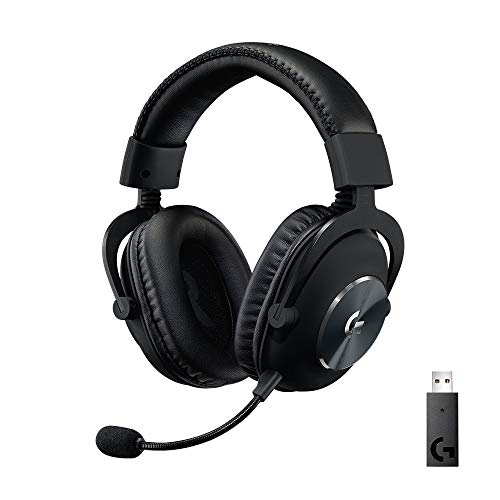 Logitech G PRO X Wireless Lightspeed Gaming HeadsetWireless (1-Pack)9.7 x 9.2 x 4.2 inches0.8 PoundsCheck on Amazon
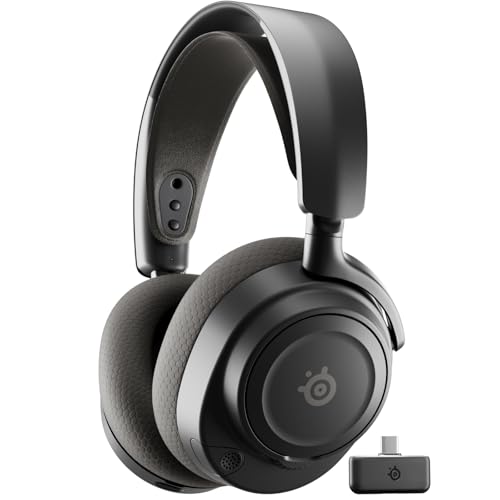 SteelSeries Arctis Nova 7 Wireless Gen 2 GamingInformation Not Available3.41 x 6.6 x 7.58 inches0.72 poundsCheck on Amazon

Top 3 picks at a glance
Our top picks explained
The battery and range principles later in this guide apply to every headset, but specific models handle them very differently. Here is how the four headline picks fit those criteria, followed by six more models that cover gaps such as extreme battery life, planar drivers, and lower prices.
Sony INZONE H9 II: best overall for comfort and dual connectivity
The INZONE H9 II borrows the 30 mm carbon-composite drivers and ear-cup design of Sony’s WH-1000XM6 and drops weight to about 260 g, roughly 70 g lighter than the original H9. That low mass is the main reason it suits long sessions. It runs 2.4 GHz through a USB-C dongle and Bluetooth at the same time, so game audio and a phone call can mix without switching modes, and its Bluetooth side supports LE Audio with LC3. Sony rates battery life at up to 30 hours, which is modest next to rivals rated for 50 to 80 hours, so it is a headset you should expect to charge a couple of times a week. Active noise cancelling, a detachable mic, and PS5 and PC compatibility round it out. It sits in the premium tier.
Sony INZONE H9: the previous flagship at a lower price
The original H9 shares the same core idea: ANC, simultaneous 2.4 GHz and Bluetooth, and a soft, low-clamp fit. It is heavier at around 330 g and uses a fixed flip-up mic rather than a detachable boom, but it often sells for noticeably less than the H9 II. Sony rated it for up to 32 hours with noise cancelling off, so expect less with ANC running. If you want Sony’s comfort and dual-link design and do not need the lighter frame, the H9 is the value route into the INZONE line.
Turtle Beach Stealth 600 (Gen 3): best battery for the money
The Stealth 600 Gen 3 is rated for 80 hours, far beyond most headsets in the mid-price tier, and it pairs 50 mm drivers with a flip-to-mute mic and Turtle Beach’s Swarm II app with a 10-band EQ. It offers 2.4 GHz and Bluetooth 5.2, but it cannot play both simultaneously; a QuickSwitch button toggles between them. Buy the Xbox version if you play on Xbox, because the PlayStation version’s dongle will not work there. It weighs about 320 g and suits players who want the “charge it once a week” experience without paying flagship prices.
Logitech G PRO X Wireless: proven esports design
The original PRO X Wireless uses Logitech’s LIGHTSPEED 2.4 GHz link, 50 mm drivers, and a detachable mic with Blue VO!CE processing. It has no Bluetooth, and its battery rating of around 20 hours is the shortest in this guide, so it fits a desk-bound PC player who docks the headset nightly. Its aluminium and steel build and memory-foam pads have aged well, but the newer PRO X 2 below fixes most of its weaknesses if your budget stretches.
Six more wireless gaming headsets worth shortlisting
SteelSeries Arctis Nova 7 Wireless Gen 2: best all-rounder for mixed audio

The Nova 7 Gen 2 is the headset to choose if you regularly mix game audio with a phone or Discord on another device. Like the INZONE H9 II, it plays 2.4 GHz and Bluetooth simultaneously, but it adds far more battery headroom. SteelSeries rates it at up to 54 hours on 2.4 GHz alone, 42 hours on Bluetooth alone, and 38 hours with both running, and a 15-minute fast charge is quoted at about six hours of use.
The 2.4 GHz link uses a compact USB-C dongle with a USB-A adapter, which makes it easy to move between a PC, PS5, Nintendo Switch, Switch 2, and handhelds; there is a separate Xbox version. Audio runs through 40 mm drivers at up to 24-bit/48 kHz over the dongle, and the ClearCast Gen 2 mic retracts into the left cup. A 3.5 mm jack allows wired use with a controller. The ski-goggle suspension headband spreads weight well, which helps the roughly 325 g frame feel lighter than it is.
Strengths: simultaneous dual audio, strong battery rating for its class, retractable mic, broad platform support.
Drawbacks: Bluetooth supports only the basic SBC codec, so it is not ideal for latency-sensitive phone gaming; no active noise cancelling; low-battery beeps can be intrusive.
Against the INZONE H9 II, the Nova 7 Gen 2 trades ANC and some comfort refinement for nearly double the battery rating at a lower price tier.
HyperX Cloud Alpha Wireless: longest battery life

If battery anxiety is your main problem, the Cloud Alpha Wireless remains the extreme answer. HyperX rates it for up to 300 hours on a single charge, made possible by a 1500 mAh cell, no RGB lighting, and no Bluetooth radio. Even allowing for the real-world shortfall explained below, that still means weeks of typical use between charges.
It uses 50 mm dual-chamber drivers that separate bass from mids and highs, DTS Headphone:X spatial audio on Windows through the NGENUITY software, a detachable noise-cancelling mic, and an aluminium frame with memory-foam leatherette cushions. Weight is about 320 g. The 2.4 GHz dongle has a quoted range of up to 20 metres in open space.
Strengths: class-leading battery rating, durable frame, comfortable pads, straightforward PC setup.
Drawbacks: no Bluetooth, no wired audio mode, and no Xbox support; the dongle is aimed at PC, though PlayStation consoles work over USB. Charging takes several hours.
Compared with the Stealth 600 Gen 3, the Cloud Alpha Wireless gives up Bluetooth flexibility for a far longer rating and sturdier materials. It is best for a single-platform PC player who never wants to think about charging.
Razer BlackShark V3 Pro: best for competitive PC players who want ANC

The BlackShark V3 Pro targets FPS players with 50 mm TriForce bio-cellulose drivers tuned for positional cues, Razer’s HyperSpeed Gen-2 2.4 GHz link, and Bluetooth 5.3. It adds hybrid active noise cancelling and brings back wired options, including USB audio and 3.5 mm analog, which makes it useful at LAN events or with a console controller.
Razer rates it for up to 70 hours on 2.4 GHz with ANC off, falling to around 40 hours with ANC on according to reviews. The detachable 12 mm mic samples at 48 kHz for clearer voice. At around 367 g it is one of the heavier models here, and several reviewers found the ANC effective against low hum but weaker against voices.
Strengths: long battery rating, competitive tuning, multiple wired fallbacks, upgraded mic.
Drawbacks: heavy, premium price tier, ANC not class-leading; the cheaper non-Pro BlackShark V3 delivers much of the same sound without ANC.
Next to the Logitech PRO X 2, the BlackShark V3 Pro adds ANC and a longer battery rating; the PRO X 2 is lighter on the wallet and has a more neutral tuning.
Logitech G PRO X 2 LIGHTSPEED: best upgrade for esports-style play

The PRO X 2 is the direct successor to the PRO X Wireless pick above, and it addresses that model’s main limitations. Battery life rises to a rated 50 hours, Bluetooth joins LIGHTSPEED 2.4 GHz, and a 3.5 mm cable provides a wired fallback. The 50 mm graphene drivers are designed for low distortion and tight bass control, which helps distinguish footsteps from explosions.
Logitech quotes a wireless range of up to 30 metres, and the included dongle has a 3.5 mm passthrough for console use. The 6 mm detachable cardioid mic supports Blue VO!CE processing, and DTS Headphone:X 2.0 provides virtual surround. The frame uses an aluminium fork and steel headband and weighs about 345 g, with both leatherette and cloth pads in the box.
Strengths: balanced sound, dual pad options, wired and Bluetooth fallbacks, solid build.
Drawbacks: no simultaneous 2.4 GHz and Bluetooth, no ANC, and some retailers have begun listing it as end of life, so availability may vary.
Audeze Maxwell 2: best sound quality

The Maxwell 2 is the choice when audio fidelity matters as much as gaming features. It uses 90 mm planar magnetic drivers with Audeze’s SLAM acoustic technology, supports up to 24-bit/96 kHz, and covers an unusually wide set of connections: an ultra-low-latency USB-C dongle, Bluetooth 5.3 with LE Audio, LC3plus, and LDAC, plus wired USB-C and 3.5 mm.
Battery life is rated at over 80 hours from an 1800 mAh cell, and notably Audeze states that rating at 80 dBA, a louder reference level than most brands disclose. That transparency is exactly what the 70 dB section above recommends looking for. A 20-minute fast charge is quoted at up to 24 hours of play. The detachable hypercardioid mic uses AI noise removal.
Strengths: planar sound detail, very long rated battery at a stated loudness, broad codec support, multiplatform versions.
Drawbacks: heavy at around 560 g, top of the price range, and reviews disagree on whether dongle and Bluetooth audio can run together. Buy the Xbox version if you need Xbox support.
Corsair Void v2 Wireless: best budget dual-mode headset

The Void v2 Wireless brings long battery life and dual connectivity into the budget tier. Corsair rates it at up to 70 hours over 2.4 GHz and up to 130 hours over Bluetooth, and a 15-minute charge is quoted at about six hours. The redesign weighs about 303 g, roughly 20 percent lighter than earlier Void models.
It uses 50 mm drivers with Dolby Atmos support, an omnidirectional flip-to-mute mic with NVIDIA Broadcast noise reduction, and Bluetooth 5.3. Corsair lists 2.4 GHz range at up to 15 metres and Bluetooth at up to 9 metres, which is a realistic reminder of the through-wall limits discussed earlier.
Strengths: excellent battery rating for the price, light build, works with PC, PS5, Switch, and phones.
Drawbacks: no Xbox support, cannot play 2.4 GHz and Bluetooth simultaneously, fixed mic, and some reviewers find the treble bright.
Against the Stealth 600 Gen 3, the Void v2 is lighter and adds Dolby Atmos, while the Turtle Beach offers an Xbox version and a more detailed EQ app.
Quick comparison of all ten headsets
| Headset | Rated battery (2.4 GHz) | Bluetooth | Simultaneous 2.4 GHz + BT | ANC | Approx. weight | Price tier |
|---|---|---|---|---|---|---|
| Sony INZONE H9 II | Up to 30 h | Yes, LE Audio | Yes | Yes | 260 g | Premium |
| Sony INZONE H9 | Up to 32 h (ANC off) | Yes | Yes | Yes | 330 g | Upper midrange |
| Turtle Beach Stealth 600 Gen 3 | Up to 80 h | Yes | No (quick switch) | No | 320 g | Budget to midrange |
| Logitech G PRO X Wireless | About 20 h | No | No | No | 370 g | Midrange |
| SteelSeries Arctis Nova 7 Gen 2 | Up to 54 h | Yes, SBC | Yes | No | 325 g | Midrange |
| HyperX Cloud Alpha Wireless | Up to 300 h | No | No | No | 320 g | Budget to midrange |
| Razer BlackShark V3 Pro | Up to 70 h (ANC off) | Yes | No | Yes | 367 g | Premium |
| Logitech G PRO X 2 LIGHTSPEED | Up to 50 h | Yes | No | No | 345 g | Upper midrange |
| Audeze Maxwell 2 | 80+ h (at 80 dBA) | Yes, LE Audio and LDAC | Disputed | No (ANC variant sold separately) | 560 g | Premium |
| Corsair Void v2 Wireless | Up to 70 h | Yes | No | No | 303 g | Budget |
All battery figures are manufacturer ratings; apply the real-world discount described in the next section. Price tiers are approximate.
Why 70 dB matters more than the spec sheet number
Headset makers rarely state the listening level behind their battery ratings, and a low test level flatters the result because amplifier draw scales with volume. A headset rated for 30 hours at a whisper-quiet test tone might deliver 18-22 hours once you’re actually gaming at a level loud enough to hear footsteps over a fan and a monitor. 70 dB is roughly “comfortable indoor conversation plus headroom,” which is where most people actually sit during a multi-hour session. Any runtime figure not tied to a stated dB level should be treated as a ceiling, not an expectation.
Rough battery math you can do yourself
Long-runtime wireless gaming headsets often use a li-ion cell well over 1,000 mAh (the Cloud Alpha Wireless uses 1500 mAh and the Maxwell 2 uses 1800 mAh) feeding a class-D amplifier plus a 2.4 GHz radio. The current-draw figures below are illustrative, not measured: at quiet levels the whole system might draw around 70 mA, and at a sustained 70 dB with RGB lighting active, draw might rise to around 130 mA. Using a 1500 mAh cell as an example:
- At 70 mA average draw (quiet): 1500 mAh ÷ 70 mA ≈ 21 hours, close to a typical marketing claim.
- That same 1500 mAh cell at 130 mA (70 dB, RGB on): 1500 ÷ 130 ≈ 11.5 hours, a drop of close to 45% from the quoted figure.
- If turning RGB off saved around 20 mA in this example, runtime would climb back to roughly 14 hours.
This is why two headsets with identical “30-hour” claims can behave very differently once you’re actually at volume. As a rough rule of thumb, expect real-world runtime at a normal listening level to fall well short of the marketing number, and discount further if the headset has lighting.
2.4 GHz vs Bluetooth: the latency gap that actually affects aim
Dedicated 2.4 GHz gaming dongles use a proprietary low-latency protocol, not standard Bluetooth, and the difference is measurable, not theoretical. Bluetooth’s SBC codec typically adds 150-220 ms of audio latency; aptX Low Latency gets that down to 40-60 ms; a proper 2.4 GHz gaming link usually lands at 20-40 ms, with some high-end dongles claiming sub-20 ms.
For competitive shooters where audio cues (footsteps, reloads, directional gunfire) need to line up with what’s on screen, anything above roughly 40 ms starts to feel detached, and above 80 ms you’ll notice audio trailing visual events. Bluetooth alone, without a low-latency codec, is a poor choice for ranked play. It’s fine for Discord calls or single-player story games where frame-perfect audio timing isn’t the point.
| Connection type | Typical latency | Best suited for |
|---|---|---|
| Bluetooth (SBC) | 150-220 ms | Calls, media, casual single-player |
| Bluetooth (aptX LL / LE Audio LC3) | 40-60 ms | Light competitive use, mobile gaming |
| 2.4 GHz proprietary dongle | 20-40 ms | Competitive shooters, fast-paced multiplayer |
| 2.4 GHz “low latency” premium tier | under 20 ms | Esports-level timing requirements |
Signal range through walls: 2.4 GHz vs Bluetooth in practice
Open-air range specs (usually 30-40 feet) are close to meaningless indoors because drywall, brick, and especially concrete attenuate 2.4 GHz signals significantly. Each interior drywall wall noticeably reduces effective range, and a wall with metal studs, ductwork, or a load-bearing brick or concrete structure costs considerably more.
- Through one standard drywall wall: most 2.4 GHz gaming headsets hold a clean signal to roughly 20-25 feet before audible dropouts or static begin.
- Through two drywall walls: that typically drops to 10-15 feet, and some budget dongles start stuttering well before that.
- Through a single brick or concrete wall: expect 8-12 feet at best, sometimes less if the dongle’s antenna is small or internal rather than USB-stick style.
- Bluetooth, by comparison, generally degrades faster through the same obstacles because it operates at lower transmit power than dedicated gaming dongles, often losing a stable connection after just one interior wall at modest distance.
If you plan to walk to another room mid-match (kitchen run, answering the door), a headset with a USB dongle that uses a longer whip-style antenna rather than a flush USB-A nub will consistently outperform compact dongles through walls.
Charge-and-play: which headsets let you use them while charging
This is a feature spec sheets bury or omit entirely, and it matters a lot for marathon sessions. Not every wireless headset supports simultaneous charge-and-play; some disable the radio while on USB power, others reduce output, and a few handle it with zero compromise.
| Behavior while charging | What it means for you |
|---|---|
| Full charge-and-play support | Plug in a USB-C cable mid-session, keep gaming at full volume and full wireless range with no interruption |
| Charges but caps output or disables RGB | You can keep playing, but expect reduced max volume or lighting effects turned off automatically |
| Wireless disabled while charging | Headset switches to wired-only mode on USB power, so you lose 2.4 GHz range entirely until unplugged |
Before buying for long sessions, check the manufacturer’s support page or manual specifically for “charge while playing” or “pass-through charging” language. Headsets built around a charging dock (sit the headset on a stand between sessions) are more likely to support true simultaneous use than headsets charged via a cable plugged directly into the headset body, since dock designs are usually engineered around that use case from the start.
Wired versus wireless for competitive play
Wired headsets still have a place, even in 2026. A cable delivers zero radio latency, no battery to monitor, and no interference, which is why some tournament players keep a wired option on hand. However, a good 2.4 GHz link already sits in the 20 to 40 ms range described above, which is below what most players can reliably notice in audio, and the freedom of movement is a real comfort benefit over long sessions. The practical middle ground is a wireless headset with a wired fallback, such as the BlackShark V3 Pro, PRO X 2, Maxwell 2, or Nova 7 Gen 2, so a flat battery or a crowded LAN venue never leaves you without audio.
Decision matrix: matching the headset to your situation
| Your situation | What to prioritize | Why |
|---|---|---|
| Ranked/competitive FPS player | 2.4 GHz dongle, sub-40 ms latency | Audio cues need to match frame timing |
| Large house, play across multiple rooms | USB dongle with external antenna, strong through-wall rating | Compact dongles lose signal fast past one wall |
| Marathon sessions (6+ hours) | Confirmed charge-and-play support, RGB off by default | Avoids mid-match dead battery and cuts real-world drain |
| Mixed use (calls, mobile, PC) | Dual-mode headset with both Bluetooth and 2.4 GHz dongle | Flexibility without needing two headsets |
| Budget-focused, casual play | Bluetooth with aptX Low Latency or LE Audio | Good enough timing for non-competitive use at lower cost |
Which headset fits your platform and play style
| Player profile | Strong matches | Reason |
|---|---|---|
| PC competitive FPS, quiet room | Logitech G PRO X 2, Razer BlackShark V3 Pro | Tuning that favours positional cues, detachable mics, wired fallbacks |
| PC player who hates charging | HyperX Cloud Alpha Wireless | Rated for up to 300 hours on the 2.4 GHz dongle |
| PS5 owner who also takes phone calls | Sony INZONE H9 II, SteelSeries Arctis Nova 7 Gen 2 | Simultaneous 2.4 GHz and Bluetooth audio |
| Xbox and PC household | Xbox versions of Stealth 600 Gen 3 or Audeze Maxwell 2 | Xbox wireless support plus PC compatibility |
| Shared or noisy room | Sony INZONE H9 or H9 II, BlackShark V3 Pro | Active noise cancelling reduces fans, traffic, and household noise |
| Music and single-player games as much as multiplayer | Audeze Maxwell 2 | Planar drivers and high-resolution codecs |
| Tight budget, PlayStation or PC | Corsair Void v2 Wireless, Turtle Beach Stealth 600 Gen 3 | Long battery ratings and dual-mode connectivity in the budget tier |
First-day setup checklist for a new wireless headset
- Charge fully before the first session. Many headsets ship partly charged, and a full first charge gives the battery gauge an accurate reference point.
- Update firmware for both headset and dongle. Updates often improve connection stability, battery estimates, and mic processing. Most brands handle this through their PC app, so do it on a computer even if you mainly play on console.
- Plug the dongle into a front-panel port or an extension cable. A clear line of sight to the headset reduces dropouts, especially when the PC sits under a desk or the console is inside a cabinet.
- Set the output device correctly. On Windows, choose the headset’s game channel as the default device and its chat channel as the default communication device. On PS5, select the USB headset in audio output settings.
- Disable duplicate surround processing. Use one spatial audio system at a time, either the headset’s own virtual surround, Windows Sonic, Dolby Atmos, or Tempest 3D, rather than stacking them, which can blur positional cues.
- Adjust sidetone and mic gain. A little sidetone stops you from shouting; mic gain set too high picks up keyboard clatter. Record a short clip or ask a teammate to confirm your voice level.
- Turn off lighting you do not need. As covered in the battery section, lighting is one of the easiest ways to reclaim runtime.
- Set an auto-off timer. A 15 to 30 minute idle shutdown prevents a forgotten headset from draining overnight.
Wireless interference: what else shares the 2.4 GHz band
Wireless headsets share the 2.4 GHz band with Wi-Fi routers, wireless mice and keyboards, Bluetooth devices, and microwave ovens. Most modern dongles hop between frequencies to avoid conflicts, but crowded setups can still cause brief crackles. If you hear dropouts, move the dongle away from the router and from your mouse receiver, switch your Wi-Fi to the 5 GHz or 6 GHz band if your router supports it, and avoid placing the dongle behind a metal PC case panel. These small changes often matter more than the difference in rated range between two headsets.
Practical settings to stretch real-world battery and range
- Turn off RGB lighting entirely rather than dimming it; dimming often still draws nearly full current on cheaper controllers.
- Keep the USB dongle on an extension cable or front-panel USB port rather than a rear motherboard port shielded by the case, which can noticeably improve effective range.
- If using Bluetooth, confirm your source device supports aptX Low Latency or LE Audio and that it’s actually negotiating that codec, not falling back to SBC, which many devices do silently.
- Set in-headset EQ/surround processing to off when chasing maximum battery life; active DSP processing adds measurable current draw over flat passthrough.
Headsets that combine sub-40 ms 2.4 GHz latency, confirmed charge-and-play, and multi-room range usually sit in the mid-range to premium tiers, with esports-focused flagships at the top. Budget options can still perform well for latency if they stick to 2.4 GHz, but tend to cut corners on through-wall range and real battery life under load.
Beyond battery and latency: other things to check before buying
Platform compatibility and dongle versions
Wireless gaming headsets are often sold in platform-specific versions. Xbox uses its own wireless protocol, so a PlayStation or PC version usually cannot connect to an Xbox over 2.4 GHz. If you own both consoles, look for a model sold in an Xbox version that also works with PlayStation and PC, or accept Bluetooth or a wired 3.5 mm connection on one of them. USB-C dongles are increasingly common and make it easier to move a headset between a PC, a PS5, and a handheld PC or Switch.
Simultaneous audio versus quick switching
Simultaneous 2.4 GHz and Bluetooth audio lets you hear the game and a phone call or a Discord session on your phone together. Headsets such as the INZONE H9 II and Arctis Nova 7 Gen 2 support this. Others, like the Stealth 600 Gen 3 and Void v2, require switching between sources. Switching is fine if you rarely mix sources; simultaneous playback is much more convenient if you do.
Microphone quality
Detachable or retractable boom mics positioned near the mouth almost always sound clearer than built-in ear-cup mics. Look for AI or software noise reduction if you play in a noisy room, and note that Bluetooth calls frequently use a lower-quality voice profile than the 2.4 GHz link. A flip-to-mute boom is convenient because you can see your mute state at a glance.
Weight and clamp
Weight ranges from around 260 g to well over 500 g in this guide. Lighter headsets reduce neck strain over long sessions, but heavy headsets with good suspension headbands can still feel comfortable. If you wear glasses, prefer soft cushions and moderate clamp force, and consider fabric pads, which run cooler than leatherette.
Active noise cancelling
ANC helps in shared rooms and with fan or air-conditioner noise, but it shortens battery life and adds cost. If you game in a quiet room, passive isolation from good pads is usually enough, and the battery saved can be significant.
Software and EQ
A companion app with a parametric or multi-band EQ, mic monitoring (sidetone), and firmware updates extends a headset’s useful life. Check that the app runs on your platform; many PC suites do not run on consoles, so settings must be saved to the headset’s onboard memory.
Wired fallback
A 3.5 mm or USB-C wired mode keeps a headset useful when the battery is flat, at tournaments where wireless is restricted, or with devices that lack Bluetooth. Several premium models in this guide include both, while some long-battery headsets offer no wired audio at all.
Frequently asked questions
How should I interpret a headset’s advertised battery-life figure?
Treat the advertised runtime as a ceiling rather than an expectation unless the manufacturer states the listening level used. Battery draw rises with volume, wireless activity, and lighting, so real-world runtime is usually noticeably lower at a normal listening level. RGB lighting may reduce it further, while turning the lighting off reclaims some of that draw.
Does turning down RGB lighting provide the same battery benefit as turning it off?
No. Turning RGB lighting off entirely is more effective than dimming it, because dimming may still draw nearly full current on cheaper controllers. Turning lighting off reduces current draw, improving runtime compared with gaming at the same listening level with RGB active.
Where should I place the wireless dongle for better reception?
Use a USB extension cable or a front-panel USB port rather than leaving the dongle in a rear motherboard port shielded by the computer case. This placement can noticeably improve effective range. A longer whip-style antenna can also outperform a compact flush USB-A nub through walls.
How can I tell whether Bluetooth is using a low-latency codec?
Confirm that the source device supports aptX Low Latency or LE Audio, then verify that the connection is actually negotiating one of those codecs rather than silently falling back to SBC. SBC typically adds 150-220 ms of audio latency, while aptX Low Latency and LE Audio are listed at 40-60 ms.
What should I check before buying a headset for marathon gaming sessions?
Check the manufacturer’s support page or manual for explicit charge-and-play or pass-through-charging language. Some headsets disable the radio while charging, while others cap output or turn off RGB. Full charge-and-play support lets you continue using the headset wirelessly at full volume and range while connected to USB power.
Can I use a wireless gaming headset on both PlayStation and Xbox?
Usually only partially. Xbox requires its own wireless protocol, so a PlayStation or PC version of a headset will generally not connect wirelessly to an Xbox. Many Xbox versions also work with PlayStation and PC, and most headsets with a 3.5 mm jack can be used wired through either console’s controller.
Is a headset with a 300-hour battery always better?
Not necessarily. Very long ratings often come from removing features such as Bluetooth, RGB lighting, and ANC. If you need to switch between devices or want noise cancelling, a headset rated for 50 to 80 hours with those features may fit better, and charging once or twice a week is easy to manage.
Do planar magnetic drivers matter for gaming?
Planar drivers, used in the Audeze Maxwell 2, are known for low distortion and fine detail, which can help separate overlapping sounds. They also add weight and cost. For most competitive players, a well-tuned dynamic driver and a stable low-latency link matter more than driver type.
How long do wireless gaming headset batteries last before they degrade?
Lithium-ion cells gradually lose capacity with charge cycles and heat. Avoiding full discharges, not leaving the headset charging in a hot place, and storing it partly charged if unused for weeks all help preserve capacity. A headset with a long initial rating still has more usable runtime after a few years of wear.
Should I buy a wireless headset with active noise cancelling for gaming?
ANC is most useful if you play in a shared or noisy room, or also use the headset for travel and commuting. It reduces steady sounds like fans and air conditioning, which can make quiet in-game cues easier to hear at lower volume. The trade-offs are higher cost, extra weight, and shorter battery life with ANC on, so players in quiet rooms often get better value from a non-ANC model.
Can I use a wireless gaming headset while it charges?
Many can, but behaviour varies, as covered in the charge-and-play section above. Some headsets keep working wirelessly on USB power, while others switch to wired-only mode or reduce volume. Check the manual or support page for the exact model, and look for USB-C charging, which is now standard on most current headsets.
Is a USB-C dongle better than a USB-A dongle?
Neither is inherently faster. USB-C dongles are more convenient because they plug directly into handheld PCs, Switch docks, phones, and modern laptops, and most ship with a USB-A adapter for older PCs and consoles. Placement and line of sight matter far more than the connector type.









