Podcasting is about the spoken voice. You need a pair that reproduces a midrange forward enough to catch every plosive, every sibilant hiss from an “s” sound, and every room tone your guest brought into the call. If your headphones smear those details together, you will not hear the problems in your recording until your audience complains.
The other trap is comfort. A solo host often records forty-five-minute episodes straight through, sometimes two or three sessions in a day. Clamp force that feels fine for a quick music listen becomes a headache by minute twenty. The eight picks below span a wide price range and are chosen on specs and owner feedback for editing interviews, recording solo shows, and checking levels on location. Each one earns its spot for a specific kind of podcast workflow.
As an Amazon Associate we earn from qualifying purchases at no extra cost to you.




Our Top Picks
 Audio-Technica ATH-M20x Professional Studio Monitor HeadphonesATH-M20X11.4 x 10 x 4.1 inches0.5 PoundsCheck on Amazon
 Sony MDR7506 Professional Large Diaphragm HeadphonePack of 11 x 1 x 1 inches0.5 PoundsCheck on Amazon
 FIFINE HD8 Wired Studio Monitor Headphone50 millimeters7.5 x 5.9 x 3.1 Inches0.6 poundsCheck on Amazon


Top 3 picks at a glance
Quick Picks
| Product | Best for | Price |
|---|---|---|
| OneOdio DJ Hi-Res (Black) | Budget DJ-style monitoring | Check on Amazon |
| Audio-Technica ATH-M20x | Beginner studio podcasting | Budget |
| Sony MDR7506 | Broadcast-grade podcasting | Mid-range |
| Generic Wired Over-Ear (DJ) | Ultra-low-cost entry | Check on Amazon |
| Philips Over-Ear Stereo | Multi-device budget use | Check on Amazon |
| FIFINE HD8 | Flexible cables on a budget | Check on Amazon |
| M-Audio HDH40 | Long-cable budget monitoring | Check on Amazon |
| Audio-Technica ATH-M50x | Critical pro monitoring | Premium |
How We Compared
Four criteria drove every selection here. First, midrange clarity and detail retrieval, because a podcast lives or dies on vocal intelligibility. Second, isolation and passive noise rejection, since most home studios are untreated and you cannot fix a bad environment in post alone. Third, long-session comfort, measured by clamping force and earpad material. Fourth, cable practicality, because detachable cables, appropriate plug sizes, and cord length determine whether a headphone actually fits your workflow or forces you into dongle gymnastics every session.
The 8 Best Podcast Headphones in 2026
OneOdio Wired DJ Hi-Res Over-Ear (Black)
This is the pick for someone who wants to start a podcast on a tight budget. The swiveling ear cups let you monitor a single side when you need to hear a co-host in the room, and the Hi-Res certification comes with more treble detail than the bass-heavy sound of many DJ-oriented cans at this price. The build feels hollow compared to Audio-Technica, and owners note the included cable is thin, which raises durability questions under daily use.
- Swivel cups useful for live co-hosting
- Genuinely detailed highs for the price
- Cable quality feels disposable
Skip it if you record multi-track remote interviews and need rock-solid comfort across two-hour sessions.
Audio-Technica ATH-M20x
The M20x has been a common recommendation for student podcasters for years. Its tuning leans slightly bright, which exposes harshness in compressed guest audio that softer headphones would mask. That honesty saves time in post. The fixed cable limits routing flexibility, and the earpads are flat vinyl that traps heat during longer edits. Still, at a budget price you get a coherent, low-distortion sound that lets you make mixing decisions you would be guessing at on anything cheaper.
- Reveals compression artifacts clearly
- Light enough for marathon editing
- Non-detachable cable restricts setups
Skip it if you need passive isolation above roughly twenty-five decibels in a noisy shared space.
Sony MDR7506
Radio stations built their reputation on these, and the MDR7506 still earns a spot on any best podcast headphones list because nothing at this price reproduces the upper midrange with that combination of bite and accuracy. You will hear every room echo, every lip-smack, every faint hum. The coiled cable stretches long enough for a desk setup but tangles if you store it loosely. Comfort is the known weak point; the clamping force is aggressive out of the box and takes weeks to relax.
- Exceptional upper-midrange transparency
- Industry-standard sound signature for broadcast
- Tight clamp causes fatigue early on
Skip it if your ears are sensitive to pressure or you record in a hot environment.
Wired Over-Ear Studio Monitor DJ Headphones
This generic listing exists because it is consistently the cheapest option with a real over-ear seal, and at a budget price it still lets you hear whether your levels are clipping. The build is plasticky, the headband adjustment clicks without feeling secure, and the sound has a midrange dip that flattens vocal presence. But for a backup pair in a kit bag or a testing set for a school lab, it does not embarrass you.
- Lowest price with genuine over-ear isolation
- Lightweight for travel backups
- Midrange dip weakens vocal detail
Skip it if your podcast depends on catching subtle EQ changes in the two-to-four-kilohertz range.
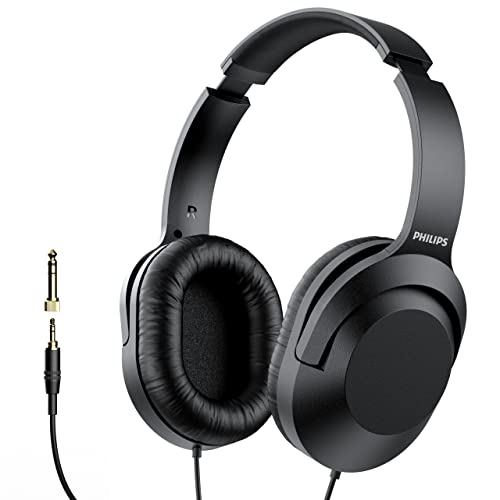
Philips Over-Ear Wired Stereo Headphones
At a budget price with a quarter-inch adapter included, this Philips set is the value play for anyone recording from a laptop, a mixer, or an audio interface interchangeably. The adapter alone saves an extra purchase. Sound is warm and forgiving, which is actually useful if your source material is already compressed from Zoom or Riverside. The trade-off is that forgiving means you might miss sibilance issues before export.
- 6.3 mm adapter included in box
- Smooth, fatigue-free tuning for long edits
- Underrepresents harsh high-frequency content
Skip it if you need to audit the last three percent of frequency response for noise-floor issues.
FIFINE HD8 Wired Studio Monitor Headphone
FIFINE built its name on microphones, and the HD8 applies that same no-nonsense philosophy to headphones. The standout feature is the dual detachable cable system, giving you both three-point-five and six-point-three-five millimeter connections without an adapter. At a budget price that is genuinely rare. The earpads are dense and seal well, though the headband has a slightly awkward arc that puts pressure behind the ears during ninety-minute sessions.
- True detachable cables in two sizes
- Sealed pads block outside chatter effectively
- Headband geometry causes ear pressure over time
Skip it if you need the widest possible soundstage for spatially mixed audio pieces.
M-Audio HDH40 Closed-Back Over-Ear
M-Audio’s HDH40 is a plain, closed-back studio headphone built for monitoring rather than style. It uses 40mm neodymium drivers rated at 32 ohms and 95dB sensitivity, so a phone, laptop, or small audio interface drives it easily. The fixed cable is long, close to 3 metres, which suits a host who sits back from the desk, and a screw-on 1/4-inch adapter connects it to mixers and interfaces. The frame rotates 180 degrees for one-ear monitoring, and stainless steel telescopic arms make the fit easy to set.
- Long cable with 1/4-inch adapter included
- Rotating frame for single-ear monitoring
- Cable is fixed and cannot be replaced
Skip it if you need a detachable cable for a shared studio; the FIFINE HD8 offers that in the same budget tier.
Audio-Technica ATH-M50x
The M50x is the professional standard for a reason. Three detachable cables in the box cover every routing scenario, the sound is balanced enough to trust for final mix decisions, and the folding design survives a gig bag without a case. It is the most expensive pair on this list, but its accuracy means you spend less time second-guessing whether an EQ move helped or hurt. The one genuine flaw is heat; vinyl pads on an enclosed cup make summer recording sessions uncomfortable.
- Accurate enough for final mix decisions
- Three included cables adapt to any setup
- Vinyl pads trap heat noticeably
Skip it if your budget cannot stretch to the premium tier, since the value gap versus cheaper options becomes hard to justify for voice-only content.
More Podcast Headphones Worth Considering
The main list leans heavily on budget picks plus three studio classics. Competing podcast guides consistently add a few more established monitoring headphones, especially in the mid-range to premium tiers where most serious hosts end up buying. These six fill that middle ground and cover the use cases the original list misses: maximum isolation for untreated rooms, all-day comfort for long interview days, and detachable locking cables for shared studios.
beyerdynamic DT 770 Pro (80 Ohm)

The DT 770 Pro is one of the most recommended podcast headphones in current roundups, usually described as the best all-rounder for hosts who record and edit long episodes. It is a closed-back over-ear design with large, soft velour ear pads and a spring-steel headband, and the 80-ohm version is the sweet spot for podcasting: easy enough to drive from most USB audio interfaces and mixers while still sounding detailed. beyerdynamic quotes a wide frequency response of 5Hz to 35kHz.
Comfort is the main reason podcasters choose it. The velour pads breathe far better than the vinyl or protein-leather pads on the ATH-M20x and ATH-M50x, which matters when you are wearing headphones for a two-hour interview and another hour of editing. The deep cups keep your ears off the drivers, and the clamp is firm enough to stay put but not punishing. Isolation is good for a closed-back design, so mic bleed is minimal.
Strengths: excellent long-session comfort, breathable replaceable velour pads, detailed sound with clear vocal presence, durable build that lasts for years.
Drawbacks: the coiled cable is fixed rather than plug-detachable, the treble can sound bright and highlight sibilance, and the headphones do not fold, which makes them bulkier for travel. The 250-ohm version is harder to drive and less suited to basic interfaces, so pick the 80-ohm model unless you have a dedicated headphone amp.
Compared with the Sony MDR7506, the DT 770 Pro is more comfortable and slightly more refined, while the Sony is lighter, folds and costs less. Against the ATH-M50x, the beyerdynamic wins on comfort and breathability, while the M50x has detachable cables and a more portable folding frame. It sits in the premium tier.
Sennheiser HD 280 Pro

If your recording space is a spare bedroom, a closet or a shared apartment, isolation is the first spec to look at, and the HD 280 Pro is the classic choice. Sennheiser rates its passive attenuation at up to 32dB, which is notably high for a non-noise-cancelling headphone. That isolation works both ways: outside noise is reduced, and your headphone mix does not leak into a sensitive condenser microphone.
It has a 64-ohm impedance, an 8Hz to 25kHz frequency range and a single-sided coiled cable. The ear cups rotate and the frame collapses for storage, and replacement ear pads and headband pads are easy to find. The sound is fairly neutral with a restrained bass, which makes voices sound natural and keeps you from overcompensating with EQ in post.
Strengths: class-leading passive isolation, neutral voice-friendly tuning, collapsible frame, widely available spare parts, mid-range tier.
Drawbacks: the clamp is firm and the faux-leather pads get warm, so it is less comfortable than the DT 770 Pro over long sessions. The cable is replaceable only by opening the ear cup, not by unplugging it. Some listeners find the sound a little flat and uninvolving for music.
Against the Sony MDR7506, the HD 280 Pro isolates more and sounds less bright; the Sony is lighter and more comfortable for many heads. If you record in a noisy space and use a condenser microphone, the Sennheiser is the safer choice.
RØDE NTH-100
RØDE is a major name in podcasting microphones, and the NTH-100 was designed for the same creators. It is a closed-back over-ear headphone with 40mm drivers, a 32-ohm impedance and a 5Hz to 35kHz frequency response, so it is easy to drive from RØDECaster consoles, USB interfaces and laptops alike.
The design focuses on long-session comfort. The ear pads are memory foam wrapped in Alcantara-style fabric, and RØDE uses a cooling gel layer intended to reduce heat buildup. A FitLok mechanism lets you lock the headband size so you do not have to readjust between sessions, and the cable can plug into either ear cup, which is handy when your microphone arm is on one side of the desk. Optional longer cables and the NTH-100M headset version with a built-in microphone are also available.
Strengths: very comfortable over long sessions, detachable cable that connects to either side, lockable headband fit, natural and balanced sound for voice work.
Drawbacks: it is heavier than the Sony MDR7506 and does not fold flat, and the fabric pads can show wear and need eventual replacement. It sits in the upper mid-range tier, above most of the main list.
Against the ATH-M50x, the NTH-100 is more comfortable and its fabric pads stay cooler, while the M50x folds and has more cable options in the box. For hosts already using RØDE microphones or a RØDECaster, it is a natural match.
Shure SRH440A

Shure’s SRH440A is the 2022 refresh of a long-running studio headphone. It uses 40mm neodymium drivers with a 10Hz to 22kHz response and a sensitivity of 97dB/mW, so it gets plenty loud from basic recorders and interfaces. The big practical improvement over the original SRH440 is a 3m straight cable that locks into the left ear cup with a bayonet connector, plus a threaded quarter-inch adapter in the box.
The sound is fairly flat and detailed, with enough upper-midrange clarity to catch harsh “s” sounds and mouth clicks while editing. The single-sided locking cable is a real advantage in studios where headphones get passed between hosts and guests: it does not pop out accidentally, and when it wears out you replace the cable, not the headphones.
Strengths: detachable locking cable, flat and revealing tuning, trusted brand in broadcast and recording.
Drawbacks: the clamp is on the firm side for larger heads, and the straight cable is less convenient than a coiled one at a busy desk. Bass is lean, which is fine for voice but less exciting for music listening. It sits in the mid-range tier.
Compared with the ATH-M20x in the main list, the SRH440A adds a detachable locking cable and more refined detail for a higher price. It is a strong pick for co-host studios and shared spaces where cables take a beating.
AKG K371

The AKG K371 is a closed-back studio headphone designed around a specific target tuning that many engineers find natural and easy to translate to other playback systems. It uses large 50mm drivers with a 32-ohm impedance and a wide 5Hz to 40kHz frequency response, so it is easy to drive from any interface or laptop.
For podcasters who also produce music beds, ads or video content, that balanced tuning is helpful: what sounds right on the K371 tends to sound right on earbuds and car speakers too. The oval ear pads are comfortable for most people, the frame folds flat for travel, and AKG includes multiple detachable cables that lock into the ear cup.
Strengths: balanced, translatable sound, folding design, detachable locking cables included, light enough for long sessions.
Drawbacks: the seal depends heavily on a good fit, so bass and isolation can drop if the pads do not sit evenly, and the pads are less breathable than velour. The hinges are plastic and need care. It sits in the upper mid-range tier.
Against the ATH-M50x, the K371 offers a more neutral tonal balance with less emphasis in the bass and treble, while the M50x has a more established track record for durability. If you edit and master your own episodes, the K371 is one of the most accurate closed-back options at this level.
Audio-Technica ATH-M40x

The ATH-M40x sits between the M20x and M50x in Audio-Technica’s range, and several podcast guides name it the best value studio headphone for voice. It uses 40mm drivers with a 35-ohm impedance and a 15Hz to 24kHz response, and its tuning is flatter than the M50x, with less bass emphasis.
That flatter balance is useful for editing spoken word: you hear the voice as it really is rather than with extra low-end warmth. The M40x also brings over some of the most practical features of the M50x: detachable cables (a straight cable and a coiled cable are included), ear cups that swivel 90 degrees for one-ear monitoring, and a folding frame for travel.
Strengths: flat, honest tuning for voice, two detachable cables, swiveling cups, folding design, upper mid-range tier.
Drawbacks: the synthetic leather pads trap heat on long sessions, much like the M50x, and the clamp can feel tight at first. The sound is accurate rather than exciting for casual listening.
If the M50x is beyond your budget but the M20x feels too basic, the M40x is the logical middle step. It keeps the detachable cables and swivel cups of its bigger sibling at a lower price, with a flatter sound that arguably suits podcast editing better.
Buying Guide
Vocal Clarity and Midrange Response
Podcasts occupy the frequency range where human speech lives, roughly two hundred hertz to eight kilohertz. A headphone that scoops the mids makes a voice sound hollow and pushes you into overcorrecting with EQ. You want a pair that is slightly forward between one and four kilohertz so consonants and breath control are audible without exaggeration. Compare candidates by listening to a known reference recording and checking whether sibilance lands naturally or feels smeared.
Comfort for Long Sessions
Clamping force is the invisible spec that determines whether you will actually use a pair daily. Heavier clamps improve passive isolation but create temple pressure within twenty minutes. Look for earpads with at least twenty millimeters of depth so the pinna does not touch the driver. If your episodes run longer than an hour, prioritize velour pads over vinyl even if it means accepting less isolation.
Cable Flexibility and Connectivity
A fixed cable forces your entire physical setup to adapt to it. Detachable cables let you swap lengths, replace a frayed cord without buying a new headphone, and switch between three-point-five and quarter-inch connections on interfaces and mixers. For podcasters who move between a laptop at home and an interface at a studio, at least one detachable cable option is a practical requirement rather than a luxury.
How the Additional Picks Compare
| Model | Impedance | Cable | Folds | Pad material | Price tier | Best for |
|---|---|---|---|---|---|---|
| beyerdynamic DT 770 Pro (80 Ohm) | 80 ohms | Coiled, fixed | No | Velour | Premium | Long recording and editing days |
| Sennheiser HD 280 Pro | 64 ohms | Coiled, fixed (user-replaceable) | Collapses | Faux leather | Mid-range | Noisy, untreated rooms |
| RØDE NTH-100 | 32 ohms | Detachable, either side | No | Fabric over memory foam | Upper mid-range | All-day comfort, RØDE setups |
| Shure SRH440A | About 40 ohms | Detachable, locking | Collapses | Faux leather | Mid-range | Shared co-host studios |
| AKG K371 | 32 ohms | Detachable, locking | Yes | Faux leather | Upper mid-range | Editing and producing |
| Audio-Technica ATH-M40x | 35 ohms | Detachable (2 included) | Yes | Faux leather | Upper mid-range | Flat sound on a mid budget |
Impedance and Your Recording Gear
Impedance tells you how much power a headphone needs. Most podcasters plug into a USB audio interface, a podcast console such as a RØDECaster, a portable recorder or a laptop, and those outputs are designed for low to moderate impedance. Headphones between roughly 32 and 80 ohms, including the studio picks in this guide, get loud enough from that kind of gear. High-impedance versions such as the 250-ohm DT 770 Pro can sound quiet unless you have a dedicated headphone amplifier, so they are best left to full studios.
Isolation and Mic Bleed
Closed-back isolation matters twice in podcasting. First, it blocks room noise so you can hear what the microphone is actually picking up. Second, it keeps your headphone audio from leaking into the microphone, which otherwise creates a faint echo of your co-host or guest on your own track. This is especially important with sensitive condenser microphones. If you use a dynamic broadcast mic close to your mouth, moderate isolation is usually enough; with a condenser in an untreated room, choose a high-isolation model such as the Sennheiser HD 280 Pro.
Monitoring vs Editing Needs
Recording and editing ask slightly different things of a headphone. While recording, you mainly need isolation, comfort and low latency so you can hear yourself naturally. While editing, accuracy matters more: you want to hear breaths, mouth clicks, sibilance, background hum and level differences between speakers. A single neutral closed-back pair handles both for most shows. If you edit for hours, consider a second, more comfortable pair just for post-production, or choose a model with breathable pads like the DT 770 Pro or NTH-100.
Headsets and Multi-Guest Studios
For video podcasts and live streams, some hosts prefer a broadcast headset that combines headphones and a microphone, which keeps the mic at a constant distance as you move. RØDE’s NTH-100M and Audio-Technica’s BPHS1 are examples. In multi-guest studios, buying identical headphones for every seat keeps everyone hearing the same balance, and detachable locking cables reduce the chance of a guest yanking a plug mid-recording.
Podcast Headphone Setup Tips
- Use zero-latency monitoring. Plug headphones into your interface or console, not your computer’s headphone jack, and enable direct monitoring. Hearing yourself through software with a delay makes it hard to speak naturally.
- Set a comfortable monitor level. Turn your headphone level down to the point where you can clearly hear yourself and your guest without having to raise your voice. Over-loud headphones lead people to speak more quietly and drift off-mic.
- Route cables away from the mic stand. Run the headphone cable down the side of the desk opposite your microphone arm so it does not tug the mic or create handling noise.
- Give guests the same setup. Remote guests often use earbuds or laptop speakers, which causes echo. Ask them to wear wired headphones of any kind; even basic in-ears prevent most bleed.
- Check edits on more than one device. After editing on studio headphones, listen back on earbuds or a phone speaker, since that is how many listeners will hear the show.
- Replace pads before they fail. Flattened or cracked pads reduce isolation and comfort. Most studio headphones in this guide have inexpensive replacement pads available.
- Take listening breaks. Long editing sessions at moderate volume can still tire your ears. Short breaks keep your judgment of levels and EQ reliable.
Which Podcast Headphones Fit Your Show?
Solo host recording at a desk
If you record alone with a dynamic microphone and edit your own episodes, comfort and accuracy matter more than extreme isolation. The ATH-M40x and AKG K371 give a flat, honest picture of your voice, while the beyerdynamic DT 770 Pro is the better pick if you spend hours in post-production and want breathable velour pads.
Interview show with in-person guests
For two or more people around one table, buy identical headphones for each seat so everyone hears the same mix. Sturdy models with replaceable cables, such as the Shure SRH440A or ATH-M40x, cope better with guests who are rough on gear. Budget pairs like the ATH-M20x or Philips work as guest headphones if you are buying several at once.
Recording in a noisy or untreated room
If you hear traffic, neighbors or household noise while recording, prioritize isolation. The Sennheiser HD 280 Pro is the standout here, and the Sony MDR7506 is a close alternative. Pair either with a dynamic microphone positioned close to your mouth for the cleanest result.
Video podcast or live stream
On camera, the look and weight of the headphones become part of the show. Lighter, slimmer designs such as the Sony MDR7506 or AKG K371 are less distracting on screen, and models sold in several colour options can suit a branded set. If you move around a lot, consider a broadcast headset so the microphone stays at a fixed distance.
Remote interviews from a laptop
If most of your guests join online, low latency and comfort for long calls matter most. Plug wired headphones into your interface rather than relying on Bluetooth, and choose a comfortable, easy-to-drive pair such as the RØDE NTH-100 or DT 770 Pro (80 ohm) for back-to-back sessions.
What You Get at Each Price Tier
Budget tier: closed-back over-ear pairs such as the OneOdio, Philips and FIFINE HD8 are good enough to monitor levels and catch obvious problems, and make sensible guest or backup headphones. Detail and long-term durability are the trade-offs.
Mid-range: the ATH-M20x, Sony MDR7506 and Sennheiser HD 280 Pro add more accurate sound, better isolation and proven reliability. This is where most podcasters get the best value.
Upper mid-range to premium: the ATH-M40x, ATH-M50x, Shure SRH440A, AKG K371, RØDE NTH-100 and DT 770 Pro add detachable cables, better comfort and more refined detail. Spending beyond this range brings smaller gains for voice-only content.
Our Verdict
The OneOdio Wired DJ Hi-Res Over-Ear is our top pick overall for most new podcasters, pairing swiveling cups for live co-hosting with detailed highs at a budget price. The Audio-Technica ATH-M50x is the upgrade pick: its accurate tuning lets you make final delivery decisions with confidence, and the included cables cover every workflow without adapters. For the tightest budgets, the Philips Over-Ear Stereo is the smartest buy; it includes the quarter-inch adapter, stays comfortable through long edits, and its forgiving tone suits already-compressed remote audio. One condition under which another product wins outright: if you record in an untreated room with moderate background noise and need maximum isolation per dollar, the Sony MDR7506 seals tightly for its mid-range price and exposes noise-floor problems faster.
FAQ
Do I need closed-back headphones for podcasting?
Yes, unless you are mixing in an acoustically treated room and monitoring on speakers as well. Closed-back designs prevent bleed from leaking into your microphone during a recording and block external noise so you can accurately judge what is on the track.
Can I use studio monitors instead of headphones for podcasting?
You can for editing, but not during recording. Monitor playback through speakers feeds sound directly back into your open microphone, creating echo or feedback that is nearly impossible to remove in post. Headphones are the practical choice for tracking.
How much should I spend on podcast headphones?
A budget-to-mid-range pair covers every technical need for a voice-only show. Going into the premium tier buys marginal comfort and build improvements. The cheapest pairs are viable as a backup but will cost you time because of reduced detail retrieval.
Are wireless headphones suitable for podcast recording?
Not for tracking. Bluetooth introduces latency that makes it impossible to hear yourself in real time without a distracting delay, and compression codecs strip the high-frequency detail you need to catch plosives. Wireless is fine for casual editing on a walk, but use wired headphones in the studio.
Part of our headphones buying guide hub.
Do I need a headphone amp for podcasting?
Usually not. USB interfaces, podcast consoles and portable recorders have headphone outputs that can drive headphones up to around 80 ohms comfortably. A dedicated amp only becomes useful with high-impedance models such as 250-ohm or higher studio headphones, or when you need to feed several pairs of headphones at once for guests.
Should every podcast guest wear headphones?
Yes, whenever possible. Without headphones, guests either hear audio through speakers, which leaks into their microphone, or they hear nothing and tend to talk over each other. Headphones on every participant give cleaner tracks, fewer echoes and a more natural conversation.
Open-back or closed-back for podcast editing?
Closed-back headphones are the practical choice for recording. For editing in a quiet room, open-back headphones can sound more natural and spacious, and some editors prefer them for long sessions. If you can only buy one pair, choose closed-back so it works for both.
Are DJ headphones good for podcasting?
They can work for monitoring, since most are closed-back and easy to drive. However, many DJ headphones boost bass, which makes voices sound warmer than they really are and can lead to poor EQ decisions. For editing, a more neutral studio monitor headphone gives a more accurate picture.
How long do studio headphones last?
Well-built studio headphones often last many years, and the parts that wear out first, ear pads, headband cushions and cables, are usually replaceable. Choosing a model with detachable cables and available spare pads, such as the ATH-M40x, SRH440A or K371, extends useful life considerably.
Can I use gaming headsets for podcasting?
Gaming headsets are comfortable and include a microphone, but their boom mics are usually far below the quality of a dedicated podcast microphone, and many headsets add virtual surround or bass boost that colors the sound. If you already own one, it is fine for monitoring; for recording, pair proper studio headphones with a dedicated dynamic or condenser microphone.
Do I need different headphones for recording on location?
Portable recorders and phones have weaker headphone outputs than desktop interfaces, so low-impedance, efficient headphones work best on location. Folding models such as the Sony MDR7506, ATH-M40x or AKG K371 pack easily, and good isolation helps you hear wind and handling noise before they ruin a take. Bring a spare cable if your headphones have a detachable one.