Low profile gaming keyboards sit in an awkward position. Full-height mechanical boards get all the attention, and slim membrane options are often dismissed as unplayable toys. But on a properly tuned low profile board, the appeal is clear: less hand travel, faster acclimation for laptop refugees, and a desk footprint that lets you angle your mouse without contorting your wrist.
The problem is execution. A bad low profile board feels mushy, rattles on bottom-out, or pairs a shallow switch with a keyboard layout so cramped you mistype your ability bar during clutch moments. The best low profile gaming keyboards in 2026 solve these issues with firm stabilizers, consistent switch travel, and thoughtful layouts that respect competitive ergonomics. Below, we rank eight boards we compared across FPS, MOBA, and typing workloads, from budget entry points to enthusiast-grade flagships.
As an Amazon Associate we earn from qualifying purchases at no extra cost to you.



Our Top Picks
 Razer Huntsman V3 Pro Low-Profile Tenkeyless 8Khz Wired14.11 x 5.37 x 0.73 inches1.42 poundsCheck on Amazon



Top 3 picks at a glance
Quick Picks
| Product | Best for | Price |
|---|---|---|
| Razer Ornata V3 | First-time low profile buyer | Check on Amazon |
| Alienware AW510K | Full-size RGB with connectivity extras | Check on Amazon |
| Logitech G515 Lightspeed TKL | Wireless tactile play | Check on Amazon |
| Logitech G915 X Wired | Wired linear smoothness | Check on Amazon |
| Razer Ornata V3 TKL | Compact budget gaming | Check on Amazon |
| Razer Huntsman V3 Pro Low Profile | Enthusiast-grade performance | Check on Amazon |
| ASUS ROG Falchion RX Low Profile | Ultra-compact wireless with touch controls | Check on Amazon |
| Hexgears Immersion A3 | Wireless mechanical on a budget | Check on Amazon |
How We Compared
We evaluated these boards on four criteria: switch consistency across the full keycap set, build rigidity under sustained keystroke loads, competitive layout logic (how well the board handles rapid ability-bar access or WASD transitions without modifier conflicts), and value relative to the price tier. A board that feels premium but wastes space on a numpad when you need mouse room loses points, just as one that saves space but introduces actuation variance across a batch fails our threshold.
The 8 Best Low Profile Gaming Keyboards in 2026
Razer Ornata V3
This is the keyboard that converts people who think low profile means compromise. The keycaps sit noticeably lower than a standard mechanical board, and Razer pairs that shallow height with a typing feel that leans soft without going rubbery. It is a wired board, which means zero latency concerns and no battery anxiety.
- Pro: Exceptionally comfortable for long typing sessions without wrist fatigue.
- Pro: Price-to-feel ratio is hard to beat in this category.
- Con: No wireless option; cable management is on you.
Skip it if you demand a tactile or clicky bump with defined actuation points, or if your setup already requires a tenkeyless footprint for mouse space.
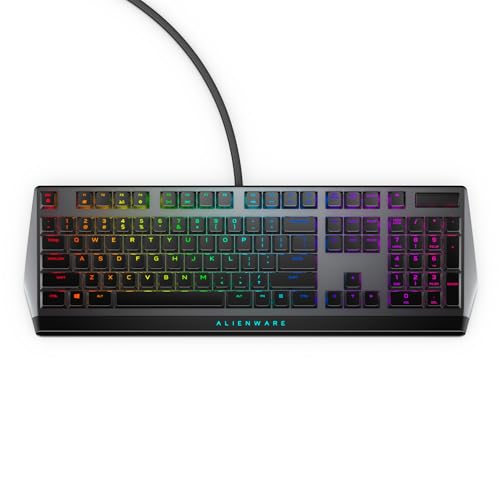
Alienware AW510K
The AW510K occupies a niche few competitors address: a full-size low profile board that does not feel bloated. Cherry MX Low Profile Red switches give it a linear feel that is smoother than most budget boards manage, and the per-key AlienFx lighting is bright and evenly spread across the keys. USB passthrough and media controls round out practical extras for desk setups.
- Pro: Cherry MX Low Profile Reds deliver consistent linear actuation across all keys.
- Pro: USB passthrough eliminates the need for a separate hub on the back of your monitor.
- Con: Full-size footprint demands significant desk real estate.
Skip it if you play fast FPS titles where a TKL or smaller layout frees your mouse arm for low-sensitivity swings.
Logitech G515 Lightspeed TKL
Logitech’s Lightspeed wireless protocol means this board connects as reliably as a wired unit for competitive play. The tactile variant gives you a defined bump that works well for typing-heavy gamers who do not want to lose feel at shallow travel depths. Build quality feels dense, and the low profile design keeps wrist angles neutral even during marathon sessions.
- Pro: Lightspeed wireless introduces no perceptible input lag in competitive contexts.
- Pro: Tactile bump provides clear actuation feedback despite the reduced travel height.
- Con: Premium pricing places it above several capable wired rivals.
Skip it if you are strictly budget-constrained or prefer a smooth linear stroke over a tactile bump.
Logitech G915 X Wired
Logitech returns the G915 name with a wired-only approach that strips the wireless tax from the price while keeping the low profile linear switches that made the original popular. The feel is smooth and quiet, ideal for shared spaces or late-night sessions. Layout is full-size, giving you numpad convenience without sacrificing switch quality.
- Pro: Linear low profile switches remain among the smoothest in any profile height.
- Pro: Wired connection guarantees consistent power and signal without battery maintenance.
- Con: Full-size layout is impractical for mouse-heavy competitive setups.
Skip it if you need the wireless freedom or a smaller footprint; it is a desk-filler in the best and worst sense.
Razer Ornata V3 TKL
Removing the numpad from the Ornata V3 platform creates a sharper competitor for gamers who want mouse room without spending flagship money. The typing feel matches the full-size sibling closely, and the low profile keys keep your hand position relaxed across long sessions. At a budget price, it undercuts most mechanical TKL boards with similar build quality.
- Pro: TKL layout frees meaningful desk space for low-sensitivity mouse play.
- Pro: Comfortable and quiet, suitable for both gaming and office work.
- Con: Limited RGB customization compared to Razer’s mechanical lineup.
Skip it if you need dedicated macro keys or a numpad for spreadsheet-heavy workflows.
Razer Huntsman V3 Pro Low Profile
This is the enthusiast answer. Razer pairs its analog optical switch platform with a low profile form factor and an 8Khz polling rate, producing a very low-latency input pipeline over a wired connection. Key actuation tuning is granular, letting you set your own trigger points per key. The build feels like a tool, not a lifestyle accessory.
- Pro: Analog optical switches with adjustable actuation points give competitive-level control.
- Pro: 8Khz polling cuts the report interval to 0.125 ms for players chasing minimal input delay.
- Con: The price is a premium that casual gamers do not need to justify.
Skip it unless you are chasing every millisecond of input reduction and your system can feed 8Khz polling without bottlenecking elsewhere.
ASUS ROG Falchion RX Low Profile
The Falchion RX Low Profile is the most feature-dense compact board here. A 65% layout keeps it tiny, tri-mode connectivity lets you juggle PC and Mac without a dongle swap, and the touch panel on the side handles volume, media, and brightness without software overlay interference. ROG RX Red optical switches provide a linear feel that is quiet enough for shared rooms. It ships white, which pairs cleanly with light-themed desk builds.
- Pro: Tri-mode connectivity and Mac support make it genuinely versatile across platforms.
- Pro: Touch panel adds utility without consuming keycap space.
- Con: 65% layout requires muscle-memory adaptation if you are coming from TKL or larger boards.
Skip it if you need function keys as dedicated row or if your workflow depends on an arrow-key cluster that does not share space with other keys.
Hexgears Immersion A3
Hexgears quietly delivers a wireless low profile mechanical board at a price that undercuts Logitech and Razer entry-tier wireless options. The tactile switch profile suits users who want confirmation feedback without a clicky annoyance. Build quality is solid for the price bracket, though you will notice it lacks the density of boards costing two or three times as much.
- Pro: Wireless mechanical at this price point removes the usual compromise between connectivity and feel.
- Pro: Tactile bump is well-calibrated for shallow-travel typing.
- Con: Software ecosystem and long-term firmware support are less mature than major-brand equivalents.
Skip it if you need per-key RGB with granular control or prefer the assurance of a major brand’s warranty and driver pipeline.
More Low Profile Keyboards Worth Considering
The eight boards above are the core of this guide, but the low profile category has changed a lot in the last year. Magnetic Hall Effect switches have arrived in slim boards, Razer has launched its first true low profile mechanical switches, and enthusiast brands now offer slim boards with QMK firmware and hot-swap sockets. The six picks below cover those gaps.
Logitech G515 TKL Rapid

The G515 TKL Rapid takes the slim chassis of the G515 Lightspeed TKL and replaces the mechanical GL switches with magnetic analog switches. It is aimed at competitive players who like the flat, laptop-like feel of a low profile board but want the adjustable actuation and Rapid Trigger that full-height Hall Effect keyboards offer.
Each key can actuate anywhere from 0.1 mm to 2.5 mm, which is the switch’s full travel, and position is read in 0.1 mm increments. The default Rapid Trigger reset is 0.4 mm and can be tuned per key in G HUB. You also get two trigger points on a single key and Key Priority, Logitech’s SOCD handling for opposing movement keys. The actuation force is light, around 35 g, which suits fast tapping.
The board stands about 22 mm tall, uses a stainless steel top plate and oil-resistant double-shot PBT keycaps, and has per-key RGB. Two-stage feet give 4 or 8 degree typing angles. It is wired only over USB-C, with a 1,000 Hz polling rate.
Strengths: magnetic switches in a genuinely slim tenkeyless body, a short 2.5 mm travel that makes Rapid Trigger feel very responsive, solid keycaps, and Logitech’s warranty support. Drawbacks: no wireless option despite sharing a name with the wireless G515 Lightspeed, 1,000 Hz polling where some rivals offer 8,000 Hz, and a premium price tier. Compared with the Razer Huntsman V3 Pro Low Profile in our main list, it offers similar adjustable actuation at a lower price, while the Razer adds 8 kHz polling.
Razer BlackWidow V4 Low Profile HyperSpeed

The BlackWidow V4 Low Profile HyperSpeed is Razer’s first board built around its new low profile mechanical switches, and the full-size version is the best choice here for players who want a wireless slim board with a numpad and macro keys.
Razer offers green clicky, orange tactile and yellow linear switches, all with about 2.8 mm of total travel. The yellow linear actuates at around 1.2 mm, shorter than a typical full-height linear switch. Connectivity covers HyperSpeed 2.4 GHz wireless at up to 1,000 Hz, Bluetooth for up to three devices, and USB-C wired. The dongle can also handle a second compatible Razer device, such as a mouse, which saves a USB port.
The build uses a 5052 aluminum alloy top case with a stainless steel plate, doubleshot PBT keycaps, Razer Chroma RGB, on-board storage for five profiles, Snap Tap and four dedicated macro keys on the full-size model. Razer quotes up to 980 hours of battery life, but only in a power-saving mode that caps polling at 250 Hz and turns the lighting off, so expect far less with RGB enabled.
Strengths: tri-mode wireless with a shared dongle, three switch choices, premium materials, and macro keys for MMO and productivity users. Drawbacks: the full-size footprint takes up mouse space, it sits in the premium price tier, and the headline battery figure is not representative of normal use. A tenkeyless version is available for players who want the same switches in a smaller body. Against the Alienware AW510K, it adds wireless and PBT keycaps at a higher price.
Keychron K3 HE

The Keychron K3 HE is a slim 75 percent magnetic keyboard that tries to be both a gaming tool and a desk piece. It suits players who want Hall Effect features in a wireless low profile board, and who like a board that looks more like premium office hardware than gaming gear.
It uses Keychron’s hot-swappable Ultra-Fast Lime low profile magnetic switches, pre-lubed linears with roughly 2.9 mm of travel. Actuation can be set per key from 0.2 mm to 2.9 mm in 0.1 mm steps, with Rapid Trigger, SOCD (Snap Tap style last-key priority), Dynamic Keystroke and controller emulation through analog input. Configuration runs through QMK firmware and Keychron’s web launcher.
Connectivity covers 2.4 GHz wireless, Bluetooth 5.2 for up to three devices, and USB-C wired, with 1,000 Hz polling on 2.4 GHz and wired and a lower rate on Bluetooth. The 84-key layout sits in an aluminum and rosewood frame with LSA double-shot PBT keycaps and a front height of about 25 mm including keycaps.
Strengths: wireless magnetic switches in a low profile body, QMK flexibility, hot-swap support, and a distinctive wood and aluminum design. Drawbacks: polling stops at 1,000 Hz, battery life is moderate compared with larger wireless boards, and the keycaps are not shine-through. If you want 8,000 Hz in a similar shape, Keychron’s sister model, the K3 Ultra 8K, uses mechanical switches instead. Against the Hexgears Immersion A3, the K3 HE costs more but adds adjustable actuation, Rapid Trigger and much stronger software.
NuPhy Air75 V2

The NuPhy Air75 V2 is one of the most popular slim mechanical keyboards for people who split their time between gaming, writing and travel. It is the pick here for laptop users, Mac owners and anyone who wants a thin wireless board they can carry every day.
The 84-key 75 percent layout keeps a full function row and arrow keys in a body only about 13.5 mm thick at the case, weighing roughly 600 g. It uses hot-swappable Gateron low profile mechanical switches, with several linear and tactile options available. Connectivity is tri-mode: 2.4 GHz wireless at 1,000 Hz, Bluetooth 5.1 with four device profiles, and USB-C wired at 1,000 Hz. A 4,000 mAh battery is rated for roughly 35 to 57 hours with lights on and far longer with them off.
The Air75 V2 runs QMK and VIA, so you can remap every key, build layers and set macros in a browser without proprietary software. The frame is aluminum with an ABS bottom, the keycaps are double-shot PBT, and fold-out feet give three typing angles. It works with Windows, macOS, Linux, iOS and Android.
Strengths: very thin and light, long battery life, QMK/VIA support, hot-swap sockets, and a mid-range price that often dips into budget territory on sale. Drawbacks: it uses standard mechanical switches, so there is no adjustable actuation or Rapid Trigger, and polling stops at 1,000 Hz. Low profile keycap choices are also narrower than for full-height boards. Compared with the Hexgears Immersion A3, it adds QMK, a larger battery and a more refined build. Players who want magnetic switches in a similar NuPhy body should look at the Air60 HE below or the Air75 HE.
Cherry MX 10.0N RGB

Cherry invented the switch standard most mechanical keyboards still copy, and the MX 10.0N RGB is its slim full-size flagship for gamers and office users. It suits buyers who want a wired, metal, full-size low profile board with genuine Cherry switches and no software dependency.
It uses Cherry MX Low Profile RGB Speed switches: linear, with 1.0 mm pre-travel, 3.2 mm total travel and an operating force of 45 cN. The short pre-travel makes it fast for gaming without any tuning. The switches are about 35 percent flatter than standard MX switches, and Cherry rates them for a very long lifespan.
The housing is solid aluminum, including a fold-out foot that retracts automatically when you lift the keyboard. Overall height is about 22 mm, the layout is full-size with extra keys, and it connects through a detachable USB-C cable. Per-key RGB, N-key rollover, laser-etched legends and on-board memory round out the feature list.
Strengths: genuine Cherry low profile switches, a rigid metal build, a slim full-size footprint, and established brand support. Drawbacks: wired only, one switch option, no hot-swap, and laser-etched legends that are not as durable as double-shot PBT over many years. It competes most directly with the Alienware AW510K, which also uses Cherry MX Low Profile switches; the Cherry has the sturdier all-metal case, while the Alienware adds USB passthrough.
NuPhy Air60 HE

The Air60 HE was one of the first low profile magnetic switch gaming keyboards, and it remains one of the most compact ways to get Hall Effect features in a slim board. It suits FPS players who want maximum mouse space and the shallowest possible hand position.
The 61-key layout sits in a case only about 13.5 mm to 18.8 mm thick. It uses Gateron low profile Magnetic Jade or Jade Pro switches, with actuation adjustable from 0.1 mm to 3.3 mm, Rapid Trigger sensitivity down to 0.01 mm, and both 8,000 Hz polling and an 8,000 Hz scan rate. Software features include Dynamic Keystroke, Mod Tap, Toggle Key, SOCD and macros.
Build quality is strong for the price, with an aluminum top panel, PBT keycaps, internal foam layers, and per-key RGB with sidelights. The cable is detachable USB-C, and the switches are hot-swappable.
Strengths: the slimmest magnetic board in this guide, full 8K polling, a wide actuation range, and a premium top case. Drawbacks: wired only because there is no space for a battery, a 60 percent layout that hides arrows and function keys behind a layer, and fewer replacement switch options than full-height magnetic boards. Against the ASUS ROG Falchion RX Low Profile, it gives up wireless and a touch panel in exchange for adjustable actuation, Rapid Trigger and 8 kHz polling.
Buying Guide
Switch Type and Profile Depth
Low profile switches travel a shorter distance than full-height mechanicals, which means the difference between linear and tactile becomes more pronounced. A well-tuned linear switch stays smooth all the way to bottom-out; a bad one produces a hollow plastic knock. Tactile low profile switches need a defined bump that arrives early enough to register before your finger reaches the plate. Optical variants add longevity and sometimes adjustable actuation, but they do not automatically mean better feel.
Layout Size vs. Mouse Space
Competitive FPS and MOBA players should treat desk width as a performance stat. A full-size board eats several inches of space your mouse needs for sweeping crosshair corrections. TKL, 75%, and 65% boards recover that space at the cost of losing a numpad or some function key access. Decide what you sacrifice before you shop; layout regret is a common reason for returns in this category.
Connectivity and Latency
Wired boards guarantee zero-latency input with no battery anxiety. Wireless boards in this tier now compete closely with wired latency, but not equally across all products. Proprietary 2.4GHz dongles consistently beat Bluetooth for gaming responsiveness. If you play at high frame rates and track aim closely, verify the wireless protocol is branded as low-latency or gaming-grade before committing.
How the Additional Picks Compare
| Keyboard | Layout | Switch type | Connection | Adjustable actuation | Price tier |
|---|---|---|---|---|---|
| Logitech G515 TKL Rapid | Tenkeyless | Magnetic analog | Wired | Yes, 0.1 to 2.5 mm | Premium |
| Razer BlackWidow V4 Low Profile HyperSpeed | Full-size | Low profile mechanical | 2.4 GHz, Bluetooth, wired | No | Premium |
| Keychron K3 HE | 75% | Low profile magnetic | 2.4 GHz, Bluetooth, wired | Yes, 0.2 to 2.9 mm | Mid-range |
| NuPhy Air75 V2 | 75% | Low profile mechanical | 2.4 GHz, Bluetooth, wired | No | Budget to mid-range |
| Cherry MX 10.0N RGB | Full-size | Cherry MX Low Profile Speed | Wired | No | Mid-range |
| NuPhy Air60 HE | 60% | Low profile magnetic | Wired | Yes, 0.1 to 3.3 mm | Mid-range |
Mechanical, Membrane, Optical or Magnetic: Low Profile Switch Types Explained
Low profile keyboards now use four different switch technologies, and they feel more different from each other than their similar heights suggest.
- Mecha-membrane and membrane (Razer Ornata V3, Ornata V3 TKL): a rubber dome provides the cushion, with a mechanical-style click or bump added on top. They are quiet, cheap and comfortable, but the feel softens toward the bottom and they lack the crisp reset of true mechanical switches.
- Low profile mechanical (Logitech GL, Cherry MX Low Profile, Razer low profile, Gateron KS-33): real spring-and-stem switches with shorter travel, usually 2.8 to 3.2 mm. They come in linear, tactile and clicky types and give the most familiar mechanical feel in a slim body.
- Low profile optical (ASUS ROG RX): a light beam detects the press, so there is no metal contact to wear out. Actuation is fast and consistent, but the actuation point is fixed on standard optical boards.
- Low profile magnetic and analog (Logitech G515 TKL Rapid, Keychron K3 HE, NuPhy Air60 HE, Razer Huntsman V3 Pro Low Profile): sensors measure exactly how far the key is pressed, allowing adjustable actuation, Rapid Trigger and SOCD features. This is the best choice for competitive shooters, but these boards cost more and some are wired only.
Who Should Buy Which Low Profile Keyboard
- Competitive FPS players: pick a magnetic or analog board, such as the Razer Huntsman V3 Pro Low Profile, Logitech G515 TKL Rapid or NuPhy Air60 HE, and favor tenkeyless or smaller sizes.
- Laptop users and travelers: the NuPhy Air75 V2 and Keychron K3 HE are thin, light and wireless, with Mac support and multi-device Bluetooth.
- MMO and productivity users: full-size boards with macros or a numpad, such as the Razer BlackWidow V4 Low Profile HyperSpeed, Logitech G915 X Wired, Alienware AW510K or Cherry MX 10.0N RGB.
- Budget buyers and first-timers: the Razer Ornata V3 or Ornata V3 TKL, or the Hexgears Immersion A3 if you want wireless mechanical switches.
- Shared rooms and late-night players: linear switches or mecha-membrane boards are quieter than clicky low profile switches.
Setup and Ergonomics Tips for Low Profile Boards
- Try the board flat first. Low profile keyboards are designed to keep your wrists close to the desk. Many players find they do not need the feet or a wrist rest at all.
- Angle the board for FPS. Rotating a compact board 15 to 30 degrees can reduce wrist bend on your movement hand and free up mouse space.
- Tune magnetic boards gradually. Short-travel magnetic switches are sensitive. Start with general actuation around 1.0 mm and Rapid Trigger around 0.3 to 0.5 mm, then make movement keys more sensitive once you are comfortable.
- Use the 2.4 GHz dongle for games. On tri-mode boards, Bluetooth usually runs at a far lower polling rate. Keep it for tablets and phones.
- Clean more often. The gap between keycaps and case is small, so crumbs and dust affect feel faster. A soft brush or compressed air once a month keeps switches consistent.
- Buy compatible keycaps only. Check the stem type before buying replacements. Cherry MX Low Profile, Logitech GL, Gateron KS-33 and proprietary optical stems use different keycap mounts.
Low Profile vs Full-Height Keyboards at a Glance
| Factor | Low profile | Full-height |
|---|---|---|
| Total key travel | About 2.5 to 3.2 mm | About 3.5 to 4.0 mm |
| Front height | Often under 25 mm with keycaps | Often 30 to 40 mm with keycaps |
| Wrist rest needed | Rarely | Often helpful |
| Keycap choice | Limited, model-specific | Huge aftermarket selection |
| Switch choice | Narrower, growing | Very wide, many hot-swap options |
| Portability | Excellent | Fair |
| Typing feel | Fast and light, less cushion | Deeper, more cushioned and customizable |
Build Details That Separate Good Slim Boards From Bad Ones
Because low profile boards have less height to hide flaws, small build choices show up quickly in feel and sound. These are the details worth checking on a spec sheet or product page before buying:
- Top plate material: aluminum or stainless steel plates, as on the Razer BlackWidow V4 Low Profile HyperSpeed and Logitech G515 TKL Rapid, reduce flex during fast inputs. All-plastic slim boards can bend slightly when you press hard near the middle.
- Stabilizers: the space bar, Shift and Enter keys are where cheap low profile boards rattle most. Look for mentions of tuned or lubricated stabilizers, and expect budget boards to be noisier on long keys.
- Keycap material: double-shot PBT keycaps resist shine and keep legends sharp for years. ABS caps with printed legends wear faster, which matters more on slim boards because replacement caps are harder to find.
- Internal dampening: foam or silicone layers inside the case, as on the NuPhy boards, reduce the hollow sound that slim cases can produce.
- Feet and angle options: two or three angle settings help you find a comfortable position without a wrist rest. Feet that fold away cleanly also make the board easier to pack.
- Hot-swap sockets: boards like the NuPhy Air75 V2 and Keychron K3 HE let you replace a faulty switch in seconds. On soldered boards, one dead switch can mean a repair or replacement.
Software and firmware matter too. A board that saves profiles to on-board memory works on any computer, which is useful if you move between a desktop and a work laptop. Open firmware such as QMK and VIA, used by the NuPhy and Keychron boards, makes remapping easy and does not tie you to one brand’s app, while Logitech G HUB and Razer Synapse offer tighter integration with those brands’ mice and headsets.
What to Expect at Each Price Tier
Budget: the Razer Ornata V3, Razer Ornata V3 TKL and Hexgears Immersion A3 deliver a slim profile and comfortable typing at a low cost. Expect mecha-membrane or basic mechanical switches, plastic builds and simpler software. These are ideal for casual gaming, office work and first-time low profile buyers.
Mid-range: the NuPhy Air75 V2, Keychron K3 HE, NuPhy Air60 HE, Cherry MX 10.0N RGB, Alienware AW510K and Logitech G515 Lightspeed TKL add aluminum frames or metal housings, wireless options, hot-swappable or premium switches, QMK support and, on the magnetic models, adjustable actuation and Rapid Trigger. This tier offers the best balance for players who game and work on the same board.
Premium: the Logitech G515 TKL Rapid, Logitech G915 X Wired, Razer BlackWidow V4 Low Profile HyperSpeed, ASUS ROG Falchion RX Low Profile and Razer Huntsman V3 Pro Low Profile focus on brand software ecosystems, refined wireless, extra controls and esports features such as 8 kHz polling. The gains over mid-range boards are real but smaller than the price difference suggests.
For most players, a mid-range board gives the most for the money. Choose premium if you want a specific brand’s wireless, software or competitive features, and choose budget if comfort and a slim profile matter more than switch technology.
Our Verdict
Top pick: The Razer Ornata V3 is the best low profile gaming keyboard for most players, pairing low, comfortable keys with a price-to-feel ratio that is hard to beat. Upgrade pick: The Razer Huntsman V3 Pro Low Profile is best for competitive players who treat input latency and actuation control as hardware advantages. Budget pick: The Razer Ornata V3 TKL delivers the most gaming comfort per dollar in the category without wireless or software sacrifices that matter. Best for PC and Mac: If you need a board that switches between a PC and a Mac on the same desk without dongle swaps, the ASUS ROG Falchion RX Low Profile wins regardless of price gap.
FAQ
Are there low profile keyboards with Rapid Trigger?
Yes. The Logitech G515 TKL Rapid, Keychron K3 HE, NuPhy Air60 HE and Razer Huntsman V3 Pro Low Profile all offer adjustable actuation and Rapid Trigger. Standard low profile mechanical, optical and membrane boards cannot, because their actuation point is fixed by the switch design.
Are low profile keyboards better for wrist comfort?
For many people, yes. A lower front edge keeps the wrist flatter, which can reduce strain during long sessions, often without a wrist rest. Comfort still depends on desk height, chair position and how hard you press, so a low profile board is not a cure for existing wrist pain.
Are low profile keyboards quieter than regular mechanical keyboards?
Usually a little quieter, because the shorter travel produces less bottom-out noise. Switch choice matters more than height, though: clicky low profile switches are still loud, while linear switches and mecha-membrane boards are the quietest options.
Is a wireless low profile keyboard fast enough for competitive gaming?
Yes, if it uses a dedicated 2.4 GHz dongle. Logitech Lightspeed, Razer HyperSpeed and similar connections run at 1,000 Hz, which is the same as most wired keyboards. Avoid Bluetooth for gaming, since it typically runs at a much lower polling rate with higher latency.
Are low profile keyboards good for gaming?
Yes. Reduced travel distance means faster actuation from a resting finger position, and the lower keycap height promotes a flatter wrist angle that reduces fatigue across long sessions. The main trade-off is less cushion before bottom-out, which can feel harsh on poorly tuned boards.
Do low profile keyboards break in over time?
Optical and magnetic switch boards maintain consistent feel throughout their lifespan since there is no metal contact to oxidize. Mechanical spring-based low profile switches can develop a slightly smoother stroke after extended use, but the profile is shorter, so the audible and tactile break-in difference is less noticeable than on full-height boards.
Can you replace keycaps on a low profile keyboard?
Only with low profile-compatible keycaps. Standard full-height caps are too tall and too wide for the shorter stems and tighter spacing. Most manufacturers sell compatible cap sets, and a small number of third-party makers offer aftermarket options for popular platforms.
Is 8Khz polling actually noticeable in games?
It is measurable in benchmarking tools but difficult to distinguish in blind gameplay unless your system already renders well over 400 FPS. Gamers running ultra-high refresh-rate monitors on top-tier hardware benefit most; for everyone else, 1Khz or 4Khz polling on the same board feels identical during play.
Part of our keyboards buying guide hub.