First-person shooters ask a keyboard for two things that office typing does not: a fast, predictable response when you strafe, stop, and reverse direction, and enough desk space beside it to swing a mouse across a pad without hitting the board. That is why the best keyboards for FPS games tend to be small, wired, and increasingly built around Hall effect magnetic switches that can reset the instant a key starts to rise. The decision in front of a shopper is whether to pay for that adjustable-actuation technology, settle for a good compact mechanical board with linear switches, or save money with a basic membrane model.
This guide is written for competitive players, ranked grinders, and anyone who has run out of mouse room on a full-size keyboard. We sort the eight listings by switch type and layout, explain the terms that appear in the titles such as rapid trigger, SOCD, and polling rate, and flag where the cheaper options give something up. All judgments come from the specs printed in the titles. Several listings share near-identical visible text, so read the full variant details before ordering.
Our Top Picks



Top 3 picks at a glance
Quick Picks
As an Amazon Associate we earn from qualifying purchases at no extra cost to you.





| Product | Best for | Key spec from the title |
|---|---|---|
| Gaozen x FURYCUBE 68% Gasket (listing one) | Compact mechanical feel | 68%, gasket mount, pre-lubed linear switches |
| Gaozen x FURYCUBE 68% Gasket (listing two) | Same board, alternate variant | 68%, gasket mount, volume knob, PBT keycaps |
| GEODMAER 65% Membrane | Tight budget | 65%, 68 keys, anti-ghosting, membrane |
| AULA WIN68 HE | Adjustable actuation on a small board | Hall effect, fast trigger, 8000Hz polling |
| NSYCA WIN68 HE | Rapid trigger tuning | Rapid trigger, DKS and SOCD, 0.01mm adjustable |
| BlueFinger Keyboard and Mouse Combo | Entry-level bundle | USB wired RGB keyboard plus backlit mouse |
| Gaozen x FURYCUBE 68% Hot-Swap | Swapping switches later | Hot-swap, pre-lubed linear switches |
| EPOMAKER Aula WIN60 HE | Hall effect, 60% layout | Adjustable actuation, 8000Hz, hot-swap, FPS-focused |
How to Choose
Layout: go compact
A 60% keyboard drops the function row, navigation block, and numpad, while 65% and 68% layouts keep arrow keys and a few extras. For FPS, every inch you remove gives your mouse arm more room, which matters at low sensitivity settings where a large swipe is needed to turn. Choose 60% if you never use arrow keys in a game, and 65% or 68% if you want arrows for menus or spectating. A full-size board is fine for casual play but becomes a liability for low-sensitivity aimers.
Switch type: linear, Hall effect, or membrane
Linear mechanical switches press smoothly with no bump, which suits rapid, repeated movement keys. Hall effect switches use magnets and let you set the actuation point, often in tiny steps, and enable rapid trigger so the key resets the moment it moves upward. Membrane boards work, but the feel is mushier and the key-to-key consistency is lower. If you play competitive shooters seriously, Hall effect gives a real, tunable advantage. If you play for fun, a linear mechanical is plenty.
Polling rate, SOCD, and anti-ghosting
A polling rate of 1000Hz is the common standard, while 8000Hz boards report key states eight times more often, which can matter on powerful systems with fast monitors. SOCD handling decides what happens when you press left and right at once; a good setting means the last key pressed wins, helping strafes feel crisp. Anti-ghosting means multiple keys register together, which is vital when you hold forward, strafe, crouch, and fire. Check that the board supports full n-key rollover or lists no-conflict behavior in the title.
Build and upgrade options
PBT keycaps resist shine and wear better than thin ABS. Gasket mount adds a slight cushion to the typing feel, and hot-swap sockets let you change switches without soldering. Ignore RGB effects count; no one wins a match because of a lighting mode. Where budget boards cut corners is in switch consistency and software, so favor listings that mention adjustable actuation or hot-swap, since those hint at a more complete design.
The 8 Best Options
Gaozen x FURYCUBE 68% Gasket (listing one)
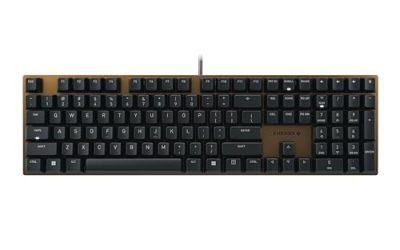
This compact 68% mechanical board lists RGB backlighting, a volume knob, gasket mounting, PBT keycaps, and pre-lubed linear switches. It is aimed at players who want the feel of an enthusiast keyboard without building one, and the volume knob is a thoughtful extra for adjusting game audio. Because it is wired, it avoids battery or wireless latency concerns. Pre-lubed switches matter more than they sound: they reduce the scratchy feel some stock linears have, which makes quick double-taps on a strafe key feel even. Players moving from a full-size board will notice the arrow keys are still present, which keeps menu navigation simple.
- Strength: linear switches and a gasket mount give a smooth, cushioned press.
- Strength: PBT keycaps and a knob add everyday polish.
- Trade-off: no Hall effect or adjustable actuation mentioned in the title.
Skip it if you want rapid trigger or tunable actuation.
Gaozen x FURYCUBE 68% Gasket (listing two)
The second listing carries almost the same visible title: 68% mechanical, RGB, wired, volume knob, gasket mount, PBT keycaps, pre-lubed linear switches. It is likely another color or version of the same board, so treat it as the same product class. The decision between the two comes down to which variant, color, and switch option the full listing offers at purchase time. If you are shopping between the two, compare the stated switch color, keycap legend, and return policy rather than assuming they are interchangeable.
- Strength: the same compact footprint leaves ample mouse room.
- Strength: wired connection with a gasket-mounted structure.
- Trade-off: near-identical title text makes it easy to order the wrong variant.
Skip it if you cannot confirm the exact variant before buying.
GEODMAER 65% Membrane
The GEODMAER is a 65% wired gaming keyboard with 68 keys, backlighting, and anti-ghosting aimed at PC and laptop users. It is a membrane design, which makes it the lowest-cost route to a compact layout. For a new player wondering whether a small keyboard suits them, it is an inexpensive way to find out. Membrane keyboards also tend to be quieter, which counts if you play late at night or share a room, and the 68 listed keys keep arrow access that many 60% boards lack.
- Strength: compact 65% layout frees up mouse space.
- Strength: no-conflict anti-ghosting for movement combinations.
- Trade-off: membrane feel is less precise than mechanical or Hall effect switches.
Skip it if you want long-term durability or tunable response.
AULA WIN68 HE
The AULA WIN68 HE is a 60% mechanical keyboard with a Hall effect magnetic switch, fast trigger mode, adjustable actuation, 8000Hz polling, and RGB backlighting. It is built for players who want rapid trigger on a small board and are comfortable with adjusting settings in software. The actuation control means you can set a light press for movement keys and a deeper one for keys you hit by accident. The 60% layout keeps the footprint small, and wired USB means the high polling rate is not limited by a wireless link. Buyers moving up from a membrane board should expect a short adjustment period as they find the right actuation depth for each key.
- Strength: adjustable actuation and fast trigger mode.
- Strength: 8000Hz polling for maximum reporting speed.
- Trade-off: configuration takes time and the full feature set depends on software.
Skip it if you want a plug-and-play board with no tuning.
NSYCA WIN68 HE
The NSYCA also uses Hall effect switches and adds rapid trigger, DKS, SOCD, 0.01mm adjustable actuation, 8000Hz polling, and RGB PBT keycaps in a 60% form. DKS is a feature that assigns different actions to different points in a key press, and SOCD resolves conflicting directional inputs. It targets tinkerers who enjoy fine control. Setting a very shallow actuation point for movement keys while keeping a deeper one for ability keys is the kind of tweak the spec list makes possible. It is a board to buy if you enjoy tuning as much as playing.
- Strength: very fine 0.01mm adjustment and rapid trigger.
- Strength: PBT keycaps in the package.
- Trade-off: advanced features can overwhelm players who just want to play.
Skip it if you do not want to open configuration software.
BlueFinger Keyboard and Mouse Combo
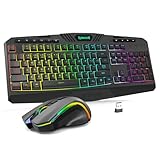
This is a USB wired RGB gaming keyboard paired with a backlit mouse, aimed at laptop and PC owners who want a cheap upgrade for both gaming and work. It is the only bundle in the group, and it makes sense for a younger player or a second setup rather than a competitive build. It also works for shared family computers, since the mouse and keyboard arrive matched and need no pairing. Treat it as a way to get a lit-up setup running quickly, then upgrade each piece when you know what you prefer.
- Strength: keyboard and mouse together in one low-cost purchase.
- Strength: wired USB connection avoids wireless concerns.
- Trade-off: the title gives no switch type, polling rate, or layout details.
Skip it if you are serious about ranked play or want a compact board.
Gaozen x FURYCUBE 68% Hot-Swap
This version swaps the gasket text for a hot-swap listing, with pre-lubed linear switches, PBT keycaps, RGB, and a volume knob in a 68% format. Hot-swap sockets mean you can change switches later, which is attractive if you want to experiment with lighter or heavier linear options. It also pairs the compact layout with a volume knob, so you can bring up game or voice chat levels without alt-tabbing. For many players, hot-swap is the feature that keeps a keyboard relevant long after the first purchase.
- Strength: hot-swap allows switch changes without soldering.
- Strength: compact layout and wired connection.
- Trade-off: the visible title does not confirm gasket mounting like the first listings do.
Skip it if you want magnetic switches or a guaranteed gasket structure.
EPOMAKER Aula WIN60 HE
The EPOMAKER Aula WIN60 HE is a 60% wired magnetic keyboard with adjustable actuation, 8000Hz polling, Hall effect switches, hot-swap support, and a title that explicitly names FPS games. It is the most direct match for this keyword and suits players who want Hall effect speed with the option to change switches later. Because magnetic switches have a flatter feel that some players love and others find unusual, hot-swap gives you a way to adapt if the stock feel is not to your taste. The listing also keeps a compact footprint that leaves room for a low-sensitivity mouse swing.
- Strength: Hall effect switches with adjustable actuation and hot-swap.
- Strength: explicitly aimed at FPS play.
- Trade-off: 60% has no arrow keys, so menus need function-layer shortcuts.
Skip it if you want dedicated arrow keys.
Which One Fits Your Situation
You play ranked and want every edge
Go with the EPOMAKER Aula WIN60 HE or the NSYCA WIN68 HE. Both pair Hall effect switches with 8000Hz polling, and the NSYCA adds rapid trigger plus very fine actuation steps.
You want a premium typing feel and some gaming speed
Pick a Gaozen x FURYCUBE gasket-mount 68% model. The pre-lubed linear switches and PBT keycaps feel nicer than most budget boards, and the volume knob is handy mid-match.
You are on a tight budget
The GEODMAER 65% is the most affordable compact option, and the BlueFinger combo covers keyboard and mouse together. Both trade precision for price.
You like to experiment with switches
The Gaozen x FURYCUBE Hot-Swap and the EPOMAKER Aula WIN60 HE let you change switches over time, so you can adjust feel as your preferences develop through 2026 and beyond.
Common Mistakes
- Buying a full-size board for a low-sensitivity setup. The numpad steals mouse room you will want.
- Assuming 8000Hz polling helps every system. Benefits depend on your PC and game, and it can raise CPU load.
- Skipping software setup on Hall effect boards. Without tuning actuation, you leave their main advantage unused.
- Ordering the wrong variant when listings look identical. Verify color, switch, and mounting details.
- Paying for lighting effects instead of switch quality and layout.
Related guides
- What Is The Best Budget Most Responsive Gaming Mouse Wired
- Low Latency Gaming Headphones Usb-C 2.4 Ghz Wireless
- Low Latency Gaming Headphones Usb-C Dongle 2.4 Ghz
Frequently Asked Questions
What is rapid trigger?
Rapid trigger resets a key as soon as it moves upward by a small distance, instead of waiting for a fixed reset point. That lets you tap a movement key again quickly, which helps with counter-strafing.
Is a 60% keyboard too small for gaming?
For most shooters it is fine, since movement and action keys fit in the main block. Arrow keys and function keys move to a layer, which takes some practice.
Do I need a Hall effect keyboard to play well?
No. Skill matters far more than hardware, but Hall effect boards offer extra tuning for players who already have the fundamentals and want finer control.
Are wired keyboards better for FPS?
Wired connections avoid battery and wireless interference concerns, so they are a safe choice for competitive play. All the keyboards in this guide use USB cables.