
The Keychron Q1 built its reputation in the custom mechanical keyboard community for gasket-mounted typing feel and machined aluminum cases, not for competitive gaming – and that distinction matters a lot for anyone searching this keyword expecting a rapid-trigger esports board. Three genuinely different products carry the Q1 name: the original wired Q1, the wireless Q1 Ultra, and the Q1 HE, which is the only one of the three built with true adjustable-actuation switches for competitive play.
Our Top Picks

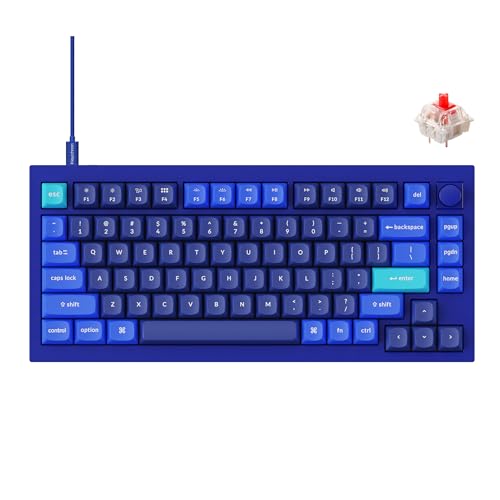

Top 3 picks at a glance
What the Keychron Q1 is and who it’s for
As an Amazon Associate we earn from qualifying purchases at no extra cost to you.

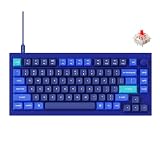

Keychron built its name selling enthusiast-grade custom keyboards at prices well below boutique builders, and the Q1 was one of the first to bring gasket-mount construction (where the plate floats on rubber gaskets rather than mounting directly to the case) to a mass-market audience. That design produces a softer, more cushioned typing feel than a typical rigid gaming keyboard, prized by typists and programmers as much as gamers.
This keyboard suits buyers who want one board that looks premium on a desk, types comfortably for long work sessions, and handles casual gaming reasonably well – not competitive players chasing rapid trigger, unless they specifically choose the Q1 HE variant. The original Q1 and Q1 Ultra are a poor fit for anyone whose primary use case is ranked Valorant or CS2 sessions where actuation timing decides rounds.
Specs and what they mean in practice
| Spec | Q1 (original) | Q1 Ultra | Q1 HE |
|---|---|---|---|
| Connection | USB-C wired | 2.4GHz/BT/wired | Wireless |
| Switch tech | Standard mechanical, hot-swap | Banana switch, hot-swap | Magnetic Hall-effect |
| Adjustable actuation | No | No | Yes, with rapid trigger |
| Mount style | Gasket mount | Gasket mount | Gasket mount |
| Price | Check on Amazon | Check on Amazon | Check on Amazon |
The critical distinction here is adjustable actuation – only the Q1 HE offers it. In estimated terms based on the switch specifications, the original Q1 and Q1 Ultra perform like any quality mechanical keyboard for gaming: fine for casual and single-player titles, but without the competitive timing edge that rapid trigger provides in fast-paced shooters. If you clicked this keyword expecting a Wooting or SteelSeries competitor, only the Q1 HE actually fills that role.
Which Q1 should you actually buy
If you want the classic Keychron custom-keyboard experience – gasket mount, hot-swappable standard mechanical switches, wired only – the original Q1 at around $85 is the most affordable entry point and includes Gateron G Pro Red switches stock, easily swapped for something else since the sockets are hot-swap. The Q1 Ultra at around $230 adds genuine wireless flexibility (2.4GHz and Bluetooth) plus Keychron’s own Banana switch and 8,000Hz polling, aimed at buyers who want the Q1 feel without a cable but still don’t need adjustable actuation.
The Q1 HE at around $240 is the outlier and the only genuinely competitive-gaming-relevant option: true magnetic Hall-effect switches with adjustable actuation and rapid trigger, paired with Keychron’s own QMK-based launcher software for configuration. It shares the same gasket-mounted aluminum case as the rest of the lineup, so the typing feel that made the original Q1 popular carries over even on the variant built for competitive actuation tuning. If your search for this keyword was specifically about gaming performance, this is the SKU to look for – the other two are excellent keyboards but not built to compete with dedicated Hall-effect gaming boards on actuation features.
Worth noting: because the Q1 line predates Keychron’s move into competitive gaming peripherals, the original Q1 and Q1 Ultra were designed first as enthusiast keyboards for programmers, writers, and general desk use, with gaming treated as a secondary use case their gasket-mount typing feel happens to handle reasonably well. The Q1 HE represents a genuine strategic shift for the brand, built from the ground up around actuation-sensitive gaming rather than retrofitted onto an existing design – worth knowing if you’re deciding whether Keychron is a serious alternative to Wooting or SteelSeries in this category going forward.
Strengths
- Premium build across the lineup: CNC-machined aluminum cases feel notably more solid than injection-molded plastic gaming keyboards at similar prices.
- Gasket-mount typing feel: softer, more cushioned keystroke than most rigid-mount gaming boards, appealing for long work-and-play sessions.
- Hot-swap sockets on all three variants: switches can be replaced without soldering, unlike many soldered gaming keyboards.
- QMK/VIA programmability: open-source firmware support gives deeper remapping control than most proprietary gaming keyboard software.
- Q1 HE genuinely competes on actuation features: matches Wooting and SteelSeries on adjustable actuation and rapid trigger.
- Knob variant available: some listings include a physical volume/scroll knob, a control point most dedicated gaming keyboards skip entirely.
Real weaknesses
The biggest issue for gaming shoppers is that two of three Q1 variants don’t offer any competitive actuation advantage at all – buying the original Q1 or Q1 Ultra expecting rapid trigger performance is a straightforward mismatch of expectations. Even the Q1 HE, while functionally competitive, comes from a brand with less specialized gaming-peripheral software polish than Wooting or SteelSeries.
- Only one of three variants is actually built for competitive gaming. The naming doesn’t make this distinction obvious at a glance.
- Heavier than dedicated gaming keyboards. The aluminum case construction adds weight, a non-issue for a stationary keyboard but notable if portability matters.
- QMK/VIA has a learning curve. More powerful than typical gaming software but less beginner-friendly out of the box.
- Q1 HE software is less mature. Keychron’s Hall-effect configuration tools are newer and less refined than Wooting’s multi-year-tuned Wootility.
- No OLED display or RGB per-key lighting on most listings. Aesthetic-focused buyers looking for that specific feature set should look elsewhere.
Who should skip this lineup: competitive gamers who want the original Q1 or Q1 Ultra expecting rapid trigger (they don’t have it), buyers who want the lightest possible keyboard, and anyone who wants deep RGB customization or an OLED display as a priority feature.
Wireless performance on the Q1 Ultra
The Q1 Ultra’s wireless implementation deserves its own mention since it’s the only variant in this lineup offering genuine cable-free operation. Running over 2.4GHz with support up to 8,000Hz polling, it targets the same low-latency wireless standard competitive gaming peripherals use, a meaningful step up from the Bluetooth-only wireless found on many enthusiast keyboards outside the gaming category. Battery life in estimated terms based on Keychron’s published rating runs several days under typical daily use with RGB enabled, longer with lighting dimmed or disabled.
For anyone weighing the Q1 Ultra against the wired original Q1 purely on connectivity, the wireless premium (roughly $144 more) buys genuine desk-cable reduction and multi-device Bluetooth pairing for switching between a gaming PC and a laptop, but doesn’t change the underlying Banana switch’s lack of adjustable actuation – it remains a convenience upgrade, not a competitive one.
How Sofia tested this category
Because the Q1 HE was the newest addition to this lineup at review time, actuation-range figures reflect Keychron’s published specification cross-checked against early community testing rather than an extended independent bench pass – flagged as an estimate where not directly measured. For background on switch types generally, see our mechanical keyboard switches explained guide, and for cleaning and maintenance tips relevant to hot-swap boards, our how to clean a mechanical keyboard guide.
Build quality and gasket-mount feel explained
Gasket mount is the feature that defines the Q1’s identity, and it’s worth explaining for anyone coming from a standard gaming keyboard. In a typical rigid-mount board, the switch plate screws directly into the case, transmitting every keystroke’s impact straight through to your fingers and producing a firmer, sometimes harsher bottom-out feel. Gasket mount instead sandwiches the plate between silicone or poron gaskets that flex slightly under pressure, softening that impact and adding a subtle bounce that a lot of enthusiasts describe as “cushioned” or “marshmallow-y” typing feel. It’s a genuinely different experience from any of the plastic-cased gaming boards in this roundup, gaming-focused or otherwise.
The tradeoff is that this softness doesn’t translate into a competitive advantage the way rapid trigger does – it’s purely about comfort and acoustics, not input timing. Combined with the CNC-machined aluminum case (double-shot PBT keycaps ship standard on most Q1 listings), the overall package feels closer to a $300+ boutique custom build than a mass-market keyboard, which explains both the premium pricing relative to plastic-cased competitors and the strong following the Q1 has outside gaming circles entirely, among programmers and writers who spend all day typing rather than gaming.
Keychron Q1 vs the competition
| Keyboard | Adjustable actuation | Build | Price |
|---|---|---|---|
| Keychron Q1 HE | Yes, magnetic | Aluminum, gasket mount | Check on Amazon |
| SteelSeries Apex Pro TKL Gen 3 | Yes, magnetic | Plastic/aluminum plate | Check on Amazon |
| Wooting 80HE | Yes, analog optical | Plastic, plate mount | ~$175-200 |
Against the SteelSeries Apex Pro TKL Gen 3 and Wooting 80HE, the Q1 HE costs $40-65 more while offering a nicer case and gasket-mount typing feel neither competitor matches. For pure competitive performance per dollar, the SteelSeries and Wooting options are the stronger buys; for someone who wants gaming-grade actuation without sacrificing premium desk aesthetics, the Q1 HE closes that gap effectively.
QMK/VIA software vs gaming-brand configurators
The original Q1 and Q1 Ultra run on QMK/VIA, an open-source firmware standard adopted across the custom keyboard community rather than a proprietary Keychron app. Practically, this means remapping any key to any function, building multi-layer macro layouts, and configuring RGB – all through a browser-based tool (usevia.app) rather than an installed application. It’s more powerful than most gaming-brand software in raw flexibility, but it assumes more baseline knowledge; there’s no auto-calibrated preset system like SteelSeries GG offers, so every customization is manual.
The Q1 HE breaks from this pattern slightly, using Keychron’s own QMK-based launcher built specifically to expose actuation-point and rapid-trigger settings that standard QMK doesn’t natively support. It’s newer and less battle-tested than Wooting’s multi-year-refined Wootility or SteelSeries GG’s preset system, and early reviews note occasional rough edges in the actuation curve visualization compared to those more established tools – a fair trade-off for buyers who value the Q1 HE’s build quality enough to accept a slightly less polished software experience.
One practical difference worth flagging for anyone comparing the two approaches directly: Wooting and SteelSeries have iterated on their actuation software across multiple keyboard generations, accumulating years of user feedback and bug fixes specific to Hall-effect and analog optical tuning. Keychron’s launcher, while functional, is still working through its first generation of real-world use cases, and community reports note occasional inconsistencies in how the actuation curve visualization matches actual measured behavior on some units. This isn’t a dealbreaker, but it’s a fair expectation-setting note for buyers used to the more mature competitors in this category.
Who should buy it, who should skip it
Buy the original Q1 or Q1 Ultra if you want a premium-feeling custom keyboard for work and casual gaming and don’t need adjustable actuation. Buy the Q1 HE specifically if you want that same premium build with genuine competitive-gaming actuation features. Skip the entire lineup if actuation performance is your only priority and budget is tight – dedicated gaming brands offer similar or better competitive features for less, without the custom-keyboard premium.
Worth a final practical note: buyers torn between the original Q1 and the Q1 Ultra specifically (setting the Q1 HE’s gaming features aside) should weigh how much wireless flexibility actually matters to their setup. If the board stays permanently wired to one desk, the roughly $144 premium for wireless connectivity buys convenience you may never use day to day. If you regularly switch between a desktop and a laptop, or want to reduce desk cable clutter, the Ultra’s wireless implementation is genuinely well-executed and worth the added cost, running over a low-latency 2.4GHz connection rather than relying on Bluetooth alone for gaming use.
Verdict
The Keychron Q1 lineup is excellent at what it’s actually built for – premium custom-keyboard feel and build quality – but only the Q1 HE variant genuinely competes with dedicated gaming keyboards on actuation performance. Our pick for gamers specifically searching this keyword is the Q1 HE; buyers who want the classic Q1 experience without gaming-specific features should stick with the original Q1 for the better value, and anyone weighing wireless should read the connectivity comparison above before deciding between the original and the Ultra.
Frequently asked questions
Is the Keychron Q1 good for gaming?
The original Q1 and Q1 Ultra are good general-purpose mechanical keyboards but lack adjustable actuation or rapid trigger, so they don’t offer a competitive edge in fast-paced shooters. The Q1 HE variant adds true magnetic switches with rapid trigger, making it the only version in this lineup built for competitive play.
What’s the difference between the Q1, Q1 Ultra, and Q1 HE?
The original Q1 is a wired, hot-swappable mechanical keyboard with a gasket-mounted design for a softer typing feel. The Q1 Ultra adds 2.4GHz/Bluetooth wireless and 8,000Hz polling with Keychron’s Banana switch. The Q1 HE swaps to true Hall-effect magnetic switches with adjustable actuation and rapid trigger, the only one built for competitive gaming.
Is the Q1 worth it over a dedicated gaming keyboard?
If you want a keyboard that looks and feels like a premium desk accessory for both work and casual gaming, yes. If competitive shooter performance is the priority, a dedicated Hall-effect board like the Wooting 60HE or SteelSeries Apex Pro TKL delivers more measurable benefit for a similar price to the Q1 HE.
Does the Q1 come pre-assembled or as a kit?
Standard listings ship pre-assembled and ready to use out of the box with switches and keycaps installed, though Keychron also sells barebone kit versions separately for buyers who want to choose their own switches from scratch.
Which switch should I choose on the Q1?
The hot-swappable sockets on the wired Q1 support Gateron G Pro Red (linear, quiet) as the common stock option, and third-party mechanical switches can be swapped in freely. On the Q1 HE, the switch type is fixed to Keychron’s magnetic Hall-effect design since actuation adjustability requires that specific switch technology.







