Our Top Picks
 Logitech MX Vertical Wireless Mouse Ergonomic Design1 Pack4.7 x 3.11 x 3.09 inches0.5 poundsCheck on Amazon
 Anker 2.4G Wireless Ergonomic Mouse4.72"L x 2.94"W3.98 x 3.23 x 3.15 inches0.28 poundsCheck on Amazon

Top 3 picks at a glance
Introduction
A vertical mouse holds your hand in a handshake position instead of flat on the desk. That small change in angle can make a big difference if your wrist aches after long gaming sessions, if you have a history of wrist strain, or if you simply find a flat mouse uncomfortable after a few hours. The best vertical gaming mouse wireless combines that ergonomic shape with a wireless connection, so there is no cable pulling against your hand while you play.
This guide looks at four wireless vertical mice. They range from a premium ergonomic mouse with a rechargeable battery and multi-device support to a simple, affordable vertical mouse that does the basics well. None of them are built for professional competitive shooters, and this guide is honest about that. What they are built for is comfortable, relaxed gaming: long sessions in strategy games, MMOs, open-world adventures, and casual shooters, where comfort matters more than the last fraction of tracking speed.
If your wrist hurts when you play, or you want a mouse that lets you game for hours without thinking about your hand, start here.
How to Choose
Start with the angle. Vertical mice hold the hand at an angle between 45 and 60 degrees from the desk. A steeper angle, like the 57-degree angle on the Logitech Lift and the MX Vertical, keeps the wrist closer to a neutral handshake position. A shallower angle feels closer to a normal mouse and is easier to adjust to. If you have never used a vertical mouse, a moderate angle is the easiest starting point, and you can move to a steeper angle later if you want more relief.
Next, look at the size. Vertical mice are taller than normal mice, and they come in different sizes just like flat mice do. The Logitech Lift is built for small to medium hands, the MX Vertical suits medium to large hands, and the Anker and TECKNET models suit medium hands. A vertical mouse that is too small forces your fingers to curl tightly, and one that is too large makes your thumb stretch. Match the mouse to your hand the same way you would with any other mouse.
Check the sensor and the DPI range. Vertical mice are not built for the same tracking speeds as competitive gaming mice, and their DPI ranges reflect that. The Anker tops out at 1,600 DPI, which is fine for relaxed play and desktop work. The TECKNET reaches 4,800 DPI, which gives you more room to find a comfortable sensitivity. For strategy games, MMOs, and casual shooters, these ranges are enough. For fast competitive shooters, a traditional gaming mouse will track better.
Look at the buttons. A vertical mouse should have at least four buttons: left, right, a scroll wheel, and a back button. Extra buttons are useful for gaming, because they let you map actions to the thumb. The Lift and the TECKNET both include forward and back buttons, and the Lift adds a DPI button for quick sensitivity changes.
Finally, check the connection. All four mice in this guide are wireless, but they connect in different ways. Bluetooth connects directly to a laptop without a receiver, which is convenient for travel. A 2.4 GHz USB receiver gives a more stable connection for gaming. The Logitech mice support both, plus multi-device switching, so you can move between a gaming PC, a laptop, and a tablet with one mouse.
Top Picks
Logitech Lift Vertical Ergonomic Wireless, Graphite
Amazon ASIN: B09J1TB35S
The Logitech Lift Vertical is the best all-round pick in this guide. It holds the hand at a 57-degree angle, which is steep enough to keep the wrist in a neutral handshake position without feeling strange. The shape is built for small to medium hands, with a soft rubber thumb rest and a textured grip that keeps the mouse secure.
The Lift connects by Bluetooth or through the Logi Bolt USB receiver, and it can pair with up to three devices, so you can switch between a gaming PC and a laptop with a button on the bottom. The clicks are quiet, which matters if you play late at night or share a room, and there are four buttons including forward and back navigation. A DPI button lets you change sensitivity quickly, and the mouse runs on a single AA battery with a long service life.
For a first vertical mouse, or for a player with small to medium hands who wants a comfortable wireless mouse for long sessions, the Lift is the pick. It is the easiest vertical mouse in this guide to adjust to, and it is built by a brand with a long history in ergonomic design.
Logitech MX Vertical Wireless Mouse, Graphite
Amazon ASIN: B07FNJB8TT
The Logitech MX Vertical is the premium pick in this guide. It uses the same 57-degree handshake angle as the Lift, but in a larger body built for medium to large hands. The shape is sculpted to support the palm and the thumb, and the textured rubber surface gives a secure grip without feeling sticky.
The MX Vertical is rechargeable through USB-C, so there is no battery to replace, and it connects by Bluetooth or through the included USB receiver. It can pair with up to three devices and move between them with a button, and Logitech Flow software lets you move the cursor and copy content between computers. The sensor tracks up to 4,000 DPI, which is the highest in this guide, and the four buttons include a dedicated DPI switch and a thumb button.
If you have larger hands, or you want a rechargeable vertical mouse with the best sensor and the most polished software in this guide, the MX Vertical is the pick. It is also the best choice if you split your time between gaming and productivity work on the same desk.
Anker 2.4G Wireless Vertical Ergonomic Optical Mouse, Black
Amazon ASIN: B00BIFNTMC
The Anker vertical mouse is the simple, affordable pick in this guide. It uses a 2.4 GHz wireless connection with a small USB receiver that stores in the bottom of the mouse, and it runs on two AAA batteries. The ergonomic design holds the hand in a neutral handshake position, with a thumb rest and a shape that fits medium hands.
The sensor gives three DPI levels: 800, 1,200, and 1,600 DPI, switched with a button on the top of the mouse. That range is modest by gaming standards, but it is enough for relaxed play, strategy games, and everyday computing. There are five buttons in total, including next and previous buttons on the side for web browsing and navigation. The mouse enters a power saving mode after eight minutes idle, which stretches battery life, and it carries an 18-month warranty.
If you want to try a vertical mouse without spending much, or you want a spare ergonomic mouse for a second computer, the Anker is the pick. It is a straightforward mouse that does the basics well, and it has been a popular first vertical mouse for years.
TECKNET Ergonomic Mouse, Wireless Bluetooth Vertical Mouse, TK-MS007
Amazon ASIN: B0DW94P1G5
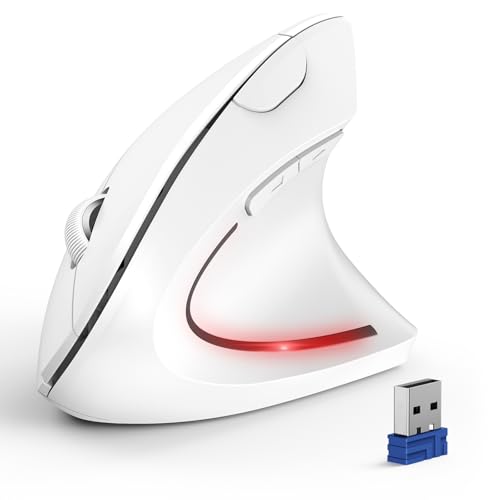
The TECKNET TK-MS007 is the versatile pick in this guide. It connects by Bluetooth or through a 2.4 GHz USB receiver, so it works with a laptop, a desktop, and a tablet without fuss. The optical sensor gives six adjustable DPI levels up to 4,800 DPI, which is the widest range among the affordable picks here, and it lets you find a sensitivity that feels right for both gaming and desktop work.
The shape is a vertical ergonomic design with a thumb rest and six buttons, including forward and back navigation. The clicks are quiet, which suits shared rooms and late-night sessions, and the battery is rated for up to 12 months of use. The mouse is sized for medium to large hands, and the receiver stores in the body for travel.
If you want a vertical mouse with the widest DPI range at an affordable level, plus both Bluetooth and receiver connectivity, the TK-MS007 is the pick. It is a good middle ground between the simple Anker and the premium Logitech models.
Quick Comparison
| Product | Key Feature | Best For |
|---|---|---|
| Logitech Lift Vertical | 57-degree angle, quiet clicks, 3-device pairing | Small to medium hands, first vertical mouse |
| Logitech MX Vertical | Rechargeable, 4,000 DPI, 3-device pairing | Larger hands and mixed work and play |
| Anker 2.4G Vertical | 800/1,200/1,600 DPI, 5 buttons, 18-month warranty | Trying vertical mice on a budget |
| TECKNET TK-MS007 | 6 DPI levels to 4,800 DPI, Bluetooth and 2.4 GHz | Widest sensitivity range, flexible connection |
Buying Guide
Give yourself time to adjust. A vertical mouse feels strange for the first few days, because your hand has spent years learning a flat grip. Most players need three to seven days before the handshake position feels natural. Do not judge a vertical mouse after one hour. Use it for real sessions, including gaming and everyday work, and let your hand learn the shape.
Think about your games. Vertical mice suit games where comfort matters more than raw tracking speed: strategy games, MMOs, open-world adventures, building games, and casual shooters. If you play fast competitive shooters at a high level, a traditional gaming mouse will serve you better, and you may want a vertical mouse for everything else and a flat mouse for ranked play.
Check the weight and the glide. Vertical mice are taller and often heavier than flat mice, so the feet and the mousepad matter more. A smooth cloth pad helps a vertical mouse glide, and a clean surface keeps the sensor tracking well. If the mouse feels draggy, check the feet for wear and the pad for dirt before blaming the shape.
Consider your desk height and chair. A vertical mouse works best when your forearm rests comfortably on the desk and your wrist stays straight. If your chair is too low or your desk is too high, your wrist will bend no matter what mouse you use. Set up your chair so your forearm is level with the desk, then let the vertical shape do its work.
Finally, remember that a vertical mouse is a tool for comfort, not a cure. If you have wrist pain that persists, take breaks, stretch, and consider talking to a doctor. A good mouse helps, but rest and posture matter just as much.
Frequently Asked Questions
Can I use a vertical mouse for gaming?
Yes, for most games. Vertical mice work well for strategy games, MMOs, open-world games, and casual shooters, where comfort over long sessions matters most. For fast competitive shooters, a traditional gaming mouse with a high-end sensor will track better. Many players use a vertical mouse for most of their play and switch to a flat gaming mouse for ranked matches.
How long does it take to get used to a vertical mouse?
Most players need three to seven days of regular use before a vertical mouse feels natural. The first day feels odd, because your hand is learning a new position. By the end of the first week, the handshake grip usually feels normal, and going back to a flat mouse can feel strange instead.
Is a vertical mouse better for wrist pain?
A vertical mouse holds the wrist in a more neutral position than a flat mouse, which reduces the twisting that can cause strain during long sessions. Many players with wrist discomfort find a vertical mouse more comfortable. It is not a medical treatment, and if pain persists you should take breaks and seek professional advice.
Should I choose Bluetooth or a 2.4 GHz receiver?
A 2.4 GHz receiver gives a more stable connection with lower latency, which is better for gaming. Bluetooth is more convenient, because it needs no receiver and works with laptops and tablets directly. The Logitech and TECKNET mice in this guide support both, so you can use the receiver for gaming and Bluetooth for travel.
Conclusion
The best vertical gaming mouse wireless is the one that fits your hand and your games. The Logitech Lift Vertical is the best all-round choice for small to medium hands, and the easiest vertical mouse to adjust to. The Logitech MX Vertical is the best choice for larger hands and for players who want a rechargeable mouse with the best sensor here. The Anker vertical mouse is the best choice if you want to try the shape without spending much, and the TECKNET TK-MS007 is the best choice if you want the widest sensitivity range with flexible connectivity.
Give any vertical mouse a week to settle, set up your chair and desk properly, and let the handshake grip do its work. Your wrist will notice the difference before your aim does.
Disclosure: As an Amazon Associate, we earn from qualifying purchases.
Related guides
More from Amazon
Programs that pair well with the guide above. Offers and eligibility are set by Amazon and may change.
Free shipping on eligible items, Prime Video and more. Eligible new members can start with a free trial.
Start a Prime free trialAd-free music streaming. Eligible new subscribers can start with a free trial.
Try Music Unlimited freeA Prime membership for ages 18-24 with a trial period. Eligibility is set by Amazon.
See Prime for Young AdultsAudiobooks and podcasts to listen to on the go. Eligible new members can start with a free trial.
Try Audible freeAs an Amazon Associate we earn from qualifying purchases.