Small hands run into a specific problem with gaming mice: most shells are drawn around an average palm, so on a standard mouse your fingers overshoot the main buttons, the hump pushes against the wrong part of your palm, and fine aim turns into constant re-gripping. The fix is not simply a lighter mouse. Shell length and shape decide whether a mouse fits, and the five picks below are symmetric models whose listings state compact sizes, low weights and specs aimed at smaller hands.
This roundup is for fingertip and claw players whose hands get lost on full-size shells, for left-handed players who need a shape that works in either hand, and for laptop gamers who want something small that still tracks properly. Every pick was chosen from its Amazon listing name and stated specifications — sensor, switch life, weight and shape wording — rather than from brand reputation, and each entry flags the detail worth double-checking before you order.
Our Top Picks
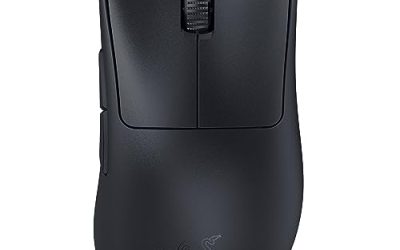
 Razer Orochi V2 Wireless Gaming Mouse4.26 x 1.52 inch (Pack of 1)4.26 x 1.52 x 2.47 inches0.13 poundsCheck on Amazon

Top 3 picks at a glance

Quick Picks
As an Amazon Associate we earn from qualifying purchases
| Product | Best for | Key spec from title |
|---|---|---|
| Glorious Model O- | Wired honeycomb fans with very small hands | 58g Superlight Honeycomb Design, Pixart 3360 Sensor |
| Glorious Model O 2 Mini | The lightest wired pick here | Superlight 49g, 26K Optical Sensor |
| Razer Orochi V2 | Wireless freedom on AA or AAA cells | Up to 950hrs Battery Life, 5G Advanced 18K DPI Optical Sensor |
| ASUS ROG Strix Impact III Wireless | Swappable switches and dual wireless | 57 G Lightweight, 36K DPI Sensor |
| Razer Cobra | A wired all-rounder with optical switches | 58g Lightweight, Gen-3 Optical Switches, 8500 DPI Optical Sensor |
How to Choose
Measure the Shell, Not the Marketing
“Mini”, “compact” and “small hands” are marketing words, and different brands draw the line in different places. What decides fit is shell length: measure your current mouse from front edge to back, then compare that figure with the listing. Only some listings print full dimensions — the Razer Cobra below states 119.6 mm long — so where a listing omits dimensions, treat the stated weight and the shape description as your guide and keep the return option in mind. A shell that is even a few millimetres too long pushes the main buttons past your fingertips and forces a stretched, tiring grip.
Symmetrical Does Not Always Mean Ambidextrous
A mirrored shell shape is only half of left-hand friendliness. Many symmetrical mice still mount their side buttons on the left flank only, positioned for a right thumb, which leaves left-handed players reaching across or going without. Listings use two different words for a reason: two picks below are described by their makers as ambidextrous, while the rest say symmetrical. Before ordering, look at the listing photos and button count, and confirm where the side buttons actually sit. If you play left-handed, a truly ambidextrous layout matters more than any sensor figure on the page.
Match Weight to Your Grip
Small hands usually pair with fingertip or claw grips, and both reward a lighter shell because your fingers, not your palm, do the steering. The five picks here run from 49 g to 58 g before batteries, which keeps wrist strain down during long sessions. Palm-grip players are the exception: full palm contact needs a hump that fills the hand, and none of these compact shells is shaped for that. Also consider the shell surface — the honeycomb Model O- sheds grams through cut-outs, while the solid shells here feel more conventional if open textures bother your skin.
Pick a Connection That Suits Your Desk
Three of these mice are wired, which removes battery weight entirely and keeps the shell as light as its designer intended — the trade-off is cable drag, which flexible modern cables keep manageable. The two wireless picks take AA or AAA cells instead of a built-in battery, so you can swap a fresh cell in seconds and even choose a lighter AAA where the model allows it. That choice changes the final weight, so check the with-battery figure in each listing. Wireless also adds 2.4 GHz and Bluetooth modes on both picks, handy for switching between a gaming PC and a laptop.
The 5 Best Options
Glorious Model O- (Minus) Wired
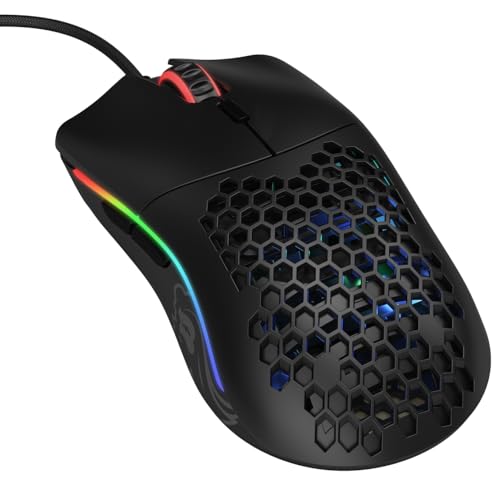
The Model O- is the older, smaller sibling in Glorious’s honeycomb line, built around a Pixart 3360 sensor and Omron switches in a wired shell that weighs 58 g. Its listing describes the shape as ambidextrous rather than merely symmetrical, and the cut-out shell keeps the weight down without shrinking to toy size. For small-handed players who like a wired mouse with a proven sensor and no battery to manage, it remains a sensible pick — just confirm the seller situation in the note below before ordering, because availability on this listing runs through third-party sellers.
Specs
- Weight: 58 g
- Sensor: Pixart 3360, up to 12,000 DPI
- Switches: Omron, rated 20M clicks
- Shape: ambidextrous compact, honeycomb shell
- Connection: wired
Best for: small-handed wired players who like a honeycomb shell and a true ambidextrous shape.
Watch out for: the brand’s own listing answers say stock comes from third-party sellers, so check who is fulfilling the order before buying.
ASIN: B07VMM5LKH
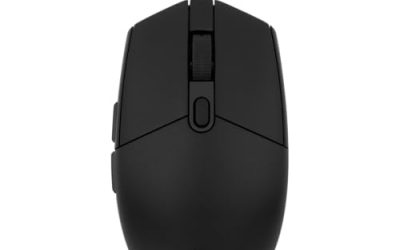
Glorious Model O 2 Mini Wired
The Model O 2 Mini is the lightest mouse in this roundup at 49 g, and its listing says the quiet part out loud: it is marketed directly for small hands. A BAMF 2.0 optical sensor with 26,000 DPI and Motion Sync does the tracking, the switches are rated at 80M clicks, and six programmable buttons give fingertip players enough inputs without crowding a small shell. It is wired only, which suits a fixed desk setup, and the symmetrical shape works for either hand as long as the side-button layout suits your grip.
Specs
- Weight: 49 g
- Sensor: BAMF 2.0 optical, 26,000 DPI, Motion Sync
- Switches: rated 80M clicks
- Buttons: 6 programmable
- Shape: symmetrical
- Connection: wired
Best for: fingertip players with genuinely small hands who want the lightest wired shell here.
Watch out for: wired only, and the white wired version sits on a separate listing — check the colour on the page before ordering.
ASIN: B0DHYNCKKK
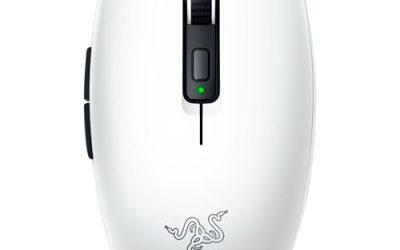
Razer Orochi V2
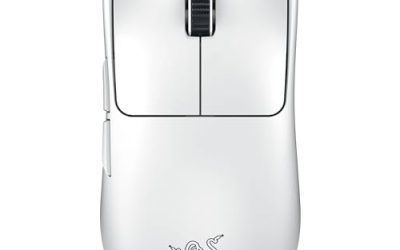
Razer’s Orochi V2 is the travel-friendly option: a compact symmetrical shell that runs on a single AA or AAA battery, connects over HyperSpeed 2.4 GHz or Bluetooth, and lasts up to 950 hours in Bluetooth mode according to its listing. The 5G Advanced optical sensor reaches 18,000 DPI, and second-generation mechanical switches handle the clicks. Because the battery is yours to choose, so is the weight — the mouse stays under 60 g, sitting at the lighter end with an AAA cell fitted and a touch heavier with an AA.
Specs
- Sensor: 5G Advanced optical, 18,000 DPI
- Switches: 2nd-gen mechanical
- Connection: HyperSpeed 2.4 GHz wireless and Bluetooth
- Battery: 1 x AA or AAA (not built in); up to 950 hrs in Bluetooth mode per listing
- Weight: under 60 g, varies with the battery fitted
- Shape: symmetrical compact
Best for: laptop gamers and travellers who want wireless without a charging cable routine.
Watch out for: there is no rechargeable battery inside — you supply the AA or AAA cells, and the final weight depends on which you fit.
ASIN: B0916N2LPZ
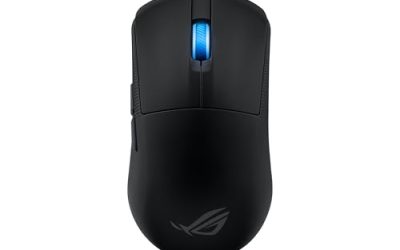
ASUS ROG Strix Impact III Wireless
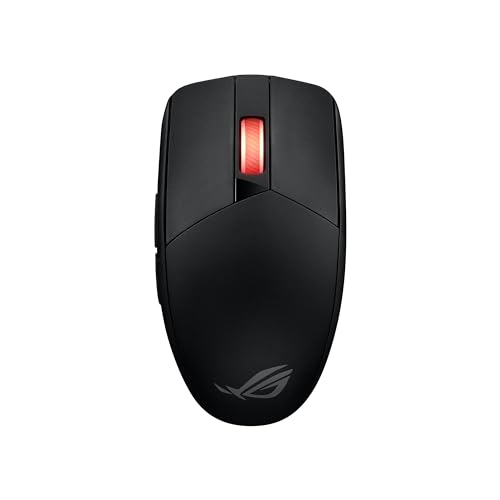
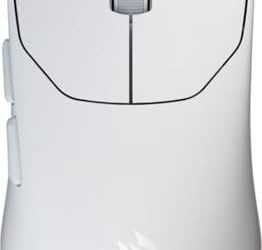
ASUS gives the Strix Impact III Wireless the strongest sensor spec in this group: a ROG AimPoint optical sensor at 36,000 DPI with 650 IPS tracking. The ambidextrous shell weighs 57 g before you add a battery, runs over 2.4 GHz or Bluetooth at 1000 Hz polling, and hides a party trick small-handed tinkerers will appreciate — the main switches sit in sockets, so a worn or unwanted switch can be swapped for a fresh ROG Micro Switch instead of replacing the whole mouse. Five programmable buttons round out a spec sheet aimed at players who keep gear for years.
Specs
- Sensor: ROG AimPoint optical, 36,000 DPI, 650 IPS, 50G
- Switches: replaceable ROG Micro Switches, rated 70M clicks
- Connection: 2.4 GHz wireless and Bluetooth, 1000 Hz polling
- Buttons: 5 programmable
- Weight: 57 g excluding battery and receiver; 68 g with AAA, 72 g with AA
- Shape: ambidextrous
- Battery life: up to 618 hrs (listing title figure — see the note below)
Best for: small-handed players who want dual wireless and switches they can replace instead of rebuying.
Watch out for: the listing title claims up to 618 hours of battery life while retail-box posts cite 450 hours, so treat that figure as unsettled; an AA cell also takes the weight to 72 g, the heaviest setup here.
ASIN: B0CVR5DM26
Razer Cobra
The Razer Cobra is the straightforward wired option: 58 g, a symmetrical shell, Gen-3 optical switches rated at 90M clicks and pure PTFE feet under a Speedflex cable. Its 8,500 DPI optical sensor is the most modest figure in this group, which in practice still covers the sensitivity range most players actually use. Helpfully, it is also the one listing here that prints full dimensions — 119.6 mm long — so you can measure your current mouse and judge the fit before ordering instead of guessing from a marketing label.
Specs
- Weight: 58 g
- Sensor: optical, 8,500 DPI
- Switches: Gen-3 optical, rated 90M clicks
- Buttons: 6 programmable
- Dimensions: 119.6 x 62.5 x 38.1 mm
- Feet: pure PTFE
- Connection: wired, Speedflex cable
- Shape: symmetrical
Best for: wired players who want optical switches and a shell they can size-check from printed dimensions.
Watch out for: some retailer tables misstate this sensor far above 8,500 DPI — trust the listing figure, and note the 119.6 mm length before assuming it suits the smallest hands.
ASIN: B0C51J2ZXN
Which One Fits Your Situation
Your Desk Setup Never Moves
If your mouse lives on one desk, wired removes every battery chore and keeps weight at its lowest. The Model O 2 Mini is the pick for the smallest hands at 49 g with a 26,000 DPI sensor, while the Model O- suits players who prefer a honeycomb texture and an explicitly ambidextrous shape. The Cobra joins them if you want optical switches and printed dimensions to confirm the fit first.
You Game on a Laptop in More Than One Room
Portability points at the Orochi V2. Bluetooth pairs with a laptop without a dongle, HyperSpeed covers serious sessions at home, and a single AA or AAA cell means a flat battery is a ten-second swap rather than an overnight charge. The Strix Impact III Wireless is the alternative if you also want the stronger 36,000 DPI sensor and replaceable switches in the same take-anywhere role.
You Play Left-Handed, or Swap Hands
Start with the two listings that use the word ambidextrous: the Model O- and the Strix Impact III Wireless. Then check the listing photos for side-button placement, because a mirrored shell with buttons on one flank still favours one hand. The symmetrical Model O 2 Mini, Orochi V2 and Cobra can work in the left hand for players who rarely use side buttons, but they are not the first stop for a left-handed player who relies on them.
You Want a Mouse That Lasts for Years
Switch wear is what usually retires a gaming mouse, so look at the click-life figures and the Strix’s sockets. The Strix Impact III Wireless lets you replace its 70M-click switches outright. Among the fixed-switch picks, the Cobra’s optical switches carry the highest click-life figure here at 90M clicks, with the Model O 2 Mini close behind at 80M — both are wired, so there is no ageing battery to plan around either.
Common Mistakes
- Buying on weight alone and never checking shell length against your current mouse.
- Assuming every symmetrical mouse is left-hand friendly, without checking which side the thumb buttons sit on.
- Choosing a palm-grip shape when you actually play fingertip or claw, then blaming the sensor for poor control.
- Forgetting that AA and AAA cells change a wireless mouse’s weight, then judging it on the no-battery figure.
- Ignoring the seller on older listings — on the Model O-, stock runs through third-party sellers, so the fulfilment details matter.
Frequently Asked Questions
What mouse size suits small hands?
Start by measuring your hand and your current mouse. Shells around or under 120 mm long are the usual small-hand territory — the Cobra in this roundup prints 119.6 mm — and a lower hump suits fingertip and claw grips. If your fingers reach past the front buttons on your current mouse, go shorter rather than just lighter.
Is a symmetrical mouse always ambidextrous?
No. Symmetrical describes the shell outline; ambidextrous should also mean the buttons work for either hand. Several symmetrical mice place side buttons on the left flank only, for a right thumb. If you play left-handed, check the listing photos and description wording — two picks here are described as ambidextrous by their makers, the rest as symmetrical.
Should small-handed players choose wired or wireless?
Both work. Wired models here are the lightest because there is no battery to carry — the Model O 2 Mini is 49 g — and modern flexible cables limit drag. Wireless adds freedom for laptops and tidy desks, and the AA or AAA designs above let you trade a little weight for very long runtimes between swaps.
Does a higher DPI number make a mouse better for small hands?
Not by itself. DPI is a sensitivity ceiling, and most players game far below the maximums listed here, which run from 8,500 on the Cobra to 36,000 on the Strix Impact III Wireless. Fit, weight and switch feel change your aim more than the headline DPI figure, so choose the shell that suits your hand first and treat DPI as a box every pick here already ticks.
Related guides
More from Amazon
Programs that pair well with the guide above. Offers and eligibility are set by Amazon and may change.
Free shipping on eligible items, Prime Video and more. Eligible new members can start with a free trial.
Start a Prime free trialAd-free music streaming. Eligible new subscribers can start with a free trial.
Try Music Unlimited freeA Prime membership for ages 18-24 with a trial period. Eligibility is set by Amazon.
See Prime for Young AdultsAudiobooks and podcasts to listen to on the go. Eligible new members can start with a free trial.
Try Audible freeAs an Amazon Associate we earn from qualifying purchases.