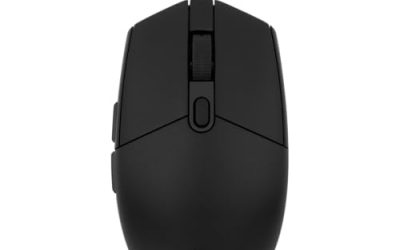
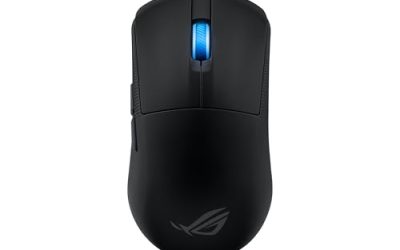
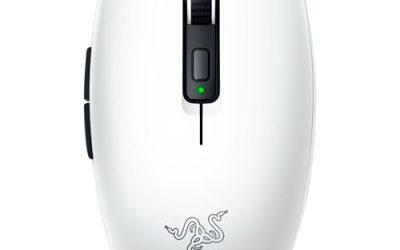
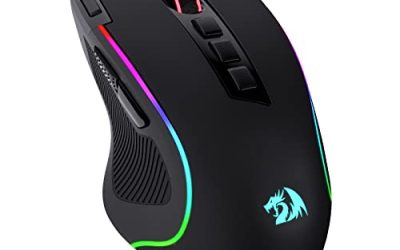
Our Top Picks


Top 3 picks at a glance

Introduction
Cheap does not have to mean compromised. The best cheap gaming mouse gives you the same core ingredients as a much more expensive one: an accurate optical sensor, buttons that respond consistently, a shape that fits your hand, and software that lets you tune the mouse to your games. The difference between a cheap gaming mouse and a premium one is usually found in the extras, not in the basics.
This guide looks at four mice that keep the basics strong while staying affordable. There is a versatile all-rounder with adjustable weights, a button-heavy mouse for players who want many shortcuts under their thumb, a proven FPS mouse with a fast report rate, and a simple RGB wired mouse that covers the essentials. Each one is a real gaming mouse from a known brand, and each one suits a different kind of player.
If you are buying your first gaming mouse, the right question is not how little you can spend. It is which mouse fits your hand and your games. A mouse that matches your grip will feel better and play better than a more expensive mouse that fights your hand. Use the guide below to find your match.
How to Choose
Start with the shape. Gaming mice come in three broad shapes: ergonomic right-handed bodies with a thumb rest, symmetrical bodies that suit either hand, and low-profile bodies for fingertip players. Palm grip players need length and height. Claw grip players need a defined hump to rest their fingers on. Fingertip players need a short, light body. If you can, compare the length of the mouse with the length of your hand. A mouse that is too short forces your fingers to curl, and a mouse that is too long makes your wrist work harder than it should.
Next, count the buttons you actually use. Most players need the two main buttons, a clickable scroll wheel, and two side buttons at minimum. Players who play MOBAs, MMOs, or battle royale games often want more, because abilities, healing items, and communication shortcuts are easier to reach on the mouse than on the keyboard. The mice in this guide range from six to eleven programmable buttons, so there is a match for every style.
Look at the sensor next. Every mouse here uses an optical sensor with a sensitivity range that covers what real players use. The key qualities are tracking accuracy, a polling rate of 1,000 Hz, and no unwanted acceleration. A high maximum DPI number looks impressive on a box, but it tells you very little about how the mouse feels in a game. Clean tracking at your usual sensitivity matters far more.
Weight is worth thinking about too. Light mice make fast flicks easier, which suits shooters. Heavier mice feel more planted, which suits tracking and slower games. Some mice, like the G502 HERO in this guide, let you adjust the weight by adding or removing small weights, so you can tune the feel to your taste.
Finally, check the cable and the software. A flexible, lightweight cable drags less across the desk than a stiff one. Software that lets you remap buttons, set sensitivity steps, and store profiles on the mouse is genuinely useful, because your setup follows the mouse to any computer you plug it into.
Top Picks
Logitech G502 HERO

Amazon ASIN: B07GBZ4Q68
The Logitech G502 HERO is the all-rounder in this guide. It uses the HERO 25K optical sensor with sensitivity up to 25,600 DPI, which gives you precise tracking across the full range of sensitivities players actually use. The shape is a right-handed ergonomic design with a thumb rest, a textured grip, and a dual-mode scroll wheel that switches between a notched mode for weapon selection and a free-spinning mode for fast scrolling through long pages and inventories.
What sets the G502 HERO apart is control. It has eleven programmable buttons, including a DPI shift button under the thumb that lets you drop to a low sensitivity for precise aiming and snap back the moment you release it. The adjustable weight system includes five small weights that you can add or remove, so you can make the mouse lighter for fast shooters or heavier for steady tracking. RGB lighting runs through the logo and the light strip, and everything is managed through Logitech G HUB software with onboard memory for your profiles.
The G502 HERO suits players who want one mouse that does everything: shooters, MOBAs, strategy games, and everyday computer work. It is a full-size mouse, so it fits medium to large hands best, and it is the pick in this guide for players who want the most features and the most control.
Redragon M612 Predator RGB
Amazon ASIN: B08SJ5Z8JL
The Redragon M612 Predator RGB is the button-heavy pick in this guide. It has eleven programmable buttons, including a cluster of side buttons and a rapid fire button that sits under the thumb. For MMO and MOBA players, that button layout is a real advantage, because you can map abilities, items, and macros to the mouse instead of stretching across the keyboard.
The M612 uses an optical sensor with sensitivity up to 8,000 DPI and five backlit lighting modes, so you can set the look to match your desk. The shape is a right-handed ergonomic design with a thumb rest, and the textured side panels keep the mouse secure during long sessions. Redragon software lets you remap every button, adjust the sensitivity in steps, and set up macros for repeated actions.
If you play games with many abilities and you want them under your thumb, the M612 is the pick. It is also a good choice for players coming from a basic office mouse who want to feel what a purpose-built gaming mouse can do, without spending much to find out.
Logitech G402 Hyperion Fury
Amazon ASIN: B00LZVNWIA
The Logitech G402 Hyperion Fury is the FPS pick in this guide. It uses the Fusion Engine sensor with sensitivity up to 4,000 DPI, paired with a 1 millisecond report rate, which keeps the mouse responsive in fast games where every frame counts. The Fusion Engine combines optical tracking with an accelerometer and a gyroscope, so the mouse keeps tracking accurately even during very fast flicks that can confuse simpler sensors.
The G402 has eight programmable buttons, including four thumb buttons and a DPI shift button, all arranged on a full-size ergonomic body that suits palm and claw grips in medium to large hands. The onboard memory stores your profiles, so your button assignments and sensitivity settings travel with the mouse. Logitech G HUB software handles the setup, and the lightweight design keeps the mouse quick across the pad.
For shooter players who want a proven, fast, comfortable mouse with a strong sensor and a sensible button layout, the G402 is the pick. It has been a staple of the budget gaming mouse market for years, and it remains a solid choice for players who value responsiveness above all else.
BENGOO Gaming Mouse Wired with RGB Backlit, BX017B
Amazon ASIN: B00Z9V0NKC
The BENGOO BX017B is the simple pick in this guide. It is a wired gaming mouse with RGB backlighting, six buttons, and four DPI levels up to 3,600 DPI, which covers the sensitivity range most players use. The ergonomic shape fits the right hand with a thumb rest on the left side, and the braided cable is built to resist tangling and wear.
There is nothing complicated about the BX017B, and that is the point. You plug it in, pick a DPI level with the button behind the scroll wheel, and play. The RGB lighting cycles through colors without any software, and the six buttons include two side buttons for forward and back navigation or in-game actions. The click feel is firm and consistent, and the sensor tracks cleanly on cloth and hard mousepads alike.
If you want a straightforward gaming mouse that covers the essentials and leaves the complexity behind, the BX017B is the pick. It is also a good choice for a younger player, a second computer, or a household where a mouse needs to survive daily use without fuss.
Quick Comparison
| Product | Key Feature | Best For |
|---|---|---|
| Logitech G502 HERO | HERO 25K sensor, 11 buttons, adjustable weights | One mouse for every game |
| Redragon M612 Predator RGB | 11 programmable buttons, rapid fire button | MMO and MOBA players |
| Logitech G402 Hyperion Fury | Fusion Engine sensor, 1 ms report rate | Fast FPS play |
| BENGOO BX017B | 6 buttons, 4 DPI levels, RGB backlighting | Simple, no-fuss gaming |
Buying Guide
Think about how many buttons you will actually press. Extra buttons only help if you remember to use them. If you play shooters, two side buttons and a DPI shift button are usually enough. If you play MMOs or MOBAs, a mouse with a side button cluster, like the M612, can transform how you play, because abilities sit under your thumb instead of across the keyboard.
Pay attention to the scroll wheel. A good scroll wheel has clear, tactile steps for weapon switching and a clickable middle button for actions like melee or ping. The G502 HERO goes further with a dual-mode wheel that free-spins for long documents, which is a small comfort that adds up if you also use the mouse for work or study.
Consider the cable. A stiff cable can pull against the mouse and change how it feels, especially at low sensitivity where you move the mouse across a wide area. The mice in this guide use flexible cables, and if cable drag bothers you, a simple cable holder or routing the cable behind the monitor can help.
Do not ignore the software. Being able to remap a button, set a sensitivity step, or turn lighting down is useful, and storing those settings on the mouse means you keep them when you move to another computer. Take ten minutes to set up your mouse when it arrives. It makes a bigger difference than any single spec on the box.
Finally, remember that a cheap gaming mouse is not a temporary mouse. The models in this guide use durable switches and sensors that last for years. Spend the money you save on a good mousepad, because a clean, consistent surface does more for your aim than any mouse upgrade.
Frequently Asked Questions
Is a cheap gaming mouse good enough for competitive play?
Yes. Competitive play depends on tracking accuracy, responsiveness, and comfort, and the mice in this guide deliver all three. A higher price usually buys lighter materials, a newer sensor, or wireless connectivity, not better aim. Many players compete with mice in this price range and never feel held back by the hardware.
How many buttons do I need on a gaming mouse?
Most players do well with six to eight buttons: the two main buttons, a clickable scroll wheel, two side buttons, and a DPI button. MMO and MOBA players may want more, because abilities and items map well to extra side buttons. More buttons are only useful if you take the time to assign them and learn the layout.
What is a DPI shift button?
A DPI shift button, sometimes called a sniper button, temporarily drops the mouse to a low sensitivity while you hold it down. It is useful for precise aiming with scoped weapons, because small hand movements translate to small movements on screen. When you release the button, the mouse returns to your normal sensitivity instantly.
Should I choose a wired or wireless cheap gaming mouse?
At this price range, wired mice give you the most performance for the money, because there is no battery or wireless hardware to pay for. Wired mice also never need charging. Wireless mice are worth it if cable drag bothers you or you move the mouse between computers often. Both types can feel equally responsive in a game.
Conclusion
The best cheap gaming mouse is the one that matches your hand and your games. The Logitech G502 HERO is the most versatile pick, with a strong sensor, eleven buttons, and adjustable weight. The Redragon M612 Predator RGB is the pick for MMO and MOBA players who want many buttons under their thumb. The Logitech G402 Hyperion Fury is the pick for fast FPS play, and the BENGOO BX017B is the pick if you want a simple, dependable mouse that covers the essentials.
Choose by grip first and by buttons second. Any of these four will give you accurate tracking and a comfortable shape, and the right one will feel like it was made for your hand.
Disclosure: As an Amazon Associate, we earn from qualifying purchases.
Related guides
More from Amazon
Programs that pair well with the guide above. Offers and eligibility are set by Amazon and may change.
Free shipping on eligible items, Prime Video and more. Eligible new members can start with a free trial.
Start a Prime free trialAd-free music streaming. Eligible new subscribers can start with a free trial.
Try Music Unlimited freeA Prime membership for ages 18-24 with a trial period. Eligibility is set by Amazon.
See Prime for Young AdultsAudiobooks and podcasts to listen to on the go. Eligible new members can start with a free trial.
Try Audible freeAs an Amazon Associate we earn from qualifying purchases.