
A headset with a built-in microphone sits in an awkward middle ground. It is not quite a gaming headset, not quite a music headphone, and rarely a professional conferencing tool. But millions of people need exactly this compromise every single day — someone who attends Zoom calls in the morning, plays a ranked match at night, and cannot justify spending a separate budget on dedicated gear for each task. The best headphones with microphone in this tier are defined by how well they handle the microphone side of the equation without making the listening experience feel like an afterthought.
Weighing these eight models across call quality, music playback, and casual gaming on desktops and laptops, the pattern is clear: driver size and frequency response tell you almost nothing about whether a headset will annoy your teammates or whether your voice will sound thin on a work call. Comfort over two hours, mic clarity at close range, and cable management matter far more. Some of these headsets punch well above their price; others cut corners in ways that compound over weeks of use. This roundup is honest about which is which.
As an Amazon Associate we earn from qualifying purchases at no extra cost to you.







Our Top Picks
 Logitech H390 Wired Headset PC/Laptop Stereo Headphones1 Pack3.23 x 8.35 x 10.24 inches0.44 poundsCheck on Amazon
 Logitech H391 Wired Headset PC/Laptop Stereo Headphones1 Pack2.68 x 5.94 x 6.73 Inches0.44 PoundsCheck on Amazon



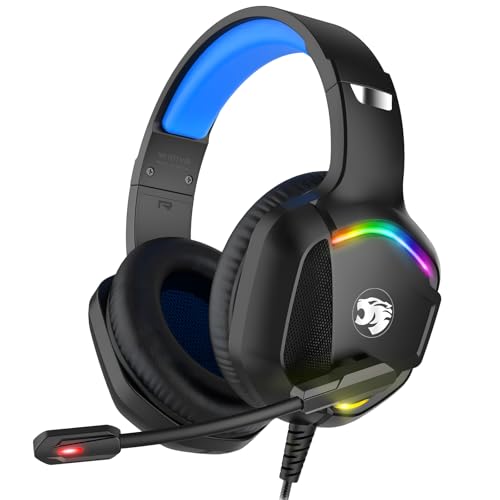
Top 3 picks at a glance
Quick Picks
| Product | Best for | Price |
|---|---|---|
| Logitech H390 | Office and laptop use | Check on Amazon |
| Logitech H111 | Lowest-budget daily driver | Check on Amazon |
| JBL Quantum 100M2 | Casual gaming with detachable mic | Check on Amazon |
| Ozeino Gaming Headset | Multi-platform PC and console play | Check on Amazon |
| Logitech H391 | USB-C laptops and workstations | Check on Amazon |
| IMYB A36 | Budget PS5 and Xbox headset | Check on Amazon |
| Razer BlackShark V2 X | Competitive gaming on a modest budget | Check on Amazon |
| Sony MDR-ZX110AP | Music-first with occasional calls | Check on Amazon |
How We Compared
Four criteria drove these selections. First, microphone intelligibility: a headset passes this test when your voice cuts through a crowded Discord channel or a quiet office call without sounding like you are speaking through a tube. Second, comfort over extended sessions — pad thickness, clamping force, and weight all factor in, and headsets that feel fine for twenty minutes can become unbearable after two hours. Third, connectivity compatibility: a headset that works with your specific device out of the box saves money and frustration. Fourth, build quality at the price point — cable strain relief, headband rigidity, and whether the microphone swivels or detaches rather than breaking at the joint. We weighted comfort and mic quality equally above sound tuning, because in this category the listening experience is secondary to the talking experience.
The 8 Best Headphones With Microphone in 2026
Logitech H390
The H390 is the default answer when someone asks which USB headset works reliably with a laptop. Its plug-and-play USB-A connection eliminates adapter headaches, and the in-line control pod makes volume and mute adjustments frictionless during calls. For gamers, it handles voice chat acceptably, but the small drivers produce a thin, unengaging audio experience that quickly reveals the headset is tuned for speech, not music or explosions. The rotating noise-canceling boom mic captures your voice clearly at close range, which is the whole reason to buy this model over a plain pair of earbuds. Skip it if you want immersive audio for gaming or listen to music with any seriousness.
- Pro: Driver-free USB-A setup works instantly on Windows and macOS
- Pro: In-line mute and volume controls are tactile and reliable
- Con: Small drivers produce weak bass and muddy midrange for gaming audio
Logitech H111
As the most affordable headset here, the H111 asks for almost nothing and delivers a surprising amount of function. The 3.5 mm jack means it connects to phones, consoles, desktops, and laptops without any dongle. For voice chats and quick game sessions, it works. The fixed microphone is adequate in quiet rooms but picks up keyboard noise and room echo noticeably during calls. Sound quality is flat and unremarkable — this is a tool, not a listening experience. Buy it as a backup pair or for a child’s first gaming setup. Skip it if you take calls with other humans who will notice the thin audio reproduction.
- Pro: Universal 3.5 mm compatibility with nearly every device
- Pro: Lowest price in this roundup with consistent build quality
- Con: Fixed mic is sensitive to ambient noise and room echo
JBL Quantum 100M2
The Quantum 100M2 stands out because of its detachable microphone — remove the boom and you have decent over-ear headphones for commuting or music. The JBL QuantumSound signature gives the audio a bass-forward profile that suits gaming and casual music listening without sounding bloated. Comfort is good for its weight class, with soft pads that seal well without excessive clamping. The 3.5 mm connection keeps it platform-agnostic, though it requires a separate adapter for phones with USB-C ports. Skip it if you want a backup microphone for calls, since removing the boom leaves you with no mic at all.
- Pro: Detachable boom mic allows use as standard over-ear headphones
- Pro: JBL’s bass-forward tuning makes games and music feel engaging
- Con: No microphone left once the boom is removed
Ozeino Gaming Headset
This headset is for the multi-platform household that needs one pair to reach across PC, PS5, Xbox, and Switch without thinking. Its 3.5 mm connection covers all four, and its advertised 7.1 surround is a virtual effect that adds only modest spatial depth in shooters. The LED lighting is purely cosmetic, and some users find it distracting in dark rooms. Mic noise cancellation works reasonably at reducing background hum but does not isolate your voice dramatically. Skip it if you dislike RGB lighting or need plug-and-play without any audio settings adjustments.
- Pro: Works across PC, PS5, Xbox Series X/S, and Switch via 3.5 mm
- Pro: Advertised virtual 7.1 surround widens the sound slightly in games
- Con: Gamer-style LED lighting is not for everyone
Logitech H391
The H391 is the USB-C version of the H390, and for modern laptop users this is a meaningful improvement — no adapter, no dongle, direct into a contemporary machine. Comfort, mic quality, and the control pod remain identical to the H390. This makes it an easy recommendation for office workers or students using USB-C-only machines who need a functional headset without thinking about compatibility. Audio quality for gaming or music is the same weak point as the H390: small drivers, thin sound. Skip it if your setup already has USB-A ports and you can buy the cheaper H390, or if you want gaming-grade audio.
- Pro: Native USB-C connection eliminates adapter need on modern laptops
- Pro: Same proven comfort and mic clarity as the H390 at no extra cost
- Con: Gaming audio performance is identical to the H390 and equally underwhelming
IMYB A36
The A36 is a budget gaming headset that prioritizes wide platform compatibility and a surprisingly comfortable fit. Memory foam ear cushions and a padded headband make it wearable for extended sessions, and the flexible boom mic swivels close to your mouth for clear voice pickup. Sound tuning leans bass-heavy, which feels punchy in action games but muddies positional audio in tactical shooters. The 3.5 mm connection keeps it universal across PC, PS5, and Xbox. Skip it if positional precision matters to you in competitive FPS titles, as the bass emphasis obscures subtle footsteps.
- Pro: Memory foam pads and light clamp force suit long-session comfort
- Pro: Flexible boom mic pivots close to the mouth for clear voice capture
- Con: Bass-heavy tuning washes out positional detail in competitive FPS games
Razer BlackShark V2 X
The BlackShark V2 X is the best all-around gaming experience in this group by a clear margin. Fifty-millimeter drivers produce full, detailed audio with strong bass response and clear highs — you hear enemy footsteps, ability cues, and music with equal definition. The lightweight design and breathable ear pads keep comfort high over marathon sessions. The fixed boom mic is among the clearest here for voice chat. It requires a 3.5 mm connection, and its controls sit on the left earcup: a volume dial and a mic mute button, with no mute indicator light. Skip it only if you cannot stretch past the budget-tier models; the upgrade is real.
- Pro: 50mm drivers deliver the fullest, most detailed audio in this roundup
- Pro: Lightweight over-ear design with excellent comfort over multiple hours
- Con: Earcup mute button has no indicator light, so mute status is easy to forget
Sony MDR-ZX110AP
The ZX110AP is a music headphone first, headset second — and that is exactly what makes it useful for a specific buyer. Closed-back on-ear design provides decent isolation and a balanced, non-fatiguing sound signature well suited to long listening sessions. The single-button inline mic and remote work naturally with phones for calls and media. The on-ear fit, however, creates pressure points on the pinnae after about ninety minutes, making it uncomfortable for marathon gaming. The mic picks up adequate voice quality in quiet environments but lacks the boom-mic directionality of dedicated headsets. Skip it if you need comfort over two-plus hours or competitive voice clarity.
- Pro: Balanced, musical tuning makes it the best-sounding option for music here
- Pro: Phone-native inline mic and controls work with Android and iOS out of the box
- Con: On-ear clamp causes ear-pinna discomfort during long sessions
Six More Headphones With Microphone Worth Considering
The eight picks above cover the budget end of the market well, but they leave gaps: there is no dedicated business headset with call certification, nothing with a metal frame built to survive years of being tossed on a desk, and only one option that moves into the mid-range for audio quality. The six headsets below fill those gaps. Each one solves a specific problem that the original list does not, so read the “who it’s for” line first and skip the ones that do not match your situation.
HyperX Cloud III

The Cloud III is the headset to buy if the Razer BlackShark V2 X sounds right in principle but you want something sturdier and more versatile. It sits in the mid-range tier, a clear step above most of this roundup, and the extra spend goes into tangible areas: an aluminum frame and forks, thick memory foam cushions wrapped in soft leatherette, and angled 53 mm drivers that point sound into the ear canal rather than straight at the side of your head.
Connectivity is the other big reason to consider it. Out of the box it plugs in over 3.5 mm, which covers PS5, Xbox controllers, Switch and phones, but it also ships with a USB adapter that works with both USB-A and USB-C ports. On a PC, that USB route unlocks DTS Headphone:X spatial audio and lets the headset behave like a plug-and-play USB device on a laptop with no headphone jack. That single cable kit covers nearly every device in a mixed household.
The detachable 10 mm microphone uses a noise-canceling capsule with a built-in pop filter and an LED mute indicator, so you can see at a glance whether your teammates or colleagues can hear you. That small indicator is something none of the original eight offer, and it prevents the classic “you were on mute” moment. Remove the mic and the Cloud III doubles as a closed-back headphone for music.
Strengths: metal construction that resists cracking at the headband, wide compatibility through both analog and USB, a mic with a visible mute status, and a comfortable fit for glasses wearers thanks to the plush pads.
Drawbacks: it is noticeably heavier than the Logitech office headsets, the closed leatherette pads get warm in summer, and the spatial audio feature only works on PC through the USB adapter.
How it compares: against the BlackShark V2 X, the Cloud III trades a little weight for a more durable build, a detachable mic and USB support. If you only ever plug into a controller, the Razer remains the value choice. If one headset needs to serve a laptop, a console and long gaming nights, the Cloud III is the safer long-term buy.
HyperX Cloud Alpha

The Cloud Alpha is an older design that has stayed relevant for one reason: its dual-chamber 50 mm drivers separate bass from mids and highs, which keeps explosions from swallowing footsteps and voices. For players who found the IMYB A36 too bassy for tactical shooters, this is the direct fix. It lands in the mid-range tier, usually a little below the Cloud III.
It is a pure analog headset. A detachable braided cable with an inline volume wheel and mic mute switch connects over 3.5 mm, and a splitter is included for desktops with separate mic and headphone jacks. There is no USB sound card in the box, which keeps the setup simple and makes it equally at home on PS5, Xbox, Switch and PC. The aluminum frame and expanded memory foam pads are the same comfort recipe that made the Cloud line popular, and the clamp is firm without being tight.
The detachable noise-canceling mic is clear for voice chat and calls, though it lacks the mute LED of the Cloud III. Because both the mic and the cable detach, the two parts most likely to fail on a cheap headset can be replaced instead of retiring the whole unit, which matters when you compare long-term cost against the sub-budget options above.
Strengths: controlled bass that keeps positional cues audible, a durable metal frame, a replaceable cable and mic, and inline mute on the cable, where the BlackShark V2 X puts its mute button on the earcup.
Drawbacks: no USB option for jack-less laptops without an adapter, no surround processing, and the red-accent design looks distinctly “gamer” on a work video call.
How it compares: the Cloud Alpha is the pick for gamers who want better tuning and build than the budget headsets but have no use for USB or software features. Choose the Cloud III instead if you also need to plug into a modern USB-C-only laptop.
Logitech G432

The G432 sits between Logitech’s office headsets and its pricier gaming line, and it fills a gap in this roundup: an affordable gaming headset that includes a USB sound adapter. In the budget-to-mid-range tier, it pairs 50 mm drivers with a 6 mm flip-to-mute microphone, so lifting the boom up instantly mutes you, an intuitive control during a heated match or a surprise doorbell on a work call.
Plugged in over 3.5 mm, it works with consoles, controllers and phones. Through the included USB adapter on a Windows PC, it gains DTS Headphone:X 2.0 virtual surround and access to Logitech G HUB for EQ adjustments. That flexibility is its main draw: the Ozeino in the main list advertises surround but relies on a basic analog connection, while the G432 has the processing hardware to actually deliver it on PC.
Comfort is reasonable for its weight class, with leatherette pads and a lightly padded headband. The pads trap more heat than fabric or velour, and the plastic build does not feel as durable as the HyperX metal frames. Sound is energetic with a lift in the bass that suits action games and movies, while the flip-to-mute mic is clear enough for Discord and video calls in a quiet room.
Strengths: flip-to-mute boom that is impossible to misread, a bundled USB adapter that brings surround and EQ to PC, and broad 3.5 mm compatibility for consoles.
Drawbacks: the microphone is fixed rather than detachable, leatherette pads get warm in long sessions, and the volume wheel on the earcup is small.
How it compares: think of it as the step up from the JBL Quantum 100M2 for PC gamers who want surround sound and software tuning without moving fully into mid-range pricing.
Turtle Beach Recon 50

The Recon 50 is one of the most widely compatible wired headsets you can buy, and it is aimed at families, students and anyone outfitting several controllers at once. It sits firmly in the budget tier alongside the Logitech H111 and Ozeino, but it brings a removable boom mic and an inline control with master volume and mic mute, two features the H111 lacks.
Its 40 mm drivers deliver a straightforward, slightly bass-forward sound that works for casual gaming and video. A single 3.5 mm plug connects to PS5 and Xbox controllers, Switch, PC, Mac and mobile devices. The lightweight frame and cushioned pads keep it comfortable for younger players or for anyone who dislikes heavy headsets pressing on the top of the head.
The removable mic is the practical highlight. When it is not needed, you can pull it out and use the Recon 50 as plain headphones on a phone or tablet, and a detached mic is less likely to snap in a backpack. Mic quality is adequate for party chat in a quiet room, though it does not reject keyboard clatter as well as the boom mics on the Logitech office models or the HyperX pair.
Strengths: plug-and-play with nearly every device that has a headphone jack, removable mic, inline mute, and a light frame suited to kids and long casual sessions.
Drawbacks: all-plastic construction, a fixed cable that cannot be replaced, and sound that is fine for games but plain for music.
How it compares: if you were weighing the Ozeino or IMYB A36 for a console setup, the Recon 50 is the more conservative choice from an established gaming brand, without RGB lighting and with an inline mute switch.
Jabra Evolve 10

The Evolve 10 is Jabra’s entry-level wired USB-A headset, and it is the most work-focused option in this entire guide. If your headset will be used mainly for Teams, Zoom or Google Meet, this deserves a look alongside the Logitech H390. It sits in the budget tier, close to the H390, but comes from a company whose business is office audio.
Jabra’s datasheet lists a single noise-canceling boom microphone on an adjustable arm that can be swapped to either side, 30 mm speakers, and a headset weight of roughly 92 grams, or about 123 grams including the inline controller. That makes it one of the lightest headsets here, ideal for eight-hour days. The in-line control unit handles call volume and mute, and resellers list it as certified for Microsoft Teams and Zoom. It is plug-and-play over USB-A with no drivers required, and the cable runs a little over six feet, enough to reach a desktop tower under the desk.
The ear cushions are on-ear leatherette rather than over-ear foam, so the light clamp is what keeps it comfortable. The trade-off is limited isolation from office noise. Note that the noise canceling applies to the microphone, not the earcups; it does not have active noise cancellation, regardless of how some listings describe it.
Strengths: very light build, mic that can sit on either side, inline call controls, and a design built around conferencing apps. Jabra also states the headset uses over 50% recycled plastic.
Drawbacks: USB-A only, so USB-C laptops need an adapter; on-ear fit offers little isolation; sound is tuned for voice, not music or games.
How it compares: the Evolve 10 and Logitech H390 are close rivals. The Jabra is lighter and more office-minded; the Logitech has larger, softer over-ear style cushions. For gaming, neither replaces a dedicated gaming headset.
Lenovo USB-A Wired Stereo Headset Gen 2

Lenovo’s Gen 2 USB-A headset targets the same office buyer as the H390 and Evolve 10, but adds one feature neither of them has: software-based AI noise canceling. Through Lenovo’s free accessories manager app on Windows, the headset can filter background noise from your outgoing voice more aggressively than a passive noise-canceling mic alone, useful in shared homes, open offices or near a noisy PC fan.
The rest of the spec sheet is aimed at all-day comfort. Lenovo lists a weight of about 140 grams, an on-ear design, a double-sided boom microphone, and an inline control box with mic mute, call hook and volume buttons. The earcups are replaceable, and Lenovo sells a memory foam replacement kit, which addresses the most common way cheap headsets wear out: flattened, peeling pads. It works with Teams, Zoom, Google Meet, Slack and Webex by simply plugging in.
The limitations are typical of a budget-tier business headset. The software features are Windows-focused, the sound is tuned for clarity rather than bass or detail, and USB-A means a USB-C-only laptop needs an adapter. It also carries TCO certification, which matters to some workplaces buying in bulk.
Strengths: app-based noise reduction for outgoing voice, replaceable earcups, a full inline control box with a hook button, and a light frame.
Drawbacks: best features require the Windows app, on-ear fit, and no gaming credentials.
How it compares: choose it over the H390 if you work in a noisy space and use Windows. Choose the H391 instead if your laptop is USB-C only and you want to skip adapters entirely.
Buying Guide
Microphone Type and Placement
Boom microphones capture voice better than built-in or inline alternatives because they sit close to your mouth, rejecting room noise and ambient hum. If calls, voice chat, or streaming matter to you, choose a headset with a dedicated boom — preferably flexible, so you can position it optimally. Inline mic cables work acceptably for casual phone calls but struggle in noisy rooms or during loud gameplay audio.
Connection Format: USB Versus 3.5 mm Versus USB-C
USB-A headsets offer plug-and-play simplicity and often include inline control pods with dedicated mute buttons. 3.5 mm headsets are the most universal — they connect to consoles, phones (with or without an adapter), desktops, and laptops without question. USB-C headsets target modern laptops that lack legacy ports. Choose based on the primary device you already own; compatibility frustration at home is worse than any marginal audio quality difference between these three options.
Comfort Metrics That Actually Matter
Weight under 250 grams, clamping force loose enough to avoid temple pressure, and ear pad material (memory foam or protein leather over thin foam) determine whether a headset is wearable for two or more hours. Over-ear designs generally outlast on-ear designs in comfort because they distribute pressure around the ear rather than onto it. If you game for long sessions or sit through multiple meetings, weight and pad construction are more important than any audio specification on the box.
Comparison Table: The Additional Picks
| Headset | Price tier | Connection | Mic style | Best for |
|---|---|---|---|---|
| HyperX Cloud III | Mid-range | 3.5 mm plus USB-A/USB-C adapter | Detachable boom, mute LED | One headset for PC, console and laptop |
| HyperX Cloud Alpha | Mid-range | 3.5 mm, detachable cable | Detachable boom, inline mute | Positional audio in shooters |
| Logitech G432 | Budget to mid-range | 3.5 mm plus USB adapter | Fixed boom, flip-to-mute | PC gamers who want surround and EQ |
| Turtle Beach Recon 50 | Budget | 3.5 mm | Removable boom, inline mute | Kids and multi-console households |
| Jabra Evolve 10 | Budget | USB-A | Swappable-side boom, inline mute | All-day office calls |
| Lenovo USB-A Headset Gen 2 | Budget | USB-A | Double-sided boom, app noise canceling | Calls in noisy rooms on Windows |
Closed-Back, Open-Back and On-Ear: Which Fit Suits You
Every headset in this guide is closed-back, which is the right default for most buyers: closed cups keep game audio from leaking into your microphone and stop people around you from hearing your calls. Open-back gaming headsets exist and sound more spacious, but they leak sound in both directions, so they only make sense in a private room. Within closed designs, the bigger split is over-ear versus on-ear. Over-ear models like the Cloud III, Cloud Alpha and BlackShark V2 X surround the ear and are generally more comfortable for long sessions. On-ear models like the Jabra Evolve 10, Lenovo Gen 2 and Sony MDR-ZX110AP are lighter and cooler, but press directly on the ear and isolate less noise.
Wired Versus Wireless
This roundup is wired on purpose. A wired headset has no battery to charge or wear out, no pairing step, and no wireless latency, and it costs far less for the same audio quality. Wireless makes sense if you pace during calls or sit far from your PC, but be careful with Bluetooth for gaming: standard Bluetooth adds noticeable delay and often drops audio quality when the microphone is active. Gaming-focused wireless headsets avoid this with a dedicated 2.4 GHz USB dongle, which moves them into the mid-range or premium tier. If you rarely leave your desk, a wired headset delivers better value.
Check Platform Compatibility Before You Buy
- PS5 and Xbox: any 3.5 mm headset works through the controller jack, including mic and audio. USB-A office headsets like the H390, Evolve 10 and Lenovo Gen 2 are designed for computers and should not be assumed to work with consoles.
- Switch: 3.5 mm headsets work for game audio in handheld mode; voice chat depends on the game and the companion setup.
- Laptops without a headphone jack: pick a USB-C model like the H391, a headset with a bundled USB adapter like the Cloud III, or add a USB-C to 3.5 mm adapter.
- Desktops with separate pink and green jacks: a four-pole 3.5 mm headset needs a splitter. The Cloud Alpha includes one; budget models often do not.
- Phones: four-pole 3.5 mm headsets with a single plug work on phones with a jack; USB-C-only phones need an adapter, and USB-A office headsets are a poor fit.
Setup Tips for Clearer Voice Calls and Chat
- Position the boom correctly. Place the mic about two finger-widths from the corner of your mouth, slightly off to the side, rather than directly in front. This keeps breath pops out of the recording while staying close enough for the noise-canceling pattern to work.
- Select the right device. On Windows and macOS, set the headset as both the default input and output in system settings, then confirm it is also selected inside Zoom, Teams, Discord or your game. Most “the mic doesn’t work” problems are a wrong device selection.
- Set input level before you go live. Use the test or level meter in your call app. Aim for speech that peaks in the upper-middle of the meter without hitting the top. Too-high gain makes noise-canceling mics pick up the room.
- Turn on noise suppression in software. Teams, Zoom, Discord and the Lenovo app all offer background noise filtering. Combined with a boom mic, it removes most keyboard and fan noise.
- Use the mute you can see. Flip-to-mute booms and mute LEDs exist because inline switches are easy to forget. Learn where your mute control sits before your first important call.
- Protect the cable. Route the cable away from chair wheels, avoid tight coils, and unplug by the connector rather than the cord. Headsets with detachable cables like the Cloud Alpha let you replace a damaged cable rather than the whole headset.
Matching the Headset to How You Actually Use It
Most buying mistakes in this category come from shopping by headline features instead of daily use. If more than half your headset time is spent on work calls, prioritize a light frame, a boom mic and an inline mute, which points to the Logitech H390 or H391, the Jabra Evolve 10 or the Lenovo Gen 2. If gaming dominates, driver quality, over-ear comfort and console compatibility matter more, which points to the BlackShark V2 X, Cloud III, Cloud Alpha or G432. If you mostly listen to music and take occasional phone calls, an inline-mic headphone such as the Sony MDR-ZX110AP is often better than a gaming headset with a boom. Households that need one cheap headset per controller should look at the Recon 50 or the Logitech H111.
Our Verdict
Top pick: The Logitech H390 is the best headphones with microphone for most buyers: plug-and-play USB-A, a rotating noise-canceling boom mic that keeps your voice clear on calls, and tactile inline mute and volume controls. If gaming audio matters as much as calls, step up to the Razer BlackShark V2 X, which feels like a purpose-built gaming headset rather than a compromise.
Budget pick: The Logitech H111 is the lowest-cost option that does not feel disposable. Its universal jack, adequate mic, and proven comfort make it a rational first purchase or a backup pair for a second machine.
Conditional winner: The Sony MDR-ZX110AP overtakes every other option here if your primary use is music listening with occasional phone calls. No other headset in this group sounds as balanced or pairs as naturally with a smartphone.
FAQ
Can I use a 3.5 mm headset with a USB-only laptop?
Yes, but you will need a USB-A or USB-C to 3.5 mm adapter, which adds a small cost and an extra connection point that can loosen over time. If your laptop has no 3.5 mm jack, a native USB headset like the Logitech H390 or H391 avoids this problem entirely.
Does 7.1 surround sound actually improve gaming performance?
It can help with positional awareness in competitive shooters by widening the perceived soundstage, but the effect depends heavily on the headset’s driver quality and implementation. A well-tuned stereo headset like the Razer BlackShark V2 X will outperform a poor 7.1 implementation every time — do not treat a surround sound label as a guarantee of advantage.
How long do wired headsets with built-in mics typically last?
With normal daily use, expect two to four years before the cable frays at the connection point or the mic arm joint loosens. Avoid coiling the cable tightly or pulling it from the plug end, as these are the two most common causes of premature failure.
Is a noise-canceling microphone the same as active noise cancellation?
No. A noise-canceling microphone refers to the mic’s directional pickup pattern that reduces background noise when transmitting your voice. Active noise cancellation refers to headphones generating opposing sound waves to cancel ambient noise reaching your ears. None of the headsets in this roundup use active noise cancellation; they rely on passive isolation from the ear cups and padding.
Why does my headset microphone sound quiet or muffled?
The most common causes are boom placement, a wrong input device, or low input gain. Move the mic closer to the corner of your mouth, confirm the headset is selected as the input in both your operating system and your app, and raise the input level in the app’s audio settings. If you use a 3.5 mm headset on a desktop with separate jacks, make sure a splitter is connecting the microphone to the pink input.
Do USB headsets sound better than 3.5 mm headsets?
Not automatically. A USB headset has its own built-in sound card, which avoids electrical noise from a cheap onboard audio chip and often adds features like surround processing or mute controls. A 3.5 mm headset relies on the device’s own audio output. A well-built analog headset such as the HyperX Cloud Alpha will still sound better than a basic USB office headset, because driver quality matters more than the connection type.
Can I use one headset for both work calls and gaming?
Yes, and that is exactly what this category is for. The best all-rounders here are the HyperX Cloud III, thanks to its USB adapter and mute LED, and the Logitech G432 with its flip-to-mute boom. If you choose a gaming headset for work, pick a design with subdued styling and no forced RGB lighting so it looks appropriate on camera.
Are on-ear headsets bad for long sessions?
Not necessarily. Light on-ear headsets like the Jabra Evolve 10 can be comfortable all day because there is little weight and gentle clamp. They become uncomfortable when the clamp is firm or the pads are thin, which presses on the ear cartilage. If you wear glasses or are sensitive to ear pressure, an over-ear design is usually the safer choice.
How do I stop my headset microphone from picking up keyboard noise?
Use a boom microphone positioned close to your mouth, lower the input gain slightly, and enable noise suppression in your call or chat app. A directional noise-canceling mic combined with software suppression removes most mechanical keyboard noise. Fixed or inline cable microphones are the hardest to fix because they sit further from your mouth and closer to the desk.









