
A PS5 setup can get crowded fast: one TV or monitor, a console, a work PC, a gaming PC, and a tangle of USB cables for a keyboard, mouse, headset receiver, or controller dock. The best HDMI KVM switch for PS5 helps consolidate that desk or media-room setup by letting two or more sources share a display and selected USB accessories.
The important caveat is that a KVM is not automatically a perfect console accessory. A PS5 uses HDMI video, while many KVM switches are designed chiefly around computer connections and USB peripherals. For a practical PS5-and-PC arrangement in 2026, prioritize an HDMI input for the console, enough display outputs for your screen plan, and a switching method you can reach without leaning behind the desk.
As an Amazon Associate we earn from qualifying purchases at no extra cost to you.

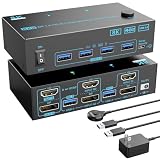


Our Top Picks



Top 3 picks at a glance
Quick Picks
| Product | Best for | Price |
|---|---|---|
| HDMI KVM Switch 1 Monitors 2 Computers 4K@60Hz USB KVM Switches 2 Ports | Affordable one-monitor PS5 and PC setups | Check on Amazon |
| KVM Switch 2 Monitors 2 Computers 8K Displayport 1.4 and HDMI 2.1 Dual Monitor USB 3.0 | High-resolution dual-screen desks | Check on Amazon |
| 4K KVM Switch HDMI 2 Port Box | Simple wired single-display installs | Check on Amazon |
| HDMI KVM Switch 4 Computers EDID 4K@60Hz 4 Port KVM | Four-source offices and shared workstations | Check on Amazon |
| UGREEN 8K@60Hz HDMI Displayport KVM Switch 3 Monitors 2 Computers, Aluminum | Premium three-monitor productivity spaces | Check on Amazon |
| UGREEN HDMI KVM Switch 2 Monitors 2 Computers 4K@60Hz | Neat two-monitor PC-and-console desks | Check on Amazon |
| TIGKTING HDMI KVM Switch 2 Monitors 2 Computers 4K@60Hz Dual Monitor KVM Switches | Dual-monitor users who want a desktop controller | Check on Amazon |
| USB3.0 HDMI KVM Switch 4 Computers 1 Monitor 4K@60Hz | One-monitor setups with four devices | Check on Amazon |
How We Compared
We ranked these KVM switches around the needs of a PS5 owner who also uses a computer: HDMI suitability, stated video capability, display count, number of sources, USB expansion, and ease of switching. Value mattered, too. The list spans budget to premium tiers, so there is a sensible option for a basic single-screen desk as well as for a complicated multi-monitor workspace.
Because the listed products have different connection layouts, fit is more important than simply choosing the highest stated resolution. A single-monitor HDMI KVM is usually the cleanest match for one PS5 and one PC. Dual- and triple-monitor models make more sense when the computer needs several screens; the PS5 itself should be planned around one compatible HDMI display connection rather than treated like a multi-monitor computer.
The 8 Best Picks
1. HDMI KVM Switch 1 Monitors 2 Computers 4K@60Hz USB KVM Switches 2 Ports
This is the best value pick for a straightforward PS5-and-PC desk with one monitor. It is a 2-port KVM for two computers sharing a single monitor, keyboard, and mouse, with stated 4K@60Hz support. The wired extend controller is especially useful when the switch sits behind a monitor stand or inside a media cabinet. As one of the most budget-friendly options in this roundup, it keeps the plan refreshingly simple.
- Pros: Budget-tier price for a basic one-screen setup.
- Pros: Wired extend controller improves everyday access.
- Con: It is limited to one monitor and two sources.
Skip it if your computer requires two displays or you need to manage more than two devices.
2. KVM Switch 2 Monitors 2 Computers 8K Displayport 1.4 and HDMI 2.1 Dual Monitor USB 3.0
For a desk where the PC is the main multi-screen machine and the PS5 is one of two sources, this feature-rich model is the strongest resolution-focused choice. It is designed for two computers sharing two screens and includes DisplayPort 1.4 and HDMI 2.1 connections, USB 3.0, a wired remote, and a 12V power cable. Its stated maximum is 8K@60Hz or 4K@144Hz. That capability gives a demanding monitor setup room to grow, while the wired remote helps keep source changes convenient.
- Pros: Stated support up to 8K@60Hz or 4K@144Hz.
- Pros: Dual-monitor design with USB 3.0 and wired remote.
- Con: More complex than a single-monitor PS5 setup needs.
Skip it if you only use one display and want the simplest possible cable plan.
3. 4K KVM Switch HDMI 2 Port Box
This 2-port HDMI KVM is a practical budget alternative for one monitor, a PS5, and a second device. It supports UHD 4K@60Hz and lets two computers share a keyboard, mouse, printer, and one HD monitor. The package includes two USB cables and two HDMI cables, which is helpful for buyers starting from scratch and trying to avoid a separate cable order. It sits in the same budget tier as the top pick while emphasizing a conventional HDMI-and-USB arrangement.
- Pros: Includes two USB cables and two HDMI cables.
- Pros: Supports UHD 4K@60Hz for a single monitor.
- Con: Only supports one display and two connected devices.
Skip it if you need a wired remote or want to share more than basic USB accessories.
4. HDMI KVM Switch 4 Computers EDID 4K@60Hz 4 Port KVM
Choose this four-port model when a PS5 is only one part of a busy workstation. It supports four PCs sharing one monitor and four USB 3.0 devices, with stated 4K@60Hz capability, EDID, and a controller. The standout benefit is source capacity: it can suit a desk with a console, primary computer, work computer, and another compatible device without repeatedly reconnecting display cables. Four USB 3.0 device connections also give keyboard, mouse, printer, and another accessory a dedicated place.
- Pros: Handles four sources instead of two.
- Pros: Four USB 3.0 device connections and a controller.
- Con: It supports only one monitor.
Skip it if you have just a PS5 and one PC; a 2-port switch will be less complicated.
5. UGREEN 8K@60Hz HDMI Displayport KVM Switch 3 Monitors 2 Computers, Aluminum
This UGREEN option is the premium choice for a high-end desk built around three monitors and two computers. Its aluminum construction distinguishes it from the more basic boxes in this list, while its stated 8K@60Hz capability targets buyers with ambitious display requirements. For PS5 owners, the appeal is primarily in keeping a console within a larger workstation rather than building a console-only system. It is the most premium pick in the main list, so its extra display capacity should be central to your plan.
- Pros: Supports a three-monitor, two-computer setup.
- Pros: Aluminum construction and stated 8K@60Hz capability.
- Con: Premium-tier price, the highest in the main list.
Skip it if your PS5 and computer share just one or two screens.
6. UGREEN HDMI KVM Switch 2 Monitors 2 Computers 4K@60Hz
The UGREEN dual-monitor HDMI KVM is a balanced option for a home office where a computer uses two displays and a PS5 needs to join the setup cleanly. It is built for two computers sharing two monitors, supports 4K@60Hz, and provides four USB 3.0 ports. Those four ports are a meaningful advantage for users with a keyboard, mouse, printer, and wireless receiver or other USB accessory. It sits in the upper mid-range of this group but offers a more expansive workspace arrangement.
- Pros: Two-monitor layout with stated 4K@60Hz support.
- Pros: Four USB 3.0 ports for desk accessories.
- Con: Costs more than basic single-monitor KVM switches.
Skip it if your display plan is limited to one screen or you are shopping strictly in the budget tier.
7. TIGKTING HDMI KVM Switch 2 Monitors 2 Computers 4K@60Hz Dual Monitor KVM Switches
The TIGKTING model is a compelling middle-price dual-monitor pick for users who want a controller within arm’s reach. It supports two computers sharing two screens at 4K@60Hz and includes four USB 3.0 ports for a keyboard, mouse, printer, and other compatible accessories. The desktop controller is the defining convenience feature: it can make a shared PS5-and-workstation desk easier to operate without searching for a button on the KVM itself. It typically costs less than the comparable UGREEN dual-monitor model.
- Pros: Desktop controller makes switching more convenient.
- Pros: Four USB 3.0 ports and dual-monitor support.
- Con: Dual-monitor hardware may be unnecessary for a basic console setup.
Skip it if you only have one monitor or need to switch among more than two sources.
8. USB3.0 HDMI KVM Switch 4 Computers 1 Monitor 4K@60Hz
This USB 3.0 HDMI KVM is the sensible alternative to pick number four for shoppers who need four sources but prefer a simpler product description and a one-monitor layout. It supports four computers and one monitor with stated 4K@60Hz capability. It usually comes in below the other four-source option, making it attractive for a PS5, two computers, and another device feeding a single shared screen. It is best for source-heavy desks, not for elaborate multi-monitor workstations.
- Pros: Four-source capacity at a mid-range price.
- Pros: USB 3.0 and stated 4K@60Hz support.
- Con: One-monitor design limits desktop expansion.
Skip it if you need two displays or want a model specifically listed with a remote controller.
More PS5-Ready KVM Switches Worth Considering
The eight picks above cover the most common desk layouts, but most of them top out at 4K@60Hz on the console side. That is fine for a lot of players, yet the PS5 can output 4K at 120Hz over HDMI 2.1, and it also supports variable refresh rate on compatible displays. If you bought a 120Hz or 144Hz monitor or TV specifically for console play, the switches below are a better match, along with a couple of options that solve reliability and source-count problems the original list does not fully address.
9. AV Access KVM Switch 1 Monitor 2 Computers, 10K HDMI 2.1 KVM with USB 3.0
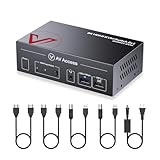
This is the switch to look at if you want a PS5 and a gaming PC to share one high-refresh display without giving up the features you paid for. AV Access lists it as HDMI 2.1 and HDCP 2.3 compliant, with support for 4K@120Hz, 8K and even 10K signals, plus HDR10, Dolby Vision passthrough, VRR and ALLM. The manufacturer explicitly lists PS5, Xbox Series X|S and Nintendo Switch as compatible sources, which is more reassuring than the generic “computer” language on most budget boxes.
On the peripheral side it has a built-in USB 3.0 hub with four ports for a keyboard, mouse, webcam, wired controller or headset dongle, a dedicated port for keyboard hotkey switching, a 3.5mm audio combo jack and a front-panel button. EDID emulation is included, though the manufacturer rates the emulated profile at 4K@60Hz, so the most stable way to get 120Hz is to let the active source negotiate directly with the display. Two ultra high speed HDMI cables and two USB 3.0 cables come in the box, along with a 12V power adapter and mounting brackets.
Who it is for: PS5 owners with a 4K 120Hz monitor or TV who also game on a PC and do not want to drop to 60Hz whenever the console is active.
Strengths: Full HDMI 2.1 feature set including VRR and ALLM, named console compatibility, quality cables included, hotkey plus button switching.
Drawbacks: It sits firmly in the premium tier, it handles only one display and two sources, and switching takes a few seconds while the display re-handshakes.
How it compares: Against the #2 pick, which also advertises high-refresh support, the AV Access is the simpler and more console-focused unit: one HDMI 2.1 output rather than a dual-monitor DisplayPort and HDMI mix. If your second screen belongs only to the PC, the #2 pick still makes sense; if your PS5 and PC share one big screen, this is the cleaner choice.
10. KCEVE KVM Switch 2 Computer 1 Monitor HDMI 8K@60Hz 4K@120Hz

The KCEVE is the budget-tier way to get 4K@120Hz between a PS5 and a PC. The listing describes HDMI 2.1 and HDCP 2.3 compatibility with support for 8K@60Hz, 4K@120Hz, 4K@60Hz and high-refresh lower resolutions, plus HDR10. KCEVE also names the PS5 among compatible HDMI sources. Each source connects with one HDMI cable and one USB cable, and the unit shares USB 3.0 devices such as a keyboard, mouse, flash drive or printer between them.
Switching is handled by a button on the unit or a wired remote, with LEDs showing which input is live. There is no keyboard hotkey switching, which is actually a small advantage for console players, because hotkeys depend on a keyboard plugged into a dedicated port and often behave inconsistently with gaming keyboards. Note that KCEVE sells several versions of this switch with three or four USB ports and with or without a power adapter, so check the box contents on the exact listing.
Who it is for: Players who want console 120Hz and a shared keyboard and mouse but do not want to spend premium money.
Strengths: HDMI 2.1 bandwidth class at a budget price, HDCP 2.3, wired remote, USB 3.0 sharing.
Drawbacks: No EDID emulation is advertised, so the PC may rearrange windows when you switch away; VRR and ALLM are not explicitly listed; one display only.
How it compares: It costs only a little more than the #1 and #3 picks yet doubles their refresh-rate ceiling at 4K. If your display tops out at 60Hz, the cheaper picks are enough; if it runs at 120Hz, this is the natural budget upgrade.
11. UGREEN HDMI KVM Switch 1 Monitor 2 Computers, 8K@60Hz, Aluminum

UGREEN already appears twice in the main list with dual- and triple-monitor units. This single-monitor aluminum model is the one that fits the classic PS5-plus-PC-on-one-screen layout best. UGREEN rates it for 8K@60Hz and backward compatibility with 4K@60Hz, 1440p@120Hz and 1080p@240Hz, with HDCP 2.3 support. It provides three USB-A 3.0 ports and one USB-C port, so a USB-C headset dongle or webcam can be shared without an adapter.
Switching uses a button on the unit or the included desktop controller; hotkeys are not supported. Two HDMI cables, two USB cables and the controller are included. UGREEN recommends keeping HDMI runs short for the highest resolutions and connecting both USB cables for stable power, and a USB-C power input is available for power-hungry devices, though the adapter is sold separately.
Who it is for: Desk setups with one monitor that want premium build quality, a desktop controller and a modern mix of USB-A and USB-C ports.
Strengths: Solid aluminum shell, desktop controller, USB-C port, HDCP 2.3, cables included.
Drawbacks: UGREEN does not list 4K@120Hz for this HDMI model, so a 4K 120Hz TV may fall back to 60Hz; no hotkeys; power adapter not included.
How it compares: It is a nicer, more expandable version of the #1 and #3 picks, landing in the mid-range tier. Choose it over the KCEVE if build quality and the USB-C port matter more than 4K@120Hz; choose the AV Access if high refresh is the priority.
12. TESmart 2 Port HDMI KVM Switch 2 Computers 1 Monitor, 4K@60Hz, USB 3.0

TESmart is one of the better-known names among desk KVM specialists, and this 2-port model is aimed at buyers who value reliable switching over headline resolution. It supports 4K@60Hz on one HDMI display, with lower resolutions at higher refresh rates, and shares USB 3.0 devices between two sources. The key feature is EDID emulation: the switch keeps presenting the monitor to the inactive source, which stops a PC from shuffling windows or changing resolution every time you jump to the PS5.
TESmart’s 2-port USB 3.0 units also offer more ways to switch than most boxes here: a front button, keyboard hotkeys, mouse switching and an IR remote, with KVM cables and a 12V power adapter in the box. For console use, the IR remote is handy when the switch lives in a TV cabinet, and the front button works if you never want to touch hotkeys.
Who it is for: Work-from-home setups where the PC is a work machine and window layout matters, with a PS5 sharing the screen after hours.
Strengths: EDID emulation, multiple switching methods including a remote, strong brand support and documentation.
Drawbacks: HDMI 2.0 bandwidth means 4K@60Hz is the ceiling for console play; premium pricing for a 60Hz box.
How it compares: It costs more than every 4K@60Hz pick in the main list, but it solves the most common complaint with cheap KVMs, which is windows jumping around after a switch. The #4 pick also lists EDID, but with four inputs; the TESmart is the better choice when you only need two.
13. Hearvo USB 3.0 HDMI KVM Switch for 2 Computers 1 Monitor, 8K@60Hz, S7229H

The Hearvo S7229H is another budget-tier option for two sources and one display. It is listed for 8K@60Hz, which signals the higher-bandwidth HDMI generation needed for high-refresh 4K, and it shares USB 3.0 peripherals between both connected devices. That makes it a reasonable alternative to the KCEVE if that model is unavailable or if you prefer Hearvo’s port layout.
As with most budget high-bandwidth KVMs, the advertised maximum resolution is easier to rely on than secondary features such as VRR passthrough, so treat VRR as a bonus to confirm after setup rather than a guarantee. Use a certified ultra high speed HDMI cable on every leg if you want the console to offer its 120Hz modes.
Who it is for: Budget shoppers who want headroom beyond 4K@60Hz and a USB 3.0 hub for a keyboard, mouse and headset receiver.
Strengths: Higher-bandwidth class at a budget price, USB 3.0 sharing, compact single-display layout.
Drawbacks: Fewer published details on VRR, ALLM and EDID than premium models; only two inputs.
How it compares: It competes directly with the KCEVE. Both are good budget upgrades from the 4K@60Hz picks; the AV Access remains the safer bet if you need confirmed VRR and ALLM.
14. UGREEN 8K@60Hz HDMI KVM Switch 4 Computers, Aluminum, with 4 USB 3.0 Ports

If your entertainment desk includes a PS5, a gaming PC, a work laptop and perhaps a streaming box or second console, this four-input UGREEN is a higher-bandwidth alternative to the #4 and #8 picks. It is rated for 8K@60Hz on a single HDMI display and includes four USB 3.0 ports to share a keyboard, mouse, headset dongle and storage across all four sources. The aluminum housing matches UGREEN’s other premium KVMs and handles heat better than thin plastic shells.
Four sources means four HDMI and four USB cables, so plan your cable routing before it arrives. The PS5 only needs its HDMI cable plus, optionally, a USB cable if you want the shared keyboard and mouse to reach it.
Who it is for: Multi-device desks that need four inputs and want more video headroom than the 4K@60Hz four-port picks offer.
Strengths: Four inputs, four USB 3.0 ports, aluminum build, higher-bandwidth video class.
Drawbacks: Mid-range to premium price; one display only; overkill for a single PS5 and PC.
How it compares: The #4 and #8 picks are cheaper and fine at 4K@60Hz. This UGREEN is the four-port choice if your shared screen runs above 60Hz at 4K.
Buying Guide
Start With Your Display Plan
For most PS5 owners, one HDMI display is the cleanest target. A 4K@60Hz single-monitor KVM can be enough for console play and regular computer use. Choose a two-monitor KVM only when your computer genuinely needs two screens. Three-monitor hardware is best reserved for specialized workspaces, since it adds complexity and cost.
Match the Number of Sources
A 2-port KVM is right for one PS5 and one PC. A 4-port model is better when you also have a work laptop or desktop and another source. Avoid paying for four inputs if you will only ever connect two devices, but do not underestimate how quickly a shared desk can accumulate hardware.
Consider USB Needs and Switch Placement
List every accessory you want to share before buying. Keyboard and mouse use little planning, but adding a printer, receiver, or other device can make four USB 3.0 ports more useful. Also consider where the KVM will live. A wired extend controller or desktop controller is worthwhile when the main unit will be hidden behind a monitor or placed in a cabinet.
Decide Whether You Need HDMI 2.1
The single biggest split in this category is bandwidth. Most budget KVMs use HDMI 2.0-class hardware with roughly 18Gbps of bandwidth, which is enough for 4K@60Hz with HDR. The PS5 can output 4K at 120Hz in supported games, and that mode needs HDMI 2.1-class bandwidth on every link in the chain: console port, KVM input, KVM output, cables and display. If any one of those is HDMI 2.0, the console will simply offer 60Hz.
A practical rule: if your display is a 60Hz 4K monitor or an older TV, a 4K@60Hz KVM is all you need and the budget picks are excellent value. If your display supports 4K@120Hz or 1440p@120Hz and you want the PS5’s performance modes at full smoothness, look for a switch listed for 4K@120Hz or 8K@60Hz, such as the AV Access, KCEVE or Hearvo models.
Check HDCP, VRR and ALLM Support
- HDCP: Streaming apps on the PS5 need HDCP to play protected video. A switch with HDCP 2.2 or 2.3 support avoids blank screens in apps like movie and TV services. Note the PS5 also has an Enable HDCP toggle in its HDMI settings; turning it off can help diagnose a handshake problem, but it will block streaming apps and disables some features while off.
- VRR: Variable refresh rate keeps frame delivery smooth when a game’s frame rate fluctuates. Many KVMs pass the signal through but do not confirm VRR in their listings. If VRR matters to you, prefer a switch that names it explicitly.
- ALLM: Auto Low Latency Mode lets a TV jump into game mode automatically. It is convenient rather than essential, since you can set game mode manually on most displays.
Understand EDID Emulation
When a KVM switches away from a source, that source can think the display has been unplugged. A PC reacts by moving windows around or dropping to a default resolution; a console may need a second or two to renegotiate. EDID emulation keeps a display profile alive for the inactive input, so the switch back is faster and tidier. It is more important for the PC side of a PS5 setup than for the console itself, which is why work-focused buyers often pay extra for models like the TESmart.
Comparison Table: Additional Picks
| Model | Inputs / Displays | Max video (listed) | Switching | Price tier |
|---|---|---|---|---|
| AV Access 10K HDMI 2.1 KVM | 2 / 1 | 4K@120Hz, 8K, 10K; VRR, ALLM | Button, hotkey | Premium |
| KCEVE 8K@60Hz 4K@120Hz KVM | 2 / 1 | 8K@60Hz, 4K@120Hz | Button, wired remote | Budget |
| UGREEN 8K@60Hz Aluminum (1 monitor) | 2 / 1 | 8K@60Hz, 4K@60Hz | Button, desktop controller | Mid-range |
| TESmart 2 Port USB 3.0 | 2 / 1 | 4K@60Hz, EDID emulation | Button, hotkey, mouse, IR remote | Premium |
| Hearvo S7229H | 2 / 1 | 8K@60Hz | Button | Budget |
| UGREEN 8K@60Hz 4 Computers | 4 / 1 | 8K@60Hz | Button, controller | Mid-range |
How to Set Up a PS5 on a KVM Switch
- Connect the display first. Run the KVM’s HDMI output to the monitor or TV input you plan to use for gaming. On TVs, use a port labeled 4K@120Hz or HDMI 2.1 if you want high refresh.
- Connect the PS5 to an input. Use the HDMI cable that came with the console or another certified ultra high speed cable. Cheap, older cables are the most common reason a PS5 will not offer 120Hz.
- Add USB only if you need it. The PS5 works fine on a KVM with only HDMI connected. Run a USB cable from the KVM to the console only if you want the shared keyboard and mouse to control the PS5 menus or supported games.
- Connect the PC. HDMI to the second input and USB to the matching USB upstream port, so the keyboard and mouse follow the video signal.
- Check the PS5 video output screen. In the console’s screen and video settings, confirm the resolution, 120Hz output and VRR options are available. If 120Hz is missing, try a shorter cable or a different display port before blaming the switch.
- Consider HDMI Device Link. The PS5’s HDMI-CEC feature can wake the TV or change its input. On a shared screen this sometimes causes surprise input changes, so turn it off if the display keeps jumping to the console.
- Power the switch properly. If the KVM has a DC input, use it. Bus-powered switches can struggle when you add a webcam, headset and storage on top of a keyboard and mouse.
Common Mistakes to Avoid
- Buying a DisplayPort-only KVM. The PS5 has no DisplayPort output, so the console input must be HDMI.
- Expecting a dual-monitor KVM to give the PS5 two screens. The console drives one display; the second output is only useful for the PC.
- Plugging a wireless controller dongle into the KVM and expecting it to pair with the PS5. DualSense controllers pair over Bluetooth directly with the console; the KVM’s USB ports are for keyboards, mice, headsets and wired accessories.
- Mixing a 4K@120Hz KVM with an HDMI 2.0 cable or display port, which silently caps the signal at 60Hz.
Three Example PS5 and PC KVM Layouts
Specs make more sense when you map them to a real desk. These three layouts cover the most common PS5 setups and show which type of switch fits each one.
Layout 1: One 4K 60Hz Monitor, PS5 and a Work Laptop
This is the simplest and cheapest arrangement. The PS5 connects to input one over HDMI, the laptop connects to input two over HDMI and USB, and a single keyboard and mouse plug into the KVM. Because the display tops out at 60Hz, there is no benefit to paying for HDMI 2.1 bandwidth. A budget 2-port 4K@60Hz switch such as the #1 or #3 pick does the job; add a wired remote if the switch sits behind the monitor. If your laptop only has USB-C, use a USB-C to HDMI adapter rated for 4K@60Hz.
Layout 2: One 4K 120Hz Gaming Monitor or TV, PS5 and a Gaming PC
Here the console and the PC can both take advantage of a high-refresh display, so the switch becomes the bottleneck. Choose an HDMI 2.1-class model listed for 4K@120Hz, such as the AV Access, KCEVE or Hearvo, and use certified ultra high speed cables for all three HDMI runs. On the PS5, confirm 120Hz output and VRR are available after setup. On the PC, set the refresh rate manually after the first switch, since some graphics drivers default to 60Hz on a new connection. If the PC also uses G-Sync or FreeSync, test it after switching; if it drops out, a switch that explicitly lists VRR support is the fix.
Layout 3: Dual Monitors for the PC, One Shared With the PS5
Many desks have a main gaming monitor and a secondary screen for chat, guides or work. In this case, a dual-monitor KVM such as the #6 UGREEN or #7 TIGKTING routes both screens to the PC, while the PS5 uses only the main output. When you switch to the console, the secondary screen will show no signal, or you can connect a second source to it if the KVM allows. An alternative many players prefer is to connect only the main monitor through a single-display KVM and plug the secondary monitor directly into the PC, which avoids paying for a dual-head switch and keeps the PC’s second screen live while the PS5 is in use.
Which Layout Needs What
- 60Hz display: any 4K@60Hz single-monitor KVM; budget tier is enough.
- 120Hz display: HDMI 2.1-class KVM and certified ultra high speed cables; budget to premium tier depending on VRR needs.
- Two PC monitors: dual-monitor KVM, or a single-display KVM for the shared screen plus a direct connection for the second.
- Three or more sources: a 4-port model such as the #4, #8 or the UGREEN 4-computer unit.
Our Verdict
For most shoppers, the first HDMI KVM Switch 1 Monitors 2 Computers 4K@60Hz USB KVM Switches 2 Ports is the best HDMI KVM switch for PS5 because it addresses the core one-console, one-PC, one-monitor problem at a budget price. Step up to the second pick if your computer needs dual displays and higher stated video capability. For four connected sources, choose either the fourth or eighth model based on price and the controller feature you prefer.
FAQ
Can I connect a PS5 to an HDMI KVM switch?
Yes, provided the KVM has an appropriate HDMI connection for the console and your display arrangement is compatible with the switch. Plan the PS5 as one source and verify the connections required by the particular KVM before ordering.
What resolution should I choose for a PS5 KVM setup?
A switch with stated 4K@60Hz support is a practical baseline for a single-screen setup. Buyers with higher-end monitor plans may prefer the second pick, which is listed at up to 8K@60Hz or 4K@144Hz.
Do I need a dual-monitor KVM for PS5?
Usually, no. A dual-monitor KVM is mainly valuable when your computer uses two displays. For a PS5 and one PC sharing one screen, a single-monitor 2-port KVM is generally the simpler and less expensive choice.
Is a wired remote controller worth paying for?
It can be. A wired extend controller or desktop controller is useful if the KVM box is mounted out of sight, tucked behind a monitor, or stored in a cabinet. If the switch will remain on your desktop within easy reach, it is less essential.
Can a KVM switch pass 4K 120Hz from a PS5?
Yes, if the switch is HDMI 2.1-class. Look for a listing that names 4K@120Hz or 8K@60Hz, and use certified ultra high speed HDMI cables on both the input and output. A 4K@60Hz switch will still work with the PS5, but the console will cap its output at 60Hz.
Does a KVM switch add input lag for PS5 games?
A passive HDMI KVM routes the signal rather than processing it, so it should not add meaningful input lag. Lag usually comes from the display’s processing, which is why enabling your TV’s game mode matters far more than the switch you choose.
Will my DualSense controller work through a KVM?
The wireless DualSense connects to the PS5 over Bluetooth, so it works regardless of the KVM. You can route a wired controller or a USB headset through the KVM’s USB ports if you connect a USB cable from the switch to the console, but it is often simpler to plug controllers directly into the PS5.
Why does my screen go black after switching to the PS5?
Black screens are usually an HDMI handshake or HDCP issue. Try switching inputs again, power-cycling the KVM, using a shorter or higher-rated cable, or temporarily dropping the console to 60Hz to see if bandwidth is the problem. If you are using a 4K@60Hz switch, make sure the PS5 is not trying to send a 120Hz signal.
Can I use a keyboard and mouse on the PS5 through a KVM?
The PS5 accepts USB keyboards and mice for menus and text input, and some games support them for gameplay. Connect the KVM’s USB cable for that input to a USB port on the console, and the shared keyboard and mouse will follow the active source when you switch.







