Our Short List of 3

- Best for: Competitive Tarkov players who want the lightest, most proven wireless mouse available.
- 60g pro-grade wireless gaming mouse
- HERO 2 sensor with 44,000 DPI
- 8kHz report rate
- LIGHTFORCE hybrid optical-mechanical switches

- Best for: Players who bind lean, hold breath, and grenades to the mouse and want zero charging.
- HERO 25K gaming sensor, 25,600 DPI
- LIGHTFORCE hybrid optical-mechanical primary switches
- 13 programmable controls
- Dual-mode scroll wheel with infinite scroll toggle

- Best for: Palm-grip players who run long raids and want comfort without giving up sensor quality.
- 63g ultra-lightweight ergonomic design
- Focus Pro 30K optical sensor
- Gen-3 optical switches
- HyperSpeed wireless
All 4 Picks at a Glance
| Product | Specs | Action |
|---|---|---|
| Logitech G Pro X Superlight 2 |
| Check price on Amazon |
| Logitech G502 X Wired |
| Check price on Amazon |
| Razer DeathAdder V3 Pro |
| Check price on Amazon |
 Logitech G305 Lightspeed |
| Check price on Amazon |
Escape from Tarkov punishes sloppy aim harder than almost any other shooter. One missed headshot in a hallway on Customs can cost you a kit you spent an hour building, and the game rewards slow, deliberate crosshair placement far more than spraying. That makes the mouse a real decision, not a cosmetic one: you need a sensor that tracks cleanly at low sensitivity, a shape that stays comfortable through a forty-minute raid, and clicks you can trust when a single shot decides the fight.
This guide is for Tarkov players who want that kind of control, whether you are a new player learning the maps, a levelled-up PMC grinding quests, or a veteran who lives in Reserve and Lighthouse. Every mouse below was chosen from the name and specifications on its Amazon product page, with the traits that matter in Tarkov — sensor accuracy, weight, polling rate, and button layout — weighed against how the game is actually played.
Our Top Picks
- Logitech G Pro X Superlight 2 Lightspeed WirelessClassic1.57 x 2.5 x 4.92 inches0.1 poundsCheck on Amazon
- Razer DeathAdder V3 Pro Wireless Gaming Mouse1000 Hz5.01 x 2.65 x 1.69 inches0.1 poundsCheck on Amazon
Top 3 picks at a glance
Quick Picks
As an Amazon Associate we earn from qualifying purchases.
| Product | Best for | Key spec from title |
|---|---|---|
| Logitech G Pro X Superlight 2 | Ultralight wireless precision | 60g, 44k DPI sensor, 8kHz report rate |
| Razer Viper V3 Pro | Flick-heavy close-quarters fights | 54g, 35K DPI optical sensor, 8K polling |
| Logitech G502 X Wired | Players who bind everything to the mouse | HERO 25K sensor, LIGHTFORCE switches |
| Razer DeathAdder V3 Pro | Long raids and palm-grip comfort | 63g, Focus Pro 30K sensor, 90-hour battery |
| Logitech G305 Lightspeed | Budget wireless for new Tarkov players | HERO 12K sensor, 250-hour battery life |
How to Choose
Sensor accuracy beats the DPI number on the box
Tarkov players usually play at low sensitivity — 400 or 800 DPI with a low in-game multiplier — because the game is about holding angles and landing one clean shot. What matters is not a 44,000 DPI ceiling you will never use, but whether the sensor tracks without acceleration, jitter, or spin-outs when you move slowly across a pad to line up a headshot. Look for a modern optical sensor from a known line, such as Logitech HERO 2 or Razer Focus Pro, and check that the listing mentions a high IPS rating and zero smoothing. A mouse that tracks perfectly at 400 DPI will serve you better than a flashy sensor that only shines at settings nobody plays at.
Weight and shape decide how your hand feels in raid forty
A raid can last thirty to forty minutes, and Tarkov asks for constant small adjustments: scanning a treeline, checking a doorway, micro-correcting onto a distant PMC. A mouse in the 54 to 63 gram range lets you make those corrections without dragging your wrist, and most competitive players notice the difference within a single session. Shape matters just as much as weight. Symmetrical mice suit claw and fingertip grips and quick repositioning, while a right-handed ergonomic shell supports the palm during long, slow holds. If you can, compare the length and hump height on the product page against the mouse you already use before switching.
Buttons and binds matter more in Tarkov than in most shooters
Tarkov has more useful binds than a typical FPS: lean left and right, hold breath, check magazine, switch fire mode, free-look, and throw a grenade, all of which you may want mid-fight. Two side buttons are enough if you only bind lean, but players who like everything on the mouse should look for a model with more programmable controls, such as the G502 X with its thirteen. Think about which actions you actually reach for under pressure and count the buttons you need before you buy. Extra buttons you never press are dead weight, but a missing lean bind will cost you fights.
Wireless latency is solved, but battery and connection still count
Modern wireless gaming mice from Logitech and Razer run at a one-millisecond report rate, which is effectively identical to wired for a game like Tarkov, where fights are decided by positioning and first-shot accuracy rather than sub-millisecond differences. The real questions are battery life and reliability: a mouse rated for ninety hours or more will survive a week of evening raids without a charge, while a model that dies mid-raid is a liability. Wired still wins if you never want to think about charging, and a wired mouse also avoids any chance of wireless interference in a crowded desk setup. Choose wireless for a clean desk and wired for zero maintenance.
The 5 Best Options
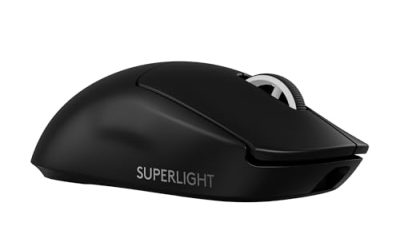
Logitech G Pro X Superlight 2
- Best for: Competitive Tarkov players who want the lightest, most proven wireless mouse available.
- 60g pro-grade wireless gaming mouse
- HERO 2 sensor with 44,000 DPI
- 8kHz report rate
- LIGHTFORCE hybrid optical-mechanical switches
Competitive Tarkov players who want the lightest, most proven wireless mouse available.
There is no dedicated DPI button, so set your sensitivity in software before your first raid.
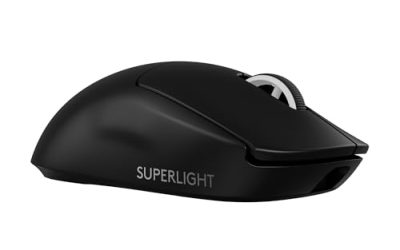
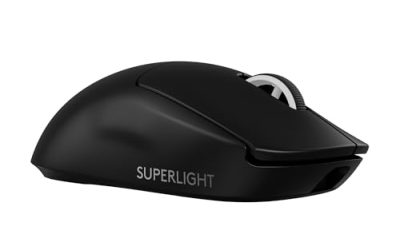
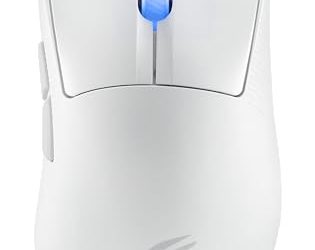
The Superlight 2 is the safe flagship pick for Tarkov because it does the fundamentals better than almost anything else: a proven symmetrical shape, a top-tier HERO 2 sensor, and a weight of just 60 grams that makes long aiming sessions feel effortless. Its low weight and clean tracking suit the slow, deliberate crosshair work Tarkov demands, and the wireless connection holds up in firefights without any perceptible lag. Players who already like the original Superlight will feel at home immediately, and newcomers get a mouse that simply gets out of the way.
Watch out for: There is no dedicated DPI button, so set your sensitivity in software before your first raid.
Razer Viper V3 Pro
The Viper V3 Pro is the lightest mouse in this guide at 54 grams, and that featherweight feel shows up in close-quarters fights on Factory and in dorms, where fast flicks and rapid target switches decide who walks out. Its Focus Pro 35K sensor tracks cleanly at low DPI, and the 8K polling support gives you the smoothest possible motion if your PC can handle the higher report rate. The symmetrical shape works well for claw and fingertip grips, which suit players who lift and reposition the mouse constantly during a raid.
Specs
- 54g lightweight symmetrical design
- Focus Pro 35K optical sensor
- 8K polling rate
- Gen-3 optical switches
- 8 programmable controls
- Up to 95-hour battery life
Best for: Aggressive players who push buildings and need fast flicks in close quarters.
Watch out for: The 8K polling mode adds CPU load, so test it on your own system before relying on it in raids.
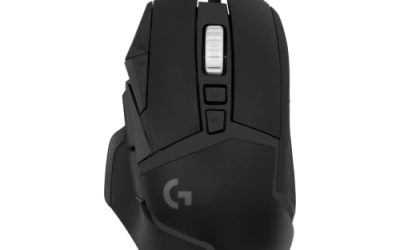
Logitech G502 X Wired
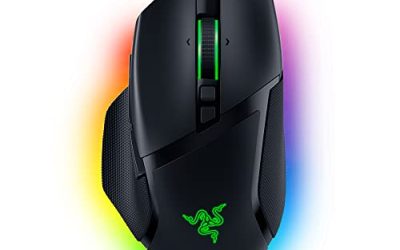
- Best for: Players who bind lean, hold breath, and grenades to the mouse and want zero charging.
- HERO 25K gaming sensor, 25,600 DPI
- LIGHTFORCE hybrid optical-mechanical primary switches
- 13 programmable controls
- Dual-mode scroll wheel with infinite scroll toggle
Players who bind lean, hold breath, and grenades to the mouse and want zero charging.
The heavier shell and extra buttons take a few sessions to learn if you are coming from a simple five-button mouse.
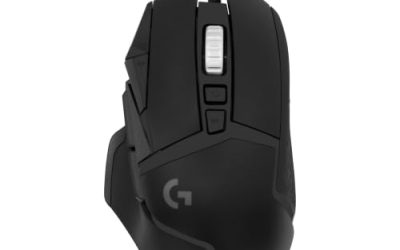
The G502 X Wired is the pick for players who want Tarkov’s controls on the mouse itself. With thirteen programmable controls, you can bind lean, hold breath, fire-mode switching, and grenades without ever moving your left hand off WASD, which matters in a game where a half-second fumble gets you killed. The HERO 25K sensor is accurate at low sensitivity, the LIGHTFORCE switches give a crisp click, and being wired means you never think about battery or wireless interference. It is heavier than the ultralight options, but that weight feels stable when you are holding a long angle.
Watch out for: The heavier shell and extra buttons take a few sessions to learn if you are coming from a simple five-button mouse.
Razer DeathAdder V3 Pro
- Best for: Palm-grip players who run long raids and want comfort without giving up sensor quality.
- 63g ultra-lightweight ergonomic design
- Focus Pro 30K optical sensor
- Gen-3 optical switches
- HyperSpeed wireless
Palm-grip players who run long raids and want comfort without giving up sensor quality.
The ergonomic shape is right-handed only, so left-handed players should look at the symmetrical options instead.
The DeathAdder V3 Pro is the comfort pick for long Tarkov sessions. Its right-handed ergonomic shape fills the palm and supports your hand during slow, patient play, which is exactly how most raids unfold: minutes of careful movement punctuated by seconds of violence. At 63 grams it is still light for an ergonomic mouse, the Focus Pro 30K sensor is accurate at low DPI, and the battery lasts up to ninety hours, so a week of evening raids will not drain it. If your current mouse leaves your hand aching after an hour, this is the shape to try.
Watch out for: The ergonomic shape is right-handed only, so left-handed players should look at the symmetrical options instead.
Logitech G305 Lightspeed
- Best for: New Tarkov players and budget buyers who want reliable wireless without the flagship cost.
- HERO 12K sensor, 12,000 DPI
- LIGHTSPEED wireless with 1 ms report rate
- 6 programmable buttons
- Up to 250-hour battery life on one AA battery
New Tarkov players and budget buyers who want reliable wireless without the flagship cost.
The AA battery adds weight compared with rechargeable flagships, and there is no USB-C charging.
The G305 is the budget entry point that still plays Tarkov properly. Its HERO 12K sensor tracks cleanly at the low sensitivities Tarkov players use, the LIGHTSPEED wireless connection is fast enough that you will not notice it in a firefight, and a single AA battery lasts up to 250 hours, so you can forget about charging for months. Six programmable buttons cover lean and a couple of extra binds, and the small egg-shaped shell suits claw and fingertip grips. It is the sensible first gaming mouse for a new Tarkov player who is not ready to spend flagship money.
Watch out for: The AA battery adds weight compared with rechargeable flagships, and there is no USB-C charging.
Which One Fits Your Situation
You hold angles and play slow, methodical raids
Take the Razer DeathAdder V3 Pro. Its ergonomic shape keeps your hand relaxed during long periods of watching a doorway or a treeline, and the Focus Pro 30K sensor tracks smoothly at the low DPI that slow play demands. The ninety-hour battery means you will not be interrupted by a charging warning in the middle of a raid.
You rush dorms, Factory, and close-quarters fights
Take the Razer Viper V3 Pro or the Logitech G Pro X Superlight 2. Both are ultralight and built for fast flicks and quick target switches, which is what close-quarters Tarkov is made of. Choose the Viper if you prefer a symmetrical shape with more buttons, and the Superlight 2 if you want the most proven shape in competitive FPS.
You want every Tarkov bind on the mouse
Take the Logitech G502 X Wired. Thirteen programmable controls let you put lean, hold breath, fire mode, and grenades under your thumb, and the wired connection means you never worry about battery or wireless dropouts. It is the practical choice for players who treat keybinds as part of their loadout.
You are new to Tarkov or watching your budget
Take the Logitech G305 Lightspeed. It covers the essentials — a clean-tracking sensor, fast wireless, and enough buttons for lean binds — at a fraction of the flagship cost, and its 250-hour battery life means you can focus on learning the maps and surviving your first raids instead of managing gear.
Common Mistakes
- Buying a mouse for its maximum DPI number instead of checking how cleanly its sensor tracks at 400 or 800 DPI.
- Copying a streamer’s sensitivity without matching their DPI, which makes your aim feel completely different.
- Choosing a heavy mouse for Tarkov’s long raids, then fighting hand fatigue halfway through a session.
- Ignoring grip shape and buying a symmetrical mouse when your palm grip needs an ergonomic shell, or the reverse.
- Turning on 8000 Hz polling without checking whether your CPU handles it, which can cause stutters instead of smoother aim.
Frequently Asked Questions
What DPI should I use for Tarkov?
Most experienced players use 400 or 800 DPI with a low in-game sensitivity, because Tarkov rewards precise crosshair placement over fast spins. Start at 800 DPI, set your in-game sensitivity so a full sweep across your pad turns you roughly 180 degrees, and adjust from there. Your exact number matters less than consistency, so pick one setting and stick with it for several raids before changing anything.
Is a wireless mouse good enough for Tarkov?
Yes. Modern wireless gaming mice from Logitech and Razer report at one millisecond, which is effectively the same as wired in a game where fights are decided by positioning and first-shot accuracy. The more practical concerns are battery life and connection stability, so pick a model rated for ninety hours or more and keep the receiver close to the mouse.
Do I need 8000 Hz polling for Tarkov?
No, it is optional. A standard 1000 Hz polling rate is already fast enough for Tarkov, and 8000 Hz mainly smooths motion on high-refresh monitors while adding CPU load. If your PC is mid-range or older, stay at 1000 Hz; if you have a strong CPU and a 240 Hz or faster monitor, try 8000 Hz and keep it only if your frame times stay stable.
How many buttons do I need on a mouse for Tarkov?
Two side buttons are enough for the essentials if you bind lean left and right to them. Players who like more control often add hold breath, fire-mode switching, and grenades, which calls for a mouse with more programmable controls. Count the actions you actually use under pressure before buying, and do not pay for buttons you will never press.
Related guides
More from Amazon
Programs that pair well with the guide above. Offers and eligibility are set by Amazon and may change.
Free shipping on eligible items, Prime Video and more. Eligible new members can start with a free trial.
Start a Prime free trialAd-free music streaming. Eligible new subscribers can start with a free trial.
Try Music Unlimited freeA Prime membership for ages 18-24 with a trial period. Eligibility is set by Amazon.
See Prime for Young AdultsAudiobooks and podcasts to listen to on the go. Eligible new members can start with a free trial.
Try Audible freeAs an Amazon Associate we earn from qualifying purchases.