Our Short List of 3

- Best for: MMO and loadout-heavy players who want many binds in a familiar ergonomic shell.
- HERO 25K sensor, 100 to 25,600 DPI
- 11 programmable buttons
- Dual-mode hyper-fast scroll wheel with tilt
- Five removable 3.6-gram tuning weights

- Best for: players who want the closest DeathAdder feel with a faster scroll wheel and deep lighting control.
- Focus+ 26K DPI optical sensor, up to 26,000 DPI
- 11 programmable buttons
- HyperScroll Tilt Wheel with free-spin and tactile modes
- 2nd-gen Razer Optical Mouse Switches, rated for 70 million clicks

- Best for: all-round players who want DeathAdder comfort in a lighter body for FPS, MOBA, and everyday play.
- TrueMove Air optical sensor, up to 18,000 CPI
- 9 programmable buttons
- PrismSync RGB lighting
- 85 grams
All 5 Picks at a Glance
| Product | Specs | Action |
|---|---|---|
| Logitech G502 HERO |
| Check price on Amazon |
| Razer Basilisk V3 |
| Check price on Amazon |
| SteelSeries Rival 5 |
| Check price on Amazon |
 Logitech G502 X |
| Check price on Amazon |
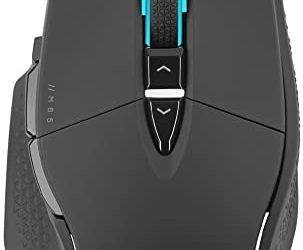
 Corsair Dark Core RGB Pro SE |
| Check price on Amazon |
The Razer DeathAdder earned its following from a simple shape: a tall rear hump that fills the palm, a flared right edge, and a thumb rest that keeps the hand relaxed during long sessions. Shoppers hunting for an alternative usually love that shape but want something else around it — a different brand, a wireless connection, a lighter body, or more buttons under the thumb. The trap is buying a mouse that looks close in photos yet feels wrong in the hand, because a flatter hump, a narrower grip, or a thumb cluster placed a few millimetres off can turn a familiar shape into a daily annoyance.
This guide is for palm-grip FPS players, MMO players who map skills to side buttons, and anyone moving from a wired DeathAdder to wireless without giving up the ergonomic shape. Each mouse below was chosen from the name and specifications on its Amazon product page, so the sensor figures, button counts, and weights match what the listing itself states.
Our Top Picks
- Razer Basilisk V3 Customizable RGB Wired Ergonomic GamingMouse2.96 x 5.12 x 1.67 inches0.2 poundsCheck on Amazon

Top 3 picks at a glance
Quick Picks
As an Amazon Associate we earn from qualifying purchases
| Product | Best for | Key spec from title |
|---|---|---|
| Logitech G502 HERO | Button-heavy MMO and loadout play | HERO 25K sensor, 25,600 DPI, 11 buttons |
| Razer Basilisk V3 | Thumb-rest comfort with a fast scroll wheel | Focus+ 26K sensor, 11 buttons, HyperScroll Tilt Wheel |
| SteelSeries Rival 5 | Lighter all-round play across genres | TrueMove Air sensor, 18,000 CPI, 9 buttons |
| Logitech G502 X | A lighter take on the classic G502 shape | HERO 25K sensor, 25,600 DPI, 13 controls |
| Corsair Dark Core RGB Pro SE | Wireless play with Qi charging | 18,000 DPI sensor, 8 buttons, SLIPSTREAM wireless |
How to Choose
Match the hump and thumb rest to your grip
The DeathAdder shape works because the rear hump supports the palm while the thumb rests on a sculpted shelf instead of gripping the side. Palm-grip players should look for a tall hump and a long body, while claw-grip players often prefer a slightly shorter shell that lets the fingers arch. Measure your hand from wrist to middle fingertip: hands above 19 centimetres usually fill the G502 HERO or Basilisk V3 comfortably, while shorter hands sit better on the Rival 5. A thumb rest that sits too far forward forces the thumb to stretch, so check the side-button layout in the listing photos before ordering.
Decide wired or wireless before comparing sensors
Wireless freedom sounds appealing, but it changes the whole mouse: a battery adds weight, and charging becomes one more habit. Wired mice skip both problems and keep the shell lighter, which is why four of the five picks here use a cable. Sensor numbers matter less than shoppers expect — every sensor in this guide tracks far beyond what a human hand can use in a match, so a 26,000 DPI ceiling is not an advantage over an 18,000 DPI one. Choose the connection first, then let the sensor, the polling rate, and the cable or battery settle the tie.
Count the buttons you will actually press
Extra buttons only help if your thumb can reach them without shifting your grip. MMO and MOBA players who bind abilities, items, and push-to-talk benefit from the 11 or 13 controls on the G502 models and the Basilisk V3, including the DPI-shift button and the tilt wheel. FPS players who use two or three binds often do better with fewer buttons, since a crowded thumb cluster invites misclicks in tense moments. Look at how many side buttons each mouse carries and where they sit, then picture your own thumb resting on them during a long session.
Check weight and cable before you commit
Weight changes how a mouse feels more than any sensor figure does. The Rival 5 at 85 grams flicks across the pad with little effort, while the Dark Core RGB Pro SE at 142 grams feels planted and steady for tracking. Heavier mice can tire the wrist in long sessions, while very light mice can feel twitchy to players used to a solid shell. The cable matters too: a stiff cable drags and fights small adjustments, while a flexible braided cable or a wireless connection removes that resistance. Check the listed weight and the cable type on the product page before choosing.
The 5 Best Options
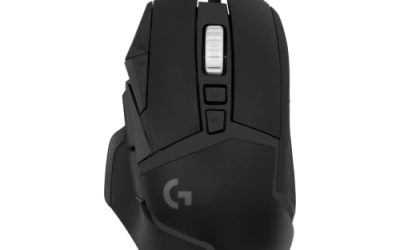
Logitech G502 HERO
- Best for: MMO and loadout-heavy players who want many binds in a familiar ergonomic shell.
- HERO 25K sensor, 100 to 25,600 DPI
- 11 programmable buttons
- Dual-mode hyper-fast scroll wheel with tilt
- Five removable 3.6-gram tuning weights
MMO and loadout-heavy players who want many binds in a familiar ergonomic shell.
the wide body and 121-gram weight feel bulky to small hands and fingertip-grip players, so check the listed dimensions first.
The G502 HERO is the safe landing spot for DeathAdder owners who want more buttons without relearning a shape. Its right-handed ergonomic shell carries a familiar tall hump and a wide thumb rest, and the 11 programmable buttons cover abilities, weapon swaps, and push-to-talk without touching the keyboard. Five removable weights let the balance shift toward the palm or the fingers, and the dual-mode scroll wheel flips between notched steps and free spin. At 121 grams it is a steady, planted mouse that suits players who anchor their wrist and aim with the arm.
Watch out for: the wide body and 121-gram weight feel bulky to small hands and fingertip-grip players, so check the listed dimensions first.
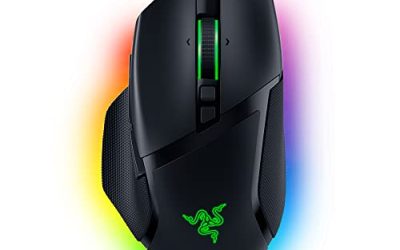
Razer Basilisk V3
- Best for: players who want the closest DeathAdder feel with a faster scroll wheel and deep lighting control.
- Focus+ 26K DPI optical sensor, up to 26,000 DPI
- 11 programmable buttons
- HyperScroll Tilt Wheel with free-spin and tactile modes
- 2nd-gen Razer Optical Mouse Switches, rated for 70 million clicks
players who want the closest DeathAdder feel with a faster scroll wheel and deep lighting control.
at 101 grams it is heavier than modern ultralight mice, so fast flick players should weigh that against the comfort.
The Basilisk V3 is the closest shape match in this guide, with the same right-handed ergonomic body, thumb rest, and tall palm hump that DeathAdder owners already know. Its HyperScroll Tilt Wheel switches between tactile steps and free spin, and it tilts left and right for two more inputs. The Focus+ 26K sensor tracks cleanly at high speeds, and the Gen-2 optical switches are rated for 70 million clicks. Eleven Chroma RGB zones light the base, logo, and wheel, and five on-board profiles keep settings saved on the mouse itself.
Watch out for: at 101 grams it is heavier than modern ultralight mice, so fast flick players should weigh that against the comfort.
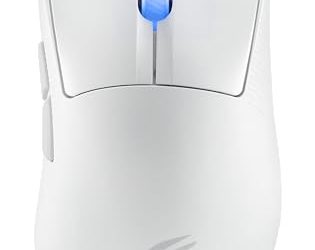
SteelSeries Rival 5
- Best for: all-round players who want DeathAdder comfort in a lighter body for FPS, MOBA, and everyday play.
- TrueMove Air optical sensor, up to 18,000 CPI
- 9 programmable buttons
- PrismSync RGB lighting
- 85 grams
all-round players who want DeathAdder comfort in a lighter body for FPS, MOBA, and everyday play.
nine buttons is fewer than the G502 models offer, so heavy MMO binders may run out of thumb inputs.
The Rival 5 is the lightest wired pick here and the best choice for players who like the DeathAdder shape but want less weight under the hand. Its ergonomic right-handed shell keeps the familiar hump while trimming the body to 85 grams, so long sessions feel less tiring on the wrist. Nine programmable buttons cover the binds most players actually use, and the TrueMove Air sensor tracks at 18,000 CPI with 1-to-1 movement. PrismSync RGB lighting runs through the logo and scroll wheel, and the whole mouse is built around one idea: a comfortable shape that stays out of the way.
Watch out for: nine buttons is fewer than the G502 models offer, so heavy MMO binders may run out of thumb inputs.
Logitech G502 X
- Best for: G502 fans who want the same shape and button layout in a lighter body with newer switches.
- HERO 25K sensor, 100 to 25,600 DPI
- 13 programmable controls
- LIGHTFORCE hybrid optical-mechanical primary switches
- 89 grams (3.14 ounces)
G502 fans who want the same shape and button layout in a lighter body with newer switches.
the white finish shows dirt and wear faster than the black version, and the light weight feels less planted to players used to a heavy mouse.
The G502 X keeps the classic G502 silhouette that DeathAdder owners recognise, then strips 32 grams from the original HERO to land at 89 grams. LIGHTFORCE hybrid optical-mechanical switches combine the crisp feel of a mechanical click with the speed of an optical sensor, and the HERO 25K sensor covers 100 to 25,600 DPI. Thirteen programmable controls include a redesigned DPI-shift button that can be removed or reversed for different thumb lengths, and PTFE feet glide smoothly on cloth pads. Five on-board profiles store settings directly on the mouse.
Watch out for: the white finish shows dirt and wear faster than the black version, and the light weight feels less planted to players used to a heavy mouse.
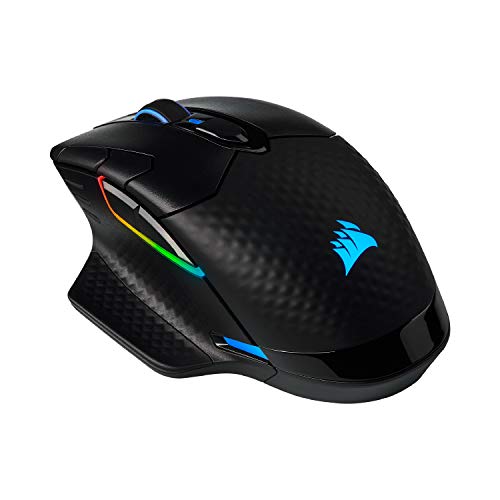
Corsair Dark Core RGB Pro SE
- Best for: players switching to wireless who still want a contoured ergonomic shell with a thumb rest.
- Custom PixArt PAW3392 optical sensor, up to 18,000 DPI
- 8 programmable buttons
- Sub-1ms SLIPSTREAM wireless, plus Bluetooth and wired USB
- Qi wireless charging
players switching to wireless who still want a contoured ergonomic shell with a thumb rest.
at 142 grams it is the heaviest mouse here, and Qi charging needs a separate compatible pad that is not in the box.
The Dark Core RGB Pro SE is the wireless pick for DeathAdder owners who are ready to cut the cable. Its contoured right-handed shell includes two interchangeable side grips, so the thumb rest can be shaped to the hand, and the custom PixArt PAW3392 sensor tracks at 18,000 DPI with sub-1ms SLIPSTREAM wireless. Qi wireless charging means the mouse can top up on a compatible charging pad between sessions, and a USB-C cable covers wired play and charging. Eight programmable buttons and four-zone RGB lighting round out a mouse built for players who want the ergonomic shape without a cable in the way.
Watch out for: at 142 grams it is the heaviest mouse here, and Qi charging needs a separate compatible pad that is not in the box.
Which One Fits Your Situation
You play FPS games with a palm grip
Pick the Razer Basilisk V3 or the SteelSeries Rival 5. The Basilisk V3 matches the DeathAdder shape most closely, with a tall hump and a thumb rest that supports the hand through long matches. The Rival 5 trades some of that bulk for an 85-gram body that flicks faster between targets. Both track cleanly at high speeds, so the choice comes down to whether you want maximum comfort or maximum lightness.
You play MMOs or games with many keybinds
Pick the Logitech G502 HERO or the Logitech G502 X. The HERO gives 11 programmable buttons plus a tunable weight system for players who like a heavy, planted mouse. The G502 X keeps the same button layout with 13 controls in an 89-gram body for players who want the binds without the bulk. Both store profiles on board, so settings travel with the mouse.
You want to cut the cable without losing the shape
Pick the Corsair Dark Core RGB Pro SE. It is the only wireless mouse in this guide, and its contoured shell with interchangeable side grips keeps the ergonomic feel that DeathAdder owners expect. SLIPSTREAM wireless keeps input lag below a millisecond, and Qi charging tops the battery up on a compatible pad. Accept the 142-gram weight as the trade for wireless freedom and a long battery.
You want the closest feel on a smaller budget
Pick the Logitech G502 HERO. It has been on the market for years, its ergonomic shape is proven, and its 11 buttons and adjustable weights cover almost every grip and genre. The wired connection keeps things simple, and the HERO 25K sensor tracks as cleanly as sensors on mice that cost far more. It is the lowest-risk switch for a DeathAdder owner.
Common Mistakes
- Judging a mouse by its DPI ceiling alone, when every sensor here already tracks beyond what a hand can use in a match.
- Assuming any ergonomic mouse fits any hand, without checking the listed length, width, and weight against your own hand.
- Buying for button count and then never binding the extra keys, while the crowded thumb cluster causes misclicks.
- Picking a wireless mouse without checking how it charges or how long the battery lasts between sessions.
- Ignoring the software each brand requires, since button mapping, lighting, and profiles all live in G HUB, Synapse, SteelSeries GG, or iCUE.
Frequently Asked Questions
Is the Basilisk V3 the closest DeathAdder alternative?
Yes. It shares the right-handed ergonomic shape, the tall palm hump, and the thumb rest that define the DeathAdder feel, and it adds a HyperScroll Tilt Wheel plus 11 programmable buttons. At 101 grams it is close in weight too. Players who want the most familiar switch should try it first, and check the listed dimensions against their hand before ordering.
Are these mice good for small hands?
The DeathAdder shape is medium to large, so small hands may find the G502 HERO and Basilisk V3 wide. The SteelSeries Rival 5 is the friendliest pick here at 85 grams with a narrower body, and the G502 X also suits shorter hands better than the HERO. Measure your hand and compare it with the dimensions on the Amazon listing before choosing.
Do I need a wireless mouse to replace a DeathAdder?
No. Four of the five picks here are wired, and a cable removes battery anxiety and keeps the shell lighter. Wireless only makes sense if the cable genuinely bothers you during play. The Dark Core RGB Pro SE is the wireless option in this guide, with SLIPSTREAM wireless and Qi charging for players who want to cut the cord.
Will my grip style work with these mice?
Palm and claw grips suit this shape best, since the tall rear hump supports the palm and the thumb rest anchors the hand. Fingertip-grip players often find the hump gets in the way, because their palm floats above the shell instead of resting on it. If you grip with fingertips, look for a shorter, flatter mouse rather than any of these five.
Related guides
More from Amazon
Programs that pair well with the guide above. Offers and eligibility are set by Amazon and may change.
Free shipping on eligible items, Prime Video and more. Eligible new members can start with a free trial.
Start a Prime free trialAd-free music streaming. Eligible new subscribers can start with a free trial.
Try Music Unlimited freeA Prime membership for ages 18-24 with a trial period. Eligibility is set by Amazon.
See Prime for Young AdultsAudiobooks and podcasts to listen to on the go. Eligible new members can start with a free trial.
Try Audible freeAs an Amazon Associate we earn from qualifying purchases.