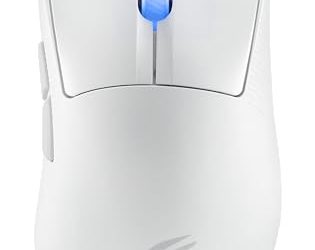
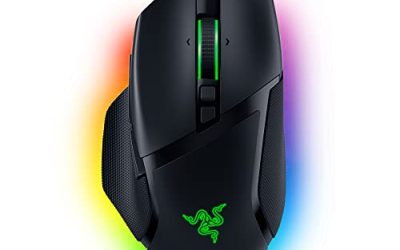
Our Short List of 3

- Best for: wired FPS players who want adjustable weight and a sniper button.
- Sensor: Corsair Marksman 26,000 DPI optical
- Tracking: 650 IPS, 50G acceleration
- Polling: up to 8,000Hz via AXON hyper-processing
- Switches: optical, with QUICKSTRIKE buttons

- Best for: MOBA and ARPG players who want several thumb inputs without a full keypad.
- Sensor: Corsair Marksman 26,000 DPI optical
- Buttons: 15 programmable, with six-button thumb cluster
- Connectivity: Slipstream 2.4GHz, Bluetooth, USB wired
- Battery: up to 80 hours (per listing)

- Best for: claw and fingertip FPS players who want the lightest Corsair shell.
- Sensor: Corsair Marksman 26,000 DPI optical
- Tracking: 650 IPS, 50G acceleration
- Weight: 60g
- Switches: optical, rated for 100 million clicks
All 3 Picks at a Glance
| Product | Specs | Action |
|---|---|---|
| Corsair M65 RGB Ultra |
| Check price on Amazon |
| Corsair Darkstar Wireless |
| Check price on Amazon |
| Corsair M75 Air Wireless |
| Check price on Amazon |
Choosing a Corsair mouse is less about the brand badge and more about matching the shell and button layout to the games you actually play. Corsair sells everything from a 60-gram wireless FPS shell to a 16-button MMO board with a sliding thumb panel, and picking the wrong shape means fighting your own hardware in every match. The real decision is grip, weight and how many inputs your thumb needs to reach without looking down.
This roundup serves three kinds of buyers: competitive FPS players who want low weight and fast polling, MMO and MOBA players who need programmable buttons within thumb reach, and all-rounders who want one mouse for work and ranked queues alike. Every pick below is a current Corsair gaming mouse sold on Amazon, chosen from the sensor, weight, connectivity and button specs printed on its product page.
Our Top Picks
- Corsair M65 RGB Ultra Wired Adjustable Weight FPS1.2" x 1.5" x 4.6"4.6 x 1.5 x 0.1 inches0.2 poundsCheck on Amazon
Top 3 picks at a glance
Quick Picks
As an Amazon Associate we earn from qualifying purchases.
| Product | Best for | Key spec from title |
|---|---|---|
| Corsair M65 RGB Ultra | Wired FPS players who tune their mouse weight | 26,000 DPI Marksman sensor |
| Corsair Scimitar Elite Wireless | MMO players who want a full thumb keypad | 16 programmable buttons |
| Corsair Darkstar Wireless | MOBA players who prefer a compact side cluster | 15 programmable buttons |
| Corsair M75 Air Wireless | Claw and fingertip players chasing low weight | 60g ultra-lightweight shell |
How to Choose
Shape, grip and hand fit
Corsair splits its lineup by silhouette, and the shell decides comfort long before the sensor matters. The M65 RGB Ultra and Scimitar Elite Wireless use sculpted right-handed bodies that fill the palm, while the M75 Air Wireless is a flat symmetrical shell built for claw and fingertip movement. Measure your hand from wrist crease to middle fingertip, then match it honestly: a large palm-grip mouse in a small hand forces wrist aiming, and a tiny shell under a big palm cramps the ring finger during long sessions.
Weight and what it does to your aim
Weight changes how a mouse starts and stops. The M75 Air Wireless weighs 60g, so flicks and micro-corrections take little effort, but some players find ultra-light shells twitchy on low sensitivities. At the other end, the Scimitar Elite Wireless is 114g, which steadies slow tracking and suits deliberate MMO play. The M65 RGB Ultra splits the difference with a tunable weight system that adjusts between 97g and 115g, letting you add mass until the glide feels controlled instead of guessing from a spec sheet.
Buttons: count what your games actually use
Extra buttons only help when your thumb can find them blind. MMO rotations justify the Scimitar Elite Wireless and its 12-button side panel, which slides forward or back to sit under your thumb. MOBA and ARPG players usually need fewer, faster inputs, which is where the Darkstar Wireless and its six-button cluster beside the thumb make more sense. Shooter players should count honestly too: two well-placed side buttons for melee and push-to-talk beat a keypad you will never bind, and every unused button is extra weight carried for nothing.
Wired, Slipstream wireless or Bluetooth
Connection choice is about latency, battery and desk clutter. The wired M65 RGB Ultra never needs charging and polls up to 8,000Hz through Corsair’s AXON hyper-processing, which suits a fixed battlestation. Slipstream 2.4GHz on the wireless picks here keeps response under a millisecond while freeing the cable, in exchange for charging every week or two depending on polling rate. Bluetooth stretches battery life dramatically on the Scimitar Elite Wireless and Darkstar Wireless, but it polls slower, so treat it as the travel and laptop mode rather than your ranked mode.
The 4 Best Options
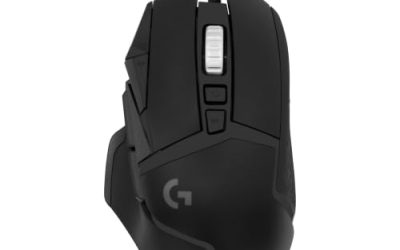
Corsair M65 RGB Ultra
- Best for: wired FPS players who want adjustable weight and a sniper button.
- Sensor: Corsair Marksman 26,000 DPI optical
- Tracking: 650 IPS, 50G acceleration
- Polling: up to 8,000Hz via AXON hyper-processing
- Switches: optical, with QUICKSTRIKE buttons
wired FPS players who want adjustable weight and a sniper button.
the shape is firmly right-handed and fairly narrow, so large palms may feel cramped.
The M65 RGB Ultra is the pick for FPS players who still want a cable and a say in how their mouse feels. Its anodized aluminum frame keeps the familiar M65 shape rigid, while the tunable weight system lets you shift the balance between 97g and 115g until flicks stop where you intend. Optical switches register clicks without the debounce delay of mechanical contacts, and AXON hyper-processing pushes polling up to 8,000Hz. A dedicated sniper button drops DPI while held, which helps on scoped weapons. It is a wired-only mouse, so your desk layout has to tolerate the cord.
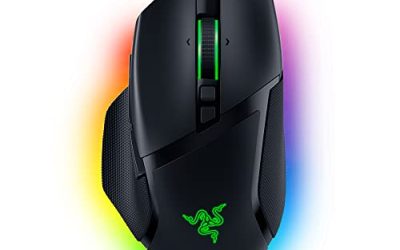
Corsair Scimitar Elite Wireless
If your hotbar has more abilities than your keyboard row can hold, the Scimitar Elite Wireless is built around that problem. Twelve side buttons sit on Corsair’s Key Slider panel, which physically moves so the pad lands under your thumb instead of forcing your thumb to hunt for it. Sixteen programmable buttons in total, onboard profile storage and Slipstream wireless at 2,000Hz polling mean the macros travel with the mouse between PCs. Battery life stretches to 150 hours over Bluetooth, and the Marksman sensor tracks at 26,000 DPI for the moments between raid pulls when you still need precise cursor work.
Specs
- Sensor: Corsair Marksman 26,000 DPI optical
- Buttons: 16 programmable, including 12-button Key Slider side panel
- Connectivity: Slipstream 2.4GHz, Bluetooth, USB wired
- Polling: up to 2,000Hz over Slipstream
- Battery: up to 150 hours (Bluetooth, per listing)
- Weight: 114g
- Profiles: onboard storage
- Model: CH-9314311
Best for: MMO players who bind a full rotation to their thumb.
Watch out for: at 114g it is the heaviest mouse here, so low-sensitivity FPS players will feel it on big swipes.
ASIN: B0CCB195GM
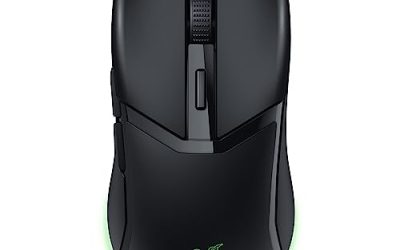
Corsair Darkstar Wireless
- Best for: MOBA and ARPG players who want several thumb inputs without a full keypad.
- Sensor: Corsair Marksman 26,000 DPI optical
- Buttons: 15 programmable, with six-button thumb cluster
- Connectivity: Slipstream 2.4GHz, Bluetooth, USB wired
- Battery: up to 80 hours (per listing)
MOBA and ARPG players who want several thumb inputs without a full keypad.
the side cluster sits close to the grip area, so check the button placement against your thumb length before committing.
The Darkstar Wireless takes the MMO idea and trims it for faster games. Fifteen programmable buttons include a six-button cluster positioned beside the thumb rather than a full numeric pad, so MOBA players get item actives and pings without memorizing a grid. The Marksman 26K sensor, Slipstream wireless and Bluetooth give it the same core tracking as Corsair’s flagships, and the listing rates battery life at up to 80 hours. Seven RGB zones and iCUE support round it out for players who want their lighting to match the rest of a Corsair setup.
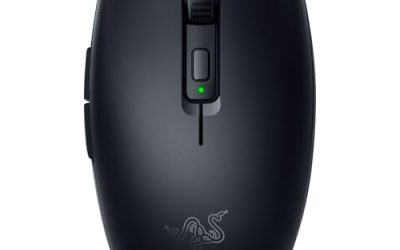
Corsair M75 Air Wireless
- Best for: claw and fingertip FPS players who want the lightest Corsair shell.
- Sensor: Corsair Marksman 26,000 DPI optical
- Tracking: 650 IPS, 50G acceleration
- Weight: 60g
- Switches: optical, rated for 100 million clicks
claw and fingertip FPS players who want the lightest Corsair shell.
there are only two side buttons and no lighting, so players who need macros or RGB should look at the other picks.
The M75 Air Wireless strips the gaming mouse back to speed. At 60g with a symmetrical shell and no RGB draining the battery, it is shaped for claw and fingertip players who move the mouse with their fingers rather than their whole arm. The Marksman sensor tracks at 650 IPS with 50G acceleration, optical switches are rated for 100 million clicks, and Slipstream wireless keeps the connection competitive-grade while Bluetooth covers laptop duty. Corsair rates battery life at up to 100 hours, which suits players who hate a charging routine interrupting a session.
Which One Fits Your Situation
You play ranked FPS most nights
Start with the M75 Air Wireless if you use a claw or fingertip grip and a low sensitivity, since its 60g shell and symmetrical shape reward fast, small movements. If you prefer a palm grip and a cable you never have to charge, the M65 RGB Ultra gives you tunable weight and 8,000Hz polling instead. Both track identically on paper; the shell decides.
Your MMO rotation runs on macros
The Scimitar Elite Wireless is the straightforward answer: twelve sliding side buttons, three onboard profiles and wireless freedom for long raid nights. If your game needs only a handful of extra binds, the Darkstar Wireless covers that with its six-button cluster and a lighter commitment, and it doubles more comfortably as an everyday mouse outside the game.
One desk for work and gaming
Pick a wireless model with Bluetooth so it can pair to a work laptop without moving a dongle. The Darkstar Wireless balances gaming buttons with an office-friendly shape, while the Scimitar Elite Wireless stores profiles onboard for switching between spreadsheets and hotbars. The wired M65 RGB Ultra makes sense only if the same PC handles both jobs every day.
Small hands or a fingertip grip
The M75 Air Wireless is the safest fit here: its flat, compact shell does not force your fingers to stretch around a palm hump, and the low weight reduces strain during long sessions. Avoid the Scimitar Elite Wireless unless you specifically need its keypad, because its tall sculpted body is designed around larger right hands and full palm contact.
Common Mistakes
- Buying a button-heavy MMO mouse for shooters, then carrying extra weight and accidental side presses in every gunfight.
- Chasing the highest DPI number instead of setting a sensitivity you can control; most players compete well below 3,200 DPI.
- Ignoring hand size and grip style, which matter more to comfort over a three-hour session than any sensor specification.
- Running a wireless mouse at its maximum polling rate all week, then blaming the mouse when the battery dies mid-match.
- Skipping iCUE setup entirely and leaving DPI stages, lift-off distance and button binds at defaults that do not match your games.
Frequently Asked Questions
Is a wired Corsair mouse still worth buying over wireless?
Yes, for a fixed desk. A wired model like the M65 RGB Ultra never needs charging, avoids battery weight and can poll at 8,000Hz, which some competitive players prefer. Slipstream wireless on the other picks here is fast enough that most players will not feel a difference, so the choice comes down to charging habits and cable tolerance.
How many buttons do I actually need for MMO games?
A full 12-button side panel, like the Scimitar Elite Wireless carries, suits players who bind a complete rotation plus consumables to the thumb. Many MMO players manage comfortably with six extra buttons, which is what the Darkstar Wireless offers. Count the binds you use in your current setup before paying for buttons that will stay unassigned.
Does a 26,000 DPI sensor make these mice more accurate?
Not by itself. DPI is a sensitivity ceiling, not an accuracy grade; accuracy in play comes from the sensor tracking cleanly at the DPI you actually use, plus your own control. All four mice here share the Marksman 26,000 DPI sensor with 650 IPS tracking, so shape, weight and buttons are the more useful ways to choose between them.
Do these Corsair mice work without iCUE installed?
They all work as standard mice out of the box, and the Scimitar Elite Wireless stores profiles onboard so binds and settings travel with it. You do need iCUE to remap buttons, build macros, adjust DPI stages and sync RGB lighting, so plan on installing it at least once to set each mouse up properly.
Related guides
More from Amazon
Programs that pair well with the guide above. Offers and eligibility are set by Amazon and may change.
Free shipping on eligible items, Prime Video and more. Eligible new members can start with a free trial.
Start a Prime free trialAd-free music streaming. Eligible new subscribers can start with a free trial.
Try Music Unlimited freeA Prime membership for ages 18-24 with a trial period. Eligibility is set by Amazon.
See Prime for Young AdultsAudiobooks and podcasts to listen to on the go. Eligible new members can start with a free trial.
Try Audible freeAs an Amazon Associate we earn from qualifying purchases.