Our Short List of 3

- Best for: Competitive FPS players who want a light, symmetrical flagship with no distractions.
- HERO 2 sensor, up to 44,000 DPI
- 8,000 Hz report rate over LIGHTSPEED wireless
- 60 g pro-grade lightweight design
- 5 programmable buttons

- Best for: Palm-grip players who want ergonomic support without giving up flagship tracking.
- Focus Pro 30K optical sensor, up to 30,000 DPI
- 63 g ultra-lightweight ergonomic design
- HyperSpeed wireless connection
- Gen-3 optical switches

- Best for: Players who want many buttons, a scroll toggle, and strong tracking in one mouse.
- HERO 25K sensor, up to 25,600 DPI
- LIGHTSPEED wireless with LIGHTFORCE switches
- 13 buttons with infinite scroll toggle
- LIGHTSYNC RGB lighting
All 4 Picks at a Glance
| Product | Specs | Action |
|---|---|---|
| Logitech G Pro X Superlight 2 |
| Check price on Amazon |
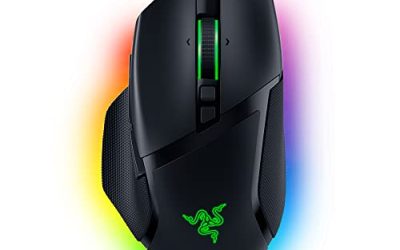
| Razer DeathAdder V3 Pro |
| Check price on Amazon |
| Logitech G502 X Plus |
| Check price on Amazon |
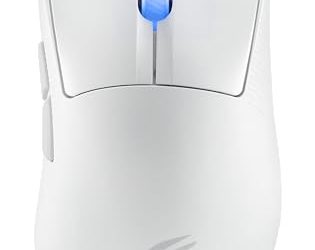
 Glorious Model O 2 Wireless |
| Check price on Amazon |
A mouse that loses track of a fast flick costs you the fight before your aim even matters. The real decision here is not which mouse has the biggest DPI number on the box, because every sensor in this guide tracks far faster than a human hand can move. The decision is which combination of sensor, polling rate, weight, and shape keeps the cursor exactly where your hand puts it, swipe after swipe, on your pad, at the sensitivity you actually play at.
This guide is for competitive FPS players who flick between targets, MOBA and strategy players who track small units across the screen, and anyone whose current mouse stutters or spins out on fast swipes. Each mouse below was chosen from the name and specifications on its Amazon product page, with the sensor, polling rate, weight, and connection taken from the listing itself, so you can match the hardware to your hand instead of guessing.
Our Top Picks
- Logitech G Pro X Superlight 2 Lightspeed WirelessClassic1.57 x 2.5 x 4.92 inches0.1 poundsCheck on Amazon
- Razer DeathAdder V3 Pro Wireless Gaming Mouse1000 Hz5.01 x 2.65 x 1.69 inches0.1 poundsCheck on Amazon
- Logitech G502 X Plus Wireless RGB Gaming MouseWireless7.1 x 4.6 x 2.7 inches0.84 poundsCheck on Amazon
Top 3 picks at a glance
Quick Picks
As an Amazon Associate we earn from qualifying purchases
| Product | Best for | Key spec from title |
|---|---|---|
| Logitech G Pro X Superlight 2 | Tournament FPS players who want the lightest flagship | HERO 2 sensor, up to 44,000 DPI, 8,000 Hz report rate |
| Razer Viper V3 Pro | Symmetrical-shape players chasing the fastest polling | Focus Pro 35K sensor, 8,000 Hz polling, 54 g |
| Razer DeathAdder V3 Pro | Palm-grip players who want an ergonomic tracker | Focus Pro 30K sensor, 63 g ergonomic shape |
| Logitech G502 X Plus | Players who want many buttons without giving up tracking | HERO 25K sensor, 13 buttons, infinite scroll toggle |
| Glorious Model O 2 Wireless | Ambidextrous players who want strong tracking at a mid-range outlay | BAMF 2.0 sensor, up to 26,000 DPI, 68 g |
How to Choose
Sensor generation matters more than the DPI number
Every flagship sensor in this guide tracks at speeds no human hand reaches, so the DPI ceiling on the box tells you almost nothing about real accuracy. What separates a good tracker from a great one is consistency: clean tracking at the low sensitivity competitive players actually use, no angle snapping or smoothing added without your consent, and a sensor that holds its line when you lift and reposition. Look for the sensor name on the listing — HERO 2, Focus Pro 35K, Focus Pro 30K, BAMF 2.0 — and check whether the maker states the tracking speed and acceleration figures. A current-generation sensor on a budget shell usually beats an older flagship sensor on paper.
Polling rate and the wireless link
Polling rate is how often the mouse reports its position to your computer each second, and it is the second number that shapes tracking feel after the sensor itself. A 1,000 Hz mouse reports a thousand times a second; an 8,000 Hz mouse reports eight thousand times, which smooths cursor movement and cuts the delay between hand and screen. The trade is battery life, since the higher rate drains the cell faster on wireless models, and older systems can struggle with the extra USB traffic. If you play wired or keep the charging cable nearby, the higher rate costs you nothing. If you play wireless for long sessions, check whether the mouse lets you drop to 1,000 Hz in software.
Weight and shape decide how the sensor behaves in your hand
A sensor can only report what your hand does, and a heavy or awkward shell makes your hand do the wrong thing. Lighter mice need less force to get moving and stop, which keeps small corrections precise and reduces fatigue across a long session, while a shape that fits your grip keeps the sensor lens flat on the pad instead of tilting on fast swipes. Symmetrical shells suit claw and fingertip grips and both hands, while ergonomic right-handed shells support the palm and thumb. Measure your hand length against the dimensions on the listing, and treat weight as a tracking feature, not a comfort footnote.
Feet, surface, and lift-off distance
Tracking lives or dies at the contact point between mouse and pad, and this is where cheap setups quietly fail. Smooth PTFE feet glide evenly so the sensor reads a steady stream of surface detail, while worn or sticky feet make the cursor stutter on slow, careful movements. Cloth pads give control and suit low-sensitivity players, while hard pads give speed and suit fast swipers, and the same sensor can feel different on each. Lift-off distance matters too: a low setting stops the cursor the moment you lift to reposition, which prevents drift during the reset. Check the listing for the feet material and whether the software lets you tune lift-off distance.
The 5 Best Options
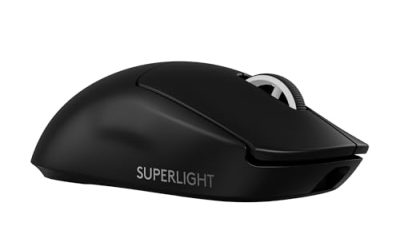
Logitech G Pro X Superlight 2
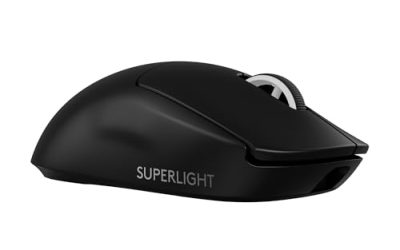
- Best for: Competitive FPS players who want a light, symmetrical flagship with no distractions.
- HERO 2 sensor, up to 44,000 DPI
- 8,000 Hz report rate over LIGHTSPEED wireless
- 60 g pro-grade lightweight design
- 5 programmable buttons
Competitive FPS players who want a light, symmetrical flagship with no distractions.
There is no Bluetooth and no DPI button on the shell, so check the listing and confirm the connection and controls fit your setup before ordering.
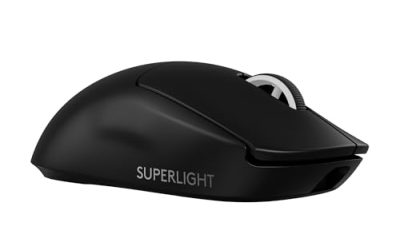
The Superlight 2 is the reference point other tracking mice get measured against, and it earns that spot by removing everything that gets between your hand and the sensor. At 60 g with a symmetrical shell, it gets moving and stops with almost no effort, so micro-corrections stay small and flicks land where you aimed them. The HERO 2 sensor pairs with an 8,000 Hz report rate over LIGHTSPEED wireless, and the five-button layout keeps accidental clicks out of the picture. This is the mouse for players who want the tracking conversation to end and the practice to begin.
Razer Viper V3 Pro
The Viper V3 Pro is the lightest mouse in this guide, and its tracking case rests on pairing a top-tier sensor with the fastest polling rate available. The Focus Pro 35K sensor reads up to 35,000 DPI, and the included HyperPolling dongle pushes wireless polling to 8,000 Hz, so cursor updates arrive in a near-continuous stream. The symmetrical 54 g shell suits claw and fingertip grips, and the Gen-3 optical switches remove the debounce delay that mechanical switches add. It is a single-minded mouse: everything on it serves speed and tracking, and nothing else competes for your attention.
Specs
- Focus Pro 35K optical sensor, up to 35,000 DPI
- 8,000 Hz polling with included HyperPolling wireless dongle
- 54 g ultra-lightweight symmetrical design
- Gen-3 optical switches
- 8 programmable buttons
- Up to 95 hours of battery life
Best for: Claw and fingertip players who want the fastest polling and the lightest shell in this guide.
Watch out for: Battery life drops sharply at 8,000 Hz polling, and the shape is right-handed only, so confirm both points against your play habits before ordering.
ASIN: B0CW25XR5R
Razer DeathAdder V3 Pro
- Best for: Palm-grip players who want ergonomic support without giving up flagship tracking.
- Focus Pro 30K optical sensor, up to 30,000 DPI
- 63 g ultra-lightweight ergonomic design
- HyperSpeed wireless connection
- Gen-3 optical switches
Palm-grip players who want ergonomic support without giving up flagship tracking.
The ergonomic shell is right-handed only, and there is no Bluetooth, so left-handed players and multi-device users should look at the symmetrical picks in this guide instead.
The DeathAdder V3 Pro is the ergonomic answer to the tracking question, built for players whose palm grip needs support through long sessions. Its Focus Pro 30K sensor tracks cleanly at up to 30,000 DPI, and the refined right-handed shell keeps your palm settled so the sensor lens stays flat during wide swipes. At 63 g it is light for an ergonomic mouse, and HyperSpeed wireless keeps the link stable while the 90-hour battery covers a full week of evening play. If your current mouse leaves your hand tired before your aim gives out, this is the shape to look at first.
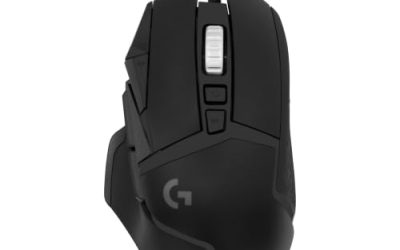
Logitech G502 X Plus
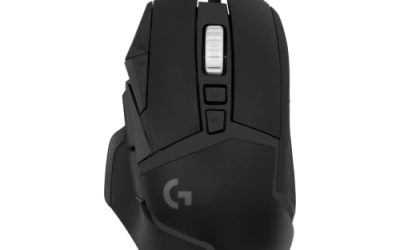
- Best for: Players who want many buttons, a scroll toggle, and strong tracking in one mouse.
- HERO 25K sensor, up to 25,600 DPI
- LIGHTSPEED wireless with LIGHTFORCE switches
- 13 buttons with infinite scroll toggle
- LIGHTSYNC RGB lighting
Players who want many buttons, a scroll toggle, and strong tracking in one mouse.
It is the heaviest pick here, so players with small hands or wrist strain should compare its size and weight against the lighter mice in this guide first.
The G502 X Plus proves that a feature-packed mouse can still track with the best of them, because its HERO 25K sensor sits in a shell built around control rather than minimalism. Thirteen buttons, an infinite scroll toggle, and LIGHTSYNC RGB give you room for bindings, macros, and weapon switching, while LIGHTSPEED wireless and the LIGHTFORCE switches keep input consistent. It is the heaviest mouse in this guide, and that weight is the trade: it steadies slow, deliberate aim but asks more of your wrist on fast flicks. Players who want one mouse for gaming and everything else will get the most from it.
Glorious Model O 2 Wireless
- Best for: Ambidextrous players who want modern sensor tracking and dual wireless at a mid-range outlay.
- BAMF 2.0 sensor, up to 26,000 DPI, 650 IPS tracking, 50G acceleration
- Hybrid 2.4 GHz and Bluetooth wireless
- 68 g superlight ambidextrous design
- 6 buttons with PTFE feet
Ambidextrous players who want modern sensor tracking and dual wireless at a mid-range outlay.
The honeycomb shell lets dust in more easily than a solid shell, so check the listing and keep the sensor lens clean if your desk runs dusty.
The Model O 2 Wireless is the value pick that refuses to feel like one, pairing a modern BAMF 2.0 sensor with a light ambidextrous shell. The sensor tracks up to 26,000 DPI at 650 IPS with 50G acceleration, which covers any flick a human hand produces, and the hybrid 2.4 GHz and Bluetooth connection lets the mouse move between a gaming PC and a laptop without re-pairing. At 68 g with PTFE feet, it glides easily across cloth pads, and the six-button layout keeps the essentials within reach. It is the sensible choice when flagship pricing is hard to justify for the way you play.
Which One Fits Your Situation
You play competitive FPS and flick constantly
Pick the Razer Viper V3 Pro or the Logitech G Pro X Superlight 2. Both pair a current flagship sensor with 8,000 Hz polling, and both weigh under 60 g, so flicks launch fast and stop clean. Choose the Viper V3 Pro if you grip claw or fingertip and want the lightest shell, or the Superlight 2 if you prefer a proven symmetrical shape with a longer track record at the top level.
You palm grip for long sessions
Pick the Razer DeathAdder V3 Pro. Its ergonomic right-handed shell supports your palm and thumb, which keeps the sensor flat and your hand relaxed across hours of play. If you also want extra buttons for bindings, the Logitech G502 X Plus is the alternate, though its added weight asks more of your wrist on fast movements.
You switch between claw and fingertip grips
Pick the Glorious Model O 2 Wireless or the Razer Viper V3 Pro. Both use symmetrical ambidextrous shells that work with either grip, and both track cleanly at high speed. The Model O 2 Wireless adds Bluetooth for a second device, while the Viper V3 Pro adds the faster sensor and the higher polling ceiling.
You want strong tracking without the flagship outlay
Pick the Glorious Model O 2 Wireless. Its BAMF 2.0 sensor tracks up to 26,000 DPI with 650 IPS, which covers any real flick, and its dual wireless connection and light shell match mice that ask for far more money. If you prefer a bigger brand name and extra buttons, the Logitech G502 X Plus is the step up.
Common Mistakes
- Playing at the highest DPI on the box instead of the sensitivity that lets you aim consistently, which turns small hand movements into wild cursor jumps.
- Judging a sensor on a dirty, glossy, or worn-out pad, then blaming the mouse for stutter the surface caused.
- Running 8,000 Hz polling on wireless and wondering why the battery drains in a day, when the mouse software lets you drop back to 1,000 Hz.
- Buying a shape because a professional player uses it, even though your hand size and grip style point to a different shell.
- Skipping lift-off distance and surface tuning in the mouse software, then living with cursor drift every time you lift to reposition.
Frequently Asked Questions
What DPI should I use for tracking in FPS games?
Most competitive players use between 400 and 1,600 DPI with a low in-game sensitivity, because that range gives fine control without forcing huge arm movements. Begin at 800 DPI, set your in-game sensitivity so a full swipe across your pad turns you about 180 degrees, and adjust from there. The sensor matters more than the number: a modern sensor tracks cleanly at any of these settings.
Does an 8,000 Hz polling rate make aim better?
It makes cursor movement smoother and cuts the delay between your hand and the screen, which helps on fast flicks and tracking moving targets. The gain over 1,000 Hz is real but small, and it costs battery life on wireless mice. If you play wired or charge often, use the higher rate; if you play long wireless sessions, 1,000 Hz still tracks well.
Can a wireless mouse track as well as a wired one?
Yes, on current models. Modern 2.4 GHz wireless links report as fast as a wired connection, and the sensors in this guide were built for wireless play first. Keep the receiver close to the mouse, away from USB hubs and metal desk legs, and use the charging cable as a wired fallback if the battery runs low mid-match.
Why does my mouse spin out on fast flicks?
Spin-out usually means the sensor lost the surface, not that the sensor is weak. Check for a dirty sensor lens, a glossy or reflective pad, worn feet that tilt the mouse, or a lift-off distance set too high. Clean the lens, try a plain cloth pad, and lower the lift-off distance in the mouse software before deciding the mouse itself is at fault.
Related guides
More from Amazon
Programs that pair well with the guide above. Offers and eligibility are set by Amazon and may change.
Free shipping on eligible items, Prime Video and more. Eligible new members can start with a free trial.
Start a Prime free trialAd-free music streaming. Eligible new subscribers can start with a free trial.
Try Music Unlimited freeA Prime membership for ages 18-24 with a trial period. Eligibility is set by Amazon.
See Prime for Young AdultsAudiobooks and podcasts to listen to on the go. Eligible new members can start with a free trial.
Try Audible freeAs an Amazon Associate we earn from qualifying purchases.