Gasket mount keyboards solved a real problem for me: after years of typing on rigid tray-mount boards that transmitted every keystroke straight into my wrists, the cushioned flex of a proper gasket build felt like a revelation. But the category is flooded with boards that slap a thin rubber ring under the plate and call it gasket. The difference between a well-executed gasket mount and a cheap one is whether the flex feels consistent across the entire keycap field or only near the center. A good gasket board delivers uniform give, a deep thock, and zero ping even after hours of sustained typing.
As an Amazon Associate we earn from qualifying purchases at no extra cost to you.





Our Top Picks
 RK ROYAL KLUDGE R98 Pro Wired Mechanical KeyboardHot Swappable Cream Switch1.8 poundsCheck on Amazon


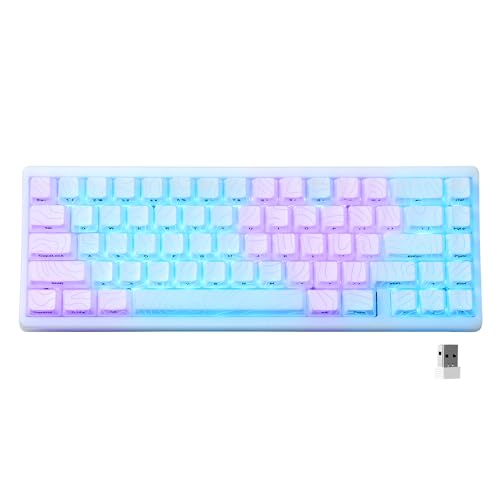

Top 3 picks at a glance
Quick Picks
| Product | Best for | Price | |
|---|---|---|---|
| Redragon K745 PRO | Full-size wireless value | budget | |
| Redragon K689 PRO | Lowest price with gasket build | budget | |
| RK R98 Pro | Best sound out of the box | budget | |
| EPOMAKER x Aula F75 | Custom feel at mid-range cost | budget | |
| Logitech Alto Keys K98M | Office-to-gaming hybrid | mid-range | |
| HITIME x XVX M67 | Compact enthusiast build | budget | |
| GravaStar Mercury K1 Lite | Statement design | budget | |
| MARUIEEB PORON Gasket Strips | DIY gasket conversion | budget |
How We Picked
The Best Gasket Mount Keyboards in 2026
Redragon K745 PRO Wireless 108-Key
This is the full-size wireless board I recommend to anyone who wants a numpad and gasket comfort without spending over sixty dollars. The typing feel is surprisingly uniform for a board at this price, with the gasket layer doing genuine work rather than just being a spec-sheet checkbox. The four dedicated hotkeys are well-placed and responsive, and wireless latency stayed competitive during FPS sessions.
- Pro: Consistent gasket flex across the entire key field, not just the center.
- Pro: Full-size layout with hotkeys at a price where competitors barely offer 60% boards.
- Con: Keycap legends feel thin and will likely shine within a year of heavy use.
Skip this if you prefer compact layouts or want hot-swap compatibility.
Redragon K689 PRO Wireless 108-Key
- Pro: Lowest entry point into gasket typing feel anywhere on this list.
- Pro: Wireless mode is stable enough for competitive gaming.
- Con: Gasket material feels spongier than the K745, reducing bottom-out feedback.
Skip this if you care about a firm, defined bottom-out in your typing feel.
RK R98 Pro Wired Mechanical Keyboard
The R98 Pro is the pick for buyers who want the best stock sound without opening a single keycap. Pre-lubed linear switches paired with MDA-profile PBT caps and a well-tuned gasket layer produce a creamy, deep tone that rivals custom builds three times its price. The volume knob is genuinely useful for media, and the 96% layout keeps a numpad while shaving off wasted space.
- Pro: Best stock sound profile in this roundup, no modding needed.
- Pro: Hot-swappable sockets are firm and handle multiple switch pulls without loosening.
- Con: Wired-only means cable management is always a consideration.
Skip this if you need wireless connectivity or desk-clutter-free setups.
EPOMAKER x Aula F75 Gasket Mechanical Keyboard
This collaboration brings five layers of internal damping padding into a 75% wireless board that costs under seventy dollars. The result is a typing feel that sits closer to a tuned custom board than to a factory product. The LEOBOG Reaper switches are smooth and linear, and tri-mode connectivity (Bluetooth, 2.4GHz, USB-C) covers every use case. The included knob adds a practical control layer.
- Pro: Five-layer padding delivers a thocky, muted sound that needs zero aftermarket work.
- Pro: Hot-swappable and tri-mode wireless in one package at this price.
- Con: Light Blue colorway attracts fingerprints and dust visibly on the case.
Skip this if you want a low-profile board or a more compact form factor.
Logitech Alto Keys K98M Wireless
Logitech’s entry into the gasket segment is the most polished out-of-the-box experience on this list. The graphite finish feels premium, the wireless pairing is instant across devices, and the typing feel is firm but forgiving, targeting users who want comfort during long work sessions without sacrificing game response. Software integration and a quiet, consistent sound profile make it the safest recommendation for mixed work-and-play users.
- Pro: Build quality and finish outclass everything else on this list by a wide margin.
- Pro: Seamless multi-device switching works reliably without re-pairing.
- Con: Not hot-swappable, so you are locked into the factory switch selection.
Skip this if you want the ability to swap switches or modify internals.
HITIME x XVX M67 Wireless 60%
The M67 packs QMK/VIA support, gasket mounting, and a topographic IMD-finished case into a 60% board under fifty-six dollars. The JadeStone finish looks like polished mineral and holds up well to daily handling. Switching between Win and Mac profiles is instantaneous, and the thocky sound profile is genuinely impressive for a board this compact. VIA support means every layout and macro is remappable in-browser without installing software.
- Pro: QMK/VIA programmability in a sub-$60 gasket board is nearly unheard of.
- Pro: IMD topographic case finish is durable and visually distinctive.
- Con: 60% layout requires function-layer access for arrow keys and media, which takes adjustment.
Skip this if you cannot live without dedicated arrow keys and a numpad.
GravaStar Mercury K1 Lite 75%
GravaStar builds keyboards that double as desk sculpture, and the K1 Lite is the most affordable entry into that aesthetic. Underneath the alien-casing looks sits a genuine gasket mount with solid wireless performance and RGB lighting that integrates cleanly with the sculpted shell. The typing feel is on par with mid-range boards, and the 75% layout balances compactness with usable arrow key placement.
- Pro: Design is immediately recognizable and well-executed without gimmicky RGB everywhere.
- Pro: Gasket feel is consistent and the board is comfortable for extended typing.
- Con: Premium price reflects the design language more than superior internals.
Skip this if you want the best raw performance per dollar and do not care about aesthetics.
MARUIEEB 20 PCS PORON Gasket Strips
Not a keyboard, but the most important item on this list for anyone willing to mod. These 3mm PORON foam strips transform a rigid tray-mount board into something that closely mimics a factory gasket build. At under seven dollars, they are the highest-impact mod available for the price. Installation requires only opening the case and placing the strips at the recommended points.
- Pro: Converts a tray-mount keyboard into a softer, quieter typing experience for under ten dollars.
- Pro: Universal fit works across most standard PCB and plate combinations.
- Con: Not a true silicone gasket; the result is close but lacks the same long-term durability.
Skip this if you already own a properly built gasket board and are not interested in modding a second one.
Two More Gasket Boards to Consider
Every keyboard in the main list sits at the budget or mid end of the market, and none of them is a CNC-aluminum enthusiast board. These two additions widen the range: another compact full-size wireless board with hot-swap for people who need a numpad, and an aluminum board for buyers ready to step up into the premium tier.
AULA F99
The AULA F99 is a 99-key board in a compact full-size layout, so you keep the number pad and arrow cluster while trimming some of the dead space a traditional 104-key board wastes. It is listed with a gasket structure, tri-mode connectivity over Bluetooth, 2.4GHz and USB-C, hot-swappable sockets and pre-lubed linear switches, which is the same recipe that made the EPOMAKER x Aula F75 popular, just in a bigger footprint.
Best for: spreadsheet users and gamers who want a numpad, wireless freedom and a soft gasket feel without moving out of the budget tier.
Skip if: desk space is tight or you prefer a smaller mouse reach, since any numpad layout pushes your mouse further to the right.
- Layout: 99 keys with number pad
- Mount: gasket structure
- Connectivity: Bluetooth, 2.4GHz, USB-C wired
- Switches: pre-lubed linear, hot-swappable

Keychron Q1 Max
The Keychron Q1 Max is the step up for anyone who has outgrown plastic budget boards. It uses a CNC-machined aluminum case with a double-gasket design, which isolates the plate and PCB from the case more thoroughly than single-layer strips. It adds acoustic foam inside, hot-swappable sockets, a rotary knob, and QMK/VIA support for remapping every key. Connectivity covers 2.4GHz, Bluetooth and wired, so it works as both a gaming board and a daily typing board.
Best for: buyers who want a premium, heavy, enthusiast-grade gasket board in a 75% layout that they can keep modifying for years.
Skip if: you carry your keyboard between locations, since a full aluminum case is heavy, or your budget stops at the mid tier.
- Layout: 75% with knob
- Case: CNC-machined aluminum
- Mount: double-gasket design
- Connectivity: 2.4GHz, Bluetooth, wired
- Firmware: QMK/VIA

More Gasket Mount Keyboards Worth Considering
The eight picks above stay mostly under the 110 dollar tier. If your budget stretches further, or you need an ISO layout, the aluminum boards from Keychron are the reference point most enthusiasts compare everything else against. At the other end, three plastic-cased boards bring the same gasket-and-foam recipe to lower prices.
Keychron Q3 Max Wireless TKL

The Q3 Max is the tenkeyless member of Keychron’s Q Max line, and it is the board to look at if you want a fully aluminum gasket build with wireless. It uses what Keychron calls a double-gasket design: gaskets on the plate, plus silicone pads between the top and bottom cases to cut resonance and metal-on-metal noise. The plate is polycarbonate, which flexes more than aluminum or steel, and the acoustic foam stack combines IXPE, PET and latex layers.
Connectivity covers 2.4GHz, Bluetooth for up to three devices and wired USB-C, with a 1000Hz polling rate in wired and 2.4GHz modes. A 4000mAh battery is rated for up to 180 hours with the backlight off. The layout is 80 percent with a programmable knob, south-facing RGB, screw-in PCB stabilizers and hot-swap sockets that accept both 3-pin and 5-pin switches. Switch options are Gateron Jupiter Red, Brown or Banana, and keycaps are doubleshot PBT. Everything is remappable through QMK firmware and the browser-based Keychron Launcher.
Importantly for buyers outside the US, the Q3 Max is sold in ISO versions, including UK, German, Nordic and Swiss layouts, which makes it one of the easiest answers to an ISO wireless gasket board search.
Strengths: genuine aluminum gasket construction, wireless with a large battery, ISO availability and full QMK/VIA programmability.
Drawbacks: it is heavy at roughly 1.77kg, and it sits in the premium tier, around double the price of the boards on the main list. Bluetooth polling is much lower than 2.4GHz, so use the dongle for games.
Who should skip it: anyone who wants a light board to carry, or anyone who is happy with a plastic-cased board and would rather spend the difference on switches and keycaps.
Keychron Q6 Max Wireless Full-Size

The Q6 Max is the same double-gasket recipe stretched to a full 100 percent layout with a numpad and knob. That combination of aluminum case, gasket mount and full-size layout is still rare; most gasket boards with a numpad are plastic 96 percent or 98 percent designs that compress the arrow cluster. If you work in spreadsheets during the day and game at night, this is the board that does not ask you to give anything up.
Specs mirror the Q3 Max: a CNC-machined 6063 aluminum case, PC plate, IXPE, PET and latex foam layers, silicone pads between the case halves, south-facing RGB and screw-in stabilizers. Connectivity is tri-mode with 1000Hz polling over 2.4GHz and wire, Bluetooth 5.1 for three devices, and a 4000mAh battery rated for up to 180 hours with lighting off. The ISO version ships with OSA-profile doubleshot PBT keycaps, while the ANSI version uses KSA profile. Hot-swap sockets accept most 3-pin and 5-pin MX-style switches.
Strengths: full-size layout with gasket feel, ISO option, wireless and QMK/VIA in one package, and a solid, resonance-free aluminum shell.
Drawbacks: at about 2.18kg, it is not moving once you set it down, and it is one of the most expensive boards in this guide. The fixed 5.2-degree typing angle has no feet, so anyone who likes a steeper angle needs a wrist rest or a stand.
Who should skip it: gamers who want maximum mouse space; a full-size aluminum board takes up a lot of desk width.
EPOMAKER x Aula F75 MAX Wireless with TFT Screen

The F75 MAX takes the formula that made the standard Aula F75 popular and adds a small TFT color screen beside the knob. The screen shows time, battery level, connection mode and lighting settings, and you can upload a custom image or GIF to it. Underneath, the gasket mount separates the PCB assembly from the shell to soften the bottom-out, and a partially flex-cut polycarbonate plate adds give.
Five sound-dampening layers sit inside the case: a sandwich pad, an IXPE switch pad, a PET pad, bottom foam and a bottom silicone layer. It is tri-mode, with 2.4GHz, Bluetooth 5.0 and USB-C wired connections, and the 4000mAh battery is rated at around 80 hours with the backlight off and roughly 30 hours with it on. The 75 percent layout has 80 keys, south-facing per-key RGB, Cherry-profile PBT keycaps, a two-stage kickstand and hot-swap sockets for 3-pin and 5-pin switches.
Strengths: much of what makes enthusiast boards sound good, including gasket mount, multiple foam layers and a flexible plate, at a mid-range price. The screen is a useful status display for wireless use.
Drawbacks: the screen is small at 0.85 inches, and reviewers have found it dim and easy to scratch. Some buyers find the knob loose. The case is ABS plastic, so it lacks the dense feel of aluminum boards. Battery life with RGB on is noticeably shorter than the Keychron boards above.
Who should skip it: anyone who already owns the standard F75 and does not need the screen, since the typing experience is close.
Ajazz AK820 75% Wired Gasket Keyboard
The AK820 is the cheapest way on this page to get a real gasket structure with a full foam stack and hot-swap sockets, typically in the under 50 dollar tier. It is a wired 75 percent board with 81 keys and a metal volume knob, built around a gasket-mounted flex-cut polycarbonate plate and a slotted PCB that lets individual keys flex slightly.
Inside are five dampening layers. Retail listings describe them as a PCB sandwich foam, an IXPE switch pad, a PET pad, case foam and a bottom silicone pad, although the exact foam materials have varied between production batches. The hot-swap PCB takes 3-pin and 5-pin switches, keycaps are PBT, and backlighting is either white or south-facing RGB depending on the version. It connects by USB-C and runs NKRO.
Strengths: real gasket construction and serious internal damping at an entry-level price, with hot-swap support for future switch upgrades.
Drawbacks: wired only, with an ABS case and plate-mounted stabilizers rather than the screw-in type found on premium boards. Specs vary between sellers and versions, so check the switch and lighting listed on the exact listing you buy. If you want wireless, the AK820 Pro adds a TFT screen, a 4000mAh battery and tri-mode connectivity at a higher price.
Who should skip it: anyone who needs wireless, or anyone who wants software-free QMK/VIA remapping.
EPOMAKER TH108 PRO Full-Size Wireless with Screen and Knob
The TH108 PRO is the budget alternative to the Keychron Q6 Max for anyone who wants a true 100 percent layout with gasket mount and wireless. It keeps a full 104-key layout with a standard arrow cluster and numpad, then adds a small smart display and a rotary knob on the side. Its standout spec is the battery: a 10,000mAh cell, more than double what most wireless boards in this tier carry, rated for up to 200 hours under light-use conditions.
Internally it follows the same soft-typing recipe as the best mid-range boards: a gasket-mounted flex-cut polycarbonate plate, a flex-cut FR4 PCB, five layers of sound dampening and tuned plate-mounted stabilizers. Switches are factory-lubed and hot-swappable with 5-pin support, keycaps are Cherry-profile doubleshot PBT, and lighting is south-facing per-key RGB. Polling reaches 1000Hz over USB and 2.4GHz, while Bluetooth runs at a lower rate suited to typing. Three typing angles, from about 6 to 10.5 degrees, let you tune the slope.
Strengths: full-size gasket feel and tri-mode wireless at a mid-range price, a very large battery, and a flexible plate and PCB combination that gives a soft, even bounce.
Drawbacks: the case is thick ABS plastic, so it lacks the density of the aluminum Keychron boards, and stabilizers are plate-mounted rather than screw-in. It is a big board at roughly 445mm wide. A newer TH108 V2 PRO also exists, so check which version a listing actually ships.
Who should skip it: anyone who wants a compact board or an ISO layout, which this listing does not offer.
Buying Guide
Gasket Material and Placement
Not all gaskets are equal. Silicone rings placed around the plate perimeter provide the most consistent flex and last longest without compressing. Foam adhesive strips are cheaper to produce and can still improve comfort, but they compress noticeably after a few months. If a product listing says “gasket mount” without specifying material, assume foam until reviews confirm otherwise.
Sound and Switch Pairing
A gasket mount alone does not guarantee a good-sounding keyboard. The switch type, keycap material, and number of internal dampening layers all interact. Linear switches with pre-lube produce the clearest benefit from gasket flex. Tactile switches can feel mushy if the gasket is too soft. Look for boards that pair gasket construction with at least one internal foam layer for the best stock sound.
Layout Choice and Wireless Latency
Gasket boards under seventy dollars now offer wireless with latency low enough for competitive play, but Bluetooth and 2.4GHz perform differently. If you game on a gasket board, always use 2.4GHz. For layout, the tradeoff is real: 60% saves desk space but demands function-layer reliance, while 96% and full-size keep dedicated keys but require more width. Pick based on how much your hands need arrow keys and F-keys during gaming.
Gasket Mount vs Other Mounting Styles
“Mount” describes how the plate and PCB are held inside the case. It is the main reason two boards with the same switches can sound and feel very different. Gasket mount is one of several common approaches, and knowing the alternatives makes it easier to read product listings critically.
| Mount style | How the plate is held | Typing feel | Sound tendency | Where you see it |
|---|---|---|---|---|
| Tray mount | PCB screws directly to standoffs in the bottom case | Stiff, uneven: firm near screws, softer between them | Can be hollow or pingy | Most budget prebuilt boards |
| Top mount | Plate screws to the top half of the case | Firm and consistent | Crisp, slightly louder | Many classic enthusiast kits |
| Integrated plate | Plate is part of the case itself | Very stiff | Sharp, loud | Some older and very cheap boards |
| Gasket mount | Plate is sandwiched between soft gaskets with no screws through it | Soft, even give across the board | Deeper, more muted | Most current custom-style boards |
| Leaf spring | Plate tabs rest on flexible springs or arms | Bouncy, noticeable flex | Muted and round | Newer enthusiast designs |
| Burger mount | Top-mount screws pass through foam or rubber layers | Softer top mount | Dampened top-mount character | Modded or budget gasket-style boards |
| Ball-catch or O-ring | Plate floats on magnets, balls or a rubber ring around the PCB | Soft, sometimes uneven | Muted | Enthusiast kits and popular mods |
The practical takeaway: a gasket mount does not guarantee more flex. Plate material, flex cuts and gasket thickness all decide how much the keys actually give. Some gasket boards feel firmer than a well-built top mount.
Plate Material and Flex Cuts
The plate holds the switches in place, so it shapes feel and sound as much as the mount. Here is how the common materials compare.
| Plate material | Stiffness | Sound character | Who it suits |
|---|---|---|---|
| Polycarbonate (PC) | Flexible | Deep and muted | Typists who want the softest gasket feel |
| FR4 (fiberglass) | Medium | Balanced, slightly crisp | Most people; a safe middle ground |
| POM | Flexible to medium | Soft, slightly muted | Users chasing a cushioned but quiet board |
| Aluminum | Stiff | Clacky, higher pitch | Gamers who want a firm, fast bottom-out |
| Brass or steel | Very stiff | Sharp and loud | Fans of a solid, heavy typing feel |
Flex cuts are slots cut into the plate or PCB, usually between key clusters. They let sections of the board bend independently, which increases the give a gasket mount can deliver. If a listing mentions a flex-cut PCB or plate, expect a softer feel. If you want gasket comfort but a firm bottom-out for gaming, a gasket board with an aluminum or FR4 plate and no flex cuts is the better match.
Foam Layers and What They Actually Do
Most budget gasket boards ship with several layers of foam or silicone. Each layer has a specific job, and knowing them helps you judge a “five-layer padding” claim.
- Plate foam: sits between the plate and PCB. It removes hollow sound and softens the bottom-out, but it can also reduce flex slightly.
- IXPE or switch pad: a thin sheet on top of the PCB under each switch. It gives the popular “poppy” or “creamy” sound many budget boards advertise.
- PCB foam: fills the gap under the PCB and quiets case resonance.
- Case foam or silicone bottom: damps the empty space in the bottom case. This has the largest effect on hollowness.
- Tape mod (built-in or DIY): layers of tape on the back of the PCB that deepen the sound.
More foam is not always better. Heavy damping can make a board sound muffled and lifeless, and plate foam in particular can fight the gasket’s flex. If you like a livelier sound, removing one layer is an easy, reversible experiment on most hot-swap boards.
Hot-Swap, ANSI vs ISO, and Wireless Details
Hot-swap sockets: 3-pin vs 5-pin
Hot-swap lets you change switches without soldering. Sockets that accept 5-pin switches also accept 3-pin switches (by trimming or simply using 3-pin ones), giving you the widest switch choice. Boards that only accept 3-pin switches still work with many options, but you may need to clip the two plastic legs off some 5-pin switches. Hot-swap matters more on a gasket board than on most, because swapping switches is the cheapest way to tune the feel once you know what you like.
ANSI vs ISO layouts
Most boards sold in North America use the ANSI layout with a wide, short Enter key and a long left Shift. ISO layouts, common in the UK and much of Europe, use a tall Enter key and a shorter left Shift with an extra key beside it. Keycap sets and some cases are layout-specific, so check the layout before ordering, especially if you plan to buy aftermarket keycaps later.
Wireless details beyond latency
The existing advice to use 2.4GHz for gaming holds. Also check the polling rate in wireless mode, battery capacity, whether RGB lighting can be turned down to stretch battery life, and whether the board remembers several Bluetooth devices. Aluminum boards can weaken wireless signal slightly, so keep the receiver close, ideally on a short extension cable on the desk rather than behind the PC.
Budget Tiers: What Each Price Level Gets You
| Tier | Typical build | What to expect | Examples on this page |
|---|---|---|---|
| Entry | Plastic case, basic gaskets, foam layers | Real comfort gain over tray mount, keycap and stabilizer quality varies | Redragon K689 PRO, Redragon K745 PRO, HITIME x XVX M67 |
| Mid | Thicker plastic or partial metal, tuned foam, hot-swap, tri-mode wireless | Good stock sound and feel, better stabilizers, knobs and software | RK R98 Pro, EPOMAKER x Aula F75, AULA F99, GravaStar Mercury K1 Lite, Logitech Alto Keys K98M |
| Premium | CNC aluminum case, refined gasket system, QMK/VIA | Heavy, consistent build, highly customizable, long service life | Keychron Q1 Max |
For most gamers the mid tier is the sweet spot. The jump from entry to mid brings better stabilizers and sound tuning that you notice every day, while the jump to premium is mainly about build weight, materials and customization.
Gasket Mount vs Tray, Top and Other Mounts
The mounting style decides how the plate and PCB connect to the case, and that connection controls how much each keystroke flexes, how much shock reaches your fingers and how much noise the case amplifies. Here is how gasket mount compares with the other common designs.
| Mount style | How the plate is held | Typing feel | Sound | Where you find it |
|---|---|---|---|---|
| Tray mount | PCB screwed directly to standoffs in the bottom case | Stiff, uneven: firmer near screws, softer between them | Can be hollow or pingy | Most budget and office keyboards |
| Top mount | Plate screwed to the top case | Firm and consistent | Clean, slightly sharper | Many enthusiast and older custom boards |
| Gasket mount | Plate sandwiched between soft gaskets, no direct screws to the case | Cushioned with even flex across the board | Deeper, muted, “thocky” | Keychron Q series, most boards on this page |
| Leaf spring or “gasket-style” foam | Plate rests on flexible tabs or foam strips | Soft, varies with design | Muted | Mid-range boards marketed as gasket |
| Integrated plate | Plate molded into the case | Very stiff | Often loud and hollow | Cheap prebuilt keyboards |
The practical takeaway: gasket mount is not just a sound feature. Because the plate floats, the force at the bottom of each keystroke is spread out rather than stopped dead, which is why gasket boards often feel less tiring during long typing sessions.
How to Spot a Real Gasket Build in a Listing
“Gasket mount” appears on boards with very different internals. A few listing details tell you how serious the implementation is:
- Gasket count and material. Listings that mention silicone or PORON gaskets, or give a number of gasket strips, usually describe a genuine design. Vague “gasket structure” wording with no detail often means foam strips glued to the plate.
- Plate material. Polycarbonate and FR4 plates flex the most, aluminum sits in the middle, and steel or brass are stiffest. A gasket mount with a steel plate feels much firmer than the same board with a PC plate.
- Flex cuts. Slots cut into the plate, and sometimes the PCB, let individual sections flex. A “flex-cut PC plate” plus gaskets gives the softest feel; full flex cuts can feel mushy to some typists.
- Double gasket. Keychron’s double-gasket design adds silicone pads between the top and bottom case halves, isolating the case itself as well as the plate. This reduces ringing on metal cases.
- Foam stack. Expect at least a PCB foam or IXPE switch pad and a bottom case foam. Boards advertising four or five layers, like the Aula F75 and Ajazz AK820, tend to sound good without modding.
Finding an ISO Layout Gasket Keyboard
Most budget gasket boards ship only in the US ANSI layout, which is a problem for UK and European buyers who want the tall ISO Enter key and the extra key beside left Shift. Your realistic options:
- Keychron Q Max series. The Q3 Max and Q6 Max are sold in ISO versions, with layouts such as UK, German, Nordic and Swiss available on the Q3 Max. They are wireless, gasket mounted and fully programmable.
- Regional versions of popular boards. Some sellers offer ISO-DE or ISO-FR versions of boards like the Aula F75 and Ajazz AK820 Pro. Check carefully that the keycaps, plate and PCB are all ISO; a few listings swap only the keycaps.
- Hot-swap plus ISO keycaps. Keycaps alone cannot convert an ANSI board to ISO, because the plate and PCB cut-outs differ. If ISO matters, buy an ISO board from the start.
Before ordering, confirm that the plate supports the ISO Enter stabilizer and that the board’s software or QMK/VIA keymap includes your regional layout.
Hot-Swap, Programmability and Battery Life
Three features decide how long a gasket board stays useful. Hot-swap sockets let you try different switches without soldering, and since the gasket changes how switches feel, being able to experiment matters. QMK or VIA support means you can remap keys and build macros in a browser instead of relying on brand software; the Keychron boards and the HITIME x XVX M67 above offer it. For wireless boards, look at battery capacity alongside lighting: a 4000mAh board can last weeks with the backlight off but only a few days with full RGB, so dim or disable the lighting if you rarely look at the keys.
How Much Should You Spend?
- Under 50 dollars: wired or basic wireless boards with a real gasket and foam stack, such as the Ajazz AK820 and Redragon K689 PRO. Expect plastic cases and plate-mounted stabilizers.
- 50 to 110 dollars: tri-mode wireless, multi-layer foam, knobs and screens, such as the Aula F75, F75 MAX, RK R98 Pro and Logitech Alto Keys K98M. This is the best value tier for most buyers.
- Around 200 dollars and up: aluminum cases, double gaskets, screw-in stabilizers and ISO options, led by the Keychron Q Max series.
Additional Picks at a Glance
| Keyboard | Layout | Connection | Case | Gasket details | ISO option |
|---|---|---|---|---|---|
| Keychron Q3 Max | 80% TKL with knob | 2.4GHz, Bluetooth, wired | Aluminum | Double gasket, PC plate, multi-layer foam | Yes |
| Keychron Q6 Max | 100% with knob | 2.4GHz, Bluetooth, wired | Aluminum | Double gasket, PC plate, multi-layer foam | Yes |
| EPOMAKER x Aula F75 MAX | 75% with knob and screen | 2.4GHz, Bluetooth, wired | ABS plastic | Gasket, partial flex-cut PC plate, five dampening layers | Regional versions from some sellers |
| Ajazz AK820 | 75% with knob | Wired | ABS plastic | Gasket, flex-cut PC plate, five dampening layers | Pro version from some sellers |
| EPOMAKER TH108 PRO | 100% with knob and screen | 2.4GHz, Bluetooth, wired | ABS plastic | Gasket, flex-cut PC plate and FR4 PCB, five dampening layers | No |
Getting the Best Sound and Feel From a Gasket Board
A gasket board is easier to tune than a tray-mount one, because the structure is already doing most of the work. A few low-cost steps make a noticeable difference:
- Check the stabilizers first. Rattle on the spacebar, Enter and Shift is the most common complaint on budget boards. A small amount of dielectric grease or stabilizer lube on the wire ends usually fixes it.
- Use a desk mat. A cloth or felt mat under the keyboard absorbs case resonance and deepens the sound, especially on hard desks.
- Experiment with switches. On hot-swap boards, linear switches with a smooth, lubed stem and long-pole or heavier springs pair well with soft gaskets. Very light tactile switches can feel vague on a highly flexible plate.
- Do not over-tighten case screws. If you open the board, tighten screws only until snug. Over-tightening compresses the gaskets and makes the board feel stiffer.
- Leave the foam in place. Removing factory foam to chase a louder sound often reintroduces ping and hollowness that the gasket design was meant to remove.
Our Verdict
The RK R98 Pro is the pick for the best stock sound: its pre-lubed linear switches, MDA PBT caps, and tuned gasket layer produce the best stock typing experience in this roundup, and hot-swap sockets keep it future-proof. For the tightest budget, the Redragon K689 PRO delivers real gasket comfort under fifty dollars, which is the lowest functional entry point in the category. However, if you play competitive FPS titles and need the lowest possible wireless latency with a full numpad, the Redragon K745 PRO wins on that specific combination of requirements.
More Gasket Keyboard Questions
Is gasket mount better than top mount?
Neither is better in every case. Gasket mount usually feels softer and sounds deeper, while top mount feels firmer and more consistent with a crisper sound. If you type for long sessions and like cushion, choose gasket. If you prefer a solid, fast bottom-out for gaming, a well-built top mount or a stiff-plate gasket board is a good fit.
How can I tell if a keyboard is really gasket mounted?
Look for a description of how the plate is held: gaskets on the plate tabs or edges, and no screws passing through the plate into the case. Teardown photos or videos show this clearly. Listings that only mention foam layers without describing the plate mounting are often tray-mount boards with extra damping.
Does plate material matter more than the mount?
They work together. A gasket board with an aluminum plate can feel firm, while a tray-mount board with a polycarbonate plate can feel softer than expected. If feel is your priority, check both the mount and the plate material before buying.
Are gasket keyboards louder or quieter?
Generally quieter and lower in pitch than tray-mount boards with similar switches, because the gaskets and foam absorb vibration. Switch choice still dominates volume: clicky switches stay loud on any mount.
FAQ
What does gasket mount actually change about typing feel?
A gasket mount suspends the plate and PCB between soft silicone or foam strips instead of screwing them rigidly to the case. This absorbs shock at the bottom of each keypress, reducing finger fatigue and producing a softer, deeper sound compared to tray-mount or top-mount constructions.
Are gasket keyboards bad for gaming?
Not inherently. The slight flex can feel unfamiliar during rapid keypresses initially, but most gamers adapt within a few sessions. The real gaming concern is wireless latency, not the gasket itself. Use 2.4GHz mode and you will not notice any delay.
Can I add gasket foam to a non-gasket keyboard?
Yes. Products like the MARUIEEB PORON strips are designed for exactly this. Open your board, place the strips at the four corners and edges between the case and plate, and reassemble. The result will not match a purpose-built gasket board, but it noticeably softens the typing feel for minimal cost.
Is there a wireless gasket mount keyboard in ISO layout?
Yes. The Keychron Q3 Max and Q6 Max are wireless gasket mount boards sold in ISO versions, and the Q3 Max is offered in UK, German, Nordic and Swiss layouts. Some budget boards such as the Aula F75 also appear in regional ISO versions from specific sellers, but check that the plate and PCB, not just the keycaps, are ISO.
Gasket mount vs tray mount: which is better?
For typing comfort and sound, gasket mount is usually better because the floating plate gives even flex across the board and absorbs bottom-out shock. Tray mount is cheaper to build and feels stiffer, with softer spots between the screws. If you prefer a very firm, crisp feel, a top mount or a gasket board with a steel plate may suit you better than a soft PC-plate gasket build.
Does a gasket mount keyboard need a polycarbonate plate?
No, but the plate material changes the result. Polycarbonate gives the most flex and the deepest sound, aluminum is moderately firm, and steel feels stiff even when gasket mounted. Many budget gasket boards use PC plates with flex cuts, which is why they feel noticeably softer than tray-mount keyboards at the same price.
Are gasket mount keyboards worth it for gaming?
They are worth it if you also type a lot, because the comfort benefit is real over long sessions. The gasket has no effect on input speed. For competitive play, focus on polling rate, the 2.4GHz connection and switch choice instead.
Do gasket mount keyboards get mushy over time?
Silicone gaskets resist compression and maintain their feel for years. Foam gaskets can flatten after six to twelve months of daily use, reducing the cushioning effect. If a listing uses foam without specifying high-density or PORON material, expect some degradation over time.
Part of our keyboards buying guide hub.