Royal Kludge has built its reputation on packing enthusiast-grade features into keyboards that do not demand an enthusiast budget, but the sheer number of similar-looking models makes choosing the right one harder than it should be. The real problem most buyers face is not finding a keyboard that lights up, it is finding one that matches their desk space, connection needs, and typing preference without paying for extras they will never use. A compact 60 percent board that is perfect for a minimal gaming setup can be frustrating for spreadsheet work, while a full-size wireless model with a display and knob is overkill if you only need a simple wired daily driver.
After comparing the current Royal Kludge lineup heading into 2026, the differences that actually matter became clear. Good models get the fundamentals right: a stable, cushioned typing feel from a gasket mount, smooth pre-lubed switches that do not rattle, and PBT keycaps that resist shine. Bad ones cut corners on stabilizers, offer mushy knob controls, or force you into software that limits customization. The standouts below balance layout, connectivity, and build quality in ways that fit specific users rather than trying to be everything to everyone.
As an Amazon Associate we earn from qualifying purchases at no extra cost to you.





Our Top Picks
 RK ROYAL KLUDGE S98 Wireless Mechanical Keyboard w/SmartLinear Cream Switch16.14 x 5.51 x 1.65 inches3 poundsCheck on Amazon
 RK ROYAL KLUDGE R98 Pro Wired Mechanical KeyboardHot Swappable Cream Switch1.8 poundsCheck on Amazon
 RK ROYAL KLUDGE R75 Wired Mechanical Keyboard withHot-swap Switch5.59 x 1.65 x 12.71 inches1.7 poundsCheck on Amazon


Top 3 picks at a glance
Quick Picks
| Product | Best for | Price |
|---|---|---|
| RK S98 Wireless | Best Overall Feature Set | Check on Amazon |
| RK R98 Pro | Best 96 Percent Wired Value | Check on Amazon |
| RK R75 Wired | Best Compact Wired 75 Percent | Check on Amazon |
| RK R75 Wireless | Best Wireless 75 Percent Value | Check on Amazon |
| RK S108 Typewriter | Best Retro Full-Size Design | Check on Amazon |
| RK RK61 | Best 60 Percent for Customization | Check on Amazon |
| RK S98 Wireless | Best S98 Alternative Source | Check on Amazon |
| RK S98 Wireless | Best Premium S98 Configuration | Check on Amazon |
How We Compared
We focused on the criteria that change daily experience the most: layout and desk footprint versus functionality, mounting style and switch behavior that determine typing comfort and sound, keycap material and profile for durability and feel, and connectivity plus onboard controls like knobs and displays for real-world convenience. We favored gasket-mounted designs with hot swappable sockets and PBT keycaps where available, prioritized models that offer tangible usability benefits over cosmetic extras, and weighted overall value against how well each board serves its intended user rather than a spec sheet alone.
The 8 Best Royal Kludge Keyboards in 2026
1. RK S98 Wireless
The RK S98 Wireless with Smart Display and Knob is for users who want a near full-size experience with modern convenience in a slightly more compact frame. It keeps the number pad and navigation essentials most productivity users need while adding a smart display and knob that make adjusting volume, checking connection status, and monitoring battery far more intuitive than key combinations. The wireless design is ideal for switching between a desktop, laptop, and tablet without replugging, and the cushioned gasket feel keeps long typing sessions comfortable and relatively quiet. Build quality feels substantial for the price, with stable keys and even lighting.
- Pro: Smart display and knob add genuinely useful daily control rather than a gimmick
- Pro: Flexible wireless plus wired operation suits both work and gaming setups
- Con: Larger footprint still takes up considerable desk space compared to 75 or 60 percent boards
Skip it if you have a small desk or primarily want a portable, minimalist keyboard for gaming only.
2. RK R98 Pro
The RK R98 Pro is built for buyers who need almost everything a full-size board offers but prefer a more efficient 96 percent layout and a creamy, refined typing character. This wired model emphasizes a soft, cushioned feel from its gasket mount combined with pre-lubed linear switches that glide smoothly without ping or scratchiness, while the MDA profile PBT keycaps provide a comfortable sculpted shape and durable texture. The integrated volume knob and full number pad make it a strong pick for office work, content creation, and gaming where quick audio control matters. It is especially appealing if you want premium feel without moving to wireless.
- Pro: Gasket mount with pre-lubed linear switches delivers a smooth, creamy sound and feel
- Pro: 96 percent layout retains number pad and knob while saving desk space
- Con: Wired-only connection limits multi-device flexibility
Skip it if you need Bluetooth or 2.4 GHz wireless for a clutter-free or multi-device setup.
3. RK R75 Wired
The RK R75 Wired is ideal for gamers and everyday typists who want the sweet spot of a 75 percent layout with a tactile control knob. It keeps function keys and arrows in a compact form that frees up mouse room but does not force you to learn layered controls for essential keys. The gasket mount softens keystrokes and reduces harsh bottoming out, while hot swappable Silver switches and MDA profile PBT keycaps give a light, responsive action and long-term durability. As a wired board with a volume knob, it is straightforward to set up and consistently responsive for competitive play and daily productivity.
- Pro: Compact 75 percent design balances functionality and desk efficiency
- Pro: Hot swappable Silver switches with gasket mount offer a light, cushioned typing experience
- Con: No wireless option for users who want cable-free placement
Skip it if you need wireless connectivity or prefer a heavier switch weight for deliberate typing.
4. RK R75 Wireless
The RK R75 Wireless is the most versatile take on the popular 75 percent size, designed for users who want one keyboard to move between work and play. With broad connectivity including Bluetooth, 2.4 GHz wireless, and USB-C wired, plus a handy knob and vibrant RGB backlighting, it adapts to desktops, laptops, and tablets with minimal hassle. The gasket mount keeps typing comfortable over long sessions, and hot swappable Cream switches provide a soft, creamy linear feel that many users find less fatiguing. PBT keycaps add texture and resistance to wear compared to thinner alternatives.
- Pro: Triple-mode connectivity makes multi-device use seamless
- Pro: Cream switches and gasket mount create a smooth, quiet, creamy typing character
- Con: Battery management and mode switching add slight complexity versus a simple wired board
Skip it if you want a purely wired, set-and-forget keyboard with no charging considerations.
5. RK S108 Typewriter
The RK S108 Typewriter is for buyers who want personality and full-size coverage on a budget. Its retro design with round keycaps, RGB sidelight, and an included detachable wrist rest stands out from typical gaming keyboards while still delivering a complete 108-key layout for work and play. The tactile Blue switches provide a clicky, typewriter-like feedback that many writers and retro enthusiasts enjoy, and the wired connection keeps setup simple with no battery concerns. It is less about compact efficiency and more about making a visual statement while retaining full productivity functionality.
- Pro: Distinctive retro round keycap design with detachable wrist rest enhances comfort and style
- Pro: Full 108-key wired layout is excellent for productivity and number-heavy tasks
- Con: Clicky Blue switches are loud and not ideal for shared spaces or quiet environments
Skip it if you need a compact footprint, quiet linear switches, or wireless flexibility.
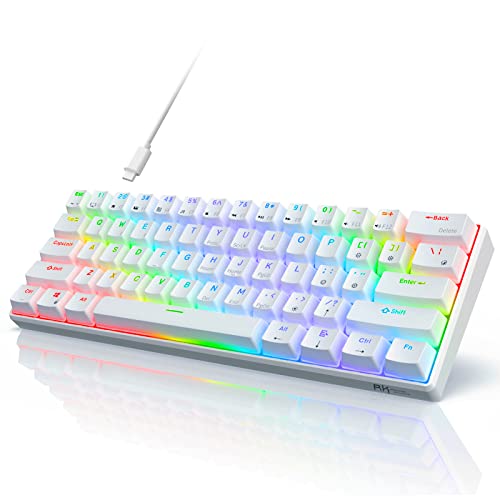
6. RK RK61
The RK RK61 is purpose-built for minimalists, enthusiasts, and gamers who prioritize desk space and deep customization. This compact 60 percent wired board drops the function row, navigation cluster, and number pad to maximize mouse movement and portability, while QMK and VIA support unlocks full programmability for layers, macros, and remapping without cumbersome software. Hot swappable Red switches offer a smooth linear action suited to fast gaming, and the PBT keycaps and RGB backlighting keep it durable and visually adaptable. It is the clearest choice when you want a small, efficient keyboard you can tailor exactly to your workflow.
- Pro: QMK and VIA support allows extensive, user-friendly customization
- Pro: Compact 60 percent and hot swappable Red switches are ideal for gaming and portability
- Con: Steep learning curve for shortcuts due to missing dedicated arrow and function keys
Skip it if you regularly rely on a number pad, dedicated arrows, or function keys without layers.
7. RK S98 Wireless
This second listing of the RK S98 Wireless with Smart Display and Knob serves the same type of user as the first: someone who wants a feature-rich, near full-size wireless board that handles both productivity and gaming without compromise. The appeal remains the combination of a space-saving full-size layout, intuitive knob and display controls, and the freedom to switch between wired and wireless as your setup demands. Typing comfort is again cushioned and consistent, and overall construction feels reliable for daily use. Choosing between listings at this price point often comes down to availability and color or switch variant rather than core capability.
- Pro: Same well-rounded S98 feature set with smart display and knob convenience
- Pro: Wireless versatility covers desktop and mobile devices equally well
- Con: Shares the same larger size that may overwhelm very compact desks
Skip it if you are specifically seeking a smaller 75 or 60 percent board for maximum space savings.
8. RK S98 Wireless
The third RK S98 Wireless listing at the higher price point targets buyers who want the same Smart Display and Knob platform but are looking at a premium configuration or bundle. Functionally it delivers the same near full-size versatility, intuitive onboard controls, and comfortable gasket-influenced typing experience that makes the S98 line the most complete option in the Royal Kludge family. The higher cost typically reflects a specific finish, switch, or included accessory set that some users will value for aesthetics or feel. For those who want the most polished presentation of the S98 concept and do not mind paying more, it remains the showcase model.
- Pro: Premium presentation of the flagship S98 feature set with display and knob
- Pro: Retains cushioned typing feel and broad wireless plus wired compatibility
- Con: Higher price reduces overall value compared to lower-priced S98 listings
Skip it if value is your top priority and the lower-priced S98 listings meet your needs.
Buying Guide
Layout Determines Daily Comfort
Do not choose size based on looks alone. A 96 or near full-size board like the S98 and R98 Pro keeps the number pad and navigation keys for spreadsheets and data entry, while a 75 percent board keeps function and arrow keys in a shorter body that frees mouse space. A 60 percent board like the RK61 is superb for competitive gaming and travel but requires layered shortcuts for missing keys. Measure your desk and consider how often you use the number pad before deciding.
Mounting, Switches, and Keycaps Define Feel
Gasket mounting has become the comfort standard because it flexes slightly and softens harsh impacts, creating a more cushioned and quieter bottom out than rigid tray mounts. Pair that with switch choice: linear Cream, Silver, and Red switches are smooth and quiet for gaming and long typing, while clicky Blue switches are loud and tactile for users who want audible feedback. MDA profile PBT keycaps add a sculpted, durable surface that resists shine and offers a more substantial feel than thin ABS.
Connectivity and Controls Should Match Your Workflow
Decide early whether you need multi-device wireless or a simple wired connection. Triple-mode boards add convenience but introduce charging and pairing, while wired boards eliminate latency concerns and maintenance. A physical knob and, on the S98, a smart display, genuinely improve daily use if you frequently adjust volume or switch modes, but they add size and cost. Hot swap sockets and VIA or QMK support matter most if you plan to experiment with switches or create custom layers and macros.
Our Verdict
For most buyers, the RK S98 Wireless at around $74 is the top pick because it combines the most useful modern features, comfortable typing dynamics, and true multi-device flexibility in a layout that still covers work and gaming. If you are on a tight budget or want distinctive style with full-size utility, the RK S108 Typewriter at around $45 is the budget pick that delivers a complete experience for the lowest price. If you want compact efficiency but need to keep function and arrow keys without going full-size, the RK R75 Wireless at around $51 wins thanks to its small footprint and versatile triple-mode connectivity.
FAQ
Which Royal Kludge keyboard is best for both work and gaming?
The S98 Wireless models are the most balanced for mixed use because they retain the number pad, add a convenient knob and display, and support wireless and wired connections. If desk space is tight, the R75 Wireless offers similar versatility in a more compact 75 percent form.
What is the difference between the R75 Wired and R75 Wireless?
The wired R75 is simpler and slightly more straightforward for a single desktop setup, while the wireless R75 adds Bluetooth and 2.4 GHz support for multi-device use. Both share a 75 percent gasket-mounted design, but the wireless version typically uses Cream switches for a creamier linear feel versus Silver switches on the wired version.
Do I need hot swappable switches?
Hot swap is valuable if you like to fine-tune feel or replace a faulty switch without soldering, and all the R75, R98 Pro, and RK61 models include it. If you plan to keep the stock switches long term, it is a nice future-proofing feature rather than an immediate necessity.
Is a 60 percent keyboard hard to use for everyday tasks?
It can be if you depend on dedicated arrow keys, function keys, or a number pad, since those require layer combinations on a 60 percent board like the RK61. Users who value desk space, portability, and deep QMK and VIA customization often adapt quickly, but consider a 75 or 96 percent model if you need those keys daily.
Part of our keyboards buying guide hub.