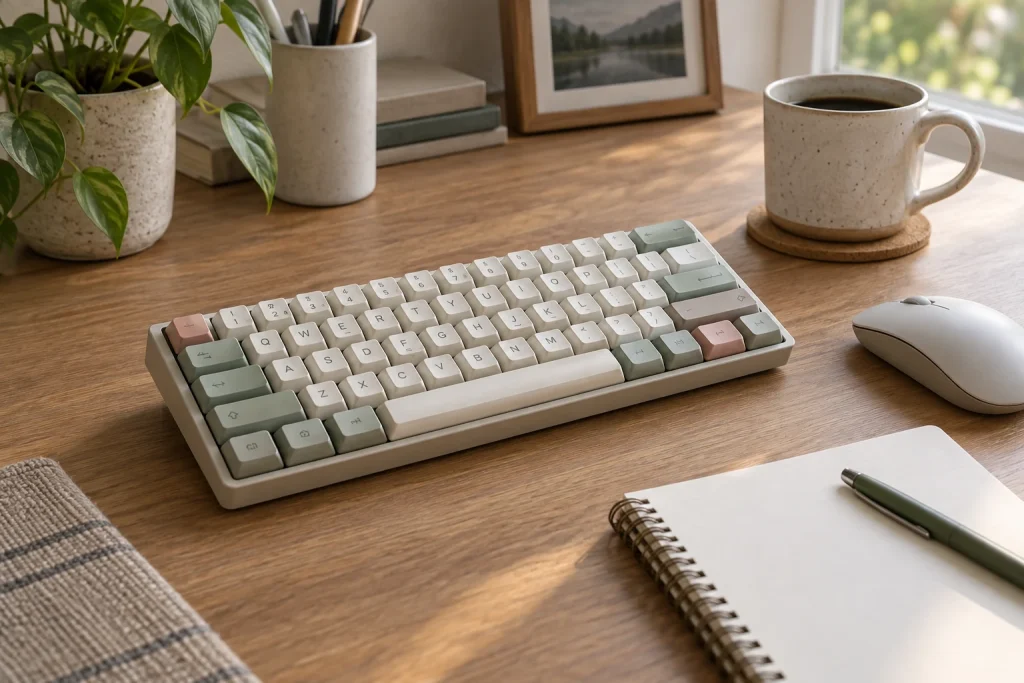
Lofree keyboards occupy an unusual space in the mechanical market. They are not budget boards, and they are not the typical enthusiast fare you see at meets and group buys. What sets them apart is a design language that treats a keyboard as a desk object first and a typing instrument second. That sounds like marketing gloss, but across the four current models in different form factors, it is also the core of the buying decision. You are not choosing between hot-swappable boards. You are choosing between a board that looks right on your desk, feels consistent under your fingers, and does not make you feel like you bought a toy.
The best lofree keyboards in 2026 share a few things in common: reliable wireless connectivity across all three modes, switches that match the typing profile the company claims, and build quality that justifies their premium prices. Where they diverge is in philosophy. Some lean retro and compact. Others go full-size and industrial. A few go low-profile and minimalist. Getting the right one means matching your desk setup and typing habits to the model, not just picking the prettiest colorway.
As an Amazon Associate we earn from qualifying purchases at no extra cost to you.


Our Top Picks
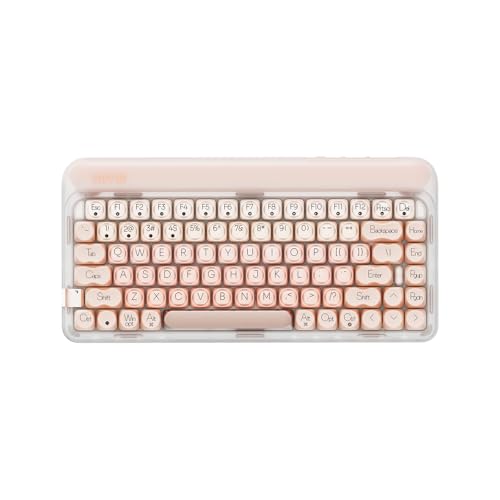
 LOFREE DOT Lipstick 84Keys Wireless Mechanical Keyboard12.8 x 6.32 x 1.75 inches2.1 PoundsCheck on Amazon


Top 3 picks at a glance
Quick Picks
| Product | Best for | Price |
|---|---|---|
| Lofree DOT Foundation | Retro aesthetics with modern typing feel | Check on Amazon |
| Lofree Flow Lite | Low-profile typing on a budget | Check on Amazon |
| Lofree Block | Full-size layout with dedicated controls | Premium |
| Lofree DOT Lipstick | Premium gasket-mount typing feel | Check on Amazon |
How We Compared
Each board was compared on four criteria, based on specs and owner feedback: typing consistency across the full keycap range, wireless reliability when switching between Bluetooth, 2.4 GHz, and wired, build integrity under daily desk use, and whether the switch option actually delivers the sound and feel profile the product page implies. Price-to-experience ratio was the final tiebreaker, since Lofree charges a design premium and you need to know whether you are paying for aesthetics or substance.
The 4 Best Lofree Keyboards in 2026
Lofree DOT Foundation
The DOT Foundation is the model to recommend to most people who want a Lofree and have not used one before. The 75 percent layout preserves a function row and arrow keys while keeping the footprint tight enough for smaller desks. The Gateron Baby Raccoon switches are quiet, linear, and smooth without the stem rattle that plagues budget linears. The hot-swappable sockets let you experiment freely. Owner feedback describes Bluetooth switching between Mac and Windows machines as clean and dependable. Build quality is solid and the case has enough heft to stay put. The main drawbacks: the pink colorway shows dust aggressively, and the typing angle is fixed.
- Pro: Quiet, smooth linear switches that sound premium out of the box.
- Pro: Reliable tri-mode connectivity with no pairing drama.
- Con: Fixed typing angle, and light colorways mark easily.
Skip if you need low-profile keys or adjustable tilt.
Lofree Flow Lite
At a budget price for the brand, the Flow Lite is the clearest value play in the Lofree lineup. The 100-key layout covers everything including a numpad in a compact footprint. These are low-profile keys, so your fingers barely travel. The Specter Linear switches are consistent across the board, and the Marble colorway is understated enough for any desk. Owners generally report no fatigue once muscle memory adapts to the shorter travel. The tradeoff is that the plastic case feels lighter than the DOT models, and the 2.4 GHz receiver has a shorter effective range. If you sit far from your tower, you may hit dropouts.
- Pro: Excellent value for a low-profile mechanical with hot-swap capability.
- Pro: 100-key layout keeps productivity without a full-size footprint.
- Con: Lighter case flexes under heavy typing, and 2.4G range is limited.
Skip if you prioritize a heavy chassis or need long wireless range.
Lofree Block
The Block is Lofree trying to be a productivity board, and for a full-size layout it succeeds surprisingly well. The 98-key arrangement includes a numpad, and the dedicated retro-style knobs for volume and mode shifting are hardware shortcuts that make sense the moment you use them once. Hot-swap sockets are present and the board ships with decent stock switches. Some listings also mention swappable decorative panels for changing the look. Where it falls short: ninety-eight keys in a full-width chassis demand serious desk real estate. If your monitor sits close to the desk edge, this will crowd you. Typing feel is good but not as refined as the DOT series.
- Pro: Dedicated knobs offer real hardware control beyond switches.
- Pro: Full 98-key layout suits data-heavy work without a separate numpad.
- Con: Large footprint and noticeable case flex around the numpad.
Skip if desk space is tight or you prefer compact layouts.
Lofree DOT Lipstick
The Lipstick is the most expensive board here, and it earns that price in exactly one way: the typing feel. Gasket mounting under the plate gives you a subtle bounce that makes long sessions easier on the fingers. The 84-key layout trims and rearranges for a tighter footprint. White backlighting is the visual centerpiece, and in a dark room the glow through the keycap legends looks genuinely striking. The black colorway hides marks well. Still, the premium over the Foundation is not proportional to the improvement. You are paying for the gasket structure and the light show, not a fundamentally better switch experience. Connectivity covers Bluetooth, 2.4 GHz, and wired, like the rest of the DOT family.
- Pro: Gasket-mount feel noticeably softer and more forgiving than the other three.
- Pro: White backlighting through PBT legends looks excellent in low light.
- Con: Highest price with marginal gains over the DOT Foundation in typing consistency.
Skip if you cannot justify a premium price for soft typing over a standard tray-mount.
More Lofree Keyboards Worth Considering
The four boards above cover the most common reasons people buy a Lofree, but the catalog is wider than that. Lofree also makes an aluminum low-profile flagship, an ultra-light travel board, an earlier low-profile design that still has a loyal following, a terrazzo-styled sibling of the DOT, and a matching numpad. If none of the main picks quite fits your desk, one of these five probably will.
Lofree Flow2

The Flow2 is Lofree’s current low-profile flagship, and it is the board to look at if you liked the idea of the Flow Lite but want a premium chassis. The case is machined from a single block of aluminum with an anodized finish, and the switches sit on a gasket mount with five layers of dampening material. It comes in 68-key, 84-key and 100-key versions; the listing featured here is the 100-key silver model with Surfer linear switches, so it keeps the numpad that the Flow Lite users rely on.
Lofree offers three switch options from its Cloud series: Surfer (linear), Void (silent linear) and Pulse (tactile). All three are rated at a light 40 gf actuation force with 2.8 mm total travel, which is shallow even by low-profile standards. Connectivity is full tri-mode, with a 2.4 GHz dongle, Bluetooth 5.3 and USB-C wired, and the manufacturer lists a 1000 Hz polling rate over the dongle and cable. A 3,000 mAh battery is rated for up to 120 hours with the backlight off. The switches are hot-swappable, the board supports VIA for remapping, and a touch-sensitive strip handles volume and brightness.
Strengths: this is the most refined low-profile Lofree, with a rigid metal body, a proper 2.4 GHz mode for gaming, and real remapping software rather than only Fn combinations. Drawbacks: published reviews commonly mention that the touch strip can be triggered by accident, the USB-C port sits on the side rather than the back, and VIA setup is not as friendly as it could be. It is also heavy for a slim board, at roughly 745 g for the 84-key version.
Compared with the Flow Lite, the Flow2 costs noticeably more but replaces the ABS shell with aluminum and adds VIA. Compared with the DOT Foundation, it trades the tall, retro profile for flat keys and a short stroke. Choose it if you already know you prefer low-profile typing and want the best version of it Lofree makes.
Lofree Flow84

The Flow84 is the original Flow that put Lofree on the map for low-profile mechanical keyboards, and it is still sold alongside the newer Flow2. It is a 75 percent, 84-key layout with an aluminum-alloy frame, a gasket mount cushioned with IXPE and Poron foam, and dye-sublimated PBT keycaps. This listing ships with Kailh Ghost linear switches, which use full POM housings and stems; Lofree rates them at about 50 gf actuation with 2.8 mm total travel. A Phantom tactile version is also available.
The reason people still seek it out is the sound. Many reviewers describe the full-POM switches and gasket stack as producing a soft, muted sound that some prefer to the newer Flow2. The board is hot-swappable with compatible low-profile switches (not standard full-height switches), has a white backlight with four brightness levels, and adds an RGB sidelight along the edge.
The important limitation is connectivity. The Flow84 connects over Bluetooth or USB-C cable only; there is no 2.4 GHz receiver. The 2,000 mAh battery is rated for up to 40 hours, which is much shorter than the Flow2 or DOT models, so you will be charging it more often if you leave the backlight on. At roughly 594 g it is also lighter and easier to carry than the Flow2.
Pick the Flow84 if you mostly type, work over Bluetooth with a laptop or tablet, and want the sound signature that made the Flow line popular, usually for less than the Flow2. Skip it if you play fast games and want a dongle, or if long battery life is a priority. Against the Flow Lite in the main list, it has the more premium metal frame but loses the 2.4 GHz mode and the numpad.
Lofree Edge

The Edge is Lofree’s answer to people who carry a keyboard in a laptop bag. It is a 75 percent, 84-key board with a 3K twill carbon fiber top case and a magnesium alloy bottom case, and Lofree describes it as the thinnest and lightest mechanical keyboard it has made. The official weight is about 485 g, and the body is only around 15 mm thick, which makes it one of the few mechanical boards that genuinely disappears into a bag.
Inside are Kailh POM 2.0 linear switches with roughly 40 gf actuation and a very short 2.4 mm total travel, mounted on a PCB gasket. The keycaps are dye-sublimated PBT, and you can set the typing angle to 3 or 6 degrees. Battery capacity is 2,000 mAh, rated for up to 130 hours with the lights off and about 10 hours with them on.
There are two caveats to understand before buying. First, the Edge offers Bluetooth 5.3 and USB-C wired only, with no 2.4 GHz mode, so it is a productivity board first. Second, Lofree’s own specification lists the switches as not hot-swappable, even though some retail listings suggest otherwise. That makes it the only board in this guide where you should treat the stock switch as permanent.
Who it is for: frequent travelers, coffee-shop workers and anyone who wants a mechanical feel over a MacBook-style slim profile. Compared with the Flow2, it is far lighter and more portable but less customizable and without a gaming dongle. Compared with the DOT Foundation, which weighs about twice as much, it is a completely different idea of what a Lofree should be. Skip it if you like modding switches or game on your keyboard.
Lofree Zero ARTZ

The Zero ARTZ is easiest to understand as a design variant of the DOT Foundation chassis. It uses the same 75 percent, 84-key layout with ten multifunction keys, the same gasket structure with a four-layer sound-filtering stack, and the same general dimensions and weight of roughly 970 g. What changes is the look and the switch: the case and dual-color PBT keycaps follow a terrazzo-stone theme in grey, and the board ships with Lofree x Gateron Zero ARTZ linear switches with full POM construction and a light actuation force.
Connectivity matches the DOT family: Bluetooth 5.3, a 2.4 GHz dongle and USB-C wired, with up to three paired devices and a 1000 Hz polling rate listed by the manufacturer. The 4,000 mAh battery is rated for up to about 14 days with the lights off and around 30 hours with the white backlight fully on. The switches are hot-swappable on MX-style stems, so anything you learn from modding the Foundation applies here too.
Strengths: you get the DOT Foundation’s solid, quiet typing and long battery life in a more subdued, grown-up colorway that suits a grey or wood desk better than pink or pastel. It is usually priced in a similar band to the Foundation. Drawbacks are the same as the Foundation: the case is ABS rather than metal, the typing angle is fixed, and the round keycaps take adjustment if you have large hands.
Choose the Zero ARTZ if you want the Foundation’s proven formula but find its colorways too loud. If you are deciding between the two, base the decision purely on aesthetics and which stock linear switch you prefer; the platform underneath is very close.
Lofree Foundation Tri-Mode Wireless Numpad

Three of the keyboards in this guide drop the number pad to save space, which is great for mouse room but awkward if you enter figures every day. Lofree’s answer is a matching 20-key numpad in the Foundation design language, inspired by 1970s and 1980s pocket calculators. It is not a keyboard on its own, but it belongs in this guide because it lets you pair a compact DOT or Edge with a numpad only when you need one.
It supports Bluetooth 5.3, a 2.4 GHz receiver and USB-C wired, connects to up to three devices, and has a white backlight. The switches are hot-swappable, the case is compact at roughly 149 by 94 mm, and a 950 mAh battery powers it. A calculator mode with its own display means it can also work as a standalone desk calculator. Weight is listed at about 252 g.
One thing to note: sources disagree on the stock switch feel, with listings describing it as linear, tactile or a Gateron Blue variant. Because it is hot-swappable, this matters less than it would on a fixed board, but check the current listing if you have a strong preference. The keycaps are ABS and PC rather than PBT.
The numpad makes the most sense next to the DOT Foundation, Zero ARTZ or Edge. If you already know you need a numpad all day, the 98-key Block or the 100-key Flow Lite and Flow2 are simpler and cheaper overall than a 75 percent board plus an add-on.
Buying Guide
Form Factor Dictates Everything
With Lofree specifically, do not overlook how much layout changes the feel. A 75 percent board like the DOT Foundation sits differently on your wrists than a 98-key Block. The Flow Lite is the only low-profile option among the four main picks, which changes your entire posture. Measure your desk depth and decide whether you need a numpad before comparing switch types. A compact board you place in a comfortable position beats a objectively better board that crowds your setup.
Switch Choice and Hot-Swap Value
All four main picks support hot-swapping, which means you are never locked into the stock switches. That said, Lofree curates its options carefully and the bundled sets are genuinely good. The Gateron Baby Raccoon in the Foundation is widely described as one of the quieter linear switches available. The Specter Linear in the Flow Lite is punchier. If you are unsure, start with what ships and swap later only if you notice a flaw. Hot-swap is insurance, not a reason to buy a worse stock option.
Connectivity Modes and Daily Practicality
All four boards offer Bluetooth, 2.4 GHz, and wired. In practice you will mostly use one mode. If you switch between a laptop and desktop frequently, Bluetooth channel count matters and every board here supports multiple paired devices. If you play games, use the 2.4 GHz receiver for lower latency. Wired is for dead-battery days when you need a keyboard immediately without hunting for a dongle. The Flow Lite receiver has the shortest range in this lineup, so if you sit more than two meters from your tower, prioritize the DOT models.
How the Extra Lofree Picks Compare
| Model | Layout | Profile | Case | Connectivity | Hot-swap | Price tier |
|---|---|---|---|---|---|---|
| Lofree Flow2 | 68, 84 or 100 keys | Low-profile | CNC aluminum, gasket | 2.4 GHz, Bluetooth, wired | Yes | Upper mid-range |
| Lofree Flow84 | 84 keys (75%) | Low-profile | Aluminum alloy, gasket | Bluetooth, wired | Yes (low-profile switches) | Mid-range |
| Lofree Edge | 84 keys (75%) | Ultra-slim low-profile | Carbon fiber and magnesium | Bluetooth, wired | No | Upper mid-range |
| Lofree Zero ARTZ | 84 keys (75%) | Standard height | ABS, gasket | 2.4 GHz, Bluetooth, wired | Yes | Mid-range |
| Foundation Numpad | 20 keys | Standard height | PC | 2.4 GHz, Bluetooth, wired | Yes | Budget |
Prices move with colorway and promotions, so treat the tiers as a guide to where each board sits in the lineup rather than a fixed figure.
Choosing a Lofree: The Details That Decide It
Low-Profile or Standard Height?
Lofree splits cleanly into two families. The DOT Foundation, Zero ARTZ, DOT Lipstick and Block use standard-height switches and taller keycaps, which give a deeper, more traditional mechanical stroke and a fuller sound. The Flow2, Flow84, Flow Lite and Edge use low-profile switches with total travel between roughly 2.4 and 2.8 mm. If you move between a laptop and a desk all day, low-profile boards feel familiar immediately. If you already own a standard mechanical keyboard and like it, a low-profile board can feel shallow for the first week.
Posture is part of this. A tall board like the DOT Foundation, which measures around 44 mm at its highest point, usually benefits from a wrist rest. Low-profile boards generally do not need one, which is part of their appeal on small desks.
Mounting Style and Case Material
Most current Lofree boards use some form of gasket mount, where the plate or PCB floats on foam or silicone instead of being screwed rigidly to the case. In practice that gives a slightly softer bottom-out and a less hollow sound. Case material changes the character on top of that: the aluminum Flow models feel dense and stay put, the ABS DOT family is lighter for its size and sounds a little warmer, and the carbon fiber Edge prioritizes weight over heft. None of these is objectively better, but if you type hard, a metal case tends to hide flex more effectively.
Wireless Modes Are Not Identical Across the Range
It is easy to assume every Lofree is tri-mode. It is not. The Flow84 and the Edge connect over Bluetooth and USB-C only. That is fine for office work, but Bluetooth adds more delay than a dedicated 2.4 GHz receiver, and some devices put Bluetooth keyboards to sleep aggressively. If you play games, even casually, choose a board with a dongle: the Flow2, Flow Lite, DOT Foundation, Zero ARTZ, Block or Lipstick.
Battery Capacity and Backlight Habits
Battery ratings vary widely. The DOT Foundation and Zero ARTZ carry 4,000 mAh batteries rated for around two weeks with lights off, the Flow2 has 3,000 mAh rated for up to 120 hours, and the Flow84 and Edge use 2,000 mAh cells. The backlight is the biggest drain on all of them; the Edge, for example, drops from up to 130 hours to about 10 hours with lights fully on. If you charge rarely, keep the backlight low or off, or choose a model with a larger cell.
Round Keycaps and Typing Accuracy
The DOT family’s round, typewriter-style keycaps are the reason many people buy one, but they also leave larger gaps between keys than square caps. Several published reviews note that people with larger hands make more typos on them during the first weeks. If accuracy matters more than looks, the square-capped Flow and Edge boards are the safer option.
Software and Remapping
Lofree historically relied on Fn-key shortcuts rather than software. That is changing: the Flow2 supports VIA, and the Flow Lite line works with Lofree’s key-mapper utility. If you need custom layers, macros or a different modifier layout for macOS, confirm software support for the exact model before buying rather than assuming it is available across the range.
Setup and Care Tips for Lofree Keyboards
- Charge fully before first pairing. Large cells such as the 4,000 mAh battery in the DOT Foundation can take around five hours from empty, so a first full charge avoids confusing low-battery disconnects during setup.
- Use the system toggle. Most Lofree boards switch between macOS and Windows layouts with an Fn combination or a physical switch. Set it before you start remapping anything in the operating system.
- Keep the 2.4 GHz dongle close. If a receiver sits behind a metal PC case, use a USB extension cable so it has a clear line to the keyboard. This often fixes dropouts more effectively than changing settings.
- Pull switches straight up. On hot-swappable models, use the included puller, grip the switch clips and lift vertically. Rocking a switch sideways is the most common way to bend pins.
- Clean with a soft brush or air. Light colorways show dust and skin oils sooner. A soft brush and a slightly damp, lint-free cloth on the keycaps are usually enough; avoid spraying liquid on the board.
- Store the dongle. Not every Lofree has a dedicated slot for the receiver, so pick a consistent place for it before it disappears into a drawer.
Which Lofree Fits Your Setup?
Small desk, mostly typing
Start with the DOT Foundation or the Zero ARTZ. Both are 75 percent boards with function rows and arrows, long-lasting batteries and quiet linear switches. Add the Foundation numpad later only if you find yourself missing number keys. If you want the shallowest possible footprint instead, the Flow2 in its 68-key or 84-key size is the low-profile alternative.
Laptop users who move around
The Edge is built for this, with its carbon fiber and magnesium body and Bluetooth pairing for up to three devices. The Flow84 is a heavier but still portable option with more of the sound people associate with the Flow line. Both lack a dongle, which is rarely a problem for laptops and tablets that already have Bluetooth.
Spreadsheets and data entry
Choose a board with a built-in numpad: the 98-key Block, the 100-key Flow Lite or the 100-key Flow2. The Block has dedicated knobs and a full-height typing feel; the Flow boards are flatter and lighter on the fingers. A 75 percent board plus a separate numpad works too, but it costs more and takes up roughly the same space.
Work by day, games by night
Prioritize a 2.4 GHz mode and a 1000 Hz polling rate. The Flow2 is the strongest low-profile option for this, while the DOT Foundation and Zero ARTZ cover standard-height typing. Lofree boards are not built around gaming features such as rapid-trigger switches, so if competitive play is your main use, a dedicated gaming keyboard will serve you better.
Desk aesthetics first
The DOT Lipstick and DOT Foundation are the most distinctive designs, with the Zero ARTZ as the calmer, stone-textured option. These boards are deliberately styled as desk objects, so pick the colorway you will be happy looking at every day; that matters more with Lofree than with most brands.
How Lofree Compares With Other Design-Led Keyboards
Lofree’s closest competitors are brands that also sell wireless boards aimed at Mac and Windows users who care about appearance. Keychron offers a broader range with more layouts and stronger software support across its lineup, usually at lower prices for comparable features. Logitech’s MX Mechanical line focuses on office reliability and multi-device switching rather than looks or modding. Lofree’s advantage is design: rounded retro keycaps, unusual colorways and, on the Flow and Edge models, very slim premium cases. Its disadvantage is that you often pay a design premium and get less software flexibility on older models.
A practical way to decide: if you would happily buy a plain black keyboard with the same specifications, a more conventional brand will often give you better value. If the look of the board on your desk is part of why you are shopping, Lofree is one of the few brands that treats that as a first-class feature rather than an afterthought.
Our Verdict
The DOT Foundation is the overall top pick. It balances a usable 75 percent layout, quiet premium switches, and reliable connectivity at a price that does not require justification. The Flow Lite is the budget pick without compromise: a budget-tier price gets you hot-swap, wireless, and a typing experience that competes with boards costing significantly more. The DOT Lipstick wins if gasket-mount feel matters more to you than value. The Block wins if you require a numpad and dedicated hardware controls and refuse to give up desk width elsewhere.
FAQ
Are Lofree keyboards good for gaming?
They are capable but not purpose-built for gaming. All four models offer a 2.4 GHz wireless mode with low enough latency for casual play. If you need polling rates above one thousand hertz or RGB per-key customization for game overlays, look elsewhere. For shared work-and-play setups on a single desk, they perform without issues.
Can I use these keyboards on Mac and Windows simultaneously?
Yes. All four main picks support tri-mode connectivity, and you can pair via Bluetooth to multiple devices and switch between them with a keypress. The macOS keycap sets included match Apple layout conventions, and the Windows layouts work identically. There is no software required for device switching.
Do I need to swap switches out of the box?
No. The stock switch options at each price tier are well tuned and sound pleasant without modification. Hot-swap is there if you want to try different types later or if a switch fails. Most buyers who swap within the first week do so because of preference, not because the stock switches are bad.
How long does battery life last in practice?
With Bluetooth active and no backlighting, expect long runtimes between charges, often weeks on the large-battery DOT models. The DOT Lipstick with white backlighting on reduces that to roughly a week of heavy daily typing. Charging is via USB-C, so keep a cable nearby for a quick top-up when needed.
Part of our keyboards buying guide hub.
More Lofree Questions
Which Lofree keyboards do not have a 2.4 GHz receiver?
The Flow84 and the Edge connect over Bluetooth and USB-C wired only. The Flow2, Flow Lite, DOT Foundation, Zero ARTZ, Block and DOT Lipstick all include a 2.4 GHz mode. If you want the lowest-delay wireless connection for games, choose one of the tri-mode models or use a cable.
Can I put regular MX switches in a low-profile Lofree?
No. Low-profile boards such as the Flow2, Flow84 and Flow Lite are hot-swappable, but only with compatible low-profile switches; standard full-height switches will not fit. The Edge is not hot-swappable at all according to Lofree’s specifications. If you want to experiment with the widest range of third-party switches, stay with the standard-height DOT Foundation, Zero ARTZ, Lipstick or Block.
Is the Flow2 worth it over the original Flow84?
It depends on what you value. The Flow2 adds a 2.4 GHz dongle, a larger 3,000 mAh battery, VIA remapping and a choice of 68, 84 or 100 keys. The Flow84 is lighter, usually cheaper and still has fans who prefer its sound. For gaming or long battery life, the Flow2 is the better buy; for Bluetooth-only typing on a budget, the Flow84 still makes sense.
Which Lofree is best for travel?
The Edge, by a wide margin. At about 485 g and roughly 15 mm thick, it is half the weight of the DOT Foundation and much slimmer than the aluminum Flow boards. Just remember it lacks a dongle and hot-swap sockets.
Do Lofree keyboards need a wrist rest?
The standard-height boards, especially the DOT Foundation and Zero ARTZ at around 44 mm tall, are more comfortable with a wrist rest for long sessions. Low-profile models like the Flow2, Flow Lite and Edge generally sit low enough that most people do without one.