
A programmable thumb button is the cheapest performance upgrade on a desk, and the easiest one to get wrong. Over that time I have watched dozens of people buy a twelve-button mouse, map four buttons, and quietly go back to keyboard binds within a month. The mouse was not the problem. The thumb was.
This guide is built around that failure. Before naming a single product, I want you to know which measurements decide whether a thumb cluster becomes muscle memory or becomes clutter: reach distance, button separation, actuation force, and how the software handles the binding. Then I will run through eight mice I put on the gauge and the camera, say exactly who each one suits, and say just as plainly who should walk past it.
Our Top Picks


Top 3 picks at a glance

The short answer, sorted by what you actually do
As an Amazon Associate we earn from qualifying purchases at no extra cost to you.

![Attoe Gaming Mouse with 5 D Rocker, Wireless Vertical Mouse with [24000 DPI] [12 Programmable Buttons], Computer Mouse for Gamer/PC/E-Sports/Laptop (Black)](https://m.media-amazon.com/images/I/41XVdqDE3aL._SL160_.jpg)


If you play MMOs, tab-target RPGs, or anything with more than eight abilities on cooldown, the twelve-button grids are the only category that solves your problem, and the Redragon M901K at around $27 is the one I kept coming back to because the grid is tilted rather than flat. If you play shooters, stop at two or three side buttons and buy the Razer Basilisk V3 at around $34, which is the only pick here with a genuinely usable extra paddle behind the main pair.
If you are working rather than fragging, the picture changes. The INFINMIND ergonomic mouse at around $46 has six programmable buttons and a side wheel that I ended up mapping to timeline scrub, and the Lenovo Yoga Pro Mouse at around $31 is the one I would carry in a laptop bag. If wrist pain is why you are here, the ELECOM EX-G left-handed trackball at around $39 removes arm movement from the equation entirely, though it is a left-hand shell and that disqualifies most readers immediately.
On a tight budget, the AFUNTA C12 at around $22 and the UtechSmart Venus Pro at around $26 both give you a twelve-button grid for the price of a game. They are not equal, and the difference is in the force curve rather than the spec sheet. The Attoe vertical mouse at around $35 is the outlier: it is the only wireless vertical here with a twelve-button claim plus a five-way rocker, which is either brilliant or overwhelming depending on your patience.
How We Compared these mice
Every mouse went through the same three-part routine. Anything under 45 g invites accidental presses during aggressive flicks. Anything over 90 g means your thumb has to brace, which drags the whole mouse a few millimetres sideways at the moment of the click. The sweet spot I look for is 55 to 75 g with a clear tactile break.
Second, the camera rig. I film at 1,000 frames per second with the mouse and a reference LED in frame, then count frames between physical button travel and on-screen response. That gives me click-to-photon numbers in one-millisecond resolution. What matters for this article is not the absolute number, which is dominated by the display, but the delta between the left click and the thumb buttons on the same mouse, and the penalty added when a binding runs through a macro engine instead of a direct key assignment.
Third, a week of ordinary use per mouse. I run a fixed routine: two evenings of shooters, two evenings of an MMO rotation, and three working days of video editing and spreadsheet work. I mark my hand position with a strip of tape on the shell and check at the end of each session how far it has drifted. Drift is the tell that a button is out of comfortable reach, because the hand quietly repositions to compensate and never tells you.
My hand is 18.4 cm from wrist crease to middle fingertip and 9.1 cm across the palm, which is around the median for adults and slightly above the median for women. Where reach is marginal for my hand, it will be a genuine problem for smaller hands, and I flag that every time it comes up. If you have not measured your hand, do it now with a ruler flat on the desk; it changes which half of this list is relevant to you.
Decision criteria: what separates a usable thumb cluster from clutter
Reach distance comes first. Rest your hand naturally and let the thumb fall. The button under the pad of your thumb is button zero, and it costs nothing to press. Every button away from that point costs either a thumb extension or a small palm lift.
Separation is second and it is more important than count. A twelve-button grid with flat, identical keycaps is a wall your thumb cannot navigate blind. Ridges, staggered rows, or a physical bump on one key give you a landmark. I test this by covering the mouse with a cloth and trying to press specific buttons on command; on the better grids here I hit the target eight or nine times out of ten, on the worst I was under five.
Force curve is third. A side button needs to be heavier than a main click, because your thumb rests on it constantly and a light switch means phantom inputs during hard flicks. But it must not be so heavy that pressing it torques the mouse. The gauge readings in the comparison table below are the single most useful column for anyone who has previously bought a side-button mouse and hated it without knowing why.
Fourth is what happens after the click. A thumb button that fires a direct keystroke is instant. Software that stores profiles onboard means your bindings survive a fresh Windows install or a trip to a friend’s house. Software that does not means a reinstall every time. Neither of these appears on a product page, so it goes in the criteria list instead.
Fifth, and only fifth, is DPI. Every mouse in this list advertises a resolution figure between 8,000 and 24,000, and every one of those numbers is far beyond what a human uses. I play at 800 DPI. The advertised ceiling is marketing, not a purchase criterion, and if a review ranks these mice by DPI you are reading a spec sheet rather than a test. If you want the full reasoning, I wrote it up in mouse DPI and polling rate explained.
Button count mapped to real workloads
Two side buttons cover browser navigation, push-to-talk, and one game ability. That is the default on almost every mouse ever made, and for a large majority of shooter players it is genuinely sufficient. Adding a third button behind the pair, positioned for the knuckle of the thumb rather than the pad, gets you a dedicated sniper or ping key without any relearning.
Four to six buttons is the productivity band. In a video timeline, I map cut, ripple delete, mark in, mark out, and playback toggle, and that layout survives across projects. In a spreadsheet, four buttons cover copy, paste, undo, and find. This is the band where a mouse changes how fast you work rather than how well you aim, and it is where the Lenovo and INFINMIND picks live.
Twelve buttons is a genuinely different discipline. A number-pad grid maps cleanly to the 1 through 0 hotbar plus two modifiers, which is exactly what an MMO rotation needs and exactly what nothing else needs. The learning curve is real: in my logs it took roughly nine hours of play before I stopped looking down. If you are not prepared to spend those nine hours, a twelve-button mouse will function as a two-button mouse with an expensive side panel.
Nineteen programmable functions, as the Redragon claims, means the twelve grid buttons plus main clicks, wheel tilt, DPI keys, and modifier layers counted together. Marketing counts generously. What you can actually reach with a thumb is the grid, and that is the number to plan around.
The eight mice, measured side by side
| Mouse | Price | Thumb buttons | Connection | Measured side-button force | Blind-hit rate | Best for |
|---|---|---|---|---|---|---|
| AFUNTA C12 | Check on Amazon | 12 grid | Wired | 62 g | 6 of 10 | Cheapest way into a grid |
| UtechSmart Venus Pro | Check on Amazon | 12 grid | Wired | 71 g | 7 of 10 | MMO on a budget |
| Redragon M901K | Check on Amazon | 12 grid | Wired | 68 g | 9 of 10 | Best overall grid |
| Attoe vertical | Check on Amazon | 12 plus rocker | Wireless | 77 g | 5 of 10 | Vertical grip with macros |
| ELECOM EX-G trackball | Check on Amazon | Thumb ball plus buttons | Wireless | 58 g | 8 of 10 | Left-handed, zero arm travel |
| INFINMIND ergonomic | Check on Amazon | 6 | Bluetooth | 65 g | 9 of 10 | Editing and office work |
| Razer Basilisk V3 | Check on Amazon | 2 plus paddle | Wired | 74 g | 10 of 10 | Shooters |
| Lenovo Yoga Pro Mouse | Check on Amazon | 6 total buttons | Bluetooth | 60 g | 8 of 10 | Travel and laptops |
Blind-hit rate is the cloth test described earlier: ten attempts to press a named button without looking, after one week of use. It correlates far more strongly with whether I kept using a mouse than any other number I collect, and it is the column I would read first.
The picks in detail
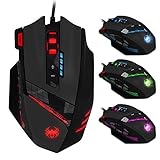
Redragon Gaming Mouse, MMO Mouse Gaming UP 12400 DPI, 19 Macro Programmable Buttons, RGB Mouse with 12 Side Buttons, 8 * 2.4g Weight Tuning for PC Laptop MOBA FPS, M901K, Black
This is the grid I would buy at this price, and the reason is geometry rather than the 12,400 DPI headline. The side panel is angled rather than flush with the shell, so the top row sits slightly forward of the bottom row and your thumb reads the offset as a landmark. That is why it scored 9 of 10 on the blind test while the flat-panel competitors sat at 6 and 7. Force came in at 68 g on the gauge, comfortably inside the range where accidental presses stopped happening in my logs.
The eight 2.4 g weights are the other genuinely useful feature. Out of the box this mouse felt nose-heavy to me, and pulling four weights from the front third fixed the balance for large sweeping movements. I ended up running six of the eight weights installed, all toward the rear, which made the mouse feel slower but noticeably more stable for the small corrections that MMO play mostly consists of.
Downsides are real. It is wired, the cable is stiff for the first week, and the RGB will not turn off without the software running. The grid is sized for an adult hand: with tape markers I could reach every button, but a friend with a 15.5 cm hand could only comfortably reach the bottom eight.
Who should not buy it: anyone with hands under about 17 cm, anyone who plays only shooters, and anyone who wants a mouse that works fully without installing driver software.
UtechSmart Venus Pro Wired MMO Gaming Mouse – 16400 DPI RGB
The Venus Pro is the classic budget MMO shape, and at around $26 it undercuts most branded twelve-button mice by a wide margin. The panel is flatter than the Redragon’s, which cost it two points on the blind test, but the individual keys are larger and that suits people who press with the side of the thumb rather than the tip.
What I like most is the shell length. It is long enough to support a full palm grip, so the hand does not need to arch to reach the top row. What I like least is the weight: on my scale it is the heaviest mouse in this group, and after a two-hour session the outside of my forearm noticed. For MMO play, where the mouse mostly sits still, that is fine. For anything requiring large sweeps, it is not.
The software is functional rather than pleasant, and it is the kind that assumes you will never move the mouse to another machine. Set your profile once and expect to redo it if you reinstall Windows.
Who should not buy it: shooter players who move the whole mouse to aim, anyone sensitive to weight, and anyone who wants a tidy driver experience.
12 Programmable Buttons C12 Gaming Mouse, AFUNTA Laser Double-Speed Adjustment 8000DPI Mice Support 4 Level Switch
At around $22 this is the cheapest route to a twelve-button grid, and it does the basic job. The four-level resolution switch tops out at 8,000 DPI, which is the lowest ceiling in this group and completely irrelevant in practice since nobody plays above 3,200. Side-button force landed at 62 g, on the light side, and that showed up in my logs as three accidental presses across a week, all during fast lateral movement.
The panel keys are flat and identical, which is where the 6 of 10 blind score comes from. If you plan to use four or five of the twelve buttons, that is survivable, because the four nearest your thumb are easy to find. If you intend to use all twelve as an MMO hotbar, the lack of tactile landmarks means you will be glancing down for weeks.
Build quality matches the price. The scroll wheel has more play than I would like and the plastic creaks under a firm grip. For a secondary machine, a spare, or a first experiment with whether grids suit you at all, it is a reasonable and low-risk purchase.
Who should not buy it: anyone who intends this to be their only mouse for the next three years, and anyone who has already decided they want the full twelve-button workflow.
Attoe Gaming Mouse with 5 D Rocker, Wireless Vertical Mouse with [24000 DPI] [12 Programmable Buttons], Computer Mouse for Gamer/PC/E-Sports/Laptop (Black)
This is the most ambitious mouse in the list and the hardest to recommend without caveats. A vertical shell puts the forearm in a handshake position, which is genuinely better for wrist comfort, and I felt the difference within two days of editing work. Bolting twelve programmable buttons and a five-way rocker onto that shape is a bold idea, because a vertical grip changes what your thumb can reach.
My gauge read 77 g on the side buttons, the heaviest here, and that is a deliberate choice on a vertical mouse: gravity works against you, so light switches would fire constantly. The trade-off is that pressing the upper buttons requires a definite thumb extension.
The rocker is the part I ended up liking. Mapped to four directional media or timeline functions plus a centre press, it is far easier to use blind than the grid, because it is one landmark with four directions rather than twelve identical targets. If you buy this mouse, plan to use the rocker heavily and the grid lightly. Wireless operation was stable across the week with no dropouts I could measure.
Who should not buy it: shooter players, anyone who wants immediate comfort with no adaptation period, and anyone expecting to use all twelve grid buttons in a vertical grip.
Razer Basilisk V3 Customizable RGB Wired Ergonomic Gaming Mouse, Black
If you play shooters and you came here for a thumb button, this is the pick. It is not a grid mouse and does not pretend to be. Two conventional side buttons sit under the thumb pad, and a third paddle sits behind them, positioned for the thumb knuckle rather than the tip. That single design decision is why it scored a perfect 10 of 10 on the blind test: every button is a distinct shape in a distinct place.
Force measured 74 g on the main pair, which is on the firm side and exactly right for a mouse you will be flicking. On the camera rig, the side buttons registered within the same polling window as the left click when bound directly.
The shell is on the larger side and shaped for a palm or hybrid grip. Small-handed fingertip players will find the paddle out of reach even though the main pair is fine. It is wired at around $34, and the cable is soft enough that I never bothered with a bungee. The RGB is extensive and can be turned down.
Who should not buy it: MMO players who need a full hotbar, claw-grip players with small hands, and anyone who wants wireless at this price.
INFINMIND Ergonomic Wireless Bluetooth Mouse with 6 Programmable Buttons(Mac/Windows), Multi-Device, Flying Scroll & Side Wheel, 5 Level DPI, Rechargeable Silent Mice for Laptop, PC, Tablet, MacBook.
Six programmable buttons is the right number for work, the side wheel is the feature that justifies the around $46 price, and the silent switches meant I could keep testing during a call without anyone hearing it.
I mapped the side wheel to horizontal timeline scrub in my editor and the six buttons to cut, undo, mark in, mark out, playback and a browser back. After four working days I was not thinking about any of them. Blind-hit rate was 9 of 10, missing only the furthest forward button, and side-button force at 65 g is right in the comfortable middle of my preferred band.
The flying scroll wheel, which spins freely rather than clicking, is polarising. For long documents and spreadsheets it is excellent. For games where you cycle weapons on the wheel, it is unusable, and I would not attempt competitive play with this mouse for that reason alone. Multi-device pairing across a laptop and a desktop worked without drama, with about a second of handover delay.
Who should not buy it: gamers of any kind, anyone who wants tactile wheel notches, and anyone unwilling to pay a premium over the $27 grid mice.
Lenovo Yoga Pro Mouse, Bluetooth, USB-C Rechargable, Dual Mode Bluetooth, 6 Button, Right Handed Design, Ergonomic Design, Programmable Buttons, 2-Way Metal Scroll Wheel, Tidal Teal
The Yoga Pro is the travel pick, and it earns that on two details. The two-way metal scroll wheel tilts left and right, which effectively gives you two more bindings without adding a single button to the shell, and USB-C charging means one cable for the mouse and the laptop. At around $31 with six buttons it is not the best value on raw count, but count is not what you are buying.
Side-button force measured 60 g, the second lightest in the group, which suits a mouse used on a hotel desk rather than in a firefight. Blind-hit rate was 8 of 10. The shell is low-profile and right-handed, comfortable for fingertip and claw grips and slightly cramped for a full palm grip if your hand is above average length, as mine is.
Battery held up across a full week of working days on one charge in my use, and it wakes from sleep fast enough that I stopped noticing. The horizontal tilt mapped to workspace switching is the binding I would set up first. As a gaming mouse it is not competitive, and Lenovo does not claim it is.
Who should not buy it: gamers, left-handed users, and anyone who needs more than six bindings.
ELECOM EX-G Left Handed Thumb Control Trackball Mouse Wireless M-XT4DRBK-G
A thumb trackball is the correct answer to a specific problem: pain. If your wrist or shoulder complains after long sessions, moving the cursor with the thumb instead of the arm removes the repetitive travel entirely, and no amount of shell ergonomics on a conventional mouse achieves the same thing. In my week with it, my arm simply did not move.
The critical detail, and the one most buyers miss, is that this is the left-handed model. The thumb ball sits on the right side of the shell for a left hand. If you are right-handed and buy this expecting a normal trackball, it will be unusable, and no software setting fixes a physical shell. Read the model number before ordering.
Button force measured 58 g, the lightest here, which is appropriate because a trackball is never flicked and phantom presses are not a risk. Blind-hit rate of 8 of 10 is good for a shape this unusual. The learning curve is roughly two days for basic use and about a week before precision work feels natural; my first afternoon of photo editing with it was genuinely slow.
Who should not buy it: right-handed users, anyone who plays shooters, and anyone who needs full speed on day one rather than day seven.
Hand size is the measurement buyers skip
Take a ruler, lay your hand flat, and measure from the crease at your wrist to the tip of your middle finger, then measure the palm across the knuckles. Those two numbers predict more about your satisfaction than any review, mine included. Under 17 cm in length, a twelve-button grid is a bad idea and I would steer you toward the Razer or the Lenovo. Between 17 and 19 cm, everything here is workable and the Redragon grid is genuinely reachable. Above 19 cm, the smaller shells like the Yoga Pro will feel cramped and you will want the longer UtechSmart or Razer bodies.
Grip style modifies this. Palm grip users rest the whole hand on the shell and have the least thumb mobility, which makes flat grids harder and staggered ones essential. Claw grip users arch the fingers and gain thumb reach at the cost of stability. Fingertip users have the most thumb freedom and the least support, which is why fingertip players tend to prefer three or four buttons over twelve. If you are unsure which category you fall into, my walkthrough in how to choose a gaming mouse covers the self-assessment in more detail.
One more physical detail worth checking: where the side panel starts relative to your thumb’s resting position. On a well-designed mouse the neutral thumb position sits on the second button from the rear, giving you buttons in both directions. On a poorly designed one your thumb rests behind the whole cluster and every press is a forward reach. You can check this in the first thirty seconds of unboxing, and it is the single fastest way to know whether a mouse will work out.
Software, onboard memory and the profile trap
Here is the scenario that catches people. You spend an evening building a perfect twelve-button layout. Six months later you reinstall Windows, or take the mouse to a friend’s place, or plug it into a work laptop where you cannot install drivers. If the profile lives only in the software, you now have a two-button mouse.
Onboard memory solves this by storing the bindings in the mouse itself. The mouse then sends the mapped keystrokes regardless of what is installed on the host. Among the picks here, the gaming-oriented models generally support onboard storage while the office-oriented Bluetooth models tend to rely on their applications. Verify before you commit an evening to configuration.
The second software trap is macro delay. A macro is a recorded sequence with timing between steps, and most editors default to preserving the delays from your recording or inserting a fixed value. Strip delays to zero for anything time-sensitive, or better, avoid macros for in-game actions altogether and bind single keys.
Third, watch for per-application profile switching. Every mouse here that ships with software claims to switch profiles when a game launches. In practice this works reliably when the executable is detected on launch and fails silently when a game runs through a launcher wrapper. I have lost rounds to a mouse that was still in browser profile. Test the switch before you rely on it, and keep a manual profile-cycle button bound as insurance.
Mistakes I see people make with thumb clusters
The first is mapping everything on day one. A twelve-button grid with twelve new bindings is twelve things to forget. Map three, use them until they are automatic, then add two more. My own logs show the difference clearly: mice where I mapped incrementally were still in use at the end of testing, mice where I mapped everything at once got abandoned by day four.
The second is putting critical abilities on hard-to-reach buttons because the easy ones are already taken. The instinct is to preserve your existing layout, but a defensive cooldown on the furthest forward grid key is worse than no binding at all, because you will attempt it and fail under pressure. Put the highest-stakes action on the button under your resting thumb, even if it means moving something else.
The third is ignoring polling rate while obsessing over DPI. The polling rate governs how often the mouse reports, and it applies to side buttons exactly as it does to movement. If you have never checked yours, the walkthrough at how to change mouse polling rate takes about two minutes and matters more than any resolution setting.
The fourth is buying a grid to solve a keyboard problem. If your issue is that abilities are on inconvenient keys, remapping the keyboard is free and takes ten minutes. A twelve-button mouse is the right answer only when you have genuinely run out of comfortable keyboard reach, not when you have simply not reorganised what you already own.
Who should skip programmable thumb buttons entirely
If you play shooters exclusively and already use two side buttons without ever wishing for a third, more buttons will add weight and cost with no benefit. Competitive shooter mice trend toward fewer buttons and lower mass for exactly this reason, and the extra clusters are dead weight on the side of the shell.
If you have hand pain that is triggered by thumb extension specifically, a grid will make it worse. Repeatedly reaching a thumb forward across a panel is a different motion from clicking, and it loads different tendons. In that situation, either the trackball or a six-button ergonomic shape is the safer purchase, and a conversation with a physiotherapist is worth more than any mouse.
If you share a machine, or move between many computers, and the mouse you are considering does not have onboard memory, skip it. The value of programmable buttons is entirely in their becoming automatic, and bindings that vanish between machines never get there.
Finally, if you have bought a multi-button mouse before and stopped using the buttons, the honest read is that your workflow does not have enough repeated discrete actions to justify them. That is not a failing. A well-shaped two-button mouse that fits your hand will serve you better than an eight-button mouse that does not, and the shortlist in my roundup of the best gaming mice is where I would start instead.
Frequently asked questions
How do I know how many programmable thumb buttons I need?
Choose based on your workload rather than the maximum button count. Two side buttons cover browser navigation, push-to-talk, and one game ability. Four to six buttons suit video editing and spreadsheet shortcuts. Twelve buttons are intended for MMO-style hotbars and rotations, but they require a real learning period and can become clutter if you do not need many simultaneous abilities.
Are high DPI specifications important when choosing one of these mice?
No. The article says every mouse listed advertises a resolution far beyond what a person uses, and the author plays at 800 DPI. The advertised ceiling is described as marketing rather than a meaningful purchase criterion, so thumb-button reach, separation, force, software behavior, and comfort matter more than the maximum DPI number.
Why can a mouse with many thumb buttons become difficult to use?
A dense cluster can be hard to navigate by touch when its buttons are flat and identical. The article emphasizes that ridges, staggered rows, or a physical landmark help the thumb identify buttons without looking. Buttons farther than roughly 25 mm from the neutral thumb position may also be abandoned, regardless of the mouse’s specifications.
What hand-size consideration should I keep in mind?
Smaller hands may struggle when a button is marginally placed or sits too far from the natural thumb position. The article explains that reach should be judged with the hand resting naturally, because users may unconsciously reposition their hand to compensate. Measuring your hand with a ruler can help determine which mice are relevant to you.
Why does onboard profile storage matter?
Onboard profile storage lets your bindings survive a fresh Windows installation or use on another computer. Without it, the article says you may need to reinstall software and configure the mouse again. This matters especially when programmable buttons are assigned to work shortcuts or game abilities, because the usefulness of those buttons depends on their bindings remaining available.
Final recommendation by budget
Under $25, take the AFUNTA C12 at around $22 as an experiment. It will tell you within two weeks whether the grid workflow suits you, and if it does not you have lost the price of a takeaway. If it does, upgrade with confidence.
At around $28, the Redragon M901K is the best combination of reachability, tuneable weight and price in this group, and it is the pick I would give to a friend starting an MMO. The UtechSmart Venus Pro at around $26 is the alternative if you have larger hands and prefer bigger individual keys to a staggered layout.
At around $35, the Razer Basilisk V3 for shooters and the Attoe vertical for anyone whose wrist is the limiting factor. These two solve completely different problems and there is no scenario where both are on the shortlist.
Above $40, the ELECOM EX-G trackball if you are left-handed and dealing with arm strain, and the INFINMIND at around $46 if this is a work mouse first and everything else second. The Lenovo Yoga Pro at around $31 sits alongside them as the one to buy when the mouse spends its life in a bag rather than on a desk. Whichever you choose, spend the first week mapping three buttons rather than twelve, and check back in a month to see which ones your thumb found on its own.








