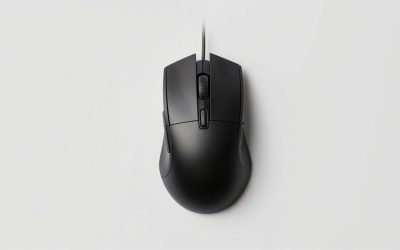
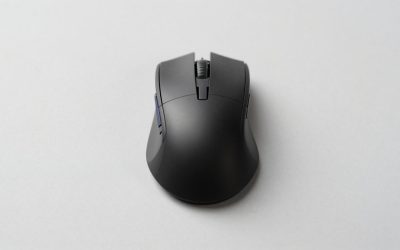
The closest Logitech G502 alternative in this set is the Razer Basilisk V3, which lists 11 programmable buttons, a tilt scroll wheel and a 26K optical sensor in an ergonomic wired shell. The G502 formula is a right-handed shape with a thumb cluster and a heavily programmable wheel, and few rivals copy all of it. Most others here are MMO mice with a numbered thumb grid, which is a different tool. Some are cheap Redragon and ENHANCE designs; one is a premium wireless Razer. Use the table to match the layout to your games, then read the notes for the traps.
Our Top Picks
 Razer Basilisk V3 Customizable RGB Wired Ergonomic GamingMouse2.96 x 5.12 x 1.67 Inches0.2 poundsCheck on Amazon
 Razer Basilisk V3 Pro Customizable RGB Wireless GamingMouse5.12 x 2.96 x 1.67 Inches0.24 PoundsCheck on Amazon
Shortlist table
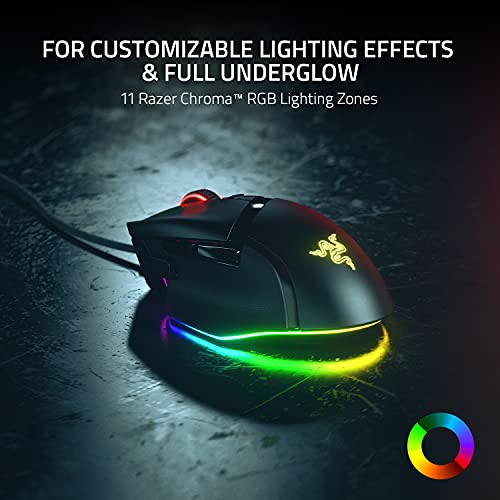
Razer Basilisk V3 Customizable RGB Wired Ergonomic Gaming Mouse, Black | Fastest Gaming Mouse Switch, Chroma RGB Lighting, 26K DPI Optical Sensor, 11 Programmable Buttons, HyperScroll Tilt Wheel




As an Amazon Associate we earn from qualifying purchases. Product prices and availability are accurate as of the date/time indicated.

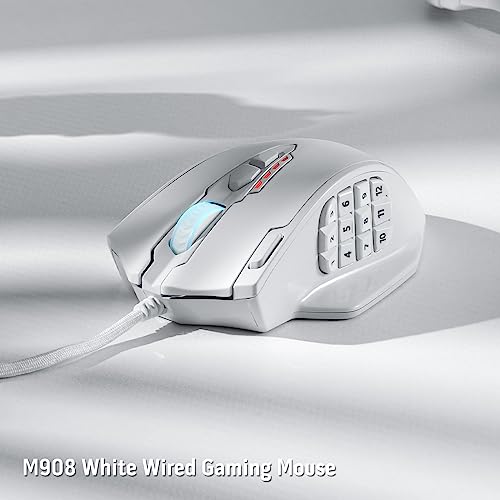
Redragon M908 Impact RGB LED MMO Gaming Mouse with 12 Side Buttons, Optical Wired Ergonomic Mouse with Max 12,400DPI, High Precision, 18 Programmable Macro Shortcuts, Comfort Grip, White




As an Amazon Associate we earn from qualifying purchases. Product prices and availability are accurate as of the date/time indicated.

Redragon M801 Gaming Mouse, RGB PC Gaming Mouse MMO with 9 Programmable Buttons Macro Recording, 16000 DPI, Fire Button for Gaming Windows Computer - Wired, Black


As an Amazon Associate we earn from qualifying purchases. Product prices and availability are accurate as of the date/time indicated.

ENHANCE Theorem 2 MMO Mouse with 13 Programmable Side Buttons - RGB Gaming Mouse with 6 Customizable DPI Settings, 5 Gaming Profiles, Quick Fire Button, Wired, Ergonomic - Black


As an Amazon Associate we earn from qualifying purchases. Product prices and availability are accurate as of the date/time indicated.

Redragon M921 Wired RGB MMO Gaming Mouse 12400 DPI Remapping Keys | Stable Lag-Free Connection, Smooth Precise Tracking, Custom Macro Keybinds, Vibing Backlight, Ergonomic Grip Body Comfort


As an Amazon Associate we earn from qualifying purchases. Product prices and availability are accurate as of the date/time indicated.
Razer Basilisk V3 Pro Customizable RGB Wireless Gaming Mouse, Black | Optical Switches Gen-3, HyperScroll Tilt Wheel, RGB, 11 Programmable Buttons, Focus Pro 30K Optical Sensor, 150 Hr Battery


As an Amazon Associate we earn from qualifying purchases. Product prices and availability are accurate as of the date/time indicated.

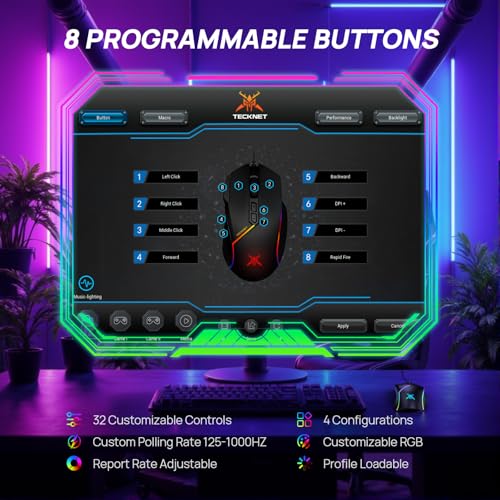
TECKNET Wired Gaming Mouse 12800 DPI 8 Buttons 13 RGB Backlit Optical Mouse | Programmable Control, Ergonomic Design, Custom Software, Precision Sensor for Laptop, PC and Gaming Setup



As an Amazon Associate we earn from qualifying purchases. Product prices and availability are accurate as of the date/time indicated.
| Model | Key point from title | Price tier | Best for |
|---|---|---|---|
| Razer Basilisk V3 | Wired, 26K DPI optical, 11 buttons, tilt wheel | Mid-range | Nearest G502 layout |
| Razer Basilisk V3 Pro | Wireless, 30K sensor, 11 buttons, 150-hour battery | Premium | Cord-free all-rounder |
| Redragon M908 Impact | 12 side buttons, 18 macros, wired optical | Budget | MMO and macro play |
| Redragon M801 | 9 programmable buttons, fire button, 16000 DPI | Budget | Cheap entry to macros |
| ENHANCE Theorem 2 | 13 side buttons, 5 profiles, 6 DPI settings | Budget | Most buttons for the money |
| Redragon M921 | Wired MMO, 12400 DPI, remappable keys | Budget | Alternate Redragon MMO shape |
| SOLAKAKA SM809 Pro | 9 side buttons, 24000 DPI, 16 macros | Mid-range | Higher DPI MMO option |
| TECKNET wired mouse | 8 buttons, 12800 DPI, 13 RGB modes | Budget | Basic wired replacement |
Eight mice, one by one
Razer Basilisk V3
Razer’s wired Basilisk V3 combines a 26K DPI optical sensor, 11 programmable buttons, a HyperScroll tilt wheel, Chroma RGB and an ergonomic shape. Eleven buttons and a tilt wheel put it on the same feature list as the G502, so it’s the easiest switch for anyone moving over. The title doesn’t state weight or grip size, so check the listing against your hand. Software-based button remapping is typical for this class; confirm it on the product page. The wheel’s tilt function and the side buttons are the controls you’d most likely map to the actions you already use on a G502. Wired mode also removes any worry about battery wear over the years.
Pros
- 11 buttons and a tilt wheel
- Wired, so no battery to manage
Cons
- Weight not in the title
- Right-handed ergonomic shape
Who it’s for: G502 owners wanting a similar control set from another brand.
Razer Basilisk V3 Pro
The Pro is the wireless step: Gen-3 optical switches, a Focus Pro 30K optical sensor, 11 programmable buttons, a tilt wheel and a stated 150-hour battery. That battery figure is the seller’s, so real life varies with lighting and use. It’s the only wireless mouse here and the priciest. Charge it with a compliant cable and a proper USB port or charger; don’t use a damaged cord. The title doesn’t mention wired mode, so confirm how it connects. Because it relies on a battery, expect the cell to lose capacity over years of use, as with any rechargeable device.
Pros
- Wireless with a long stated battery life
- 30K sensor, 11 buttons
Cons
- Highest price tier
- Battery claim is the maker’s, not ours
Who it’s for: people who want a cord-free mouse with G502-style controls.
ENHANCE Theorem 2
This MMO mouse lists 13 programmable side buttons, six DPI settings, five gaming profiles, a quick fire button and an ergonomic wired design. Thirteen thumb buttons is the most in the group, which helps in MMOs and productivity macros. It’s a different layout from the G502’s thumb cluster, so don’t expect the same feel. Profile switching is useful, but check what the software supports before counting on every macro. The wired connection keeps latency simple, and the ergonomic shape suggests a palm-style grip, though the listing should confirm hand size.
Pros
- 13 side buttons, 5 profiles
- Low price tier
Cons
- Thumb grid is easy to mis-press at first
- Software support unclear from the title
Who it’s for: MMO and macro-heavy players on a budget.
Redragon M908 Impact
The M908 gives you 12 side buttons, an optical wired design, up to 12,400 DPI, 18 programmable macro shortcuts and a comfort grip in white. The white finish is unusual for this class. The 12-button grid mirrors the standard MMO layout. It isn’t a thumb-cluster-plus-wheel mouse like the G502, so competitive FPS players may prefer something simpler. Weight is not in the title, and neither is the size of the thumb rest, so read buyer comments about hand fit. Left-handed players should check carefully, since this layout is described as ergonomic and is usually right-handed.
Pros
- 12 side buttons and 18 macros
- White colour option
Cons
- MMO layout, not G502-style
- Weight unknown from the title
Who it’s for: MMO players who want a white setup at a budget price.
Redragon M921
The M921 is a wired RGB MMO mouse with 12400 DPI, remappable keys, custom macro keybinds and an ergonomic grip. It shares its DPI figure with the M908, so the two are close cousins in specification, and the title doesn’t give a button count. Treat it as an alternate shape rather than a different class, and expect similar day-to-day behavior to the M908 if the sensors match. Check photos of the thumb area to see how many buttons there are and how they are arranged. Because it is so close to the M908 in numbers, price and photos are the real tie-breakers.
Pros
- Remappable keys and macros
- Budget-friendly
Cons
- Button count absent from the title
- Near-duplicate of the M908 in specs
Who it’s for: shoppers comparing Redragon MMO shapes who prefer a different look.
SOLAKAKA SM809 Pro
SOLAKAKA’s SM809 Pro lists nine side buttons, 24000 DPI, RGB lighting and 16 programmable macros as an MMO mouse in black. The DPI number is high, but DPI past a few thousand rarely matters for aiming; the layout and shape do. Nine side buttons give a smaller grid than the Redragon M908, which some hands find easier. Brand support is less established, so read the warranty terms and the seller’s return policy. With 16 macros on tap, it can store a lot of actions, though only the software will show how easily you can assign them.
Pros
- 16 macros, 9 side buttons
- Very high stated DPI
Cons
- Lesser-known brand
- Higher price than similar Redragon mice
Who it’s for: players who want a smaller MMO grid and are willing to pay slightly more.
Redragon M801
The M801 offers nine programmable buttons, macro recording, 16000 DPI and a dedicated fire button on a wired RGB MMO design. It’s a simpler model in a cheap price tier. A fire button can be useful for repeated actions, and nine buttons are manageable for new macro users. Shape and weight aren’t in the title, so look at buyer photos and reviews. It’s also a simpler design than the newer shapes here, which can mean a more basic feel.
Pros
- Fire button and macro recording
- Low price tier
Cons
- Basic MMO layout
- Shape and weight not stated
Who it’s for: beginners trying macros for the first time.
TECKNET wired gaming mouse
The cheapest mouse here lists 12800 DPI, eight buttons, 13 RGB modes, an optical sensor and an ergonomic shape. It’s a basic replacement rather than a G502 rival, and it has the fewest buttons in the set. If your G502 has simply died and you need a stopgap, it works, and it asks for little setup beyond plugging in. For anyone who relies on many programmable controls, it’s a step down. Eight buttons are plenty for ordinary shooters and office use, and the low price makes a spare easy to justify.
Pros
- Lowest price tier
- Wired and simple
Cons
- Fewest buttons here
- Not a G502-class feature set
Who it’s for: stopgap buyers who need any wired gaming mouse quickly.
How we picked these
We took the gaming mice that Amazon returns for this keyword and compared what each title states about buttons, sensor class and connection. Nobody on the team used or measured these units. Our editorial team works from published specifications, manufacturer documentation and buyer reviews, so weight, shape and software details not in the title are marked as items to check. Where two listings looked nearly identical, we say so instead of padding the list. Prices appear as relative tiers because live prices change.
What matters when replacing a G502
Thumb cluster versus MMO grid
The G502 puts a few buttons under the thumb. MMO mice such as the Redragon and ENHANCE models put 9 to 13 buttons in a grid that you press by sliding your thumb. That suits macros, but fast shooters can mis-press, so FPS players should lean toward the Basilisk. Our G502 HERO review covers what you’re leaving behind.
Wired or wireless
Wired mice never need charging and are free from pairing glitches. A wireless mouse such as the Basilisk V3 Pro frees the desk but adds a battery to maintain. Use compliant cables and chargers, and avoid damaged cords. A wireless dongle also takes up a USB port, so check how many your desk setup has free.
DPI, sensors and honest numbers
Headline DPI is mostly a marketing number. Worked example: at 1,600 DPI, moving the mouse one inch registers 1,600 counts; on a 2,560-pixel-wide screen at a 1:1 setting, that takes about 1.6 inches to cross. Most people play between 400 and 3,200 DPI, so a 24,000 maximum adds little. Compare sensor class and consistency in reviews instead.
Weight and shape fit
The G502 HERO has adjustable weights per Logitech’s documentation, and none of these titles mention any. Measure from your wrist crease to the tip of your middle finger; a hand around 18 to 19 cm usually suits a full-size shape, though this is a rough guide. If the listing gives no dimensions, check the reviews for grip type. A palm grip rests the whole hand on the shell, a claw grip arches the fingers, and a fingertip grip only touches with the finger pads; larger shells favor the first.
Software and profiles
Macros and remapping need software. Look for onboard profile memory so settings persist on another PC. If the listing doesn’t say, assume you’ll need the driver installed. Download drivers only from the manufacturer’s own website, and be wary of third-party driver sites.
Scroll wheel and extra controls
The G502 is known for a heavily used wheel. Tilt wheels on both Razer models give you two extra inputs, while the MMO mice rely on the side grid instead. If you scroll through long documents, check whether a listing mentions a free-spinning or notched wheel, since the titles here don’t.
Mistakes buyers make
- Chasing DPI. A larger number doesn’t improve aim; shape and consistency do.
- Assuming MMO means G502-like. The layouts differ, and the learning curve is real, so give a thumb grid time.
- Ignoring weight. Check the listing; none of the titles list it, and a heavy mouse tires the wrist over long sessions.
- Counting buttons you can’t reach. More thumb buttons only help if your thumb can find them without moving your grip.
- Forgetting the software. Macros need a driver on Windows; check compatibility first.
- Skipping the return policy. Hand fit is personal, so buy somewhere that accepts returns if the shape disappoints.
- Trusting battery claims. A stated hours figure assumes certain settings; real life will be lower with bright lighting.
Verdict
The Razer Basilisk V3 is the best overall G502 alternative here, the Basilisk V3 Pro is the wireless upgrade, and the ENHANCE Theorem 2 is the budget pick for macro play. The TECKNET is a stopgap, not a rival. If you’d rather stay with the brand, see Logitech mice under $100 or the G403 Hero review before deciding. Whichever you pick, set it to a moderate DPI first and give your hand a week to adjust before judging the shape.
Frequently asked questions
What is the closest mouse to the Logitech G502 in this list?
The Razer Basilisk V3 is the nearest match. Its title lists 11 programmable buttons, a tilt wheel and an ergonomic wired shape, which maps to the G502’s thumb controls and programmable wheel. The Basilisk V3 Pro adds wireless. The Redragon and ENHANCE models are MMO mice with side grids, so they feel different.
Are MMO mice good for FPS games?
They can be, but the thumb grid is easy to hit by accident when you grip hard. If you play fast shooters, a mouse with fewer, well-placed buttons usually feels better. Many MMO players use macros and profiles to get value from the extra buttons; check that the software supports what you need before you buy.
Is 24,000 DPI better than 12,400 DPI?
Not for most players. DPI describes how many counts the sensor reports per inch, and most gamers use 400 to 3,200. Past that, the number mostly adds marketing value. Compare sensor class, tracking consistency in reviews, and the shape of the mouse, which affects aiming far more than a very high maximum.
Do any of these have adjustable weights like the G502?
None of the titles mention weight adjustment. The Logitech G502 HERO is documented as having adjustable weights, but that does not carry over to the alternatives here. Check each listing for weight in grams and any included weights before buying if heft matters to you. Without adjustable weights, you can only change feel by changing mice.
Should I buy wireless or wired?
Wired is simpler, cheaper and never needs charging. Wireless, like the Basilisk V3 Pro, clears the desk and suits laptops, but you need to keep the battery topped up. Use the supplied or a compliant cable and charger, and stop using it if the cable or battery shows damage such as swelling or heat.