
As an Amazon Associate we earn from qualifying purchases at no extra cost to you.


When people shop for a USB-C dock or charging station, the wattage number on the box does most of the persuading — and most of the misleading. A “1000W” station sounds twice as capable as a “380W” block, but neither number tells you what actually gets delivered to your laptop. Shoppers routinely overpay for headline wattage they can’t use, or underbuy a dock that throttles their MacBook the moment a second device plugs in. Others confuse a pure charging station with a true docking station that carries video and data, then wonder why their monitor won’t connect. This guide breaks down what wattage figures really mean, how to match them to your devices, and which specs separate a $25 charger block from a $90-plus dock.
Our Top Picks
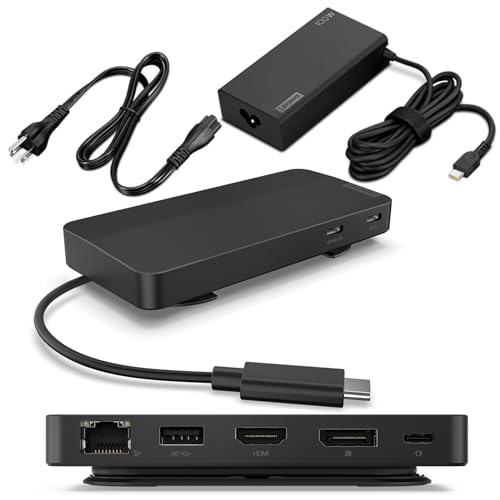 Lenovo USB-C Dual Display Travel Dock w/ 100W0.79" x 2.17"4.72 x 2.6 x 0.79 inches1.44 PoundsCheck on Amazon


Top 3 picks at a glance
Decide These 3 Things First
Before comparing wattage figures, answer three questions, because they eliminate half the products on the market.
1. Charging station or true dock? A charging station (like a multi-port charger block) delivers power only — no video output, no data transfer to a computer, no Ethernet. A docking station (like the Lenovo travel dock) carries power plus DisplayPort video, USB data, and often Ethernet through a single USB-C connection. If you want to plug in one cable and drive two 4K monitors, you need a dock, and you need at least 100W of power delivery passthrough for most laptops.
2. What’s your hungriest device? Laptops range enormously: many Ultrabooks (Dell XPS 13, MacBook Air) draw 45–65W; mainstream 14–16-inch laptops (MacBook Pro 14, Lenovo ThinkPad) want 65–100W; gaming laptops and 16-inch workstation machines often need 140–180W or more and may not charge properly over USB-C at all. Your dock’s single-port maximum — not its total wattage — is what matters here.
3. How many devices charge simultaneously? A realistic count, not a fantasy one. Phone (20–30W), tablet (30–45W), earbuds (5W), watch (5W), laptop (65–100W). Most households never actually pull more than 150–200W at once, which is why a well-engineered 245W GaN station covers nearly every real scenario.
Single-Port Wattage Matters More Than Total Wattage
This is the single most misunderstood spec in the category. Total wattage is the budget shared across all ports; power delivery (PD) per port is what any one device can receive.
A 380W charger block advertising “dual 100W PD” can feed two laptops at full speed and still have 180W left for phones and tablets. A 1000W 12-port station with dual 100W PD outputs has a bigger number on the box, but if you own one 100W laptop, both units deliver the identical experience. Total capacity only pays off when you genuinely run three or more high-draw devices at once.
Look for these numbers specifically:
– 100W PD on at least one port — the floor for modern laptop charging. Anything advertising a laptop-charging dock at 60W maximum will leave a MacBook Pro or ThinkPad draining during heavy use.
– 140W PD is the new premium benchmark, matching Apple’s 2026-era fast charging on 16-inch laptops. It’s worth paying for only if your laptop explicitly supports it.
– Per-port renegotiation — when you unplug a phone, a good charger redistributes power so the laptop port jumps back to full output within a second or two. Cheap units lock at reduced wattage until everything is unplugged.
Check the fine print for port combinations: many multi-port chargers advertise 100W total but drop each USB-C port to 45W or 65W when two or more ports are active. That’s the spec trap that causes “my laptop charges slowly at my desk” complaints.
Size, Weight, and Desk Footprint
Charging blocks and docks vary more in physical size than buyers expect.
– Compact GaN charger blocks run roughly 3.5–4.5 inches wide, 2.5–3.5 inches deep, and weigh 8–16 ounces. A 245W GaN unit with ten ports typically measures around 4 × 3 × 1.5 inches and under a pound — GaN (gallium nitride) components allow roughly 40–50% smaller designs than old silicon chargers of equal output.
– Multi-port charging stations with built-in bays run 5–7 inches wide and 1–2 pounds, and most include short captive cables or slots for your own cords.
– True docking stations like the Lenovo travel dock measure roughly 5–6 inches across and 4–8 ounces, designed for portability.
If the unit lives behind a desk or in a drawer, size barely matters. If it sits on the desktop, prioritize units under about 5 inches wide with cable-management slots, and check whether the AC plug is a bulky wall wart or a detachable power cord — the latter mounts far more cleanly.
Build Material and Thermal Construction
Wattage creates heat; construction determines whether that heat is managed or merely tolerated.
Housing: Look for a polycarbonate or PC-ABS shell with a matte, non-slip finish — expect weight of at least 8 ounces for a 200W-plus unit, since internal heatsink mass is a good proxy for thermal engineering. Featherweight bricks advertising high wattage usually skimp on heatsinking.
Internals: GaN (preferably GaN II or GaN III) is the meaningful material upgrade — it runs cooler, switches more efficiently, and enables the compact sizes mentioned above. Non-GaN multi-port chargers over 100W are noticeably bulkier and run hotter under sustained laptop loads.
Thermal behavior: Under a full 100W laptop load, a well-built unit’s case should stay comfortable to hold — warm, not painful. Sustained surface temperatures above roughly 130°F signal undersized heat sinking. You can’t measure this from a product page, so rely on warranty length and brand track record as proxies, and read reviews specifically mentioning heat during laptop charging, not just phone charging.
Plug quality: Foldable or replaceable AC plugs, reinforced strain relief where the captive cable exits, and USB-C ports rated for 10,000-plus insertion cycles distinguish the better units.
Ports, Protocols, and Real-World Performance
Wattage is worthless without the right port mix and protocols.
Port count by use case:
– 2–4 devices: a 4-port, 240–380W block is ideal
– 5–8 devices (family desk, shared charging drawer): 8–10 ports, 245–500W
– Full family command center (10+ devices): 12-port, 500W-plus stations make sense
Protocols to verify: USB Power Delivery 3.1 (enables 100–240W), PPS (Programmable Power Supply, needed for Samsung Super Fast Charging at 45W), and QC 3.0/4+ legacy support for older Android devices. Every USB-C port should be PD-capable; avoid stations where only one of several ports supports high wattage without it being clearly labeled.
Dock-specific performance: For a true dock like the Lenovo travel dock, verify video bandwidth — dual 4K displays at 60Hz requires DisplayPort Alt Mode 1.4 or a DisplayLink chip, and the dock’s host cable should be USB-C 3.2 Gen 2 (10Gbps) or better so data doesn’t bottleneck. Confirm the integrated cable is long enough for your setup: 2–2.5 feet suits laptop stands; under 1.5 feet is frustrating on a full-size desk. Confirm 100W passthrough so your laptop charges while everything else runs.
Price Tiers: What Each Dollar Buys
Budget ($20–35): Expect 240–380W GaN charger blocks with 4–10 ports and one or two 100W PD outputs. At this tier, units in the $25–30 range — like the 245W ten-port and 380W four-cable models — deliver surprisingly complete hardware. Trade-offs: shorter warranties (often 12–18 months), occasional power-redistribution quirks, and no video/data support.
Mid-tier ($35–70): 500–1000W multi-port stations and entry docks. You’re paying for more ports, better port-labeling and per-port wattage transparency, and sturdier housings. The $50 twelve-port 1000W station fits here — worthwhile only if you’ll genuinely populate 8-plus ports.
Premium ($70–130+): True docking stations with video, data, and Ethernet. The Lenovo dual-display travel dock at roughly $93 is representative: 100W adapter, seven ports, dual 4K output, integrated cable. You’re buying one-cable convenience and monitor support, not raw wattage — a $30 block out-charges it, but can’t drive a display.
The honest takeaway: if you only need charging, the $25–35 tier covers 90% of buyers. Step up only when you need video or genuinely simultaneous high-draw charging.
Warranty and Support
– Budget brands: 12–24 months is standard; 24 months is the sign of a manufacturer confident in its thermal design.
– Established accessory brands: 18 months to 2 years, plus responsive replacement rather than repair-only policies.
– Dock makers: 1–3 years; Lenovo and similar OEMs sit at the longer end.
Warranty length is a surprisingly good proxy for build quality in this category, because heat-related failures show up in the first year if the design is poor. Also check that the company documents per-port wattage clearly — vague specs (“smart charging for all ports”) usually mean real outputs are lower than advertised.
Delivery and Setup
These are small, light products — a charger block ships at 1–2 pounds boxed and docks under 3 pounds — so virtually every option arrives in 2–5 days domestically with no assembly. Setup should take under five minutes: plug into a wall outlet (verify the outlet circuit isn’t already heavily loaded if you’re pulling 200W-plus continuously), connect devices, and confirm your laptop shows “charging” or “fast charging.” If a dock requires driver installation (some DisplayLink-based models do), budget 10 extra minutes and confirm driver support for your operating system before buying.
Spec Checklist
| Spec | Budget ($20–35) | Mid ($35–70) | Premium ($70–130+) |
|---|---|---|---|
| Total wattage | 240–380W | 500–1000W | 90–180W (dock passthrough) |
| Max single-port PD | 100W | 100–140W | 100W |
| Ports | 4–10 | 8–12 | 5–7 plus video/Ethernet |
| Video output | None | Rare | Dual 4K60 |
| GaN internals | Usually | Yes | Varies |
| PPS support | Sometimes | Yes | Sometimes |
| Weight | 8–16 oz | 1–2 lb | 4–8 oz |
| Warranty | 12–24 mo | 18–24 mo | 1–3 yr |
| Best for | Phone/laptop charging | Family charging hub | One-cable desk setup |
Red Flags
– Total wattage without per-port breakdown. If a listing doesn’t state what each port delivers in every combination, assume the worst.
– “1000W” with no PD protocol listed. Raw amperage without USB PD 3.0/3.1 or PPS certification can’t fast-charge modern devices properly.
– Laptop charging claimed below 60W per port. Insufficient for most current laptops under load.
– No named safety certifications. Look for UL, ETL, or FCC listing; uncertified high-wattage chargers are a genuine fire risk.
– Weight far below the wattage class. A “380W” brick weighing 5 ounces almost certainly lacks adequate heatsinking.
– Captive cables thinner than 3.5mm diameter on 100W outputs — they may not carry the current safely at full load.
– Warranty under 12 months on any charger above 200W.
FAQ
Is a 1000W charging station better than a 380W one?
Not for most people. Total wattage only matters if you simultaneously charge multiple high-draw devices. A single 100W laptop, phone, and tablet pull roughly 150W combined — well within a 380W unit. The 1000W station earns its price only in a household genuinely running 8-plus devices at once.
Will a 100W dock charge a gaming laptop?
Sometimes, slowly. Ultrabooks and most 14-inch machines charge fine at 100W, but many gaming laptops need 140–180W or a proprietary barrel charger. At 100W they’ll charge only while off or idle, and may still lose charge under full GPU load. Check your laptop’s included adapter wattage before relying on any dock.
What’s the difference between a charger block and a docking station?
A charger block delivers power only. A docking station passes power plus video, USB data, and often Ethernet through one USB-C cable to your computer. If you connect monitors or peripherals, you need a dock; if you only charge devices, a $25–35 block does the job better and cheaper.
Do I need GaN, or is it just marketing?
It’s a real engineering advantage, not a gimmick. GaN chargers run roughly 40–50% smaller, waste less energy as heat, and handle high wattage more gracefully than silicon designs. Above 100W total output, we’d treat GaN as effectively mandatory — non-GaN units at that level are bulky, hot, and dated.









