
Walk into any electronics aisle — or scroll through a marketplace listing for thirty seconds — and you’ll see the same claim over and over: 15W fast wireless charging. The wattage number is stamped on the box in huge type, and most buyers stop reading right there. That’s the first mistake. The second is assuming that a 15W charger automatically charges a 15W-capable phone at 15W, when in practice alignment — the match between what the charger puts out, what the phone accepts, and what the wall adapter actually delivers — determines most of the real-world speed.
The third mistake is spending on wattage you can’t use. A around $39 multi-port charging station with 100W of total output is genuinely useful for a household with an iPad, a phone, earbuds, and a smartwatch plugged in at once. But if you’re charging a single phone that maxes out at 7.5W, that headroom buys you nothing. Conversely, the cheapest option on the shelf can be a false economy: some sub-$10 pads advertise 15W but ship without a wall adapter, or include one that can’t actually sustain fast wireless output, leaving you charging at half speed and wondering why.
As an Amazon Associate we earn from qualifying purchases at no extra cost to you.



This guide breaks down what wattage alignment actually means, how to match a charger to your specific phone, and which physical and construction details separate a charger you’ll use daily from one that ends up in a drawer. The examples below — from a around $15 basic pad to a around $39 desktop hub — illustrate the range, but the buying logic applies to any brand.
Our Top Picks
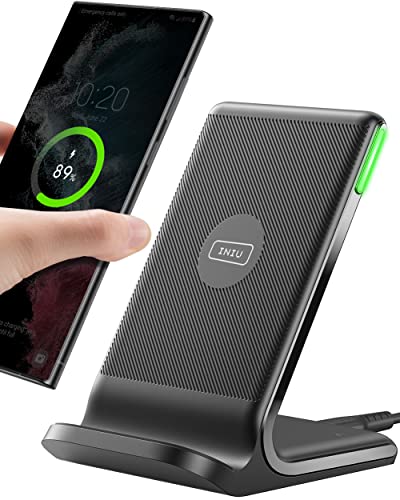

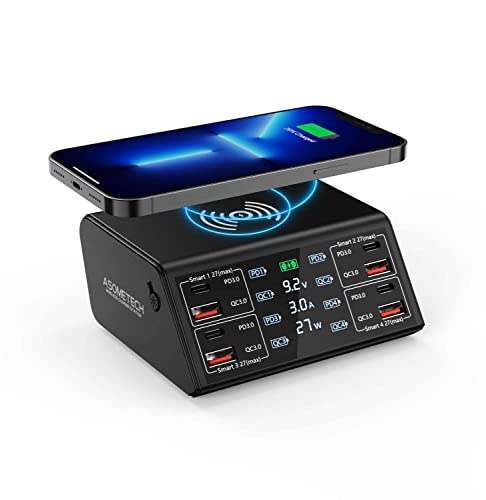

Top 3 picks at a glance
Decide These 3 Things First
1. Your phone’s actual wireless input ceiling. This is the single most important number, and it’s not on the charger’s box — it’s in your phone’s specifications. iPhones currently cap wireless input at roughly 7.5W on standard Qi pads and around 15W on MagSafe-style magnetic chargers. Most flagship Android phones accept 15W via Qi, while some Samsung and Chinese-brand models support 15W+ proprietary protocols. Buying a 15W pad for a phone that tops out at 7.5W doesn’t damage anything, but you’re paying for speed you’ll never see.
2. Whether you need magnetic alignment. If your phone supports magnetic wireless charging, a magnetic charger (like the Bohuma-style pad in the around $9 range) physically snaps the phone’s charging coil into position. That matters more than people expect, because even a few millimeters of coil misalignment can drop effective wattage and add heat. Non-magnetic pads rely on you centering the phone by eye.
3. How many devices you charge at once. One phone? A single pad between $10 and $25 is the right category. Phone plus earbuds nightly? Look at dual-coil pads or a stand with a second output. A whole family of devices — phones, tablets, earbuds — points you toward a multi-port station, where the “100W” figure describes total shared output across eight ports plus a wireless pad, not what any single phone receives.
Match the Wattage to Your Phone, Not the Box
Wireless charging loses energy as heat — typically 30 to 40 percent of the input never reaches the battery — so a “15W” pad drawing from a 15W wall adapter often delivers an effective 9-11W to the phone, and less once thermal throttling kicks in. Here’s how alignment works in practice:
iPhone users: On a standard Qi pad, iPhones negotiate roughly 7.5W regardless of whether the pad claims 10W or 15W. To get the full ~15W, you need a charger certified for magnetic fast charging, which also requires a USB-C power adapter of at least 20W (30W is a safer ceiling for phone-plus-accessory setups). A around $15 pad rated at 15W will not deliver 15W to an iPhone unless it meets the magnetic protocol and ships with — or is paired with — a sufficient wall brick. Check this before buying; many budget pads include only a USB-A cable.
Android users: Most recent Samsung, Google Pixel, and OnePlus flagships accept 15W via Qi or a proprietary variant (Samsung’s Fast Wireless Charging 2.0, for example). Pixel phones historically capped at higher effective speeds only on Google’s own Pixel Stand. Match the protocol name on the charger’s spec sheet to your phone’s supported list — generic “15W Qi” is fine for most, but proprietary protocols need explicit compatibility.
Older or budget phones: Anything older than about 2019 likely accepts 5W or 7.5W wirelessly. A basic $10-16 pad is genuinely all you need; there is no performance benefit to anything more expensive.
Verify the Wall Adapter Is Included and Sufficient
This is where budget listings quietly cut corners. Wireless charging is only as strong as the weakest link in the chain: wall adapter → cable → charging pad → phone.
- Minimum adapter ratings: 15W wireless charging generally demands an 18W-20W+ USB-C Power Delivery adapter. A 5W/1-amp old iPhone cube will throttle any modern pad to a trickle.
- Cable matters: USB-C to USB-C with PD support is the safest choice. Older USB-A to micro-USB or USB-A to USB-C cables often can’t carry enough current.
- Check the listing: The around $31 KPON under-desk charger, for instance, explicitly includes a Quick Charge adapter — that’s a genuine value signal. Many pads at the $10-15 price point list “adapter not included” in fine print.
- For multi-port stations: Understand shared output. An 8-port station advertising 100W total divides that across active ports. If a phone, tablet, and laptop draw simultaneously, the wireless pad’s slice shrinks. Look for stations that publish per-port maximums, such as 4x Quick Charge 3.0 ports at 18W each plus PD ports at 30W+.
Coil Alignment and Physical Design
Even perfect wattage matching fails if the coils don’t line up. Wireless charging works by induction between two coils, and the sweet spot is small — typically a coil diameter of 20-40mm on the pad against a similar coil in the phone.
- Magnetic chargers solve this automatically for compatible phones; the magnets center the coils every time. This is the biggest practical advantage of the MagSafe-style category, and why a around $9 magnetic pad can outperform a misaligned generic 15W pad in real use.
- Flat pads should have a visible coil ring or printed alignment target. Rubbery or silicone top surfaces help keep phones from sliding; glossy plastic tops let a phone drift half an inch overnight.
- Stands hold the phone vertically, which usually self-centers it and lets you read notifications while charging. Look for a charging surface angle of 55-65 degrees for desk visibility.
- Under-desk and furniture-integrated models like the KPON hide the coil beneath a tabletop up to about 30mm thick — that thickness limit is a hard spec to check against your furniture. Thicker wood, metal, or tables with cross-bracing will block the field entirely. These typically output 10-15W through the surface and include a QC adapter because the installation demands it.
Heat Management and Construction
Heat is the enemy of both charging speed and battery longevity. When a pad gets too warm, it throttles wattage — often dropping from 15W to 10W or lower mid-charge. Construction details that matter:
- Venting: Look for ventilation slots or perforations on the base. Sealed plastic units trap heat.
- Material: Silicone or fabric-covered tops dissipate heat better than thick glass or metal finishes. Weight is a rough proxy — a 15W pad under 3 ounces is usually mostly hollow plastic, while better-built units run 4-8 ounces.
- Built-in cooling behavior: Well-designed chargers reduce power automatically when temperatures climb; cheaper ones simply run hot. Reviewers’ thermal photos and “does it get hot” mentions in user reviews are worth reading.
- Non-slip base: A silicone ring or feet on the bottom prevents the pad itself from sliding off nightstands — a small thing you’ll appreciate daily.
Safety Certifications and Extras
Look for Qi certification from the Wireless Power Consortium, plus FCC and CE markings on the listing. Foreign-object detection (FOD) is essential — it stops power transfer if keys, coins, or a credit card sit on the pad. An LED indicator is standard across the category, but check whether it dims or shuts off; a bright blue light at 2 a.m. is a common complaint on otherwise good pads. Some units offer a dimmed or timed mode, which is worth a dollar or two of price premium.
Price Tiers: What Each Level Buys You
Budget ($8-20): Single-device pads, 10-15W rated output, sometimes magnetic. Expect to possibly supply your own wall adapter. The INIU pad at around $15 is typical: a straightforward 15W pad with LED indicator. This tier is correct for one-phone users whose phones accept 7.5-15W.
Mid-tier ($20-40): Included adapters, magnetic certification, under-desk or stand form factors, dual-device support. The KPON at around $31 and the ASOMETECH station at around $39 sit at the top of this band and bottom of the next, adding installation flexibility or multi-device capacity.
Premium ($40-100+): Three-in-one folding travel chargers, 100W+ GaN desktop hubs with LCD readouts, and certified magnetic stands charging phone, watch, and earbuds simultaneously. Buy here only if you genuinely charge multiple devices nightly or travel frequently.
Spec Checklist
| Spec | Budget ($8-20) | Mid ($20-45) | Premium ($45-100+) |
|---|---|---|---|
| Rated output | 10-15W Qi | 15W, magnetic or under-desk | 15W per device, multi-coil |
| Wall adapter included | Sometimes; verify | Usually (18W+ QC/PD) | Yes, typically 30W+ PD |
| Devices charged | 1 | 1-2 (or 8+ ports on hubs) | 3 (phone/watch/earbuds) |
| Mounting | Flat pad | Stand, under-desk, or hub | Foldable travel or charging stand |
| Heat management | Basic venting | Thermal throttling protection | Active design + per-coil temp control |
| LED dimming | Rare | Sometimes | Usually |
| Warranty | 12-18 months | 18-24 months | 24-36 months |
Red Flags
- “15W” with no protocol details. If a listing doesn’t name Qi, magnetic fast charging, or your phone’s brand protocol, assume 5-7.5W real-world output.
- No wall adapter at a budget price. Add $10-15 for a 20W PD adapter and the “deal” often costs more than a complete competitor.
- Claims above 15W for generic Qi. Consumer phone wireless charging tops out around 15W for mainstream iPhones and most Android flagships; 30W or 45W wireless claims apply only to specific proprietary phone-and-charger pairings.
- No safety certifications listed. No FCC/CE/Qi mention means skip it.
- Under-desk chargers without a thickness spec. If the listing doesn’t state a maximum surface thickness (typically 20-35mm), it won’t work through your furniture.
- Fake review volume. A few hundred detailed reviews beat 20,000 one-line five-star ratings posted within a month.
FAQ
Does a higher-wattage charger damage my phone?
No. Wireless charging is negotiated: the phone requests the wattage it accepts, and the pad complies. A 15W pad feeding a 7.5W phone simply delivers 7.5W. The only real risk is heat — a poorly built high-wattage pad running hot for hours can accelerate long-term battery wear, which is why ventilation and certification matter more than raw wattage.
Why is my “15W” charger charging so slowly?
Three usual culprits: the wall adapter is underpowered (you need 18-20W+ for full speed), the phone isn’t aligned with the coil (a few millimeters off can halve the output), or the pad is throttling due to heat or a thick phone case. Cases over about 3mm thick, or any case with metal plates or magnets not designed for wireless charging, will block or slow the charge.
Is a magnetic charger worth it if I don’t have a magnetic phone?
No — the magnets only help if your phone or its case has the matching magnet array. On a non-magnetic phone, a magnetic pad works as an ordinary pad, and the magnets add nothing except a metal ring that can interfere with case fit. Buy magnetic only if your phone supports it natively or you use a magnetic-compatible case.
Do multi-port charging stations divide the wattage?
Yes. A 100W station’s output is shared across whatever is plugged in. Charging one phone may get the full per-port maximum (commonly 18W-30W on PD ports); charging a phone, tablet, and laptop simultaneously splits the total. The built-in wireless pad on such stations typically gets 10-15W reserved when in use — check the per-port ratings in the spec sheet rather than trusting the headline number.
The bottom line: match the charger’s protocol to your phone’s ceiling, confirm the wall adapter is included and adequate, and only then compare form factors and extras. Get those two alignment basics right and even a $16 pad will outperform a badly matched $40 one.









