The best one handed gaming keyboard depends mostly on how many keys you really press, and the ten keypads below split cleanly: 35-key budget models, one 39-key and one 42-key option, a 32-key Razer, and a four-in-one mobile combo. Seven of the ten are no-brand style listings with nearly identical specs, so the gaps come down to wired versus wireless, wrist rest and key feel. The Redragon K585 looks like the practical pick on paper because it lists 42 keys, onboard profiles and a detachable rest, while the Razer Tartarus V2 is the premium name. Everything here comes from titles, so check the listing for details.
Our Top Picks
Top 3 picks at a glance
Quick look at all ten keypads
As an Amazon Associate we earn from qualifying purchases at no extra cost to you.





| Model | Key point from title | Price tier | Best for |
|---|---|---|---|
| GOWENIC | 39 keys, wired, wrist rest | Budget | Extra keys on a budget |
| Zunate | 35 keys, RGB, wired | Budget | Basic entry keypad |
| 2.4G Wireless (unbranded) | 35 keys, 2000mAh battery, Type C | Mid-range | Cable-free desks |
| EBTOOLS | 35 keys, RGB, USB | Budget | Gaming plus office |
| Sazao | 35 keys, wide palm rest | Budget | Comfort-focused trial |
| Vikye | 35 keys, silent, RGB | Budget | Quiet shared spaces |
| 4-in-1 Combo | Keypad, mouse converter, phone stand | Mid-range | Mobile gaming on PC |
| Razer Tartarus V2 | 32 keys, mecha-membrane, macros | Premium | MMO and macro players |
| Redragon K585 | 42 keys, 28 combo slots, USB pass-through | Mid-range | Heavy keybind users |
| RedThunder | 35 keys, portable mini | Budget | Travel and trial |
The ten keypads
GOWENIC 39-Key One Handed Gaming Keyboard
The listing names 39 keys, luminous backlighting, USB wired, mechanical switches and a wrist rest. Four more keys than the usual 35 is its main selling point. Switch type is not stated, so check the listing if key feel matters. The wrist rest is a plus for anyone planning sessions longer than an hour, and the extra keys can hold utility binds like push-to-talk or a screenshot shortcut.
- Pros: extra keys and a wrist rest at a budget tier.
- Cons: unfamiliar brand, with no software or switch detail in the title.
Who it’s for: someone who wants space for more binds without paying for a premium brand.
Zunate 35-Key RGB Gaming Keypad
Zunate offers 35 keys, RGB backlighting, USB wired and an ergonomic design. It is the standard layout in this set, so what separates it from rivals is price and build, not features. There is no word on a rest or software, so a separate gel pad may be worth budgeting for. Because it is so similar to its rivals, read buyer feedback on key wobble and cable length before deciding.
- Pros: a straightforward wired setup with lighting.
- Cons: little to distinguish it from others and no stated wrist rest.
Who it’s for: first-time keypad buyers who want a low-risk trial.
2.4G Wireless 35-Key One Handed Keyboard
This unbranded model combines 2.4G wireless, RGB lighting, 35 keys, a Type C port and a 2000mAh rechargeable battery. Runtime is not stated. Wireless adds a battery to charge and a receiver to keep track of, so wired remains the default for competitive play. The Type C port is handy for charging from a laptop or power bank, and you should confirm the receiver storage and range on the page.
- Pros: no cable across the desk and rechargeable over Type C.
- Cons: battery life and latency are unknown from the title.
Who it’s for: players with cluttered desks who prize convenience.
EBTOOLS 35-Key Half Keyboard
EBTOOLS lists 35 keys, a colorful RGB backlight, a USB interface and an ergonomic keypad aimed at gaming and office work. The “half keyboard” phrasing suggests a layout that mirrors the left half of a normal board, which shortens the learning curve. People who already touch-type on the left side of a normal keyboard may adapt in days, not weeks, though that is a general expectation and not a promise.
- Pros: familiar half-board layout is easy to adopt.
- Cons: no stated rest and a generic spec sheet.
Who it’s for: users who also type and want a smaller second keypad.
Sazao 35-Key One Handed Keyboard
Sazao gives 35 keys, a three-color backlight and a wide palm rest, with a note about mobile games. The wide rest is the differentiator for long sessions. The mobile-games wording is vague, so confirm PC support in the listing. Of the 35-key pads, it is the one to look at first if your hand tires quickly, because the rest supports the heel of the palm.
- Pros: large palm rest helps comfort over long sessions.
- Cons: basic lighting and unclear platform notes.
Who it’s for: players who value wrist support.
Vikye 35-Key Silent One Handed Keyboard
Vikye lists 35 keys, RGB backlight, a silent keyboard design and USB wired connection for PC. “Silent” is a seller claim; actual noise depends on the switch and case. Check whether the case and switches really dampen sound, since silent in a listing can mean anything from soft keys to a quiet-click mechanism.
- Pros: quieter operation is aimed at shared rooms.
- Cons: noise claims are unverified and no rest is named.
Who it’s for: late-night players and shared-room users.
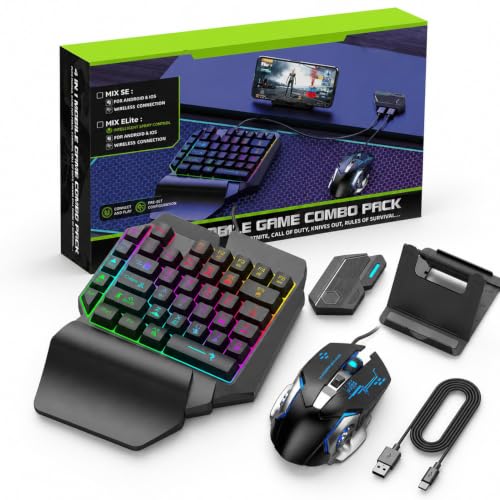
One Hand RGB Keyboard and Mouse Combo (4-in-1)
A half-hand keyboard set with a mouse converter, an adjustable phone stand and RGB lighting, aimed mainly at mobile gaming but also tagged for PC. This is a bundle, not a pure PC keypad, so treat it as a runner-up. Confirm what each of the four parts does and which devices it supports. A converter that maps a keypad and mouse to a phone or tablet is a different job from running a PC game, and the 4-in-1 name suggests the first.
- Pros: bundle with phone stand and converter.
- Cons: mixed purpose, with unclear PC key count and quality.
Who it’s for: mobile gamers wanting to try physical controls.
Razer Tartarus V2 Left-Handed Gaming Keypad
Razer lists a left-handed layout with 32 programmable keys, mecha-membrane switches, Chroma RGB and macros. It is the only keypad here whose title spells out its switch type and macro support. Fewer keys than the 35-key models, yet it is aimed at serious macro users. Check software requirements on the listing, and compare the layout against your hand size, since a keypad with a thumb pad and shaped keys suits some players more than a flat grid.
- Pros: programmable macros and a recognised brand.
- Cons: premium tier with fewer keys than several rivals.
Who it’s for: MMO players who already run many abilities and macros.
Redragon K585 42-Key Wired Keypad
Redragon packs in a 42-key tactical layout, 28 onboard combo slots, four profiles, a USB pass-through port, 16.8 million colors, a swap-ready socket and a detachable wrist rest. It is the most featureful of the ten by title. The “swap-ready socket” wording means you should read the listing to see which switches are compatible. The USB pass-through port can host a mouse receiver, but check power limits on the page.
- Pros: highest key count, onboard profiles and detachable rest.
- Cons: bigger footprint, and more to learn than a 35-key pad.
Who it’s for: heavy keybind users in MMOs or creative software.
RedThunder 35-Key Portable Mini Keypad
RedThunder lists 35 keys, RGB backlight and a portable mini design described as an ergonomic game controller. It sits at the budget tier and suits a trial run, particularly if you expect to travel with it. A very small pad leaves little room for the palm, so a separate rest may help. No rest, battery or software is named.
- Pros: compact and light enough for a bag.
- Cons: few listed features, so confirm build quality in reviews.
Who it’s for: buyers testing the format before spending more.
How we picked these
These ten listings come from a Creator Connections gaming campaign. Each is a one-handed keyboard or keypad, though the combo is a runner-up. We grouped near-identical budget listings together and noted which ones add a rest, wireless, or onboard profiles. Specs come from published listings, manufacturer documentation and buyer reviews. Nobody on the team used or measured these units. Price tiers are relative within this set, and phrases like “silent” or “professional” are seller wording, not independent results.
What to look for in a one handed gaming keyboard
Count your bindings first
Before you pick a model, list every action you press. Assume four movement keys, one jump, one crouch and 12 abilities. That is 18 physical keys. Add two or three modifier keys to reach layers, such as Shift and Ctrl, and you need about 21, so a 35-key pad leaves spare room. If you would rather give 24 abilities their own keys with no layers, the sum rises to about 30, still within 35. Past that, 39 or 42 keys start to earn their space. These figures are estimates based on those assumptions.
Key count and layout
The choice between 35, 39 and 42 keys comes down to thumb reach and desk space. Larger pads need more hand travel. Layout learning curve is real, and it usually takes a few weeks to build muscle memory. Full-size mechanical keyboards for competitive play remain an alternative if you do not want to retrain.
Wired or wireless
Wired is simpler, and nothing needs charging. Wireless saves cable clutter. Battery runtime is rarely stated in titles, so check the listing. Whichever you choose, keep the receiver or cable path short and away from interference sources.
Palm rest and comfort
A wide or detachable rest reduces wrist strain over long sessions. If the pad has no rest, a separate gel pad is a cheap fix. Take regular breaks regardless of the hardware.
Software and remapping
Check the listing for remapping tools and whether they work on your operating system. Games with in-game rebinding make this less important. Onboard profiles, as on the Redragon, store settings in the device, which helps if you move between machines.
Which games benefit
MMOs, strategy games and creative apps reward extra keys. Fast shooters benefit from the mouse-hand freedom but can feel cramped at first. If you are thinking about faster monitors to match, keep keypad use separate from that choice, as it does not change frame rate.
Mistakes buyers make
First, they buy by key count alone and ignore layout. Second, they assume every no-brand listing is the same product, then discover differences in rests and cables. Third, they trust “silent” without reading feedback. Fourth, they skip software checks and find that remapping does not work on their system. Fifth, they buy a mobile-oriented combo expecting a PC-first keypad. Sixth, they forget that desk space matters: a large pad plus a mouse needs room on both sides. Finally, they give up on the learning curve within a few days, when most layouts need weeks.
Verdict
For heavy keybind users, the Redragon K585 is the sensible starting point, and the Razer Tartarus V2 is the premium macro choice. If you want to try the format cheaply, any of the 35-key budget models will do, with Sazao for comfort and GOWENIC for the extra keys. Choose the wireless model only if you accept unknown battery life. Treat the 4-in-1 combo as a mobile extra. Before buying any of them, count your binds, confirm remapping and check the return window, because a keypad is a personal fit and some people return them after a week.
Related guides
- What Is The Best Budget Most Responsive Gaming Mouse Wired
- Low Latency Gaming Headphones Usb-C 2.4 Ghz Wireless
- Mechanical Gaming Keyboards Competitive Pc Gaming
Frequently asked questions
Are one handed gaming keyboards worth it?
They are worth it if your game uses many keybinds and you want your other hand on the mouse, as in MMOs, strategy titles and creative apps. For fast shooters, a keypad cuts the key count but adds a learning curve. Try it with a cheap model first, and expect a few weeks before it feels natural.
Should I choose 35 keys or 39 keys?
Count the actions you actually press. If you rely on a full movement cluster plus three or four ability rows, 35 keys can be tight, and 39 or 42 keys leave room for modifier layers. If you only need movement and a dozen abilities, 35 is plenty and the keypad stays smaller on a crowded desk.
Is a wireless one handed keyboard good for gaming?
A 2.4G wireless model removes a cable, but the battery needs charging and lag depends on the radio, which a listing title cannot prove. For competitive play, wired is the safer default. For casual or creative use, wireless is convenient. The listing here gives a 2000mAh battery but no runtime, so treat it as unknown.
Do I need software to remap keys?
Check before you buy. Some keypads, like the Razer and the Redragon listed here, point to programmable macros or onboard profiles, which usually involve software. Budget no-name models may offer little or no remapping. If your game lacks in-game rebinding, confirm that the keypad can send the keys you need.
Will a one handed keyboard work with my games?
Most keypads send standard keystrokes, so they work wherever the game accepts keyboard input. Problems arise when a game needs a particular key or key combination the keypad cannot send. Look at the number of keys, the layout and whether remapping exists, and check the listing for compatibility with your system.