The best mesh WiFi systems depend less on the largest advertised coverage number than on your home’s size, wall materials, wired-network options, internet plan, and number of busy devices.
| Home situation | Best-fit system class | Models worth considering | Why it fits |
|---|---|---|---|
| Apartment or small single-floor home, up to about 1,500 sq. ft. | Dual-band or compact tri-band WiFi 6/7, one or two nodes | Google Nest Wifi Pro, eero 6+, compact WiFi 7 systems | Simple setup, low equipment cost, and less wasted wireless capacity |
| Medium home, about 1,500–3,000 sq. ft., several rooms | Tri-band WiFi 6E or WiFi 7 | ASUS ZenWiFi ET12, eero Pro 6E, TP-Link Deco BE63 | More backhaul capacity and better performance across multiple rooms |
| Large or multi-story home, 3,000 sq. ft. or more | Tri-band or quad-band WiFi 7 with Ethernet backhaul | TP-Link Deco BE85, eero Max 7, Netgear Orbi 970 Series | Strong node-to-node links, high device capacity, and multi-gigabit ports |
| Thick brick, concrete, foil-backed insulation, or detached rooms | Fewer nodes connected by Ethernet, or a wired access-point system | Any suitable mesh system with Ethernet backhaul | Radio signals lose too much strength through dense construction |
| Gaming, home office, NAS, or multi-gigabit internet | WiFi 7 with 2.5Gbps or faster wired ports | TP-Link Deco BE85, eero Max 7, ASUS WiFi 7 mesh systems | Wired clients and backhaul avoid wireless congestion |
As an Amazon Associate we earn from qualifying purchases at no extra cost to you.



Our Top Picks


Top 3 picks at a glance
How to choose the right mesh WiFi system
1. Match the system to your floor plan, not just square footage
Coverage claims are measured in favorable conditions. A two-story, 2,400-square-foot wood-frame house may need fewer nodes than a 1,600-square-foot concrete apartment. Wireless signals also weaken through kitchens, bathrooms, ductwork, metal shelving, and appliances.
As a starting point, use one node for a small apartment, two nodes for a typical medium home, and three nodes for a large or multi-story property. More nodes are not automatically better: placing them too close together increases channel competition, while placing them too far apart creates a weak backhaul link.
Position the primary unit near the center of the usable home, not inside a cabinet or at the far end beside the modem. Put a second node in an open area roughly halfway toward the weak zone. If its connection to the main node is already poor, moving it closer usually improves the whole network more than adding another node at the edge.
2. Decide whether wireless or wired backhaul matters
Mesh nodes use a backhaul connection to communicate with one another. With wireless backhaul, some of the available radio capacity is used for both node-to-node traffic and your devices. A tri-band system can reserve a band for this job, but walls and interference still matter.
Ethernet backhaul is the most dependable option. Run Ethernet from the main router or network switch to each satellite, then let the mesh use its radios entirely for phones, computers, consoles, and smart-home devices. This is especially valuable for gaming PCs, workstations, NAS storage, and 4K streaming.
Check the ports before buying. A system with only gigabit Ethernet cannot deliver a full multi-gigabit internet plan to a wired computer. TP-Link Deco BE85, eero Max 7, and Netgear Orbi 970 Series are aimed at homes that need faster wired connections, while many mainstream systems are built around 1Gbps or 2.5Gbps ports.
3. Choose WiFi 6, WiFi 6E, or WiFi 7 by traffic level
- WiFi 6: Still suitable for ordinary broadband, streaming, video calls, smart-home devices, and most gaming. It is often the best value for smaller homes.
- WiFi 6E: Adds the 6GHz band, which can be cleaner than 5GHz but has shorter range and weaker wall penetration. It works best when clients are relatively close to the router or node.
- WiFi 7: Adds features such as 320MHz channels where regulations and client hardware allow, 4K-QAM, and Multi-Link Operation. The benefits are greatest with newer WiFi 7 laptops, phones, and desktops; older WiFi 5 and WiFi 6 devices will not receive every advantage.
Do not buy WiFi 7 solely because an internet provider offers a fast plan. A 1Gbps connection does not require WiFi 7 for basic use, although WiFi 7 can improve local file transfers and provide more headroom in a crowded household.
Recommended systems by home type
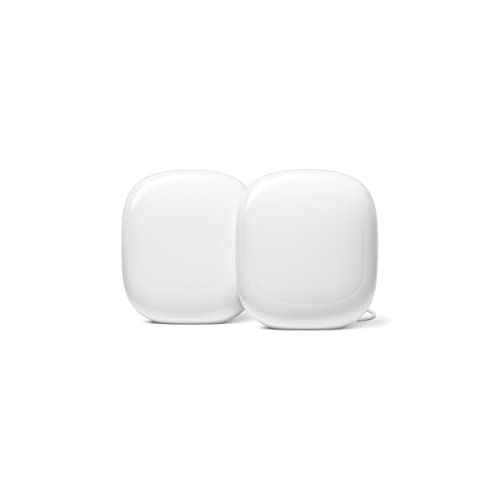
Best for simple small homes: Google Nest Wifi Pro
Google Nest Wifi Pro is a straightforward WiFi 6E system for apartments and smaller houses. Its main strengths are uncomplicated setup, a clear app, automatic updates, and easy management for households that do not want advanced networking controls.
Its 6GHz band can help compatible devices near a node, but 6GHz does not travel through walls as effectively as 5GHz. It is therefore a better fit for an open-plan home than for a long house with several dense walls. It also has fewer advanced wired-network options than premium WiFi 7 systems.
Best for flexible performance: TP-Link Deco BE63
TP-Link Deco BE63 is a WiFi 7 mesh system aimed at medium and larger homes. It offers multi-gigabit Ethernet connectivity and supports newer WiFi 7 clients while remaining compatible with older devices. It is a sensible middle ground when you want faster wired networking and modern wireless features without moving to the most expensive class.
Deco’s app provides guest networking, parental controls, security features, and device management. Some advanced security and parental-control functions may depend on a subscription, so check the current plan structure before purchase.
Best for wired-heavy large homes: TP-Link Deco BE85
Deco BE85 is designed for demanding networks with multi-gigabit internet, wired desktops, media servers, and many simultaneous clients. Its high-speed Ethernet ports make it more useful than a system whose headline wireless speed cannot be matched by its wired connections.
Choose it when you can place nodes sensibly or connect them with Ethernet. In a large home using only wireless backhaul, the distance between nodes and construction materials will still determine performance. A premium radio cannot eliminate the attenuation caused by concrete floors or metal framing.
Best for a polished premium experience: eero Max 7
eero Max 7 is a WiFi 7 mesh option for homes with fast broadband and a preference for automated management. Its multi-gigabit ports and WiFi 7 support suit households with newer client devices, while the app emphasizes simple installation and monitoring rather than extensive manual tuning.
It is a strong choice for people who value ease of use, but advanced users should review eero’s subscription requirements and configuration limits. If you need detailed channel controls, complex VLAN layouts, or highly customized routing, a more configurable platform may be preferable.
Best for maximum capacity: Netgear Orbi 970 Series

Netgear’s Orbi 970 Series targets very large homes and demanding networks. Its quad-band WiFi 7 design provides a dedicated high-capacity backhaul radio, and its multi-gigabit Ethernet options are appropriate for fast internet and local network transfers.
This class of system is expensive and can be excessive for a small apartment. It makes more sense when many people stream, work, upload, game, and transfer files simultaneously, or when you need broad coverage across multiple floors and can place the satellites correctly.
More mesh WiFi systems worth considering
The systems above cover the classic home types, but the 2025-2026 wave of WiFi 7 hardware added several kits that change the value equation. Dual-band WiFi 7 has pushed into the budget tier, tri-band systems with multi-gigabit ports have dropped into the mid-range, and 10-gigabit wired backhaul is no longer limited to the most expensive flagships. The six picks below fill the gaps between the models already discussed.
eero 7 Dual-Band WiFi 7 Mesh System

The eero 7 is the entry point to eero’s WiFi 7 family and the most sensible eero for a typical gigabit household. It is a dual-band BE5000 design that uses the 2.4GHz and 5GHz bands with 2×2 radios on each, supports channels up to 240MHz on 5GHz, and is rated for internet plans up to 2.5Gbps. Each unit has two auto-sensing 2.5GbE ports, and there is no fixed WAN port, so either jack can face the modem. The maker rates each unit at roughly 2,000 sq. ft. and more than 100 connected devices, and this three-pack listing is pitched at homes up to about 6,000 sq. ft.
Who it suits: households that want the simple eero app, automatic updates and hands-off management, but do not need the 6GHz band. Because it has no 6GHz radio, it is a better fit for homes full of WiFi 5 and WiFi 6 phones, TVs and smart-home gear than for a desk packed with new WiFi 7 laptops. The two 2.5GbE ports on every node are a real advantage: you can run 2.5Gbps wired backhaul between nodes and still have a spare port for a console or desktop at each location.
Strengths: compact units, quick setup, Multi-Link Operation for steadier node links, and wired ports that outpace most budget kits. Drawbacks: no 6GHz band, only two ports per node, and some advanced security and parental features sit behind an optional subscription. Compared with the Google Nest Wifi Pro, it trades the 6GHz band for faster wired ports and WiFi 7 features. Compared with the eero Max 7, it gives up a lot of headroom but covers most gigabit homes for far less.
eero Pro 7 Tri-Band WiFi 7 Mesh System

The eero Pro 7 sits between the eero 7 and the eero Max 7, and for many buyers it is the eero worth stretching for. It is a tri-band WiFi 7 system using 2.4GHz, 5GHz and 6GHz, rated BE10800, with 320MHz channel support on the 6GHz band. Each unit carries two auto-sensing 5GbE ports and is rated for internet plans up to 5Gbps, with coverage of about 2,000 sq. ft. per node and support for more than 200 devices. This listing is the two-pack, aimed at homes of around 4,000 sq. ft.
Who it suits: homes with a multi-gigabit plan, several newer WiFi 7 or WiFi 6E devices, and people who want eero’s simplicity without paying flagship money. The 6GHz band gives nearby compatible clients a cleaner lane, while the 5GbE ports let a fast desktop or NAS use much more of a multi-gig connection than a gigabit port ever could.
Strengths: tri-band WiFi 7, 5GbE ports on every unit, strong device capacity and a setup process that takes minutes. Drawbacks: eero keeps manual controls limited, so people who want to choose channels, build VLANs or tune radios will feel boxed in; there are only two ports per unit; and the 6GHz band still falls off quickly through walls. Against the TP-Link Deco BE63, it offers a cleaner app experience but fewer wired ports and less configurability. Against the eero Max 7, it gives up 10GbE and some range for a much lower tier.
NETGEAR Orbi 370 Series Dual-Band WiFi 7 Mesh System

The Orbi 370 is NETGEAR’s first budget-tier WiFi 7 Orbi and the cheapest way into the Orbi ecosystem. It is a dual-band BE5000 system without a 6GHz radio, using 2×2 radios with up to 240MHz channels on 5GHz and Multi-Link Operation for the wireless backhaul. The router has one 2.5Gbps internet port and one 2.5Gbps LAN port, and each satellite has a single 2.5Gbps LAN port that can also carry wired backhaul. NETGEAR rates the three-pack at up to 6,000 sq. ft. and positions it for internet plans up to 2.5Gbps.
Who it suits: owners of medium or large homes on a 1Gbps plan who want Orbi’s reputation for range without the cost of the tri-band 770 or 970 series. Independent reviews have found that its 5GHz performance at middle distances holds up well against more expensive tri-band kits, because dual-band 5GHz signals penetrate walls better than 6GHz.
Strengths: low cost for a WiFi 7 three-pack, small units, a 2.5Gbps internet port and support for wired backhaul. Drawbacks: very few Ethernet ports, no 6GHz band and a device ceiling that a busy smart home can approach. Some NETGEAR security features also require a subscription. Compared with the Google Nest Wifi Pro already listed above, it gives up the 6GHz band but adds WiFi 7 features and a faster 2.5Gbps internet port; compared with the Orbi 970, it is a completely different class aimed at value rather than capacity.
NETGEAR Orbi 770 Series Tri-Band WiFi 7 Mesh System

The Orbi 770 is the middle child of NETGEAR’s WiFi 7 range and a strong choice for large homes that want 6GHz support without the cost of the quad-band Orbi 970. It is a tri-band BE11000 system that supports 320MHz channels on 6GHz. The router has one 2.5Gbps internet port and three 2.5Gbps LAN ports, while each satellite has two 2.5Gbps LAN ports, which is a generous wired layout for the tier. This three-pack listing is rated for large homes; NETGEAR quotes coverage of roughly 7,500 to 8,000 sq. ft. depending on the source.
Who it suits: multi-story homes with a fast plan, a gaming PC or two, and enough wired devices to use the extra 2.5Gbps ports. If you can run Ethernet to the satellites, the 770 becomes a very capable system, because wired backhaul frees the radios for client traffic.
Strengths: 6GHz with 320MHz channels, plenty of 2.5Gbps ports on every unit, and a mature app. Drawbacks: unlike the 970, it does not have a second 5GHz radio reserved for backhaul, so wireless node links share airtime with your devices; it is also a premium purchase for anyone on a gigabit plan. Against the TP-Link Deco BE85 and Orbi 970, it is the more reasonable option when you want most of the capability with fewer extremes.
ASUS ZenWiFi BD5 Dual-Band WiFi 7 Mesh System

The ZenWiFi BD5 is the budget-tier ASUS WiFi 7 kit and the best pick here for people who want more control than eero or Google allow. It is a dual-band BE5000 system with 2×2 radios on 2.4GHz and 5GHz, Multi-Link Operation and 4K-QAM. Each node has two auto-detecting 2.5G Ethernet ports, so 2.5Gbps wired backhaul is possible. ASUS rates a single unit at about 2,500 sq. ft. and this three-pack at up to roughly 6,800 sq. ft.
Who it suits: tinkerers on a gigabit or 2Gbps plan, gamers who want detailed QoS and device prioritization, and anyone who prefers a one-time purchase with security and parental controls included rather than a monthly plan. ASUS firmware exposes channel selection, guest network isolation, VPN options and a level of detail that simple mesh apps hide.
Strengths: included security and parental tools, 2.5G ports on every node, flexible settings and a reasonable cost for three nodes. Drawbacks: only two network ports per node, no 6GHz band, and an interface that can overwhelm someone who just wants WiFi that works. It competes directly with the eero 7 and Orbi 370; choose it over those two if you value configuration depth and no-subscription features.
ASUS ZenWiFi BT10 Tri-Band WiFi 7 Mesh System

The ZenWiFi BT10 is the enthusiast option in this group and one of the few mesh kits with two 10G ports on every node. It is a tri-band WiFi 7 system rated up to 18Gbps, with 4×4 radios on 6GHz and 5GHz, a 2×2 2.4GHz radio and 320MHz channel support. Each unit has a 10G WAN/LAN port, a 10G LAN port, a 1G WAN/LAN port and a USB 3.0 port. The router and satellite use identical hardware, and this two-pack is rated for about 6,000 sq. ft.
Who it suits: homes with multi-gigabit fiber, a NAS or home studio, and Ethernet runs between floors. With 10G wired backhaul, the BT10 can move large local files between rooms far faster than gigabit or 2.5G systems. It also supports dual-WAN setups, which helps home workers who keep a backup connection.
Strengths: dual 10G ports per node, powerful radios and the full ASUS feature set with no required subscription. Drawbacks: only three Ethernet ports per node, so wired-heavy rooms need a switch; it is not designed for easy wall mounting; and it is firmly premium. Compared with the eero Max 7 and Deco BE85, it offers deeper configuration; compared with the Orbi 970, it trades the dedicated backhaul radio for faster wired ports.
Comparison of the additional mesh systems
| System | WiFi standard and bands | Wired ports per node | Rated coverage (kit) | Best for | Price tier |
|---|---|---|---|---|---|
| eero 7 (3-pack) | WiFi 7, dual-band (2.4/5GHz) | 2 x 2.5GbE | About 6,000 sq. ft. | Simple gigabit homes | Mid-range |
| eero Pro 7 (2-pack) | WiFi 7, tri-band (2.4/5/6GHz) | 2 x 5GbE | About 4,000 sq. ft. | Multi-gig plans, easy management | Premium |
| NETGEAR Orbi 370 (3-pack) | WiFi 7, dual-band (2.4/5GHz) | Router: 2.5G WAN + 2.5G LAN; satellite: 1 x 2.5G | About 6,000 sq. ft. | Budget WiFi 7 for larger homes | Budget |
| NETGEAR Orbi 770 (3-pack) | WiFi 7, tri-band (2.4/5/6GHz) | Router: 2.5G WAN + 3 x 2.5G LAN; satellite: 2 x 2.5G | About 7,500-8,000 sq. ft. | Large homes with many wired devices | Premium |
| ASUS ZenWiFi BD5 (3-pack) | WiFi 7, dual-band (2.4/5GHz) | 2 x 2.5G | About 6,800 sq. ft. | Control and no-subscription features | Budget to mid-range |
| ASUS ZenWiFi BT10 (2-pack) | WiFi 7, tri-band (2.4/5/6GHz) | 2 x 10G + 1 x 1G | About 6,000 sq. ft. | 10G backhaul, NAS, multi-gig fiber | Premium |
Coverage figures are the makers’ own ratings under favorable conditions. Treat them as a ceiling, not a promise: dense walls, floors and interference will shrink the useful area, which is why node placement and backhaul matter more than the number on the box.
More factors to weigh before you buy
Ongoing subscription costs
Several mesh brands now split their features into a free tier and a paid plan. Advanced threat blocking, content filtering, detailed parental schedules and ad blocking may require a monthly or yearly subscription with eero, TP-Link Deco and NETGEAR Orbi. ASUS includes its security and parental tools without a separate plan. Over a five-year lifespan, a subscription can add a meaningful amount to the true cost of a system, so compare the total, not just the hardware tier. If you only need basic guest networks and device pausing, the free features from most brands are enough.
Number of wired ports you actually need
Many compact WiFi 7 nodes have only two Ethernet ports, and one of them may be used for the modem or for backhaul. Count the wired devices near each node: a gaming PC, console, smart TV, NAS or desktop dock. If you need more than one free port at a location, either choose a system with more ports per unit, such as the Orbi 770, or plan on a small unmanaged switch. A switch is inexpensive, but buy one whose speed matches the node port, otherwise a 2.5G link becomes a 1G bottleneck.
Client devices in your home
WiFi 7 features such as Multi-Link Operation and 320MHz channels only help devices that support them. Look at what you own: if most phones, laptops and TVs are WiFi 5 or WiFi 6, a dual-band WiFi 7 kit or a strong WiFi 6 system will feel nearly the same as an expensive tri-band flagship. The 6GHz band matters most when you have several newer WiFi 6E or WiFi 7 devices used close to a node.
Configuration depth versus simplicity
eero and Google prioritize automation and keep manual settings minimal. TP-Link Deco and NETGEAR Orbi sit in the middle. ASUS ZenWiFi exposes the most controls, including detailed QoS, VPN server and client options, dual-WAN and advanced wireless settings. There is no wrong answer here, but buying a simple system when you need VLANs or port forwarding control, or buying a complex one when nobody in the house wants to manage it, leads to frustration.
Expandability and mixing nodes
Most brands let you add nodes later, but usually only within the same ecosystem and sometimes only within the same product family. Check whether a single add-on unit is sold for your system, and whether older and newer generations can mix. A system that cannot expand cleanly may force a full replacement when you add a garage office or finish a basement.
A practical bandwidth calculation
Suppose a household has a 1Gbps internet plan, two 4K streams using approximately 25Mbps each, two video calls at about 4Mbps each, a gaming PC downloading at 300Mbps, and eight ordinary devices averaging 3Mbps each during a busy period:
25 + 25 + 4 + 4 + 300 + (8 × 3) = 382Mbps.
That leaves roughly 618Mbps of internet capacity before protocol overhead and other activity. The calculation does not mean every WiFi client will receive 618Mbps: wireless airtime, signal quality, interference, and the mesh backhaul determine actual speeds. It does show why a well-placed WiFi 6 system may be entirely adequate for this household, while WiFi 7 becomes more valuable for multi-gigabit service, local file transfers, or many simultaneous high-throughput clients.
Mesh, extenders or wired access points?
A mesh system is not the only way to fix weak WiFi, and it helps to know where the alternatives fit.
- Range extenders: A single extender is the lowest-cost fix for one dead room. However, a basic extender repeats the signal on the same radio, which can cut available throughput for devices connected to it, and it often creates a separate network name. It suits a small home with one problem area, not a whole-home upgrade.
- Mesh systems: Nodes coordinate with each other, share one network name, hand devices between units and are managed from one app. Tri-band and WiFi 7 kits reduce the throughput penalty of wireless backhaul. This is the best balance of performance and convenience for most homes.
- Wired access points: Ceiling or wall access points connected by Ethernet to a central router or switch give the most consistent results, especially in homes with concrete, brick or metal framing. They require cabling and more setup knowledge, but every access point has a full-speed wired link.
A practical compromise for many households is a mesh kit with Ethernet backhaul to at least one satellite. You keep the easy app and roaming, while the wired link removes the biggest performance limit.
Placement examples by home layout
Two-story house with the modem in a corner
Run a short Ethernet cable from the modem to the primary node and place it on a shelf near the center of the ground floor if possible. Put the second node upstairs, roughly above or slightly offset from the first, in an open landing rather than a bedroom closet. Floors absorb less signal when the nodes are close to vertically aligned.
Long single-story home
Place the primary node near the middle of the house and one satellite toward each end, each about halfway between the primary unit and the far rooms. Avoid putting nodes in kitchens, behind televisions or next to aquariums and metal appliances, which all absorb or reflect signal.
Apartment with thick concrete walls
Use fewer nodes and connect them by Ethernet if you can, even with a flat cable along the baseboard. If wiring is impossible, keep nodes within one wall of each other. A single well-placed router plus one wired satellite will often beat three wireless nodes struggling through concrete.
Detached office, garage or garden room
Wireless backhaul across a yard is unreliable, particularly through exterior walls with insulation foil. Run outdoor-rated Ethernet or use a weatherproof outdoor node designed for the purpose, then place an indoor node inside the outbuilding for good coverage.
ISP compatibility and setup checks
- Cable or fiber modem: Most mesh systems can connect by Ethernet, but confirm whether the provider requires VLAN tagging, PPPoE credentials, or a specific router configuration.
- Gateway supplied by the ISP: Use bridge mode when available to avoid double NAT. If bridge mode is unavailable, place the mesh system in access-point mode or use the provider gateway’s DMZ option carefully.
- Fiber optical terminal: You normally cannot replace the optical hardware with a consumer mesh unit. Connect the mesh router to the ONT’s Ethernet output.
- Static IP or business service: Verify support for the required WAN settings before buying.
- TV and phone bundles: Some ISP services depend on their gateway for voice or television features, so bridge mode may require provider-specific instructions.
Security settings worth enabling on day one
A new mesh system is a good moment to tighten home network security, and most of these steps take only a few minutes in the app.
- Turn on automatic firmware updates. Router vulnerabilities are patched through firmware, and mesh systems that update themselves overnight stay protected without effort.
- Use WPA3 or WPA2/WPA3 mixed mode. WPA3 is stronger, and mixed mode keeps older devices connected while newer ones use the better protocol.
- Secure the admin account. Use a strong, unique password for the mesh app account and enable two-factor sign-in if the brand supports it, since that account controls the entire network.
- Create a guest network. Visitors get internet access without seeing your computers, NAS or printers.
- Separate smart-home gadgets where possible. Cameras, plugs and inexpensive sensors rarely receive long-term updates. An IoT or guest network limits what a compromised device can reach.
- Disable remote management and UPnP you do not need. Some games need UPnP for open NAT, but if nothing in your home depends on it, turning it off reduces exposure.
None of these settings slow the network noticeably, and they protect every device behind the router, including those you cannot secure individually.
Settings that improve real-world results
After installation, update firmware, give the network a distinct name, and place nodes where their app reports a strong connection to the primary unit. Keep the main router elevated and away from metal, televisions, and enclosed furniture.
For a crowded 5GHz network, automatic channel selection is usually the safest starting point. If a manual setting is available, 80MHz channels often provide a better balance than 160MHz: the narrower channel is less likely to overlap neighboring networks and is more tolerant of interference. Use 160MHz or 320MHz only when compatible devices are nearby and the environment is sufficiently clean.
For gaming, connect the gaming PC or console by Ethernet whenever possible. If wireless is unavoidable, use the closest mesh node, avoid placing it behind the television, and enable the system’s traffic-prioritization feature only for the devices that need lower latency. Prioritization cannot fix a weak signal or an overloaded broadband connection.
Troubleshooting common mesh WiFi problems
Even a well-chosen system can disappoint if a few common issues are left in place. Work through these checks before deciding that you need more nodes or a more expensive kit.
- Slow speeds near a satellite: Check the node’s backhaul rating in the app. A weak link to the primary unit caps everything connected to that satellite. Move it one room closer, raise it off the floor, or connect it by Ethernet.
- Devices stuck on a distant node: Phones and laptops decide when to roam, not the mesh. Toggling WiFi off and on forces a fresh connection. If one device repeatedly clings to the wrong node, check for a firmware update for that device.
- Double NAT warnings in games or consoles: This usually means both the ISP gateway and the mesh router are routing traffic. Put the gateway in bridge mode, or run the mesh in access-point mode so only one device handles routing.
- Smart-home devices will not connect: Many plugs, cameras and sensors only support 2.4GHz. Most mesh systems combine bands under one network name, which can confuse setup apps. Use the system’s temporary 2.4GHz-only option or an IoT network if it offers one.
- Random dropouts in the evening: Busy neighboring networks raise interference after work hours. Let the system re-optimize channels, avoid forcing very wide channels, and confirm that the modem is not the actual cause by checking whether the internet light drops too.
- Wired backhaul not detected: Make sure each cable goes from a port on the primary unit or switch to the satellite, not through a powerline adapter or an old splitter. Some systems need a reboot of the satellite after the cable is attached.
Frequently asked questions
How many mesh nodes do I need?
Start with one node per roughly 1,500 to 2,000 sq. ft. of usable space, then adjust for construction. A two-story wood-frame home of about 2,500 sq. ft. often works with two nodes, while a long single-story house or one with brick interior walls may need three. Add nodes only after checking backhaul quality, because a poorly placed extra node can reduce performance.
Is a mesh system better than a single powerful router?
For small apartments, a single good router is often enough and costs less. Mesh systems win when the home is large, multi-story or has dense walls, because several nodes placed sensibly provide more consistent coverage than one router at the edge of the home trying to push signal through every wall.
Can I mix brands in one mesh network?
Generally no. Mesh nodes use proprietary coordination, so an eero satellite will not join a Deco network. EasyMesh is an industry standard designed for cross-brand operation, but support is limited and features are often reduced. Plan to stay within one brand and product family.
Do I need WiFi 7 if my internet plan is 1Gbps?
Not necessarily. A good WiFi 6 or dual-band WiFi 7 system can deliver most of a gigabit plan to nearby devices. WiFi 7 becomes more useful when you have multi-gigabit internet, many simultaneous heavy users, fast local file transfers or several new WiFi 7 clients. Budget dual-band WiFi 7 kits are a reasonable middle ground if you want some future headroom.
Will a mesh system lower my gaming ping?
Mesh WiFi cannot reduce the distance to a game server, but it can reduce local delays caused by weak signal and congestion. The best result for gaming is Ethernet from the nearest node to the PC or console. If you must stay wireless, keep the device close to a node with a strong backhaul and use traffic prioritization for that device only.
Should I keep my ISP’s router after installing mesh?
You usually still need the modem or fiber terminal. If the ISP device is a combined modem and router, set it to bridge mode so the mesh system handles routing, or switch the mesh to access-point mode. Running both as routers often causes double NAT and makes port forwarding harder.
Bottom line
The best mesh WiFi systems are the ones that fit the building and traffic pattern. Choose a simple WiFi 6 or 6E kit for a small home, a tri-band WiFi 7 system for a busy medium-sized property, and a premium multi-gigabit system such as Deco BE85, eero Max 7, or Orbi 970 for large homes with fast service and many clients. If your walls are difficult or your network carries serious local traffic, prioritize Ethernet backhaul and useful wired ports over the biggest wireless number on the box.