
Finding the best gaming keypads usually starts with the same frustration: a full-size keyboard wastes space, forces awkward hand stretches for key combos, and never puts the controls where your left hand actually wants them. Whether you are trying to hit every ability in an MMO without looking down, strafe and aim more naturally in an FPS, or just free up desk space for a bigger mouse pad, a good keypad solves the layout problem by clustering only what you need into an ergonomic, one-handed form factor.
Over long sessions, the difference between good and bad comes down to execution, not marketing. The best gaming keypads offer a comfortable, natural hand position that does not strain your wrist, switches that feel consistent and responsive without misfires, and software that makes programming macros actually usable instead of a chore. The worst feel cramped, force you to relearn basic movement, or lock you into limited platform support that undercuts their value.
As an Amazon Associate we earn from qualifying purchases at no extra cost to you.





Our Top Picks
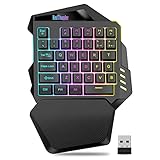
 Razer Tartarus V2 Left-Handed Gaming Keypad6.02x 2.36 x 0.8 Inch2.36 x 7.98 x 6.02 inches0.8 poundsCheck on Amazon
 Razer Tartarus Pro Gaming Keypad: Analog-Optical Key Switches5.95L x 7.96W x 2.5H inches5.95 x 7.96 x 2.5 inches0.8 PoundsCheck on Amazon
 BTXETUEL Mini 4-Key Keypad WASD Arrow Key KeycapsArrow Keycaps 12.5 x 1.7 x 1.1 inchesCheck on Amazon


Top 3 picks at a glance
Quick Picks
| Product | Best for | Price tier |
|---|---|---|
| Razer Tartarus V2 | Best Overall for MMO and MOBA Players | Mid-range |
| Razer Tartarus Pro | Best for Analog Control | Premium |
| Azeron Cyborg II Black | Best for Ergonomic Custom Fit | Premium |
| RedThunder Wireless One-Handed Keypad | Best Wireless Budget Option | Budget |
| BTXETUEL Mini 4-Key | Best Ultra-Compact Option | Budget |
| HORI TAC Mechanical Keypad | Best for PlayStation and PC FPS | Mid-range |
| Pulsar XPAD Mini | Best for Osu! and Rhythm Games | Budget to mid-range |
| ATTACK SHARK M36 HE | Best Budget Rapid Trigger Keypad | Budget |
How We Compared
Each keypad was judged on comfort and hand fit during extended play, switch quality and control precision, the depth and reliability of programmability and software, and platform compatibility including PC, PlayStation, and Xbox. Build quality, layout logic for gaming genres, and whether extra inputs like thumbsticks, d-pads, or wheels genuinely improve control rather than adding clutter.
The 8 Best Gaming Keypads in 2026
1. Razer Tartarus V2
The Razer Tartarus V2 is for PC gamers who want a full-featured, left-handed keypad without a steep learning curve. If you play MMOs, MOBAs, or strategy games and rely on layered macros, its familiar key arrangement with a directional pad, scroll wheel, and removable wrist rest feels immediately usable. With 32 programmable keys, you get generous customization through Razer’s software for profiles, macros, and Chroma RGB lighting.
- Pro: Highly customizable with 32 programmable keys and intuitive software support
- Pro: Comfortable, supportive design with wrist rest for long sessions
- Con: Mecha-membrane switches feel softer than true mechanical switches
Skip it if you demand analog input or a fully mechanical key feel; the Tartarus Pro is the better step up for that.
2. Razer Tartarus Pro
The Razer Tartarus Pro is made for enthusiasts who want nuanced control from a keypad. It builds on the V2 layout but swaps in analog-optical key switches with adjustable actuation and Rapid Trigger, letting you feather movement or hold a key halfway for walk versus run in supported games. With 32 programmable keys, customizable macros, and Chroma RGB lighting in Classic Black, it is the most versatile option for players who fine-tune every input.
- Pro: Analog-optical switches allow adjustable actuation and dual-action inputs per key
- Pro: Retains full programmability with 32 keys and deep macro customization
- Con: Premium price and more complex tuning may overwhelm casual users
Skip it if you want a simple plug-and-play pad or prefer to stay at a lower budget.
3. AZERON Cyborg II Black
The Azeron Cyborg II in Black is for right-handed players who want a truly ergonomic, hand-shaped alternative to a traditional keypad. This programmable one-handed gaming keyboard uses a 3D printed, customizable structure that positions each finger over its own tower of keys, plus a Hall Effect analog thumbstick for smooth movement. With 30 programmable keys, it excels for FPS, sim, and MMO players who want analog motion without touching a controller.
- Pro: Outstanding ergonomics with 3D printed, adjustable towers that reduce finger strain
- Pro: Hall Effect analog thumbstick adds fluid, controller-like movement
- Con: Large footprint and highly specialized design require adjustment time
Skip it if you need a left-handed device or want something compact and instantly familiar.
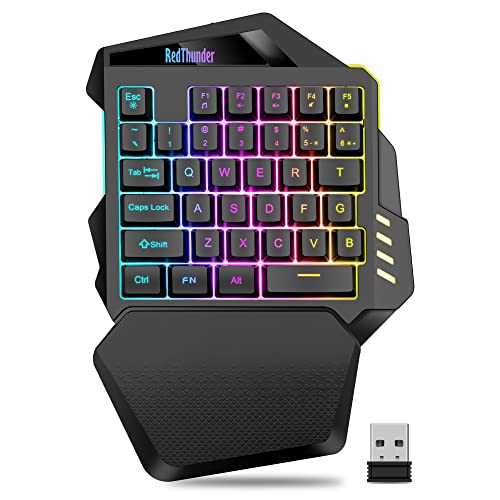
4. RedThunder Wireless One-Handed Gaming Keypad
The RedThunder Wireless One-Handed Gaming Keypad is for players who want a cable-free off-hand pad without spending much. It connects through a 2.4GHz USB receiver rather than Bluetooth, so there is no pairing step, and a built-in 2000mAh rechargeable battery charges over USB-C. The 35-key membrane layout copies the left side of a keyboard, with anti-ghosting on all keys, an ABS palm rest, and RGB backlighting with static and breathing modes. It is a simple, plug-and-play companion for laptops and compact desks rather than a deeply programmable command center.
- Pro: Wireless 2.4GHz connection keeps the desk free of cables
- Pro: Familiar keyboard-style layout needs almost no relearning
- Con: Membrane keys and limited software feel basic next to mechanical or magnetic pads
Skip it if you want mechanical or Hall Effect switches, deep macro software, or a wired connection with no battery to charge.
5. BTXETUEL Mini 4-Key
The BTXETUEL Mini 4-Key is for gamers and workers who need just a few extra inputs, not a full pad. This one-handed mechanical keypad comes with WASD and arrow keycaps and is programmable over USB-C, making it useful as a dedicated movement cluster, macro trigger, or osu! helper. Its tiny, customizable footprint lets you place precise controls exactly where your hand rests, ideal for minimalist setups or as a supplement to a main keyboard.
- Pro: Extremely compact and affordable with a USB-C connection
- Pro: Programmable for gaming or productivity macros despite its size
- Con: Only four keys, so it cannot replace a larger keypad for complex games
Skip it if you need a comprehensive set of abilities or analog movement; this is a complement, not a standalone command center.
6. HORI Tactical Assault Commander (TAC) Mechanical Keypad
The HORI Tactical Assault Commander is built for console FPS players who want PC-style control on PlayStation 5, PlayStation 4, and PC. Officially licensed by Sony, this mechanical keypad pairs a PC-style key zone with a dedicated layout for shooters and MMOs, giving you faster key access than a controller while you aim with a mouse. Its mechanical keys deliver a crisp, tactile response that holds up in competitive matches.
- Pro: Official PlayStation licensing ensures reliable compatibility across PS5, PS4, and PC
- Pro: Mechanical keys offer a more responsive and durable feel than membrane pads
- Con: Layout is heavily FPS-focused and less versatile for other genres
Skip it if you primarily game on Xbox or need deep macro layering for MMO abilities.
7. Pulsar Gaming Gears XPAD Mini 3-Key
The Pulsar XPAD Mini in Turquoise is a specialist tool for rhythm game fans, particularly osu! players. This 3-key gaming keypad strips everything away except what matters for rapid, consistent tapping: low-friction switches, a compact, stable chassis, and a layout that keeps your fingers perfectly aligned. It is not trying to be a full keypad, and that focus is why it feels so precise for its niche.
- Pro: Purpose-built for rhythm games with clean, rapid key response
- Pro: Ultra-small, portable design that fits easily beside a main keyboard
- Con: Three keys are too limited for general gaming use
Skip it if you want a general-purpose gaming keypad; this is strictly for osu! and similar titles.
8. ATTACK SHARK M36 HE One-Handed Hall Effect Keypad
The ATTACK SHARK M36 HE is a budget-tier way to get magnetic switches and Rapid Trigger in a compact off-hand pad. Its 36-key layout covers WASD, the number row and the surrounding ability keys while leaving plenty of room for low-sensitivity mouse swipes. Hot-swappable Gateron magnetic switches allow actuation to be set from about 0.1mm to 3.3mm, Rapid Trigger can be adjusted in 0.01mm steps, and the listing quotes 8,000Hz polling plus Snap Tap-style last-keystroke priority. PBT keycaps, layered sound dampening, RGB lighting and a web-based driver round out the package.
- Pro: Adjustable actuation and Rapid Trigger for faster strafing and peeking
- Pro: Small footprint and web-based driver with no software to install
- Con: Wired only, and too few keys for MMOs with large ability bars
Skip it if you play key-heavy MMOs or need official console support.
More Gaming Keypads Worth Considering
The main list leans on Razer and Azeron at the higher end and very small 3-key and 4-key pads at the low end, which leaves two gaps: affordable full-size keypads with a traditional WASD layout, and the new wave of Hall Effect magnetic keypads with Rapid Trigger that many FPS players now prefer. The five picks below fill those gaps, each with a clearly different control style.
Redragon K585 DITI One-Handed Mechanical Keypad

The Redragon K585 DITI is the most common budget recommendation for a full one-handed keypad, and for good reason. Instead of the Tartarus-style grid, it keeps a familiar keyboard layout: Redragon lists 42 keys in total, including WASD, the number row, a spacebar-style thumb area, and seven dedicated macro keys down the left edge. That means there is almost no relearning; anyone who games on a standard keyboard can use it within minutes.
It uses Outemu mechanical switches, offered in blue (clicky), brown (tactile) and red (linear) versions, and the switches can be swapped without soldering for other Outemu-compatible switches. Players can store up to 28 macros across four on-the-fly profiles, and macros can be recorded directly on the keypad without the software. A magnetic, detachable wrist rest, full RGB backlighting, a detachable USB-C cable and a steel plate round out the package.
Who is it for? Budget-conscious PC players who want a full off-hand control deck for FPS, MOBA or MMO games but prefer a keyboard layout over a grid. Strengths: true mechanical switches in the budget tier, a layout that requires no adjustment period, onboard macro recording, and swappable switches. Drawbacks: the ABS keycaps will shine with heavy use, the companion software is basic and dated, the wrist rest is firm rather than cushioned, and there is no analog input. Choose the red switches for gaming; blue switches are loud and slower to reset.
Compared with the Razer Tartarus V2, the K585 DITI offers real mechanical switches and a more familiar layout at a lower price tier, but it lacks the Tartarus’s thumbpad and polished software. Compared with the BTXETUEL 4-key pad, it is a complete replacement for the left half of a keyboard rather than a supplement. A wireless K585 PRO version with 2.4GHz and Bluetooth is also available if you want to eliminate the cable.
One setup tip: the seven macro keys along the left edge are easy to reach with the pinky but also easy to hit by accident at first. Assign them to low-risk actions such as push-to-talk, map or scoreboard until your hand learns the boundaries. The USB pass-through port on the wired model is also handy for plugging in a headset dongle or flash drive.
Redragon K585 HE Magnetic Rapid Trigger Keypad

The K585 HE takes the K585’s familiar 42-key layout and replaces the mechanical switches with Redragon’s UltraMag magnetic Hall Effect switches. Because a magnet sensor measures the key position continuously, you can set the actuation point per key in software, from roughly 0.1mm to 3.4mm, and enable Rapid Trigger, which resets a key the instant you begin to release it rather than waiting for it to pass a fixed reset point.
For FPS players, that makes counter-strafing and quick peeks noticeably more responsive: releasing A or D stops movement almost immediately. Redragon also lists 8,000Hz polling, seven programmable macro keys, a magnetic detachable wrist rest, RGB lighting and a dual-module floating plate structure designed to reduce wobble and harsh bottom-out noise. It connects over a detachable USB-C cable and comes with a switch puller and spare switches.
Who is it for? Competitive shooter players who want Rapid Trigger without paying for a premium Hall Effect keyboard, and who like the K585’s keyboard-style layout. Strengths: adjustable actuation and Rapid Trigger at a budget price, a familiar layout, and solid macro support. Drawbacks: Redragon itself notes that results at the most extreme 0.1–0.2mm settings vary with normal part tolerances, so very sensitive settings may cause accidental presses; it is wired only; and like other budget magnetic boards, the software is functional rather than refined.
Compared with the Razer Tartarus Pro, which also offers adjustable analog actuation, the K585 HE uses a standard keyboard layout instead of a grid and sits a full price tier lower. Compared with the regular K585 DITI, it is the better choice for FPS play, while the mechanical version suits players who prefer a tactile or clicky feel.
Because actuation is set per key, you can treat different keys differently: a short actuation with Rapid Trigger on W, A, S and D for crisp movement, and a deeper actuation on abilities, grenades or the reload key to avoid accidental presses. Saving those settings as separate profiles for shooters and slower games lets one keypad cover very different genres without compromise.
Turtle Beach Command Series KP7 Hall Effect Keypad

The Turtle Beach KP7 is a newer, more premium take on the Hall Effect keypad. It is a compact 28-key design built around Turtle Beach’s low-profile Titan magnetic switches, with actuation adjustable down to 0.1mm, Rapid Trigger, and a rated lifespan of 100 million keystrokes. Turtle Beach lists 8,000Hz polling, double-shot PBT keycaps, per-key RGB lighting, aluminum reinforcement, adjustable kickstands and a detachable wrist rest.
Two design details set it apart. First, the thumb bar extends and acts like a spacebar, which helps the keypad work as a standalone device. Second, a programmable scroll wheel adds a quick-access control for macros, weapon swaps or volume. The KP7 can also dock to Turtle Beach’s Command Series KB7 tenkeyless keyboard via modular rails, so it can serve as a dedicated gaming pad, macro pad or numpad.
Who is it for? FPS and MOBA players who want a well-built, compact Hall Effect keypad with better materials than budget options. Strengths: PBT keycaps, adjustable actuation and Rapid Trigger, a useful scroll wheel and a solid, reinforced build that weighs around 308g. Drawbacks: it is wired only, it supports Windows 10 and 11 rather than consoles, the low-profile switches feel different from standard-height keys, and as a newer product it has a smaller track record than long-running keypads.
Compared with the Redragon K585 HE, the KP7 has fewer keys but better materials, a scroll wheel and a lower-profile design. Compared with the Tartarus Pro, it favors a compact WASD-style layout over a large grid, which suits shooters better than MMOs. It sits in the mid-range tier.
The low-profile switches are worth considering before you buy. They have shorter travel than standard-height keys, which many FPS players like for fast taps, but players used to tall mechanical keyboards may need a few sessions to adjust. The adjustable kickstands and detachable wrist rest help here by letting you set a flatter or steeper angle to match your hand position.
AJAZZ AK029 Hall Effect Gaming Keypad

The AJAZZ AK029 is one of the most compact Hall Effect options, with a 29-key layout that covers the essentials for shooters: WASD, the surrounding modifier and ability keys, and a short number row. It uses hot-swappable magnetic linear switches with actuation adjustable from 0.1mm to 3.5mm in 0.01mm steps, Rapid Trigger, and an 8,000Hz polling rate.
The AK029 also supports SOCD (often called Snap Tap or Snap Key), which prioritizes the most recent of two opposing directional keys, and DKS (Dynamic Keystroke), which lets one key trigger different actions at different press depths. AJAZZ pairs that with an aluminum plate, gasket mounting, five layers of sound-dampening material, double-shot keycaps and south-facing RGB. Configuration is handled through a web-based driver, with multiple profiles stored on the keypad. It measures about 155×122mm and weighs around 300g.
Who is it for? Budget-tier FPS players who want Rapid Trigger, SOCD and adjustable actuation in a footprint small enough to leave lots of mouse space. Strengths: a feature set that matches far more expensive boards, a stable gasket-mounted typing feel, hot-swappable switches and a very small desk footprint. Drawbacks: 29 keys are not enough for MMOs or games with many abilities, there is no wrist rest or thumb cluster, and some competitive games and tournaments restrict SOCD-style features, so check the rules for your game before relying on them.
Compared with the BTXETUEL Mini 4-Key, the AK029 is a complete movement-and-ability cluster rather than a supplement. Compared with the K585 HE, it is smaller and has more advanced options, but it gives up the dedicated macro column and wrist rest.
The web-based driver is a practical benefit: there is no software to install, and settings save directly to the keypad, so it works the same on a laptop, a LAN-party machine or a work computer. The small size also makes it easy to travel with alongside a gaming laptop, where it can replace the cramped laptop keyboard for movement and abilities.
Azeron Keyzen Ergonomic Keypad
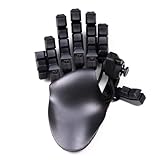
The Azeron Keyzen is a middle ground between a traditional keypad and Azeron’s finger-tower designs such as the Cyborg II. Instead of individual towers, it uses curved rows of standard keycaps, with 32 fully programmable keys mounted on Cherry MX switches in red (linear), brown (tactile) or blue (clicky) versions. A 360-degree Hall Effect thumbstick provides drift-free analog control: in games that accept simultaneous mouse and controller input it works as a true analog stick, and in others it can emulate WASD.
The body is 3D-printed with modular, replaceable components, and Azeron includes both curved and flat palm rests. It stores six onboard profiles, supports RGB lighting, and is available in left- and right-handed versions, unlike the right-handed Cyborg II in the main list. Azeron designs it in a single size, with a guide hand length of about 20–21cm.
Who is it for? Players who like the idea of Azeron’s analog thumbstick but want a shorter learning curve and a more keyboard-like feel. Strengths: real mechanical key switches, curved rows that reduce finger stretch, a drift-free analog thumbstick, and left-handed availability. Drawbacks: it is large, sits in the premium tier, uses a fixed size that may not suit smaller hands, and needs some time to set up properly in Azeron’s software.
Compared with the Cyborg II, the Keyzen is easier to learn and uses keycaps instead of towers, but it is less adjustable for individual finger positions. Compared with the Tartarus Pro, it adds a true analog thumbstick at a higher price tier, making it a strong option for sim, survival and open-world games where gradual movement matters.
Because the keys use standard Cherry MX switches and DSA keycaps, the Keyzen is also easier to personalize than tower-based designs: you can change keycaps for texture or color, and the modular 3D-printed parts can be replaced individually if something wears out. An optional Elite thumbstick kit adds adjustable resistance for players who want a firmer, weightier stick feel.
Additional Keypads at a Glance
| Keypad | Keys | Switch type | Analog or Rapid Trigger | Best for | Price tier |
|---|---|---|---|---|---|
| Redragon K585 DITI | 42 | Outemu mechanical, swappable | No | Budget full-size keypad | Budget |
| Redragon K585 HE | 42 | Magnetic Hall Effect | Adjustable actuation, Rapid Trigger | Budget FPS | Budget |
| Turtle Beach KP7 | 28 plus wheel | Low-profile Hall Effect | Adjustable actuation, Rapid Trigger | Compact premium FPS/MOBA | Mid-range |
| AJAZZ AK029 | 29 | Magnetic, hot-swappable | Rapid Trigger, SOCD, DKS | Small-footprint FPS | Budget |
| Azeron Keyzen | 32 plus thumbstick | Cherry MX mechanical | Hall Effect analog thumbstick | Ergonomic analog movement | Premium |
Buying Guide
Ergonomics and Handedness
Keypads live or die by fit. Left-handed pads like the Razer Tartarus series keep movement and abilities under one hand with a wrist rest, while right-handed designs like the Azeron Cyborg II mold to your fingers for longer comfort. Test your priorities: do you want a familiar grid you can learn in minutes, or a fully adjustable, hand-shaped device that takes longer to dial in but reduces fatigue? Also consider desk space and whether you need a compact companion versus a standalone control deck.
Switch Type and Control Style
Membrane and mecha-membrane switches are quieter and softer, mechanical switches are more tactile and consistent, and analog-optical switches add pressure-sensitive input for walking, driving, or gradual actions. If you play competitive shooters or sims, an analog thumbstick or analog keys can blend controller-like movement with keyboard precision. For rhythm or ultra-minimal setups, a small mechanical 3-key or 4-key pad will feel faster than a larger membrane grid.
Programmability and Platform Support
Programmable keys are only useful if the software makes them easy to map, layer, and save per game. Look for on-board profiles, macro recording, and intuitive remapping. Equally important is compatibility: PC keypads are the most flexible, PlayStation-licensed pads like the HORI TAC guarantee console support, and most Hall Effect pads are aimed at PC. Decide where you play most and choose a device that is officially supported there to avoid adapter hassles.
Layout Style: Grid, Keyboard-Style or Finger Towers
The most important decision is how you want your fingers to sit, because it determines how long you will spend relearning controls. There are three broad approaches. Grid-style keypads such as the Razer Tartarus series arrange keys in even rows with a thumbpad, which is excellent for MMOs once learned. Keyboard-style keypads such as the Redragon K585, AJAZZ AK029 and Turtle Beach KP7 copy the left side of a normal keyboard, so muscle memory transfers almost immediately. Finger-tower designs such as the Azeron Cyborg II place each finger on its own adjustable cluster, which is the most ergonomic option but has the steepest learning curve. If you want to start gaming the same day, choose a keyboard-style layout; if you are willing to invest a few weeks for long-term comfort, a grid or tower design can pay off.
Hall Effect, Rapid Trigger and SOCD Explained
Hall Effect (magnetic) switches measure key position with a magnetic sensor rather than a physical contact. That allows three useful features. Adjustable actuation lets you choose how far a key travels before it registers, from a hair-trigger tenth of a millimeter to a deep, deliberate press. Rapid Trigger resets the key as soon as you start releasing it, which makes stopping and changing direction faster in shooters. SOCD handling, sometimes marketed as Snap Tap or Snap Key, decides what happens when two opposing keys are held, typically favoring the most recent press.
These features genuinely help in competitive FPS games, but they are less relevant for MMOs, where macro count and layout matter more. Also note that some games and tournament rule sets restrict SOCD features, so check before relying on them in ranked play. Very short actuation settings can also cause accidental presses if you rest your fingers heavily on the keys; start around 1.0–1.5mm and shorten gradually.
Analog Thumbsticks: When They Are Worth It
An analog thumbstick, like those on the Azeron Cyborg II and Keyzen, lets you walk slowly, sneak, or steer gradually instead of the all-or-nothing movement of a key. It is most valuable in games that accept simultaneous mouse and controller input, such as some survival, sim and open-world titles. In games that only accept keyboard input, the stick is usually mapped to WASD and loses its analog advantage. Hall Effect sticks are preferable because they use magnetic sensors that resist the drift common to older potentiometer-based sticks.
Size, Hand Fit and Desk Space
Measure your hand from the wrist crease to the tip of your middle finger before buying a large ergonomic keypad. Azeron, for example, designs the Keyzen around a hand length of roughly 20–21cm, and players with much smaller hands may find the reach uncomfortable. Compact pads such as the AJAZZ AK029 suit almost any hand size and free up the most space for low-sensitivity mouse movement. If you game on a small desk, measure the space to the left of your mouse pad: full-size pads with wrist rests can be more than 20cm deep.
Which Keypad Suits Your Main Genre?
| Genre | Priority | Good matches |
|---|---|---|
| Competitive FPS | Rapid Trigger, adjustable actuation, compact size | Redragon K585 HE, AJAZZ AK029, Turtle Beach KP7, Razer Tartarus Pro |
| MMO and MOBA | Key count, macro layers, thumb controls | Razer Tartarus V2, Razer Tartarus Pro, Redragon K585 DITI |
| Survival, sim and open-world | Analog movement, long-session comfort | Azeron Cyborg II, Azeron Keyzen |
| Console FPS with keyboard support | Official platform compatibility | HORI TAC Mechanical Keypad |
| Rhythm games | Few keys, consistent fast taps | Pulsar XPAD Mini, BTXETUEL Mini 4-Key |
How to Set Up a Gaming Keypad
A keypad is only as useful as its configuration. These steps help you get productive faster and avoid common frustrations.
- Start by mirroring your keyboard. Map the keypad to the same keys you already use (WASD, 1–5, Q, E, R, F) before adding anything new. This keeps muscle memory intact.
- Create one profile per genre, not per game. A shooter profile, an MMO profile and a general profile cover most needs and are easier to remember than dozens of game-specific layouts.
- Save profiles to onboard memory. If your keypad supports it, store your main profiles on the device so they work without the software running and on other computers.
- Add macros sparingly. Use macros for repetitive, non-competitive actions such as crafting or inventory management. Many online games prohibit automated combat macros, so read the game’s rules.
- Tune actuation gradually on magnetic keypads. Begin with a moderate actuation depth, enable Rapid Trigger for movement keys only, and adjust over several sessions.
- Use layers or shift functions for MMOs. A shift or hypershift key effectively doubles the available bindings without adding keys, keeping common abilities on the base layer.
- Give yourself a week. Even keyboard-style keypads take a few sessions to feel natural; grid and tower designs often need two to three weeks before they become faster than a keyboard.
Our Verdict
Our top pick for most gamers is the Razer Tartarus V2. Its 32 programmable keys, thumb d-pad, scroll wheel and padded wrist rest deliver the best blend of customization, comfort, and easy setup for a wide range of genres. Players who want adjustable actuation and Rapid Trigger should step up to the Razer Tartarus Pro. For shoppers on a tight budget, the BTXETUEL Mini 4-Key is the clear value choice, offering programmable mechanical input in a tiny, versatile package. If ergonomic fit and true analog movement are your priority and you are a right-handed player, the Azeron Cyborg II wins despite its higher price thanks to its tailored, hand-shaped design and Hall Effect thumbstick.
FAQ
Do I need a gaming keypad if I already have a mechanical keyboard?
Not necessarily, but a keypad can help if you want to shorten reach to abilities, save desk space for mouse movement, or reduce wrist strain during long sessions. Many players keep both and use the keypad for gaming while retaining the full keyboard for typing and general use.
Are gaming keypads good for FPS games?
Yes, especially models with analog inputs or thumbsticks that allow gradual movement. Traditional keypads excel for key-heavy shooters and MMOs, while specialized pads like the HORI TAC are tuned specifically for FPS control on both console and PC.
What is the difference between the Razer Tartarus V2 and Pro?
The V2 uses mecha-membrane switches that balance softness and click, while the Pro uses analog-optical switches with adjustable actuation and Rapid Trigger for more precise, pressure-sensitive control. Both offer 32 programmable keys, but the Pro adds deeper tuning for competitive play.
Can I use a mini 3-key or 4-key pad as my main gaming keypad?
Mini pads are best as supplements for specific actions like movement, osu! tapping, or a handful of macros. If you need a dozen or more abilities, cooldowns, and utility keys at your fingertips, a larger pad with 30 or more programmable keys will be far more practical.
What is Rapid Trigger and do I need it?
Rapid Trigger is a feature of magnetic Hall Effect switches that resets a key as soon as you begin to release it, rather than at a fixed point. It makes stopping, strafing and repeated taps faster, which is a real advantage in competitive shooters. For MMOs, strategy and casual games, it makes little difference, so prioritize layout and macro support instead.
Are macros on gaming keypads allowed in online games?
It depends on the game. Remapping keys is almost always fine, but macros that automate multiple combat actions with a single press are banned in many competitive and online games. Check each game’s terms of service, and keep macros to non-competitive tasks when in doubt.
Do gaming keypads work on PS5 or Xbox?
Most PC keypads only work on consoles in games that support keyboard and mouse input, and even then compatibility varies. Officially licensed devices such as the HORI TAC are the safest choice for PlayStation. Many Hall Effect keypads, including the Turtle Beach KP7, are listed for Windows only.
How long does it take to get used to a gaming keypad?
Keyboard-style keypads such as the Redragon K585 take a few sessions. Grid layouts like the Razer Tartarus usually need one to two weeks, and finger-tower designs like the Azeron Cyborg II can take two to three weeks before they feel faster than a keyboard. Mirroring your existing key bindings shortens the adjustment period considerably.









