
Twenty minutes before a client presentation, your iPad Pro won’t talk to the conference room projector. Or you’re editing 4K footage on the couch and there’s nowhere to plug in an SD card, a backup drive, and power all at once. The iPad Pro’s single USB-C (or Thunderbolt) port is elegant until you actually need to connect anything, and that’s when a good USB-C hub with HDMI stops being an accessory and becomes essential gear. The catch: the market is flooded with cheap plastic dongles that overheat, drop your external display, or block the very port they’re plugged into.
The picks below pair HDMI output with real-world usability for iPad Pro owners, with attention to power delivery passthrough, build quality, port selection, and how well each hub stays put when three cables are hanging off it.
As an Amazon Associate we earn from qualifying purchases at no extra cost to you.


Our Top Picks

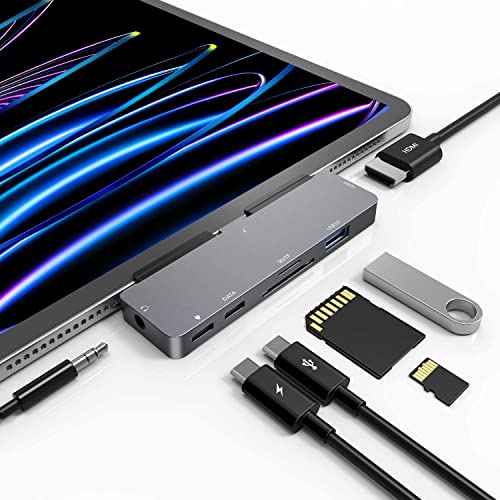


Top 3 picks at a glance
Anker USB C Hub, 7in1 Multi-Port USB Adapter, 4K@60Hz USBC to HDMI...Check priceQuick Picks
| Product | Best for | Price |
|---|---|---|
| UGREEN Revodok Pro USB-C Hub 6 in 1 10Gbps 4K 60Hz HDMI | Best overall | Check on Amazon |
| iPad Pro USB C Hub, 7-in-1 Multiport Adapter with 4K HDMI for iPad | Best iPad-specific fit | Check on Amazon |
| Anker USB C Hub, 7-in-1 Multi-Port USB Adapter, 4K@60Hz | Best brand reliability | Check on Amazon |
| USB C HUB for iPad Pro 9-in-1 Adapter Docking Station | Most ports | Check on Amazon |
| MOKiN USB C Hub HDMI Adapter, 7 in 1 Dongle | Best for photographers | Check on Amazon |
| BENFEI USB C Hub 5-in-1 with 4K HDMI | Best budget pick | Check on Amazon |
| Anker USB-C Hub with Ethernet, 6-in-1 | Best for wired networks | Check on Amazon |
| UGREEN Revodok 6 in 1 USB C Hub Gigabit Ethernet Adapter with 4K HDMI | Best value with Ethernet | Check on Amazon |
How We Compared
We focused on hubs that meet the needs of iPad Pro users specifically: HDMI output capable of driving an external monitor, power delivery passthrough so you can charge while using the hub, and enough data ports and card readers to handle file transfers without constant plugging and unplugging. We prioritized aluminum builds over plastic, since a hub dangling off an iPad’s port lives a rougher life than one sitting behind a desktop. We also weighed cable length and strain relief — a stiff, short cable torques the iPad’s port when you set the tablet down. Finally, we leaned toward budget and mid-range hubs over Thunderbolt docks, whose extra features most iPad workflows never touch. Every hub here outputs 4K over HDMI; several push it at a 60Hz refresh rate, which matters more than most listings admit.
The Best Picks
1. UGREEN Revodok Pro USB-C Hub 6 in 1 10Gbps 4K 60Hz HDMI — Best Overall
The Revodok Pro is the hub to recommend to anyone who just wants it to work. The headline spec is 10Gbps data transfer on its USB-C data port — twice the speed of most budget hubs — paired with 4K at 60Hz HDMI output and 100W power delivery passthrough. The aluminum shell dissipates heat well during long video-output sessions, and the six ports cover nearly every iPad Pro scenario: HDMI, fast data, charging, and USB-A peripherals. Its budget price undercuts most comparable hubs from the big-name brands.
- Pros: 10Gbps data speeds for fast SSD transfers; 4K 60Hz HDMI with 100W passthrough charging
- Con: No card reader for camera workflows
When to skip: If you offload photos from SD cards regularly, choose a hub with a built-in reader instead.
2. iPad Pro USB C Hub, 7-in-1 Multiport Adapter with 4K HDMI — Best iPad-Specific Fit
This hub is designed around the iPad’s proportions rather than adapted from laptop duty, and it shows. The seven ports — 4K HDMI, USB-C PD charging, USB-A data ports, and card slots — are packed into a compact aluminum body that sits flush against the iPad’s edge without a long, lever-like cable fighting the port. It’s the sort of hub you can leave attached semi-permanently. It costs a little more than the generic hubs here, but the iPad-first design justifies it for anyone who docks daily.
- Pros: Compact form factor designed for iPad use; full seven-port selection including card readers
- Con: Shorter attached cable limits positioning with desktop monitors
When to skip: If you plan to use the same hub with a laptop at a desk, a longer-cable option is more versatile.
3. Anker USB C Hub, 7-in-1 Multi-Port USB Adapter, 4K@60Hz — Best Brand Reliability
Anker built its reputation on dependable charging gear, and this 7-in-1 applies that same discipline to hubs. You get 4K at 60Hz HDMI, a USB-C PD passthrough port, two USB-A 3.0 data ports, and SD/microSD card slots in a compact aluminum-and-black housing. Anker’s firmware and power management are conservative in the right ways — phones and tablets negotiate charge safely, and the hub doesn’t run hot under sustained HDMI output. The slightly higher price reflects the name, but you’re buying predictability.
- Pros: Strong quality control and warranty support; stable 4K 60Hz output with sensible power management
- Con: Costs more than spec-identical generics
When to skip: If price is your top priority, the budget options below deliver similar port counts.
4. USB C HUB for iPad Pro 9-in-1 Adapter Docking Station — Most Ports
Need everything at once? This 9-in-1 covers iPad Pro M4, M2, and M1 models in 13, 12.9, and 11 inches, plus iPad Air 5/4 and iPad mini 6. Alongside 4K HDMI you get USB-C PD charging, SD and microSD card readers, USB 3.0 ports, a 3.5mm headphone jack, and a USB-C data port — the most complete port list of any hub here. It effectively replaces a small docking station, ideal for a desk setup where the iPad stays put.
- Pros: Nine ports including headphone jack and dual card readers; explicit compatibility across M-series iPad Pros
- Con: Larger body adds bulk for travel
When to skip: If your hub lives in a backpack, the added size and weight will annoy you daily.
5. MOKiN USB C Hub HDMI Adapter, 7 in 1 Dongle — Best for Photographers
The MOKiN leads with the two things a photo workflow needs: SD and microSD card readers and 100W power delivery, wrapped around 4K HDMI output, a USB-C data port, and two USB 3.0 ports. It’s rated for MacBook Pro/Air, Dell XPS, and Lenovo ThinkPad as well, so it pulls double duty between an iPad Pro and a laptop edit station. It typically costs less than the Anker while matching the port count, making it a strong mid-range value.
- Pros: Dual card readers plus 100W passthrough; cross-platform compatibility with laptops
- Con: HDMI output tops out at standard 4K 30Hz-class performance in this configuration
When to skip: If smooth 60Hz external video is your priority, pick a hub explicitly rated 4K 60Hz.
6. BENFEI USB C Hub 5-in-1 with 4K HDMI — Best Budget Pick
The BENFEI is one of the most affordable credible hubs here, and it doesn’t feel like a throwaway: a certified 4K HDMI port, 100W power delivery, three USB-A ports, a short silicone-sheathed cable that’s gentler on the iPad’s port than stiff PVC, and an aluminum case. Five ports is enough for most people — display, power, and a mouse or drive. If your needs are simple and your budget is tight, this is the rational choice.
- Pros: Budget price with aluminum build and 100W passthrough; flexible silicone cable reduces port strain
- Con: No SD/microSD card readers
When to skip: Photographers and anyone needing more than three USB-A devices should step up to a 7-in-1.
7. Anker USB-C Hub with Ethernet, 6-in-1 Multiport Adapter — Best for Wired Networks
Wi-Fi is fine until you’re moving large files across a local server or want a stable connection for cloud backups. This Anker 6-in-1 adds Gigabit Ethernet to 4K HDMI output, USB-C power delivery, and USB-A data ports — a rare combination at this size. It costs more than most of the compact hubs here, but wired networking plus Anker’s build quality makes it the hub for home-office setups where reliability beats portability.
- Pros: Gigabit Ethernet for stable large-file transfers; Anker build quality and support
- Con: No card readers for media workflows
When to skip: If you never touch Ethernet, you’re paying for a port you won’t use.
8. UGREEN Revodok 6 in 1 USB C Hub Gigabit Ethernet Adapter with 4K HDMI — Best Value with Ethernet
This Revodok delivers nearly the same feature set as the Anker above — Gigabit Ethernet, 4K HDMI, USB-C PD, and USB-A data ports — for noticeably less. UGREEN’s Revodok line has become a go-to for budget-conscious buyers who don’t want no-name gamble quality. If your desk setup needs wired networking on a budget, this is the obvious pick.
- Pros: Gigabit Ethernet plus HDMI at a budget price; aluminum build with passable heat management
- Con: Shorter warranty coverage than Anker offers
When to skip: If Ethernet isn’t in your workflow, the Revodok Pro 6-in-1 at #1 is a better fit.
9. Satechi OntheGo 7-in-1 USB-C Hub, 4K/60Hz HDMI, 100W PD — Most Portable 7-in-1

The Satechi OntheGo 7-in-1 packs a full travel kit into a puck about 2.5 inches across that weighs roughly 68g. Its coiled, braided USB-C cable winds into a recess in the body, so nothing dangles in a bag, and a built-in magnet lets it snap onto the back of a MagSafe iPhone or any surface fitted with the included adhesive plate. For iPad Pro owners, that means the hub can stick to the back of a magnetic case or keyboard folio rather than hanging off the port.
Despite its size, the port list covers almost every iPad scenario: HDMI at up to 4K at 60Hz, Gigabit Ethernet, two 5Gbps USB-A ports, SD and microSD readers rated UHS-I, and a USB-C Power Delivery input. The PD port accepts up to 100W and passes up to 80W through to the connected device, which is far more than any iPad needs. The cable connection runs at 10Gbps.
The compromises are sensible for a travel hub. The card readers are UHS-I rather than the faster UHS-II, there is no headphone jack and no USB-C data port, and only one external display is supported. Users who regularly copy large files from fast SSDs will get more from a hub with a 10Gbps data port.
Strengths: exceptionally compact, magnetic mounting, 4K at 60Hz HDMI, Ethernet and dual card readers in one hub.
Drawbacks: mid-range pricing, no 3.5mm audio or USB-C data port, and UHS-I card speed.
How it compares: it combines the Ethernet of the Anker and UGREEN Ethernet hubs with the card readers of the MOKiN in a much smaller body. It is the hub to pick if you want one adapter for both iPad and laptop that disappears into a pocket.
10. Satechi 6-in-1 USB-C Stand Hub for iPad Pro, Foldable Design — Best Stand and Hub

Satechi’s 6-in-1 Stand Hub solves the problem the “How We Compared” section warns about: a hub dangling off the iPad’s port while the tablet wobbles on a desk. Here the iPad rests on a folding aluminum stand, connected by a short USB-C cable, and all the ports sit at the back of the base. It works with cases up to 15mm thick and folds flat for a bag.
Ports include HDMI at 4K at 60Hz, a USB-C PD charging input rated up to 60W, a 5Gbps USB-A port, SD and microSD readers rated UHS-I, and a 3.5mm audio jack that handles both input and output. That combination suits a desk where the iPad drives a monitor, charges, and connects to a keyboard receiver or a USB microphone. The padded cradle helps protect the tablet’s finish, and rubber feet keep the base steady.
The viewing angle is fixed, which works for most desk heights but cannot be adjusted for drawing or for very low or high seating. Sixty watts of pass-through is plenty for an iPad but less than the 100W of most hubs in this list, which matters only if you plan to use the stand with a laptop. There is just one USB-A port, so add a small hub if you need several wired accessories.
Strengths: stable stand with integrated ports, 4K at 60Hz HDMI, card readers and an audio jack.
Drawbacks: premium pricing, a fixed angle, a single USB-A port, and 60W pass-through.
How it compares: it is the desk-bound alternative to the 9-in-1 iPad hub. Both put nearly every port in one place, but the Satechi also holds the tablet at a usable angle, which makes it a better fit for iPad-as-desktop setups with Stage Manager.
11. UGREEN Revodok Pro 9-in-1 USB-C Hub 10Gbps 4K HDMI — Best Wired Hub with Ethernet and 10Gbps Data

The Revodok Pro 109 is the hub for iPad Pro users who want a single mid-range adapter that does everything at a decent speed. It provides HDMI 2.0 at 4K at 60Hz, a 10Gbps USB-C data port, a 10Gbps USB-A port, two 5Gbps USB-A ports, Gigabit Ethernet, SD and microSD readers and 100W pass-through charging, all in an aluminum body about 4.5 inches long and roughly 208g.
The 10Gbps ports are the main reason to choose it over a basic 7-in-1. An external NVMe SSD connected to the USB-C data port can transfer large video files substantially faster than through a 5Gbps hub, which matters for iPad Pro owners who edit footage in apps such as Final Cut Pro or LumaFusion. Ethernet adds a stable connection for large uploads or cloud backups.
A few practical notes from UGREEN’s documentation: the 10Gbps USB-C port carries data only, with no video or charging, and connecting or disconnecting the charger during screen output or file transfers can interrupt them. It is a cabled hub, so it sits beside the iPad rather than clipping on, which works with cases but adds a cable to manage.
Strengths: 10Gbps USB-C and USB-A data, Ethernet, card readers and 4K at 60Hz HDMI in one hub.
Drawbacks: no 3.5mm audio jack, a cabled design that is less tidy for travel, and only one 10Gbps USB-A port.
How it compares: it adds Gigabit Ethernet and SD/microSD readers to the same 10Gbps, 4K at 60Hz foundation as the Revodok Pro 6-in-1 at #1. If you want a single hub for the couch, the desk and a laptop, it is a stronger all-rounder than buying the 6-in-1 and the Revodok Ethernet hub separately.
12. HyperDrive iPad Pro USB C Hub, 4-in-1 with 4K30Hz HDMI — Best Clip-On Hub

The HyperDrive 4-in-1 is designed to plug directly into the iPad Pro’s USB-C port with a patented grip that holds it against the tablet’s edge, so it feels like part of the iPad rather than an accessory hanging on a cable. It weighs about 38g and matches the look of Apple’s tablets, which makes it pleasant to keep attached during a presentation or while editing on the go.
Its four ports cover the basics: HDMI at up to 4K at 30Hz, a 5Gbps USB-A port, a USB-C port that handles both 5Gbps data and 60W Power Delivery charging, and a 3.5mm headphone jack. The audio jack is the standout for iPad Pro owners, since recent models have no headphone port, and iPadOS gives direct file access to USB-A and USB-C drives connected through it.
The limits are clear. The 30Hz HDMI output is fine for slides and documents but looks less smooth for scrolling and video. Hyper lists compatibility with earlier USB-C iPad Pro, iPad Air and iPad mini models; the grip shape may not seat perfectly on newer, thinner iPad Pro generations or in thick cases, even if the ports work.
Strengths: clip-on design with no cable, a headphone jack, USB-C data plus charging, and a small, light body.
Drawbacks: 4K limited to 30Hz, only four ports, no card reader, and fit that depends on your iPad generation and case.
How it compares: it trades the port count of the 7-in-1 and 9-in-1 hubs for the neatest attachment in the list. Choose it for meetings and travel where a headphone jack and a quick HDMI connection matter more than card readers.
13. Anker USB C Hub for iPad, 551 USB-C Hub (8-in-1), with Foldable Tablet Stand — Best Adjustable Stand Hub

The Anker 551 is the adjustable alternative to Satechi’s fixed-angle stand. The base tilts up to 70 degrees and the cradle rotates up to 180 degrees, so the iPad can sit upright for video calls, tilt back for sketching or rotate to portrait for reading documents. A short USB-C cable connects the tablet to the stand, and the aluminum body has non-slip silicone where the iPad rests.
Ports include HDMI 2.0 at 4K at 60Hz, two 5Gbps USB-A ports, SD and microSD readers rated UHS-I, a 3.5mm audio jack for input and output, and a USB-C power input that accepts a 45W to 100W charger. Anker’s support pages list pass-through at up to 85W. That means the stand can charge the iPad, drive a monitor, read a camera card and connect a keyboard receiver at once.
At around 650g it is noticeably heavier than Satechi’s stand, which is good for stability but less ideal for travel. There is no Ethernet and no USB-C data port, so fast USB-C SSDs will need an adapter. Anker’s compatibility list covers USB-C iPad Pro and iPad Air models.
Strengths: adjustable tilt and rotation, 4K at 60Hz HDMI, two USB-A ports, card readers and audio.
Drawbacks: heavy for travel, no Ethernet or USB-C data, and a mid-range to premium price.
How it compares: it offers one more USB-A port and more angles than the Satechi stand hub, while the Satechi is lighter and folds flatter. Both make far more sense than a dangling dongle for anyone who uses an iPad Pro as a desk computer.
Buying Guide
HDMI Resolution and Refresh Rate
Every hub here outputs 4K over HDMI, but not all at 60Hz. For documents and web browsing, 4K at 30Hz is fine. For video editing, motion-heavy design work, or anything involving smooth scrolling, insist on 4K 60Hz — your eyes will notice the difference within seconds. Every M-series iPad Pro has a Thunderbolt port and can drive higher-resolution displays, but only through hubs rated for the bandwidth.
Power Delivery Wattage
Look for 100W passthrough charging if you want the hub to keep up with Apple’s charger while driving a display and transferring data. Anything below 60W passthrough means your iPad may charge slowly or not at all under load. One rule of thumb: expect to lose roughly 10–15W to the hub’s own operation, so a 100W input typically delivers around 85W to the tablet.
Build, Cable, and Port Layout
Aluminum bodies dissipate heat and survive bag life far better than plastic. Cable length is the underrated spec: a 4–6 inch attached cable is ideal for direct iPad docking, while an 8-inch-plus cable or braided lead suits desk setups. Check strain relief where the cable meets the hub — that joint fails first on cheap units. Finally, match the port count to reality; a 9-in-1 you only half-use is bulk for nothing.
Know what your iPad’s port supports
The hub can only pass along what the iPad provides. Every M-series iPad Pro, in both the 11-inch and larger sizes, has a Thunderbolt / USB 4 port with up to 40Gbps bandwidth. Recent iPad Air and iPad mini models have USB-C ports rated at 5Gbps to 10Gbps depending on generation, while the entry-level iPad’s USB-C port runs at USB 2.0 data speeds of 480Mbps, so a 10Gbps hub will not speed up its file transfers. Older USB-C iPad Pro models from 2018 and 2020 run at 10Gbps. Check your exact model in Settings before paying extra for high-speed data ports.
Mirroring versus extended display
By default, an iPad mirrors its screen on an external monitor, with black bars on the sides because the aspect ratios differ. Stage Manager on iPads with an M1 chip or newer adds true extended display, letting you place separate app windows on the external monitor. Apple has expanded external display and window support with recent iPadOS releases, so update to the latest version before judging a hub. Either way, choose a 4K at 60Hz hub for an extended desktop, because 30Hz output makes cursor movement and window dragging feel sluggish.
Direct-attach or cabled?
Hubs that plug straight into the iPad, like the HyperDrive 4-in-1, are neat and travel well, but they often block a case, can lever against the port if bumped, and may not fit newer, thinner iPad generations. Cabled hubs work with nearly any case and usually offer more ports, at the cost of one more thing to manage. Stand hubs such as the Satechi and Anker 551 are the best option if the iPad lives on a desk, because the tablet’s weight rests on the stand instead of the port.
Pick ports for your workflow
- Photographers and videographers: SD and microSD readers plus a 10Gbps data port for an SSD.
- Musicians and podcasters: a 3.5mm audio jack and enough USB-A ports for an audio interface or MIDI controller.
- Remote workers: Gigabit Ethernet for stable video calls and large uploads.
- Presenters and travelers: a small HDMI hub with pass-through charging and a short cable.
Comparison of the Added Picks
| Product | Design | HDMI output | Notable ports | Pass-through | Price tier |
|---|---|---|---|---|---|
| Satechi OntheGo 7-in-1 | Magnetic puck, coiled cable | 4K at 60Hz | Ethernet, SD/microSD, 2 USB-A | Up to 80W | Mid-range |
| Satechi 6-in-1 Stand Hub | Fixed-angle stand | 4K at 60Hz | SD/microSD, 3.5mm audio | Up to 60W | Premium |
| UGREEN Revodok Pro 109 | Cabled hub | 4K at 60Hz | 10Gbps USB-C and USB-A, Ethernet, SD/microSD | Up to 100W | Mid-range |
| HyperDrive 4-in-1 | Clip-on, no cable | 4K at 30Hz | 3.5mm audio, USB-C data | Up to 60W | Mid-range |
| Anker 551 Stand Hub | Adjustable stand | 4K at 60Hz | SD/microSD, 2 USB-A, 3.5mm audio | Up to 85W | Mid-range to premium |
Tips for Using a Hub with iPad Pro
- Connect power first. Plug the charger into the hub before attaching the iPad, so the hub negotiates charging cleanly. Unplugging power mid-session can briefly drop the external display.
- Use a 30W or higher charger. The hub keeps some power for itself, so a small phone charger may not keep an iPad Pro topped up while it drives a 4K monitor.
- Open Stage Manager for extended display. In Control Center, enable Stage Manager, then drag windows to the external screen. Without it, the monitor mirrors the iPad.
- Use the Files app for drives and cards. USB drives and SD cards appear in Files under Locations; format drives as exFAT for compatibility with both iPad and computers.
- Set the display resolution. In Settings, under Display and Brightness, choose the scaling option for your monitor so text is neither too small nor too large.
- Support the hub. If you use a direct-attach hub, avoid moving the iPad with heavy cables attached; a stand or a cabled hub reduces stress on the port.
Which Hub Fits Your iPad Pro Workflow?
- Just need a monitor and charging: the BENFEI 5-in-1 or the UGREEN Revodok Pro 6-in-1 at #1 keep it simple.
- Editing video from an external SSD: pick a hub with a 10Gbps data port, such as the Revodok Pro 6-in-1 or the Revodok Pro 109.
- Offloading camera cards: the MOKiN, the 9-in-1 iPad hub, the Satechi OntheGo or the Revodok Pro 109 all include SD and microSD readers.
- Using the iPad as a desk computer: a stand hub such as the Satechi 6-in-1 or the Anker 551 keeps the tablet at eye level and the weight off the port.
- Presentations and meetings: the HyperDrive 4-in-1 clips on, adds a headphone jack and gets a projector connected quickly.
- Wired internet on the road: the Satechi OntheGo fits Ethernet and card readers into a pocket-sized puck.
Whichever you choose, prioritize 4K at 60Hz HDMI if you plan to use Stage Manager’s extended display, and confirm your iPad’s port speed before paying for 10Gbps data you cannot use.
Common Hub Problems and Quick Fixes
- No picture on the monitor: unplug the hub, connect the HDMI cable to the monitor first, then reconnect the hub to the iPad. Confirm the monitor is on the correct input, and try a shorter HDMI cable rated for 4K at 60Hz.
- Screen flickers or drops out: often a power issue. Connect a charger to the hub’s PD port, avoid unplugging it during use, and keep the hub away from heat sources.
- iPad charges slowly or not at all: use a USB-C PD charger rated 30W or higher and plug it into the hub’s charging port, not a data port.
- External drive not recognized: some large spinning drives need more power than a hub port provides. Use a powered drive or a charger on the hub, and format the drive as exFAT or APFS.
- Ethernet not working: check for a wired network option under Settings; iPadOS shows an Ethernet entry when an adapter is detected. Reseat the cable and restart the iPad if it does not appear.
- Card reader is slow: UHS-I readers cap transfer speed. For large RAW or video files, a dedicated UHS-II reader on a 10Gbps port is noticeably faster.
Our Verdict
For most iPad Pro owners, the UGREEN Revodok Pro 6-in-1 is the pick: 4K 60Hz HDMI, 10Gbps data, and 100W passthrough at a budget price that undercuts the big brands. Photographers should grab the MOKiN or the 9-in-1 iPad-specific hub for card readers; home-office users who want wired networking should choose between the Anker Ethernet hub and the UGREEN Revodok Ethernet depending on budget. And if you just need the cheapest reliable HDMI-and-power solution, the BENFEI is remarkably hard to beat.
FAQ
Will a USB-C hub work with both iPad Pro and iPad Air?
Yes. Any hub with a standard USB-C plug works with the iPad Air (4th gen and later), iPad mini 6 and later, and every iPad Pro with USB-C. The hub doesn’t care which tablet it’s attached to — features like external display output depend on the iPad’s own capabilities.
Can I charge my iPad Pro while using a hub?
With power delivery passthrough, yes. Look for hubs rated at 100W PD input; they route charging through to the iPad while the HDMI, data, and card ports stay active. Without PD passthrough, you’d have to choose between charging and using your peripherals.
Will a hub slow down my external SSD?
It can. Hubs with USB 3.0 (5Gbps) ports will bottleneck fast NVMe-based SSDs; hubs with 10Gbps ports, like the UGREEN Revodok Pro, let those drives run closer to full speed. If you edit video directly off an external drive, prioritize the 10Gbps spec.
Do these hubs support Extended Desktop mode on iPad Pro?
On iPads running iPadOS 16 or later with an M-series chip, yes — HDMI output through these hubs supports full extended desktop mode, not just screen mirroring. Older iPads or iPads on earlier software versions will mirror the internal display instead.
Can I use a mouse and keyboard through the hub?
Yes. iPadOS supports USB and wireless keyboards, mice and trackpads. Plug a wired keyboard or a wireless receiver into a USB-A port and adjust pointer settings under Accessibility if needed.
Does a Thunderbolt dock work with iPad Pro?
M-series iPad Pro models have Thunderbolt ports, so Thunderbolt docks generally work and can drive high-resolution displays and fast storage. Not every dock feature is supported by iPadOS, so check the dock maker’s iPad compatibility notes. For most users, a 10Gbps USB-C hub is the better value.
Why does my external monitor show black bars?
That is screen mirroring: the iPad’s display shape differs from a 16:9 monitor. Enable Stage Manager on an M1 or newer iPad to use the monitor as an extended display that fills the screen.
Can I connect a USB microphone or audio interface?
Most class-compliant USB microphones and audio interfaces work with iPadOS through a hub. Power the hub with a charger if the device draws significant power, and use a hub with a 3.5mm jack if you also want wired headphones.
Will a hub work with my iPad in a case?
Cabled and stand hubs work with almost any case. Direct-attach hubs need clear access around the port and may not fit thick or rugged cases.









